29 Thread Network Operations

More
Depth: Practitioner
Progress saves as you read. Mark sections complete as you go; your progress appears in the sidebar.
29.1 Start With the IPv6 Mesh Claim
This section: Start With the IPv6 Mesh Claim — Run one clear operations drill.
Run one clear operations drill. Add a new sensor. Watch it join. Record its role. Record its parent. Send a reading. Let the sensor sleep. Confirm that the reading still arrives.
Now remove a helper. Watch the route change. Check how long recovery takes. Confirm that the device keeps its identity. Restore the helper. Make sure the network settles again.
Test the border next. Keep local work running when the outside path fails. Restore that path. Check that old data does not look new. Save the evidence from each step.
Approve only what the drill proves. One join does not prove recovery. One local message does not prove the app. Repeat after layout or software changes.
Picture a home with door sensors, lights, and heating controls. Most devices use little power. A few stay awake and help pass messages. One border device links the home to other services. The system must keep working when a helper moves or fails.
Thread is a low-power mesh system for this kind of local network. A mesh lets suitable devices pass messages for one another. Not every device does that job. A sleepy sensor may wake only to check in with its parent. A powered device may help form paths.
Review the life of one device. First it joins. Then it receives an address. It finds a parent or helper. It sends useful data. It sleeps when allowed. It must also recover when the chosen path disappears. Each step should leave evidence that an operator can read.
Keep roles separate. A device role can change. Its identity should remain clear. The border role also needs care because it connects the local mesh to the rest of the product. A working local path does not prove that an app service works.
This first view shows one healthy mesh. Real systems can split, merge, and choose new leaders. The Practitioner layer builds an operations record and recovery drill. Under the Hood explains address scopes, role choice, path repair, and the limits that appear when low power and changing links meet.
Start with the claim that a low-power mesh device can speak IP directly enough for the product need. Thread Network Operations should help prove where IPv6 is native, where mesh behavior is managed, and where the border or application layer still sets limits.
The simple review path is join, address, route, recover, and observe. Once those steps are clear, Thread roles, security, implementation, and Matter relationships can be checked without treating the mesh as magic.
29.2 Thread Network Operations Evidence
This section: Thread Network Operations Evidence — Thread network operations are not just formation commands or battery calculations.
Thread network operations are not just formation commands or battery calculations. A useful review asks whether the network can explain its role choices, address behavior, parent and router relationships, Border Router service path, low-power behavior, and recovery response when conditions change.
This chapter replaces command transcripts, calculators, and simulator instructions with an operations evidence record. The goal is to help learners decide whether a Thread network is observable and maintainable, not to memorize a particular CLI output.
29.3 In 60 Seconds
This section: In 60 Seconds
- Start with the operational claim: what the network must keep doing after formation.
- Review role evidence before assuming router, child, sleepy child, or Border Router behavior is correct.
- Keep address identity separate from routing location.
- Treat low-power behavior as an operations contract, not only a firmware setting.
- Use recovery drills to prove that parent changes, router changes, partition behavior, and service handoff are understood.
- Approve only the operating state that the evidence actually supports.
29.4 Learning Objectives
This section: Learning Objectives
By the end of this chapter, you will be able to:
- Write a Thread operations claim that can be reviewed and tested.
- Identify evidence for formation, attachment, role selection, parent-child behavior, and router behavior.
- Distinguish stable endpoint identity from topology-dependent routing location.
- Review low-power operation without relying on brittle battery-life arithmetic.
- Build an operations record that connects diagnostics, recovery drills, limits, and handoff ownership.
29.5 Quick Check: Thread Network Operations
This section: Quick Check: Thread Network Operations
29.6 Operations Claim Before Tuning
This section: Operations Claim Before Tuning — Start with a claim that names the network behavior, operating boundary, expected evidence, and owner.
Start with a claim that names the network behavior, operating boundary, expected evidence, and owner.
Network behavior
Formation, attachment, routing, service reachability, commissioning support, low-power operation, or recovery after change.
Operating boundary
Single Thread mesh, Border Router service, application service path, commissioning authority, or multi-network handoff.
Evidence source
Role state, address state, parent-child records, route observations, service advertisements, diagnostics, or recovery drill notes.
Owner
The team that accepts the evidence, responds to failures, and decides when a configuration change needs retest.
Avoid claims such as “the Thread network is healthy.” A better claim says which operating behavior is expected and which evidence would prove or limit that claim.
29.7 Operations Evidence Loop
This section: Operations Evidence Loop — Use the operations evidence loop after every configuration change, firmware change, commissioning change, placement change, or service change.
Use the operations evidence loop after every configuration change, firmware change, commissioning change, placement change, or service change. A network that joins once still needs evidence that it can be operated.
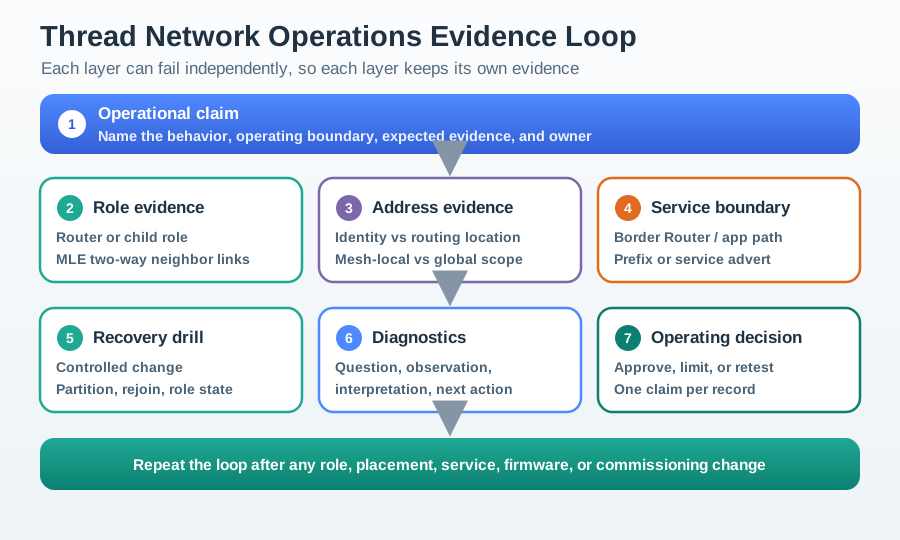
The loop keeps formation, role, address, service boundary, recovery, diagnostics, and operating decision evidence separate because each layer can fail independently.
29.8 MLE and Mesh Maintenance
This section: MLE and Mesh Maintenance — A Thread mesh is maintained by MLE, or Mesh Link Establishment.
A Thread mesh is maintained by MLE, or Mesh Link Establishment. MLE lets neighbors discover each other, lets a joining device attach to a parent, measures and shares link quality, and gives routers the neighbor evidence they need before route information is useful.
This matters operationally because a join event does not prove that the mesh will keep working. MLE evidence should explain which parent was selected, why the link is acceptable, what neighbors can see, and whether later routing choices are built on reliable two-way links.
29.9 Knowledge Check: MLE Evidence
This section: Knowledge Check: MLE Evidence
29.10 Formation and Role Evidence
This section: Formation and Role Evidence — Formation evidence explains how the network reached its current state and why each device role is acceptable.
Formation evidence explains how the network reached its current state and why each device role is acceptable.
Formation state
The record says whether the network was newly formed, joined, restored from a dataset, or reattached after a change.
Role selection
The record explains which devices act as routers, router-eligible devices, full end devices, or sleepy end devices.
Promotion boundary
The record identifies whether promotion or demotion is automatic, constrained, blocked, or owned by a release setting.
Operational limit
The record states where the review stops, such as formation only, low-power behavior only, or full service reachability.
Role evidence should match deployment intent. A powered device, a sleepy sensor, and a service bridge can all join a Thread network, but their operating responsibilities are different.
29.11 Addressing and Identity Evidence
This section: Addressing and Identity Evidence — Thread uses multiple address concepts because network routing and application identity answer different questions.
Thread uses multiple address concepts because network routing and application identity answer different questions.
Neighbor scope
Link-local evidence proves direct radio-neighbor communication. It does not prove mesh-wide application reachability.
Stable identity
Endpoint identity should remain usable by the application even when topology changes.
Routing location
Routing-locator evidence can change when parent or router position changes. That change is normal when topology changes.
External reachability
Global or service-reachable behavior depends on Border Router and prefix/service evidence, not only on local mesh attachment.
Applications should not treat every address as the same kind of identifier. Reviewers should ask which address proves local neighbor behavior, which proves stable application identity, and which proves routing or external service behavior.
29.12 Parent, Child, and Router Evidence
This section: Parent, Child, and Router Evidence — Thread operations depend on parent-child relationships and router behavior.
Thread operations depend on parent-child relationships and router behavior. The evidence should make those relationships visible enough to explain failures.
Parent-child evidence: A child can identify its parent, explain why that parent is acceptable, and show the behavior expected after parent loss or reattachment.
Router evidence: A router can explain neighbor visibility, route expectations, child custody, and whether it is expected to forward for others.
Partition evidence: The network can explain whether devices remained in one partition, split, rejoined, or required a configuration repair.
This evidence is stronger than a single successful message because it explains where a device is attached and how the mesh should react when that attachment changes.
29.13 Bidirectional Link-Quality Evidence
This section: Bidirectional Link-Quality Evidence — Thread routing should not treat “I can hear a neighbor” as enough evidence.
Thread routing should not treat “I can hear a neighbor” as enough evidence. Data delivery usually needs acknowledgements in the reverse direction, so an asymmetric link can look acceptable from one side while still wasting airtime and breaking delivery.
MLE lets nodes report incoming link quality so both ends can estimate the two-way cost. Routing can then prefer a slightly longer path over reliable symmetric links instead of a shorter path through a flaky asymmetric neighbor.
29.14 Knowledge Check: Bidirectional Links
This section: Knowledge Check: Bidirectional Links
29.15 Low-Power Operation Evidence
This section: Low-Power Operation Evidence — Low-power operation is an agreement between application needs, role selection, polling behavior, parent custody, and diagnostics.
Low-power operation is an agreement between application needs, role selection, polling behavior, parent custody, and diagnostics. It should not be approved from a theoretical battery calculation alone.
Reachability need
The record says whether delayed reachability is acceptable or whether the device must be reachable immediately.
Sleep behavior
The record explains when the device sleeps, wakes, polls, transmits, or receives pending data.
Parent custody
The record shows how the parent stores or forwards data for the child and how missed contact is handled.
Retest trigger
The record names changes that require retest, such as role profile, reporting frequency, firmware behavior, or placement.
A low-power claim is complete only when the operations team can explain both normal behavior and the failure behavior.
29.16 Border Router and External Service Evidence
This section: Border Router and External Service Evidence — Border Router service can make a Thread mesh useful beyond local devices, but it also adds a boundary that must be reviewed separately.
Border Router service can make a Thread mesh useful beyond local devices, but it also adds a boundary that must be reviewed separately.
Mesh operation
Attachment, routes, parent-child behavior, and mesh-local service behavior.
Border service
Prefix advertisement, external routes, service discovery, network dataset handling, or off-mesh handoff.
Application path
Telemetry, command, event, Matter interaction, dashboard, or controller behavior that depends on the mesh.
Operations handoff
Owner for monitoring, recovery, credential custody, service changes, and retest.
Do not approve external service behavior just because a mesh-local test passed. The service boundary needs its own evidence.
29.17 Recovery and Partition Evidence
This section: Recovery and Partition Evidence — Recovery evidence shows what happens when the network changes.
Recovery evidence shows what happens when the network changes. A review should include at least one controlled change that proves the team can interpret the result.
Partition behavior belongs in this recovery record. If a mesh splits, each side can keep operating as its own partition with its own Leader. When the halves can communicate again, they merge back into one network. The evidence should say which partition state was observed, whether the merge happened as expected, and what operational claim remains approved.
Recovery evidence should not be written as “it recovered.” It should say what changed, what evidence was observed, and which layer was responsible.
29.18 Knowledge Check: Partition Merge
This section: Knowledge Check: Partition Merge
29.19 Diagnostics Without Transcript Drift
This section: Diagnostics Without Transcript Drift — Raw diagnostic output is useful during troubleshooting, but a chapter review should not become a command manual.
Raw diagnostic output is useful during troubleshooting, but a chapter review should not become a command manual. A useful diagnostic record interprets the evidence.
Question
What operational question is being answered?
Observation
What role, address, route, service, or parent-child state was observed?
Interpretation
What does the observation prove, limit, or fail to prove?
Next action
Approve, retest, repair, monitor, or assign ownership.
This format keeps diagnostics tied to operating decisions instead of leaving learners with long transcripts that are hard to review.
29.20 Operations Record
This section: Operations Record — The second figure shows how operational observations become a decision record.
The second figure shows how operational observations become a decision record.
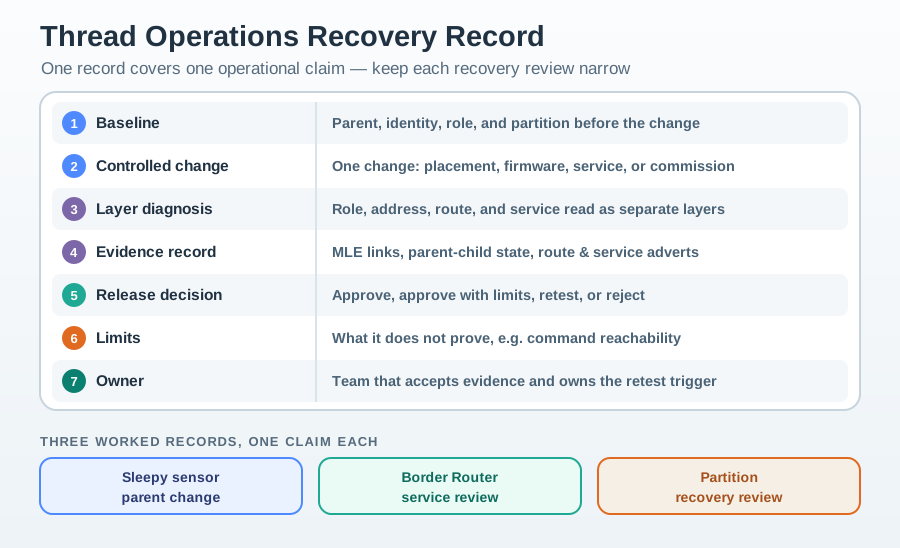
One record should cover one operational claim. If the same network has a low-power claim, a Border Router service claim, and a Matter application claim, each claim may need its own evidence.
29.21 Worked Operations Records
This section: Worked Operations Records
Sleepy sensor parent change
Claim: a sleepy sensor can keep reporting after parent change. Evidence: baseline parent and identity are recorded, parent change is observed, routing location changes are interpreted separately from stable application identity, and telemetry resumes through the expected application path. Decision: approve the reporting claim. Limit: immediate command reachability is not included.
Border Router service review
Claim: external service reachability is available through the Border Router boundary. Evidence: mesh-local attachment, prefix or service advertisement, application path, and recovery owner are recorded separately. Decision: approve the tested service boundary. Limit: alternate controller behavior requires separate review.
Partition recovery review
Claim: the network can explain partition or rejoin behavior after a controlled change. Evidence: baseline partition, role state, route observations, and final operating state are recorded. Decision: approve recovery interpretation. Limit: placement changes outside the reviewed environment need retest.
29.22 Common Mistakes
This section: Common Mistakes
Approving from one join event
A successful join does not prove role suitability, address behavior, service reachability, or recovery behavior.
Treating all addresses alike
Stable identity, local neighbor scope, routing location, and external reachability answer different questions.
Hiding parent-child state
If the parent relationship is not visible, child failures become difficult to explain.
Using battery math as proof
Low-power approval needs observed role, sleep, poll, parent, and application behavior, not only a calculation.
Confusing mesh and service evidence
Mesh-local success does not automatically prove Border Router, controller, Matter, or cloud service behavior.
Skipping recovery drills
Networks that are never disturbed can look healthy while hiding unclear ownership and weak diagnostics.
29.23 Network Operations Checklist
This section: Network Operations Checklist
Before approving a Thread network operations claim, confirm that the record includes:
- A bounded operational claim, operating boundary, evidence source, and owner.
- Formation and role evidence that matches deployment intent.
- Parent-child and router evidence visible enough to explain attachment changes.
- Addressing evidence that separates stable identity from routing location and service reachability.
- Low-power evidence tied to reachability, sleep behavior, parent custody, and retest triggers.
- Border Router and external service evidence when the claim depends on off-mesh behavior.
- At least one controlled recovery or boundary drill with layer diagnosis.
- A release decision, explicit limits, monitoring owner, and retest triggers.
29.24 Knowledge Check: Role Promotion Evidence
This section: Knowledge Check: Role Promotion Evidence
29.25 Knowledge Check: Address Stability
This section: Knowledge Check: Address Stability
29.26 Match Operations Evidence
This section: Match Operations Evidence
29.27 Order a Network Operations Review
This section: Order a Network Operations Review
29.28 Summary
This section: Summary — Thread network operations should be reviewed through evidence records, not through isolated commands or one successful join event.
Thread network operations should be reviewed through evidence records, not through isolated commands or one successful join event. The strongest record explains formation, role selection, parent-child behavior, addressing, low-power behavior, service boundaries, diagnostics, and recovery outcomes.
Keep network evidence separate from application and service evidence. A mesh can attach without proving off-mesh service behavior, and an application can succeed once without proving recovery behavior. Good operations evidence says what is proven, what is limited, and who owns retest.
29.29 Key Takeaway
This section: Key Takeaway — Thread Network Operations Evidence should turn Thread planning into deployment evidence for commissioning, role changes, border routing, diagnostics, repair, and operational ownership.
Thread Network Operations Evidence should turn Thread planning into deployment evidence for commissioning, role changes, border routing, diagnostics, repair, and operational ownership.
29.30 Concept Relationships
This section: Concept Relationships
Operations claim
Connects network behavior, operating boundary, evidence source, and owner.
Formation evidence
Connects join, restore, reattach, role choice, and dataset state.
Role evidence
Connects routing responsibility, parent-child state, low-power behavior, and repair control.
Address evidence
Connects local scope, stable identity, routing location, and external reachability.
Recovery evidence
Connects baseline, controlled change, layer diagnosis, and operating decision.
Operations record
Connects diagnostics, limits, monitoring, handoff owner, and retest triggers.
29.31 What’s Next
This section: What’s Next
- Thread Development and Integration Evidence - Connect operations evidence to implementation and application boundaries.
- Thread Introduction - Revisit the core Thread concepts that make mesh operations possible.
- Thread Network Architecture - Review device roles and topology responsibilities in more depth.
- Thread Deployment Evidence Guide - Move network operations evidence into site rollout and staged release.
- Thread Comprehensive Evidence Review - Combine operations, deployment, security, and Matter evidence in one review path.
Find help
3 reviewed answers.
Where should I start in a module?
Open the module page from the sidebar to see its chapters in order. Use the module map to return to a topic you need.
Modules and pathsReviewed
What can I try when a project does not work?
Check the symptom, then work through the diagnostic steps. Keep the error message and the smallest example that reproduces it.
When you are stuckReviewed
How do interactive examples work?
Use the interactive guide to check how examples and simulations work before changing your project.
Interactive examples guideReviewed