14 Zigbee Routing

More
Depth: Practitioner
Progress saves as you read. Mark sections complete as you go; your progress appears in the sidebar.
14.1 Test the Repaired Lamp Route
This section: Test the Repaired Lamp Route — Imagine a lamp command must cross several small routers after one path has failed.
Imagine a lamp command must cross several small routers after one path has failed. The team must decide whether the mesh can find, use, and repair a path in time. Zigbee is a low-power wireless system for nearby devices. A gateway is a device or service that links one network or system to another. Latency means the wait from an event to a useful result.
After a router fails, the lamp command needs a usable mesh path from sender to receiver. Route discovery can find a path and repair can replace it, but the service claim rests on observed delivery time and recovery under the site’s actual link conditions.
14.1.1 Check Discovery and Delivery
- Which router or link failed on the command path?
- How did the mesh discover or repair a route?
- Did the lamp receive the command within the useful time?
- What happened when repair failed or the route changed again?
Keep sender and receiver times, route state, discovery and repair events, and failed deliveries together. A topology diagram should be checked against the lamp’s observed response.
14.1.2 When One Route Is Not Recovery
A successful command on one route establishes delivery for that observed path and condition. It does not establish that the lamp will recover after another router or link fails. Recovery evidence must connect the failure to route discovery or repair, the resulting forwarding path, and the lamp’s response within the useful time.
At Practitioner depth, review reactive discovery within the tested deployment boundary. Distinguish traffic using an existing route from traffic that resumes after a replacement path is discovered. Keep sender and receiver times, route state, discovery events, and failed deliveries together so the routing change can be compared with application behavior. If only some affected endpoints recover, narrow the claim to the supported behavior. A further link change or unsuccessful repair calls for retesting, with an owner responsible for the unresolved path and service impact.
14.1.3 Before Approving the Mesh
Follow the command from the switch through each available router to the lamp. If route repair delays the command, show whether the result remains useful to the person waiting. Retest after the link changes instead of approving the mesh from its routing label.
14.2 In 60 Seconds
This section: In 60 Seconds — Zigbee routing review asks whether messages have owned, observable, and recoverable paths through the mesh.
Zigbee routing review asks whether messages have owned, observable, and recoverable paths through the mesh. A route is not approved because a diagram shows connected routers. It is approved when route discovery, forwarding behavior, failure response, route-table evidence or, for many-to-one/source routing, Route Record visibility, gateway reporting, and operations ownership support the claim.
This chapter reviews AODV-style route discovery, route repair, many-to-one traffic, source-route use, path stability, and retest triggers without turning routing into a fixed-latency promise or a packet-field tutorial.
14.3 Learning Objectives
This section: Learning Objectives
By the end of this chapter, you will be able to:
- state a reviewable Zigbee routing claim,
- identify the evidence needed for route discovery and repair,
- separate route-table presence from proven application behavior,
- review many-to-one and source-route boundaries,
- recognize routing drift in deployment records, and
- record decisions, owners, exclusions, and retest triggers.
14.4 Start With a Routing Claim
This section: Start With a Routing Claim — Begin with the behavior the system needs.
Begin with the behavior the system needs.
Weak claim: the Zigbee mesh can self-heal.
Stronger claim: within this deployment boundary, representative endpoints can discover or reuse a working path, route loss is visible enough for operations to respond, affected behavior recovers within the approved service expectation, gateway records show the interruption, and retest triggers are defined.
The stronger claim avoids promising universal self-healing. It names the boundary, observed behavior, gateway visibility, owner, and conditions that reopen the review.
14.5 Routing Evidence Families
This section: Routing Evidence Families — Use these evidence families before accepting a routing claim.
Use these evidence families before accepting a routing claim.
Route discovery evidence records whether a source can find a path when no suitable path is available.
Forwarding evidence records which routers carry representative traffic and whether the observed path matches the approved topology claim.
Route table evidence records whether routing entries support the intended destination, next hop, route state, and owner of stale entries.
Repair evidence records what happens when a router, parent, or link assumption changes.
Gateway evidence records whether the gateway exposes route interruption, retry, or application-level failure clearly enough for support.
Operations evidence records who monitors routing symptoms, approves placement changes, replaces routers, and retests paths.
14.6 AODV Review Without Packet Drift
This section: AODV Review Without Packet Drift — Zigbee routing commonly uses reactive route discovery.
Zigbee routing commonly uses reactive route discovery. The important review question is not whether learners can memorize packet fields. The important question is whether route discovery behavior is observable and appropriate for the service claim.
Review:
- what source needs a route,
- what destination or concentrator is being reached,
- whether a route request reaches enough of the mesh,
- whether a reply returns through an owned path,
- whether intermediate routers have plausible forwarding roles,
- whether repeated discoveries point to an unstable path, and
- whether the application can tolerate discovery before normal traffic resumes.
Avoid approving a design from protocol names alone. AODV behavior still needs evidence from the deployment boundary.
14.7 AODV Path Cost Evidence
This section: AODV Path Cost Evidence — Zigbee PRO mesh routing is commonly described as AODV-style discovery.
Zigbee PRO mesh routing is commonly described as AODV-style discovery. When a router needs a path it does not already have, it broadcasts a route request. Routers that hear it can rebroadcast it while adding link-cost information. The destination, or a router with a usable route, sends a route reply back along the selected path. Routers on that path install route-table state so later frames can reuse the route.
Two review facts matter more than packet-field memorization. First, the route is discovered and then reused; it is not rediscovered for every application frame. Second, the selected route is based on accumulated path cost, not simply the fewest hops. A longer chain of reliable links can be a better route than a shorter chain with weak links.
After the reply, verify the resulting route-table state and later traffic. Figure 14.1 connects discovery to that review record and service evidence.
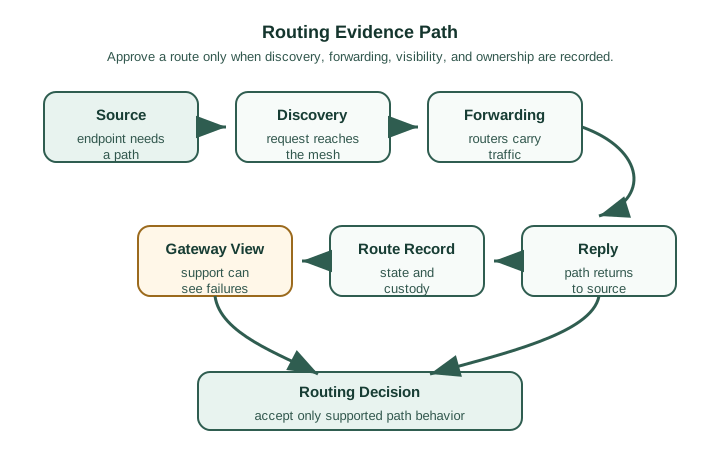
Figure 14.1 begins with the Source endpoint that needs a path. Discovery sends a request into the mesh, Forwarding lets routers accumulate and carry the evidence, and Reply returns the selected path to the source. The next box records the discovered route-table state so later traffic and diagnosis can be checked against it. This review record is separate from Zigbee’s Route Record command, which supports many-to-one and source routing. Gateway View then asks whether support can see failures before the Routing Decision accepts only the observed path behaviour. This sequence turns the accumulated-cost explanation above into an operations claim rather than a one-off packet trace.
Use the path-cost story as evidence only when the route claim connects discovery, forwarding, route reply, resulting route-table state, gateway visibility when relevant, decision, owner, and retest trigger. For many-to-one/source routing, also examine Route Record commands and source-route state.
14.8 Knowledge Check: AODV Path Cost
This section: Knowledge Check: AODV Path Cost
14.9 Route Repair and Self-Healing Evidence
This section: Route Repair and Self-Healing Evidence — Self-healing should be reviewed as evidence, not as a slogan.
Self-healing should be reviewed as evidence, not as a slogan.
When a path fails, review:
- which endpoints were affected,
- which router or path assumption changed,
- whether the affected endpoints found another usable path,
- whether the application behavior recovered or stayed degraded,
- whether the gateway reported the interruption clearly,
- whether a hidden single dependency remains, and
- who owns the repair and retest.
If some endpoints recover and others do not, the evidence supports a narrowed decision. Do not approve the whole mesh from partial recovery.
14.10 Route Repair and Concentrator Evidence
This section: Route Repair and Concentrator Evidence — Route repair is the self-healing behavior a reviewer can actually observe.
Route repair is the self-healing behavior a reviewer can actually observe. When a link on an established route fails, an upstream router can initiate a fresh discovery for that destination. A healthy repair usually appears as a short burst of route requests followed by traffic resuming on a new path. Continuous discovery that never settles is different evidence: it points to route churn, too few routers, a flapping link, or missing ownership.
For gateway-bound collection, many-to-one routing changes the evidence pattern. A concentrator such as the coordinator or gateway can issue a many-to-one request so routers learn a next hop toward the sink. Devices can then send route records that let the concentrator build reverse source routes for replies. This is useful evidence for collection-heavy systems, but it still must be retested after gateway replacement or topology changes.
| Mechanism | When used | Healthy evidence |
|---|---|---|
| Route repair | An in-use link fails. | One bounded discovery burst, then traffic resumes on an alternate path. |
| Many-to-one request | Many devices send toward one sink. | Sink-initiated discovery gives routers a next hop toward the concentrator. |
| Route record | The sink needs a reverse path. | Devices report route state that the concentrator can use for downstream replies. |
14.11 Knowledge Check: Route Repair Evidence
This section: Knowledge Check: Route Repair Evidence
14.12 Knowledge Check: Route Repair Claim
This section: Knowledge Check: Route Repair Claim
14.13 Many-to-One and Source-Route Boundaries
This section: Many-to-One and Source-Route Boundaries — Some Zigbee networks concentrate traffic toward a coordinator or gateway.
Some Zigbee networks concentrate traffic toward a coordinator or gateway. Many-to-one routing and source-route behavior can reduce repeated discovery for that pattern, but they do not prove every traffic direction.
Review:
- whether most traffic actually flows toward the concentrator,
- whether route records are captured and usable,
- whether downlink commands depend on source-route state,
- whether route records are refreshed after topology changes,
- whether gateway replacement changes route-record custody, and
- whether non-concentrator traffic still has a tested path.
Many-to-one routing can be a strong fit for collection-heavy systems. It is weak evidence for peer-to-peer or direct-control claims unless those paths are separately tested.
14.14 Tree Routing and Fallback Claims
This section: Tree Routing and Fallback Claims — Tree-based forwarding and hierarchical assumptions may appear in routing explanations, but they need careful review.
Tree-based forwarding and hierarchical assumptions may appear in routing explanations, but they need careful review. A tree path can be simple to reason about, yet it may hide weak alternate-path evidence.
Use tree-related claims only when the review record states:
- what hierarchy is being used,
- which devices depend on that hierarchy,
- whether alternate mesh forwarding is available,
- how path changes are observed,
- what gateway or coordinator behavior depends on the hierarchy, and
- when a topology change requires retest.
Do not treat a clean hierarchy diagram as proof of resilient routing.
14.15 Routing Tables, Source Routes, and Tree Fallback
This section: Routing Tables, Source Routes, and Tree Fallback — A routing review should name which mechanism is carrying the flow.
A routing review should name which mechanism is carrying the flow. A router can use an AODV-discovered route-table entry that maps a destination to a next hop. A concentrator can use source-route state learned from route records to send downstream frames. If a route is unknown, cannot be discovered, or routing state is constrained, tree routing can follow the parent-child address hierarchy as a fallback.
These mechanisms fail differently. A route-table entry can become stale. A concentrator source route can stop matching the topology after a gateway or router change. A tree fallback can keep traffic moving but take a long, non-optimal hierarchical path. The fix depends on which mechanism is actually visible in the evidence.
If throughput is acceptable but some paths have unexpectedly high latency, do not treat that as automatic approval. Check whether tree routing or stale source-route state is hiding a route-discovery problem, then assign an owner and retest after the topology or gateway state is refreshed.
14.16 Knowledge Check: Tree Fallback
This section: Knowledge Check: Tree Fallback
14.17 Routing Review Record
This section: Routing Review Record — Use a routing record when accepting path behavior.
Use a routing record when accepting path behavior.
A repair can restore traffic without proving why the route failed. Figure 14.2 provides the minimum record for carrying a routing incident into an owned decision.
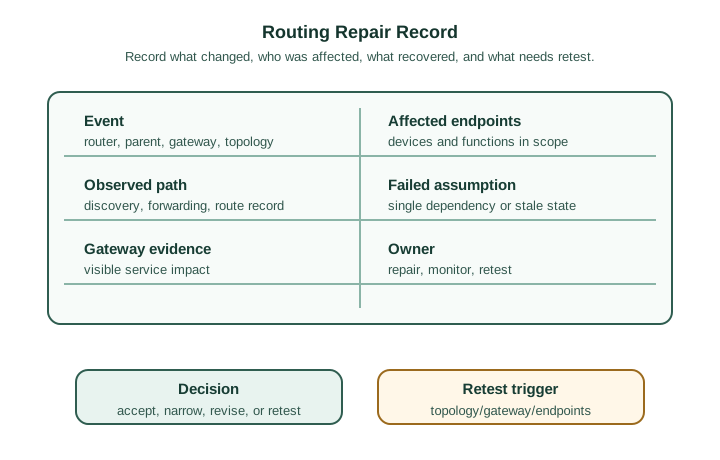
The first row of Figure 14.2 binds the Event—router, parent, gateway, or topology change—to the Affected endpoints and functions in scope. Observed path records discovery, forwarding, and route state, while Failed assumption names a single dependency or stale state instead of hiding it behind “mesh instability.” Next, Gateway evidence distinguishes visible service impact from radio-only change. The record closes with Owner, a bounded Decision, and the Retest trigger for topology, gateway, or endpoint changes. Those fields structure the repair examples below and prevent recovery from being mistaken for permanent proof.
The record should include:
- Claim: route behavior being approved.
- Boundary: site, topology, gateway, and endpoint families covered.
- Observed path: route discovery, forwarding, or route-record evidence.
- Affected endpoints: devices or functions included in the review.
- Gateway evidence: what support or application systems can see.
- Failure event: router, parent, gateway, or topology change tested.
- Decision: accept, narrow, revise, reject, or retest.
- Owner: person or team responsible for repair and monitoring.
- Retest trigger: router movement, endpoint replacement, gateway change, firmware update, topology change, or repeated route discovery.
14.18 Worked Review: Repeated Route Discovery
This section: Worked Review: Repeated Route Discovery — Scenario: A group of endpoints is reachable, but support logs show repeated route discovery before normal reports.
Scenario: A group of endpoints is reachable, but support logs show repeated route discovery before normal reports.
Review path:
- Confirm the affected endpoints and the destination being reached.
- Compare observed paths across several representative reports.
- Check whether the repeated discovery follows one router, one area, or one endpoint family.
- Review gateway visibility and application symptoms.
- Decide whether to accept the behavior, revise placement, or retest after a route-stability fix.
Decision: Revise when repeated discovery points to a fragile path or missing owner. Accept only when the behavior remains inside the approved service expectation and the owner can monitor it.
14.19 Worked Review: Gateway Replacement
This section: Worked Review: Gateway Replacement — Scenario: A gateway replacement preserves device joins, but downlink commands to some endpoints become inconsistent.
Scenario: A gateway replacement preserves device joins, but downlink commands to some endpoints become inconsistent.
Review path:
- Separate join evidence from routing evidence.
- Confirm route-record custody before and after the replacement.
- Test representative downlink and uplink behavior.
- Record which commands remain proven and which are exclusions.
- Assign ownership for route-record refresh, gateway configuration, and retest.
Decision: Approve only the paths that were retested after replacement. Joined devices alone do not prove preserved routing behavior.
14.20 Matching Quiz: Routing Evidence Family
This section: Matching Quiz: Routing Evidence Family
14.21 Ordering Quiz: Routing Review Sequence
This section: Ordering Quiz: Routing Review Sequence
14.22 Common Routing Drift
This section: Common Routing Drift — Diagram drift: approving a mesh path because a diagram shows connected routers.
Diagram drift: approving a mesh path because a diagram shows connected routers.
Partial-recovery drift: treating recovered endpoints as proof that every affected endpoint recovered.
Protocol-name drift: assuming AODV, many-to-one, or source routing proves service behavior.
Gateway drift: ignoring whether route failure is visible to the application or support system.
Route-table drift: treating a route-table entry as proof of successful application behavior.
Owner drift: testing repair once without naming who monitors future route symptoms.
Retest drift: moving routers or replacing a gateway without reopening the routing claim.
14.23 Knowledge Check: Routing Readiness
This section: Knowledge Check: Routing Readiness
14.24 Routing Evidence Checklist
This section: Routing Evidence Checklist — Follow ownership from the radio frame to the lighting service in Figure 14.3.
Before accepting a Zigbee routing claim, confirm that the record:
- states the route behavior and boundary being approved,
- identifies representative endpoints and destinations,
- separates discovery evidence from cached-path behavior,
- records forwarding or route-record evidence,
- tests at least one meaningful route-change condition,
- records affected endpoints and unresolved gaps,
- includes gateway and application-facing visibility when relevant,
- names the operations owner,
- avoids fixed timing or capacity promises not proven by this site, and
- defines retest triggers for topology, gateway, endpoint, firmware, or operations changes.
Follow ownership from the radio frame to the lighting service in Figure 14.3.

In Figure 14.3, NWK chooses the route while APS names the service; Security protects each hop through its own fields and counters. The Boundary rule prevents a valid FCS from being mistaken for proof of route intent or application authorization.
Compare the installed failure surfaces of two Zigbee layouts with the diagram Figure 14.4.

In the diagram Figure 14.4, the STAR card concentrates every path at One centre, whereas MESH spends Many routers to create alternatives. Application profiles remain a service-interoperability mechanism in both cases; they do not manufacture radio coverage.
Test the phrase self-healing against an observable route change in the diagram Figure 14.5.

In the diagram Figure 14.5, the broken A → B → C → D route is replaced by A → D → G as RREQ discovery and RREP selection complete. The final G ACK is the critical label: restored endpoint delivery, not a redrawn graph, closes the claim.
14.25 Summary
This section: Summary — Zigbee routing evidence review is about observed path behavior, repair behavior, route-table evidence or, for many-to-one/source routing, Route Record visibility, gateway visibility, and ownership.
Zigbee routing evidence review is about observed path behavior, repair behavior, route-table evidence or, for many-to-one/source routing, Route Record visibility, gateway visibility, and ownership. Route discovery, route repair, many-to-one routing, and source-route behavior are useful only when tied to the claim and deployment boundary being approved.
Do not approve routing from a diagram, protocol name, route-table entry, or partial recovery alone. Approve only the route behavior that was observed, bounded, owned, and tied to retest triggers.
14.26 Key Takeaway
This section: Key Takeaway — Approve Zigbee routing only when observed discovery, repair, route-table evidence or, for many-to-one/source routing, Route Record visibility, owner, and retest evidence support the exact route behavior being released.
Approve Zigbee routing only when observed discovery, repair, route-table evidence or, for many-to-one/source routing, Route Record visibility, owner, and retest evidence support the exact route behavior being released.
14.27 Concept Relationships
This section: Concept Relationships
- Zigbee Network Formation Evidence Review provides the join and parent evidence that routing depends on.
- Zigbee Network Topologies Evidence Review explains the topology claims behind path diversity.
- Zigbee Protocol Stack Evidence Review separates network-layer routing from application behavior.
- Zigbee Deployment Readiness Evidence Review records site ownership and retest gates for routing changes.
- Zigbee Worked Example Evidence Review shows scenario records that include route repair and gateway replacement.
14.28 What’s Next
This section: What’s Next — Next, continue with Zigbee Application Profile Evidence Review, where routing evidence connects to endpoint, cluster, and interoperability behavior.
Next, continue with Zigbee Application Profile Evidence Review, where routing evidence connects to endpoint, cluster, and interoperability behavior.
Find help
3 reviewed answers.
Where should I start in a module?
Open the module page from the sidebar to see its chapters in order. Use the module map to return to a topic you need.
Modules and pathsReviewed
What can I try when a project does not work?
Check the symptom, then work through the diagnostic steps. Keep the error message and the smallest example that reproduces it.
When you are stuckReviewed
How do interactive examples work?
Use the interactive guide to check how examples and simulations work before changing your project.
Interactive examples guideReviewed