21 Zigbee Temperature Sensor Network

More
Depth: Practitioner
Progress saves as you read. Mark sections complete as you go; your progress appears in the sidebar.
21.1 In 60 Seconds
This section: In 60 Seconds — Zigbee is a low-power device network.
Zigbee is a low-power device network. A gateway is a local bridge to a wider service.
A Zigbee temperature network is useful when its readings can be traced to a clear sensor meaning, reporting boundary, path, freshness record, and follow-up decision. It is weak evidence when the review treats a visible reading as proof that the room condition, sensor placement, route, gateway record, and control response are all correct.
This chapter reviews temperature-network evidence rather than rebuilding a hardware tutorial. The goal is to decide what a temperature reading can support, what context is still missing, and what must be retested before a learner or reviewer trusts the result.
21.2 Learning Objectives
This section: Learning Objectives
By the end of this chapter, you will be able to:
- state a reviewable temperature-network claim,
- separate sensor readings from room-condition proof,
- check reporting scope, freshness, units, and topology context,
- connect temperature symptoms with gateway and field observations,
- identify missing evidence before making control or operations decisions, and
- document review decisions, owners, exclusions, and retest triggers.
21.3 Quick Check: Zigbee Temperature Network
This section: Quick Check: Zigbee Temperature Network
-

Is the warm chart live, or is it showing old data?
21.4 Start With the Temperature Claim
This section: Start With the Temperature Claim — Picture a room chart that stays warm after one sensor has gone quiet.
Picture a room chart that stays warm after one sensor has gone quiet. A smooth line may be old data, not a true view of the room.
First, name the sensor, place, sample time, and alert rule. Then record how a missing or late report changes the claim.
Frequent reports can show change sooner, but they spend radio time and battery. Sparse reports save both, yet they can hide a fast rise.
A temperature value is useful only with its time and sensor fit, plus route evidence that the reading reached its destination.
Use the Practitioner sections to build and test the report record.
Zigbee is a low-power device network. A gateway is a local bridge to a wider service.
Plain check
- Name the room. Name the sensor. Check the unit. Save the sample time.
- Mark a late report. Mark a lost report. Mark a bad value. Keep each case apart.
- Test one route loss. Test one quiet node. Test one hot room. Save each result.
- Check battery cost. Check radio cost. Check alert delay. Keep the trade clear.
- Use Practitioner to record. Use deeper route checks. Test the gateway edge. State each limit.
Do not start by asking whether the temperature network is working. Start with the claim the evidence can actually support.
Weak claim: the temperature sensor says the room is warm, so the Zigbee network and the room condition are both confirmed.
Stronger claim: during the reviewed window, the selected temperature endpoint reported through the expected path, the reported value used the expected sensor meaning, the gateway record agreed with the observed symptom, the missing placement and calibration context was listed, and a named owner will retest after the site condition changes.
The stronger claim keeps the review grounded. It lets the temperature reading matter without turning one reading into a complete deployment conclusion.
21.5 Evidence Families
This section: Evidence Families — Use these evidence families before accepting a temperature-network result.
Use these evidence families before accepting a temperature-network result.
Reporting-scope evidence records which endpoint, room, zone, path, gateway, and review window the claim covers.
Sensor-meaning evidence records what the value represents, how units were interpreted, and whether the reading was raw, converted, averaged, or filtered before review.
Freshness evidence records whether the reading is recent enough for the decision being made and whether missing reports are explained.
Topology evidence records the parent, relay, coordinator, bridge, or gateway path that carried the report.
Context evidence records placement, airflow, enclosure, nearby heat sources, commissioning notes, maintenance activity, and any field observation that could change how the reading is interpreted.
Correlation evidence compares the temperature report with gateway logs, control-system records, support reports, manual observations, or analyzer evidence.
Limit evidence records what the review did not prove, such as room-wide temperature, sensor calibration, hidden interference, route stability outside the review window, or endpoint behavior outside the selected group.
21.6 Set the Reporting Boundary
This section: Set the Reporting Boundary — A temperature report needs a boundary before it can support a decision.
A temperature report needs a boundary before it can support a decision.
Ask:
- Which endpoint, room, zone, or path is under review?
- Which observation source carried the report?
- What review window is covered?
- Was the reading reported, converted, summarized, or inferred?
- Which gateway, coordinator, bridge, relay, or endpoint observations are included?
- Which devices, routes, rooms, or field conditions are outside the evidence?
- What retest would prove that the decision still holds after a change?
Avoid accepting a broad statement such as “the temperature network is healthy.” A narrow claim can be tested. A broad claim usually hides missing context.
21.7 Review Sensor Meaning Before Value
This section: Review Sensor Meaning Before Value — The number is not the first thing to trust.
The number is not the first thing to trust. First verify what the number means.
At the data-model layer, a Zigbee temperature sensor exposes the reading through the Zigbee Cluster Library (ZCL). The device has one or more endpoints, each endpoint hosts clusters, and the Temperature Measurement cluster uses cluster ID 0x0402. Its MeasuredValue attribute is a signed integer in hundredths of a degree Celsius, so 2350 means 23.50 degrees C. The cluster also carries MinMeasuredValue and MaxMeasuredValue, which tell consumers the valid range the sensor claims to support.
That means a reviewable temperature statement is not just “the temperature is 23.5.” It is “endpoint X, cluster 0x0402, attribute MeasuredValue equals 2350, and that value is within the cluster’s declared range.” Reviewing a reading means knowing which endpoint and cluster produced it before treating the value as field evidence.
The numeric payload is meaningful only after its cluster, units, freshness, and source path are known. Figure 21.1 assembles those checks into one evidence flow.
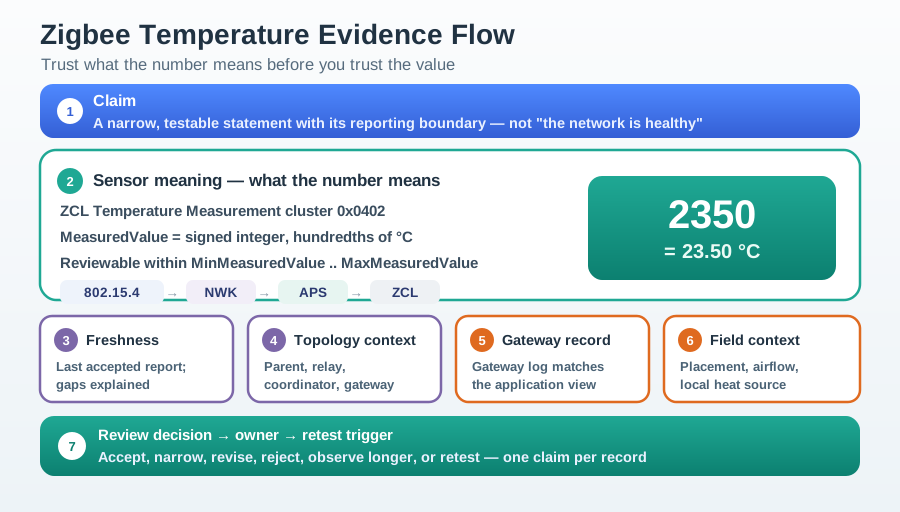
Figure 21.1 begins with a narrow Claim, then decodes ZCL Temperature Measurement cluster 0x0402: MeasuredValue is a signed integer in hundredths of a degree, so 2350 = 23.50 °C, subject to the declared minimum and maximum. The stack labels 802.15.4 → NWK → APS → ZCL preserve where that meaning appears. Next, Freshness asks when the last accepted report arrived, while Topology context and Gateway record tie it to the observed path and application view. Field context—placement, airflow, and local heat—can still overturn a technically valid payload. Only after those branches converge does the review assign a decision, owner, and retest trigger.
Review:
- whether the report is temperature, humidity, a derived comfort value, or a gateway-transformed value,
- whether the unit conversion is documented,
- whether rounding or filtering changed the reviewed value,
- whether a stale report is being displayed as a fresh condition,
- whether the endpoint location matches the room or zone being discussed,
- whether field observations agree with the reading, and
- whether the value is being used for observation, alerting, control, or maintenance.
Zigbee application data often travels through profiles, clusters, gateways, and application logic before a learner sees it on a page. That path matters. A correct radio report can still become a misleading review result if the value is mapped to the wrong room, interpreted with the wrong unit, or accepted after it has gone stale.
21.8 Review Freshness and Missing Reports
This section: Review Freshness and Missing Reports — Freshness is not just a clock.
Freshness is not just a clock. It is evidence that the value still belongs to the decision.
A well-designed Zigbee sensor is not normally polled for every value. It uses attribute reporting configured with three parameters: a minimum reporting interval, a maximum reporting interval, and a reportable change. The minimum interval prevents reports from arriving too frequently. The maximum interval creates a heartbeat even if the value has not changed. The reportable change defines the value delta that triggers an earlier report.
For review work, the maximum interval is the freshness contract. If the maximum interval is 300 seconds, a reading older than about 300 seconds plus reasonable slack is stale and suspect. A missing report after that window calls for checking the sensor, reporting configuration, radio and parent path, and gateway processing; it does not prove that the temperature stayed constant.
| Reporting parameter | Meaning | Review use |
|---|---|---|
| Minimum interval | Fastest allowed report cadence | Lower bound on time between configured reports of this attribute. |
| Maximum interval | Heartbeat even if unchanged | Freshness bound: older than this is stale or unreachable. |
| Reportable change | Delta that triggers a report | Explains why small drifts are not reported between heartbeats. |
Review:
- the last accepted report,
- the expected reporting pattern for that endpoint group,
- whether missing reports line up with route changes, gateway gaps, maintenance, or site activity,
- whether repeated values are real stability or repeated stale display,
- whether alerts depend on a single reading or a confirmed pattern,
- whether another observation source agrees with the symptom, and
- what condition reopens the review.
Do not let a clean-looking dashboard replace the review record. A smooth display can hide stale readings, missing routes, changed placement, or incomplete gateway evidence.
21.9 Review Topology and Context Together
This section: Review Topology and Context Together — Temperature evidence is stronger when the network path and field context agree.
Temperature evidence is stronger when the network path and field context agree.
Topology asks how the report reached the reviewer. Context asks whether the report describes the thing the reviewer cares about.
A reading travels up a layered stack. The 802.15.4 radio carries the frame, the NWK layer routes it across the mesh, APS delivers it to a specific endpoint, and the ZCL frame names the cluster and attribute. Binding links a source endpoint and cluster to a destination so Report Attributes commands can flow without hardcoding the receiver address. Groups let one report reach multiple destinations when that is part of the application design.
This layering is why a “missing temperature” is ambiguous until the reviewer localizes it. The problem can be at radio level when link quality is too low to decode, at NWK when no route reaches the coordinator, at APS when binding was removed, or at ZCL when reporting was never configured. Naming the layer is the difference between replacing a router and re-binding a cluster.
Review:
- whether the endpoint used the expected parent, relay, coordinator, bridge, or gateway path,
- whether a route or parent change appears near the symptom,
- whether one endpoint, one path, one room, or one service is affected,
- whether the field location explains the value,
- whether placement or airflow could make the sensor valid for one question but weak for another,
- whether a gateway or application transform changed the reviewed evidence, and
- whether the next decision should be accept, narrow, revise, observe, or retest.
A temperature network can be healthy as a Zigbee path while still weak as room evidence. It can also show a real room condition while the network evidence remains incomplete. The review record should make that distinction visible.
21.10 Temperature Review Record
This section: Temperature Review Record — Use a review record when accepting temperature-network evidence.
Use a review record when accepting temperature-network evidence.
After decoding and correlating the reading, inspect Figure 21.2 to preserve exactly what the temperature conclusion covers—and what it does not.
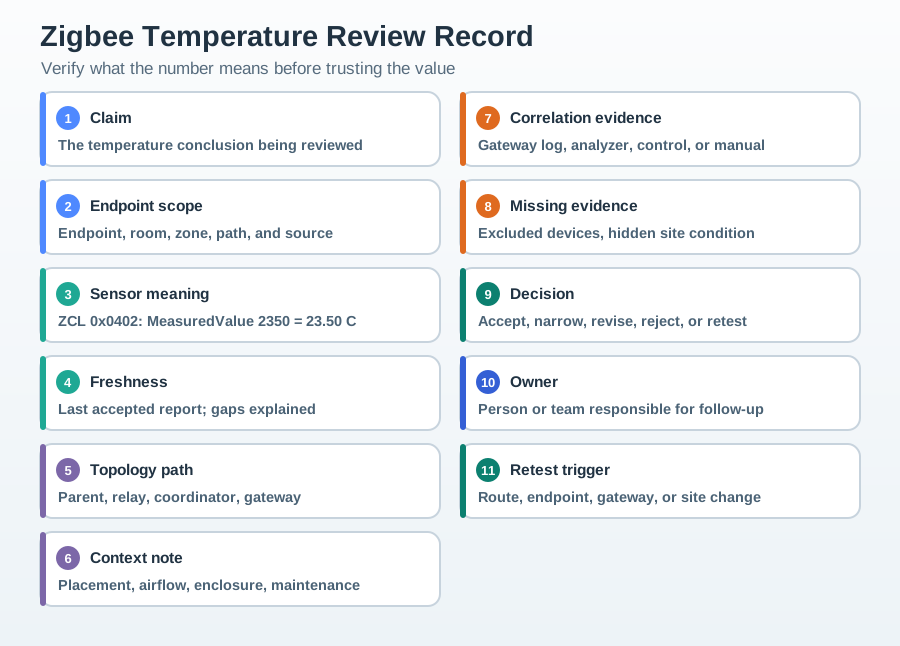
The record in Figure 21.2 anchors 1 Claim to 2 Endpoint scope, then makes 3 Sensor meaning explicit with the 0x0402 and 2350 = 23.50 C example. 4 Freshness and 5 Topology path test whether the right report arrived through the expected parent, relay, coordinator, and gateway. 6 Context note captures placement, airflow, enclosure, or maintenance, whereas 7 Correlation evidence names an independent log, analyzer, control, or manual observation. 8 Missing evidence remains visible before 9 Decision; 10 Owner and 11 Retest trigger then keep route, endpoint, gateway, or site changes from silently inheriting the old approval.
The record should include:
- Claim: the temperature conclusion being reviewed.
- Endpoint scope: endpoint, room, zone, path, and observation source covered.
- Sensor meaning: value type, unit interpretation, conversion, rounding, or filtering.
- Freshness: last accepted report and whether missing reports are explained.
- Topology path: parent, relay, coordinator, bridge, gateway, or single dependency.
- Context note: placement, airflow, enclosure, maintenance, or field observation.
- Correlation evidence: gateway log, analyzer record, control-system record, or manual observation.
- Missing evidence: excluded devices, hidden site condition, unconfirmed placement, or unobserved path.
- Decision: accept, narrow, revise, reject, observe longer, or retest.
- Owner: person or team responsible for follow-up.
- Retest trigger: route change, endpoint movement, gateway change, recurring symptom, site change, or changed reporting pattern.
21.11 Worked Review: Warm Room Alert
This section: Worked Review: Warm Room Alert — Scenario: A room shows a warm condition in the application view.
Scenario: A room shows a warm condition in the application view. The gateway has a matching report from the expected endpoint, but the field note says the sensor is near a localized heat source.
Review path:
- Record the endpoint, room, observation source, and decision being considered.
- Confirm that the reported value uses the expected sensor meaning and unit interpretation.
- Compare the gateway record with the application view.
- Add the placement note before deciding whether the room itself is warm.
- Assign a retest after placement or airflow context is corrected.
Decision: Accept the report as a valid endpoint observation. Narrow the room-condition claim until placement context is retested.
21.12 Worked Review: Stale Temperature Display
This section: Worked Review: Stale Temperature Display — Scenario: A temperature value remains visible after the endpoint stops reporting.
Scenario: A temperature value remains visible after the endpoint stops reporting. The application page does not make the missing-report condition obvious, and the topology record shows a recent path change.
Review path:
- Record the last accepted report and the affected endpoint group.
- Compare the reporting pattern with gateway and analyzer evidence.
- Check whether the visible value is fresh or simply retained.
- Connect the missing reports with topology context before changing control behavior.
- Assign an owner to retest after route recovery or endpoint service.
Decision: Reject the visible value as fresh evidence. Treat it as a stale display until reporting and topology evidence recover.
21.13 Knowledge Check: Temperature Claim
This section: Knowledge Check: Temperature Claim
21.14 Knowledge Check: Freshness
This section: Knowledge Check: Freshness
21.15 Match the Evidence
This section: Match the Evidence
21.16 Order the Review
This section: Order the Review
21.17 Common Temperature-Network Mistakes
This section: Common Temperature-Network Mistakes — Treating a reading as room proof: A sensor reports from a location.
Treating a reading as room proof: A sensor reports from a location. It does not automatically prove the whole room condition.
Forgetting freshness: A retained display can be mistaken for a live report when missing-report evidence is not reviewed.
Ignoring unit meaning: A transformed or rounded value can be correct for display but weak for diagnosis if the transformation is undocumented.
Reviewing topology without field context: A healthy path does not prove the sensor is placed where the decision requires.
Reviewing field context without topology: A visible symptom still needs network evidence when the decision depends on Zigbee reporting.
Skipping ownership: A review without an owner and retest trigger becomes a note, not a controlled decision.
21.18 Summary
This section: Summary — The review should not drift into hardware setup, code parsing, or dashboard touring.
Zigbee temperature-network evidence is strongest when the reviewer can state a bounded claim, trace the endpoint and path, interpret the sensor value correctly, prove freshness, compare field and gateway context, and record a decision with an owner and retest trigger.
The review should not drift into hardware setup, code parsing, or dashboard touring. The useful question is whether the available evidence is strong enough for the decision being made.
21.19 Key Takeaway
This section: Key Takeaway — Zigbee Temperature Network Evidence Review should leave deployment evidence for network formation, binding, routing, security, scaling, diagnostics, and observed simulation or lab behavior.
Zigbee Temperature Network Evidence Review should leave deployment evidence for network formation, binding, routing, security, scaling, diagnostics, and observed simulation or lab behavior.
21.20 Concept Relationships
This section: Concept Relationships
- Temperature report and sensor meaning: the value needs unit, conversion, and transformation context before it supports a claim.
- Freshness and missing reports: a visible value is not automatically a live value.
- Topology and field context: the network path explains how the report arrived, while placement explains what the report means.
- Gateway and analyzer evidence: independent records strengthen or challenge the application view.
- Decision and retest trigger: the review stays useful only when follow-up conditions are explicit.
21.21 What’s Next
This section: What’s Next — Continue with Zigbee Network Analyzer Evidence Review to connect temperature-network symptoms with diagnostic evidence, then review Zigbee Mesh Simulator Evidence Review for path and routing behavior.
Continue with Zigbee Network Analyzer Evidence Review to connect temperature-network symptoms with diagnostic evidence, then review Zigbee Mesh Simulator Evidence Review for path and routing behavior. Use Zigbee Security when the temperature evidence touches trust, access, or protected reporting boundaries.
Find help
3 reviewed answers.
Where should I start in a module?
Open the module page from the sidebar to see its chapters in order. Use the module map to return to a topic you need.
Modules and pathsReviewed
What can I try when a project does not work?
Check the symptom, then work through the diagnostic steps. Keep the error message and the smallest example that reproduces it.
When you are stuckReviewed
How do interactive examples work?
Use the interactive guide to check how examples and simulations work before changing your project.
Interactive examples guideReviewed