24 Thread IPv6 Mesh Foundations

More
Depth: Practitioner
Progress saves as you read. Mark sections complete as you go; your progress appears in the sidebar.
24.1 Start With the IPv6 Mesh Claim
This section: Start With the IPv6 Mesh Claim — Picture a battery sensor that can join a Thread network but stops reporting when one router loses power.
Break One Mesh Path Before Calling It Ready
Picture a battery sensor that can join a Thread network but stops reporting when one router loses power. Joining once does not prove that the device can recover or reach the right service.
-
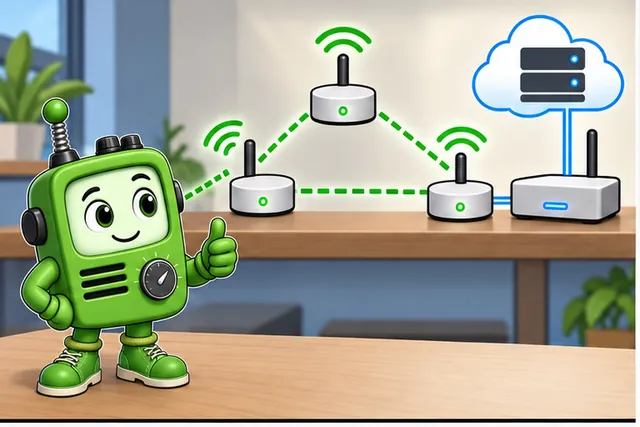
A battery sensor stops after one Thread router loses power.
-
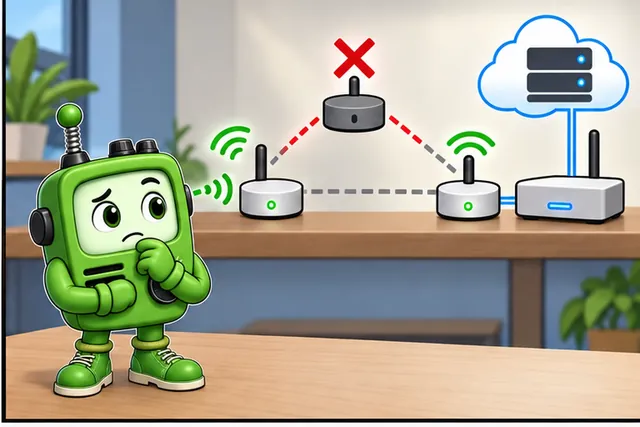
One successful join does not prove that the mesh can recover.
-
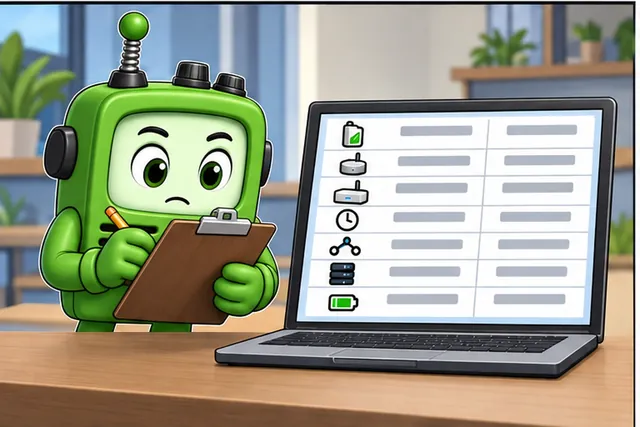
Record its role and path, remove a router, then send again.
-
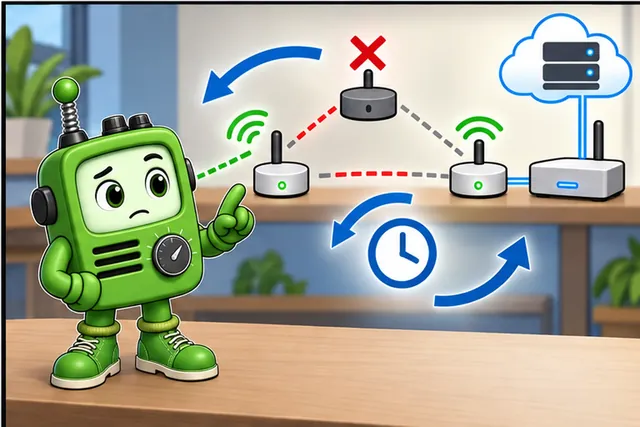
Claim recovery only when the right service gets the new report.
Internet Protocol means the shared addressing rules used to route data across networks. A protocol means the shared rules for a message exchange. 6LoWPAN means a method for carrying Internet Protocol version 6 traffic over small low-power radio frames. Thread uses both ideas to form a routed mesh.
Join one device, record its address and role, remove a router, restart the border router, and repeat a report. Record path, time, parent change, delivery result, service identity, and power state.
This runway does not prove application behavior, security, coverage, or battery life. The deeper sections explain Thread roles, addressing, mesh recovery, border routing, Matter boundaries, and release evidence.
Start with the claim that a low-power mesh device can speak IP directly enough for the product need. Thread IPv6 Mesh Foundations should help prove where IPv6 is native, where mesh behavior is managed, and where the border or application layer still sets limits.
The simple review path is join, address, route, recover, and observe. Once those steps are clear, Thread roles, security, implementation, and Matter relationships can be checked without treating the mesh as magic.
24.2 Thread IPv6 Mesh Foundations Evidence
This section: Thread IPv6 Mesh Foundations Evidence — Thread is a low-power mesh networking protocol that carries IPv6 traffic over constrained radios.
Thread is a low-power mesh networking protocol that carries IPv6 traffic over constrained radios. It is important in IoT because it gives small devices a network layer that can be routed, secured, commissioned, and connected to application protocols without turning every device into a Wi-Fi device.
This introduction focuses on boundaries. Thread is not the radio alone, not Matter alone, not a product ecosystem, and not a guarantee that any smart-home deployment is ready. A useful first review identifies what Thread provides, what it depends on, and what still needs separate evidence.
24.3 In 60 Seconds
This section: In 60 Seconds
- Thread provides an IPv6 mesh network for constrained IoT devices.
- The low-power radio, 6LoWPAN adaptation, IPv6 mesh, Border Router, and application layer each prove different things.
- Border Routers route between the Thread mesh and other IP networks; they do not make every application path automatically correct.
- Matter can use Thread as a network transport, but Matter behavior and Thread behavior are separate review layers.
- Device roles matter because always-on, router-eligible, and sleepy devices have different responsibilities.
- A Thread fit decision should be based on application needs, power needs, service boundaries, and evidence, not on protocol branding.
24.4 Learning Objectives
This section: Learning Objectives
By the end of this chapter, you will be able to:
- Explain Thread as an IPv6 mesh layer for constrained IoT networks.
- Separate Thread’s radio, adaptation, network, Border Router, and application boundaries.
- Describe how Thread relates to Matter without merging the two protocols.
- Identify the first evidence needed for role, addressing, mesh, and service-fit claims.
- Recognize common overclaims about Thread, gateways, product ecosystems, and battery life.
24.5 Thread Claim Before Comparison
This section: Thread Claim Before Comparison — Start with a bounded claim before comparing Thread with another protocol.
Start with a bounded claim before comparing Thread with another protocol.
Device behavior
Telemetry, local control, event notification, commissioning support, bridge handoff, or low-power sensing.
Network need
IPv6 mesh routing, low-power wireless operation, local service reachability, or Border Router connectivity.
Application boundary
Thread-only traffic, Matter behavior, local controller behavior, dashboard path, cloud path, or support workflow.
Evidence owner
The person or team that accepts the claim, records limits, and owns retest after changes.
A claim such as “Thread is better” is too broad. A better claim says which device behavior needs a low-power IPv6 mesh and which evidence will prove the network boundary.
24.6 What Thread Provides
This section: What Thread Provides — Thread should be introduced as a networking layer.
Thread combines several mature networking ideas into one low-power mesh system:
Constrained radio use
Thread uses a low-power wireless link suited to small devices and mesh participation.
IPv6 adaptation
Header compression and adaptation make IPv6 practical over constrained frames.
Mesh networking
Router-capable devices can forward traffic and help the network recover from local changes.
IP boundary
Border Routers connect the Thread mesh to other IP networks while preserving layer boundaries.
Thread should be introduced as a networking layer. Application protocols, product setup flows, dashboards, and automation rules sit above that layer and need their own review.
24.7 Stack and Boundary Map
This section: Stack and Boundary Map — Use the stack and boundary map when a claim mixes layers.
Use the stack and boundary map when a claim mixes layers. For example, a successful Matter command may depend on Thread, but it does not by itself prove mesh recovery, role suitability, or Border Router service behavior.
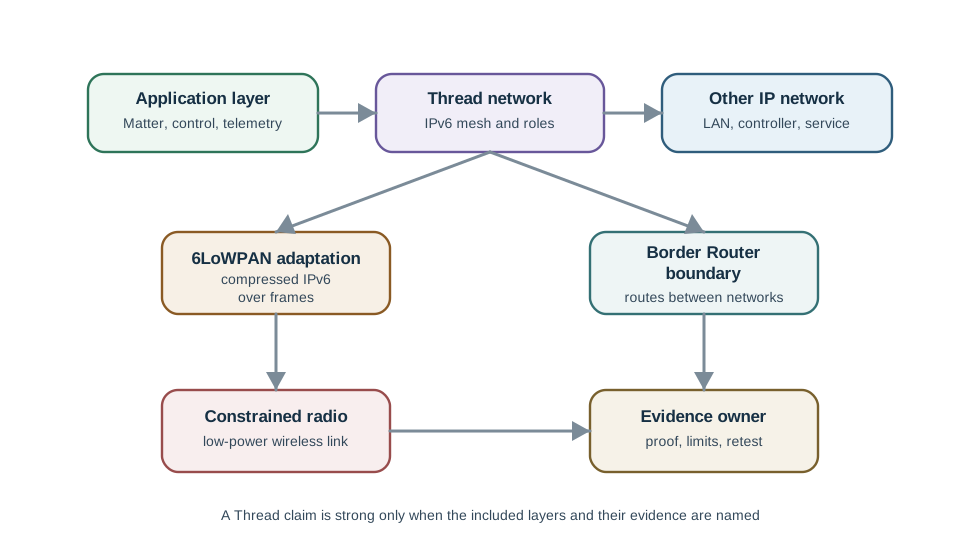
The boundary map separates constrained radio, 6LoWPAN adaptation, IPv6 mesh, Border Router routing, application behavior, and evidence ownership. That separation is the shortest way to prevent one successful demo from being treated as proof of every Thread claim.
24.8 Native IPv6 Stack
This section: Native IPv6 Stack — Thread is built on the same IEEE 802.15.4 radio family as Zigbee, but it uses a different network stack.
Thread is built on the same IEEE 802.15.4 radio family as Zigbee, but it uses a different network stack. Thread layers 802.15.4 radio and MAC behavior, 6LoWPAN adaptation, IPv6 networking, and UDP transport so each Thread device is a real IP node with its own address.
That IPv6-native design is the main architectural difference from non-IP mesh stacks. Connecting a Thread mesh to another IP network needs a Border Router that routes packets across the boundary, not a protocol-translating gateway that converts every device interaction into a different application model.
24.9 Knowledge Check: Native IPv6
This section: Knowledge Check: Native IPv6
24.10 Thread Layer Stack
This section: Thread Layer Stack — The introduction should make the layer stack visible without becoming a setup guide.
The introduction should make the layer stack visible without becoming a setup guide.
| Layer | Role in Thread | Review question |
|---|---|---|
| IEEE 802.15.4 PHY/MAC | Low-power radio and link behavior | Is the claim about constrained radio behavior or a higher layer? |
| 6LoWPAN | IPv6 header compression and adaptation | Is the claim about fitting IPv6 over constrained frames? |
| IPv6 and mesh routing | Addressing and routing between devices | Is the claim about Thread network reachability and recovery? |
| UDP, CoAP, and DTLS | Lightweight transport, management, and security paths | Is the claim about protocol behavior above the mesh? |
Thread’s Border Router routes IPv6 between the Thread mesh and the outside IP network because both sides speak IP. A Zigbee gateway typically translates between a non-IP Zigbee network/application model and IP services. That routing-versus-translation distinction is why a Thread border claim should be reviewed as an IP boundary, not as a proprietary gateway claim.
24.11 Knowledge Check: Thread and Zigbee Network Layer
This section: Knowledge Check: Thread and Zigbee Network Layer
24.12 Device Roles at Introduction Level
This section: Device Roles at Introduction Level — Learners should understand role intent before learning detailed role mechanics.
Learners should understand role intent before learning detailed role mechanics.
Router-capable devices
Can stay available enough to help carry mesh traffic when the network needs them.
End devices
Communicate through a parent and do not carry traffic for the wider mesh.
Sleepy devices
Trade immediate reachability for low-power behavior and rely on parent custody.
Border Router role
Connects the Thread mesh to another IP network and introduces service-boundary evidence.
The introduction does not need every role detail. It does need the idea that role choice changes what evidence is required.
24.13 Resilience and Leader Election
This section: Resilience and Leader Election — Thread avoids a single fixed controller.
Thread avoids a single fixed controller. At any moment, one router acts as the Leader for management state inside a partition, but that role is elected. If the current Leader disappears, the remaining routers elect another Leader without operator intervention.
Routers can forward for one another, end devices can attach to a new parent if the old parent becomes unsuitable, and a deployment can include multiple Border Routers for external path redundancy. Losing a Border Router can cut off-mesh connectivity, but it does not have to stop mesh-local traffic.
24.14 Knowledge Check: Leader Failure
This section: Knowledge Check: Leader Failure
24.15 Thread and Matter Relationship
This section: Thread and Matter Relationship — Thread and Matter solve related but different problems.
Thread and Matter solve related but different problems.
Thread evidence: Devices attach to the mesh, keep appropriate roles, use network addresses correctly, route traffic, recover from local changes, and expose enough diagnostics to explain failures.
Matter evidence: Devices expose an application model, endpoints, clusters, commands, events, fabrics, and commissioning behavior that match an application claim.
Matter can run over Thread, but Matter approval is not automatic proof of Thread operational quality. Thread readiness and Matter readiness should be recorded separately.
24.16 Border Router Boundary
This section: Border Router Boundary — A Border Router is often the point where learners overgeneralize.
A Border Router is often the point where learners overgeneralize. It is a network boundary, not a magic product gateway.
Inside the mesh
Attachment, role, route, parent-child behavior, and mesh-local service behavior.
At the boundary
Routing, prefix or service advertisement, network dataset custody, and external path availability.
Above the network
Application commands, user-facing control, automation, dashboard, and support behavior.
When a Border Router is involved, the review should say whether the claim is mesh-local, off-mesh IP reachability, application control, or a complete user workflow.
24.17 Fit Evidence Map
This section: Fit Evidence Map — The fit map shows the first fit questions for deciding whether Thread belongs in a design.
The fit map shows the first fit questions for deciding whether Thread belongs in a design.

Thread is a strong fit when the application benefits from low-power mesh networking and IP-based service boundaries. It may be the wrong fit when the design primarily needs high throughput, simple point-to-point links, or a non-mesh deployment.
24.18 First Evidence Questions
This section: First Evidence Questions — These questions keep the introduction practical without turning it into a setup guide.
Use these questions before treating a Thread design as selected:
These questions keep the introduction practical without turning it into a setup guide.
24.19 Worked Introduction Records
This section: Worked Introduction Records
Low-power sensor claim
Claim: a sensor should report events through a low-power mesh. Evidence needed: role expectation, parent behavior, mesh attachment, service path, and application report handling. Limit: immediate command reachability is not assumed.
Local controller claim
Claim: a local controller should reach Thread devices through an IP boundary. Evidence needed: Thread mesh behavior, Border Router service boundary, controller path, and recovery owner. Limit: remote cloud behavior is separate.
Matter-over-Thread claim
Claim: an application protocol uses Thread as its network transport. Evidence needed: Thread attachment and role behavior separated from application model, commissioning, and controller behavior. Limit: protocol certification is not implied by a local demo.
24.20 Common Mistakes
This section: Common Mistakes
Calling Thread a product ecosystem
Thread is a network protocol. Product setup, app behavior, and ecosystem support are separate layers.
Treating Matter and Thread as the same thing
Matter can use Thread, but Matter application behavior and Thread network behavior prove different claims.
Ignoring device roles
A device that sleeps, a device that routes, and a device that bridges networks require different evidence.
Assuming a Border Router proves everything
The Border Router boundary must be reviewed separately from mesh-local behavior and application behavior.
Comparing protocols by slogans
Use application need, power need, mesh need, service boundary, and operations evidence instead.
Approving from one successful demo
A demo may prove one path but leave roles, recovery, commissioning, and service boundaries unreviewed.
24.21 Thread Introduction Checklist
This section: Thread Introduction Checklist
Before leaving the introduction, confirm that the learner can state:
- What Thread provides as a low-power IPv6 mesh network.
- Which parts belong to radio, adaptation, network, Border Router, and application layers.
- Why role choice changes evidence requirements.
- How Thread and Matter relate without becoming the same protocol.
- Which first evidence questions decide whether Thread is a fit.
- Which claims remain outside a basic Thread introduction.
24.22 Knowledge Check: Thread Layer Boundary
This section: Knowledge Check: Thread Layer Boundary
24.23 Knowledge Check: Border Router Boundary
This section: Knowledge Check: Border Router Boundary
24.24 Match Thread Foundations
This section: Match Thread Foundations
24.25 Order the Thread Fit Review
This section: Order the Thread Fit Review
24.26 Summary
This section: Summary — Thread is best introduced as a low-power IPv6 mesh network for constrained IoT devices.
Thread is best introduced as a low-power IPv6 mesh network for constrained IoT devices. It depends on a constrained radio and adaptation layer, provides mesh networking and IP addressing, and can connect through Border Routers to other IP networks.
Keep the boundaries clear. Thread is not the same as Matter, not the same as a product ecosystem, and not proof of every application path. A strong introductory review says what Thread proves, what it depends on, and what needs separate evidence.
24.27 Key Takeaway
This section: Key Takeaway — Thread IPv6 Mesh Foundations Evidence should connect Thread IPv6 mesh roles, routing, commissioning, border routers, security, power behavior, and deployment evidence.
Thread IPv6 Mesh Foundations Evidence should connect Thread IPv6 mesh roles, routing, commissioning, border routers, security, power behavior, and deployment evidence.
24.28 Concept Relationships
This section: Concept Relationships
Thread
Connects constrained devices through an IPv6 mesh network.
Constrained radio
Provides the low-power wireless link that Thread uses.
6LoWPAN adaptation
Connects IPv6 semantics to constrained link-layer frames.
Border Router
Connects mesh-local behavior to another IP network boundary.
Matter
Connects application behavior to a network transport that may be Thread.
Evidence record
Connects fit claims to proof, limits, owners, and retest triggers.
24.29 What’s Next
This section: What’s Next
- Thread Network Architecture - Learn the role and topology details behind the introduction.
- Thread Protocol Comparison - Compare Thread with other IoT network options using bounded claims.
- Thread Network Operations Evidence - Review formation, addressing, roles, diagnostics, and recovery evidence.
- Thread Deployment Evidence Guide - Move from protocol fit to site and rollout evidence.
- Matter Protocol Overview - Review the application layer relationship after the Thread boundary is clear.
Find help
3 reviewed answers.
Where should I start in a module?
Open the module page from the sidebar to see its chapters in order. Use the module map to return to a topic you need.
Modules and pathsReviewed
What can I try when a project does not work?
Check the symptom, then work through the diagnostic steps. Keep the error message and the smallest example that reproduces it.
When you are stuckReviewed
How do interactive examples work?
Use the interactive guide to check how examples and simulations work before changing your project.
Interactive examples guideReviewed