2 Devices, Packets, and Layers
More
Depth: Practitioner
Progress saves as you read. Mark sections complete as you go; your progress appears in the sidebar.
2.1 Start With One Sensor Message
This section: Start With One Sensor Message — Picture a leak sensor that must warn a nearby person and update a remote screen.
Trace One Alarm Before Naming the Network Parts
Picture a leak sensor that must warn a nearby person and update a remote screen. A green network icon is not enough; the team needs to know where the alarm stopped and what stayed safe. The first useful map follows one message and its evidence.
An actuator means a part that turns a command into a physical action. A gateway means a device or service that joins two message paths.
Record sender identity, source time, unit, quality, packet, each hop, final receiver, and physical result. Break one link, delay and repeat the message, restart the gateway, and reject an old screen value as current. Keep the local warning active.
This runway does not prove that one link or network layout fits every system. The deeper sections explain packets, addresses, links, routes, layers, applications, and the evidence needed at each hand-off.
Imagine a sensor reading that must leave a device, cross a room, pass a gateway, and land in a dashboard without losing its meaning. The beginner mistake is to name protocols first. The useful move is to trace the message and ask what proof each hop needs before the next hop can matter.
Use this page as the route map for that trace. Packets, links, addresses, routers, and layers are not separate trivia; they are the handoff points that turn a local signal into a trustworthy IoT event.
2.2 Message Paths Need Evidence
This section: Message Paths Need Evidence — A network lets one device send a message to another device through agreed rules.
A network lets one device send a message to another device through agreed rules. In IoT, that message might be a temperature reading, a door-state event, a firmware request, an alarm, or a command sent back to an actuator.
The first useful idea is simple: a network is not just a radio or cable. It is a chain of jobs. The system must identify who is talking, package the message, move it across one or more links, deliver it to the right application, and prove what happened when something is late or missing.

Packet Pete
“A packet you can’t trace is a claim you can’t defend — name the address, the route, and the hop that dropped it.”
Through this chapter, Pete stamps every message with the same delivery slip: who is talking, which hops carry it, and what proves it arrived.
If you only need the intuition, this layer is enough: networking is the delivery evidence path for IoT messages. Addresses identify endpoints, packets carry payloads plus headers, protocols define the rules, and layers keep each job reviewable.
When a reading fails to arrive, the useful next question is which job stopped working. Figure 2.1 names five jobs and the technologies that do each one.
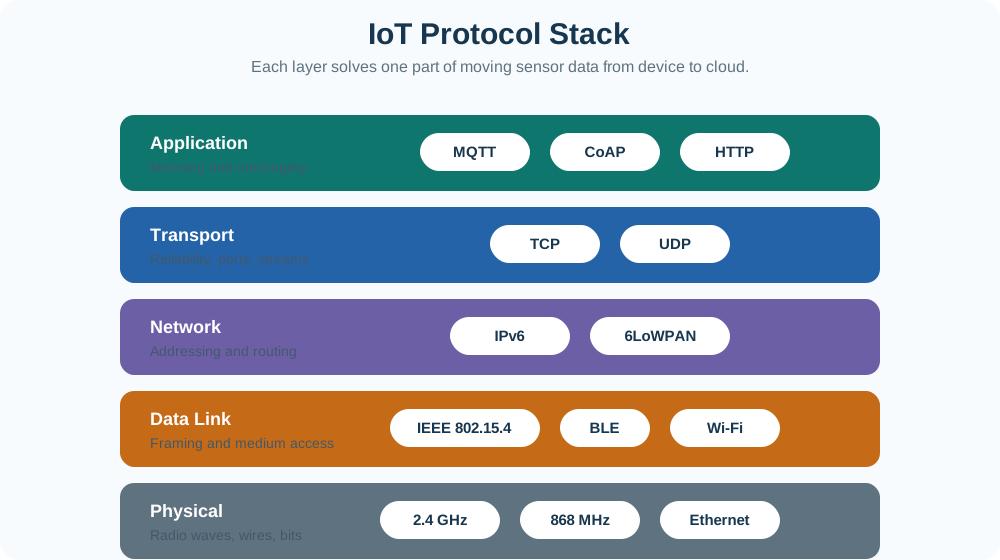
Read Figure 2.1 from the bottom up. The lowest band is bare physics, whether radio at 2.4 GHz or 868 MHz or a wire, and it only moves bits. Above it, framing and medium access decide whose turn it is on that shared link. The middle band adds addresses and routing, which is what lets a reading leave the building at all. Transport then supplies ports and a choice about reliability, and only the application band gives the bytes a meaning such as a topic or a resource. Each band names real technologies, so a fault can be pinned to one of them and tested there instead of being called a network problem.
Think of sending a parcel. The object inside is the payload. The label, tracking number, address, and handling marks are headers. The local courier, sorting center, long-haul carrier, and final courier each do different jobs. If the parcel is lost, a useful system can say where the evidence stopped. Networking uses the same pattern for digital messages.
For IoT, that evidence must survive gateways and time gaps. A sleepy sensor may report only once every few minutes, a gateway may buffer during an outage, and a dashboard may cache the last good value. The network review therefore asks for sender time, gateway time, broker or service time, acknowledgement behavior, and stale-data handling instead of trusting one visible screen.
That record turns a vague complaint such as "the network is down" into a specific next test at the lowest unproven boundary.
The One-Minute View
Identify
A local-link address—often a MAC address on Ethernet or Wi-Fi—helps deliver a frame on the current link. An IP address supports routed delivery, while a port or application resource helps the receiving endpoint hand the message to the correct service.
Package
A packet or frame carries the application payload plus headers that describe delivery, ordering, integrity, or local-link handling.
Prove
Useful network designs keep evidence: timestamps, retries, acknowledgements, sequence checks, logs, and failure paths.
These three questions belong together. A message can be addressed correctly but arrive too late, or it can reach a host without evidence that the application accepted the right meaning. Apply the complete Identify–Package–Prove view to the examples before studying any one address type in detail.
Beginner Examples
First, A room sensor sends temperature=22.4 to a gateway. The payload is small, but the link and network headers still decide how it reaches the service. Next, A gateway receives a command for an actuator. A good design records whether the command was authorized, delivered, acknowledged, retried, or rejected. Finally, A dashboard showing stale data may have a sensor problem, a link problem, a route problem, a broker problem, or an application-cache problem. Layers help narrow the search.
Each example is a whole-path problem, not a single-protocol puzzle. Start with the message, then find the first boundary whose delivery or freshness evidence is still missing.
Overview Knowledge Check
If you can identify the message, trace its local and routed path, and name the evidence that would distinguish delivered, delayed, missing, or stale data, you have the Overview. Stop here for the conceptual map, or continue to Practitioner to turn it into a repeatable network review.
2.3 Build the IoT Network Review
This section: Build the IoT Network Review — The practical networking workflow starts with one message and follows it end to end.
The practical networking workflow starts with one message and follows it end to end. The goal is not to memorize every protocol name. The goal is to know what each layer is responsible for and what evidence would prove that responsibility in a deployment.
Walkthrough: From Device Event to Review Evidence
First, Name the message. State the payload, expected rate, freshness need, and consequence if it is delayed or lost. Next, Name the local link. Record whether the first hop is wired, Wi-Fi, cellular, LPWAN, mesh, or another medium, and what local identity is used. Next, Name the route. Record gateway, router, broker, service, or peer handoffs that move the message beyond the local link. Next, Name the transport behavior. Decide whether the message needs connection setup, ordering, retransmission, low overhead, or application-level acknowledgement. Next, Name the application endpoint. Record the topic, URL, port, resource, or command channel that receives the payload. Finally, Name the proof. Keep timestamps, sequence checks, acknowledgements, logs, counters, and the reopen trigger for later review.
Pete’s Delivery Slip
- Address: the named message and its endpoint — topic, URL, port, or command channel.
- Route: the local link first, then gateway, router, broker, or service handoffs.
- Receipt: timestamps, acknowledgements, sequence checks, logs, and the reopen trigger.
Local-Link Identity in the Review
Step 2 asks how the message crosses its current link and how the next device on that link is identified. On Ethernet, a switch normally forwards a frame using its destination MAC address without rewriting the source and destination addresses. A switch uses its forwarding table for a known destination; broadcasts and unknown destinations may be flooded within the Layer-2 domain. A router ends the incoming link-layer frame and creates a new frame for the outgoing link, so the link-layer addressing normally changes at a routed boundary—not at every switch.
Under ordinary IP routing, the destination IP address continues to name the routed destination. NAT, a proxy, a tunnel, or a load balancer can alter or terminate that simple end-to-end view, so record the observation point whenever addresses are being used as evidence.
Treat a MAC address as interface evidence, not permanent device identity. One device may have separate wired and wireless addresses, and locally administered or randomized Wi-Fi addresses may vary by network. On Ethernet, ff:ff:ff:ff:ff:ff is a broadcast destination within the local Layer-2 broadcast domain; it is not an Internet-wide address.
Before comparing addresses in a capture, inspect Figure 2.2 to see which identity belongs to the current link and which continues across an ordinary routed path. This prevents a changing MAC address from being mistaken for a changing IP destination.

Read Figure 2.2 from the sensor frame through the Ethernet switch, where the source and destination MAC addresses normally remain intact. At the router, the incoming frame ends and a new local frame is created for the next link, while ordinary routing preserves the packet’s destination IP. NAT, proxies, and tunnels are exceptions to record explicitly. The diagram connects local-link identity to the observation point used in troubleshooting.
Local-link identity explains one delivery boundary, but it does not describe the whole network cost. The next example keeps the application payload fixed and shows how network and transport headers add delivery context before link framing, security, and retransmissions are counted.
Worked Example: Tiny Reading, Large Delivery Context
Suppose a device reports a 12-byte application payload: a sensor identifier, timestamp delta, and scaled temperature value. The payload is not the whole network cost. Before link framing and security, a minimal IPv4 plus UDP path adds 20 bytes of IPv4 header and 8 bytes of UDP header. A minimal IPv6 plus UDP path adds 40 bytes of IPv6 header and 8 bytes of UDP header.
This example does not prove that one path is always better. It shows why IoT network reviews start with the message requirement. A once-per-hour soil reading, a safety command, and a firmware chunk have different timing, reliability, power, and evidence needs.
Bandwidth, Throughput, and Goodput
The header overhead above raises a related question: how much of a link’s rated capacity actually reaches the application? Three terms answer it at different points in the path, and a review should not treat them as interchangeable.
Bandwidth
The specified or ideal maximum capacity of the medium, set by the physical link and its encoding scheme. It is a ceiling, not a promise.
Throughput
The bits per second actually observed on the link, including headers, retries, and idle time. Traffic load, congestion, and hop count usually keep it below bandwidth.
Goodput
The usable-data rate left after headers, retransmissions, and duplicate delivery are subtracted — the number that actually matters for the reading or command a deployment cares about.
The gap between bandwidth and goodput is easy to underestimate at IoT scale. Suppose a field gateway has buffered 2 GB of diagnostic logs during a multi-week backhaul outage, and the recovery radio link is rated at 250 kb/s. Observed throughput on that link, once retries and headers are counted, might run closer to 150 kb/s. At 150 kb/s, moving 2 GB (about 1.6×1010 bits) back to the office takes roughly 30 hours. Physically swapping the storage card and driving it in takes a couple of hours. For a one-time bulk recovery, the slower-looking physical option can beat the faster-looking radio link, even though the radio’s bandwidth figure is larger on a spec sheet. The lesson generalizes: choose the transfer path from goodput and total volume, not from the headline bandwidth number.
Incremental Practice
Beginner
For one sensor reading, write the payload, local link, gateway or router, destination service, and the timestamp evidence you expect to see.
Intermediate
Compare UDP and TCP for the same message. Record what reliability is provided by the transport and what must be handled by the application.
Advanced
Design the failure record for a missing command acknowledgement: retry limit, stale command handling, operator alert, and rollback action.
Practitioner Knowledge Check
If your job is to make a defensible network choice, you can stop here. Continue to Under the Hood for the layer mechanics behind the review.
2.4 Layer Contracts and Failures
This section: Layer Contracts and Failures — Layering is a contract discipline.
Layering is a contract discipline. Each layer adds or interprets enough information for its own job, then hands the result to the next layer. The same application payload may be wrapped by transport, network, data-link, and physical-layer mechanisms before it leaves the device.
Layer Contract Ledger
Read the ledger from the application row downward. For each layer, pair the observable evidence with the failure question, then use the final column to choose the next review action. This keeps the running diagnosis tied to proved boundaries: a valid frame supports the local-link claim, for example, but it cannot stand in for routed, transport, or application evidence.
Pete’s Delivery Slip
First, Address: MAC on the local link, source and destination IP across networks, port at the endpoint. Next, Route: gateway, hop behavior, and reachability toward the intended endpoint. Finally, Receipt: transport retransmissions and timeouts, application acknowledgements, and local-link retries.
Encapsulation and Overhead
Encapsulation means each layer wraps the data it receives. A transport header might add ports. A network header might add IP addresses. A data-link frame might add local delivery information and an integrity check. The receiver unwraps the same structure in the opposite direction.
This is why a tiny IoT payload can still consume meaningful airtime, energy, and memory. The review should include payload size, header overhead, retransmission behavior, and how often the message repeats. A design that is efficient for a mains-powered gateway may be wasteful for a sleeping sensor.
48-Bit MAC Address Format and Scope
Many Ethernet and Wi-Fi interface addresses are written as six hexadecimal octets, for example 00:00:5e:00:53:01. Globally administered addresses are drawn from IEEE-assigned address blocks, but not every 48-bit MAC address consists of a 24-bit manufacturer OUI followed by a 24-bit interface number. IEEE assigns MA-L, MA-M, and MA-S prefixes of different lengths, while locally administered or randomized addresses do not carry vendor-prefix meaning in the same way.
Two bits in the first octet help describe the address scope. One distinguishes an individual address from a group address; another distinguishes globally administered space from locally administered space. These bits describe address behavior, not the permanent identity of a physical device.
In an Ethernet frame, the destination and source addresses appear near the start, followed by an EtherType or length field and the payload. The frame check sequence is a trailer used to detect frame corruption. These are local link-layer fields, not the routed application endpoint.
The address format explains how a local identity is represented. The next boundary question is what MAC addresses, IP addresses, ports, application resources, and device identities are each allowed to mean.
Address Boundaries
First, MAC or local-link identity: helps deliver a frame on one local medium. It is not a global route by itself. Next, IP address: supports routed delivery across networks. IPv4 uses 32-bit addresses; IPv6 uses 128-bit addresses. Next, Port or application resource: helps the endpoint hand the packet to the correct application behavior. Finally, Device identity: may be separate from all of the above. Security, fleet management, and operations need to know which real device the network endpoint represents.
MAC Address vs. IP Address at a Glance
The two addresses in Pete’s delivery slip answer different review questions, and a reviewer who conflates them will misdiagnose a working device as unreachable, or a routed outage as a radio fault.
Common Pitfalls
First, Confusing reachability with correctness. A packet arriving at a host does not prove the application accepted the right command or data meaning. Next, Choosing a protocol by popularity. The right path depends on payload size, timing, loss tolerance, power, security, and operational evidence. Next, Ignoring stale-data behavior. Many IoT failures are not dramatic outages; they are old values that look current. Finally, Hiding the gateway. Gateways often translate, buffer, filter, authenticate, and retry. Those are design responsibilities, not invisible plumbing.
Under-the-Hood Knowledge Check
At this depth, networking is a sequence of contracts. Each layer needs a job, a boundary, and evidence that the job was satisfied under normal and failure conditions.
2.5 Summary
This section: Summary
- Confusing reachability with correctness. A packet arriving at a host does not prove the application accepted the right command or data meaning.
- Choosing a protocol by popularity. The right path depends on payload size, timing, loss tolerance, power, security, and operational evidence.
- Ignoring stale-data behavior. Many IoT failures are not dramatic outages; they are old values that look current.
- Hiding the gateway. Gateways often translate, buffer, filter, authenticate, and retry. Those are design responsibilities, not invisible plumbing.
- IoT networking moves messages through identifiable jobs: local link, route, transport behavior, application endpoint, and operating workflow.
- Packets carry payloads plus headers, so small telemetry can still have meaningful overhead.
- MAC addresses, IP addresses, ports, and device identities answer different questions and should not be treated as one thing.
- TCP, UDP, and application acknowledgements provide different reliability evidence.
- A useful network review traces observation, command, exception, and maintenance paths instead of trusting a diagram alone.
Design the network from the message outward: state the payload, choose the delivery behavior, trace the boundaries, and keep evidence that the right endpoint received the right meaning at the right time.
2.6 See Also
This section: See Also
Layered Models Fundamentals
Deepen the OSI and TCP/IP model vocabulary used by this chapter.
IPv4 Addressing Fundamentals
Practice address structure, local networks, subnets, and route planning.
Networking Protocol Fundamentals
Review how protocol rules shape interoperability and evidence.
Medium Access Control (MAC)
See how the local link shares the medium and frames data before routing and transport take over.
Find help
3 reviewed answers.
Where should I start in a module?
Open the module page from the sidebar to see its chapters in order. Use the module map to return to a topic you need.
Modules and pathsReviewed
What can I try when a project does not work?
Check the symptom, then work through the diagnostic steps. Keep the error message and the smallest example that reproduces it.
When you are stuckReviewed
How do interactive examples work?
Use the interactive guide to check how examples and simulations work before changing your project.
Interactive examples guideReviewed