Discover
A new client broadcasts for a DHCP server because it does not yet know its own usable network settings.
Progress saves as you read. Mark sections complete as you go; your progress appears in the sidebar.
This section: Start With How the Device Learns the Network — Picture a replacement sensor joining a plant network and receiving an address once held by another unit.
Trace One Device From Link Identity to Service
Picture a replacement sensor joining a plant network and receiving an address once held by another unit. A dashboard can reach that address while attaching the new reading to the wrong asset record.
A MAC address is a link-layer identifier carried by a network interface. A gateway is the device or service that joins two system paths. A broker is a service that accepts and routes messages.
Record interface identity, assigned address, lease time, name result, asset identity, and final receiver. Expire the lease, change the interface, repeat the lookup, restart the device, and reject stale ownership. Reachability is not identity or trust.
This runway does not prove secure enrolment or correct application mapping. The deeper sections explain address assignment, leases, local resolution, name lookup, default routes, and the evidence that joins those steps.
Most IoT devices do not wake up already knowing their useful network identity. DHCP, ARP, DNS, and neighbor discovery are the support conversations that turn a powered device into a reachable participant.
When a device fails, these conversations are often where the first clue lives. Before blaming the application, prove how the device received an address, found a gateway, translated names, and mapped neighbors on the local link.
DHCP gives an IoT device a usable IP configuration. Address resolution then finds the local link-layer destination for the next hop. Both jobs must be healthy before a sensor can reliably reach a gateway, broker, dashboard, or peer device.
Before this begins, an interface needs a 48-bit MAC address for local frame delivery. It may use a globally administered address assigned from an IEEE registration block, a locally administered address set by software, or a private address that rotates between scans or network profiles. For a globally administered unicast address, the leading 24 bits commonly identify the registered allocation rather than proving the current device vendor or a durable asset identity. Treat an observed MAC as a time-bounded link identifier and use managed enrollment or cryptographic identity for durable inventory. DHCP itself runs over UDP, with servers listening on port 67 and clients on port 68, so configuration can begin before the device has a usable IP identity.
Beneath that MAC address sits one more layer this chapter otherwise takes for granted: the interface hardware that turns frame bits into something a medium can carry. Figure 15.1 follows one byte through the three physical forms an IoT deployment will actually mix.

All three strips in Figure 15.1 carry the identical pattern from the bit row above them: the COPPER trace steps between voltage levels, the FIBRE strip fires a light pulse for each 1, and the RADIO trace swells the carrier under the same cells. The boundary card then names the hardware performing each translation — RJ45 jack and PHY, SFP transceiver, antenna and radio — which is precisely where the MAC address described above lives, whatever medium the frame leaves on.
The configuration job is more than the address itself. A lease normally carries the subnet mask, default gateway, DNS servers, lease lifetime, renewal behavior, and sometimes site options such as NTP or boot information. If any one of those settings is wrong, the device may look "online" in the DHCP table while still failing application traffic.
The local-delivery job starts after configuration. A device decides whether the destination is local or remote from its address and mask. Local destinations need ARP in IPv4 or Neighbor Discovery in IPv6; remote destinations need resolution for the default gateway. Troubleshooting has to prove both decisions, because a healthy lease can still be paired with a stale neighbor cache, duplicate address, or wrong route boundary.
Count the messages in Figure 15.2 and notice what none of them proves.
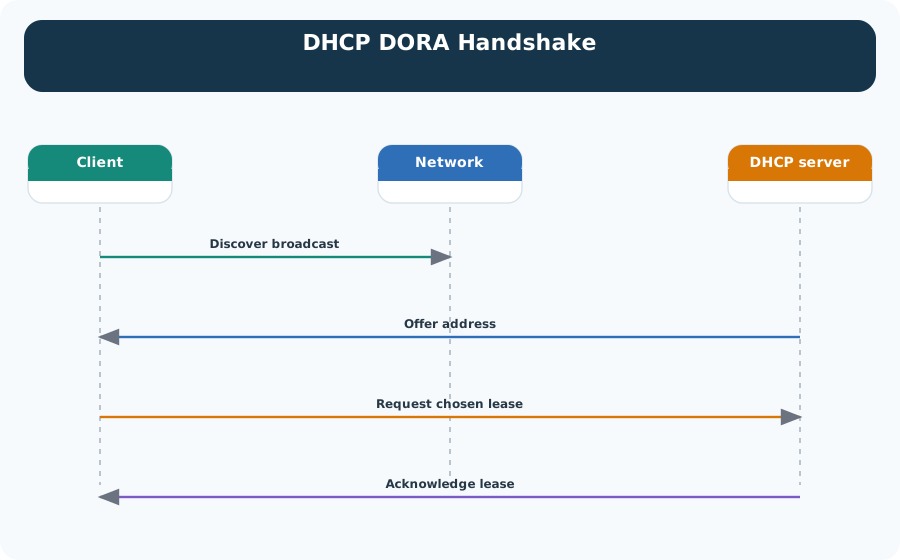
The exchange runs down the diagram in four steps. The client broadcasts a discover, because it has no address yet and does not know the server. The server offers an address. The client requests the lease it has chosen, which matters when more than one server answered. The server acknowledges, and the lease exists. That is the whole of Figure 15.2, and all of it is configuration. The device now holds an address, a mask and a gateway, but not one frame has yet reached a peer. The second job, local delivery, is still unproven.
A new client broadcasts for a DHCP server because it does not yet know its own usable network settings.
The server proposes an address, subnet mask, gateway, DNS, lease time, and any site-specific options.
The client accepts one offer so all listening servers know which lease is being claimed.
The server confirms the lease and starts the timer that controls renewal and expiry behavior.
A client that is done with an address, such as during a controlled shutdown or decommission, can send DHCPRELEASE to return it to the pool immediately instead of waiting for the lease to expire.
A valid IoT addressing design records three things: how devices obtain addresses, how those addresses map to local delivery, and what evidence proves the result. DHCP lease logs, ARP or neighbor tables, gateway routes, and device telemetry should agree.
| Question | Evidence | Common Failure |
|---|---|---|
| Did the device receive usable settings? | Lease table, client log, address, mask, gateway, DNS, lease time. | Wrong pool, exhausted pool, short lease, missing gateway, or stale reservation. |
| Can it deliver to the next hop? | ARP cache for IPv4 or neighbor table for IPv6. | IP conflict, stale cache entry, duplicate address, or wrong subnet mask. |
| Will it survive maintenance? | T1/T2 renewal timing, redundancy plan, and outage test. | Fixed sensors with one-hour leases losing addresses during a planned DHCP outage. |
DHCP is not just an address dispenser. In IoT networks it is an operations control point: lease duration, reservation policy, static ranges, DNS/NTP options, and pool boundaries determine how devices behave during movement, maintenance, and growth.
Use long leases such as 7 to 30 days because the devices rarely move and frequent renewal adds noise without value.
Use shorter leases such as 1 to 4 hours so addresses return to the pool when phones, tablets, or carts leave.
Use DHCP reservations when gateways, cameras, meters, or controllers need predictable addresses with central management.
Keep routers, switches, and the DHCP server itself in a documented static range outside dynamic pools.
| Device Class | Assignment | Lease | Evidence to Keep |
|---|---|---|---|
| Fixed environmental sensors | Dynamic DHCP pool | 7 to 30 days | Lease table, expected count, pool utilization, renewal success. |
| Cameras and floor gateways | DHCP reservation by MAC address | 30 days or longer | Reservation record, asset label, monitoring target, gateway reachability. |
| Commissioning devices | Temporary test pool | 30 minutes to 1 hour | Hostname, owner, expiry time, and removal after test. |
| Routers and DHCP service | Manual static address | Not applicable | Network diagram, config backup, change record, and route test. |
DHCP clients try to renew at T1, normally 50 percent of the lease, and retry more broadly at T2, normally 87.5 percent. A 7-day fixed-sensor lease gives a 3.5-day window before the first normal renewal; a 1-hour lease makes fixed devices depend on the server every 30 minutes.
Reserve 192.168.1.1 to 192.168.1.20 for network infrastructure and cameras, then give sensors a dynamic pool such as 192.168.1.50 to 192.168.1.249 with seven-day leases. Keep commissioning laptops and test devices in a separate short-lease range. The design record should connect those ranges to the reservations, lease policy, and named owner so later address evidence can be interpreted against the intended plan.
Once an IoT device has an IP configuration, it still needs local delivery evidence. IPv4 uses ARP to map a local IP destination to a MAC address. IPv6 uses Neighbor Discovery, Router Advertisements, Duplicate Address Detection, and SLAAC for related jobs.
In IPv4, the route decision happens before ARP. The host compares the destination with its own address and subnet mask; if the destination appears local, the host broadcasts an ARP request for that destination. If the destination is remote, the host sends the frame to the default gateway's MAC address instead. A wrong mask therefore creates misleading symptoms: the device may repeatedly ARP for a remote PLC, server, or broker that should never be resolved on the local segment.
A device does not have to wait to be asked. Gratuitous ARP is a broadcast ARP reply a host sends unprompted, announcing "I own this IP, and here is my MAC address" to the whole segment. IoT devices commonly send one right after a DHCP lease is confirmed or after a static address is set, so every neighbor's ARP cache and every bridge's learned-MAC table update immediately instead of waiting for a normal request. It is also the fastest way an address conflict surfaces: if another device already claims that IP, the conflicting gratuitous announcement itself becomes the first evidence in ARP or switch logs, often before an application-layer symptom appears.
Conflict diagnosis also needs timing evidence. DHCP lease tables show who was assigned an address, but they do not prove that no static device is using the same address. ARP caches, switch MAC tables, gateway logs, and duplicate-address alarms show whether one IP is moving between link-layer identities. IPv6 adds Duplicate Address Detection and neighbor-cache state, so the same investigation checks router advertisements, prefixes, and whether a tentative address became usable.
Before blaming an application timeout, inspect Figure 15.3 to see how an IPv4 host obtains the link-layer destination for its next hop. The diagram makes the subnet decision visible before the broadcast request, which is why a wrong mask can resemble a remote service failure.
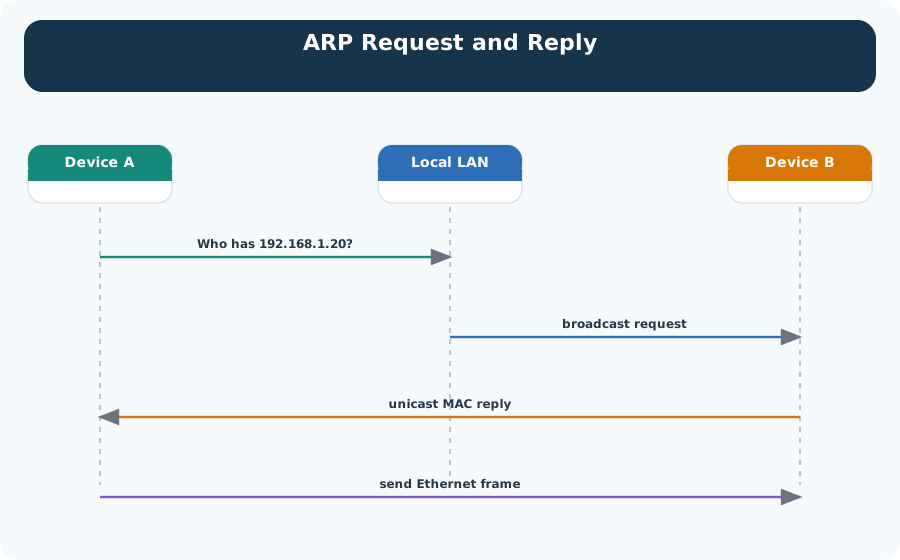
Read Figure 15.3 from the sender’s local-or-remote decision into the broadcast request, then follow the target’s unicast reply back to the sender’s cache. ARP resolves only a local next hop; for a remote destination, that next hop should be the gateway. If the host broadcasts for a remote server instead, the trace points back to prefix or mask configuration rather than the application protocol.
One local IP maps to one MAC address, and the cache agrees with the DHCP lease or reservation record.
One IP alternates between two MAC addresses, usually because two devices claim the same address.
A device thinks a remote subnet is local and ARPs directly instead of sending traffic to its default gateway.
IPv6 neighbor tables show link-layer reachability, router information, and duplicate-address behavior.
A host announces its own IP-to-MAC mapping unprompted, typically right after a lease or static address is set, to refresh neighbor caches and surface conflicts early.
To compare the IPv6 evidence path with gratuitous ARP, inspect Figure 15.4 before treating a formed address as usable. The sequence shows that prefix discovery and duplicate-address detection are separate checks, each leaving different diagnostic evidence.
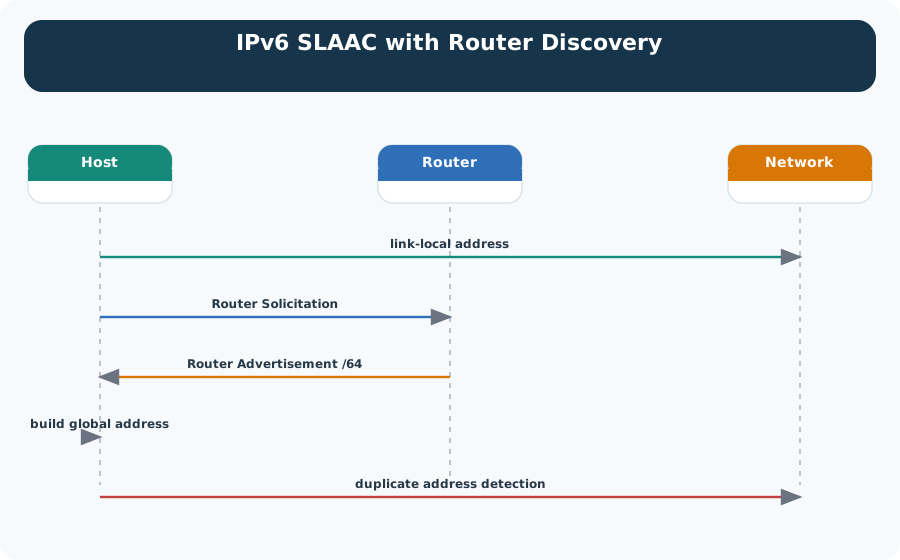
Read Figure 15.4 from router discovery into the advertised prefix, then follow address generation into Duplicate Address Detection. A tentative address must survive that final check before normal use. This connects neighbor-cache and router-advertisement evidence to the conflict investigation: address formation, local reachability, and uniqueness are related but distinct operational claims.
Open the DAD-conflict preset below to follow that IPv6 path as an ordered trace. The candidate address is formed, but Duplicate Address Detection blocks it before any 6LoWPAN fragments are transmitted. Compare that evidence with ARP flapping: both are address conflicts, but they fail at different states and leave different records.
The trace should change the diagnosis order. When DAD blocks the address, DNS and application checks are not failures yet; they are prerequisites that never became testable.
Start with the gateway ARP table: 192.168.10.45 alternates between two MAC addresses. The DHCP leases then show that Sensor A received .45 while Sensor B received .67. Finding a manual static .45 configuration on Sensor B connects the conflicting observations to their cause. Restore Sensor B to DHCP, create an appropriate reservation, or move static addresses outside the dynamic range, and then confirm that the ARP mapping remains stable.
Use arp -a or ip neigh for local neighbor evidence. Use DHCP server leases for assignment evidence. Use ip route get TARGET to confirm whether a device will send traffic locally or through the gateway.
Narrated audio tour. The full transcript is below.
Play the tour to open the simulator. Pause, replay a beat, or read the full transcript below.
Some beats explain situations this teaching model cannot show; those beats keep the existing frame and provide captions only.
B1 — Sensor lease
You are the technician bringing a battery sensor onto a building network. Its readings need to reach a dashboard, and getting network settings is part of that job. Before the sensor can use an assigned address, how does it obtain a lease, and how long does that lease last?
Model caption: A battery sensor needs network settings as part of reaching its dashboard. How does its lease begin and end?
B2 — Timed assignment
Dynamic Host Configuration Protocol, or DHCP, supplies network settings. It gives the sensor a lease: an address assignment with a lifetime. The conversation moves from finding a server to agreeing on an assignment. The server's final confirmation starts the timer for renewal and expiry.
Model caption: Dynamic Host Configuration Protocol supplies settings. A lease is a timed address assignment; final confirmation starts its timer.
B3 — Discover
First comes Discover. The sensor has no address yet and does not know the server, so it broadcasts its discovery message. Broadcasting lets it seek a server before it knows which server will provide its settings. Your sensor is asking for configuration.
Model caption: The unassigned sensor broadcasts because it does not yet know the server.
B4 — Competing offers
Next comes Offer. A server proposes an address, a subnet mask, and a gateway. Suppose two servers answer. The sensor chooses one offer by naming the selected server in its request. That choice tells the other server which assignment the sensor is claiming.
Model caption: An offer proposes an address, mask, and gateway. The client identifies one selected server in its request.
B5 — Request and acknowledge
The sensor broadcasts its Request for the chosen offer. The other server can reclaim its unused offer. Then the selected server sends an acknowledgement, confirming the lease. The sensor can now configure the assigned address, and the lease timer begins.
Model caption: Request selects Server A; Server B reclaims its unused offer. Acknowledgement confirms the lease and starts its timer.
B6 — Lease checkpoints
Give your sensor an eight hour lease in the model. The usual first renewal point is fifty percent of the lifetime: eight times one half gives four hours. The later fallback is eighty seven point five percent: eight times that fraction gives seven hours. Unless overridden, those are the checkpoints; the original lease expires at eight hours.
Model caption: Eight-hour model lease: 8 × 0.5 = 4 hours to normal renewal; 8 × 0.875 = 7 hours to fallback; original expiry at 8 hours, unless renewed.
B7 — Offer is a proposal
The misconception is that receiving an offer already grants a usable lease. An offer only proposes the assignment. The client still requests its choice, and the server confirms it. Receiving an offer and receiving that final acknowledgement are different stages.
Model caption: Misconception: an offer grants the lease. Offer is a proposal; Request chooses it; Acknowledge confirms it.
B8 — Renewal and expiry
At the first checkpoint, the sensor tries its original server. If renewal has failed by the later checkpoint, it tries any server. Expiry means starting the address acquisition exchange again. A lease is a timed agreement, from confirmed assignment to renewal or expiry.
Model caption: First try the original server. If renewal fails by the later checkpoint, try any server. At expiry, restart address acquisition. A lease is a timed agreement, from confirmed assignment to renewal or expiry.
An unchanged no application connection symptom does not prove that address assignment failed. Use the evidence composer below to stop at the first failed prerequisite: begin with Address response withheld, change only Address response with the Address response arrives counterexample, then open IPv6 DAD conflict to see why a formed address can still be unusable. Later DNS and service evidence stays explicitly not yet testable until the preceding stages pass.
This section: Address Configuration Fallbacks — Automatic configuration is a sequence of distinct services.
Automatic configuration is a sequence of distinct services. Do not diagnose “no address” and “no name resolution” as the same fault.
| Mechanism | Address and prefix | Default router | DNS resolver information | Scope when it is the only mechanism working |
|---|---|---|---|---|
| DHCPv4 | Yes: lease, mask, lifetime | Yes, through an option | Yes, through an option | Configured IPv4 network |
| IPv4 link-local (often called APIPA) | Self-selects from 169.254.0.0/16 and probes for conflict | No | No general Internet DNS service | Same layer-2 link only |
| IPv6 router advertisements and SLAAC | Prefix plus an interface identifier; link-local exists first | Yes: the advertising router | Possible through the RDNSS option, but not inherent in basic address formation | Link plus advertised IPv6 routes |
| DHCPv6 | Stateful address and/or other configuration, depending on mode | No: IPv6 learns default routers from router advertisements | Yes, when the DNS option is supplied | Scope allowed by the advertised routes |
An IPv4 host normally broadcasts DHCP discovery before it has a usable address. If no server answers, many operating systems select a candidate in 169.254/16, use ARP probing to ensure no neighbour already uses it, and then announce it. Two such hosts on the same link may communicate, but the address supplies neither a default gateway nor evidence that the enterprise DHCP path works. Treat an APIPA address as a useful local fallback and a diagnostic signal, not as a small private subnet that routers should forward.
IPv6 separates more responsibilities. A host first creates a link-local address and can then receive a router advertisement containing an on-link prefix and default-router lifetime. SLAAC forms an address from that prefix and an interface identifier; DHCPv6 can provide a managed address or additional options. The default router still comes from router advertisements, not DHCPv6. Basic neighbour discovery does not itself promise a DNS resolver, although modern networks may include Recursive DNS Server options in router advertisements. If those options are absent, DNS information can arrive through DHCPv6 or manual policy.
Once configuration works, a hostname still has to be resolved. Follow a cold recursive lookup step by step:
telemetry.example.net..net..net server which name servers are authoritative for example.net.example.net server for the requested record, following a CNAME chain if necessary.That hierarchy is delegation, not one server forwarding blindly “upwards.” Capture the DHCP or RA options, routing table, configured resolver, query, response code, answer, and TTL separately. A device can have a valid lease and route while DNS fails, or resolve a cached name while its default route is already broken.
The two halves of this section — who configures the device, and who resolves its names — meet in Figure 15.5, which is worth keeping open while reading a packet capture of a failing lookup.

The ladder in Figure 15.5 starts at the Device stub resolver and only reaches the example.net authoritative server after two referrals; the return arrow is the reason repeat queries rarely climb the tree — answers are cached at each hop for their TTL. The matrix beneath encodes this section’s fallback rules as marks: APIPA earns its check only for a same-link address, DHCPv6 never supplies the default router, and the RDNSS entry stays conditional on the router advertisement actually carrying the option.
This section: MAC Identity Evidence — A 48-bit MAC address contains 12 hexadecimal digits because each digit represents four bits.
A 48-bit MAC address contains 12 hexadecimal digits because each digit represents four bits. The usual six-octet spelling makes the byte boundary visible:
01:23:45:67:89:ab = 01-23-45-67-89-ab = 0123.4567.89abThese are display conventions for the same 48 bits. They do not change byte order on the wire. In a basic Ethernet frame, the addresses sit at the front of the MAC header:
| Field | Size | Review meaning |
|---|---|---|
| Destination MAC | 6 octets | Interface or group intended to accept the frame on this link |
| Source MAC | 6 octets | Interface that transmitted this frame onto this link |
| Optional 802.1Q tag | 4 octets | VLAN identifier and priority when tagging is present |
| EtherType or length | 2 octets | Identifies the carried protocol or payload length interpretation |
| Payload and padding | 46—1500 octets in classic Ethernet | Higher-layer data plus padding when required |
| Frame check sequence | 4 octets | Link error-detection value |
For globally assigned unicast addresses, the first 24 bits commonly contain an IEEE organisationally unique identifier and the remaining bits come from an assigned device block. That split is allocation evidence, not guaranteed manufacturer or asset identity: virtual interfaces, locally administered addresses, replacements, and privacy mechanisms can all break that inference.
Figure 15.6 compresses the last three paragraphs into one review sheet: where the two address fields sit in the frame, how the 48 bits decompose, and why three spellings are one address.
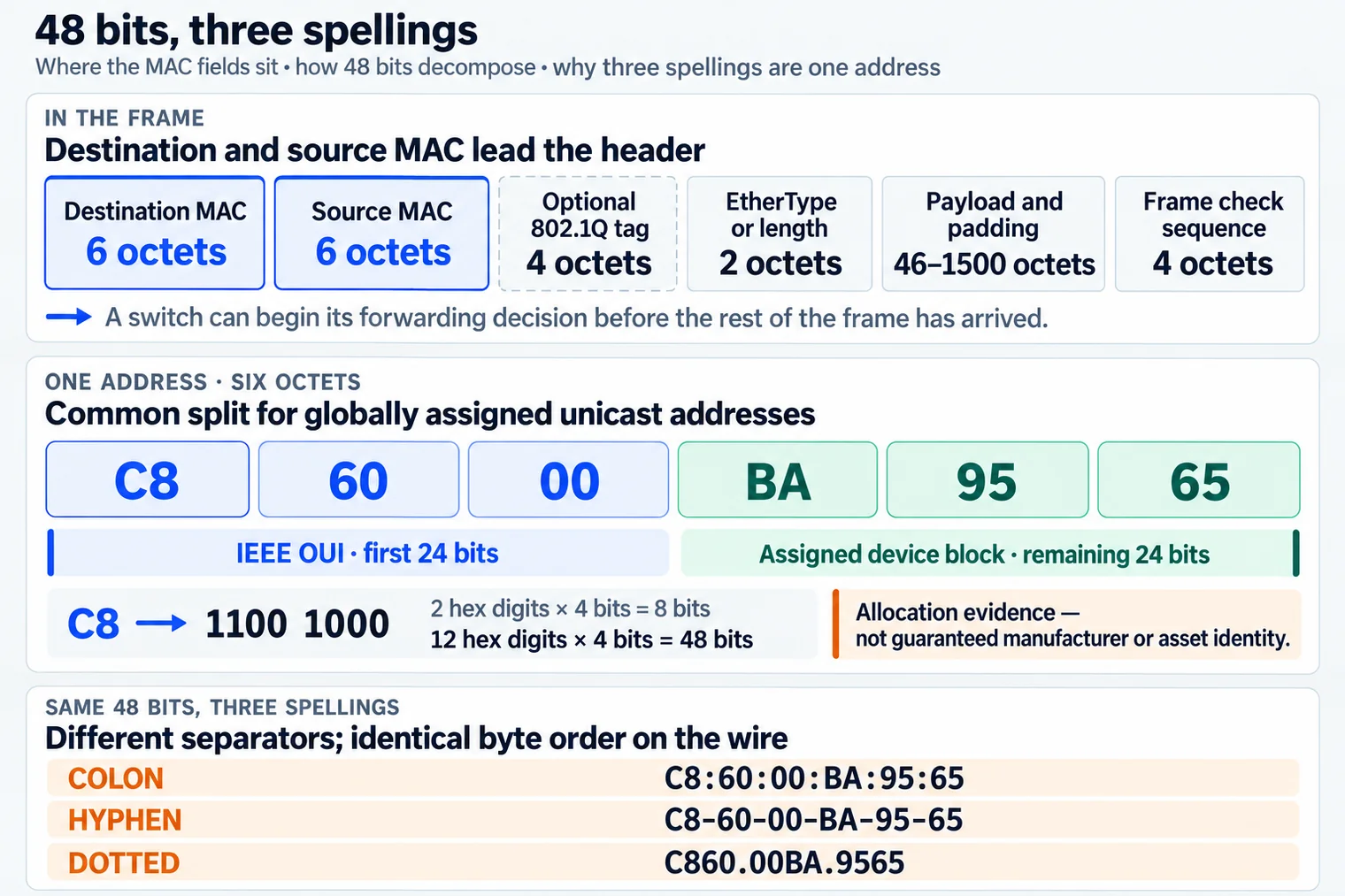
In Figure 15.6, read the frame strip first. Dst MAC and Src MAC come at the front, so a switch can start its choice before the whole frame arrives. The next card splits the first three OUI bytes from the device ID bytes. It also turns C8 into 1100 1000. C and 8 each stand for four bits, so the two hex marks form one eight-bit byte. The last card shows colon, dash, and dotted forms. They are three ways to write the same bytes sent on the wire.
The broadcast destination is ff:ff:ff:ff:ff:ff—all 48 bits are one. A switch floods such a frame within the relevant broadcast domain; a router does not normally carry that layer-2 broadcast into another link. Ordinary unicast MAC addresses likewise need to be unique only within the layer-2 domain in which they are simultaneously used.
Wireless clients may generate a locally administered address for scanning or for each network profile so observers cannot correlate one permanent hardware address across locations. The address can rotate between associations or after policy changes. Consequently, an observed MAC is a link-delivery identifier at a time and place, not automatically a durable device key. Asset systems should bind a cryptographic device identity, enrollment record, certificate, or managed account to the currently observed interface address and retain the time-bounded mapping as evidence.
Because the last two paragraphs pull in opposite directions — broadcast reaches everyone while private addresses keep changing — Figure 15.7 puts the three identities side by side, along with the flag bits that let a capture distinguish them.

The top card of Figure 15.7 highlights the two flag bits: I/G at zero marks unicast delivery, while U/L at one marks a locally administered address — and the quick-read note (second hex digit 2, 6, A or E) is the pattern worth memorizing for captures. In the identity rows, the broadcast entry tagged every listener stops at routers, and the rotating entry is tagged for exactly what it does to naive inventories; the verdict card closes with the evidence rule this section has been building toward.
This section: Summary
  <ol>
    <li>Gateway ARP table shows `192.168.10.45` alternating between two MAC addresses.</li>
    <li>DHCP leases show Sensor A was assigned `.45` and Sensor B was assigned `.67`.</li>
    <li>Sensor B is found with a manually configured static `.45` address.</li>
    <li>Fix by returning Sensor B to DHCP, creating a reservation, or moving static addresses outside the dynamic range.</li>
</ol>This section: Key Takeaway
Treat DHCP and address resolution as a single evidence chain: prove how the device got its configuration, how it resolves the next hop, and what will reopen the addressing decision when scale, movement, or maintenance conditions change.
This section: See Also
3 reviewed answers.
Open the module page from the sidebar to see its chapters in order. Use the module map to return to a topic you need.
Modules and pathsReviewed
Check the symptom, then work through the diagnostic steps. Keep the error message and the smallest example that reproduces it.
When you are stuckReviewed
Use the interactive guide to check how examples and simulations work before changing your project.
Interactive examples guideReviewed