32 SPI Protocol
More
Depth: Practitioner
Progress saves as you read. Mark sections complete as you go; your progress appears in the sidebar.
A controller reads an accelerometer correctly until a display is added to the same serial bus. The new peripheral changes more than the wire count: each transaction needs the correct timing mode and a single selected return-line driver. A known register read makes that contract testable.
32.1 Start With Speed and Selection
This section: Start With Speed and Selection — Picture a controller reading a motion part that works after power-up but returns shifted values after a restart.
Freeze the Timing Contract Before Wiring
Picture a controller reading a motion part that works after power-up but returns shifted values after a restart. The wires are connected, yet the two parts disagree about when a bit is valid and which byte begins the record.
Serial Peripheral Interface (SPI) is a short wired link in which a controller supplies a clock and selects one connected part at a time. A protocol is the agreed order and meaning of that exchange. An analog-to-digital converter is a part that turns a measured voltage into a number; it is often shortened to ADC. Write the clock limit, idle state, sampling edge, bit order, word length, select timing, and reply format before coding.
Test the slowest safe clock first. Read a known register, repeat the transfer, restart each side, and capture the wires when the result changes. Add a second part and prove that an idle device does not drive the shared return line.
One clean bench trace does not cover cable length, noise, or every vendor detail. The deeper sections explain transfer timing, shared-bus faults, and evidence needed to raise speed without losing the contract.
SPI trades extra wires for direct, fast transfers. A controller provides the clock, chooses one device with a select line, and shifts bits in both directions with little protocol overhead.
That makes SPI attractive for displays, radios, memory, and fast sensors, but the design still needs evidence: clock mode, maximum rate, chip-select timing, wiring length, and whether each peripheral can share the bus safely.
32.2 Overview: SPI Trades Wires For Deterministic Transfers
SPI is a short-distance synchronous serial bus for connecting a controller to board-level peripherals such as displays, ADCs, flash memory, radio modules, and sensors. The controller supplies the clock, selects exactly one peripheral with a chip-select line, and shifts data over MOSI and MISO at the same time.
The design trade is simple: SPI avoids addressing overhead and open-drain pull-up limits, but it spends pins. Shared SCLK, MOSI, and MISO lines can serve several peripherals, yet each independently selected peripheral usually needs its own CS line and its own timing contract.
That makes SPI attractive when the product needs predictable bursts of data rather than a self-describing network. A display controller can stream pixels, an external flash chip can clock blocks of bytes, and an ADC can return samples with tight timing because the controller owns the transaction cadence. The same explicitness is also the risk: if firmware asserts the wrong CS, uses the wrong clock phase, clocks too fast for the layout, or assumes a device releases MISO when it does not, there is no bus-level address scan or ACK layer to explain the mistake.
The overview decision is therefore a board-level fit decision. SPI is usually a good match inside one PCB, between stacked boards, or across a very short harness inside the same enclosure. It is weaker as a field cable or shared installation bus because signal integrity, grounding, connector stubs, and device-count wiring become the dominant constraints. For longer or noisier boundaries, a local SPI peripheral should normally sit behind a microcontroller, gateway, or transceiver that exposes CAN, RS-485, Ethernet, or a wireless interface to the outside world.
Use Figure 32.1 to follow one selected SPI transfer across its clock and two data directions.
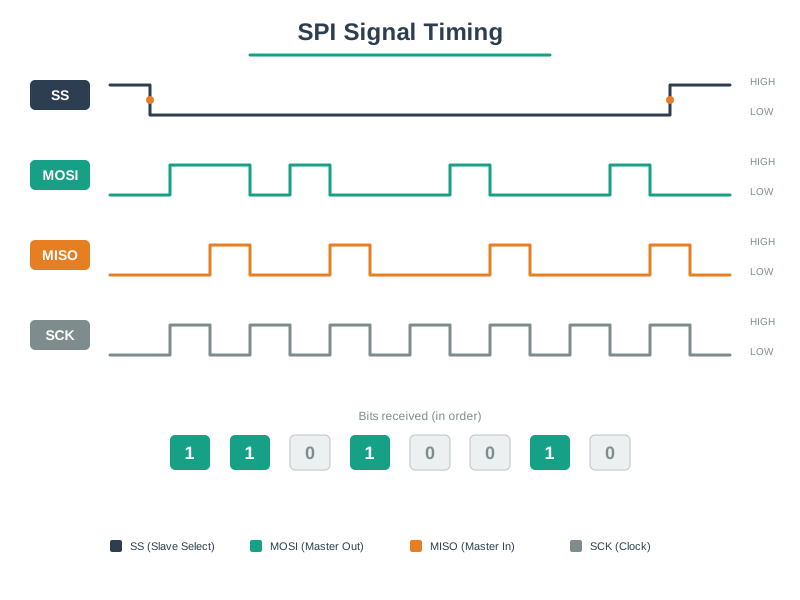
The controller first asserts SS, selecting one peripheral and framing the transfer. SCLK then supplies the edges that shift and sample bits. MOSI carries controller-to-peripheral data while MISO carries peripheral-to-controller data, so a bit can move in each direction during the same clock cycle. Deasserting SS ends the frame and should release that peripheral’s MISO driver. The diagram explains SPI’s deterministic timing and wire cost together: multiple devices may share clock and data, but each selected device needs controlled chip-select behaviour and only one peripheral may drive MISO.
Synchronous
The controller clock defines when each bit is launched and sampled. Without the correct clock mode, the peripheral can read every bit on the wrong edge.
Full Duplex
Data shifts in both directions on the same clock stream. Some devices use only one direction, but the bus still clocks both paths.
Chip Select
CS is the transaction boundary. The selected peripheral drives or listens; the others should ignore the clocks and release the shared return line.
What actually grows when a fourth peripheral joins an SPI bus? Figure 32.2 makes the answer countable.
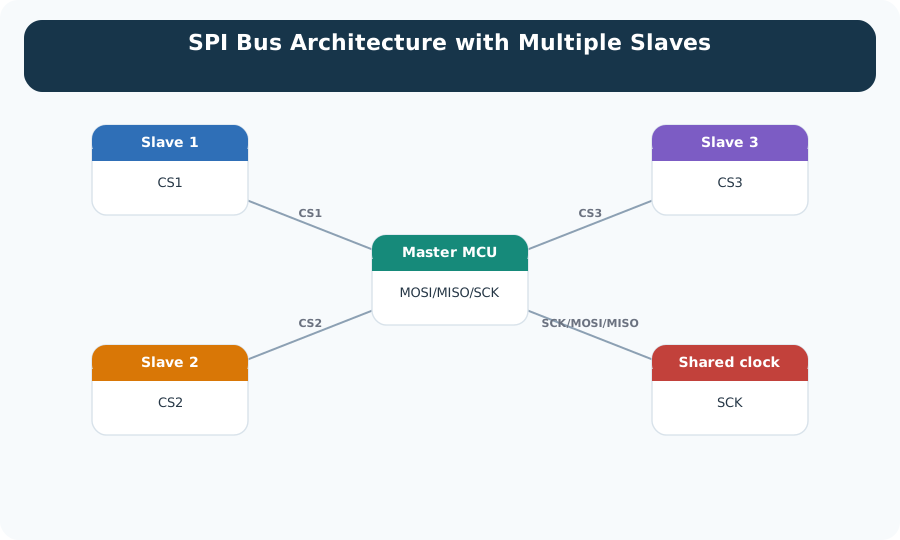
Three wires in Figure 32.2 run to every peripheral at once: the clock and the two data lines. Those do not multiply. What multiplies is the set of select lines beside them, one per device, each returning to its own pin on the controller. SPI has no address field, so that dedicated line is the only way to say who is being spoken to. A fourth peripheral therefore costs a fourth chip-select pin and a fourth entry in the firmware that raises and lowers it. Read the figure as a budget rather than a picture: pins and bookkeeping scale with the device count, while the shared bus and its timing stay the same.
Selection rule: choose SPI when the peripheral needs predictable short-board transfers and the design can afford the pins, routing, and per-device chip-select discipline. Do not choose it only because it is faster on a datasheet; choose it when the board, firmware, and validation plan can preserve the timing margin that the speed requires.
32.3 Practitioner: Treat Each Peripheral As A Timing Contract
An SPI design is not complete when the four signal names are wired. Each peripheral datasheet defines clock mode, maximum clock rate, bit order, command framing, CS timing, bus idle behavior, and whether MISO is released when the device is not selected. Capture those terms before the board is routed and before firmware is written.
Use a per-device contract, not a single bus note. A microSD card, display controller, radio transceiver, and ADC can all share the same SPI controller while needing different clock rates, modes, setup times, and command sequences. The driver should configure those fields at the transaction boundary, and the schematic should make it obvious which GPIO owns each chip select. If an RTOS, DMA engine, or interrupt handler can start transfers from multiple tasks, add a bus lock and record who is allowed to change mode or speed.
Read the CPOL and CPHA figure to see how CPOL and CPHA define idle level and sampling edge.
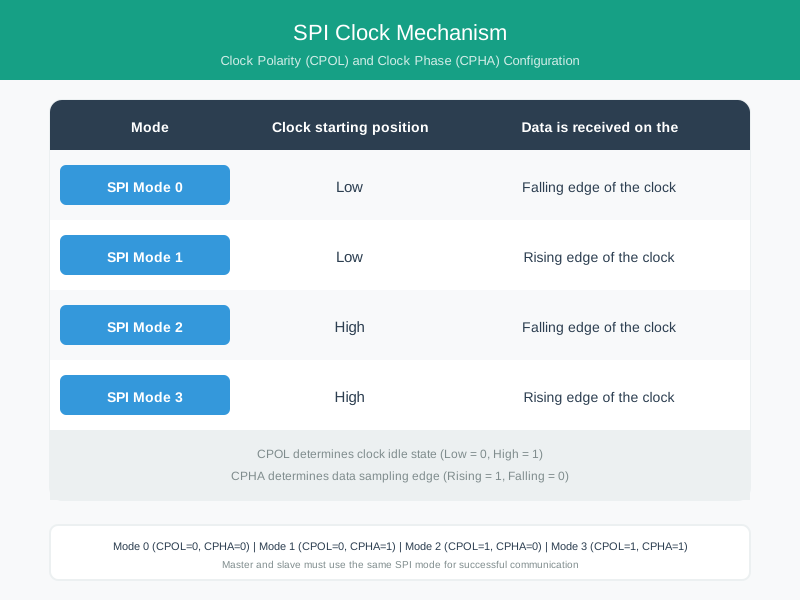
First inspect CPOL, which sets whether SCLK rests low or high. CPHA then decides whether receivers sample on the first clock transition or the second, with data changing on the opposite edge. Their two binary choices produce four modes; a controller in mode 0 and a peripheral expecting mode 3 can appear active while sampling unstable bits. The mode is therefore a shared endpoint contract, not a controller preference. Verify it with the data sheet and a trace that includes SS, SCLK, MOSI, and MISO at the peripheral pins.
Those four clock modes have datasheet numbers, not just polarity/phase jargon, and it is worth naming them because most peripheral datasheets specify "Mode 2" or similar rather than spelling out CPOL and CPHA. The four combinations of the idle clock level (CPOL) and the sampling edge (CPHA) are:
| Mode | CPOL | CPHA | Clock idle level | Bit sampled on |
|---|---|---|---|---|
| 0 | 0 | 0 | Low | Rising edge |
| 1 | 0 | 1 | Low | Falling edge |
| 2 | 1 | 0 | High | Falling edge |
| 3 | 1 | 1 | High | Rising edge |
Mode 0 is the most common default, but always confirm the mode in the peripheral datasheet. A controller configured for the wrong mode may sample on the wrong edge and return shifted or corrupted bytes, or no valid response. In this 8-bit Mode 0 transfer with active-low select and MSB-first bit order, SS (also called CS) stays low for the whole byte, SCLK pulses eight times, and bits shift on MOSI and MISO together. Mode 0 itself does not prescribe bit order or select polarity.
Four wires do all the work here, and each name already encodes a direction. Figure 32.4 maps them between a controller and an SD card.
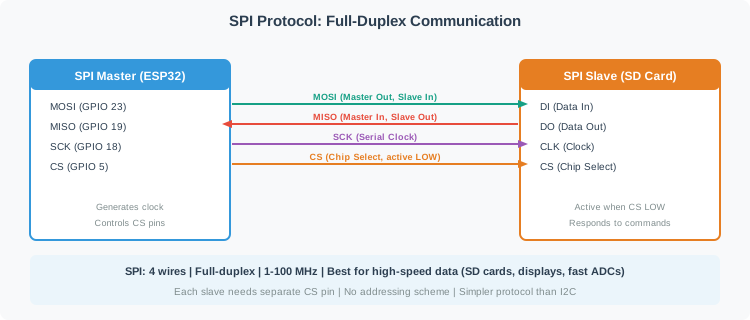
The two boxes in Figure 32.4 are a controller and a card, with four wires between them and a legend that expands every name. Two carry data in opposite directions at the same time, which is what full duplex means here: a byte goes out while a byte comes back. The third is the clock, and the note that the controller generates it is the reason the card never sets the speed. The fourth is chip select, marked active low, so the card listens only while that line is held down. The strip underneath states the trade plainly: no addresses, a separate select line per device, and a clock measured in megahertz.
Bring-up habit: validate one peripheral at a time at a conservative clock rate, capture SCLK/MOSI/MISO/CS on a logic analyzer, then raise speed only after mode, framing, and release behavior are proven. Keep one capture for a known-good register read and one for a failed or not-ready response, because those traces become the reference when the same driver later moves to the production board.
32.4 Under The Hood: The Bus Is Fast Because It Is Simple
SPI does not define a universal packet format, address field, arbitration scheme, acknowledgement, or error recovery method. That simplicity is why transfers can be efficient on a PCB, but it also means the application must define the safety rails: retries, status checks, CRC use when available, and what happens after a failed transaction.
Electrical details matter. The controller drives SCLK and MOSI, the selected peripheral drives MISO, and all devices share ground and compatible voltage levels. Long traces, weak return paths, too many stubs, or multiple peripherals driving MISO can create failures that look like firmware bugs.
The clock edge is the contract between digital logic and the physical route. CPOL defines the idle clock level; CPHA defines which edge captures the bit. At low speed with short wires, the wrong mode may still produce recognizable but shifted data. At higher speed, propagation delay, edge rate, ringing, crosstalk, and setup/hold margin decide whether a receiver samples the intended bit. That is why SPI speed should be validated on the final routing, not only on a development jumper.
Failure handling is also device-specific. Some flash memories expose status bits while an erase is in progress, some sensors require dummy clocks before valid data, some radios need an interrupt or ready pin before reading a FIFO, and some devices add CRC fields that firmware must actually check. Without those guards, a transfer can return bytes that are electrically valid but semantically stale, misaligned, or from the wrong command phase.
Use Figure 32.5 to check the electrical assumptions beneath a logically correct SPI transfer.
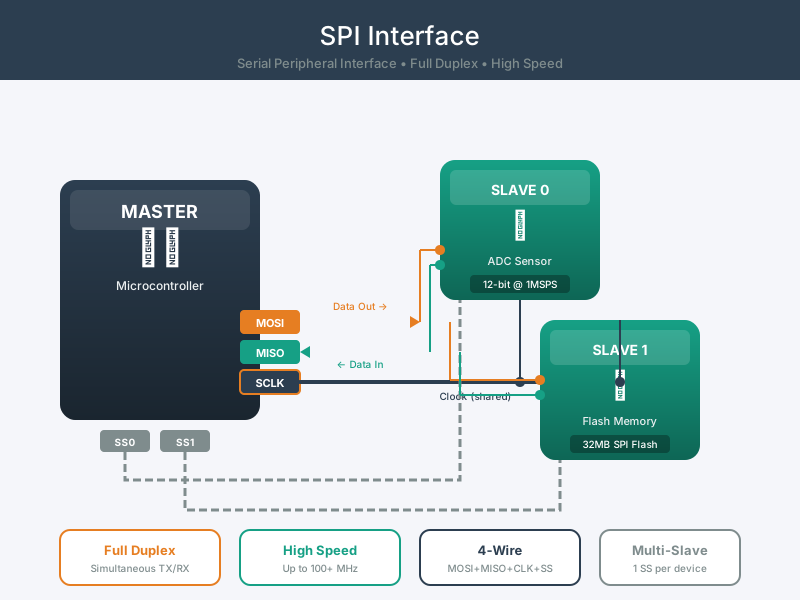
Start at the controller and selected peripheral, then follow SCLK, MOSI, MISO, and select as physical conductors rather than abstract names. Their logic levels must be compatible, their return path controlled, and their edges clean enough at the receiver. Unselected peripherals must release MISO so two outputs do not contend. Longer traces, connectors, level shifters, or many loads can add delay and ringing that a slower bench setup hides. The SPI interface is accepted only when timing and voltage are measured at the receiving pins under the intended rate and topology.
No Bus Arbitration
The controller owns the clock and selection. If two peripherals are selected together, the bus can produce invalid data or electrical contention on MISO. Firmware and board design must make simultaneous CS assertion observable and unlikely.
No Standard ACK
Many SPI transfers do not include an acknowledgement. Use device status registers, ready pins, CRC fields, or known-response reads when the device supports them, and log enough context to tell a protocol error from an electrical one.
Short Physical Reach
SPI is strongest inside one board or enclosure. For off-board wiring, reduce speed, control grounding, avoid long stubs, and consider a protocol or transceiver intended for cable runs.
SPI is one option among several wired buses, and the choice between them is made link by link. Figure 32.6 places that choice on the platform that has to live with it.
Figure 32.6 is a schematic rather than a comparison table. A single platform block sits at the centre with dashed lines to the panels around it, and the one substantive label says that each serial protocol is strongest in a different use. Take that as the section’s summary, not as data. Nothing in the drawing ranks the buses or gives a speed, a distance or a pin count, and it should not be quoted as though it did. The comparison that matters is in the cards above: short board-level runs with a fast clock favour this bus, while long cable runs, multi-drop wiring, or scarce pins point somewhere else.
Follow Figure 32.7 to decide whether SPI’s speed and duplex path justify its wiring cost.
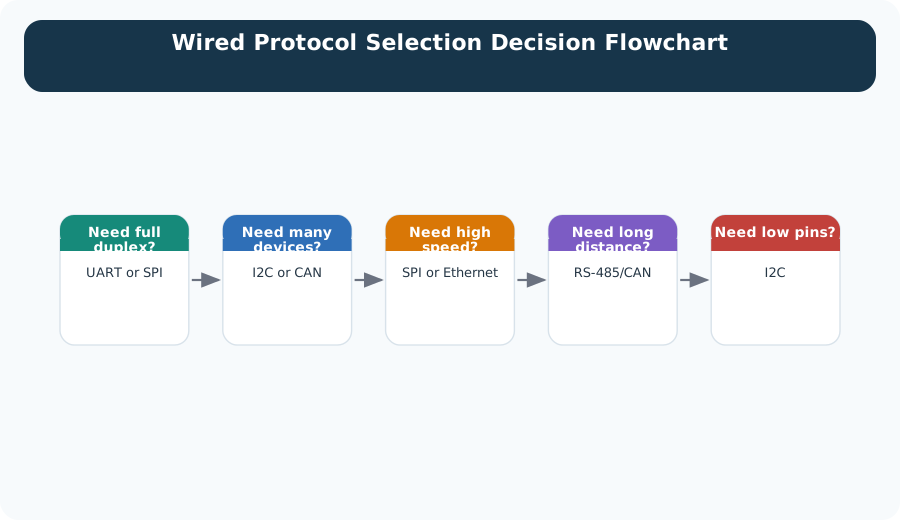
Start by rejecting board buses when distance or noise calls for a cabled physical layer. For a short link, ask how many devices share it and whether they need full duplex or high sustained rate. SPI becomes attractive when deterministic clocked transfer matters and enough pins remain; I2C may fit many moderate-rate peripherals, while UART may fit a simple point-to-point stream. The route also exposes hidden costs: select lines, level compatibility, recovery, and test access. Record the measured traffic and physical layout so “need full duplex” is a requirement rather than a habitual answer.
Release rule: an SPI interface is ready when the timing mode, chip-select map, transaction framing, speed limit, electrical assumptions, ownership rules, and diagnostic readback are all recorded and tested on the target hardware. A useful release record includes the final SCLK rate, a logic-analyzer trace of a known register read, a MISO-release check with other peripherals deselected, and the fallback behavior when the expected status or CRC is not returned.
32.5 Clock a Register Read after Selecting the Right Peripheral
This section: Clock a Register Read after Selecting the Right Peripheral — Assume a particular sensor requires one command byte followed by two data bytes under one asserted chip-select interval.
Assume a particular sensor requires one command byte followed by two data bytes under one asserted chip-select interval. The controller must provide 3 × 8 = 24 clock cycles. At 2 MHz, the ideal shift time is 24 divided by 2,000,000 = 12 microseconds. Select setup, hold and software gaps add to that time. This is an illustrative peripheral transaction, not a format imposed by SPI itself.
Full-duplex shifting means bits travel both ways during each clock cycle. The received byte during the command phase may be dummy data under this sensor’s contract. The useful two-byte result begins only afterward. A driver that treats all three received bytes as measurements can create an offset error while the electrical trace remains perfectly regular.
Read Figure 32.1 from select through MOSI, MISO and clock. Then use the CPOL and CPHA figure to check the idle level and sampling edge. A matching clock frequency is insufficient if the controller samples while the peripheral is changing the signal.
Predict what happens when the display’s driver leaves the bus in a different mode. The next sensor read needs to restore its timing contract before asserting select. Next, hold both chip-select lines active in a controlled diagnostic setup only if the hardware permits a safe test. Two peripherals driving MISO can corrupt data or cause electrical contention; normal firmware must prevent that state.
Raise the clock only after a slow known-register read survives repeated transfers and resets. Capture select, clock and both data lines together when diagnosing a shifted value. An unchanged register is a better first timing check than a moving acceleration signal, because its expected bytes are known.
The module’s interface lesson is that a simple serial mechanism moves responsibility into the driver and board design. Explicit framing, mode ownership and readback checks let multiple peripherals share wires without pretending they share one universal command language. Component documentation and measured setup and hold margins determine the final rate.
32.6 Summary
This section: Summary — SPI is a controller-clocked serial bus for short, deterministic peripheral transfers.
SPI is a controller-clocked serial bus for short, deterministic peripheral transfers. It uses SCLK, MOSI, MISO, and chip select to frame transactions without a standard address or acknowledgement layer. That simplicity is useful for displays, converters, memory, radios, and sensors, but it requires disciplined records: clock mode, chip-select ownership, transaction framing, speed, voltage, board layout, and readback checks.
32.7 Key Takeaway
This section: Key Takeaway
SPI is fast because it is explicit. Record the timing mode, chip-select map, transaction format, electrical assumptions, and diagnostic readback before treating a peripheral as production-ready.
32.8 See Also
This section: See Also
Wired Communication Fundamentals
Review clocking, duplex behavior, bus topology, and physical wiring constraints.
I2C Protocol
Compare SPI with the address-based two-wire bus used for many low-speed sensors.
UART and RS-232
Contrast SPI with point-to-point asynchronous serial links used for modules and debug ports.
Wired Access: Ethernet
Move from board-level serial links to networked wired access when distance and infrastructure matter.
Find help
3 reviewed answers.
Where should I start in a module?
Open the module page from the sidebar to see its chapters in order. Use the module map to return to a topic you need.
Modules and pathsReviewed
What can I try when a project does not work?
Check the symptom, then work through the diagnostic steps. Keep the error message and the smallest example that reproduces it.
When you are stuckReviewed
How do interactive examples work?
Use the interactive guide to check how examples and simulations work before changing your project.
Interactive examples guideReviewed