Data
The application payload, such as a sensor reading, command, status event, or query.
Progress saves as you read. Mark sections complete as you go; your progress appears in the sidebar.
This section: Start With the Message Getting Wrapped — Picture a freezer sensor sending an alarm that arrives at the wrong service.
Trace One Reading Through Every Wrapper
Picture a freezer sensor sending an alarm that arrives at the wrong service. The reading still looks valid, so the team must find which wrapper sent it along the wrong path.
A physical layer means the part that sends raw bits as signals. A protocol means the shared rules for a message exchange. CoAP means Constrained Application Protocol, a compact system for small devices. A payload means the useful reading or command carried inside a message.
Capture one alarm at the sensor, link, router, and receiver. Record each wrapper, address, port, size, time, and result. Change one address, exceed one size limit, repeat the alarm, and show where the path rejects or fragments it.
This runway does not prove that every layer or network is healthy. The deeper sections explain protocol data unit names, nesting, overhead, size pressure, and the trace evidence needed at each boundary.
A sensor reading does not cross the network as bare text. Each layer wraps it with the information that layer needs: application meaning, transport ports, network addresses, link framing, and physical signaling.
Encapsulation is the story of those wrappers being added and removed without losing the payload. When a deployment breaks, the wrapper that is missing, oversized, stale, or misunderstood often tells you where to look first.
Encapsulation is the way a network layer turns the data it receives into the unit it can carry. The application creates a message. The transport layer adds delivery context and creates a segment or datagram. The network layer adds network addressing and creates a packet. The link layer adds local delivery and error-check context and creates a frame. The physical layer sends bits.
Decapsulation is the reverse path at the receiver. Each layer checks and removes its own wrapper, then passes the remaining payload upward. The important habit is to name the unit by the outermost wrapper you are inspecting.
For example, a temperature value may begin as a small application reading, but by the time it reaches the radio it is no longer just that value. It may be inside a CoAP message, a UDP datagram, an IP packet, and a Wi-Fi or IEEE 802.15.4 frame. A gateway capture that sees the link wrapper should call the captured unit a frame, even though the frame contains a packet and the packet contains a datagram. That naming discipline prevents a review from mixing application meaning with transport delivery, routing scope, and local-link behavior.
If you only need the intuition, remember this: data is wrapped on the way down, unwrapped on the way up, and the PDU name follows the layer that most recently wrapped it.
Read Figure 4.1 downward and watch the name of the unit change while the reading inside it does not.
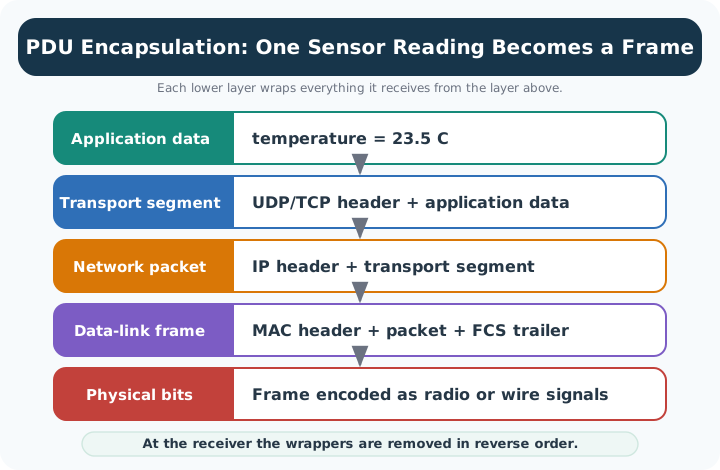
At the top of Figure 4.1 there is only a measurement, and it is the whole of what the application cares about. One step down, that measurement has been wrapped and the wrapper’s own name has taken over: the unit is a segment now, and the reading has become payload. The same thing happens again, and again, each layer treating everything handed to it as one opaque block and adding only what its own scope needs. By the bottom the reading is signal on a wire or in the air. That is the naming discipline this section asks for. Call the unit by the outermost wrapper you are looking at, because capturing a frame alone does not prove that the application accepted its contents.
The application payload, such as a sensor reading, command, status event, or query.
The transport PDU, with port and delivery context for the application flow.
The network PDU, with source and destination network addresses plus routing context.
The data-link PDU, with local link addressing, link type, and frame-check information.
A useful encapsulation review does not stop at naming layers. It records what each wrapper proves, what field or observation supports the claim, and what would make the trace suspicious.
For an IoT message, trace the application payload down the stack at the sender, across the local medium, and back up at the receiver or gateway. Focus on evidence that a reviewer can inspect: capture location, outer PDU, addressing scope, payload owner, and failure clue.
The trace record should also state what changed since the last good capture. A new security wrapper, a different transport, a gateway move, or a larger diagnostic payload can change the outer PDU size without changing the application value. That is why a useful review keeps the raw capture, the decoded layer names, and the release decision together.
Before labelling a capture, inspect Figure 4.2 to see how the unit’s name follows its current outer wrapper. The diagram gives a reviewer a consistent vocabulary for comparing evidence captured at different boundaries.
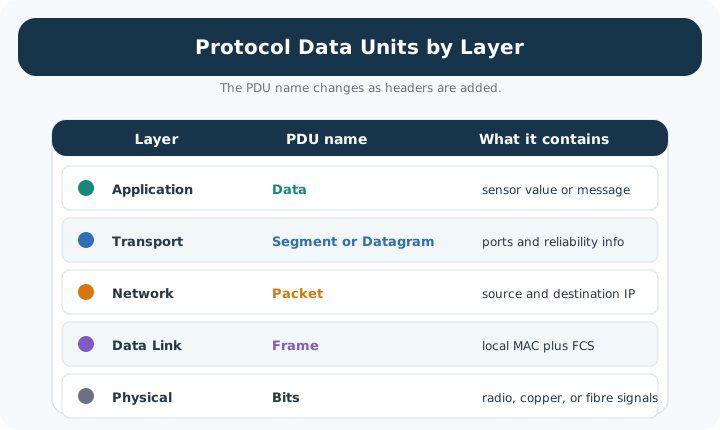
Read Figure 4.2 from application data into the transport segment or datagram, then follow the network packet into the link frame and physical bits. Each step wraps the higher-layer result without changing which layer owns the inner meaning. In the reverse direction, the receiver validates and removes those wrappers. This sequence connects precise PDU naming to the capture point and failure clue kept in the trace record.
A gateway radio capture, Ethernet mirror, browser request, and cloud log expose different wrappers.
Do not call every unit a packet. Write frame containing packet containing datagram containing payload when that is what the trace shows.
The trace should answer a review question: delivery boundary, payload overhead, fragmentation risk, retry behavior, or parser ownership.
Recheck the trace when payload size, transport choice, link type, gateway placement, or security wrapper changes.
Every wrapper has a cost. Headers and trailers carry useful control information, but they also consume airtime, frame space, queue space, and processing effort. This matters most when the payload is small, the link frame budget is tight, or the radio sleeps between messages.
MTU pressure appears when the network packet plus lower-layer wrapper does not fit cleanly into the link frame. Fragmentation can be valid, but it increases failure exposure because losing one fragment can invalidate the whole higher-layer packet. Compression techniques and smaller application payloads are ways to reduce that pressure when they fit the protocol and deployment.
A reviewer should compare wrapper cost with the control value it buys. A few bytes of port, sequence, integrity, or security context may be essential for a command path, while the same overhead may be excessive for a tiny periodic reading. The boundary is not "fewest headers wins"; it is whether the flow can meet its latency, energy, reliability, and observability requirements after all wrappers are counted. When the budget is tight, the options are to compress repeated fields, batch readings, reduce payload verbosity, change the link, or move the work to a gateway that can afford the wrapper stack.
Before reducing overhead, inspect Figure 4.3 to see why each header exists on the sending path and what the receiver must validate before removing it. The diagram makes wrapper cost inseparable from the delivery contract it provides.
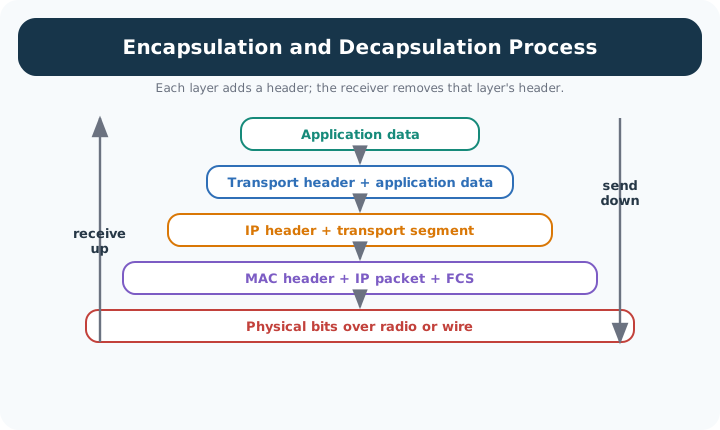
Read Figure 4.3 down the sender stack as each layer adds its own addressing, delivery, or integrity context. Then follow the receiver upward as those wrappers are checked and removed to recover the application payload. A missing fragment or invalid wrapper interrupts that reverse path. This connects the byte budget to the chapter’s design rule: optimise only after identifying which layer creates the cost and which contract would be weakened.
Addressing, sequencing, integrity, security context, and type information are useful when they match the flow's needs.
Header compression is strongest when endpoints share stable context and the deployment can validate decompression behavior.
More fragments mean more opportunities for loss, duplication, reordering, timeout, and retry behavior to affect the message.
Application logs can prove meaning; packet captures prove wrappers; link counters prove local delivery behavior.
To see why evidence must be measured at the correct layer, inspect Figure 4.4 before treating all non-payload bytes as waste. The byte layout shows which wrapper owns addressing, delivery, integrity, and link-local handling.
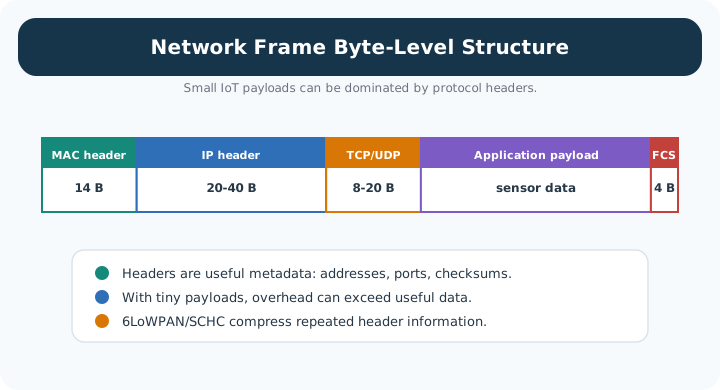
Read Figure 4.4 from the application payload outward through transport, network, and link wrappers. Note which fields are added at each boundary, then compare their combined size with the useful sensor value. The result connects packet capture evidence to the design decision: compression, batching, fragmentation avoidance, or payload redesign should target the layer that actually creates the cost.
The wrapper is not one anonymous block of overhead. Each layer's header carries specific fields, and a reviewer who can name a few of them can read a packet trace instead of just weighing its size. Three commonly captured headers illustrate the pattern.
Two device names come directly from this table. Because a switch normally inspects only the Ethernet header and a router normally inspects only the IP header, network teams describe devices by the highest header they act on: a Layer-3 switch makes forwarding decisions using the IP header instead of only the MAC address, while a Layer-4 or Layer-7 load balancer reads the TCP port or the application payload to decide where a connection goes. The label names the layer the device is willing to open, not a claim about the rest of the stack.
Narrated audio tour. The full transcript is below.
Play the tour to open the simulator. Pause, replay a beat, or read the full transcript below.
Some beats explain situations this teaching model cannot show; those beats keep the existing frame and provide captions only.
B1 — Alarm frame budget
You are the engineer responsible for a freezer sensor's alarm path. The reading has to travel inside network wrappers, and a tight radio frame budget can put delivery under pressure. How much room does the alarm really need once every wrapper is counted?
Model caption: You are checking a freezer alarm's frame budget. How much room will the complete frame need?
B2 — Payload and wrappers
The payload is the useful reading carried inside a message. A protocol is a set of shared rules for exchanging messages. Encapsulation adds the information each layer needs around the unit it receives. A protocol data unit takes its name from its outermost wrapper. The reading remains enclosed as the wrappers accumulate.
Model caption: Payload means the useful reading. Encapsulation wraps the enclosed unit; the outermost wrapper determines its name.
B3 — Transport datagram
Start with a hundred bytes of application payload. In our model, User Datagram Protocol adds an eight byte transport header, including ports for the application flow. The resulting datagram is a hundred eight bytes. The original hundred bytes are still inside it; the extra eight belong to transport.
Model caption: User Datagram Protocol: 100 B payload + 8 B transport header = 108 B datagram.
B4 — Network packet
Internet Protocol version six adds a forty byte network header for network addressing. Adding forty to a hundred eight gives a hundred forty eight byte packet. The packet contains the datagram, and the datagram contains the reading. Each name describes a different boundary around the same payload.
Model caption: Internet Protocol version six: 108 B datagram + 40 B network header = 148 B packet.
B5 — Link frame
The model's radio link adds a nine byte header and a two byte trailer for local delivery and error checking. A hundred forty eight plus nine plus two gives a hundred fifty nine byte frame. Subtracting the hundred byte payload leaves fifty nine bytes of overhead. Rounded to a whole percent, useful payload is sixty three percent of the frame.
Model caption: 148 + 9 + 2 = 159 B frame. Overhead = 159 − 100 = 59 B. Useful payload = round(100 ÷ 159 × 100) = 63%.
B6 — Reverse nesting
Those wrappers carry useful control information and consume frame space. At a receiver, decapsulation reverses the process: each layer checks and removes its own wrapper before passing the enclosed unit onward. The original reading survives that change in representation. Our byte budget concerns the complete frame needed to carry it.
Model caption: Conceptual decapsulation: 159 B frame → 148 B packet → 108 B datagram → 100 B reading. Each layer checks and removes its wrapper. No radio delivery is simulated.
B7 — Fragmentation pressure
The misconception is that a hundred byte reading must fit a hundred twenty seven byte radio frame limit. The reading alone fits, but the modeled frame needs a hundred fifty nine bytes, exceeding that limit by thirty two. Your alarm therefore faces fragmentation pressure once its wrappers are counted.
Model caption: 100 B payload fits alone. The complete 159 B frame exceeds the model's 127 B limit by 32 B: fragmentation pressure.
B8 — Budget the whole frame
Name the unit by its outer wrapper, and budget the whole frame for the reading inside.
Model caption: Name the unit by its outer wrapper, and budget the whole frame for the reading inside.
Locate implementation responsibility as the message is wrapped in the diagram Figure 4.5.

In the diagram Figure 4.5, application author owns message semantics, Operating system owns transport sockets and IP, and Driver + controller places the frame on the medium. The Data, Segment, Packet, Frame, and Bits strip names the PDU by its current outer wrapper.
This section: Unwrap a Boiler Reading at the Receiver — A boiler controller creates the text temperature=23.5 C, but no Ethernet wire carries that application message bare.
A boiler controller creates the text temperature=23.5 C, but no Ethernet wire carries that application message bare. In Figure 4.1, follow the payload as transport, network, and link information wrap it for progressively different scopes. Figure 4.2 names the result at each layer, and Figure 4.3 reverses the order at the receiving host.
At the application layer, the reading has meaning for the boiler service. The transport wrapper identifies the sending and receiving processes. The network wrapper supplies source and destination hosts. The link wrapper carries the packet across one local hop. A switch can act on the link frame without understanding 23.5 C; a router can act on the network packet without owning the boiler application.
Now follow a fault. If the destination IP is wrong, the network wrapper sends an otherwise sound segment toward the wrong host. If the destination port is wrong, the packet can reach the correct host but miss the boiler process. If the payload scale is wrong, every wrapper can be valid while the application still displays a false temperature. Encapsulation narrows the search because each field belongs to a named boundary.
Packet capture points change which wrappers are visible. A capture before a tunnel begins can show the original transport ports, while a capture outside may show only the tunnel’s network conversation. Name the interface and layer beside every encapsulation trace so two valid captures are not mistaken for conflicting evidence.
Use the byte view in Figure 4.4 to locate the same boundary numerically. In an illustrative UDP over IPv4 packet with no IPv4 options and no other application or security headers, a 12-byte reading gains an 8-byte UDP header and a 20-byte IPv4 header before the link wrapper is added. The IP packet is then 12 + 8 + 20 = 40 bytes. Only 12 / 40 = 30% is the original reading at that point. The wrappers are overhead for payload efficiency, but they carry information required for process and host delivery.
The ownership view in Figure 4.5 links each wrapper to the component that acts on it. The application owns the reading format. The operating system commonly builds transport and network state. The network interface and local link handle the frame. This ownership map helps place a capture: an application log cannot prove which link frame crossed the cable, while a link capture may not explain the decoded boiler value.
On receipt, each layer checks and removes only its own wrapper before passing the enclosed unit upward. That symmetry is why a protocol data unit changes names by layer without becoming a different original reading. The data is nested, not copied into unrelated messages at every step.
This section: Summary — Encapsulation gives each layer a wrapper it can own.
Encapsulation gives each layer a wrapper it can own. Application data becomes a transport segment or datagram, then a network packet, then a data-link frame, and finally bits on the medium. Decapsulation reverses that process at the receiver. The reviewer should name the outermost visible wrapper, preserve the nesting in packet traces, and connect overhead or fragmentation concerns to evidence from the right boundary.
This section: Key Takeaway
Name the PDU by the wrapper you are inspecting: frames carry packets, packets carry segments or datagrams, and those carry application data.
This section: See Also
3 reviewed answers.
Open the module page from the sidebar to see its chapters in order. Use the module map to return to a topic you need.
Modules and pathsReviewed
Check the symptom, then work through the diagnostic steps. Keep the error message and the smallest example that reproduces it.
When you are stuckReviewed
Use the interactive guide to check how examples and simulations work before changing your project.
Interactive examples guideReviewed