42 Radio Propagation and Link Budgets
42.1 Overview
This comprehensive guide to radio propagation and link budgets has been organized into focused chapters for easier learning. Each chapter covers a specific aspect of wireless signal behavior with worked examples, knowledge checks, and practical deployment guidance.
42.2 Learning Objectives
By the end of this module, you will be able to:
- Calculate free space path loss (FSPL) for various frequencies and distances
- Apply log-distance path loss models for different environments
- Quantify signal attenuation through building materials
- Estimate distance from RSSI for localization applications
- Design wireless links using link budget calculations
- Explain Fresnel zone clearance requirements for reliable outdoor deployments
- Estimate coverage areas for Wi-Fi, LoRa, BLE, and other protocols
Minimum Viable Understanding
- Path loss increases with distance and frequency – higher frequencies (2.4 GHz Wi-Fi) lose signal faster than lower frequencies (915 MHz LoRa), and doubling the distance adds ~6 dB loss in free space.
- A link budget tells you if a wireless connection will work – sum up transmit power + antenna gains - all losses; if the result exceeds receiver sensitivity, the link is viable.
- Real-world propagation is always worse than theory – walls add 3-20 dB loss each, multipath fading causes signal dips, and Fresnel zone blockage degrades outdoor links; always add a 10-20 dB fade margin.
Sensor Squad: Why Can’t My Sensor Talk to the Gateway?
Sammy the Sensor is trying to send a temperature reading to Bella the Base Station across a big warehouse. “Why can’t Bella hear me?” Sammy asks.
Lila the LoRa chip explains: “Imagine you’re shouting across a football field. In an empty field, your voice carries far – that’s free space. But if someone puts up walls of cardboard boxes between you and Bella, each wall swallows some of your shout. That’s what walls and obstacles do to radio signals!”
Max the Microcontroller adds: “And it’s not just walls. The farther apart you and Bella are, the quieter your voice gets – that’s called path loss. It’s like how a flashlight beam gets dimmer the farther away you shine it.”
Think of it this way: A radio signal is like throwing a ball. In open air, it flies far. But every wall it has to pass through slows it down. If it doesn’t have enough energy left when it reaches Bella, she can’t catch it. That’s why engineers do a link budget – they add up all the energy the signal starts with and subtract everything that weakens it, to make sure Bella can still “catch” the message!
For Beginners: Radio Propagation Essentials
What is radio propagation? It describes how radio waves travel from a transmitter (like a sensor) to a receiver (like a gateway). Understanding propagation helps you predict whether your wireless devices will communicate reliably.
Key concepts in plain language:
- Path loss: Signals get weaker as they travel farther – just like sound fades with distance
- Frequency matters: Higher frequencies (like 2.4 GHz Wi-Fi) fade faster than lower ones (like 915 MHz LoRa), but can carry more data
- Obstacles block signals: Every wall, floor, or tree absorbs some signal energy, measured in decibels (dB)
- Link budget: A simple arithmetic check – add up signal strength and subtract losses. If the result is above the receiver’s minimum threshold, the link works
- Fade margin: Extra “safety buffer” (typically 10-20 dB) added to the link budget to account for unpredictable fading
Why should you care? If you skip propagation analysis, you might deploy 4 gateways when you actually need 12, wasting thousands of dollars and months of rework. A 15-minute link budget calculation prevents expensive field failures.
42.3 Chapter Guide
| Chapter | Description | Difficulty |
|---|---|---|
| Free Space Path Loss | FSPL formula, log-distance model, path loss exponents, worked examples | Intermediate |
| Material Attenuation and RSSI | Building material losses, frequency dependence, RSSI localization | Intermediate |
| Link Budget and Coverage | Complete link budget calculations, protocol comparisons, BLE/LoRa deployment | Intermediate |
| Fresnel Zones and Deployment | Fresnel clearance, antenna height, ground sensors, practical examples | Intermediate |
42.4 Propagation Concepts at a Glance
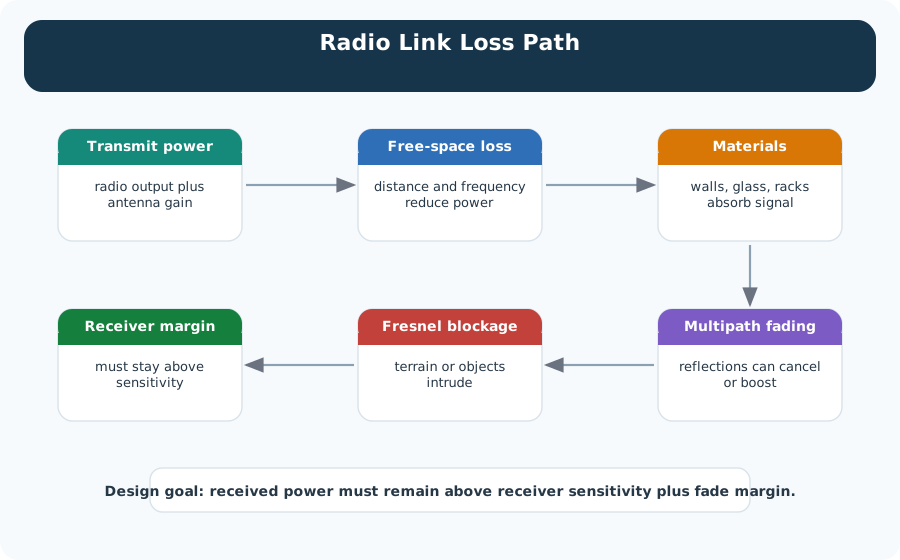
The following diagram shows how radio signals degrade as they travel from transmitter to receiver, passing through free space and encountering real-world obstacles.
Putting Numbers to It
Free Space Path Loss (FSPL) Calculation
Radio signals weaken with distance and frequency. The Free Space Path Loss formula quantifies this:
\[\text{FSPL (dB)} = 20 \log_{10}(d) + 20 \log_{10}(f) + 20 \log_{10}\left(\frac{4\pi}{c}\right)\]
where \(d\) = distance (m), \(f\) = frequency (Hz), \(c\) = speed of light (3×10⁸ m/s).
Simplified form (frequency in MHz, distance in km): \[\text{FSPL (dB)} = 32.45 + 20 \log_{10}(f_{\text{MHz}}) + 20 \log_{10}(d_{\text{km}})\]
Example comparisons (1 km distance): - LoRa 915 MHz: \(\text{FSPL} = 32.45 + 20\log(915) + 20\log(1) = 32.45 + 59.2 + 0 = 91.7\) dB - BLE/Zigbee 2.4 GHz: \(\text{FSPL} = 32.45 + 20\log(2400) + 0 = 32.45 + 67.6 = 100\) dB - Wi-Fi 5 GHz: \(\text{FSPL} = 32.45 + 20\log(5000) + 0 = 32.45 + 74 = 106.5\) dB
Key insight: Doubling frequency adds ~6 dB loss. This explains why sub-GHz protocols (LoRa, Sigfox) achieve 10× longer range than 2.4 GHz protocols (Wi-Fi, BLE) with the same transmit power – they save 8-15 dB just from frequency choice.
Try It: Free Space Path Loss Calculator
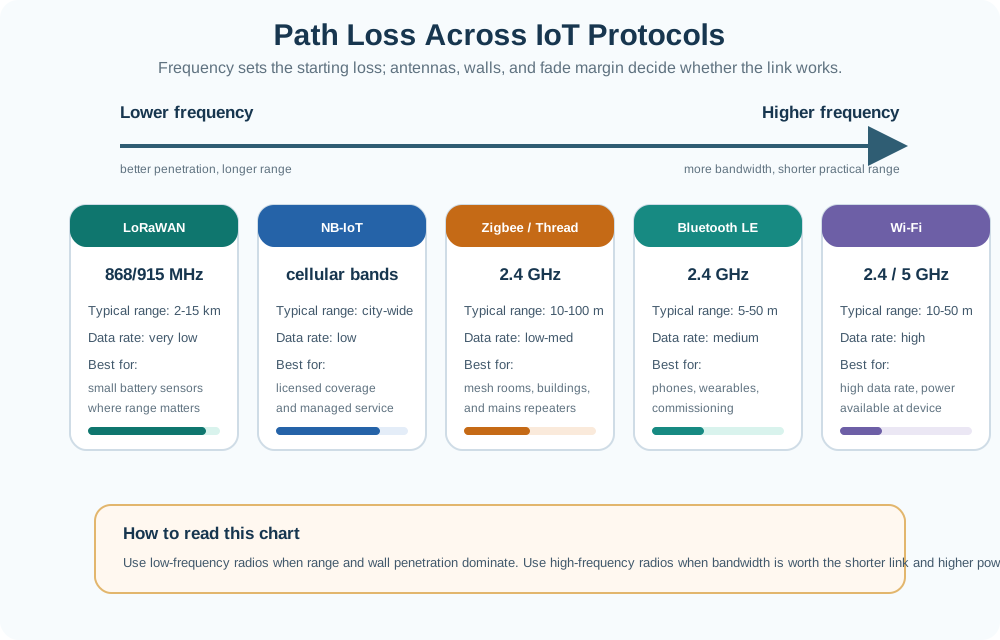
42.5 Path Loss Across IoT Protocols
Different IoT protocols operate at different frequencies, which fundamentally affects their propagation characteristics. The diagram below compares how frequency, range, and environment interact.
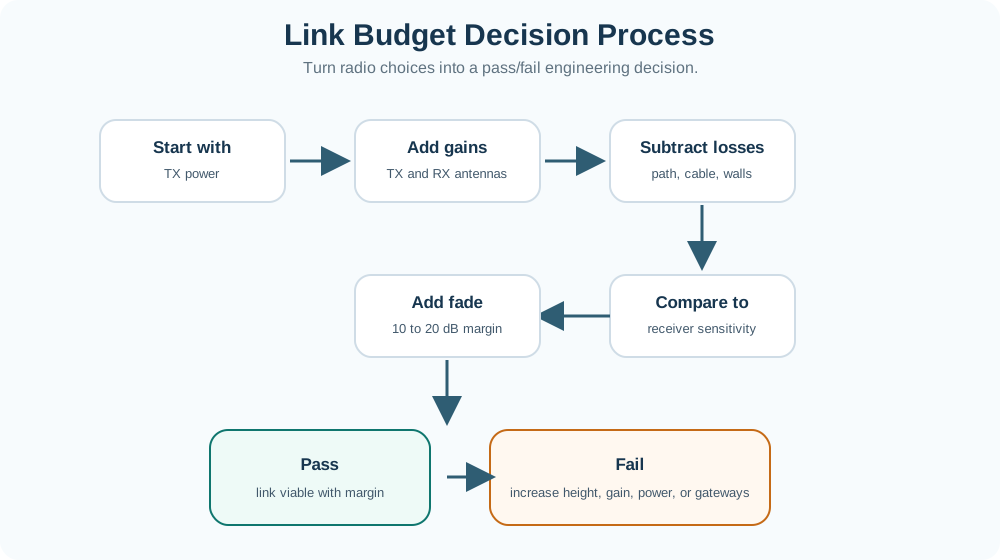
42.6 Link Budget Decision Process
When designing a wireless IoT deployment, engineers follow a systematic process to determine whether a link will work. The decision tree below captures this workflow.
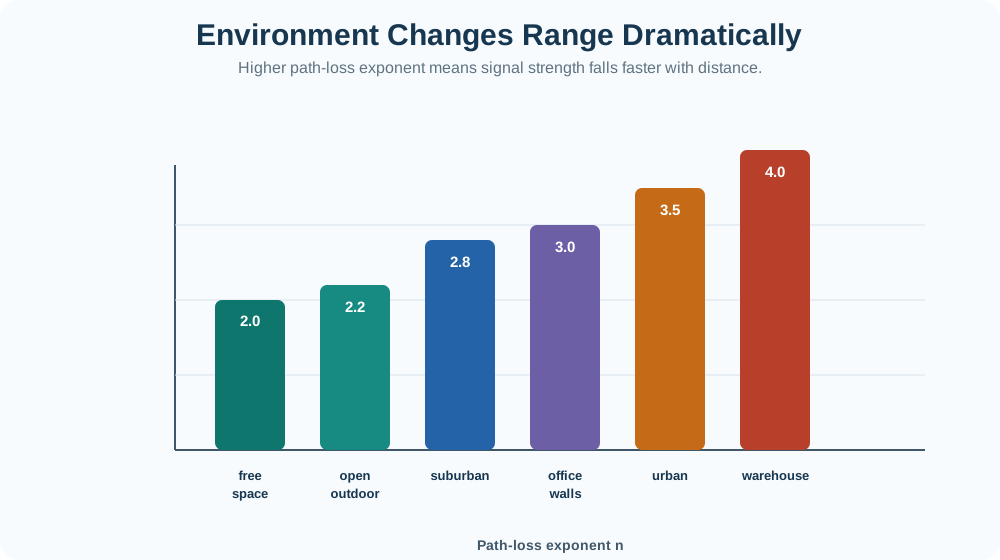
42.7 Environment Impact on Path Loss
The path loss exponent (n) varies significantly depending on the environment. This determines how fast the signal degrades with distance.
How It Works: Radio Wave Propagation and Path Loss
Radio signals weaken predictably as they travel through space. Understanding this physics-based degradation is essential for IoT network planning.
Step 1: Transmitter Emits Signal
- Antenna radiates electromagnetic waves spherically
- Power spreads uniformly in all directions (omnidirectional antenna)
- Initial power: P_TX (in dBm or milliwatts)
Step 2: Free Space Spreading Loss
- Signal power density decreases with distance squared: P ∝ 1/d²
- This is the inverse-square law (same as gravity, light, sound)
- Doubling distance reduces power by 6 dB
Step 3: Environmental Attenuation
- Walls absorb energy: concrete (7-12 dB), drywall (3-5 dB), metal (20+ dB)
- Higher frequencies attenuate more: 2.4 GHz loses 5 dB more per wall than 868 MHz
- Path loss exponent increases: n=2 (free space) → n=3.5 (indoor/urban) → n=4.0 (dense industrial)
Step 4: Receiver Sensitivity Check
- Signal arrives at receiver with power P_RX
- Receiver has minimum sensitivity threshold (e.g., -137 dBm for LoRa SF12)
- If P_RX > sensitivity → link works
- If P_RX < sensitivity → link fails
Step 5: Fade Margin Buffer
- Real-world fading (multipath, weather, moving objects) causes signal dips of 10-20 dB
- Add fade margin: P_RX should exceed sensitivity by 15-20 dB for reliable operation
- Example: -137 dBm sensitivity + 20 dB margin = -117 dBm minimum received power target
Try It: Link Budget Calculator
42.8 Worked Example: Smart Warehouse LoRa Deployment
Real-World Scenario: LoRa Temperature Monitoring in a Warehouse
Problem: A logistics company wants to monitor temperature in a 200m x 100m steel-frame warehouse using LoRa sensors (868 MHz) and a single gateway. Will one gateway at the center of the warehouse be sufficient?
Given:
- LoRa transmit power: +14 dBm
- LoRa receiver sensitivity: -137 dBm (SF12, 125 kHz bandwidth)
- TX antenna gain: +2 dBi (omnidirectional whip)
- RX antenna gain: +6 dBi (gateway with external antenna)
- Frequency: 868 MHz
- Maximum distance to corner: ~112 m (diagonal of 100m x 50m half)
- Environment: industrial warehouse (path loss exponent n = 3.5)
- Obstacles: 3 metal shelving units between sensor and gateway (~5 dB each)
Step 1: Calculate Free Space Path Loss at 112 m
\[L_{FSPL} = 20\log_{10}(0.112) + 20\log_{10}(868) + 32.45\] \[= 20(-0.951) + 20(2.938) + 32.45\] \[= -19.02 + 58.77 + 32.45 = 72.2 \text{ dB}\]
Step 2: Adjust for Industrial Environment (n = 3.5)
The log-distance model scales path loss beyond a reference distance (d0 = 1 m):
\[L_{total} = L_{FSPL}(d_0) + 10 \times n \times \log_{10}\left(\frac{d}{d_0}\right)\]
At 868 MHz and d0 = 1 m: FSPL(1m) = 31.2 dB
\[L_{total} = 31.2 + 10 \times 3.5 \times \log_{10}(112) = 31.2 + 35 \times 2.049 = 31.2 + 71.7 = 102.9 \text{ dB}\]
Step 3: Add Material Attenuation
- 3 metal shelving units x 5 dB = 15 dB additional loss
Total path loss = 102.9 + 15 = 117.9 dB
Step 4: Complete Link Budget
| Component | Value |
|---|---|
| TX Power | +14 dBm |
| TX Antenna Gain | +2 dBi |
| Path Loss | -117.9 dB |
| Material Loss | (included above) |
| RX Antenna Gain | +6 dBi |
| Received Power | -95.9 dBm |
| Receiver Sensitivity | -137 dBm |
| Link Margin | 41.1 dB |
| Required Fade Margin | 20 dB |
| Excess Margin | 21.1 dB |
Conclusion: A single gateway at the center provides 41.1 dB of link margin – well above the 20 dB fade margin requirement. The link is viable with 21.1 dB to spare. Even with additional shelving or temporary obstructions, the system has ample budget. One gateway is sufficient for this warehouse.
Design Recommendation: Mount the gateway at ceiling height (6-8 m) to clear Fresnel zone obstructions from shelving units. This eliminates the 15 dB material loss and further improves reliability.
42.9 Common Pitfalls
Common Pitfalls in Radio Propagation and Link Budget Analysis
1. Using free space path loss for indoor deployments FSPL assumes perfect line-of-sight with no obstacles. Indoor environments have walls, furniture, and people that add 20-50 dB of additional loss. Always use the log-distance model with appropriate path loss exponent (n = 2.6-4.0 for indoors).
2. Forgetting fade margin A link that works with 0 dB margin will fail intermittently due to multipath fading, humidity changes, and moving objects. Always include a 10-20 dB fade margin – 10 dB for static environments, 20 dB for dynamic ones (people moving, doors opening).
3. Ignoring Fresnel zone clearance for outdoor links Even with line-of-sight between antennas, ground reflections and obstacles within the Fresnel zone degrade the signal. At 1 km and 868 MHz, the first Fresnel zone radius is ~9.3 m. Ground-mounted antennas will always block this zone, causing 15-25 dB extra loss.
4. Assuming range scales linearly with power Doubling transmit power (+3 dB) does NOT double range. Due to the inverse-square law, doubling range requires quadrupling power (+6 dB). In environments with n=3.5, doubling range requires 10.5 dB more power – a 10x increase.
5. Confusing dBm, dBi, and dB
- dBm = absolute power referenced to 1 milliwatt (e.g., +20 dBm = 100 mW)
- dBi = antenna gain referenced to isotropic radiator
- dB = relative difference (e.g., 10 dB loss)
Mixing these units causes link budgets to be off by orders of magnitude.
6. Ignoring frequency-dependent material attenuation A concrete wall attenuates 2.4 GHz Wi-Fi by ~12 dB but only attenuates 868 MHz LoRa by ~7 dB. Using a single attenuation value for all frequencies produces incorrect range estimates.
7. Not accounting for antenna orientation Omnidirectional antennas still have nulls at certain angles. Dipole antennas have nulls directly above and below. Misoriented antennas can lose 10-20 dB of effective gain, especially in ceiling-mounted deployments.
42.10 Review Activities
42.10.1 Match the Concepts
42.10.2 Order the Process
42.11 Knowledge Checks
Test your understanding of radio propagation fundamentals before diving into the detailed chapters.
Incremental Examples: Beginner Level
Scenario: Your smart doorbell 10 meters from the Wi-Fi router works perfectly, but your garage sensor 20 meters away keeps disconnecting.
Question: Why does doubling the distance cause such a dramatic difference?
Answer: Free space path loss at 2.4 GHz: FSPL = 20log(d) + 20log(f) + 32.45 - At 10m: FSPL = 20log(10) + 20log(2400) + 32.45 = 20 + 67.6 + 32.45 = 120 dB - At 20m: FSPL = 20log(20) + 20log(2400) + 32.45 = 26 + 67.6 + 32.45 = 126 dB
Doubling distance adds 6 dB loss. If your link margin is only 8 dB, losing 6 dB drops you below the threshold!
Incremental Examples: Intermediate Level
Scenario: You’re deploying BLE beacons in a shopping mall. Specifications say 30m range, but you’re getting 12m through one brick wall.
Analysis:
- Free space at 30m (2.4 GHz): 129.6 dB path loss
- Through brick wall adds 12 dB attenuation
- Total loss: 141.6 dB
Link Budget Check:
- BLE TX power: +4 dBm
- Antenna gain (both sides): 0 dBi (isotropic)
- Path loss: -141.6 dB
- Received power: 4 + 0 - 141.6 = -137.6 dBm
- BLE sensitivity: -90 dBm
- Link margin: -137.6 - (-90) = -47.6 dB ❌ NEGATIVE MARGIN = LINK FAILS
Solution: Reduce deployment spacing (use multiple beacons), increase TX power, or use a lower-attenuation path (doorways, corridors).
Incremental Examples: Advanced Level
Scenario: Agricultural IoT deployment: 200 hectares (1.4 km × 1.4 km). Soil sensors every 100m. LoRa gateway at center. Will 1 gateway suffice?
Full Link Budget Calculation:
| Step | Calculation | Result |
|---|---|---|
| Maximum distance | Corner to centre: sqrt(700^2 + 700^2) | About 990 m, so use 1 km |
| Radio settings | TX +14 dBm, sensor antenna +2 dBi, gateway antenna +6 dBi, sensitivity -137 dBm | Strong LoRa SF12 receive margin |
| Farmland path loss | 31.2 + 10 x 2.2 x log10(1000) | 97.2 dB |
| Crop attenuation | Wheat/corn at 868 MHz | About 3 dB |
| Received power | 14 + 2 + 6 - 97.2 - 3 | -78.2 dBm |
| Link margin | -78.2 - (-137) | 58.8 dB |
| Excess over required fade margin | 58.8 - 20 | 38.8 dB, excellent |
| Verdict | Coverage is not the limiting factor | One gateway can cover the area, but capacity still matters |
42.12 Concept Relationships: Propagation and Link Design
| Concept | Depends On | Enables | Conflicts With |
|---|---|---|---|
| Free Space Path Loss (FSPL) | Frequency, distance, physics | Baseline range prediction | Assumes no obstacles (never true indoors) |
| Log-Distance Path Loss | FSPL, environment-specific path loss exponent n | Realistic indoor/urban predictions | Requires empirical n measurement per environment |
| Material Attenuation | Frequency, material composition, thickness | Accurate multi-wall penetration modeling | Frequency-dependent (must recalculate per band) |
| RSSI Localization | Multiple anchor points, measured signal strength | Indoor positioning (2-5m accuracy) | Multipath fading, moving objects, limited precision |
| Link Budget | TX power, antenna gains, all loss components | Guarantees link viability, determines range | Conservative margins reduce range vs risk tolerance |
| Fresnel Zone | Wavelength, distance, obstacle geometry | Long-range outdoor link reliability | Requires antenna height (costly for ground sensors) |
Application to IoT Design:
- Short-range sensors (< 50m) → Use FSPL + material attenuation for each wall
- Long-range outdoor (> 1km) → Use log-distance model + Fresnel zone clearance
- Dense urban → Path loss exponent n=3.5-4.0, plan for worst-case
- Localization systems → Need 4+ anchors, accept 2-5m error from multipath
42.13 See Also
- Wi-Fi Physical Layer - OFDM modulation, sensitivity vs data rate trade-offs, 2.4 GHz vs 5 GHz propagation
- LoRaWAN Link Budget - Spreading factor selection, adaptive data rate, real-world range measurements
- BLE Range and Power - Coded PHY for extended range, advertising interval vs battery life
- Antenna Fundamentals - Antenna gain, radiation patterns, omnidirectional vs directional
- RF Site Survey - RSSI heatmaps, spectrum analysis, real-world validation
Try It Yourself: Measure FSPL in Your Environment
Objective: Validate the free space path loss formula by measuring real signal strength at various distances.
Materials:
- Wi-Fi router or BLE beacon (known TX power)
- Smartphone with Wi-Fi Analyzer app (Android) or Airport Utility (iOS)
- Measuring tape (up to 50m)
- Open outdoor area (park, empty parking lot)
Procedure:
Record TX Power:
Transmitter Typical value Where to check 2.4 GHz Wi-Fi router About +20 dBm Router data sheet or regulatory power setting BLE beacon About 0 dBm Beacon app, nRF Connect, or device data sheet Measure RSSI at Distances: | Distance | Predicted FSPL | Measured RSSI | Difference | |———-|—————|—————|————| | 1m | 100 dB | | | | 2m | 106 dB | | | | 5m | 114 dB | | | | 10m | 120 dB | | | | 20m | 126 dB | | | | 50m | 134 dB | | |
Calculate Predicted RSSI:
Quantity Rule of thumb Example at 10 m with +20 dBm Wi-Fi FSPL at 2.4 GHz 20 x log10(distance in metres) + 100 20 x log10(10) + 100 = 120 dB Predicted RSSI TX power - FSPL +20 dBm - 120 dB = -100 dBm Measurement check Real RSSI should be close but usually worse Expect about 2-5 dB extra loss outdoors
Hint: Your measured RSSI will be 2-5 dB worse than predicted due to ground reflection and antenna orientation. This is normal!
Solution - What You Should Observe:
- Doubling distance adds ~6 dB loss (e.g., -100 dBm at 10m → -106 dBm at 20m with +20 dBm TX)
- Slope on log-distance plot should be close to 20 dB/decade (path loss exponent n ≈ 2)
- Deviations indicate non-free-space conditions (trees, buildings, ground effects)
Extension: Repeat indoors through walls. Measure attenuation per wall by comparing RSSI with line-of-sight vs through 1, 2, 3 walls at same distance.
42.14 Key Takeaways
Free Space Path Loss (FSPL) is the baseline: Real-world losses are ALWAYS worse than FSPL due to obstacles, multipath, and interference
Path loss exponent (n) determines environment impact: Indoor (n=3-4) degrades signals much faster than outdoor (n=2-2.5)
Material attenuation is cumulative: Each wall, floor, or metal obstacle adds 3-20 dB loss, drastically reducing range
Link budget calculation predicts success: If P_RX > P_sensitivity, link works. Always include 10-20 dB fade margin for reliability
Lower frequencies penetrate better: 915 MHz LoRa loses ~5 dB less per concrete wall than 2.4 GHz Wi-Fi (7 dB vs 12 dB), which compounds across multiple walls to explain superior indoor range
RSSI-based localization has 2-5m error: Good for room-level positioning, not precision tracking
Urban vs rural range differs by 5-10x: Same LoRa hardware achieves 15 km rural vs 2 km urban due to path loss exponent differences
Fresnel zones require 60% clearance: At least 60% of the first Fresnel zone must be clear for reliable wireless links
Ground-mounted sensors have poor range: Without elevation, Fresnel zone blockage causes 15-25 dB loss, reducing range by 80-90%
Antenna height scales with distance and wavelength: LoRa at 5 km needs ~12.5 m height (60% Fresnel clearance), Wi-Fi at 1 km needs ~3.4 m height for reliable outdoor performance
42.14.1 Quick Reference Summary
| Concept | Formula / Rule of Thumb | When to Use |
|---|---|---|
| FSPL | 20log10(d) + 20log10(f) + 32.45 | Initial range estimates |
| Log-distance model | L = L(d0) + 10nlog10(d/d0) | Real-world deployments |
| Doubling distance | Adds 6*n dB path loss | Quick scaling estimates |
| Fade margin | Add 10-20 dB to required sensitivity | All production designs |
| Fresnel clearance | 60% of first zone radius | Outdoor link design |
| Wall loss (concrete) | 7-15 dB per wall (frequency-dependent) | Indoor range planning |
42.15 Prerequisites
Before starting this module, you should be familiar with:
- Networking Basics: Fundamental networking concepts
- Basic mathematics: Logarithms, decibels (dB), and unit conversions
42.17 What’s Next
After completing radio propagation and link budgets, continue with:
| Topic | Chapter | Description |
|---|---|---|
| Free Space Path Loss | FSPL and Log-Distance Model | Master the FSPL formula, path loss exponents, and worked calculation examples for IoT protocols |
| Material Attenuation | Material Attenuation and RSSI | Quantify building material losses by frequency and apply RSSI-based localization techniques |
| Link Budget Design | Link Budget and Coverage | Design complete link budgets for BLE, LoRa, and Wi-Fi and compare protocol coverage areas |
| Outdoor Deployment | Fresnel Zones and Deployment | Apply Fresnel zone clearance rules to outdoor antenna height and gateway placement decisions |
| Network Addressing | IP Addressing and Subnetting | Plan IP address schemes and subnets for IoT sensor networks |
| LPWAN Technologies | LPWAN Fundamentals | Apply link budget knowledge to real LoRaWAN, Sigfox, and NB-IoT deployments |