23 Link Budget and Coverage Planning
More
Depth: Practitioner
Progress saves as you read. Mark sections complete as you go; your progress appears in the sidebar.
A gateway hears a field sensor reliably, but configuration commands rarely return. The radio path is shared, yet the two ends need not have equal transmit power or receiver requirements. Coverage planning must calculate the weaker direction as well as the successful one.
23.1 Start With the Margin You Need to Trust
This section: Start With the Margin You Need to Trust — Picture a field sensor that works beside the office but disappears after installation.
Check the Weakest End of the Radio Path
Picture a field sensor that works beside the office but disappears after installation. A gateway means the device or service that joins the local radio network to another system.
Name transmitter power, cable loss, antenna gains, path loss, receiver limit, and required margin. Calculate the expected path, then test normal orientation, low battery, rain, and one installation error.
Keep assumptions, units, measured levels, packet results, and remaining margin. This proves one path and set of conditions, not every season or site; the deeper sections derive the budget and examine fade, uncertainty, and release limits.
A link budget is the story of a signal from transmitter to receiver with every gain and loss written down. It prevents a design from depending on hope, a lucky bench test, or a single reading taken on a good day.
For IoT, the budget becomes a release gate. If the margin is thin before rain, foliage, battery voltage, installation error, or antenna orientation are considered, the network is not ready for the field.

23.2 Overview: A Link Budget Turns Range Into A Checkable Record
This section: Overview: A Link Budget Turns Range Into A Checkable Record
A link budget is the radio range ledger for an IoT deployment. It starts with transmit power, adds antenna gains, subtracts cable, path, obstacle, and reserve losses, then compares the predicted received power with receiver sensitivity. The useful output is not a single optimistic range number. It is the remaining margin and the assumptions that created it.
Use the record before choosing gateway spacing, antenna placement, enclosure location, or battery targets. If the ledger has no named environment, no reserve margin, or no field measurement plan, the design is still a guess.
The ledger matters because every term answers a different review question. Transmit power and antenna gain describe how much useful signal leaves the device. Cable loss, connector loss, and antenna orientation describe how much of that launch power actually reaches the path. Path loss, material attenuation, Fresnel clearance, foliage, and body blocking describe what the site does to the signal. Receiver sensitivity and the required packet success target describe how weak the signal can be before the application stops meeting its requirement.
A simple budget also makes trade-offs visible. Suppose a device launches 14 dBm, gains 2 dB from its antenna path, loses 96 dB to distance, and loses another 15 dB to the site. The predicted received power is -95 dBm. If the deployed receiver mode is sensitive to -118 dBm and the design requires 10 dB of reserve, the remaining release margin is 13 dB. That is a reviewable decision. If any input changes, the team can recompute the same ledger instead of debating a vague range claim.
Read Figure 23.1 as the order in which this chapter’s ledger is filled in.
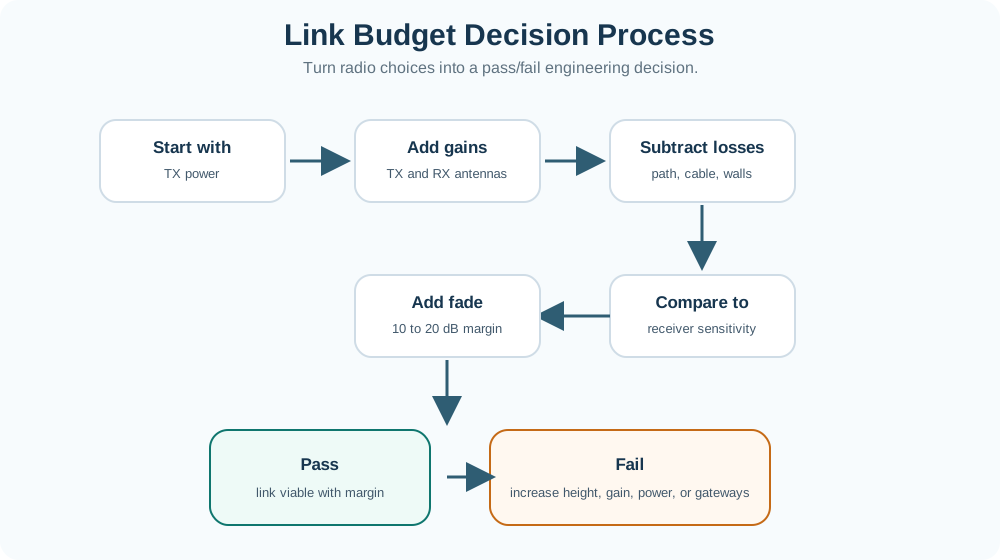
Each step adds one line to the record. Transmit power opens it. Antenna gains at both ends are added, then path, cable and wall losses are subtracted. The running total is compared with receiver sensitivity, which is where a design first looks either promising or short. A fade margin, typically 10 to 20 dB, is then held back, so the answer survives a bad day rather than a good one. The two endings are the point of Figure 23.1. A calculated pass still needs field validation. A fail names possible repairs: more height, more gain, permitted power, or more gateways.
Power And Gain
Record conducted transmit power, antenna gain in the intended direction, and any cable or connector loss before the signal leaves the device.
Path And Site Loss
Start from path loss, then add realistic losses for walls, foliage, terrain, body blocking, antenna height, weather, or installation quality.
Margin
Received power minus receiver sensitivity is the headroom. A design with no reserved margin may pass one desk calculation and fail in the first bad location.
Core check: received power = transmit power + gains - losses. The link is plausible only when received power remains above receiver sensitivity after the required reserve margin has been included.
23.3 Practitioner: Build The Budget As A Deployment Ledger
This section: Practitioner: Build The Budget As A Deployment Ledger
A useful link budget is traceable. Each number should have a source, a location, and an owner: radio configuration, antenna datasheet, cable length, path model, measured RSSI, or field survey. Keep the calculation simple enough that a field engineer can update it when gateway height, antenna alignment, enclosure material, or sensor location changes.
Build the record in the same order the signal experiences the path. Start with the transmitter and antenna system, then the open-air or log-distance path estimate, then installation losses, then receiver sensitivity, then reserve. Add a short evidence note beside each uncertain term. For example, wall loss may come from a site survey, a conservative design allowance, or an early RSSI walk test. The review should be able to tell which terms are measured, which are data-sheet values, and which are deliberate safety allowances.
After installation, keep the budget alive. Field measurements should not replace the record; they should calibrate it. If measured RSSI is weaker than predicted, update the loss assumption and check whether similar paths are also at risk. If measured RSSI is stronger than predicted, keep the conservative reserve unless the team has enough representative samples to reduce it. That habit turns the link budget into an operating document for gateway moves, enclosure changes, seasonal foliage, and radio-mode updates.
Use Figure 23.2 to trace every gain, loss, and reserve behind an LPWAN coverage claim.
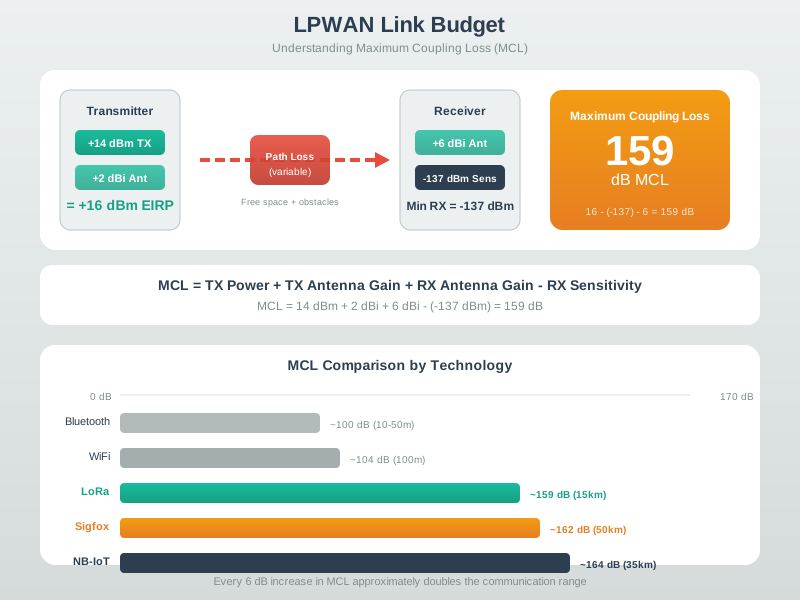
Begin with send power and antenna gain. Then subtract loss in the cable, plugs, path, walls, and site. Compare the result with receiver sensitivity at the chosen data rate. Maximum coupling loss is the total loss that the pair can bear, not a range claim. The link still needs margin for fades, model error, weather, antenna angle, and age. Keep all terms in decibels so gains and losses add in one unit. The record should name each source, site type, receiver setting, spare margin, and field test that backs or changes the model.
Where The Antenna-Gain Line Actually Comes From
The ledger's antenna-gain line is not a number to look up once and forget. It is a choice between antenna types that trade directionality for reach, and that choice decides how much of the launched power actually lands where the deployment needs it. An omnidirectional antenna radiates in all directions around one plane, spreading a fixed amount of power over the widest area and giving typically the least gain of the common choices. A Yagi antenna lines up several parallel elements to concentrate that same power into a narrower beam, trading coverage angle for a substantial gain increase. A parabolic reflector antenna goes further, using a dish or mesh reflector built larger than the wavelength it focuses to concentrate power into a tight beam with typically the highest gain of the three, at the cost of needing the far end to stay inside that narrow beam. Actual gain depends on frequency, size and efficiency.
Omnidirectional
Typically the lowest gain, widest coverage angle. The standard choice for a gateway or access point serving devices in unknown or scattered directions.
Yagi (Directional)
Multiple parallel elements concentrate power into a narrower beam. Substantial gain increase over omnidirectional, useful when the link direction is fixed and known.
Parabolic (Directional)
Reflector geometry focuses power into the narrowest beam and typically the highest gain of the three. Needs accurate aiming; the gain only helps while both ends stay in the beam.
Selecting between them is a directionality, gain, and bandwidth decision made together, not a single spec copied from a datasheet: how tightly can the deployment predict where the far end will be, how much gain does the remaining margin actually need, and does the antenna's usable bandwidth cover the intended band. The same decision should also record polarization. A receiver's orientation is rarely known in advance -- a handheld device, a vehicle-mounted sensor, or a tag on a rotating asset can present any polarization to the antenna. Some access points answer this by propagating both vertical and horizontal polarization, or by using a configurable or diversity antenna, so an unknown receiver orientation does not silently turn into an unrecorded polarization-mismatch loss. Treat polarization the same way the ledger already treats cable loss: name it in the record, or budget an explicit mismatch allowance for it.
Read the steps in Figure 23.3 in order, because one of them is far larger than the rest.
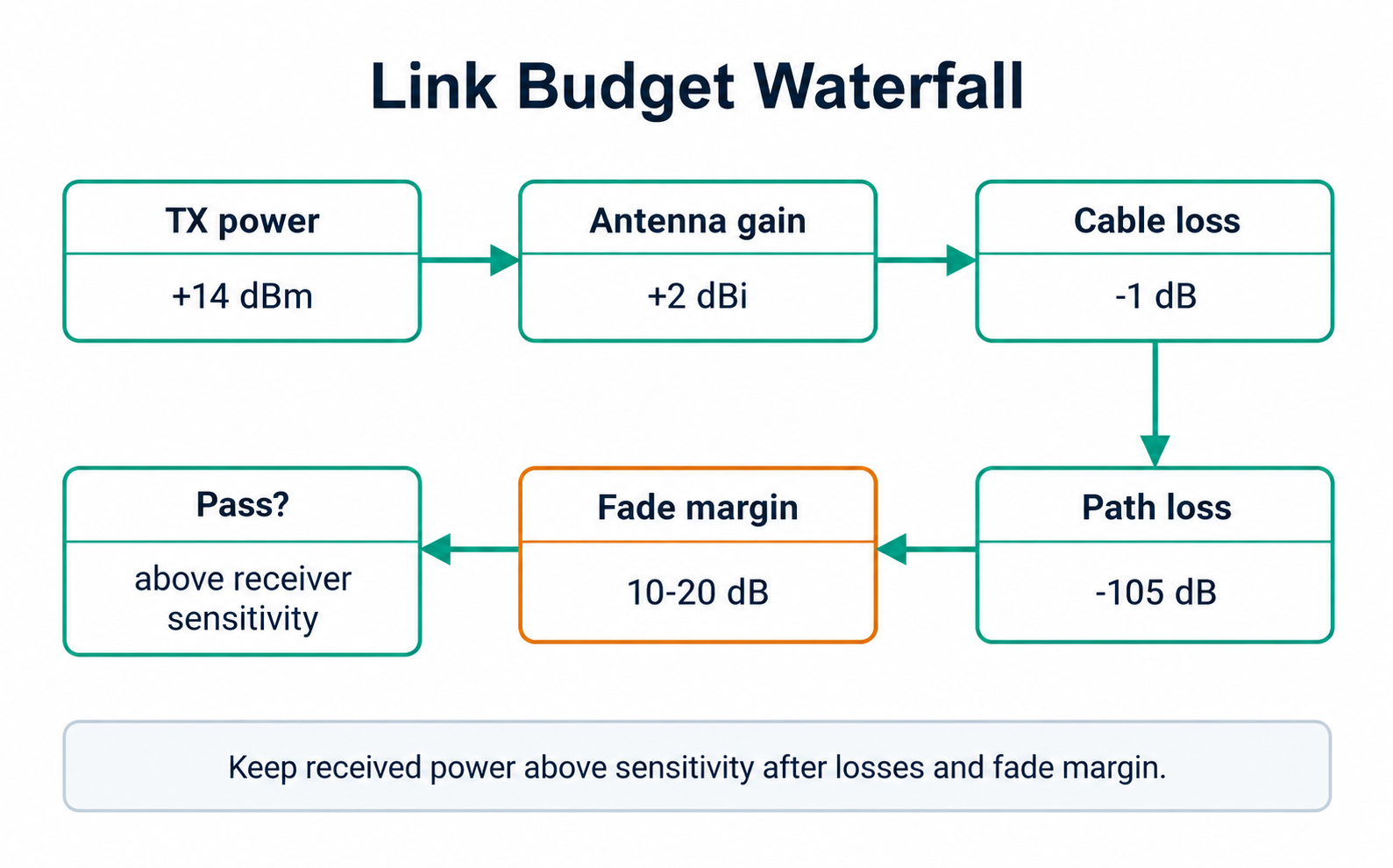
The example signal starts at 14 dBm of transmit power and gains 2 dBi from the antenna. Cable loss takes 1 dB back, which looks trivial. Then path loss removes 105 dB, and the scale of the drawing makes the point: nothing you can add at the transmitter matches that single loss. The fade margin, typically 10 to 20 dB, is held back after it, not before. The final box asks whether what remains still sits above receiver sensitivity. That is why Figure 23.3 is read step by step. A budget that passes on path loss alone can still fail once installation losses are added.
Common failure pattern: the desktop range estimate used free-space loss, but the installed link also had cable loss, antenna mismatch, foliage, wall loss, gateway shadowing, and no reserve margin. Treat those as budget lines, not troubleshooting surprises.
Once the ledger fields are named, the fastest way to see how they trade off is to move them. Try the range calculator below to estimate wireless range from link budget, path loss, receiver sensitivity, and fade margin, and to compare that estimate across common IoT protocols under the same deployment assumptions.
23.4 Under The Hood: Margin Is Where Assumptions Become Risk
This section: Under The Hood: Margin Is Where Assumptions Become Risk
The budget is arithmetic, but the risk is in the assumptions. Free-space path loss is a baseline, not a site guarantee. Receiver sensitivity depends on data rate, bandwidth, coding, and required error behavior. Antenna gain depends on orientation and mounting. A clean design keeps those assumptions visible instead of hiding them inside one range claim.
dB arithmetic is useful because gains and losses can be added in one chain, but it can also hide weak evidence. A quoted 6 dBi antenna gain only helps when the antenna pattern points toward the receiver and is mounted away from detuning surfaces. A receiver sensitivity number only applies to the bandwidth, coding, spreading, data rate, packet error target, and interference assumptions used to measure it. A path-loss number only applies to the environment model and distance convention recorded with it.
Margin is therefore not spare decoration at the end of the spreadsheet. It is the buffer between an assumed world and the deployed world. Fade, multipath, human movement, wet foliage, antenna tilt, component tolerance, enclosure changes, and measurement error all consume that buffer. When the reserve is too small, the system may work during commissioning and fail later under normal site variation. When the reserve is visible, engineers can decide whether the right fix is more gateway density, a different mounting point, a slower radio mode, or a field survey.
For review, separate nominal margin from release margin. Nominal margin is predicted received power minus receiver sensitivity. Release margin subtracts the reserves the team promised to protect: fade allowance, installation uncertainty, site-change allowance, and measurement uncertainty. That second number is the one that should drive approval because it says what headroom remains after known risk has been paid for.
Figure 23.4 works the chapter’s own numbers in three stages, so check each stage against the arithmetic you would do yourself.
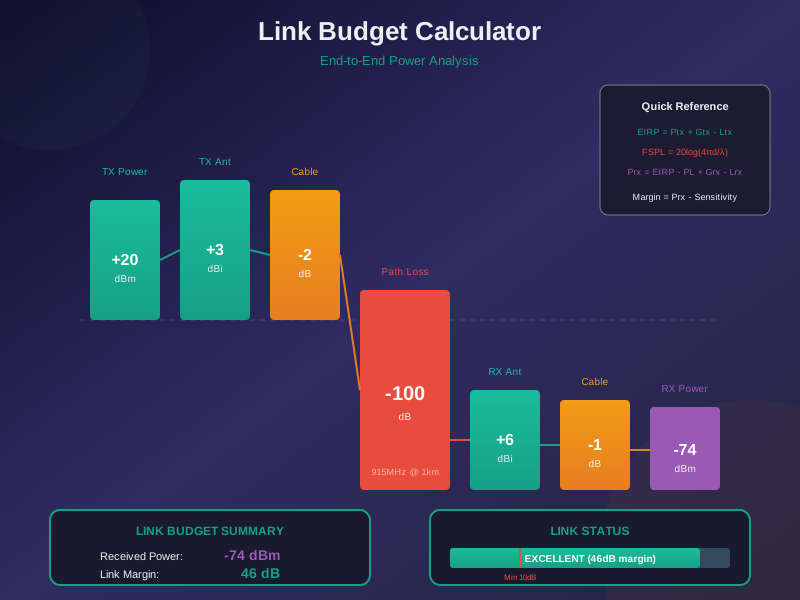
Stage one adds and subtracts in dB: 14 dBm of transmit power, plus 2 dB of antenna path gain, minus 96 dB of path loss and 15 dB of site loss, giving -95 dBm at the receiver. Stage two compares that with a receiver sensitivity of -118 dBm, and the gap is 23 dB. Stage three is the one a review must not skip. Subtract the 10 dB reserve the team promised, and 13 dB is what actually remains. Figure 23.4 separates those three results because only the last one is margin you may spend.
Distance And Frequency
Path loss grows with distance and frequency. The free-space formula is useful for an open-air baseline, but real deployments add environment-specific losses before making a coverage decision.
Receiver Mode
Changing data rate, bandwidth, spreading, or coding can change sensitivity. A budget copied from another mode may claim margin that the deployed receiver does not actually have.
Reserve
Reserve margin absorbs fade, installation variation, aging, seasonal foliage, and measurement uncertainty. Low reserve is an operational risk even when the nominal calculation passes.
Use Figure 23.5 to distinguish raw link margin from the reserve left after deployment risks are charged.
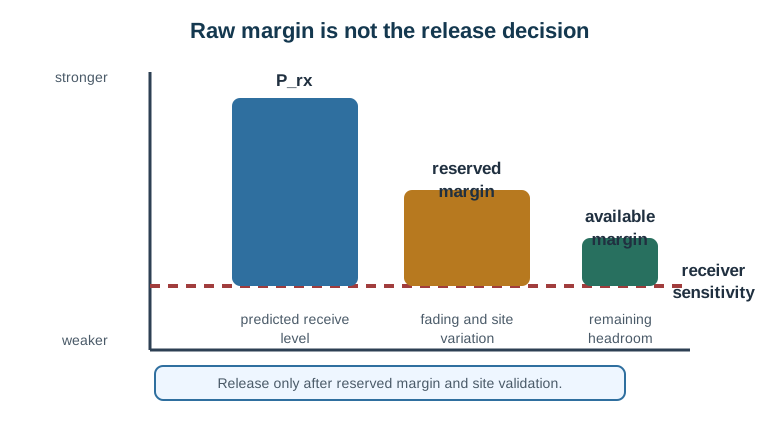
Read received power against the receiver threshold: their difference is the raw margin, with stronger signals above and weaker signals closer to failure. Then subtract explicit allowances for fading, body or wall loss, antenna variation, installation error, and model uncertainty. For example, -105 dBm - (-120 dBm) = 15 dB raw margin; reserving 10 dB leaves 5 dB decision margin. The remaining value, not the raw gap, supports release. Field percentiles and outage behaviour must still confirm that the chosen reserve covers the required service condition.
Compare the urban and rural paths in Figure 23.6 to see why identical radios can have very different range.
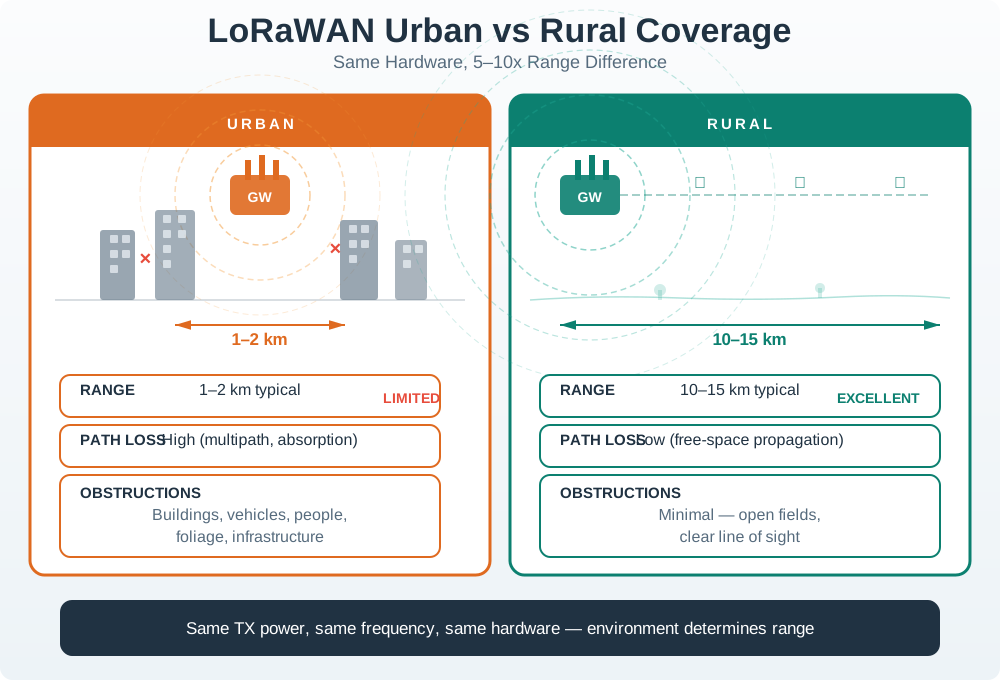
The urban path in the illustration adds buildings, lower antennas, reflections, interference, and penetration loss, consuming link budget quickly. The rural path offers clearer geometry and fewer obstructions, so the same transmitter, receiver, and settings can cover roughly five to fifteen times the distance in this illustration. That ratio is an observed class, not a conversion rule for every site. Gateway height, terrain, foliage, indoor placement, and traffic load still change coverage. A coverage plan should use separate environment models and repeated field passes, then place gateways from measured margin and outage evidence rather than one advertised radius.
Release rule: do not approve coverage from a formula alone. Approve it from a recorded budget, a named margin target, representative field measurements, and a clear trigger for when the budget must be reopened.
23.5 Check Both Directions before Calling the Site Covered
This section: Check Both Directions before Calling the Site Covered — Use the chapter’s uplink screen: 14 dBm transmitter power plus 2 dB gain, minus 96 dB path loss and 15 dB site loss.
Use the chapter’s uplink screen: 14 dBm transmitter power plus 2 dB gain, minus 96 dB path loss and 15 dB site loss. The received estimate is −95 dBm. Against −118 dBm sensitivity, nominal margin is 23 dB. After a 10 dB reserve, the remaining allowance is 13 dB. Keep that reference point clear before reusing any values for a reply.
For an illustrative return-path calculation, suppose effective launched power is 10 dBm and the same modeled losses total 111 dB. The receiving device sees −101 dBm. If its selected mode requires −110 dBm, the nominal margin is only 9 dB. With the same 10 dB reserve, the downlink misses the target by 1 dB even though the uplink passes comfortably.
Follow Figure 23.3 from transmit power through each gain and loss. Run a separate waterfall for each direction instead of reversing an arrow and retaining the first result. Sensitivity belongs to a particular receiver and setting; it is not a universal property of the site.
Predict whether increasing the gateway antenna gain helps every sensor equally. The installed pattern may favour some directions while weakening others, and cable loss can consume part of the gain. Next, suppose the sensor uses a faster mode with a less sensitive receive requirement. Its coverage calculation changes even if no hardware moves.
The return-path failure should lead to a bounded field test: preserve orientation, mounting, enclosure and settings, then record command receipt and application acknowledgement. A radio acknowledgement alone need not prove the requested configuration was applied. This module uses the power ledger to identify which assumption needs testing, while measured service results establish whether the installation meets its promise. All levels in the second calculation are illustrative; the deployed components must supply their own supported values.
23.6 Summary
This section: Summary — Link-budget planning turns wireless range from a hope into a record.
Link-budget planning turns wireless range from a hope into a record. The record names transmit power, antenna gains, cable and connector losses, path loss, site losses, receiver sensitivity, required reserve margin, and the field measurements used to check the model. Free-space path loss is a useful baseline, but indoor walls, terrain, foliage, antenna mounting, receiver mode, and gateway placement decide whether the deployed link has enough headroom.
23.7 Key Takeaway
This section: Key Takeaway
A link budget is useful only when the assumptions are visible. Record the gains, losses, receiver threshold, required reserve, and validation points so coverage decisions can be checked when the site changes.
23.8 See Also
This section: See Also
Free-Space Path Loss
Use the open-air path-loss baseline before adding installation and environment losses.
Attenuation and RSSI
Estimate how walls, glass, metal, foliage, and measured RSSI affect the budget.
Fresnel Zones and Deployment
Check clearance, antenna height, and obstruction risk for longer outdoor links.
LPWAN and Cellular Physical Layer
Connect link-budget thinking to long-range IoT access choices and gateway planning.
Find help
3 reviewed answers.
Where should I start in a module?
Open the module page from the sidebar to see its chapters in order. Use the module map to return to a topic you need.
Modules and pathsReviewed
What can I try when a project does not work?
Check the symptom, then work through the diagnostic steps. Keep the error message and the smallest example that reproduces it.
When you are stuckReviewed
How do interactive examples work?
Use the interactive guide to check how examples and simulations work before changing your project.
Interactive examples guideReviewed