8 Networking Knowledge Checks
8.1 Learning Objectives
By the end of this chapter, you will be able to:
- Test your understanding of core networking concepts
- Apply networking knowledge to real-world IoT scenarios
- Identify common misconceptions in protocol selection and network design
8.2 Videos
8.3 Knowledge Check
Test your understanding of fundamental concepts.
8.4 Auto-Gradable Quick Check
8.5 Understanding Check: IoT Protocol Selection
8.6 Understanding Check: Smart Agriculture Network Design
Scenario: You’re designing a network for a 10 km² farm with 500 soil moisture sensors. Each sensor sends 50 bytes every 15 minutes. The farm has no cellular coverage, limited power infrastructure, and sensors must run on batteries for multiple years.
Think about: 1. What are the critical network requirements? (Range: 2-15 km per gateway, Data rate: ~50 bytes/15 min = ultra-low bandwidth, Power: multi-year battery life) 2. Which wireless technologies can achieve 10 km² coverage without extensive infrastructure? (Wi-Fi: 50-100m, BLE: 10-50m, LoRa: 2-15 km) 3. How does transmission power affect battery life? (Wi-Fi: 150-300 mA TX = weeks, BLE: 15-30 mA = months, LoRa: 30-40 mA but 50ms TX time = years)
Key Insight: LoRaWAN is specifically designed for wide-area, low-power sensor networks. It uses LoRa at the physical layer (long-range CSS modulation) and LoRaWAN for MAC/network management (Class A/B/C behavior, join + security, ADR, and network routing via gateways to a network server). Application data is typically a compact binary payload that the network server exposes to applications via integrations (often MQTT/HTTP). With a small number of gateways (often 1–3 depending on terrain), a 10 km² farm can be covered while supporting multi-year battery life (depending on message rate, payload size, and battery capacity).
Verify Your Understanding: - Why would Wi-Fi require 100+ access points for this deployment? (50-100m range per AP) - How does LoRa achieve years of battery life despite using 30-40 mA transmit current? (50-100ms TX time vs seconds for Wi-Fi, plus deep sleep between transmissions) - What’s the protocol overhead difference between HTTP and CoAP for 50-byte payloads? (HTTP: ~500 bytes total, CoAP: ~54 bytes total)
8.7 Understanding Check: IPv6 Addressing in Multi-Floor Buildings
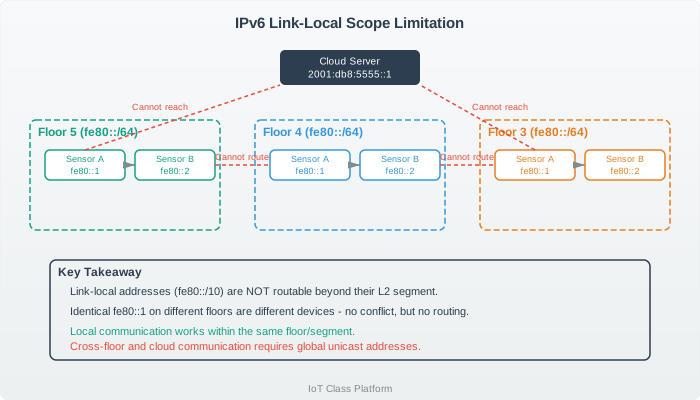
Scenario: A 5-floor smart building has 2,000 IoT sensors. The network engineer discovers all sensors are using IPv6 addresses starting with fe80:: (like fe80::1, fe80::2). Sensors on Floor 3 cannot communicate with sensors on Floor 5, and no sensor can reach the cloud server at 2001:db8:5555::1.
Think about: 1. What type of IPv6 address is fe80::/10? (Link-local - auto-configured, non-routable) 2. Why can Floor 3 sensors communicate with each other but not Floor 5? (Same L2 segment vs different L2 segments) 3. What happens when a router receives a packet destined for fe80:: addresses? (Router drops it - these addresses never leave local segment)
Key Insight: Link-local addresses (fe80::/10) are designed for auto-configuration and local communication only - they NEVER get routed beyond the Layer 2 network segment. Each floor is typically a separate L2 segment, so building-wide monitoring is impossible with link-local addresses. Sensors need either Global Unicast addresses (2000::/3 from ISP, like 2001:db8:1234:1::42) for internet routing, or Unique Local addresses (fd00::/8, like fd12:3456:789a:1::42) for private network routing within the building.
Verify Your Understanding: - How would you fix this addressing problem? (Assign global unicast or unique local addresses to sensors) - Can 6LoWPAN compression help with IPv6 address length concerns? (Yes - reduces 40-byte header to 2-4 bytes) - What’s the difference between ::1 suffix in fe80::1 vs ::1 alone? (fe80::1 is valid link-local; ::1 alone is loopback)
8.8 Deep Dive: IPv6 Address Types
IPv6 Address Types Explained:
| Prefix | Type | Routable? | Use Case |
|---|---|---|---|
| fe80::/10 | Link-local | No | Auto-config, local only |
| fc00::/7 | Unique Local | No | Private networks |
| 2000::/3 | Global Unicast | Yes | Internet-routable |
| ff00::/8 | Multicast | Depends | One-to-many |
| ::1/128 | Loopback | No | Host-only |
Important: fe80:: addresses NEVER leave the local L2 segment!
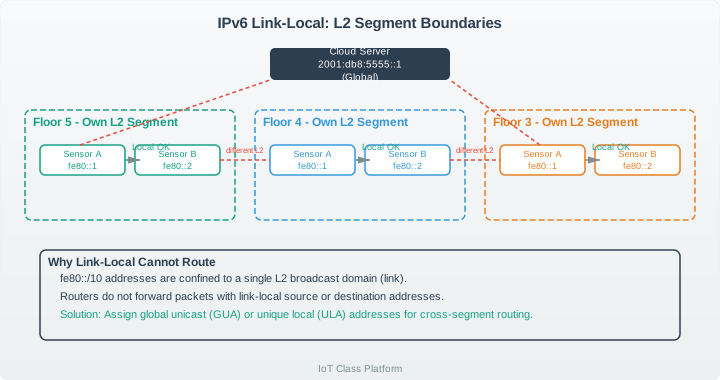
{fig-alt=“Diagram showing link-local IPv6 addressing problem in multi-floor building where sensors using fe80:: addresses cannot communicate across different L2 network segments or reach cloud server requiring global unicast addresses”}
8.9 Understanding Check: UDP vs TCP Flow Control
Scenario: An industrial gateway receives sensor data via CoAP (UDP) and forwards to cloud via MQTT (TCP). Under peak load (100 sensors × 10 msg/sec = 1000 msg/sec), the gateway drops 15% of incoming CoAP messages, but MQTT delivery to cloud stays at 100%.
Think about: 1. What happens when UDP packets arrive faster than the gateway can process them? (Buffer fills up → packets dropped, no feedback to sender) 2. How does TCP handle the same situation? (Receive window shrinks → sender slows down automatically, zero packet loss) 3. Why doesn’t the gateway drop MQTT packets? (TCP flow control: gateway tells cloud “slow down” via window size)
Key Insight: UDP is connectionless with no flow control mechanism. When the gateway’s 64 KB receive buffer fills (holds ~640 100-byte messages), new UDP packets are silently dropped with no notification to senders. TCP, however, uses sliding window flow control - when buffer fills, TCP advertises smaller window size, cloud automatically slows transmission, gateway processes backlog, then window increases again. Result: TCP achieves 100% delivery (just slower), while UDP experiences 15%+ packet loss under same load.
Verify Your Understanding: - If processing takes 2ms per message and gateway receives 1000 msg/sec, when does buffer overflow occur? (After 1.28 seconds: 640-message buffer fills) - Does CoAP have more or less overhead than MQTT? (Less: CoAP 4 bytes + UDP 8 bytes vs MQTT 2-14 bytes + TCP 20+ bytes) - How could you prevent UDP packet loss? (Rate limiting at sensors, larger buffer, application-layer flow control, or switch to TCP)
8.10 Deep Dive: TCP vs UDP Flow Control
TCP uses sliding window flow control: when the receiver buffer fills, TCP advertises a smaller window, the sender slows down, and zero packets are lost. UDP has no flow control: when the buffer fills, packets are silently dropped.
At 100% buffer utilization: TCP achieves 0% packet loss (just slower), while UDP experiences 15%+ packet loss.
8.11 Understanding Check: 2.4 GHz Spectrum Coexistence
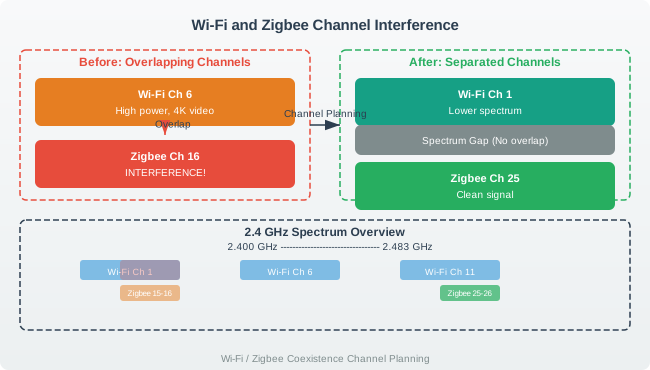
Scenario: A smart home has both Zigbee sensors and Wi-Fi devices operating at 2.4 GHz. When streaming 4K video over Wi-Fi, Zigbee temperature sensors stop responding. Wi-Fi is configured to channel 6 (2437 MHz, 22 MHz wide), and Zigbee is using channel 16 (2430 MHz, 2 MHz wide).
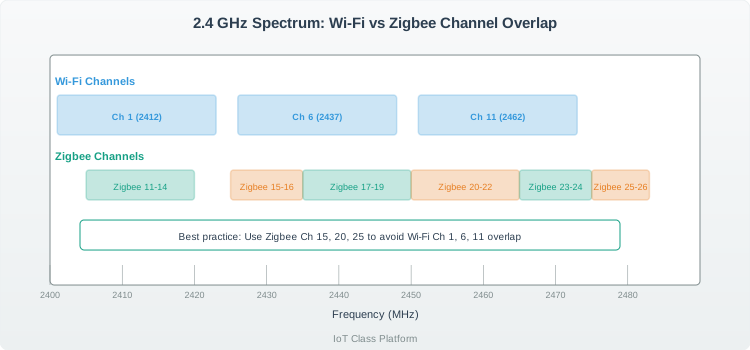
Think about: 1. Do Wi-Fi channel 6 and Zigbee channel 16 overlap in frequency? (Yes! Wi-Fi Ch 6 spans 2426-2448 MHz, Zigbee Ch 16 is 2430 MHz - direct interference) 2. How much stronger is Wi-Fi compared to Zigbee? (Wi-Fi: 100-500 mW, Zigbee: 1-20 mW = 10-25× power difference) 3. Which Wi-Fi channels don’t overlap with which Zigbee channels? (Wi-Fi Ch 1 → Zigbee Ch 15,20,25,26; Wi-Fi Ch 11 → Zigbee Ch 11-14,25,26)
Key Insight: Wi-Fi channels are 22 MHz wide while Zigbee channels are only 2 MHz wide. Wi-Fi channel 6 (2426-2448 MHz) directly overlaps Zigbee channels 13-19, causing the high-power Wi-Fi video stream to drown out low-power Zigbee sensors. The solution is channel separation: configure Wi-Fi to channel 1 or 11, then use Zigbee channels that don’t overlap (e.g., Wi-Fi Ch 1 + Zigbee Ch 25). This provides interference-free coexistence in the same 2.4 GHz band.
Verify Your Understanding: - Why can’t you upgrade Zigbee to 5 GHz? (Zigbee standard only supports 2.4 GHz and sub-GHz 868/915 MHz) - Would increasing Zigbee power help? (No - Wi-Fi is still 10-25× stronger, and you’d violate regulatory limits) - Could you coordinate Zigbee and Wi-Fi transmissions? (No coordination protocol exists between these independent standards)
8.12 Deep Dive: 2.4 GHz Coexistence
Interference-free combinations:
- Wi-Fi Ch 1 + Zigbee Ch 15, 20, 25, 26
- Wi-Fi Ch 11 + Zigbee Ch 11-14, 25, 26
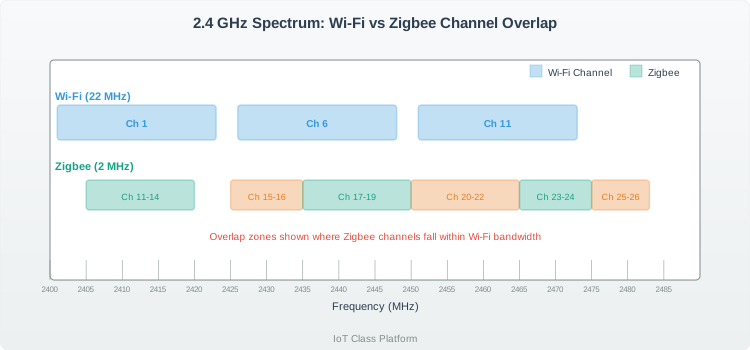
{fig-alt=“Spectrum diagram showing 2.4 GHz band with Wi-Fi channels 1, 6, 11 as 22 MHz wide blocks and Zigbee channels 11-26 as 2 MHz blocks, highlighting overlapping vs non-overlapping channel combinations for interference-free coexistence”}
8.13 Summary
This chapter provides practice questions covering protocol selection, addressing schemes, IPv6, UDP vs TCP, and wireless coexistence. Use these to reinforce your understanding before moving to advanced topics.
8.14 What’s Next
Continue to the MAC Protocols chapter for a deep dive into advanced networking concepts including hidden terminals, congestion control, and QoS.