Port Number
A 16-bit service identifier in TCP or UDP. The same IP address can host different services on different ports.
Progress saves as you read. Mark sections complete as you go; your progress appears in the sidebar.
This section: Start With the Doorway into the Service — Picture a home air sensor that can send readings to its service but cannot accept a new incoming connection from the public side.
Trace the Doorway Out and the Reply Back
Picture a home air sensor that can send readings to its service but cannot accept a new incoming connection from the public side. The owner sees one public address on the router and assumes every device behind it can be reached. The missing fact is which conversation opened the temporary return doorway.
A protocol means agreed rules for exchanging messages. IPv4 is one common address system. A gateway is the device that carries traffic between networks. Network address translation means rewriting a private address and often its service number at that boundary. Telemetry is a device’s reported measurements and state, carried through this address and port path. Transmission Control Protocol (TCP) keeps an ordered connection; User Datagram Protocol (UDP) sends separate messages. Hypertext Transfer Protocol Secure (HTTPS), Message Queuing Telemetry Transport (MQTT), and Constrained Application Protocol (CoAP) are named service rules that may use those transports.
Record the source address and service number, destination address and service number, direction, and chosen protocol. Start one outbound conversation, wait for its mapping to expire, change the sensor’s private address, and try an unsolicited inbound request. Check which reply returns and why the other request fails.
This trace does not prove every router, firewall, or mobile network. The deeper sections show service numbers, temporary mappings, connection state, timeouts, forwarding rules, and safer remote-access patterns.
An IP address gets traffic to a host, but a port number gets it to the right service. NAT adds another doorway by rewriting addresses and ports as traffic crosses a gateway.
This matters whenever a device reports out, receives commands, or sits behind a home router, mobile network, or enterprise firewall. The story to follow is simple: who opened the session, which address and port are visible, and can the reply find the same doorway back?
An IP address gets a packet to a host or gateway. A port number identifies the application conversation on that host. TCP and UDP use port numbers so one device can run several services at the same time, such as HTTPS management, MQTT telemetry, CoAP resources, DNS, or time synchronization.
Network Address Translation changes the address and often the port seen on the public side of a connection. That lets many private IoT devices share one public IPv4 address, but it also means unsolicited inbound connections usually have no translation entry to follow.
For diagnostics, the important object is not just "port 8883" or "the sensor IP." It is the full five-tuple plus direction: source address, source port, destination address, destination port, and protocol. A device may open an outbound MQTT over TLS connection from a temporary source port to broker port 8883, while a local web console might listen on TCP 443 or 8443. Those are different conversations with different firewall and NAT evidence.
Diagnosis needs a name for the thing you are tracing. Figure 13.1 shows the five values that name one MQTT session.
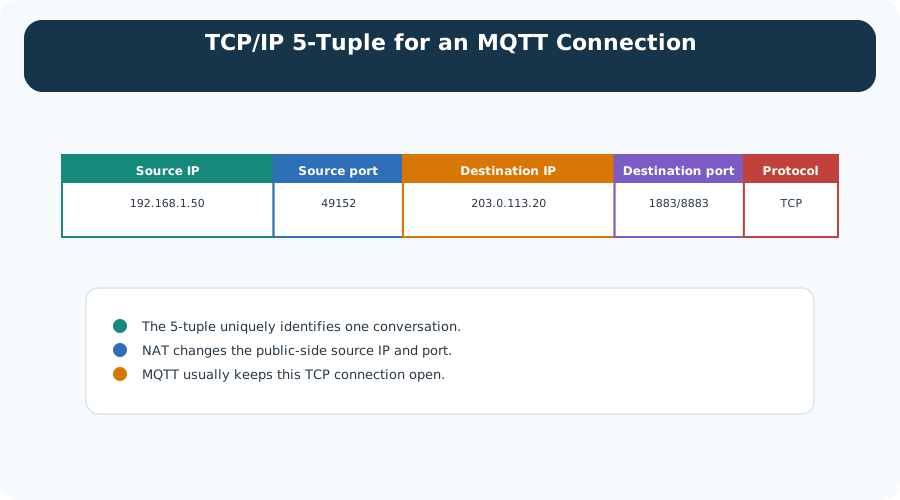
Figure 13.1 lists five values for a single session: the device address and the temporary port it chose, the broker address and its listening port, and the protocol. Together they identify one conversation, which is why a firewall rule or a capture filter written from all five is precise, and one written from an address alone is not. The note beneath matters as much as the fields. NAT rewrites the first two on the public side, so the same conversation has two valid descriptions depending on where you stand. The last note explains why that is survivable: an MQTT client usually holds the connection open, so the translation entry stays alive and replies keep finding their way home.
A 16-bit service identifier in TCP or UDP. The same IP address can host different services on different ports.
Source IP, source port, destination IP, destination port, and transport protocol identify a specific conversation.
A router records a private side and a public side so return traffic can be translated back to the correct device.
Traffic from the internet needs an existing mapping, a deliberate port forward, a tunnel, or an outbound connection held open by the device.
When a connection fails, write down both ends of the five-tuple before changing firewall or NAT settings. Most mistakes come from confusing host reachability with service reachability.
NAT is also stateful. A return packet is allowed only while the gateway still has a matching translation record, and the timeout can differ for TCP, UDP, cellular gateways, home routers, enterprise firewalls, and carrier-grade NAT. IoT applications that rely on long quiet periods need a deliberate keepalive, reconnect, or brokered command pattern instead of assuming the old mapping still exists.
Most IoT deployments use private IPv4 addresses inside a LAN, building, gateway, or carrier network. Outbound traffic works because the NAT device creates a translation entry. Inbound traffic from the cloud fails unless the deployment intentionally creates a safe return path.
Choose the return path as an architecture decision, not as an afterthought. A brokered outbound path such as MQTT over TLS or HTTPS/WebSocket usually fits telemetry and command workloads because the device initiates and authenticates the session. Direct operator access may need a VPN, zero-trust access proxy, or managed reverse tunnel. A raw port forward should be treated as an exception with owner, patching, logging, and retirement criteria.
Follow the address pair across Figure 13.2 to see exactly what the internet is allowed to know about the sensor.
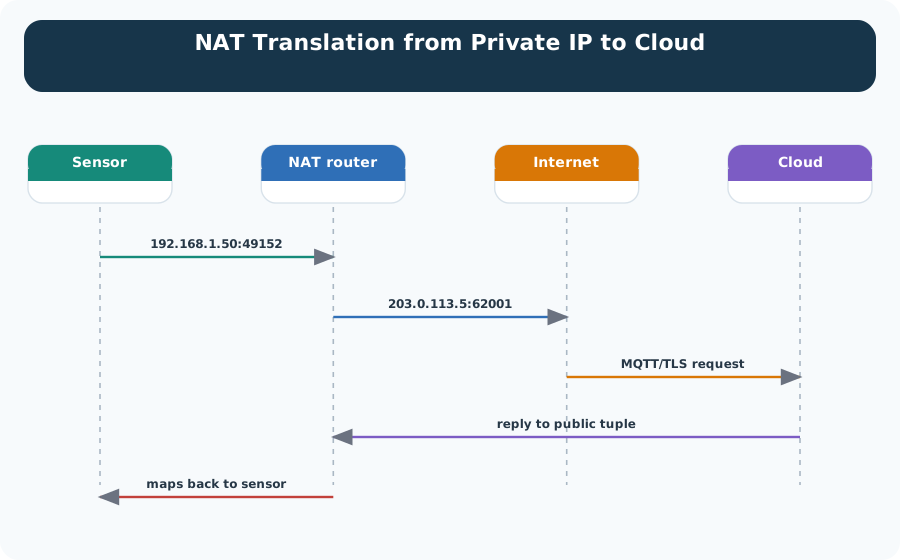
The sensor opens the conversation from a private address and a high port, 192.168.1.50:49152, and sends an MQTT over TLS request. At the NAT router that pair is rewritten. What leaves for the internet is 203.0.113.5:62001, a public address with a different port. The cloud only ever answers that public pair, because it has no route to the private one. The last arrow in Figure 13.2 is the part to remember. The reply maps back only because the router kept the record it made on the way out. Nothing outside can start this conversation, and the design has to live with that boundary.
The NAT boundary is easier to design around once you can see what the router is remembering. Figure 13.3 follows three devices through one public address.
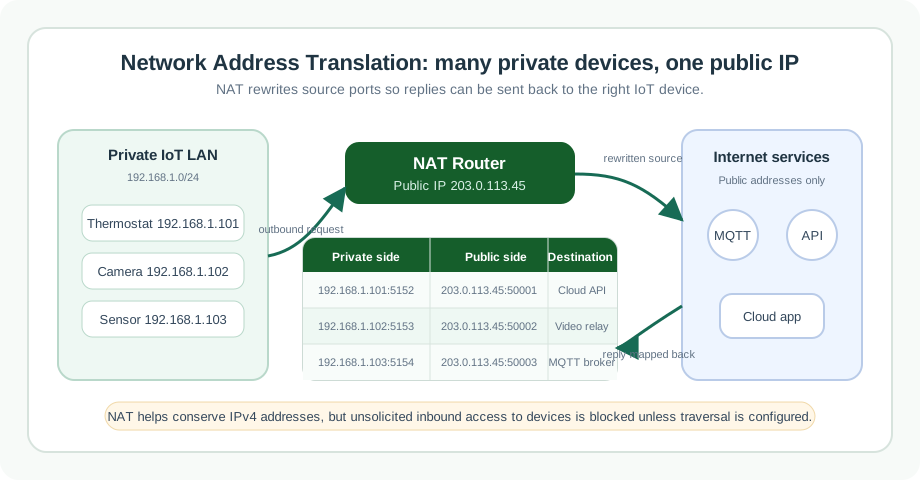
Start on the left of Figure 13.3, where a thermostat, a camera and a sensor each open an outbound flow from their own private address and port. The router in the middle gives all three the same public address and separates them by handing out a different public port to each. The numbered steps spell out the four things it must do: store the flow, rewrite the port, match the reply to that port, and restore the private endpoint. The table at the bottom is that state written out. Every row in it was created by traffic leaving the network, which is why a call that arrives from outside uninvited has no row to follow and is dropped.
Carrier NAT needs special review because the deployment may not control the public mapping at all. A cellular sensor can have a private address behind the carrier network, then pass through enterprise or cloud firewalls after it opens an outbound connection. In that design, "open a port to the device" is usually not an available operation. The evidence should instead prove subscription authentication, broker reachability, keepalive timing, reconnect behavior, and the command path used when the device is asleep or temporarily offline.
MQTT over TLS, HTTPS/WebSocket, or a managed tunnel works through typical NAT because the device initiates the connection.
A forwarded port can make a device reachable, but it also creates a public attack surface that needs authentication, encryption, patching, and monitoring.
When operators need direct management of many devices, a VPN or managed remote-access tunnel is usually safer than many independent port forwards.
Reliable diagnostics starts by separating four questions: is the service listening, is the local firewall allowing it, is NAT translating it, and is the return path expected to work? A single "connection failed" message does not identify which boundary failed.
TCP and UDP leave different clues. A TCP path can show SYN, SYN-ACK, reset, retransmission, or TLS handshake failure, which helps separate reachability from application security. UDP has no connection handshake, so NAT gateways infer state from observed packets and timers. A CoAP or DNS exchange can fail because the UDP mapping expired, because replies arrive from an unexpected address or port, or because the application retransmission timer gives up before a sleepy radio device wakes.
Before opening an inbound port, inspect Figure 13.4 to see how an IoT device can establish the state needed for a controlled return path. The diagram separates service reachability from unsolicited inbound exposure at the NAT boundary.
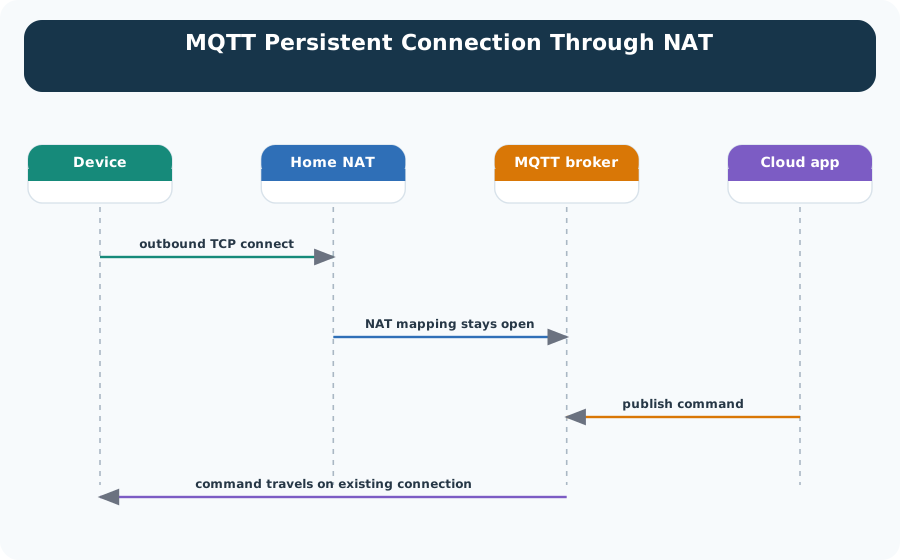
Read Figure 13.4 from the private device’s outbound connection through the NAT mapping to the broker. Broker messages return over that established flow while the gateway continues to reject unrelated inbound attempts. Keepalive timing and mapping lifetime therefore become operational evidence, alongside listener, firewall, credentials, and application acknowledgements. This connects the port diagnosis to a design that avoids exposing a general inbound service.
Ports 0 through 1023 are commonly called well-known ports. Ports 1024 through 49151 are registered or application-specific. Ports 49152 through 65535 are the IANA dynamic or private range, though operating systems and embedded stacks can use configurable ephemeral ranges. Always verify the actual device and gateway behavior before making capacity claims.
Translation behavior can also change the public-side source port. Port address translation lets many private devices share one public IPv4 address by assigning distinct public ports, and some gateways reuse or preserve ports only when safe. For a fleet, this means the cloud log, gateway translation table, and packet capture may show different source ports for the same private device over time. Correlate by timestamp, protocol, device identity, and private-side tuple before declaring a device duplicate or a credential problem.
Record every exposed management port, the authentication method, encryption state, owner, patch path, log source, and reason the exposure is necessary. For most IoT fleets, an outbound secure tunnel or brokered command channel is easier to audit than internet-facing device services.
When direct peer-to-peer communication is required, document the traversal method separately from the application protocol. STUN can reveal a public mapping, TURN can relay traffic when direct traversal fails, and VPN or private APN designs can avoid public exposure by moving the device into a controlled routing domain. Each option changes latency, cost, observability, and failure ownership, so it belongs in the network design record rather than in application code comments.
This section: Keep One MQTT Reply Attached to One Socket — Two indoor sensors both open MQTT connections from private port 49152, but they share one public IPv4 address.
Two indoor sensors both open MQTT connections from private port 49152, but they share one public IPv4 address. Figure 13.1 identifies each conversation by protocol, source address, source port, destination address, and destination port. Figure 13.2 then shows the router rewriting the outward identity, and Figure 13.3 makes the stored mapping visible.
The router can map 10.0.0.21:49152 to public port 61001 and 10.0.0.22:49152 to public port 61002. A broker reply to 61001 returns to the first sensor; a reply to 61002 returns to the second. The private source ports may match because the full five-tuples do not. When an idle mapping expires, an unsolicited late reply has no private destination to recover.
Inbound port forwarding is a separate NAT rule. It creates a standing path toward a named private service rather than waiting for that service to open an outbound flow. Exposing an IoT service this way also needs firewall and authentication decisions.
Now let the second sensor contact a different broker. Even if both outward flows use public port 61002 at different times, destination address, destination port, protocol, and session timing still distinguish their NAT state. A capture that records only the public source port is incomplete.
Keep-alive timing must sit below the shortest idle timeout on the real path. If a router drops MQTT state after 60 seconds and the sensor stays silent for 90 seconds, the next broker packet may meet no NAT mapping. A 45-second keep-alive may preserve the path, but only a test on that router can confirm its timeout and battery cost.
This section: Summary — Port numbers identify services and conversations on a host.
Port numbers identify services and conversations on a host. NAT rewrites private-side address and port information into public-side mappings so many IoT devices can share one IPv4 address. That translation is useful, but it changes how cloud-to-device communication, diagnostics, and remote management must be designed. Strong IoT designs name the five-tuple, verify the NAT boundary, avoid unnecessary public exposure, and use controlled outbound paths such as MQTT over TLS, HTTPS/WebSocket, VPN, or managed tunnels when devices sit behind NAT.
This section: Key Takeaway
Ports tell you which service is involved; NAT tells you whether a return path exists. Treat both as review evidence before opening management access or blaming the application.
This section: See Also
3 reviewed answers.
Open the module page from the sidebar to see its chapters in order. Use the module map to return to a topic you need.
Modules and pathsReviewed
Check the symptom, then work through the diagnostic steps. Keep the error message and the smallest example that reproduces it.
When you are stuckReviewed
Use the interactive guide to check how examples and simulations work before changing your project.
Interactive examples guideReviewed