29 UART and RS-232 Protocols
More
Depth: Practitioner
Progress saves as you read. Mark sections complete as you go; your progress appears in the sidebar.
A sensor console prints nonsense when connected to a legacy instrument. The connector fits, but that says little about its voltage levels or serial frame settings. Prove the electrical connection before trying random baud rates.
29.1 Start With Two Devices Sending Bytes
This section: Start With Two Devices Sending Bytes — Picture a sensor board printing clear text until it is connected to a second board and the display becomes nonsense.
Prove Both Boards Read the Same Byte
Picture a sensor board printing clear text until it is connected to a second board and the display becomes nonsense. A microcontroller means a small computer on one chip that reads inputs and controls a device.
Name the two boards, voltage levels, ground, speed, frame settings, and expected byte. Test a correct link, wrong speed, missing ground, and reversed transmit and receive wires.
Keep the wiring, settings, sent bytes, received bytes, and logic trace. This proves one serial link, not the meaning of every message; the deeper sections cover UART timing, RS-232 levels, framing, buffering, and fault diagnosis.
UART is the simplest useful story for many devices: one side sends timed bits, the other samples them, and both must agree on framing and speed. There is no shared clock wire to rescue a mismatch.
That simplicity is why UART is common for consoles, sensors, modules, and debugging. It also means the evidence must be practical: voltage level, ground reference, baud rate, framing, and what each received byte is supposed to mean.
29.2 Overview: UART Sends Bytes Without A Clock Wire
UART is the simple asynchronous serial link used for debug consoles, GPS receivers, radio modules, bootloaders, and many board-to-board IoT connections. One wire transmits, one wire receives, and a shared ground gives both devices the same voltage reference.
The simplicity has a condition: both ends must already agree on baud rate, frame format, logic voltage, and flow-control behavior. UART does not carry an address, a clock, or a built-in retry scheme, so wiring and configuration mistakes show up as silence or garbled characters.
The design boundary is the important lesson. A microcontroller UART peripheral defines byte timing and framing; it does not define connector shape, cable robustness, message boundaries, or safe voltage levels. TTL UART on a board may idle at 3.3 V or 5 V logic. RS-232 inverts the logic and uses higher positive and negative voltages through a transceiver. RS-485 can carry UART-style bytes over a differential multidrop electrical layer, but then direction control, termination, and bus ownership become part of the release record.
For IoT products, UART is strongest as a local service, configuration, or module link: a boot console, GPS NMEA stream, AT-command modem, serial sensor, or factory programming port. It becomes fragile when teams treat it as a complete protocol. If bytes can be lost, delayed, or inserted during reset, the application needs explicit message framing, checksums, timeouts, retry rules, and buffer-overflow behavior above the serial link.
Read Figure 29.1 left to right as one byte crossing the wire, since there is no clock line to read it by.
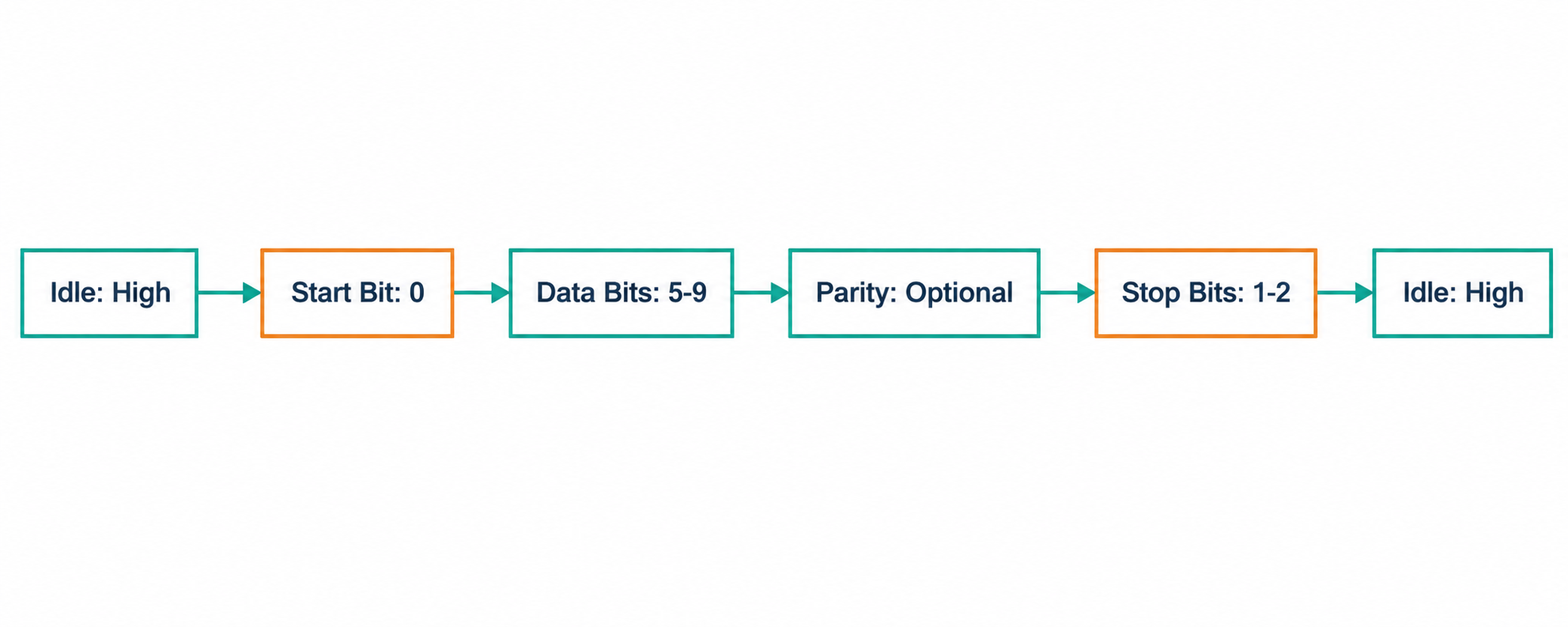
The line rests high while nothing is being sent. The start bit is a single low, and it exists only to mark the moment the receiver should begin counting. Five to nine data bits follow, and the receiver finds each one by timing alone, from that first edge. An optional parity bit sits after them, then one or two stop bits return the line to its idle level, ready for the next byte. The whole of Figure 29.1 is therefore an agreement made in advance. Both ends must already share the bit rate and the frame shape, or the bits are counted in the wrong places.
Read Figure 29.2 to see how a UART receiver recovers one frame without a shared clock wire.
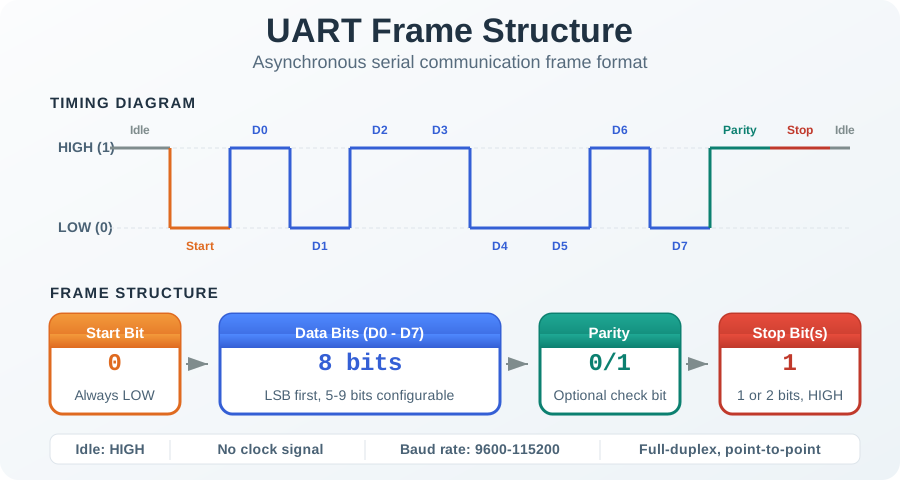
The line begins idle, then the falling start bit gives the receiver a timing reference. It samples the data bits near their centres using its own baud-rate clock, optionally checks parity, and expects a stop bit at the idle level. For an 8-N-1 frame, eight data bits plus start and stop make 10 bits; at 9600 bit/s, one frame takes 10 / 9600 s = 1.04 ms. A mismatched baud rate moves later samples toward bit edges, which is why framing errors often appear before every byte becomes unreadable.
Frame Format
8N1 means 8 data bits, no parity, and 1 stop bit. With the start bit included, one data byte uses 10 bit times on the wire.
Baud Rate
Both devices must sample at the same bit timing. Common IoT settings include 9600 for sensors and 115200 for debug consoles.
Electrical Layer
TTL UART, RS-232, and RS-485 can carry similar serial bytes, but their voltages and wiring are not interchangeable.
Boundary to remember: UART describes the byte framing. RS-232 describes an older electrical interface with inverted, higher-voltage signaling. A microcontroller UART pin is not an RS-232 port unless a level shifter is present, and a working USB serial adapter test does not prove the final harness, grounding, or enclosure routing.
29.3 Practitioner: Keep A Serial Link Record
The photo shows several DB9/RJ45 adapter pieces beside a handwritten pinout note. Look at the connector forms and the separate loose contacts before choosing a cable.

A connector shape and a handwritten note do not prove which pins the installed peer uses. The serial-link record below must name each endpoint, the viewed side of the pinout, voltage standard, and any flow-control wires, then verify them on the actual link.
A dependable UART build has a short record: the electrical standard, connector or pinout, frame setting, baud rate, cable length, flow-control choice, and a known-good test message. Without that record, teams waste time swapping wires, guessing defaults, and blaming software for electrical faults.
Make the record executable. It should say exactly which endpoint is DTE or DCE when RS-232 language is used, which side of a connector drawing is shown, whether the port is 3.3 V tolerant, and whether RTS/CTS is wired or intentionally unused. If a legacy peer depends on DTR/DSR-style readiness, record whether DTR must be asserted for the whole transfer or tied through the connector; otherwise the data line can look correct while the peer refuses to send or receive. For field devices, include the installed cable length, shield or drain treatment, enclosure pass-through, and the highest sustained burst rate that the receiver can absorb without losing bytes.
Look at both ends in Figure 29.3 before deciding which side of a pinout drawing you are holding.

Both connectors in the photograph present a socket: nine holes in two rows, set in a blue insert. That single fact settles what each end can mate with, and it is not visible in any wiring diagram. Look next at the thumbscrews on either side of each shell, which are what keep a vibrating install connected. Then follow the moulded strain relief back into the grey jacket, where print runs along the cable. Figure 29.3 also shows the lead coiled to roughly its full length. Contact gender, retention and installed length are three entries the link record needs, and the name RS-232 supplies none of them.
The link record has to say what voltage arrives at the pin, not just which protocol is in use. Figure 29.4 shows why that distinction is not pedantic.
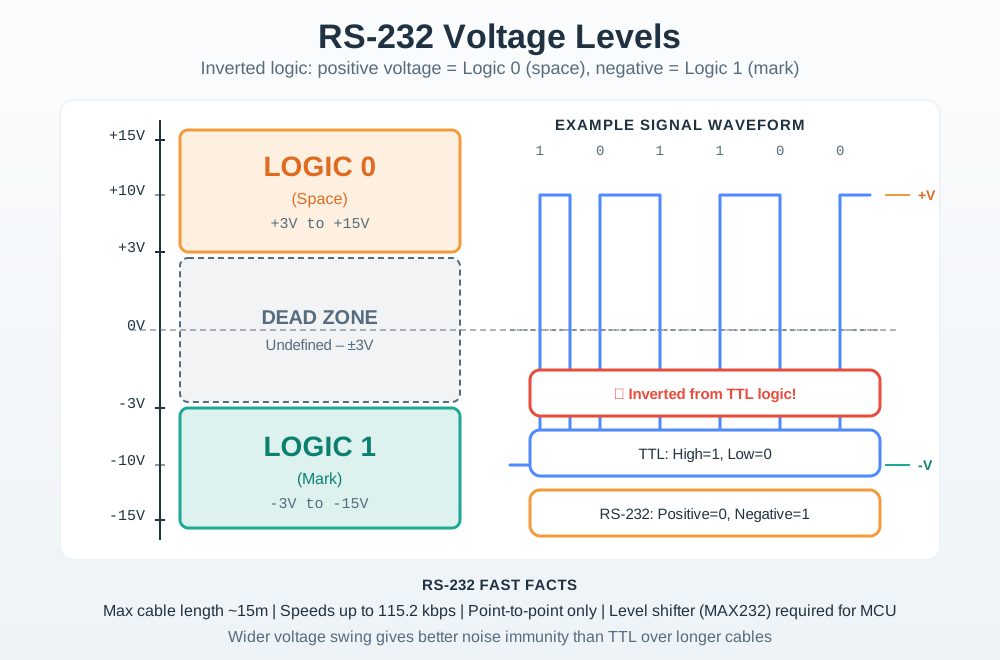
The scale on the left of Figure 29.4 runs from plus fifteen volts to minus fifteen, and the two logic bands sit at its extremes. Positive means zero here and negative means one, the reverse of the convention a microcontroller pin uses. Between them lies a band around zero that decodes to nothing at all, so noise landing there is simply undefined. The example waveform below swings across both bands to show the size of that movement. Two results follow, and both belong in the link record. A level shifter is needed before any 3.3 or 5 volt pin, and the wide swing is what buys this link its noise tolerance over roughly fifteen metres.
Use Figure 29.5 to verify connector viewpoint and the TX/RX crossing before testing an RS-232 link.
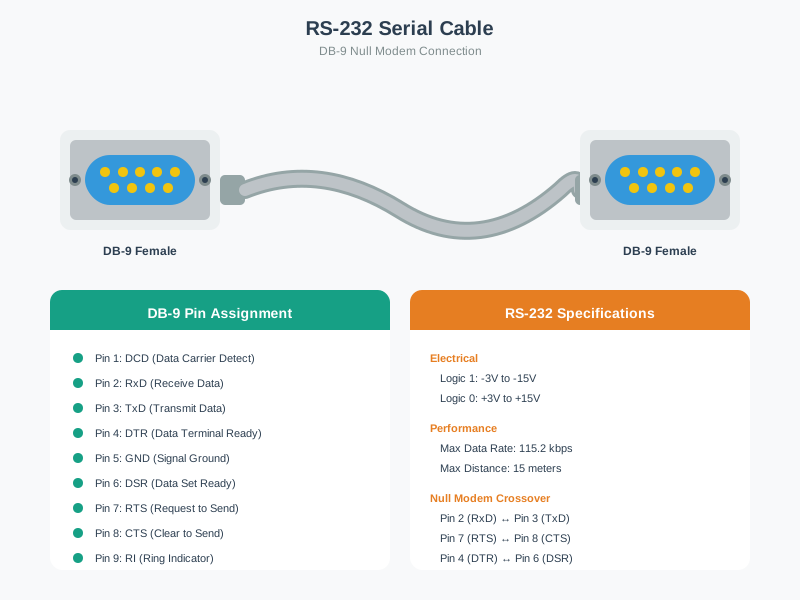
Start with the labelled female DB-9 face and note whether the drawing shows the mating side or the solder side; those views mirror the pin positions. Follow transmit on one endpoint to receive on the other in the null-modem crossing, then verify the common signal ground. Handshake lines must be crossed or intentionally omitted according to the configured flow control. A serial record should preserve connector gender, viewpoint, pin numbers, signal direction, and cable type, because a continuity test can pass while a mirrored interpretation still swaps TX and RX.
RS-232's mark and space levels are inverted and much wider than logic levels: a logic 1 ("mark") is between −3 V and −25 V, and a logic 0 ("space") is between +3 V and +25 V (TIA-232-F receiver range). The band from −3 V to +3 V is undefined; compliant loaded drivers commonly produce between 5 V and 15 V in magnitude. These levels require a suitable transceiver before a 3.3 V or 5 V microcontroller UART pin. RS-232 targets roughly 15 m (50 ft) at typical baud rates; long or high-capacitance cables need lower rates. USB 2.0 cables are limited to 5 m.
| Pin | Signal | Name |
|---|---|---|
| 1 | DCD | Carrier Detect |
| 2 | RD | Receive Data |
| 3 | TD | Transmit Data |
| 4 | DTR | Data Terminal Ready |
| 5 | GND | Signal Ground |
| 6 | DSR | Data Set Ready |
| 7 | RTS | Request To Send |
| 8 | CTS | Clear To Send |
| 9 | RI | Ring Indicator |
RTS/CTS flow control and DTR readiness are separate interface signals; RS-232 does not prescribe a universal RTS-then-CTS-then-DTR sequence before the first start bit. Record which signals each endpoint actually requires and when they are asserted. If a peer uses RTS/CTS, capture whether the sender waits for its CTS before sending. If it requires DTR or DSR, capture that readiness condition too. The observed sequence must match the two devices' interface contracts.
115200 8N1.A low-speed link that works on the bench can still fail in a product when cable length, ground offset, oscillator tolerance, EMI, connector orientation, missing flow control, or a 5 V to 3.3 V mismatch eats the signal margin. The release test should use the final cable and a sustained message pattern, not only a short terminal echo.
29.4 Under The Hood: Timing Error Accumulates Across The Frame
UART receivers usually resynchronize on the start edge, then sample near the center of each bit period. Because there is no shared clock, relative transmitter/receiver timing error accumulates until the frame ends. Longer frames and poor oscillators reduce timing margin; a higher baud rate shortens each bit's absolute time budget for cable edges and noise, although the same fractional clock error accumulates across a fixed-length frame.
A receiver commonly oversamples the line, detects the falling start edge, waits toward the center of the first data bit, and then samples each following bit at the configured interval. If the local clock is too fast or too slow, those sample points drift. In an 8N1 frame the receiver only needs to stay aligned for one start bit, eight data bits, and one stop bit, then it can resynchronize on the next start bit. That is why moderate clock error can work for short frames but fail with long words, parity, two stop bits, or marginal edges.
Use Figure 29.6 to distinguish a simple timed serial link from USB’s host-managed transfers.
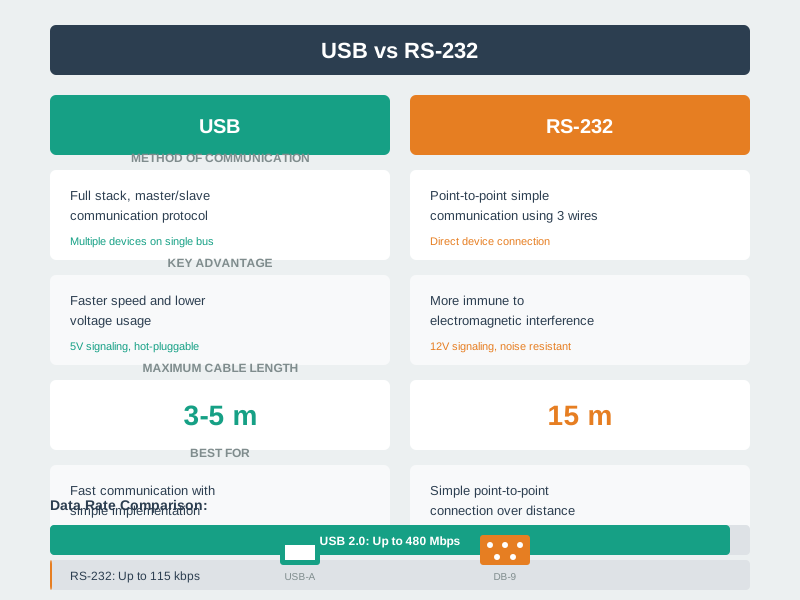
Read the RS-232 side as a byte stream with no shared clock. Both ends set the same baud rate. A start bit tells the receiver when to sample the data bits, and stop bits check the end of the frame. Clock error grows across that frame, so the settings and clock limits at both ends must match. USB adds a host, device setup, named end points, framed moves, and error checks. An adapter links the two systems, but it does not make their voltage, pins, flow control, or UART settings the same.
In 8N1, every byte consumes 1 start bit, 8 data bits, and 1 stop bit. At 9600 baud, that gives about 960 data bytes per second before protocol overhead. At 115200 baud, the byte rate is about 11,520 bytes per second, but electrical and timing margin become more sensitive to cable and oscillator quality.
Throughput is not only baud divided by frame length. A real product may pause between messages, wake a modem, wait for line turnaround, process AT responses, or copy bytes through interrupt handlers into a ring buffer. If the consumer task stalls, bytes can overrun even when the electrical link is perfect. That is why serial diagnostics should log framing errors, parity errors, overrun counts, buffer high-water marks, and message checksum failures separately.
The panel at Figure 29.7 marks the comparison this section makes, but the comparison itself is in the text.
The panel holds three outline boxes around a central platform block, and only one of them carries a readable claim: that each serial protocol is best at something different. No protocol is named and no property is scored. Treat Figure 29.7 as a placeholder for the trade this chapter has already stated. UART gives up device addressing and a shared clock line, and gets a link that needs two wires, a common ground, and an agreed bit rate. The comparison worth recording is the one you can defend with timing numbers, not one read from an unlabelled box.
Clock Error
Keep combined transmitter and receiver error to only a few percent across the whole frame; crystal-based clocks usually make this easier than uncalibrated RC clocks, especially across temperature.
Signal Integrity
Cable capacitance, weak drivers, poor grounds, connector oxidation, and EMI slow edges or shift thresholds, especially at higher baud rates.
Error Handling
Parity can detect some single-bit errors, but robust IoT protocols still need message framing, checksums, sequence or length fields, timeouts, and retry behavior above UART.
29.5 Separate a Framing Error from a Voltage Mismatch
This section: Separate a Framing Error from a Voltage Mismatch — Use an illustrative UART frame with one start bit, eight data bits, no parity and one stop bit.
Use an illustrative UART frame with one start bit, eight data bits, no parity and one stop bit. It occupies ten bit periods per byte. At 19,200 bits per second, one bit lasts about 52.08 microseconds and a full frame takes about 520.8 microseconds. A 64-byte record takes about 33.33 ms without gaps. Application framing, such as a length field or newline, sits above this byte timing.
Now compare a receiver configured for 9,600 bits per second. Its nominal bit period is about 104.17 microseconds, twice the transmitter’s. It samples the incoming signal on the wrong time scale, so clean voltage transitions cannot produce the intended byte stream. Correct both ends to the same speed and frame settings before interpreting the payload.
Read Figure 29.2 from the start transition through data and stop. The receiver uses that transition to establish timing for one frame. The wiring figure at Figure 29.1 then connects transmit to receive with the required reference. Timing and wiring are separate checks.
Predict whether a DB9 connector proves compatibility with a microcontroller input. It does not identify safe pin voltages. RS-232 signalling needs the appropriate electrical interface; direct connection to a low-voltage UART pin can be unsafe for the component. Next, suppose the bytes decode correctly but records occasionally disappear. Check buffering and processing time, because a valid frame does not prevent software overflow.
For example, an incoming 64-byte burst fills a 64-byte receive buffer completely if nothing is removed during that interval. The next byte needs space or an explicit overflow policy. Adding a shared clock is not the remedy; servicing the buffer or controlling the source rate addresses the observed failure.
This module makes serial troubleshooting a sequence of measurable boundaries. Establish levels, reference and pinout; verify speed and frame; then check byte handling and message meaning. A successful text line is a useful starting observation, but the sustained record stream is the service that must survive.
29.6 Summary
This section: Summary — UART is a simple asynchronous byte stream for IoT debug consoles, sensors, modules, and legacy equipment.
UART is a simple asynchronous byte stream for IoT debug consoles, sensors, modules, and legacy equipment. It works when both sides agree on baud rate and frame format, TX/RX are crossed with a shared ground, the electrical layer is compatible, and sustained traffic has an overflow strategy. RS-232 is not the same as a microcontroller UART pin; translate the voltage before connecting it.
29.7 Key Takeaway
This section: Key Takeaway
Treat every serial link as a record of framing, timing, wiring, voltage, and evidence. Most UART failures are not mysterious protocol bugs; they are mismatched settings, unsafe voltage levels, missing ground, weak timing margin, or unchecked buffering.
29.8 See Also
This section: See Also
Wired Communication Fundamentals
Review synchronous versus asynchronous links and the design reasons wired buses persist in IoT.
I2C Serial Bus
Compare UART point-to-point wiring with a shared two-wire addressed bus.
SPI Serial Bus
Compare asynchronous UART with a clocked, chip-select-based serial interface.
Wired Ethernet Physical Layer
See when a serial byte stream should give way to packetized network infrastructure.
Find help
3 reviewed answers.
Where should I start in a module?
Open the module page from the sidebar to see its chapters in order. Use the module map to return to a topic you need.
Modules and pathsReviewed
What can I try when a project does not work?
Check the symptom, then work through the diagnostic steps. Keep the error message and the smallest example that reproduces it.
When you are stuckReviewed
How do interactive examples work?
Use the interactive guide to check how examples and simulations work before changing your project.
Interactive examples guideReviewed