10 MAC Protocols: Sharing the Channel
More
Depth: Practitioner
Progress saves as you read. Mark sections complete as you go; your progress appears in the sidebar.
10.1 Start With Who Gets to Talk
This section: Start With Who Gets to Talk — Picture twenty battery sensors trying to report through one receiver after power returns.
Choose the Sharing Rule From the Hard Moment
Picture twenty battery sensors trying to report through one receiver after power returns. IEEE 802.15.4 is one low-power radio and channel-sharing standard. Its name alone does not say how the installed devices behave when they all want the channel.
Write the local traffic story. Name each message type, time need, device count, who can hear whom, sleep limit, reply rule, retry limit, receiver, missed-frame action, and owner.
Test one sender, all senders, two hidden from each other, a busy channel, a sleeping receiver, a lost reply, a low battery, and recovery after a long outage. Measure useful delivery, delay, retries, listen time, and stored energy. An idle channel at one sender is not proof that the receiver is free.
Keep urgent local action safe when the shared channel is busy. The network can retry and report, but the device needs a known rule for a missed deadline.
This opening does not say that one access method always wins. Practitioner compares random, listen-before-send, and scheduled choices. Under the Hood examines backoff, hidden senders, timing, replies, load, mixed strategies, and the proof needed at the final site.
Use a simple field drill. Trigger every sensor at once, then repeat with two sensors hidden from each other. Record who sends, who waits, what the receiver gets, and how much energy each retry uses. Keep missed and late frames in the result.
Run the drill after a node, shelf, antenna, channel, report rate, or retry rule changes. If the hard moment no longer fits the promise, change the rule or narrow the promise before release.
A shared channel is like a narrow doorway: if every device talks whenever it wants, useful messages collide or waste battery waiting. MAC protocols are the rules that decide who may transmit, who must listen, and how the network recovers when two devices choose the same moment.
For IoT design, the question is practical before it is theoretical. Decide whether the workload is periodic, alarm-driven, mobile, sleepy, or dense, then choose the channel-sharing rule that can survive that behavior.
10.2 MAC Rules Decide Who Transmits
This section: MAC Rules Decide Who Transmits
Medium Access Control, or MAC, is the data-link responsibility that controls access to a shared medium. In an IoT network the medium might be a Wi-Fi channel, an IEEE 802.15.4 channel, a sub-GHz LPWAN channel, or a wired bus. The MAC decision is local and immediate: listen, wait, transmit, acknowledge, retry, or sleep.
A good MAC choice is not simply a protocol name. It is a fit between traffic timing, node density, radio reachability, power budget, and failure behavior. CSMA/CA shares a channel by listening and backing off. TDMA shares a channel by assigning time. ALOHA-style access transmits with minimal coordination and accepts collisions when traffic is sparse enough.
The review question is therefore operational: what does the device do when another device wants the medium at the same time? A door sensor sending a rare alarm can tolerate a different access rule from a motor controller that must report in a bounded time window. A battery node that wakes for a few milliseconds cannot afford long idle listening, while a powered gateway can coordinate schedules, acknowledgements, and retries.
MAC evidence is local but it shapes the whole system. Lost frames become transport retries, stale dashboard values, missed alarms, and unnecessary battery drain. A defensible design names the local access rule, the expected traffic shape, the devices that cannot hear one another, and the field evidence that will trigger retesting.
10.2.1 Three Ways to Handle a Collision
Every shared-medium MAC design answers the same question with one of three strategies: let transmissions collide and accept the loss, detect a collision while it happens and stop early, or avoid collisions before they start. Classic wired Ethernet could afford the middle option, carrier-sense multiple access with collision detection (CSMA/CD): a station listens to its own cable while transmitting, and because the transmitted and received signal levels are close enough on a shared copper segment, it can recognize an overlapping signal and abort immediately.
Wireless radios cannot do this cheaply. A transmitting radio's own outgoing signal is far louder at its antenna than any incoming signal it might be trying to hear, so most radios are functionally half-duplex: they cannot listen for a collision while they are the one causing it. Carrier sensing before transmission also only proves the channel looked clear to the sender, not that it will stay clear at the receiver—the hidden-terminal problem covered below. Given both limits, most wireless MAC protocols choose the third option, collision avoidance (CSMA/CA): listen first, back off if busy, and reduce the odds of an overlap instead of trying to detect one after it starts.
Figure 10.1 shows what avoidance costs a sender, one decision at a time.

Follow the frame in Figure 10.1 from the left. Before anything is sent there is a wait, and that wait is random rather than fixed, so two radios that became ready at the same moment do not start together. Next comes the local listen. A clear channel lets the frame go, while a busy one sends the sender back to waiting instead of into a collision. After transmission the flow splits on whether an acknowledgement was expected at all, and only then on whether one arrived. A missing acknowledgement is not a verdict. It buys a bounded number of retries and then a declared failure. Read the note at the bottom last: a channel that sounded clear here can still be busy at the receiver.
The busy-channel branch returns to bounded backoff; the success branch closes only after the selected profile’s acknowledgement condition is satisfied.
Contention
Devices compete for the same medium. Carrier sensing, random backoff, acknowledgements, and bounded retries help them share moderate traffic without a central schedule.
Scheduling
A coordinator or network service assigns time, frequency, or link opportunities. Access can become predictable and idle listening can fall when synchronization and slot allocation are maintained.
Random Access
Devices transmit with little coordination. This is attractive for sparse long-range telemetry, but successful throughput falls quickly as competing attempts increase.
10.2.2 A Concrete Example: IEEE 802.15.4
IEEE 802.15.4 is worth naming because it is a real, deployed protocol that does not sit neatly in one MAC family. It defines low-rate physical and MAC options used by Zigbee, Thread, and other low-power WPAN stacks, and it targets infrequent, short, low-duty-cycle transmissions so battery devices can sleep almost all the time.
One common channel-access rule is CSMA/CA, the same family described above, but 802.15.4 offers it in two forms. A non-beacon-enabled network uses unslotted CSMA/CA: devices sense the channel and back off independently, while a coordinator may still manage association. A beacon-enabled network has a PAN coordinator broadcast periodic beacons that define a superframe. Devices contend using slotted CSMA/CA in its contention access period; configured guaranteed time slots can provide scheduled access. The superframe gives access windows, but contention alone does not guarantee a worst-case delivery time.
The lesson for MAC selection is not that 802.15.4 is the answer. It is that real standards often combine access strategies rather than picking one purely, and that the beacon-enabled versus non-beacon choice is itself a design decision with the same traffic-pattern and energy tradeoffs described in the evidence table below.
10.3 Choose MAC Rules from Evidence
This section: Choose MAC Rules from Evidence
Start with the workload instead of the protocol. Record whether messages are periodic, event-driven, alarm-first, bulk, or interactive. Then test whether devices can hear one another, whether a gateway can coordinate them, how long a battery device may listen, and what happens when a frame is missed.
That record should be tied to a physical layout, because shelves, machinery, walls, and antenna height can change who hears whom even when every node reports the same configured channel.
Look at the two sensing circles in Figure 10.2 before you look at the nodes.
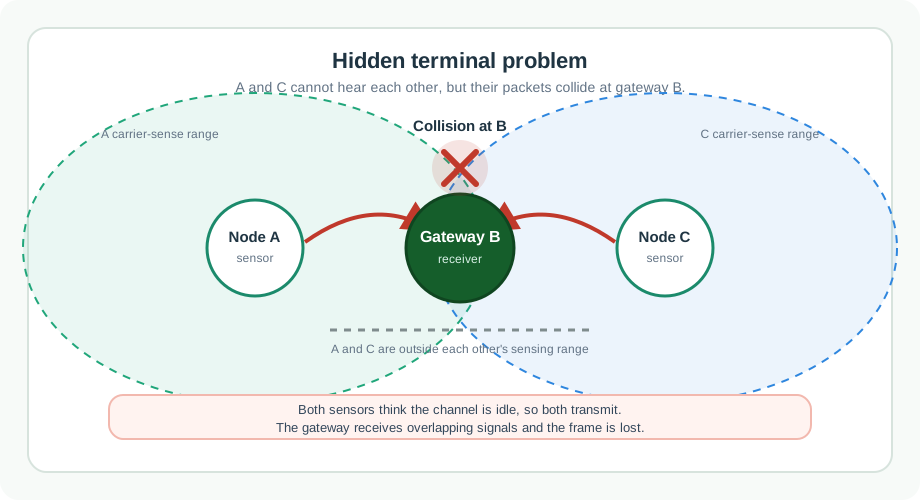
Each sensor sits at the centre of its own range, and the gateway sits where the two ranges overlap. Node A and node C are outside each other’s circle, so neither can hear the other. Both can reach gateway B. That geometry is the whole failure. Each sensor checks the channel, finds it idle, and is correct about what it can hear. Both transmit, the signals overlap at the gateway, and the frame is lost. Figure 10.2 is a warning about where the test is run. Carrier sensing happens at the sender, but collisions happen at the receiver.
Minimum retest record: record the traffic pattern and physical layout used for the choice; measure delivery after the retry limit, tail latency, retry or CCA-busy behaviour, and radio-on energy; retest after placement, density, traffic, schedule, or firmware changes.
10.3.1 Practitioner: Compare Mitigations
A warehouse has periodic inventory sensors behind metal shelving. The average channel load is low, but sensors on opposite aisles cannot hear each other and both can reach the gateway. Basic CSMA/CA without receiver-coordinated reservation may still lose frames because each hidden sensor believes the channel is idle. There are three defensible responses.
Improve Visibility
Move gateways, add gateways, or adjust antennas so more nodes can hear each other and the coordinator has cleaner reception.
Add Handshakes
Use RTS/CTS when control-frame overhead costs less than hidden-terminal retransmissions.
Schedule Traffic
Use slots when reports are predictable and deterministic delivery matters more than immediate unscheduled access.
The hidden-terminal problem is one of geometry, so the fix has to travel through the one node that hears both senders. Figure 10.3 walks that exchange through in five steps.
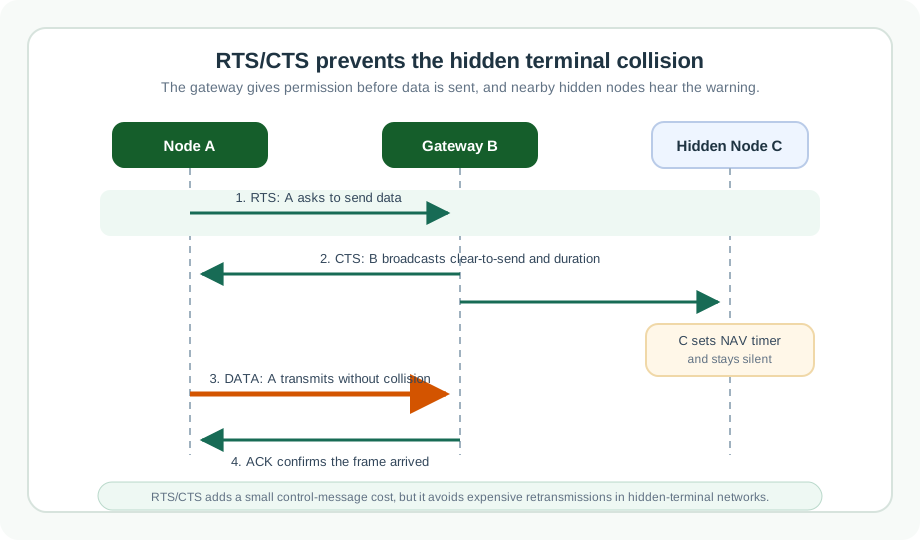
The setup line at the top of Figure 10.3 is the whole reason the handshake exists: two senders cannot hear each other, but both reach the same gateway. Step one has the sender ask for a stated length of airtime. Step two does the real work, because the gateway answers out loud, so the hidden node hears a grant it could never have worked out by listening for the sender. In step three that node starts a timer and stays quiet, which is virtual carrier sensing. Data and an acknowledgement follow. The closing lines keep the claim honest: the request itself can still collide, and nothing here removes interference or a weak receiver.
In IEEE 802.11, an optional RTS/CTS exchange can reserve the medium before a unicast data frame. Stations that hear the reservation information defer for the advertised duration through virtual carrier sensing, represented by the Network Allocation Vector (NAV). This handshake descends from MACA (Multiple Access with Collision Avoidance) and its refinement MACAW, media-access designs built specifically for wireless links that cannot rely on wired-style collision detection.
RTS/CTS can reduce some hidden-terminal collisions, but control overhead, control-frame collisions, interference geometry, and the configured frame-size threshold mean that it is not a universal cure.
10.4 MAC Collision and Timing Bounds
This section: MAC Collision and Timing Bounds
Under the hood, a MAC protocol is a set of timing and state rules. A contender may sense the channel, choose a random backoff, reserve the medium with control frames, send a data frame, wait for an acknowledgement, expand a retry window, or sleep until a scheduled slot. Each rule affects latency, energy, and how failures appear in logs.
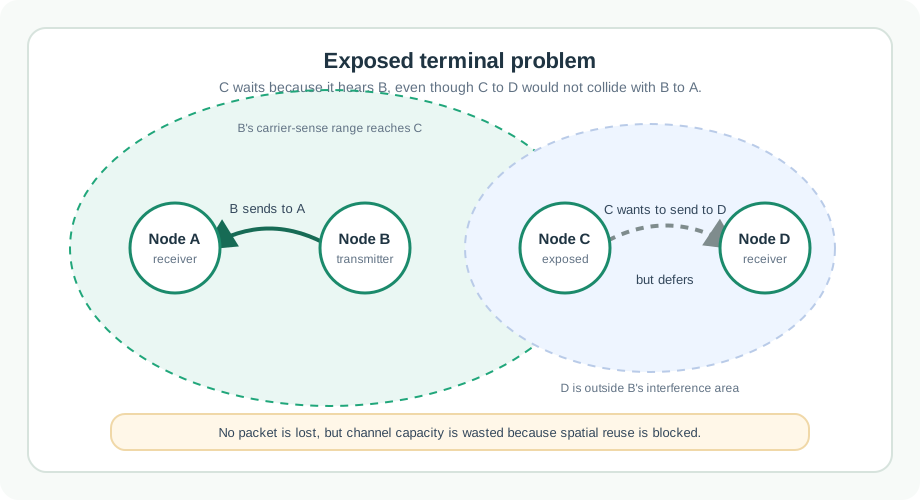
Do not treat theoretical utilization as production proof. Pure ALOHA has an ideal maximum near 18% channel throughput and slotted ALOHA near 37%. These analytical maxima assume fixed-duration frames, independent Poisson transmission attempts, no capture effect, and no external channel loss; they are reference points, not deployment targets. CSMA/CA can perform much better at moderate load, but hidden terminals, exposed terminals, capture effects, noisy receivers, and acknowledgement loss change the field result.
Failure mode: reporting only channel utilization. A network can show low utilization and still drop critical frames if the radio geometry creates hidden terminals or if sleeping nodes miss their receive window.
Review Checklist
Collision Boundary
Name which collisions the design prevents, which it merely retries, and which it cannot observe directly.
Timing Boundary
Record worst-case access delay, retry delay, sleep window, and any synchronization dependency.
Energy Boundary
Separate transmit time, receive listening, overhearing, control frames, retry behavior, and resynchronization cost.
Retest Trigger
Retest after gateway moves, density changes, firmware alters backoff, or field logs show rising retries.
10.6 Summary
This section: Summary
- MAC protocols decide when a local device may use a shared medium.
- CSMA/CA fits moderate contention when carrier sensing sees enough of the local channel.
- TDMA or scheduled access fits predictable traffic, bounded timing, and duty-cycled devices that can follow a schedule.
- ALOHA-style access can be acceptable for sparse telemetry but degrades quickly as offered load increases.
- Hidden terminals cause receiver-side collisions; exposed terminals waste spatial reuse.
- Production MAC decisions need evidence about traffic, reachability, timing, energy, retries, and retest triggers.
10.7 Key Takeaway
This section: Key Takeaway
Choose a MAC protocol from measured channel behavior, not from a protocol label. The defensible design states what the channel-access rule prevents, what it retries, what it cannot see, and when operators must retest the assumption.
10.8 See Also
This section: See Also
Find help
3 reviewed answers.
Where should I start in a module?
Open the module page from the sidebar to see its chapters in order. Use the module map to return to a topic you need.
Modules and pathsReviewed
What can I try when a project does not work?
Check the symptom, then work through the diagnostic steps. Keep the error message and the smallest example that reproduces it.
When you are stuckReviewed
How do interactive examples work?
Use the interactive guide to check how examples and simulations work before changing your project.
Interactive examples guideReviewed