37 Wide-Area Access: LPWAN and Cellular
More
Depth: Practitioner
Progress saves as you read. Mark sections complete as you go; your progress appears in the sidebar.
37.1 Start With Reach Before Speed
This section: Start With Reach Before Speed — Picture a soil probe that sends four small readings each day.
Picture a soil probe that sends four small readings each day. It sits far from the farm office and must run for years. A fast link may waste power. A long-range link may fit if it can carry the small job with clear support.
A payload is the useful data carried in a message. Latency means the time from sending work to receiving the needed result. A gateway is a device or service that joins the field radio path to a wider network. LoRaWAN is a low-power wide-area network in which gateways forward radio messages to a network service. Start with the job. Name message size, send rate, reply need, movement, battery goal, and site owner.
Use a short choice route:
- How far must the link reach?
- How much data is sent?
- How often is it sent?
- How soon must it arrive?
- Must the device hear quick commands?
- Does it move between sites?
- Who owns local network gear?
- Which service covers the real site?
- Can the battery afford failed tries?
- What change forces a new test?
Long reach does not mean endless reach. The final case, soil, walls, trees, noise, and service rules still matter. Practitioner builds the coverage and message record. Under the Hood covers link budget, air-time limits, mobile service, and power states. Those details can overturn a paper choice. They cannot replace proof at the installed site.
LPWAN and cellular choices begin with reach, ownership, power, and service model before raw throughput. A tiny sensor that reports once an hour and a mobile gateway that streams diagnostics do not need the same wide-area network.
Follow the workload first: payload size, reporting interval, latency tolerance, battery target, coverage evidence, and who operates the network. The right technology is the one whose constraints match that record.

37.2 Overview: Wide-Area IoT Trades Bandwidth For Reach
LPWAN and cellular IoT links are chosen when sensors must reach beyond a building, campus, or Wi-Fi cell while using small batteries. They are not just "longer Wi-Fi." They use different assumptions: small payloads, long sleep periods, constrained downlink, operator or gateway coverage, and careful link-budget planning.
The first design question is not which radio is newest. It is what the application really needs: reporting interval, payload size, battery target, mobility, ownership model, coverage proof, regulatory limits, and acceptable latency.
Unlicensed LPWAN and cellular IoT solve the wide-area problem in different ways. A private LoRaWAN deployment may let the owner place gateways where the sensors actually are, but it also makes gateway siting, network-server operation, shared-spectrum behavior, and regional airtime limits part of the design. NB-IoT and LTE-M move much of that infrastructure into a mobile operator network, but they add SIM or eSIM provisioning, subscription terms, roaming behavior, module certification, and operator lifecycle as real dependencies. Neither family is automatically better. Sparse meters, mobile trackers, remote alarms, firmware-update paths, and gateway backhauls each stress a different part of the trade space.
The practical distinction is therefore not only range. Ask whether the device needs confirmed delivery, frequent downlink, mobility between cells or gateways, large bursts, indoor penetration, private network ownership, or years of unattended battery life. A link that is excellent for four tiny readings per day can be wrong for streaming diagnostics or interactive control, even if both use the phrase "wide area."
The comparison at Figure 37.1 turns the selection step into an evidence check. Read one row at a time: site reach, data need, then the complete power cycle.
The empty cells in Figure 37.1 are deliberate. This chapter does not provide one universal range, data-rate, or current-draw number for every candidate, and a datasheet range or transmit-current figure would not prove the installed service anyway. The worked LoRaWAN values are tied to the chapter’s named model assumptions; the other cells preserve the evidence boundary instead of inventing comparable-looking numbers. The decision record remains the same: reporting interval, payload size, battery target, mobility, coverage proof, ownership model and acceptable delay. Until those are recorded, a wide-area choice is a preference rather than a design.
In Figure 37.2, look for the row where the four options actually disagree.
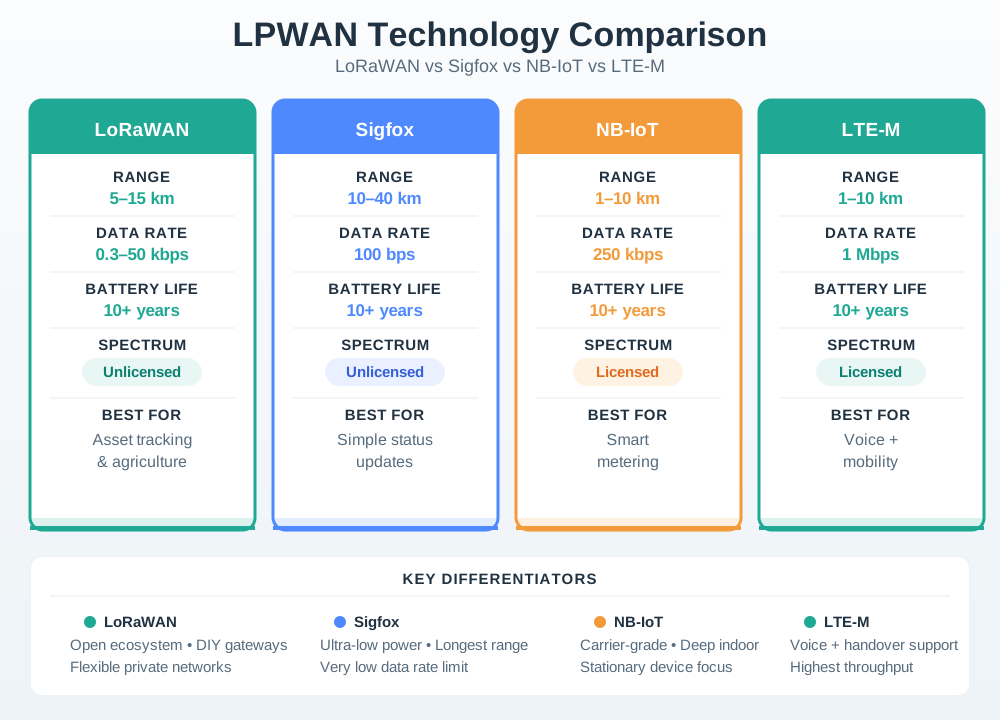
Read the battery row of Figure 37.2 first: all four claim a decade of life as vendor design targets, so that row cannot decide the choice. The rate row runs from about 100 b/s at one end to roughly 1 Mb/s at the other. LoRaWAN and Sigfox use shared, unlicensed spectrum, but that does not mean either service is automatically privately deployable: LoRaWAN can use owner-operated gateways, whereas Sigfox service normally depends on its operator network. NB-IoT and LTE-M use licensed cellular spectrum and generally require an operator agreement. The panel’s distinguishing strengths, including mobility, downlink, and service ownership, decide which option fits; check site coverage and the device power cycle too.
Short-Range Mesh
IEEE 802.15.4 families such as Zigbee, Thread, and WirelessHART fit local low-power networks where mesh or scheduled operation matters more than kilometre-scale reach.
Unlicensed LPWAN
LoRaWAN and similar systems can support private or community infrastructure, but must live within shared-spectrum rules and duty-cycle or airtime limits.
Cellular IoT
NB-IoT and LTE-M use licensed operator infrastructure, which can simplify coverage in served areas while adding subscription, module, roaming, and lifecycle dependencies.
Selection doctrine: choose the radio family only after the workload is bounded. A daily meter read, a mobile asset tracker, a firmware-updated field gateway, and a low-latency factory controller are different access problems.
37.3 Practitioner: Build A Coverage And Cadence Record
A practical LPWAN or cellular decision should leave a record that a field team can test: where the devices are, how often they transmit, how much data moves in each direction, who owns the network, what coverage evidence exists, and what happens when the device cannot reach the network.
Build the record from representative sites, not from the easiest demonstration point. Include the best, typical, and worst install locations; the normal message; the largest exceptional message; the expected acknowledgement pattern; and the fallback when a report is missed. For battery devices, keep one measured current trace that includes wake, attach or join, transmit, receive-window behavior, retry, and return to sleep. For managed networks, keep the provisioning path, owner, renewal date, and support route beside the radio evidence.
Use Figure 37.3 to see which gains and losses create an LPWAN range claim.
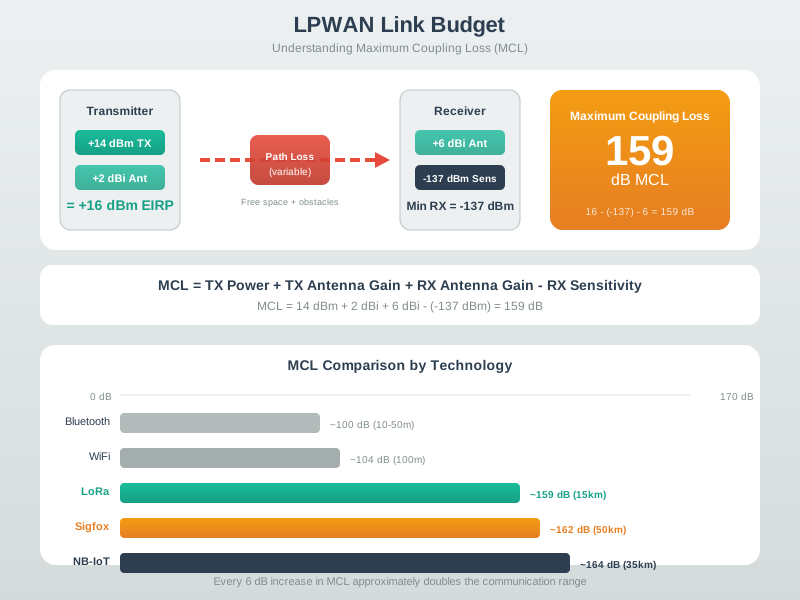
Begin with send power and add antenna gain. Subtract loss in the feed line, plugs, path, and site. Then compare the power that should arrive with the receiver limit. Maximum coupling loss is the total loss the link can bear; it is not a distance. Land, walls, antenna height, gateway spacing, and fades decide how fast that budget is spent. The spare margin must cover doubt and the service goal. Keep every term in decibels, its source, the site model, and field test results. Do not copy a range from the data sheet.
Figure 37.4 is a record to be filled in, so read each block for the evidence it demands rather than the topic it names.
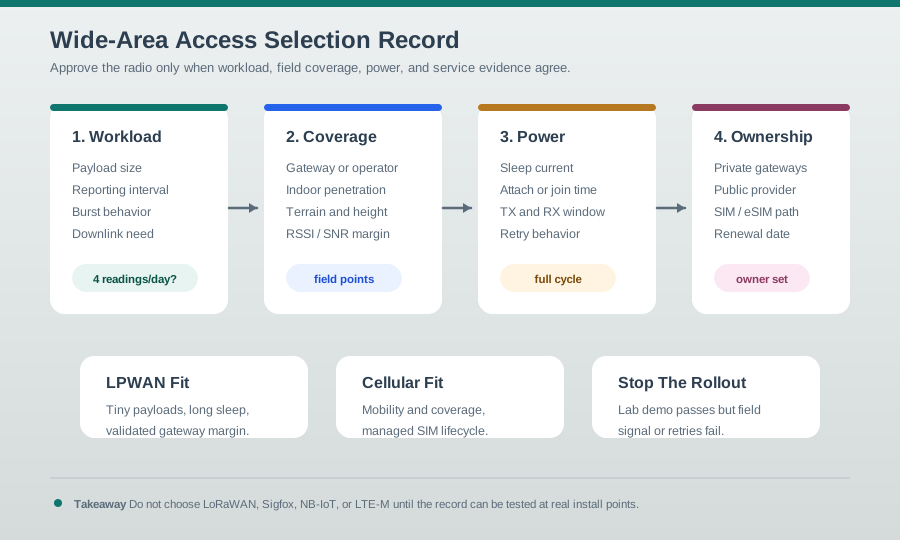
The four blocks of Figure 37.4 run in the order the evidence has to be gathered. The first describes the traffic the device will really generate, including the rare large message and any need to be reached from the network. The second turns coverage from a claim into measurements taken at the awkward install points, not the convenient one. The third asks for a full duty cycle, because joining and retrying often cost more energy than sending. The fourth names who owns the network and when the arrangement expires. Only after all four does the figure offer a verdict, and one of the three verdicts is to stop. A demonstration that passes on a bench and fails in the field is a result, not a setback.
Do not approve a wide-area access choice from a lab demo alone. Field signal, retry behavior, payload cadence, and provisioning friction often dominate the real deployment.
37.4 Under The Hood: Radio Physics Meets Service Model
Wide-area IoT is a stack of constraints. The radio layer controls link budget, airtime, interference, and energy per message. The service layer controls network ownership, SIM or device provisioning, roaming, downlink timing, firmware-update path, and long-term continuity.
The radio side starts with a link budget, not with an advertised range number. Transmit power, antenna gain, receiver sensitivity, path loss, building loss, terrain, foliage, interference, and fade margin decide whether a packet can be heard at the gateway or base station. Lower data rates can improve sensitivity, but they keep the transmitter on air for longer. That longer airtime can consume battery, reduce channel capacity, increase collision exposure, and run into regional duty-cycle or fair-use limits. A design that looks efficient for one sensor can fail when thousands of devices wake near the same reporting window.
The service side is just as technical. LoRaWAN classes define different receive-window and downlink expectations; cellular IoT devices may use features such as Power Saving Mode or extended Discontinuous Reception to trade reachability for battery life. Those settings affect command latency, firmware-update feasibility, and troubleshooting. Provisioning also becomes part of the system: keys, SIM profiles, roaming permissions, operator coverage, gateway backhaul, and network-server ownership decide whether the radio path remains usable after rollout. A wide-area design needs radio and service evidence tied to real sites, payload schedules, and support owners.
Read Figure 37.5 from the bottom to see how much of a short-range design the radio standard actually settles.
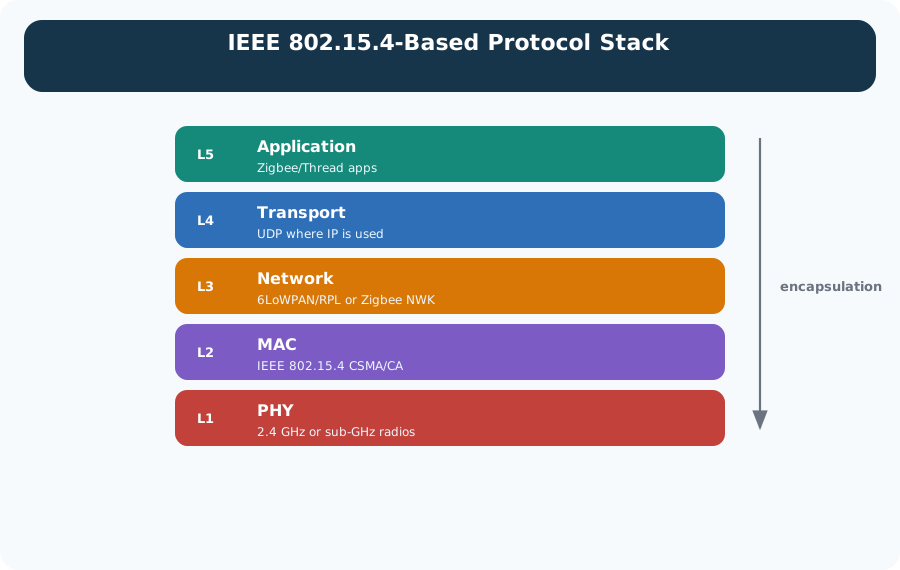
IEEE 802.15.4 defines PHY and MAC options, including CSMA/CA access in common modes. Zigbee and Thread build different network stacks above it. An IP-based Thread stack can use 6LoWPAN, IPv6, and UDP for application traffic; Zigbee uses its own network and application layers. Read Figure 37.5 as alternative stack choices, not all layers of one product. Local mesh or scheduled access still needs a separate wide-area path when the application requires one.
Read the four cards in Figure 37.6 as added options, not as replacements for each other.
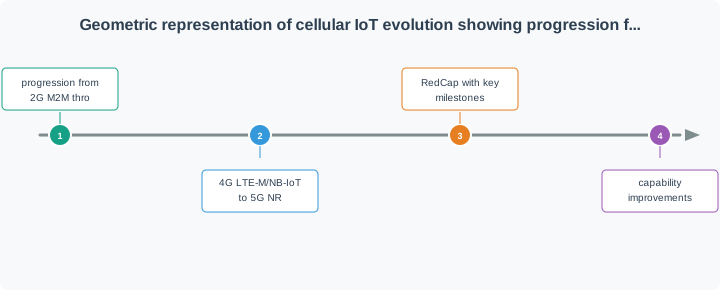
Read the cards from left to right. The first is early machine traffic on 2G and 3G: devices reused ordinary mobile modems, so coverage was wide but energy demand and sunset risk were high. LTE-M answers part of that with mobility, useful downlinks and lower-power modes. NB-IoT answers a different part, favouring small messages, deep coverage and long sleep. The last card holds the 5G categories for dense and reduced-capability devices. The footer under Figure 37.6 is the line to keep. Each card still has to be checked by region, operator, device and date, because a category in a standard is not a service at your site.
Read Figure 37.7 column by column, since each column is a different promise.
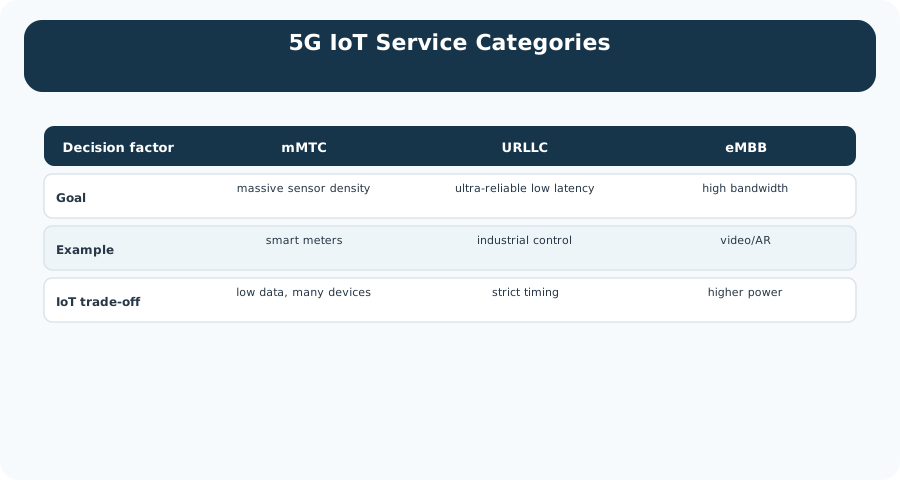
The mMTC column targets many low-rate devices such as meters; density typically buys low data rates per device. URLLC targets stringent latency and reliability for industrial control, with tighter timing constraints. eMBB targets higher user data rates for video, at a higher power cost. These are service objectives, not automatic properties of every 5G attachment. Read Figure 37.7 as three design goals, then verify which capability is available at the site.
Airtime Pressure
Low data rate increases time on air. That can help sensitivity but consumes duty-cycle budget, gateway capacity, and battery energy.
Downlink Boundaries
Battery devices often sleep. Confirm when a device can receive commands, acknowledgements, or updates before relying on downlink behavior.
Lifecycle Risk
Operator sunsets, subscription changes, regional band differences, SIM logistics, and provider continuity can matter as much as radio performance.
37.5 Summary
This section: Summary — LPWAN and cellular IoT access choices are workload and lifecycle decisions.
LPWAN and cellular IoT access choices are workload and lifecycle decisions. Short-range mesh, private LPWAN, public LPWAN, NB-IoT, LTE-M, and 5G service categories each optimize different combinations of range, rate, latency, power, ownership, mobility, and coverage. A defensible selection records the payload cadence, link margin, power profile, network ownership, provisioning path, and field evidence.
37.6 Key Takeaway
This section: Key Takeaway
Choose wide-area IoT access from evidence, not slogans: prove the coverage, airtime, battery, downlink, provisioning, and lifecycle assumptions at representative deployment sites.
37.7 See Also
This section: See Also
Wireless Access: Wi-Fi
Compare high-throughput local wireless access with low-power wide-area alternatives.
Network Physical Classification
Place LPWAN and cellular choices beside other physical access media.
Link Budget and Coverage Planning
Turn range claims into received-power, margin, and field-validation records.
Free-Space Path Loss
Build the open-air baseline before adding terrain, building, foliage, and fade losses.
Find help
3 reviewed answers.
Where should I start in a module?
Open the module page from the sidebar to see its chapters in order. Use the module map to return to a topic you need.
Modules and pathsReviewed
What can I try when a project does not work?
Check the symptom, then work through the diagnostic steps. Keep the error message and the smallest example that reproduces it.
When you are stuckReviewed
How do interactive examples work?
Use the interactive guide to check how examples and simulations work before changing your project.
Interactive examples guideReviewed