26 Bandwidth and Channel Capacity
More
Depth: Practitioner
Progress saves as you read. Mark sections complete as you go; your progress appears in the sidebar.
26.1 Start With Capacity as a Shared Resource
This section: Start With Capacity as a Shared Resource — Firmware is the software stored on a device.
Firmware is the software stored on a device. Modulation is the way data changes a radio signal. A payload is the useful data inside a message. A protocol is a shared set of message rules.
Picture one hundred meters that send at the same minute. Add the useful message bits first. Then add headers, security, replies, retries, joining traffic, and the return path. Compare that busy minute with the shared link, not with a daily average.
Now test a clash and a weak link. A high stated rate can still deliver little useful data when devices wait or resend. A lower rate may reach farther, but it keeps the channel busy for longer.
This meter story cannot prove useful delivery from a rate label. It does not choose channel access, retry limits, or spare room for every site. Those need traffic traces and radio tests.
Use the Practitioner sections to build the traffic and delivery budget. Use Under the Hood for capacity, signal form, clashes, and useful-data math. The deeper work qualifies the headline rate; it does not replace the busy-window check.
Build the minute in small steps. Count the meters. Count each report. Count its useful bytes. Add all headers. Add each reply. Add join traffic. Add likely retries. Add the return path. Put alarms first. Put updates last. Spread routine sends. Start a burst. Watch wait time. Watch lost work. Leave spare room. Repeat on a weak link. Keep the useful result, not the label.
Bandwidth is the ceiling, not the useful delivered value. Headers, retries, collisions, scheduling gaps, and weak links all reduce what applications actually receive.
For IoT planning, start with the messages the estate must carry and the deadlines they must meet. Then compare that demand with channel capacity, overhead, and contention so the design has evidence before deployment.
26.2 Overview: Capacity Is Not the Same as Useful Delivery
Here, bandwidth means the link's nominal data rate in bits per second; radio-frequency bandwidth is instead measured in hertz. Usable channel capacity is limited by radio conditions, modulation, coding, channel access rules, and interference. Throughput is what actually gets delivered after contention, loss, acknowledgements, and retries. Goodput is the useful application payload left after protocol overhead.
IoT design needs all four terms. A sensor that sends a small reading every few minutes may need little average bandwidth, while a shared wireless channel still needs enough airtime margin for bursts, retries, acknowledgements, and neighboring devices using the same medium.
The traffic shape usually matters more than the headline rate. Periodic telemetry is predictable, event bursts are short and concentrated, firmware updates are rare but large, and control loops may care more about delay than volume. A link that looks safe on a daily average can still feel full during an alarm storm, power restoration, shift change, or gateway reconnect.
Ask which of these traffic shapes your estate really carries, then read Figure 26.1 for the demand each one makes.
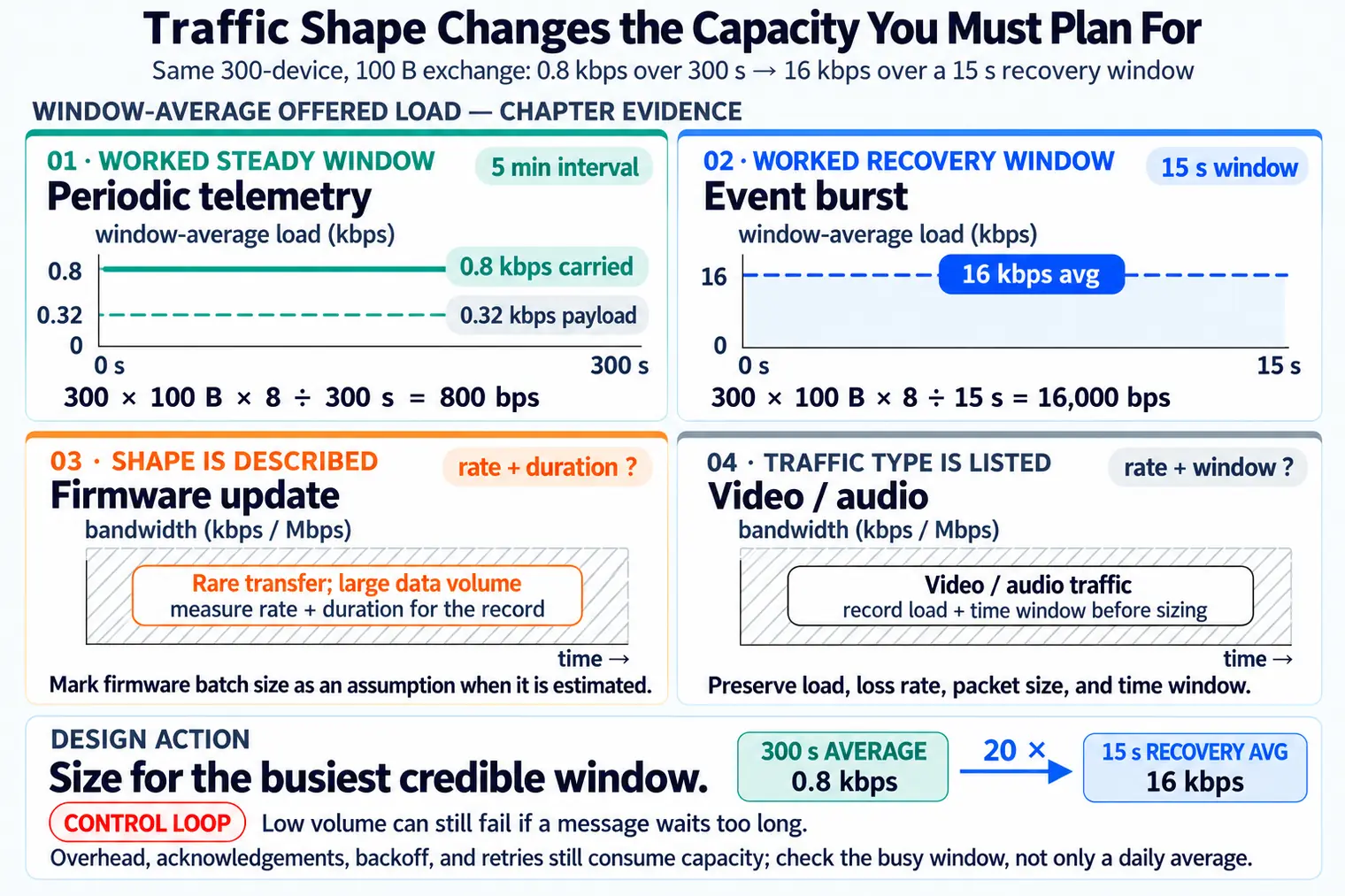
Read the boxes from the calm case outward. Periodic telemetry sends small, predictable messages, and a daily average describes its volume well when reports are staggered. Event bursts are different: alarms arrive together and create a short peak. A firmware update is rare, but it moves a lot of data at once. A control loop may send very little and still fail if the message waits too long. So Figure 26.1 lists four separate tests of the same link, not four sizes of one test. The closing note gives the rule this section defends: size the link for its peak, not for its average.
Use capacity numbers as a filter, not as a final decision. First ask whether the medium can carry the application payload during the busiest credible window. Then ask how much of that capacity is consumed by headers, encryption, channel access, retransmissions, route or join traffic, and return-path messages. The result is a delivery budget, not just a larger number on a datasheet.
That delivery budget also keeps options honest: a low-rate link can be correct for sparse telemetry, while a high-rate link can still fail a synchronized burst if the channel access and retry behavior are ignored.
The chart at Figure 26.2 places two sensor demands on the same scale as three link options, so the spare room in each pairing becomes visible.
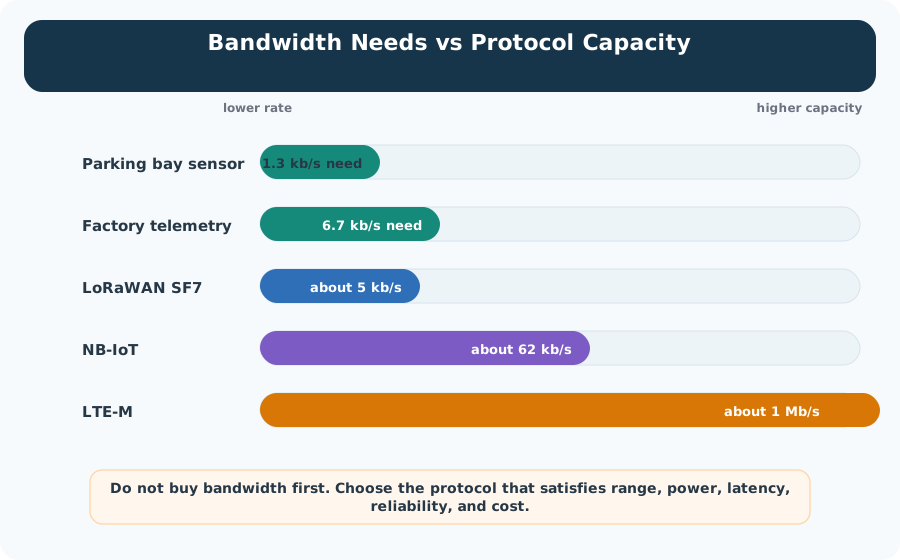
Start at the low-rate end. The chart’s illustrative parking bay sensor asks for about 1.3 kb/s, and its factory telemetry example asks for about 6.7 kb/s. Now look at the links. LoRaWAN at SF7 (125 kHz) offers roughly 5.5 kb/s of nominal bitrate (the chart rounds to about 5 kb/s), above the first demand but below the second; protocol overhead, shared airtime, and regional limits still decide whether the parking workload fits. The chart’s NB-IoT and LTE-M rates sit above both example demands. That difference is potential headroom, not guaranteed application capacity. The closing line in Figure 26.2 is the warning to keep: rate is one test out of five. Range, power, delay, reliability and cost decide the rest.
Bandwidth
The advertised or configured rate of a link. It is a ceiling, not a promise that every payload byte arrives as useful application data.
Throughput
The delivered rate after protocol behavior, channel access, retransmissions, and scheduling have taken their share of the link.
Goodput
The application payload rate after headers, acknowledgements, retries, keepalives, encryption overhead, and management traffic are excluded.
More bandwidth can carry more simultaneous data, but it does not automatically reduce propagation delay, wake-up delay, queueing delay, radio scheduling delay, or application response time.
26.2.1 What Makes a Link Feel Full
26.3 Practitioner: Build a Capacity Record Before Selecting a Link
A useful capacity record starts from device behavior. Count devices, payload bytes, reporting interval, event bursts, protocol overhead, acknowledgements, retries, and growth margin. Then compare the result with the link's usable capacity and the medium access rules.
The formula is a starting point, not the whole answer. It estimates average offered load. A release-quality record also asks when messages arrive, whether many devices transmit at once, how much protocol overhead each message carries, whether the return path carries acknowledgements or commands, and how the link behaves under loss.
For an illustrative single-channel exchange, 300 devices sending a 40-byte application reading every 5 minutes produce 300 x 40 x 8 / 300 = 320 bps of payload average. If the real exchange is closer to 100 bytes after framing, addressing, security, acknowledgement, and supervision overhead, the average carried by the link is about 800 bps before retries (preamble and inter-frame gaps not counted). That number is still small, but it is a better starting record than the payload-only estimate.
Now change only the timing. If the same 300 devices reconnect after an outage and send those assumed 100 on-channel bytes inside a 15-second recovery window, the offered load becomes 300 x 100 x 8 / 15 = 16,000 bps. At an assumed 250 kbps PHY rate for those bytes, their serialization alone occupies 0.96 seconds of channel time before preambles, clear-channel checks, inter-frame time, backoff, and retries. That is why the record must show both the normal interval and the busiest plausible window.
When a value is estimated rather than measured, mark it as an assumption and name the retest trigger. Payload size, firmware batch size, retry rate, and command frequency are common places where early records become stale.
Use Figure 26.3 to trace how contention and protocol work reduce nominal link capacity to useful payload.
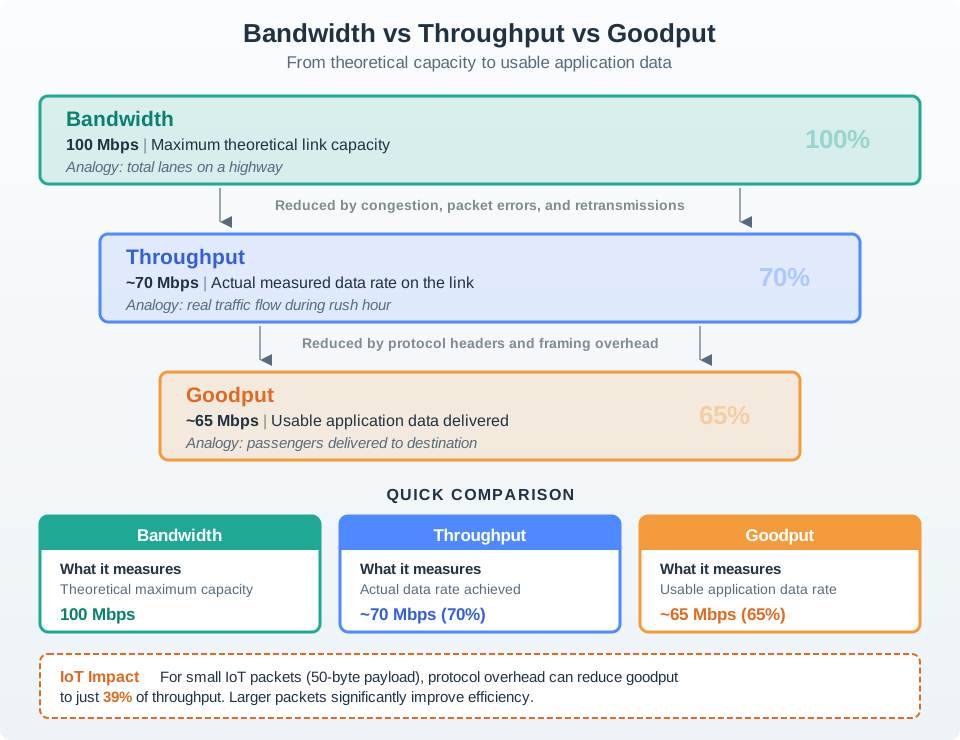
Start with bandwidth as the medium’s nominal capacity, then subtract time lost to contention, inter-frame gaps, control traffic, and retransmission to obtain measured throughput. Remove headers, duplicates, and application-rejected data to reach goodput. If a 1 Mbit/s radio delivers 700 kbit/s of frames and 500 kbit/s of new payload, throughput uses 70% of capacity and goodput uses about 71% of throughput. Preserve load, node count, loss rate, packet size, and time window so the comparison explains the deployment rather than only the data sheet.
26.3.1 Capacity Record Checklist
26.3.2 Worked Sizing Record
Do not turn a rough traffic estimate into a price or lifetime promise. If costs, subscription tiers, duty-cycle rules, or battery life matter, verify them from the selected vendor, region, radio settings, and measured payload schedule.
26.4 Under the Hood: Airtime Turns Average Load into Collision Risk
On a shared medium, a packet does not consume only its payload time. It consumes preamble, headers, inter-frame spacing, acknowledgements, backoff, retransmission opportunities, and sometimes channel-scan time. The practical question is not just "How many bits per second?" It is "How much airtime is occupied when the medium is busiest?"
Collision risk rises when independent transmitters choose overlapping airtime on the same channel and cannot coordinate well enough to avoid each other. Hidden nodes make this worse: two devices may both believe the channel is clear because they cannot hear each other, while the gateway receives overlapping signals.
Airtime math makes the risk visible. In this illustrative case, at 250 kbps a 100-byte frame contains 800 bits, so its data portion takes about 3.2 ms before preamble, turnaround time, acknowledgement handling, contention windows, or retransmission. If 100 devices try to report in the same second, those data portions alone occupy about 320 ms of channel time. If retries add 20 more full-frame transmissions, the data-portion total becomes about 384 ms, before the random waits that spread or delay those attempts.
That does not mean the link is automatically overloaded. It means the release check must match the access method. A scheduled link needs slot capacity and clock discipline; a CSMA/CA link needs carrier-sense assumptions, backoff behavior, hidden-node evidence, and retry limits; an ALOHA-like link needs a low enough offered load that collisions remain tolerable. The under-the-hood evidence should explain which of those assumptions protects the busiest window.
A good review therefore records both the physical rate and the access rule. Without both, teams can confuse a raw-data calculation with a channel-availability calculation.
Contention systems
CSMA/CA-style systems listen before transmitting and back off when the channel looks busy. They work well when devices can hear enough of each other and offered load is moderate.
Scheduled systems
TDMA or centrally scheduled links reserve time or frequency resources. Scheduling can reduce collisions, but it adds coordination state and timing discipline.
Low-coordination systems
ALOHA-like access accepts some overlap and relies on sparse traffic, diversity, or retries. It is attractive only while airtime demand remains low enough.
26.4.1 What Reduces Usable Capacity
A capacity check is credible when it measures or models the busy window, not only the quiet average. A narrow-band sensor link can be correct for sparse telemetry, while the same link can fail if all devices report together or retry together after an outage.

26.5 Summary
This section: Summary
- Bandwidth is nominal capacity; throughput and goodput are the delivered and useful portions after overhead, contention, and loss.
- The baseline IoT sizing formula is devices x bytes per message x 8 / interval seconds, but release decisions also need burst timing, overhead, return-path traffic, and retry behavior.
- Shared-medium capacity is governed by airtime during the busy window, not only by average payload volume.
- Collision risk rises when devices contend for the same channel, cannot sense each other, or retry together after a busy period.
26.6 Key Takeaway
This section: Key Takeaway
Right-size IoT links from measured or defensible traffic records: average payload load, burst windows, protocol overhead, airtime, retries, and collision behavior. A high headline data rate is not a substitute for a capacity record.
26.7 See Also
This section: See Also
Find help
3 reviewed answers.
Where should I start in a module?
Open the module page from the sidebar to see its chapters in order. Use the module map to return to a topic you need.
Modules and pathsReviewed
What can I try when a project does not work?
Check the symptom, then work through the diagnostic steps. Keep the error message and the smallest example that reproduces it.
When you are stuckReviewed
How do interactive examples work?
Use the interactive guide to check how examples and simulations work before changing your project.
Interactive examples guideReviewed