8 LoRa Modulation and Spreading Factors

More
Depth: Practitioner
Progress saves as you read. Mark sections complete as you go; your progress appears in the sidebar.
-

What could help the short message cross the weak link?
8.1 Start Simple
This section: Start Simple — Picture a field sensor whose short message barely reaches the receiver.
Trade One Weak-Link Gain Against Airtime
Picture a field sensor whose short message barely reaches the receiver. Making the radio easier to hear may keep it on air much longer, which costs energy and shared channel time. The first comparison changes one setting and measures both effects.
Bandwidth means the range of radio frequencies used to carry a signal. Modulation means changing a radio signal over time to carry information. A payload means the useful reading or command inside a message.
Record spreading setting, bandwidth, error protection, payload size, signal margin, airtime, energy, and receiver result. Weaken the path, repeat the packet, change one setting, and restart the receiver. Compare successful delivery with total channel cost.
This runway does not prove coverage, legal compliance, or fleet capacity from one bench link. The deeper sections explain chirps, spreading, coding, data rate, airtime, sensitivity, regional limits, and measured trade-offs.
Imagine turning one radio knob and getting two effects at once: a weaker signal may become readable, but the message occupies the channel for longer. That is the central LoRa modulation tradeoff. Spreading factor, bandwidth, coding rate, payload size, and regional limits are not isolated facts. They become airtime and link-margin evidence that the network must be able to defend.

Overview: LoRa Modulation Turns Radio Settings Into Airtime Evidence
LoRa is the physical radio modulation used by LoRaWAN. It sends symbols as chirps: controlled sweeps across a channel span. LoRaWAN adds the network behavior around that radio, but modulation review starts with radio settings, payload size, observed link evidence, and time on air.
The beginner mistake is choosing the highest spreading factor by habit. Higher spreading factors can help weak links, but they also keep the channel occupied longer. A defensible choice records why the setting fits the device group, message schedule, gateway evidence, regional profile, and ADR handoff.
If you only need the intuition, this layer is enough: spreading factor is not a quality slider. It is a tradeoff between link margin and airtime, and the release decision needs evidence for both sides.
A simple scale check keeps the tradeoff concrete. With a 125 kHz LoRa bandwidth, symbol time is about 1.024 ms at SF7 because 2^7 / 125,000 seconds is 0.001024. At SF12 it is about 32.768 ms, or 32 times longer before payload, preamble, header, coding-rate, and retry details are counted. If 200 sensors all default to the slowest setting, the release problem is no longer only "can one device be heard"; it becomes whether the shared channel, gateway duty, retry pattern, and application schedule still fit.
Inspect Figure 8.1 to see how radio settings turn into time on air. First trace the calculated SF10 chirp across a 125 kHz channel, then compare the symbol-duration bars from SF7 to SF12 at the same bandwidth.
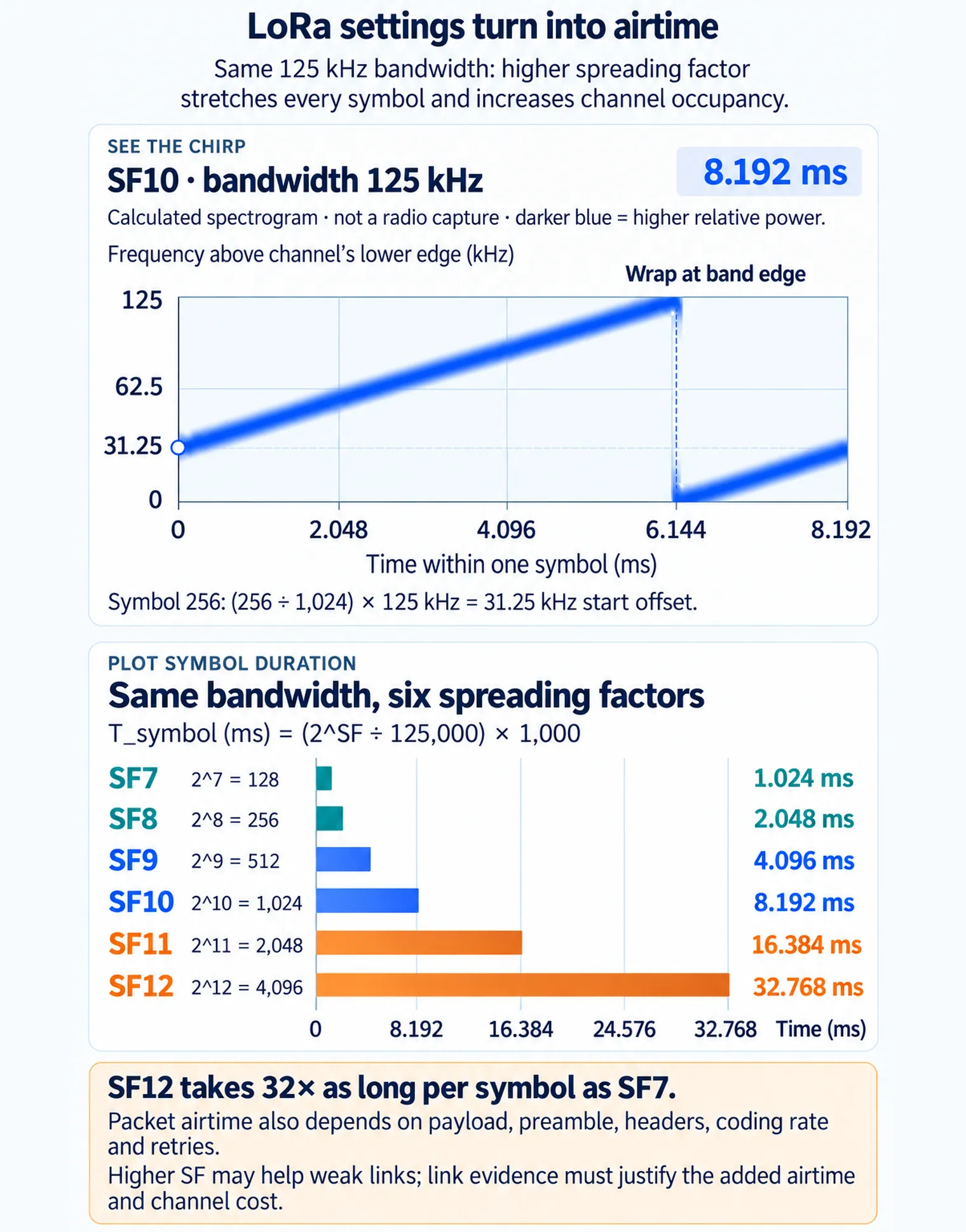
In See the chirp, symbol 256 begins 31.25 kHz above the lower channel edge, wraps at 6.144 ms and lasts 8.192 ms. In Plot symbol duration, each increase in spreading factor doubles the symbol time: SF7 takes 1.024 ms and SF12 takes 32.768 ms, a 32-fold difference. These are calculated symbol durations, not measured packet airtimes. Payload, preamble, headers and coding affect a complete packet; retries add further channel use. The release review still needs link evidence to justify the airtime cost and an explicit ADR policy.
LoRaWAN spreading factor narrated tour
Play silently with captions on provisional storyboard timing; narration audio is pending. Production pacing is not protocol time. Choose Reduced motion for a complete still at each beat.
Play the tour to open the workbench. Pause, replay a beat, or read the full transcript below. Some situations cannot be shown by this teaching model; those beats keep the existing frame and provide captions only.
Full transcript — LoRaWAN spreading factor (8 beats)
B1 — Field sensor tradeoff
You are the engineer choosing radio settings for two hundred field sensors. A short message barely reaches the receiver. Making that message easier to hear could help, but longer transmissions cost energy and shared channel time. How much extra time does a higher spreading factor cost?
Model caption: Your task: choose radio settings for 200 field sensors. Weak-signal reception competes with energy and shared channel time.
B2 — Chirps and symbols
The radio carries symbols using chirps, controlled sweeps across a span of frequencies. Bandwidth names that span. Spreading factor controls how long each symbol lasts. Longer symbols can help a receiver recover a weak signal, while keeping the channel occupied for longer.
Model caption: A chirp sweeps across a frequency span. Bandwidth is that span; spreading factor controls symbol duration.
B3 — SF7 calculation
For your sensors, hold bandwidth at one hundred twenty-five kilohertz. Start with spreading factor seven. Two raised to the seventh power gives one hundred twenty-eight. Divide one hundred twenty-eight by one hundred twenty-five thousand to get zero point zero zero one zero two four seconds per symbol.
Model caption: 125 kHz = 125,000 Hz. Two to the seventh power = 128; 128 ÷ 125,000 = 0.001024 seconds per symbol.
B4 — Change to SF12
In milliseconds, that is one point zero two four per symbol. Keep the same bandwidth and change to spreading factor twelve. Two raised to the twelfth power gives four thousand ninety-six. Divide four thousand ninety-six by one hundred twenty-five thousand to get zero point zero three two seven six eight seconds.
Model caption: SF7: 1.024 ms. SF12 at the same bandwidth: two to the twelfth power = 4,096; 4,096 ÷ 125,000 = 0.032768 seconds = 32.768 ms.
B5 — Thirty-twofold symbol time
That is thirty-two point seven six eight milliseconds per symbol. Divide thirty-two point seven six eight by one point zero two four: each symbol now takes thirty-two times as long. The bandwidth stayed fixed; changing the spreading factor stretched the time needed for a symbol.
Model caption: 32.768 ÷ 1.024 = 32. Each symbol takes 32 times as long at SF12 as at SF7, with bandwidth fixed at 125 kHz.
B6 — Whole packet airtime
A whole packet also carries overhead alongside its payload, so symbol time is only part of its airtime. Longer symbols lengthen the packet's time on air. For your sensor fleet, more time per message means less shared capacity. The weak signal benefit comes with a channel cost.
Model caption: Symbol duration is part of packet airtime. Payload and overhead also contribute. Longer packets use more shared channel time.
B7 — Link margin tradeoff
The misconception is that the highest spreading factor is always the safest choice for every sensor. It can help weak links, but the extra airtime uses shared capacity. Link margin means breathing room for receiving a weak signal; gaining that room has a time cost.
Model caption: Highest spreading factor for every sensor is not automatically safest: weak-signal breathing room costs shared airtime.
B8 — Shared capacity
Choose spreading factor to give a weak signal enough breathing room while leaving shared channel time for the fleet.
Model caption: Choose spreading factor to give a weak signal enough breathing room while leaving shared channel time for the fleet.
Spreading Factor
Controls symbol duration. Lower settings reduce airtime; higher settings can support weaker links when the evidence justifies the cost.
Bandwidth
Defines the channel span used by the chirp. It interacts with sensitivity, data-rate choices, and regional profile constraints.
Coding Rate
Adds redundancy for error tolerance. More redundancy can help robustness, but it also adds transmitted symbols.
Payload Fit
Payload length, headers, joins, MAC commands, retries, and acknowledgements all affect the channel budget.
Overview Knowledge Check
Practitioner: Write the Modulation Review Record
A practical modulation record ties the setting to one message class and one deployment condition. The reviewer should not approve "LoRa works" as a broad claim. The record should say which payload, which message schedule, which regional profile, which gateway evidence, which data-rate or ADR policy, and which retest trigger are in scope.
Before deciding the “symbol”–“chirp” decision, inspect “symbol” in Figure 8.2 and compare it with “Chirp”. That contrast matters because Chirp spread spectrum explains the radio mechanism; the release record still needs observed link and airtime evidence.
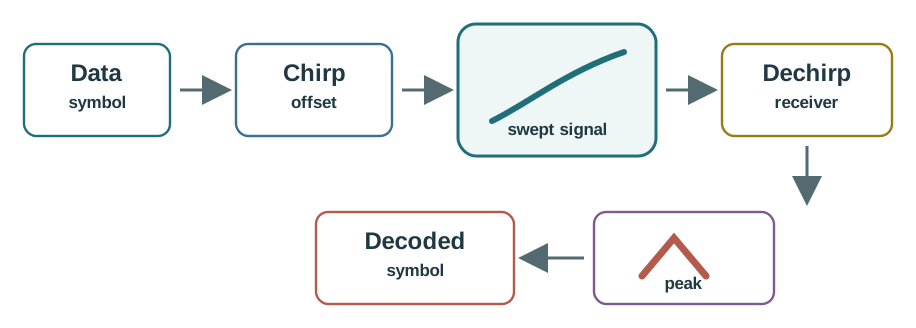
Trace Figure 8.2 by asking what “symbol” establishes and what “Chirp” changes. Check “offset” next, ending at “swept signal”. That progression is the mechanism behind Chirp spread spectrum explains the radio mechanism; the release record still needs observed link and airtime evidence and the evidence order needed for the “symbol”–“chirp” decision.
Accept
The selected setting has enough link evidence, payload evidence, airtime evidence, regional fit, ADR ownership, and retest boundaries.
Revise
The setting may be plausible, but the record lacks payload, airtime, field, or ADR evidence for the reviewed scope.
Defer
The reviewer cannot tie the radio setting to a real device group, regional profile, gateway path, or release owner.
Practitioner Knowledge Check
Under the Hood: Symbol Time Drives the Tradeoff
LoRa symbols are represented by chirps. Spreading factor changes how many possible symbol states are represented and how long each symbol occupies the channel. A higher spreading factor can make weak-link decoding more practical, but it also extends the time on air for the same payload family.
That is why modulation review is a system decision, not only a radio decision. Airtime affects channel occupancy, retries, downlink opportunities, regional profile fit, battery behavior, and gateway capacity. ADR can help only when the device pattern gives it useful, recent evidence.
The useful under-the-hood shortcut is Tsymbol = 2SF / bandwidth. At 125 kHz, SF10 gives 1024 / 125,000 = 8.192 ms per symbol, while SF12 gives 4096 / 125,000 = 32.768 ms. That fourfold jump from SF10 to SF12 happens before counting low-data-rate optimization, coding-rate overhead, preamble, headers, acknowledgements, or retries. A field record that says "SF12 worked once" therefore proves only a narrow reception event unless it also shows the payload family, traffic count, retry rate, gateway diversity, and regional airtime headroom.
A release decision about the “same 125 khz channel, same time window — each step up in sf doubles the chirp period”–“sf7 — symbol time 1.024 ms” decision needs “11 chirps in this window”, not a slogan. Inspect Figure 8.3 through “Same 125 kHz channel, same time window — each step up in SF doubles the chirp period” and “SF7 — symbol time 1.024 ms” to check this claim: The raw chirp shape behind the symbol-time formula: each step up in SF doubles the chirp period, so half as many chirps fit in the same window.

Read Figure 8.3 from “Same 125 kHz channel, same time window — each step up in SF doubles the chirp period” to “SF7 — symbol time 1.024 ms”. Next, trace “11 chirps in this window” into “SF8 — symbol time 2.048 ms”. This ordering shows why The raw chirp shape behind the symbol-time formula: each step up in SF doubles the chirp period, so half as many chirps fit in the same window. For the “same 125 khz channel, same time window — each step up in sf doubles the chirp period”–“sf7 — symbol time 1.024 ms” decision, record “Same 125 kHz channel, same time window — each step up in SF doubles the chirp period” as the starting condition and reopen “SF8 — symbol time 2.048 ms” if “11 chirps in this window” changes.
The same shortcut can be written as a rate check. Symbol rate is Rs = bandwidth / 2SF, and an uncoded bit-rate intuition is Rb = SF x bandwidth / 2SF. With 125 kHz bandwidth that puts SF7 near 6.84 kbit/s before 4/5 coding lowers the nominal rate to about 5.47 kbit/s. SF12 is only a few hundred bit/s; low-data-rate optimization also matters at that setting. Coding, headers, preamble, MAC commands, acknowledgements, and retries determine delivered application throughput.
A release record should not stop at the raw formula. Forward error correction adds redundancy, and the regional data-rate table also accounts for low-data-rate optimization at SF11 and SF12. For the EU863-870 LoRaWAN profile at 125 kHz, the specified indicative physical bit rates are:
| Spreading Factor | Chips per Symbol | EU863-870 Bit Rate (125 kHz) |
|---|---|---|
| SF7 | 128 | 5.470 kb/s |
| SF8 | 256 | 3.125 kb/s |
| SF9 | 512 | 1.760 kb/s |
| SF10 | 1,024 | 980 b/s |
| SF11 | 2,048 | 440 b/s |
| SF12 | 4,096 | 250 b/s |
Use the selected region's specified data rate for a release record. These are indicative physical rates, not delivered application throughput or packet airtime; calculate airtime from the complete frame, preamble, header, payload, coding rate, and low-data-rate optimization. Whitening and interleaving do not independently reduce the bit rate.
Use that arithmetic when checking ADR too. If a fixed meter has weeks of stable uplinks, ADR may be able to move it toward a lower spreading factor and return channel capacity. If a tracker moves between basements, loading docks, and outdoor yards, old uplinks can overstate the current margin. The review should name when ADR owns the decision, when a manual boundary is safer, and which movement or gateway change reopens the calculation.
Inspect Figure 8.4 to see how increasing spreading factor changes symbol rate and symbol time when bandwidth stays fixed.
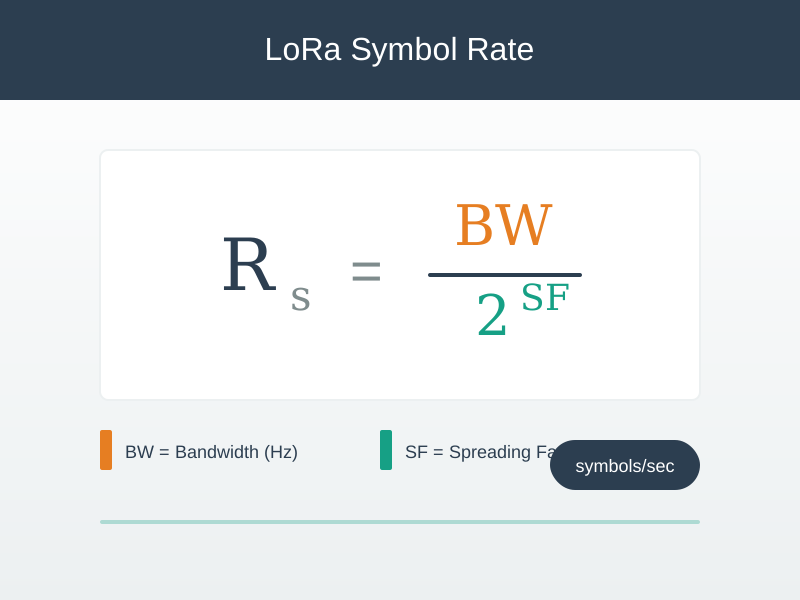
In Figure 8.4, hold bandwidth at 125 kHz and compare SF7 with SF12. At SF7, the denominator is 2^7 = 128, so 125,000 Hz / 128 = 976.5625 symbols/s, or about 976.6 symbols/s. The SF12 row shows a much lower symbol rate and a much longer symbol time because each symbol spans far more chips at the same bandwidth. That longer time can improve the receiver’s ability to recover a weak signal, but it also lengthens packet airtime and reduces shared capacity. Spreading factor is therefore a rate-and-airtime choice tied to field conditions, not a free range setting.
Symbol Duration
Longer symbols can support weaker links, but every longer frame also consumes more shared channel time.
Payload Coupling
Headers, MAC commands, joins, retries, acknowledgements, and encoded payload size all change the airtime record.
ADR Limits
ADR is strongest for relatively stable devices with useful history. Mobile or bursty devices may need narrower review boundaries.
Retest Boundary
Antenna, gateway, firmware, payload, schedule, region, or ADR-policy changes can make the modulation record stale.
Inspect Figure 8.5 with one question from the “size”–“profile” decision: how does “size” constrain “Profile”? The answer supports The release record turns radio evidence into an approval, revision, exception, or retest decision.
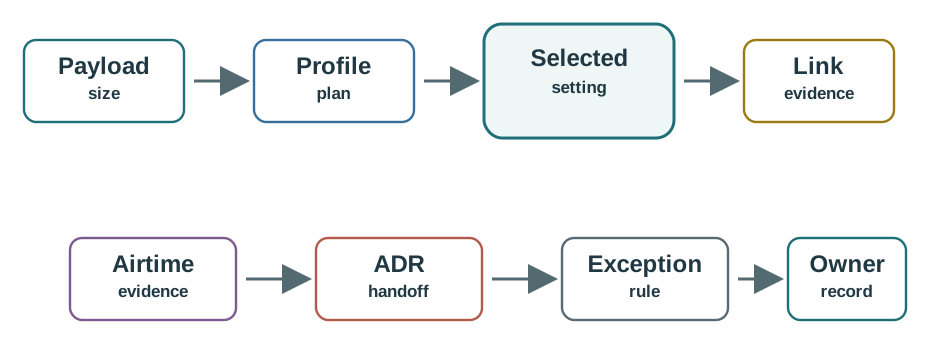
Begin Figure 8.5 at “size”, but do not stop there. Compare “Profile”, then follow “plan” until “Selected”. The resulting chain supports The release record turns radio evidence into an approval, revision, exception, or retest decision; it also gives the “size”–“profile” decision a specific retest boundary.
Under-the-Hood Knowledge Check
8.2 Figure Review: Chirp Duration and Sensitivity
This section: Figure Review: Chirp Duration and Sensitivity — Inspect Figure 8.6 to see how spreading factor changes chirp duration rather than merely changing a nominal range label.
Inspect Figure 8.6 to see how spreading factor changes chirp duration rather than merely changing a nominal range label.

Read Figure 8.6 from the SF7 · short sweep to SF12 · long; Ts = 2^SF / BW yields 1.024 ms versus 32.768 ms, making the potential sensitivity gain a 32-times-longer per-symbol airtime cost before coding overhead.
8.3 Summary
This section: Summary — Inspect Figure 8.7 to connect chirp encoding and spreading factor with airtime and device-class listening cost.
Inspect Figure 8.7 to connect chirp encoding and spreading factor with airtime and device-class listening cost.

Read Figure 8.7 from Spreading factor sets time, which contrasts the 1.024 ms SF7 symbol with the 32.768 ms SF12 symbol in the same 125 kHz channel. Class sets downlink availability then separates two post-uplink windows in Class A from scheduled Class B and nearly continuous Class C listening, preventing radio reach and receiver duty from being conflated.
The second view, Figure 8.8, labels the doubling 2^SF count as “chirps/symbol”; technically this is chips per symbol. Its coded rates are idealized calculations, so use the regional data rate for an airtime record.

Read across Figure 8.8 from SF7 at the figure’s 128 chirps/symbol label (128 chips per symbol) and about 5.47 kb/s to SF12 at its 4,096 chirps/symbol label (4,096 chips per symbol). One LoRa symbol is one chirp. The figure’s SF11 537 b/s and SF12 293 b/s are idealized coded-rate calculations; EU863-870 specifies 440 b/s and 250 b/s, respectively, at 125 kHz. Use the selected regional data rate and the complete frame when calculating airtime, including preamble, MAC commands, acknowledgements, and retries.
LoRa modulation review connects radio settings to evidence. Spreading factor, bandwidth, coding rate, payload size, regional profile, gateway evidence, and ADR policy all affect whether a LoRaWAN message pattern is fit for release.
The safest review habit is to avoid broad claims. Approve one message class, one deployment condition, one regional profile, and one retest boundary at a time. Higher spreading factors can support weak links, but they also increase airtime pressure and must be justified by observed need.
8.4 Key Takeaway
This section: Key Takeaway
Treat spreading factor as a tradeoff, not a guarantee. The release record should prove enough link margin while keeping airtime, payload, ADR, and retest limits visible.
8.5 See Also
This section: See Also
LoRaWAN Introduction
LoRaWAN Network Architecture
LoRaWAN Link Budget and ADR Review
LPWAN Link Budget and Range
Open printable teacher run sheet
Find help
3 reviewed answers.
Where should I start in a module?
Open the module page from the sidebar to see its chapters in order. Use the module map to return to a topic you need.
Modules and pathsReviewed
What can I try when a project does not work?
Check the symptom, then work through the diagnostic steps. Keep the error message and the smallest example that reproduces it.
When you are stuckReviewed
How do interactive examples work?
Use the interactive guide to check how examples and simulations work before changing your project.
Interactive examples guideReviewed