
Missing uplinks
Check airtime, payload size, data-rate policy, regional channel plan, and gateway-hearing evidence.
Progress saves as you read. Mark sections complete as you go; your progress appears in the sidebar.
A car-park sensor begins draining its battery after a firmware update. Its new LoRaWAN messages still arrive, so the dashboard looks healthy. The LoRaWAN transmission schedule is the first comparison when the firmware change coincides with higher drain.
This section: Start Simple — Imagine a car-park unit that stops reporting after a new version is installed.
Start With the Symptom, Then Narrow the Cause
Imagine a car-park unit that stops reporting after a new version is installed. It is tempting to blame radio range. The real cause might be a larger message, more retries, a failed join, or a battery that now spends longer awake.
The support owner should write the exact symptom first. Is the message missing, late, repeated, rejected, or followed by high battery use? Note when it began and what changed. Then ask for the smallest evidence that separates likely causes.
Change one thing and repeat the same test. Keep message size, message count, radio setting, site-radio record, join result, and power use together. Do not close the issue with a vague note such as “coverage improved.”
Check the service promise as well as the radio. A late command may be normal for a sleeping unit but unsafe for a task that expects instant control. A repeated status record may be harmless unless it starts the same work twice. State the expected behaviour before changing settings.
End with a narrow correction and a rule for retest. If the fix reduces message size, repeat the field path and battery check. If it moves an antenna, repeat weak-place and weather tests. Keep other changes out until the cause is clear.
Use plain names in the support record. “Join failed after power loss” is more useful than “network issue.” Add the device, place, time, version, and last good event. A later team can then compare the same fault instead of starting from a guess.
Check that the screen tells the truth during the fault. Show late or missing data as late or missing. Do not hold the last value without its time. A clear unknown state can be safer than a smooth but false history.
Use one fault card per event. Name the unit. Name the place. Note the last good time. State the symptom. List recent changes. Keep the first failing record. Add the narrow fix. Add the repeat test.
Do not merge unlike faults. A failed join is not a late report. A late report is not a missed command. High power use is not poor reach. They may share a cause, but each needs its own observed result.
Review trends after each fix. Count events by place, version, and condition. A pattern can reveal a common change. Keep the raw event available so a neat count does not hide a new failure type.
One symptom can still have several linked causes. Practitioner uses a repeatable fault record. Under the Hood explains airtime limits, device classes, rate control, frame checks, and reset behavior.
When a LoRaWAN deployment disappoints, begin with the symptom instead of guessing the cause. Missing uplinks, late commands, failed joins, high battery drain, duplicate records, and poor ADR behavior each point to different evidence. The useful first move is to name what changed, then check payload size, airtime, class promise, activation, regional profile, gateway evidence, and ownership one by one.
Most LoRaWAN failures do not begin as mysterious radio problems. They begin as mismatches between the application promise and the deployment evidence: too many transmissions, oversized payloads, ADR used without stable conditions, the wrong device class, activation shortcuts, channel-plan mismatch, or missing reset behavior.
For example, a parking sensor fleet that looks fine in a workshop can fail after installation because the review bundled several assumptions together. Twelve-byte status reports every fifteen minutes means 96 routine uplinks per device per day before retries, joins, alarms, or confirmed messages are counted. If the field location forces a slower radio setting, the same payload consumes more airtime and leaves less room for bursts. The useful question is therefore not "does LoRaWAN have long range?" but "which symptom changed, what evidence moved, and what smallest correction restores margin without hiding the cause?"
That symptom-led record also protects later maintainers. If a missing-reading incident is closed only as "coverage improved," the next firmware or payload change can repeat the mistake. If the record says payload size was reduced, retry policy was bounded, ADR history was rechecked after final placement, and the owner must retest after antenna or reporting-interval changes, the fix remains auditable.
Pause before applying the “e.g. 12 b every 15 min = 96 uplinks/device/day”–“symptom” decision, then inspect Figure 14.1. It places “e.g. 12 B every 15 min = 96 uplinks/device/day” against “Symptom”, exposing the evidence behind this claim: Useful pitfall review starts with a symptom, maps it to likely causes, requests narrow evidence, and records the correction.
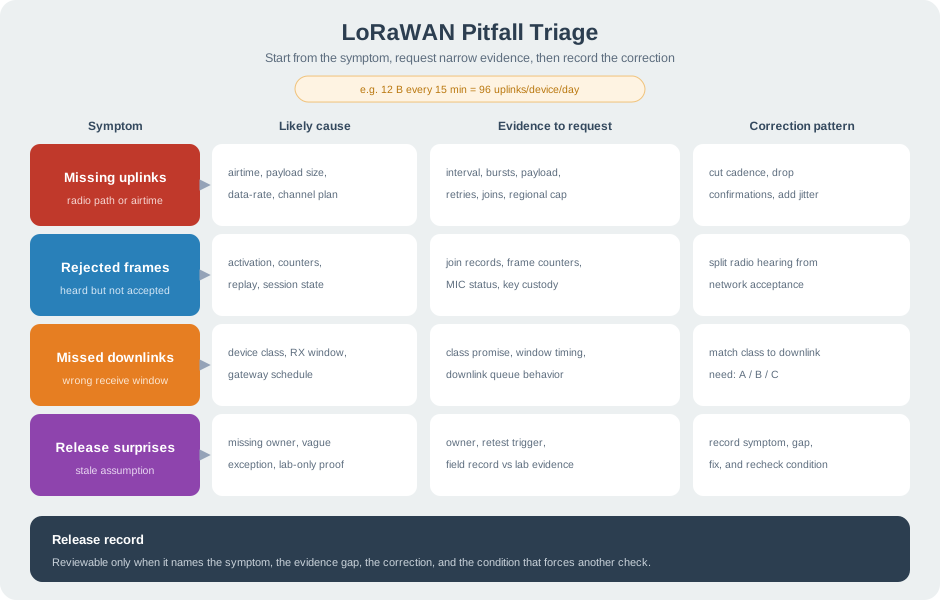
The first useful contrast in Figure 14.1 is “e.g. 12 B every 15 min = 96 uplinks/device/day” versus “Symptom”. After resolving it, move from “Likely cause” to “Evidence to request”. This is how the visual substantiates Useful pitfall review starts with a symptom, maps it to likely causes, requests narrow evidence, and records the correction and reconnects it to the “e.g. 12 b every 15 min = 96 uplinks/device/day”–“symptom” decision.
Check airtime, payload size, data-rate policy, regional channel plan, and gateway-hearing evidence.
Separate radio hearing from network acceptance, then inspect activation, counters, replay protection, and session state.
Check the device class, receive-window behavior, gateway scheduling, and the downlink timing promise.
Look for missing owners, vague exceptions, lab-only evidence, or stale assumptions after deployment changes.
A LoRaWAN pitfall is reviewable when the record names the observed symptom, the likely evidence gap, the correction, and the condition that requires another check. A broad claim such as "long range and low power" is not enough.
The most common LoRaWAN mistakes are operational: an uplink schedule without margin, a payload designed only for a generous lab data rate, ADR enabled without follow-up, or a device class that does not match the downlink promise.
Turn that into a release check before optimizing anything. Sixty devices sending four routine uplinks per hour already create 240 scheduled uplinks per hour before retries, join traffic, alarm bursts, confirmations, or maintenance downlinks. A reviewer should ask whether the plan still has margin when the weakest installed devices use the slowest expected setting and when alarms cluster instead of arriving evenly. If the answer depends on "usually" or "the gateway should hear it," the release needs a measured packet record and a smaller fallback plan.
Inspect Figure 14.2 to ask whether the weakest installed devices still leave airtime for retries, joins, alarms, and downlinks.
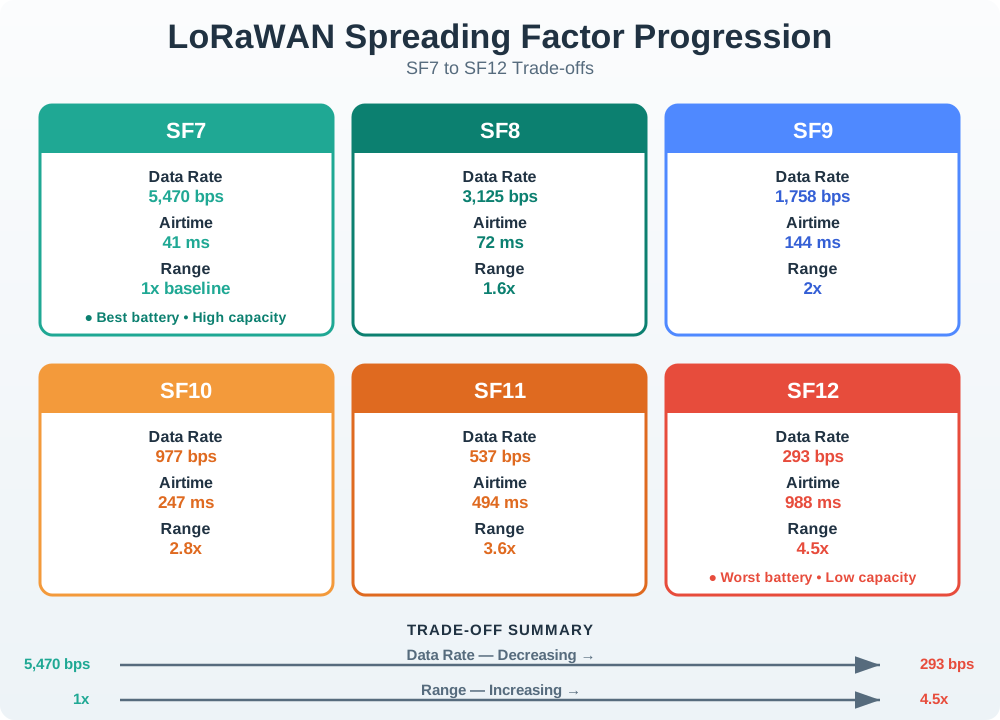
In Figure 14.2, start with one rule. A slower field setting keeps the same payload on air for longer. That leaves less room for a burst. The normal load is 60 devices with four sends each hour. Thus, 60 devices × 4 uplinks/device/hour = 240 uplinks/hour before extras. Now add retry, join, alarm, confirm, and downlink traffic. Check payload size, rate rules, and the local airtime limit too. The lower panel shows ways to regain margin: send less, trim fields, compact the payload, add jitter, and cap retries. Test the installed plan; spreading factor alone proves nothing.
| Pitfall | Evidence To Request | Correction Pattern |
|---|---|---|
| Airtime treated as unlimited | Message interval, bursts, payload sizes, data-rate policy, retries, joins, downlinks, and regional limit. | Reduce reporting frequency, remove avoidable confirmations, add jitter, and recheck when payload or retry policy changes. |
| Payload designed for the lab | Payload size against the most restrictive allowed setting, decoder version, forced-slow test, and fallback layout. | Compact the encoding, omit optional fields under weak links, version the payload, and keep diagnostics on a maintenance path. |
| ADR enabled without proof | Stationary profile, representative uplinks after final placement, ADR command evidence, and follow-up quality checks. | Use ADR for stable devices with evidence; use fixed or bounded settings when movement makes history misleading. |
| Class chosen by habit | Downlink timing promise, energy source, gateway and network support, missed-window behavior, and owner. | Use Class A for uplink-triggered downlinks, Class B for scheduled windows with evidence, and Class C only when power and need justify it. |
Do not accept Device class review should be tied to downlink timing and power assumptions, not to habit or convenience as “After uplink” prose alone. Look at Figure 14.3 before the “after uplink”–“class b” decision, where “After uplink” is explicitly distinguished from “Class B”.
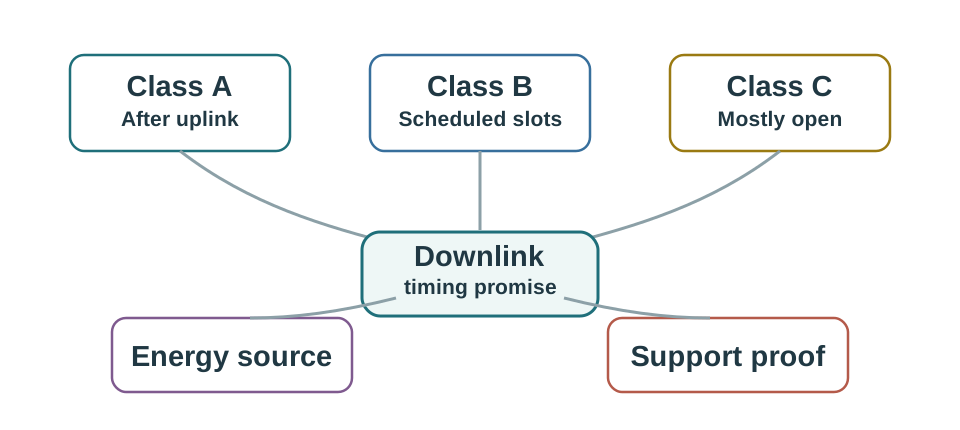
Notice how Figure 14.3 separates “After uplink” from “Class B”. Now move to “Scheduled slots” and finish at “Class C”; that second step reveals why Device class review should be tied to downlink timing and power assumptions, not to habit or convenience. Apply the distinction when “Class C” closes the record for the “after uplink”–“class b” decision.
A payload works near the gateway, but final placement causes slower data rates. The reviewer checks payload size against the most restrictive allowed setting, confirms ADR evidence, compacts the payload, tests a forced slow setting, and records decoder version plus fallback behavior.
Some LoRaWAN pitfalls are not visible in application dashboards. A gateway can hear a frame while the network server rejects it. A downlink promise can fail because receive windows are wrong. A release can drift because channel plans, credentials, or reset behavior were never recorded.
A good under-the-hood review separates the layers in the evidence. Start with a gateway observation only to prove that a radio packet was heard; then check the network-server accept or reject decision, the activation state, the frame counter, and the application route. If an ABP device resets and reuses stale state, the gateway trace may still look healthy while replay protection correctly rejects traffic. If OTAA devices rejoin successfully but the application sees no data, the join path and application routing evidence should be checked separately rather than merged into one "network problem."
The release record should also define the recovery path. Counter repair, credential replacement, channel-mask correction, ADR rollback, and receive-window tuning are different fixes with different owners. Recording them separately prevents an urgent field workaround from weakening the security or timing behavior that the network depends on.
Before deciding the “start”–“generate deveui” decision, inspect “START” in Figure 14.4 and compare it with “Generate DevEUI”. That contrast matters because Activation review separates OTAA join evidence, ABP exceptions, frame counters, reset behavior, replay protection, and recovery records.
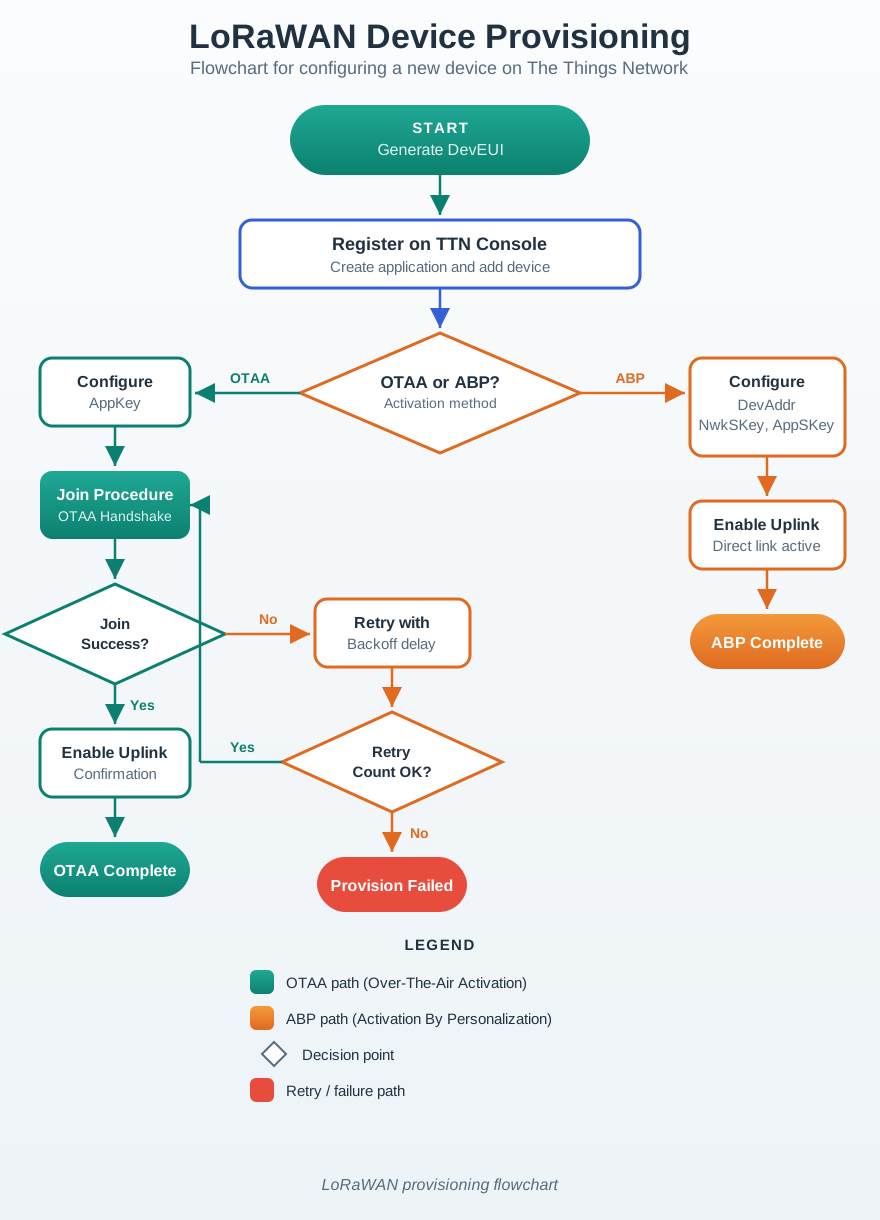
Read Figure 14.4 from “START” to “Generate DevEUI”. Next, trace “Register on TTN Console” into “Create application and add device”. This ordering shows why Activation review separates OTAA join evidence, ABP exceptions, frame counters, reset behavior, replay protection, and recovery records. For the “start”–“generate deveui” decision, record “START” as the starting condition and reopen “Create application and add device” if “Register on TTN Console” changes.
Keep join records, credential ownership, accepted and rejected frame examples, and recovery behavior after reset.
Document why ABP is used, how counters persist, how replay protection is preserved, and how recovery is tested.
Record region, sub-band, channel mask, join channels, data-rate policy, gateway forwarding, and network-server limits.
Name who revisits evidence after firmware, payload, gateway, channel-plan, antenna, or placement changes.
Before carrying The release packet makes recurring mistakes visible before they become field failures into the “release record” design record, view Figure 14.5. It makes “release record” and “Airtime” separate, inspectable parts of the “release record”–“airtime” decision.
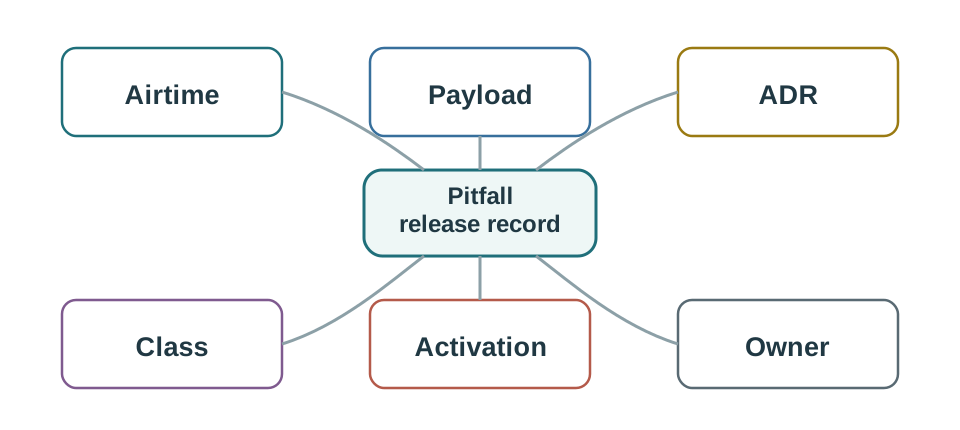
Notice how Figure 14.5 separates “release record” from “Airtime”. Now move to “Payload” and finish at “ADR”; that second step reveals why The release packet makes recurring mistakes visible before they become field failures. Apply the distinction when “ADR” closes the record for the “release record”–“airtime” decision.
After maintenance, ABP devices transmit and gateways hear them, but the network server rejects many frames. The reviewer separates radio hearing from network acceptance, checks counter rollback and session state, then requires OTAA or persistent counter handling with reset testing before release.
This section: Find the Reporting-Interval Regression before Moving the Antenna — Assume the old schedule sent a 12-byte application reading every 15 minutes.
Assume the old schedule sent a 12-byte application reading every 15 minutes. A day contains 1,440 minutes, so the device sent 1,440 divided by 15 = 96 scheduled uplinks. The new schedule sends once a minute, producing 1,440 uplinks. This common configuration mistake multiplies the scheduled count by 15 even though each useful payload remains small.
For an illustrative LoRaWAN test with 0.1 s measured airtime per transmission, the old schedule uses 9.6 s of transmit airtime per day. The new one uses 144 s. Neither calculation includes joins, retries or downlinks, and neither establishes compliance with the installed regional rules. Those common omissions can make the spreadsheet look better than the current trace.
Follow Figure 14.1 from the reporting example to symptom and evidence. The battery complaint points first to counts, radio state and time awake. A common troubleshooting error is moving the antenna before checking counts, which can hide a schedule regression behind better signal.
A second common error is enabling confirmation on every periodic reading without budgeting the return traffic. LoRaWAN downlinks require receive opportunities and network resources; requesting many acknowledgements does not make them free. Compare attempted, accepted and repeated transmissions before deciding whether loss or a changed policy caused the battery increase.
Predict whether returning to the old payload size fixes the problem when its size never changed. It leaves the fifteenfold schedule increase untouched. Next, suppose the LoRaWAN application sees two records for one radio frame. Duplicate LoRaWAN copies need server and application checks before they are counted as separate sensor transmissions.
These pitfalls illustrate why a narrow fault record is useful. Preserve the old and new firmware settings, message counts and measured current over matching intervals. After correcting the schedule, repeat the same test and check that both the reporting promise and energy behaviour recover. The module’s radio model then explains the remaining difference rather than becoming a catch-all excuse for every field symptom.
This section: Summary — LoRaWAN pitfall review is symptom-led and evidence-based.
LoRaWAN pitfall review is symptom-led and evidence-based. The reviewer checks airtime, payload fit, ADR suitability, device-class behavior, activation, regional parameters, reset recovery, and ownership before accepting a release.
The goal is not to memorize every possible failure. It is to catch the common evidence gaps before a team mistakes them for random radio problems.
This section: Key Takeaway — Common LoRaWAN failures come from oversized payloads, frequent messages, unmanaged downlinks, poor gateway planning, ADR misuse, weak regional-parameter checks, and activation records that do not prove reset recovery.
Common LoRaWAN failures come from oversized payloads, frequent messages, unmanaged downlinks, poor gateway planning, ADR misuse, weak regional-parameter checks, and activation records that do not prove reset recovery.
Open printable teacher run sheet
3 reviewed answers.
Open the module page from the sidebar to see its chapters in order. Use the module map to return to a topic you need.
Modules and pathsReviewed
Check the symptom, then work through the diagnostic steps. Keep the error message and the smallest example that reproduces it.
When you are stuckReviewed
Use the interactive guide to check how examples and simulations work before changing your project.
Interactive examples guideReviewed