30 LoRaWAN Activation Quiz
Quiz mastery targets are easiest to plan with threshold math:
\[ C_{\text{target}} = \left\lceil 0.8 \times N_{\text{questions}} \right\rceil \]
Worked example: For a 15-question quiz, target correct answers are \(\lceil 0.8 \times 15 \rceil = 12\). If a learner moves from 8/15 to 12/15, score rises from 53.3% to 80%, crossing mastery with four additional correct answers.
30.1 Learning Objectives
By the end of this quiz chapter, you will be able to:
- Contrast OTAA vs ABP: Evaluate the security trade-offs between activation methods and justify OTAA for production deployments
- Diagnose Frame Counter Issues: Identify root causes of MIC validation failures and resolve frame counter reset vulnerabilities
- Assess Replay Attack Vectors: Differentiate between proper and disabled frame counter validation to prevent replay attacks
- Architect Secure Deployments: Apply session key management best practices to design production-grade LoRaWAN networks
Key Concepts
- OTAA (Over-the-Air Activation): Secure dynamic join procedure where device and server perform a cryptographic handshake to derive unique per-session keys; preferred for production.
- ABP (Activation By Personalization): Static activation with pre-configured DevAddr and session keys; simpler but less secure due to fixed keys and no join-based key refresh.
- JoinEUI (formerly AppEUI): 64-bit identifier of the Join Server handling a device’s activation; used in OTAA join request to route to the correct join server.
- DevNonce: Random 16-bit value included in each OTAA join request to prevent replay attacks; must be unique per AppKey.
- MIC (Message Integrity Code): 4-byte cryptographic authentication tag on LoRaWAN frames ensuring message integrity; computed using NwkSKey.
- AES-128: Symmetric encryption algorithm used in LoRaWAN for both network authentication (NwkSKey) and application payload encryption (AppSKey).
- Key Hierarchy: LoRaWAN 1.1 introduced separate forwarding and serving network session keys, enabling network-level security without exposing device traffic to forwarding networks.
Before attempting this quiz, you should be familiar with:
- LoRaWAN Overview - Activation procedures
- LoRaWAN Architecture - Security architecture
- Device Security - IoT security concepts
This is Part 4 of 5 in the LoRaWAN Quiz Bank series.
| Quiz | Focus Area |
|---|---|
| 1. Fundamentals | Misconceptions, class selection |
| 2. Battery Optimization | Battery life calculations |
| 3. Network Scalability | Collision analysis, ADR |
| 4. Activation & Security | OTAA vs ABP (You are here) |
| 5. Regional Deployment | EU868, US915 configuration |
Return to the Quiz Bank Index for the complete overview.
30.2 Quiz Questions
## Visual Reference Gallery {#net-lora-quiz-sec-visual}
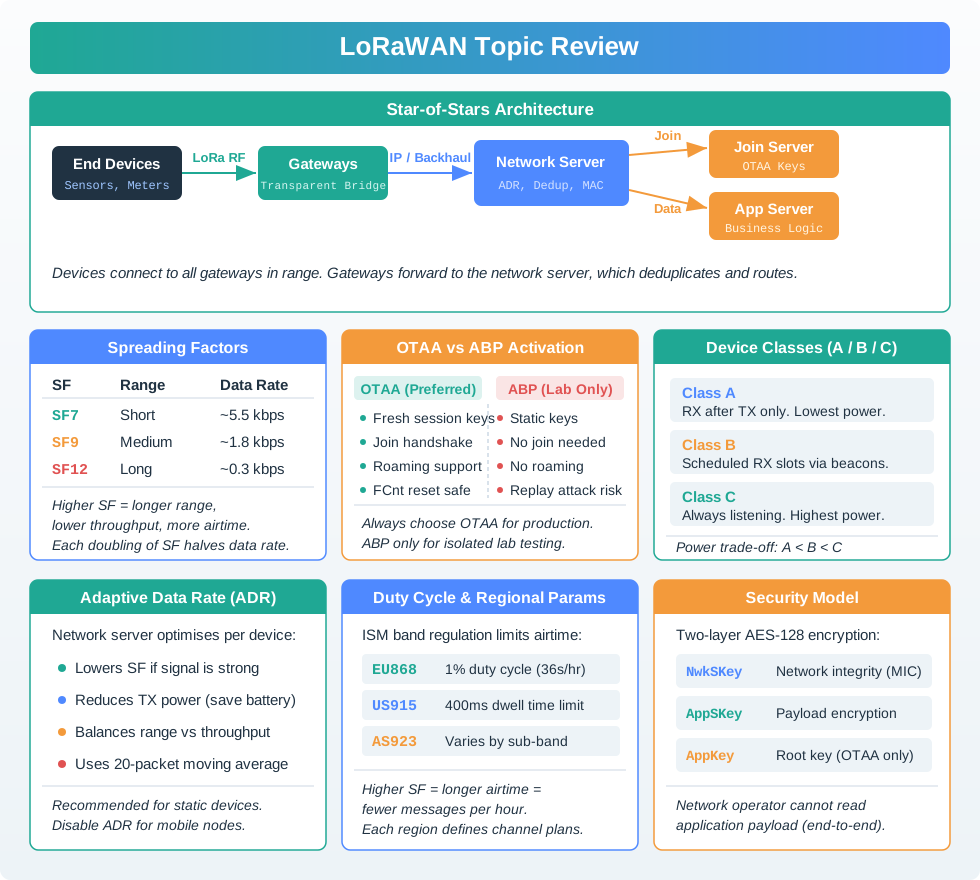
Key LoRaWAN concepts for quiz preparation, including OTAA vs ABP comparison.
Quick Answer: Always use OTAA for production. ABP is only for lab testing or isolated applications where frame counter resets are acceptable.
Detailed Comparison:
| Factor | OTAA | ABP | Winner |
|---|---|---|---|
| Security | Fresh keys per join | Static keys forever | OTAA |
| Frame Counter Reset | Legitimate (new session) | Security vulnerability | OTAA |
| Scalability | Network server assigns DevAddr | Manual DevAddr management | OTAA |
| Provisioning | 3 values (DevEUI, AppEUI, AppKey) | 5 values (+ DevAddr, NwkSKey, AppSKey) | OTAA |
| Key Storage | AppKey only (session keys derived) | NwkSKey + AppSKey (must protect both) | OTAA |
| Network Roaming | Supported (Join Server) | Not supported | OTAA |
| Initial Setup Time | ~30s join process | Instant (no join) | ABP |
When ABP Might Be Acceptable (Rare Cases):
1. Laboratory Testing:
   - Rapid prototyping, no security requirements
   - Frequent firmware reflashing (join delay annoying)
   - Controlled environment

2. Isolated Applications:
   - Single device, single gateway, local network server
   - No internet connectivity
   - No replay attack threat model

3. Legacy Constraints:
   - LoRaWAN 1.0.0 devices without OTAA support
   - Must upgrade to LoRaWAN 1.0.3+ ASAP
Production Deployment: OTAA Best Practices:
1. Protect AppKey:
   - Never hardcode in source code
   - Store in secure element (ATECC608 chip)
   - Different AppKey per device (no shared keys)

2. Monitor Join Activity:
   - Alert on excessive join attempts (>5/hour = possible attack)
   - Log join timestamps for forensics
   - Track join success rate (should be >95%)

3. Handle Join Failures:
   - Exponential backoff: 1s, 2s, 4s, 8s, 16s, max 30s
   - Randomize retry timing (avoid synchronized storms)
   - Give up after 10 attempts, alert operator

4. Post-Join Verification:
   - Store session keys in non-volatile memory
   - Persist frame counter to EEPROM every 100 frames
   - Validate DevAddr assignment (no collisions)
Real-World OTAA Migration Example:
Company: Smart water meter deployment
Original: 5,000 ABP devices
Problem: 15% packet rejection after power outages (frame counter resets)

Migration Plan:
Phase 1: Network server upgrade (support OTAA)
Phase 2: Firmware update OTA (add OTAA join logic)
Phase 3: Provision AppKeys (generate unique keys per device)
Phase 4: Enable OTAA, disable ABP fallback
Phase 5: Monitor for 30 days

Results:
- Packet rejection: 15% → 0.8%
- Manual interventions: 750 hours/year → 8 hours/year
- Security posture: Vulnerable → Compliant
- ROI: 6 months (labor savings)
Key Numbers:
- OTAA join time: ~30 seconds (depends on SF, retries)
- ABP initial connection: 0 seconds (but insecure)
- Frame counter reset cost: 15-20% packet loss (ABP)
- OTAA key rotation: Automatic per join (vs never for ABP)
- Migration effort: 2-4 hours per 1,000 devices (firmware update + provisioning)
30.2.1 Quick Check: Session Key Architecture
30.3 Summary
This chapter covered activation and security concepts for LoRaWAN deployments:
- OTAA vs ABP Trade-offs: Why OTAA is mandatory for production security
- Frame Counter Vulnerabilities: How MIC validation and replay prevention depend on monotonically increasing FCnt values
- Security Best Practices: Protecting against replay attacks with proper FCnt validation and OTAA activation
- Session Key Architecture: How NwkSKey and AppSKey provide separate network integrity and application privacy
Common Pitfalls
Storing AppKey as a plain text constant in firmware source exposes it to anyone with code access (repositories, firmware dumps). Use secure element storage, provisioning tools, or encrypted key injection to protect root keys.
ABP is often chosen to avoid OTAA complexity, but ABP frame counters stored in RAM reset on every power cycle. The network server rejects all uplinks with counters ≤ stored value. Always store ABP frame counters in non-volatile memory.
Using the same AppKey for multiple devices means compromise of one device compromises all. Every device must have a unique AppKey. Use device-specific key provisioning tools (e.g., LoRa Alliance Device Claiming) for production deployments.
If a device appears to transmit (gateway receives packets) but the network server shows no traffic, MIC validation failure is the likely cause — commonly from frame counter issues or wrong NwkSKey. Check network server logs rather than assuming an RF coverage problem.
30.4 What’s Next
| Chapter | Focus | Link |
|---|---|---|
| Regional Deployment Quiz | EU868 vs US915 configuration and roaming | lorawan-quiz-regional-deployment.html |
| Fundamentals Quiz | Misconceptions and device class selection | lorawan-quiz-fundamentals.html |
| Battery Optimization Quiz | Battery life calculations and SF impact | lorawan-quiz-battery-optimization.html |
| Network Scalability Quiz | Collision analysis and ADR optimization | lorawan-quiz-network-scalability.html |
| Quiz Bank Index | Complete overview of all quiz chapters | lorawan-quiz-bank.html |