13 LoRaWAN Link Budget and ADR

More
Depth: Practitioner
Progress saves as you read. Mark sections complete as you go; your progress appears in the sidebar.
A meter in a courtyard reaches the gateway comfortably until it is placed inside its final cabinet. Reducing transmit power from the earlier history may now spend margin that the installation needs. Link-budget arithmetic should precede the ADR change.
13.1 Start Simple
This section: Start Simple — A gateway is a radio listening point that passes device messages onward.
A gateway is a radio listening point that passes device messages onward. LoRaWAN is a low-power radio system for small messages over long paths. Picture a meter at the edge of a site where the signal just reaches one gateway.
First ask whether the path has spare signal in the hard season and at the hard place. Count send power, antenna gains and losses, path loss, receiver need, and a margin for change. Keep the units and test point in the record.
Then ask whether automatic data-rate changes use a steady history. A slower radio setting may reach farther but stays on air longer. A faster one saves air time but can lose the weak edge. A moving device can make old history unsafe.
This edge-meter story cannot prove every link or set one margin for all sites. It does not show that an automatic change is safe during motion or sudden loss. Those cases need field samples and a fallback.
Use the Practitioner sections to build the path and change record. Use Under the Hood for signal math, margin, radio time, and rate rules. The deeper work refines the two opening questions; it does not separate them.
Start with two linked questions. Can the selected radio setting be heard with enough margin at the gateway? If the device later changes data rate or power, is ADR using evidence from a stable situation? Link budget and ADR belong together because one estimates the path and the other changes behavior based on observed path history. Neither should be approved as a slogan.

Overview: Link Budget Is Evidence, Not a Guarantee
A LoRaWAN link-budget review asks whether the received signal has enough margin above the receiver requirement for the selected radio setting. It combines configured transmit behavior, antenna path, path-loss assumptions, gateway evidence, and receiver threshold.
ADR, or Adaptive Data Rate, then uses recent uplink evidence to request better data-rate, transmit-power, channel-mask, or repetition behavior. ADR should not be approved as a generic battery or capacity feature; it is only as good as the evidence window it uses.
A simple review example makes the boundary visible. Suppose a device transmits at 14 dBm EIRP, the installation record allows 1 dB for enclosure and connector loss, the path survey estimates 126 dB of path loss, and the gateway antenna contributes 2 dB. The expected received level is about -111 dBm. If the selected data rate needs roughly -123 dBm and the project requires 10 dB of margin, the paper margin is only about 2 dB above target. That does not reject the design by itself, but it tells the reviewer to demand representative gateway samples before approving a less robust setting. It also names exactly which assumption to revisit when enclosure, antenna height, gateway diversity, or regional data-rate policy changes.
Inspect Figure 13.1 to see how installed gains and losses become received level, required margin, and a small remaining reserve.
In Figure 13.1, begin with the transmitter setting and antenna gain, then subtract every installed path loss before comparing the received signal with receiver sensitivity. The ledger reaches −111 dBm at the receiver and shows 12 dB of total margin. The safety target requires 10 dB, so 12 dB − 10 dB = 2 dB remains beyond the requirement. That last reserve is small enough to make antenna placement, obstruction, and seasonal change operational concerns. ADR can reduce excess airtime when the field link permits it, but it cannot replace the measured losses or the margin policy recorded here.
Configured Input
Transmit power, data rate or spreading factor, antenna path, channel plan, message profile, and confirmed-message policy.
Path Evidence
Gateway reports, survey records, map assumptions, enclosure notes, antenna placement, and any known obstruction pattern.
Margin Decision
Received evidence compared with the receiver requirement and the safety target selected for the deployment.
ADR Boundary
Network-service commands are reviewed against representative uplink history and verified with follow-up traffic.
Use conservative wording. "This packet was received" is not the same as "this setting has representative margin." The release record should separate measured evidence from assumptions.
Practitioner: Review Margin Before Changing Settings
Margin is the gap between what the receiver needs and what the device path appears to deliver. A strong review does not stop at packet delivery; it asks how much room is left after normal placement, enclosure, antenna, gateway, and seasonal conditions are considered.
In practice, the ADR decision should name both the proposed change and the evidence window. If the network server wants to reduce transmit power by 6 dB after 20 strong courtyard uplinks, the reviewer should check whether those uplinks cover the expected gateway, weather, enclosure, and payload conditions. The approval should then require follow-up uplinks after the LinkADR response. If the same device later moves behind a metal cabinet or switches to a larger confirmed payload, the old evidence window no longer proves the new margin. The record should say whether the action is automatic, manually approved, or disabled for that route.
Inspect Figure 13.2 with one question from the “margin is the gap between what the receiver needs and what the path actually delivers”–“link budget: +14 dbm eirp −1 db enclosure −126 db path loss +2 db gateway” decision: how does “Margin is the gap between what the receiver needs and what the path actually delivers” constrain “Link budget: +14 dBm EIRP −1 dB enclosure −126 dB path loss +2 dB gateway”? The answer supports Link margin turns received evidence into a bounded setting decision.
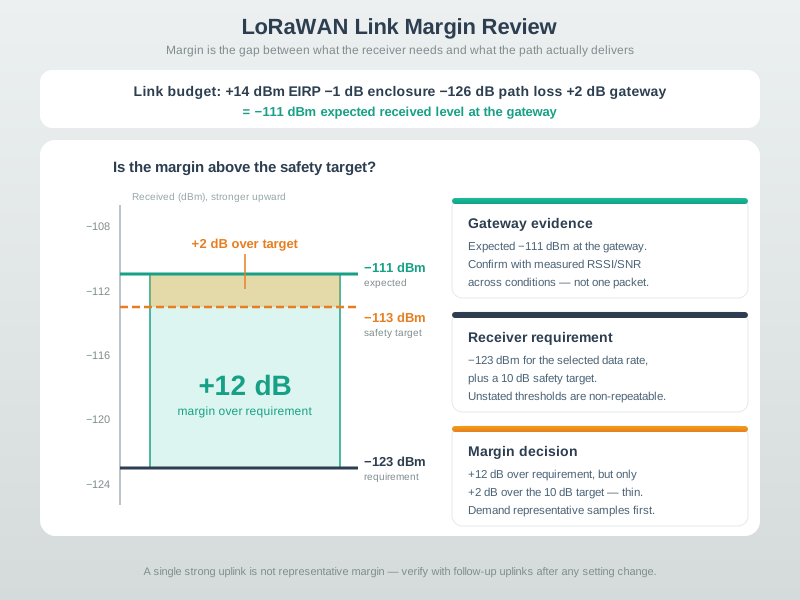
Notice “Margin is the gap between what the receiver needs and what the path actually delivers” on Figure 13.2 as the condition under review. “Link budget: +14 dBm EIRP −1 dB enclosure −126 dB path loss +2 dB gateway” marks the adjacent responsibility, while “= −111 dBm expected received level at the gateway” leads to “Is the margin above the safety target?”. Together they explain Link margin turns received evidence into a bounded setting decision; preserve that division when documenting the “margin is the gap between what the receiver needs and what the path actually delivers”–“link budget: +14 dbm eirp −1 db enclosure −126 db path loss +2 db gateway” decision.
Start the evidence review for the “adaptive data rate acts on link evidence — it does not replace coverage review”–“adr control loop” decision: inspect Figure 13.3. Two labels deserve attention—“Adaptive Data Rate acts on link evidence — it does not replace coverage review” and “ADR control loop”—because they bound ADR is a control loop on top of link evidence, not a replacement for coverage review.
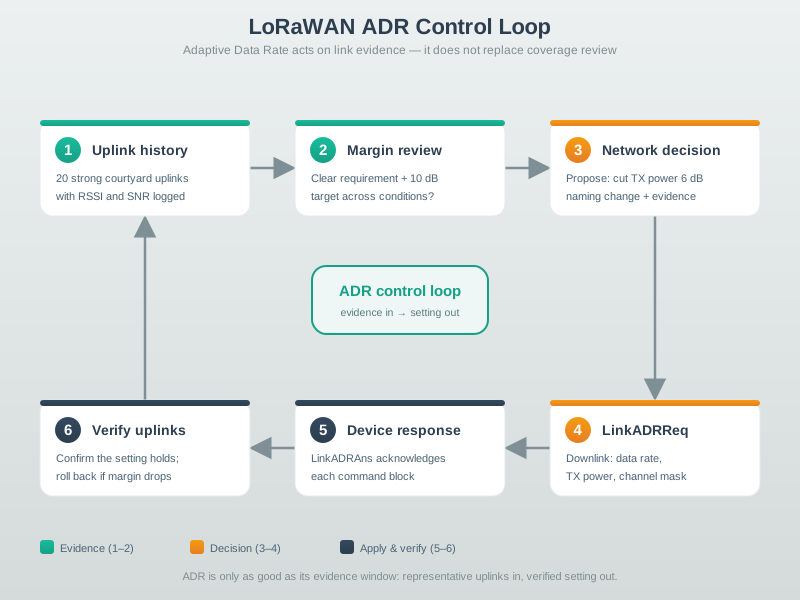
The first useful contrast in Figure 13.3 is “Adaptive Data Rate acts on link evidence — it does not replace coverage review” versus “ADR control loop”. After resolving it, move from “evidence in → setting out” to “Uplink history”. This is how the visual substantiates ADR is a control loop on top of link evidence, not a replacement for coverage review and reconnects it to the “adaptive data rate acts on link evidence — it does not replace coverage review”–“adr control loop” decision.
For fixed courtyard sensors, repeated gateway records from stable locations can justify ADR when margin remains acceptable and follow-up uplinks verify the new setting. For a moving asset, recent uplinks from one stop may not represent the next stop, so ADR should be disabled, bounded, or manually reviewed until route evidence is representative.
Under the Hood: Airtime, Exceptions, and Release Records
More robust settings usually consume more shared channel time. Less robust settings may reduce airtime but need enough margin. The reviewer should connect link-budget decisions to airtime-budget decisions instead of approving them separately.
Every number this chapter uses — path loss, sensitivity, margin — comes from three short equations. New to dB entirely? Start with the Decibels and the Link Budget foundations interactive, which teaches the idea from zero. Then, if you want the mathematics behind the calculator rather than just its output, the optional panel below derives the equations and works one real link end to end. You can skip both without losing the chapter's thread.
The release record should make tradeoffs auditable. A change from a slower spreading-factor setting to a faster one may reduce airtime and gateway load, but it can also shrink margin enough that retransmissions erase the benefit. A useful record therefore includes the before-and-after setting, the measured RSSI/SNR range, the receiver requirement used, the margin target, the expected airtime impact, and the rollback trigger. For example, "accept faster data rate while median margin stays above target and confirmed retries stay below the release limit" is reviewable. "ADR saves battery" is not. The same record should name who watches the exception signal: operations may own gateway outages, firmware may own ADR response handling, and the application team may own retry or command-expiry policy. That ownership keeps a radio optimization from becoming an untracked production behavior change.
A release decision about the “everything another reviewer needs to reproduce the link-budget and adr decision”–“link-budget + adr” decision needs “Release record”, not a slogan. Inspect Figure 13.4 through “Everything another reviewer needs to reproduce the link-budget and ADR decision” and “LINK-BUDGET + ADR” to check this claim: The release packet lets another reviewer reproduce the link-budget and ADR decision.
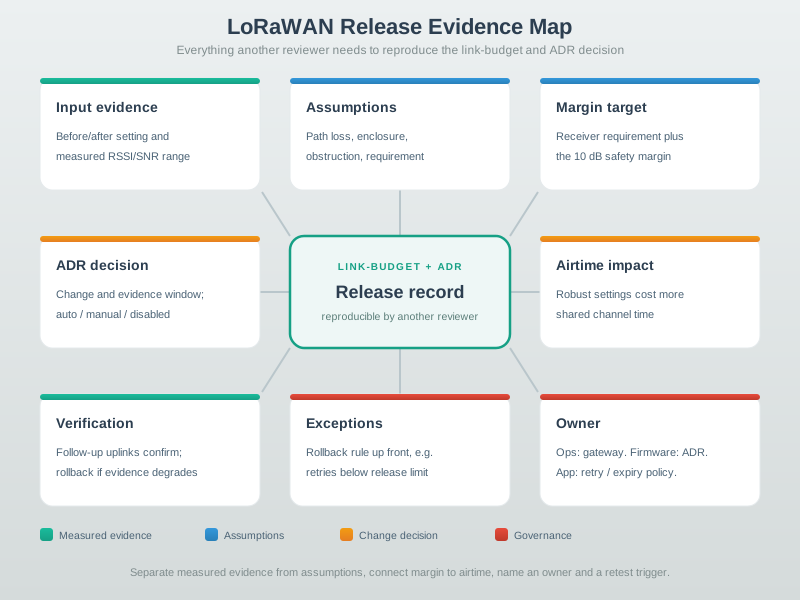
The release packet in Figure 13.4 contains what another reviewer needs to reproduce the link-budget and ADR decision.
Measured Inputs
Gateway evidence, device setting, antenna path, channel-plan context, and decision window.
Assumptions
Path-loss estimate, enclosure placement, obstruction pattern, and receiver requirement source.
Verification
Follow-up uplinks after a setting or ADR change, plus rollback behavior when evidence degrades.
Ownership
Named owner for route, gateway, enclosure, firmware, network-service, or application changes.
Retest when environment, route, antenna, enclosure, gateway path, channel plan, payload pattern, firmware, network-service ADR policy, or ownership changes. The point is not to freeze one setting forever; it is to keep the approval tied to current evidence.
A moving asset, a basement meter, and a fixed courtyard sensor should not share one ADR conclusion unless their evidence windows represent the same future path. Exception handling is part of the release, not an afterthought.
13.2 Spend Only the Margin above the Safety Target
This section: Spend Only the Margin above the Safety Target — Use the chapter’s illustrative path: 14 dBm EIRP, 1 dB enclosure loss, 126 dB path loss and 2 dBi receive antenna gain.
Use the chapter’s illustrative path: 14 dBm EIRP, 1 dB enclosure loss, 126 dB path loss and 2 dBi receive antenna gain. The budget predicts a received level of 14 − 1 − 126 + 2 = −111 dBm. The budget leaves 12 dB of margin against the receiver requirement of −123 dBm. A budget reserving 10 dB for variation leaves only 2 dB above that target.
Now propose a 6 dB transmit-power reduction with everything else fixed. The revised budget predicts −117 dBm received, leaving 6 dB above the receiver requirement. The budget may still permit a packet, but it misses the reserved margin by 4 dB. The ADR decision cannot claim the original safety target simply because the received level remains above sensitivity.
Read the margin ladder in Figure 13.2 from the receiver requirement to the safety target and expected signal. The budget must keep these three levels distinct. The ADR loop in Figure 13.3 then separates uplink history, decision, command and verification. The LoRaWAN command response establishes whether settings were accepted; subsequent uplinks must establish performance.
Predict the consequence of using only courtyard samples after moving the meter indoors. The link budget no longer describes the same path, so the historical evidence cannot justify the same adjustment. Next, suppose a faster setting shortens airtime but raises the receiver’s required signal level. Recompute the budget against that new requirement instead of retaining the old sensitivity.
This is why the LoRaWAN module connects ADR to installation evidence. Fewer milliseconds on air can help capacity and energy, but repeated failed attempts can erase the saving. Keep received samples, data rate, transmit setting and gateway identity together to test the budget against the path actually used. The arithmetic is a screening model; measured packet delivery and current traces decide whether the final setting meets the service.
13.3 Summary
This section: Summary — LoRaWAN link-budget review turns radio settings, path assumptions, gateway evidence, and receiver requirements into a margin decision.
LoRaWAN link-budget review turns radio settings, path assumptions, gateway evidence, and receiver requirements into a margin decision. ADR can improve settings when the evidence is representative, but it needs suitability review, command acknowledgement, follow-up uplinks, and rollback behavior.
Good release records separate measured evidence from assumptions, connect margin to airtime impact, document exceptions, name an owner, and state retest triggers.
13.4 Key Takeaway
This section: Key Takeaway
Review link budget and ADR together. Coverage margin, data-rate choice, gateway evidence, airtime impact, exceptions, and follow-up verification decide whether a LoRaWAN setting is release-ready.
13.5 See Also
This section: See Also
Keep downlink timing separate from radio setting selection.
Connect gateway placement and star-of-stars topology to evidence quality.
Review activation and session behavior alongside radio evidence.
Test whether the release record handles common deployment failure cases.
Open printable teacher run sheet
Find help
3 reviewed answers.
Where should I start in a module?
Open the module page from the sidebar to see its chapters in order. Use the module map to return to a topic you need.
Modules and pathsReviewed
What can I try when a project does not work?
Check the symptom, then work through the diagnostic steps. Keep the error message and the smallest example that reproduces it.
When you are stuckReviewed
How do interactive examples work?
Use the interactive guide to check how examples and simulations work before changing your project.
Interactive examples guideReviewed