22 LoRaWAN Classes Review
This review covers the LoRaWAN network architecture and device classes. Here’s what you need to remember:
The Three Device Classes:
| Class | Downlink Capability | Power Usage | Best For |
|---|---|---|---|
| Class A | Only after uplink (RX1/RX2 windows) | Lowest | Sensors, meters |
| Class B | Scheduled ping slots (beacon sync) | Medium | Actuators, alarms |
| Class C | Continuous listening | Highest | Smart plugs, HVAC |
Quick Trade-off Summary:
| Decision | Trade-off |
|---|---|
| Higher Spreading Factor (SF) | Longer range BUT slower data rate and more battery use |
| More Frequent Transmissions | Fresher data BUT shorter battery life |
| Lower TX Power | Longer battery BUT shorter range |
“LoRaWAN’s network is shaped like a star of stars!” said Max the Microcontroller, drawing a diagram. “Sensors talk to gateways, gateways talk to the network server, and the network server talks to your application. One sensor’s message can be picked up by multiple gateways – that is called spatial diversity, and it makes the network super reliable.”
Sammy the Sensor pointed to the device class chart. “Which class am I?” Max explained, “Most sensors like you are Class A – you transmit when you have data, then open two short receive windows. If no downlink arrives, you go back to sleep. It is the most power-efficient mode because you control when you wake up.”
“I need Class C,” said Lila the LED. “As a smart light, I need to respond instantly when someone sends a turn-on command. Class C keeps the receiver on all the time, so downlink messages arrive immediately. The trade-off is that I need mains power – no battery could handle continuous listening.”
Bella the Battery highlighted Class B. “Class B is the clever middle ground. The gateway sends periodic beacons, and the device opens scheduled ping slots to check for downlinks. It is like setting regular check-in times with the doctor instead of sitting in the waiting room all day.”
22.1 Learning Objectives
By the end of this section, you will be able to:
- Analyze LoRaWAN Architecture: Explain how the star-of-stars network topology distributes intelligence between end devices, gateways, and servers to achieve scalability
- Evaluate Device Classes: Justify the selection of an appropriate device class (A, B, or C) based on downlink latency, power budget, and application requirements
- Apply Protocol Parameters: Configure key LoRaWAN settings for spreading factors, security modes, and regional bands to meet deployment constraints
22.2 Prerequisites
Before using this review, ensure you have completed:
Required Chapters:
- LoRaWAN Overview - Core concepts and architecture
- LoRaWAN Architecture - Network components and topology
Recommended Background:
- LPWAN Introduction - Context for low-power wide-area networks
Key Concepts
- End Device: LoRaWAN sensor or actuator node; implements LoRa radio, LoRaWAN MAC stack, and application logic; may be Class A, B, or C.
- Gateway: RF packet forwarder receiving LoRa transmissions and forwarding to network server via IP backhaul; multiple gateways increase redundancy and coverage.
- Network Server: Central LoRaWAN intelligence handling deduplication, ADR, MAC commands, session management, and application server routing.
- Application Server: Business logic layer decrypting application payload and integrating sensor data with enterprise systems.
- Star-of-Stars Architecture: Two-tier topology enabling scalability; gateways are stateless forwarders, intelligence resides in network server.
- Protocol Flow: Complete message path from sensor measurement → LoRa uplink → gateway forwarding → network server processing → application server delivery.
- Architecture Trade-offs: Centralized vs. distributed network server, public vs. private deployment, single vs. multi-tenant considerations for LoRaWAN deployments.
22.3 LoRaWAN Architecture Overview
This diagram provides a visual summary of the LoRaWAN network architecture and key components.
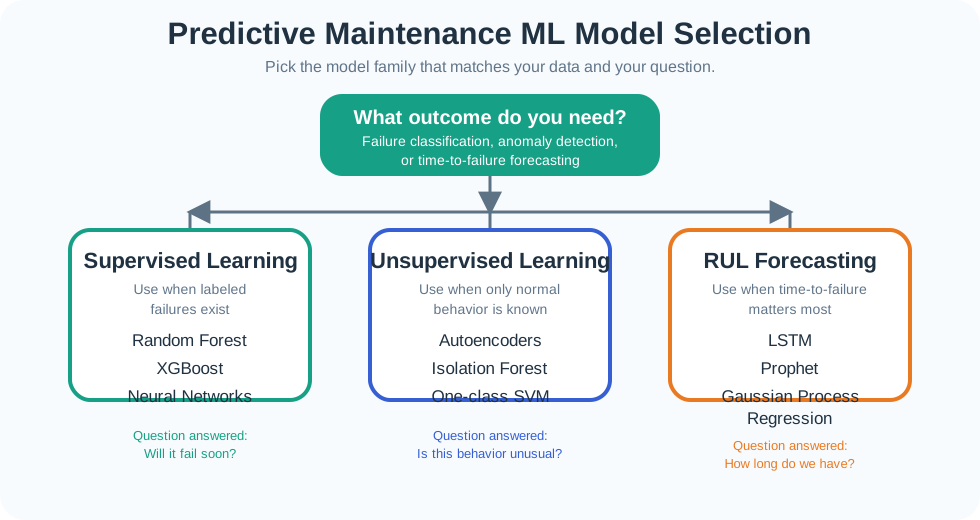
This flowchart shows how Adaptive Data Rate (ADR) dynamically optimizes spreading factor based on link quality, balancing range needs against airtime and battery consumption.
22.4 Device Class Comparison
LoRaWAN defines three device classes (A, B, C) that trade power consumption for downlink latency.
Key Insights:
| Class | Downlink Latency | Power (mA) | Sleep Mode | Battery Life | Use Cases |
|---|---|---|---|---|---|
| Class A | Seconds to minutes | 0.0005 (sleep) | Yes | 2-10 years | Battery sensors, meters |
| Class B | Sub-second (scheduled) | 0.5 (sleep + beacon) | Partial | 6-18 months | Smart alarms, actuators |
| Class C | <1 second (instant) | 12-15 (continuous) | No | Hours to days | Mains-powered controls |
Trade-off Analysis:
- Class A uses 24,000x less power than Class C (0.5 uA vs 12 mA)
- Class B adds 5% overhead for beacon synchronization vs Class A
- Class C provides instant downlinks but requires mains power for practical operation
How do we calculate the Class B beacon overhead?
Class B devices synchronize with network beacons sent every 128 seconds:
Beacon reception energy:
- Beacon preamble detection: \(t_{\text{detect}} = 8\text{ symbols} = 8 \times 32.768\text{ ms} = 262\text{ ms}\) (SF12)
- RX current during detection: \(I_{\text{RX}} = 15\text{ mA}\)
- Beacons per hour: \(n = \frac{3600}{128} = 28.125\)
- Energy per hour: \(E_{\text{beacon}} = 28.125 \times 0.262\text{s} \times 15\text{ mA} = 0.111\text{ mAh/h}\)
Ping slot reception (device opens RX window every \(n \times 128\) seconds, where \(n\) is the ping slot periodicity):
For \(n = 1\) (maximum downlink responsiveness): - Ping slots per hour: \(28.125\) (same as beacons) - RX time per slot: \(t_{\text{ping}} = 30\text{ ms}\) (typical) - Energy: \(E_{\text{ping}} = 28.125 \times 0.030\text{s} \times 15\text{ mA} = 0.0127\text{ mAh/h}\)
Total Class B overhead: \(E_{\text{B}} = 0.111 + 0.0127 = 0.124\text{ mAh/h} = 2.98\text{ mAh/day}\)
Compare to Class A daily consumption (~0.6 mAh/day for 10 msgs): Class B adds 5× the power consumption of baseline Class A operation.
22.5 LoRaWAN Quick Reference Table
| Component | Key Characteristics | Trade-offs |
|---|---|---|
| Device Classes | ||
| Class A | RX after TX only, lowest power | Downlink latency: seconds to minutes |
| Class B | Scheduled RX slots, beacon sync | Medium power, deterministic latency |
| Class C | Continuous RX listening | Lowest latency, highest power (mW range) |
| Spreading Factors | ||
| SF7 | 5.5 kbps, 2-5 km range, 41 ms ToA | Best data rate, shortest range |
| SF9 | 1.8 kbps, 5-10 km range, 206 ms ToA | Balanced performance |
| SF12 | 0.3 kbps, 10-20 km range, 991 ms ToA | Maximum range, 24x power vs SF7 |
| Network Topology | ||
| End Devices | Sensors/actuators with LoRa radio | Battery-powered, <50 mA TX |
| Gateways | Multi-channel (8+), multi-SF receivers | IP backhaul required, <10W power |
| Network Server | ADR, deduplication, routing | Manages 1000s-100,000s devices |
| Application Server | Decryption, processing, APIs | End-to-end payload access |
| Security | ||
| OTAA | Dynamic session keys, scalable | Requires join procedure |
| ABP | Pre-configured keys, simple | Manual key management, less secure |
| Encryption | AES-128, dual-layer (network + app) | End-to-end security |
| Regional Bands | ||
| EU868 | 863-870 MHz, 1% duty cycle | 36 sec/hour TX limit per device |
| US915 | 902-928 MHz, no duty cycle | FCC Part 15, 64 channels + 8 uplink |
| AS923 | 920-923 MHz, regional variants | Country-specific regulations |
| Performance | ||
| Range (Urban) | 2-10 km typical | Depends on SF, obstacles, antenna |
| Range (Rural) | 10-40 km typical | Line-of-sight, SF12 optimal |
| Battery Life | 2-10 years on coin cell | Class A, infrequent TX, ADR enabled |
| Payload | 51-222 bytes (depends on SF/DR) | Smaller at higher SF |
| Latency | 1-10 seconds typical (Class A) | Class B/C for lower latency |
Use This Table For:
- Quick parameter lookup during network planning
- Comparing device classes for your use case
- Understanding SF selection impact on range/battery/throughput
- Reference during troubleshooting and optimization
22.6 Visual Reference Gallery
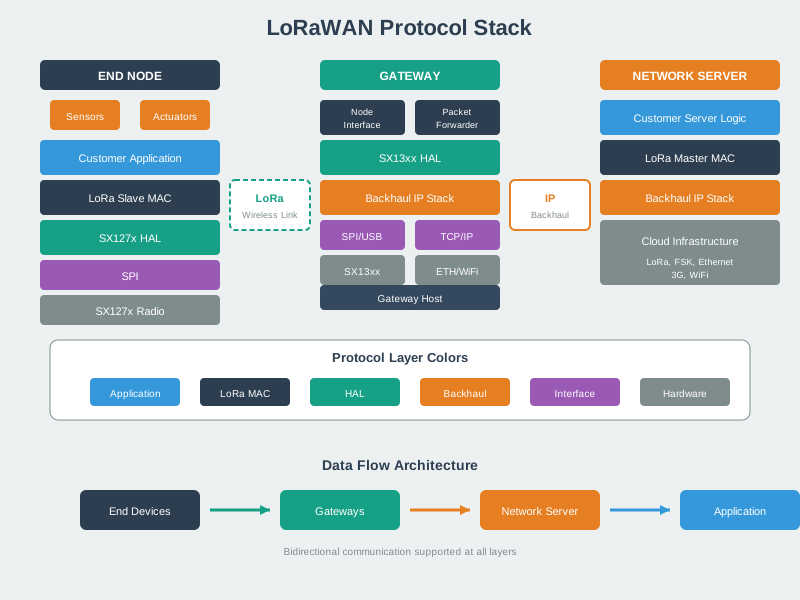
Understanding the LoRaWAN protocol stack helps explain how the physical LoRa modulation, MAC layer protocol, and application layer work together to enable long-range, low-power IoT communication.
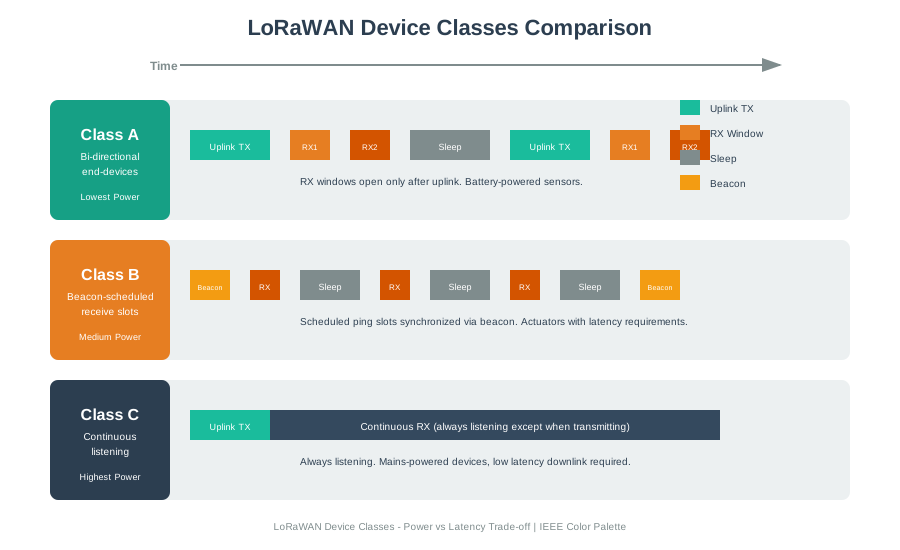
Device class selection directly impacts power consumption and downlink latency - Class A achieves 10+ year battery life while Class C enables near-instant command delivery at the cost of continuous power.
The star-of-stars topology enables redundant reception through multiple gateways while centralizing network intelligence at the server level, simplifying end device complexity.
Use this framework to systematically choose between Class A, B, and C based on your application requirements:
Step 1: Define Downlink Latency Requirement
Ask: "How fast must the device respond to a command?"

< 5 seconds (emergency shutoff, door locks): Class C required
5-60 seconds (irrigation valves, alarms): Class B viable
Minutes to hours (firmware updates, config): Class A sufficient
No downlinks needed (sensor-only): Class A default
Step 2: Assess Power Budget
Battery-powered (years):
- Class A: 10+ years possible (0.5 uA sleep)
- Class B: 1-3 years (5 mA average for beacons)
- Class C: Days to weeks (15+ mA continuous RX)

Mains-powered:
- Any class acceptable, Class C provides best responsiveness
Step 3: Consider Hybrid Approaches
Time-based switching:
- Daytime (business hours): Class B for scheduled control
- Nighttime: Class A for monitoring only
- Battery impact: 60% of pure Class B, 10x better latency than pure Class A

Event-based switching:
- Normal: Class A (10+ year battery)
- Emergency mode (triggered by sensor threshold): Class C for 1 hour
- Returns to Class A automatically
Decision Matrix:
| Application | Downlink Need | Power Source | Recommended Class | Rationale |
|---|---|---|---|---|
| Soil moisture sensor | Config updates (rare) | Battery | Class A | 10+ year life, downlinks can wait hours |
| Smart parking sensor | Price updates (hourly) | Battery | Class A + frequent heartbeat | 3-5 year life, hourly config acceptable |
| Irrigation valve | Open/close commands | Battery | Class B | 1-2 year life, 30-second latency OK for watering |
| Building HVAC control | Temp adjustments | Mains | Class C | Instant response, power not constrained |
| Fire alarm actuator | Emergency signals | Mains + backup | Class C | Life safety requires < 1 sec latency |
| Livestock tracker | Geofence alerts | Battery | Class A | Alerts via uplink, no downlink needed |
| Smart streetlight | On/off/dim commands | Mains | Class C | Instant control, centralized power |
| Water meter | Read requests (monthly) | Battery | Class A | 15+ year life, billing cycle allows delay |
Real-World Trade-off Example:
Agricultural Irrigation System (200 valves, 50-hectare farm):

Option 1: Class C for all valves
- Latency: < 1 second (excellent)
- Power: 15 mA continuous = requires mains power to all 200 valve locations
- Cost: $500/valve x 200 = $100,000 for power trenching
- Result: Not viable

Option 2: Class A with 5-minute heartbeat
- Latency: 0-5 minutes (acceptable for irrigation timing)
- Power: 30 mAh/day = 3 years on 3x AA batteries
- Cost: $20/valve battery system x 200 = $4,000 total
- Battery replacement: Every 3 years, $4,000
- Result: Viable, saves $96,000 vs Class C

Option 3: Class B with 2-minute ping slots
- Latency: 0-2 minutes (better responsiveness)
- Power: 60 mAh/day = 18 months on 3x AA batteries
- Cost: $20/valve x 200 = $4,000 initial
- Battery replacement: Every 18 months, $8,000/3yr
- Result: Viable if 2-min response worth $4,000 extra vs Option 2

Decision: Class A with 5-minute heartbeat (Option 2)
- Irrigation timing tolerates 5-minute latency
- 10-year TCO: $4,000 initial + $12,000 batteries = $16,000
- vs Class C 10-year TCO: $100,000 power + $8,000 maintenance = $108,000
- Savings: $92,000 (85% cost reduction)
Pro Tips:
- Default to Class A unless proven otherwise - most IoT applications overestimate downlink needs
- Measure actual latency requirements - “instant” often means “within 5 minutes” when analyzed
- Consider mobile apps for urgent control - user-initiated uplink trigger eliminates downlink wait
- Reserve Class C for truly latency-critical applications - emergency systems, life safety, real-time control
- Use Class B for scheduled operations - predictable ping slots work well for time-based automation
22.7 Summary
This section covered the LoRaWAN architecture fundamentals:
- Network Topology: Star-of-stars architecture with end devices, gateways, and servers
- Device Classes: Class A (lowest power), Class B (scheduled), Class C (continuous RX)
- Physical Layer: Spreading factors SF7-SF12 trading range for data rate
- Security: OTAA/ABP activation with AES-128 encryption
22.8 Knowledge Check
Common Pitfalls
Students often confuse which layer handles which function. Gateways operate at the physical/link layer and are stateless; the network server operates at the MAC layer; the application server handles application layer. Mixing up these responsibilities leads to incorrect architecture designs.
The application server only holds AppSKey and cannot decrypt NwkSKey-authenticated MAC headers. Many students incorrectly assume the application server can inspect all LoRaWAN traffic. The dual-key architecture deliberately limits application server visibility.
The star-of-stars is not hierarchical in a tree sense — devices can be received by any gateway, and gateways are interchangeable. The topology provides coverage diversity, not routing hierarchy. A device doesn’t “belong” to a specific gateway.
In multi-tenant or high-security deployments, the join server provides critical separation between root key storage and network operation. Many architecture reviews overlook the join server or treat it as optional, missing its security and organizational benefits.
22.9 What’s Next
Continue to the next review section to learn about common configuration pitfalls:
| Direction | Chapter | Focus |
|---|---|---|
| Next | Configuration Pitfalls | ADR, RX2 parameters, and common mistakes |
| Tools | Calculators and Tools | Range, power, and comparison calculators |
| Overview | Comprehensive Review | Main LoRaWAN review index page |
| Deep Dive | Security & ADR Review | Security architecture and ADR optimization |
| Foundations | LoRaWAN Overview | Core concepts and architecture introduction |