16 LoRaWAN Release Readiness

More
Depth: Practitioner
Progress saves as you read. Mark sections complete as you go; your progress appears in the sidebar.
16.1 Start Simple
This section: Start Simple — Picture a water meter that sends a leak warning from a basement.
Walk One Alarm Through the Release Chain
Picture a water meter that sends a leak warning from a basement. One receiver hears it during a test, yet the service may still miss it after a reset, a site change, or a busy hour. The release question is whether the whole path supports the promised warning.
LoRaWAN is a low-power wide-area network system for carrying small device messages. A gateway is a receiver that forwards nearby radio messages to the network service. A payload means the useful content inside a message. Name the meter, the installed receiver, the service decision, the final user, and the time limit for action.
Now block one path, restart the meter, delay the reply, repeat the warning, and change the message size. Check the records at the meter, receiver, network service, and final screen. Each accepted or rejected step needs an owner and a reason.
This walk-through does not prove every region, radio setting, device class, or fleet size. The deeper review joins architecture, joining, keys, link evidence, adaptive settings, and exceptions into the full release packet.
This capstone starts with a simple release question: could another reviewer follow the evidence and reach the same decision? A good LoRaWAN packet connects architecture, topology, device class, joining, keys, link budget, ADR, pitfalls, lab records, and ownership without hiding assumptions. If a claim is plausible but not provable, the review should keep it open rather than call it ready.
16.2 Minimum Viable Understanding
This section: Minimum Viable Understanding
- Readiness is a chain. A release is only as strong as its weakest missing proof point.
- Architecture explains responsibility. It separates LoRa radio behavior, LoRaWAN network behavior, gateway forwarding, server control, joining, and application ownership.
- Settings need evidence. Class choice, activation method, ADR policy, payload size, and channel plan should be backed by observations or records.
- Pitfalls are symptoms of missing review. Failed uplinks, rejected frames, missed downlinks, and unstable settings should lead to narrow evidence requests.
- The final record must be maintainable. Future reviewers need owners, assumptions, exceptions, and recheck triggers.
16.3 Learning Objectives
This section: Learning Objectives
By the end of this review, you will be able to:
- Assemble a complete LoRaWAN review packet from focused chapter evidence.
- Explain how topology, class behavior, security, link evidence, and ADR depend on each other.
- Diagnose deployment scenarios without relying on broad claims or unsupported numbers.
- Identify which evidence is missing from an incomplete release packet.
- Defend a LoRaWAN design decision while naming assumptions and exceptions.
- Decide when a topic belongs in a focused chapter instead of this capstone review.
16.4 Quick Check: LoRaWAN Release Boundaries
This section: Quick Check: LoRaWAN Release Boundaries
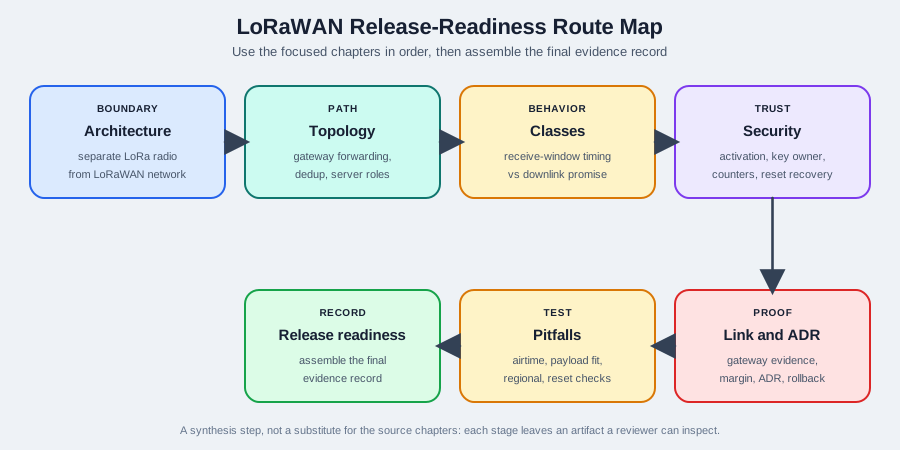
16.5 Capstone Route Map
This section: Capstone Route Map — Use the release-readiness chapter after the focused LoRaWAN chapters.
Use the release-readiness chapter after the focused LoRaWAN chapters. It is a synthesis step, not a substitute for the source chapters.
Use Figure 16.1 as a worked synthesis of evidence from the focused chapters. It shows how a numeric link-budget example, representative ADR history, and a reporting-interval pitfall become inspectable fields in the final release record. The values demonstrate the record structure; they are separate worked examples from the focused chapters, not measurements from one field deployment.
Read Figure 16.1 from the evidence inputs into the assembled output. The blue panel shows why a 12 dB link margin can still leave only 2 dB beyond the project target and require representative gateway samples. The teal panel shows why an ADR change needs a representative history, command response, follow-up uplinks, and rollback. The orange panel shows a 15-fold schedule regression even though the payload remains 12 bytes. The final strip reminds the reviewer that scope, topology, class, security, ownership, and recheck evidence are still required in the complete packet.
Recommended order:
- Use Network Architecture to confirm boundaries, forwarding, deduplication, and server roles.
- Use Device Classes to confirm downlink timing behavior.
- Use Security and Joining to confirm activation and counter behavior.
- Use Link Budget and ADR to connect radio evidence with policy.
- Use Common Pitfalls to test failure cases.
- Use this chapter to assemble the final evidence record.
16.6 Readiness Dimensions
This section: Readiness Dimensions
Architecture
Can the learner separate LoRa radio behavior from LoRaWAN network behavior and application ownership?
Topology
Can the learner explain gateway forwarding, deduplication, routing, join, and application boundaries?
Classes
Can the learner connect receive-window behavior to the promised downlink timing?
Security
Can the learner review activation, key ownership, counter behavior, and reset recovery?
Link and ADR
Can the learner justify link assumptions, gateway evidence, ADR suitability, and rollback rules?
16.7 Release Proof Chain
This section: Release Proof Chain — The capstone check should move from requirements to release record.
The capstone check should move from requirements to release record. Each step should leave an artifact that another reviewer can inspect.
Start the evidence review for the “requirements”–“what application behavior is promised” decision: inspect Figure 16.2. Two labels deserve attention—“Requirements” and “what application behavior is promised”—because they bound LoRaWAN release proof chain: eight numbered steps from requirements to release record, each leaving an artifact a reviewer can inspect.
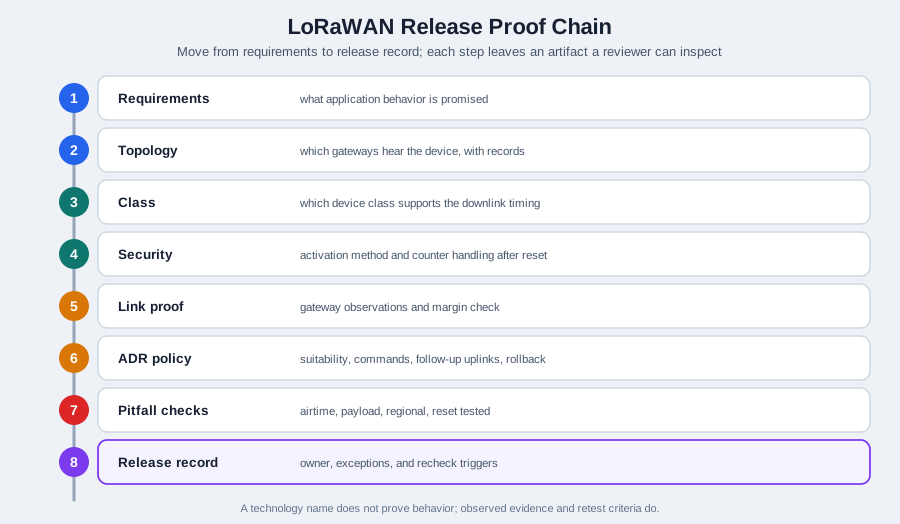
Rather than scanning Figure 16.2, use “Requirements” as the start. Relate it to “what application behavior is promised”, then carry “Topology” toward “which gateways hear the device, with records”. The labelled route demonstrates LoRaWAN release proof chain: eight numbered steps from requirements to release record, each leaving an artifact a reviewer can inspect and returns the result to the “requirements”–“what application behavior is promised” decision.
Ask these questions in order:
- What application behavior is promised?
- Which LoRaWAN version, regional profile, and device profile are in scope?
- Which gateways can hear the device, and what records prove it?
- Which server owns deduplication, routing, joining, and downlink scheduling?
- Which device class supports the downlink timing promise?
- Which activation method is used, and how are counters handled after reset?
- Which link evidence supports the data-rate or ADR policy?
- Which pitfalls were tested before release?
- Who owns future rechecks?
16.8 Scenario Diagnosis Method
This section: Scenario Diagnosis Method — Begin with an operational symptom and identify the boundary at which the expected behavior stops.
Begin with an operational symptom and identify the boundary at which the expected behavior stops. A gateway hearing a device and a network server accepting its frames are separate observations; a missing application reading does not by itself identify a radio fault. Form a small set of likely causes, then request the smallest evidence set that distinguishes them.
Match each request to the uncertainty: gateway records for the packet path, server logs for activation and counters, device-class evidence for downlink timing, and representative uplinks for ADR decisions. Choose a correction after examining that evidence. Keep unsupported claims open, and record the decision, assumptions, responsible owner and recheck trigger. This gives a later reviewer a traceable connection between the observed issue, the diagnosis and the release decision.
16.9 Field, Dense-Site, And Control Scenarios
This section: Field, Dense-Site, And Control Scenarios — The first scenario diagnosis chapter is folded here.
The first scenario diagnosis chapter is folded here.
Field monitoring scenario
For sparse field monitoring, approve only the exact behavior proven by gateway records, profile settings, payload schedule, activation evidence, and application acceptance. A single successful uplink does not prove seasonal placement, enclosure, or downlink behavior.
Dense-site scenario
For dense sites, separate link weakness from airtime pressure. Check spreading-factor distribution, payload cadence, gateway overlap, ADR suitability, and application tolerance before adding gateways or increasing retries.
Control-command scenario
For control-like behavior, state the downlink timing promise first. If the product needs immediate action, LoRaWAN Class A telemetry may be the wrong path; Class B/C or another network must be justified with energy and field evidence.
16.10 Regional, Airtime, And Roaming Scenarios
This section: Regional, Airtime, And Roaming Scenarios — The second scenario diagnosis chapter is folded here.
The second scenario diagnosis chapter is folded here.
Regional profile scenario
If a device or gateway profile is copied from another region, hold release until channel plan, dwell-time or duty-cycle assumptions, payload size, and server profile match the target region.
Airtime exception scenario
If exception devices require robust settings, show how the airtime budget remains acceptable and what owner rechecks the exception before scale.
Roaming or shared-network scenario
If the deployment depends on a shared or roaming network path, record who owns gateway evidence, join/application routing, downlink limits, and incident response.
The claim that LoRaWAN scenario diagnosis method showing symptom, hypothesis, requested proof, decision, correction, and record needs “Observed issue” as a concrete check beside “Hypothesis”. Inspect Figure 16.3 before continuing the “observed issue”–“hypothesis” decision, especially “Observed issue” beside “Hypothesis”.
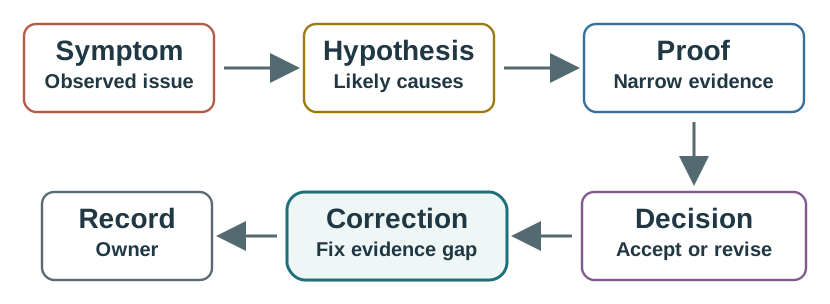
Inspect “Observed issue” against “Hypothesis” on Figure 16.3, then test the link between “Likely causes” and “Proof”. The two comparisons clarify LoRaWAN scenario diagnosis method showing symptom, hypothesis, requested proof, decision, correction, and record. They also keep “Observed issue” in the running decision about the “observed issue”–“hypothesis” decision, tied to labelled evidence.
- Name the symptom in operational terms.
- List two or three likely causes without overfitting.
- Request the smallest evidence set that separates those causes.
- Choose the corrective action that fixes the evidence gap.
- Record the assumption and owner so the same issue does not return.
16.11 Walkthrough: Missing Uplinks
This section: Walkthrough: Missing Uplinks — A team reports missing uplinks after final installation.
A team reports missing uplinks after final installation. The first proposal is to increase the spreading factor for every device.
Decision path:
- The reviewer rejects the blanket setting change as unsupported.
- Gateway-hearing records are requested first.
- Payload size is checked against the slowest setting the profile allows.
- Channel-plan evidence is compared with the production profile.
- ADR evidence is reviewed only after the path and payload questions are answered.
- The release record names the final setting policy and the recheck trigger.
This walkthrough avoids treating every missing uplink as a radio-only problem.
16.12 Walkthrough: Downlink Promise
This section: Walkthrough: Downlink Promise — A release packet says that field devices can receive commands “quickly.” The packet does not state the device class, receive-window behavior, or energy-source assumption.
A release packet says that field devices can receive commands “quickly.” The packet does not state the device class, receive-window behavior, or energy-source assumption.
Decision path:
- The promise is not accepted because “quickly” is not an evidence term.
- The device class and downlink timing behavior are requested.
- If the promise is after-uplink only, Class A may be acceptable.
- If the promise is scheduled, Class B support evidence is needed.
- If the promise is mostly immediate, Class C requires an energy-source and operations check.
- The release packet is updated with exact timing language and an exception owner.
The class decision is accepted only when it matches the application promise.
16.13 Walkthrough: Reset and Rejoin
This section: Walkthrough: Reset and Rejoin — A device is heard by gateways after reset, but the network server rejects frames.
A device is heard by gateways after reset, but the network server rejects frames. The application dashboard shows no new readings.
Decision path:
- The reviewer separates radio hearing from network acceptance.
- Gateway records prove the packet path reached the network boundary.
- Server logs are requested to check counter and activation behavior.
- The team proves either OTAA rejoin behavior or ABP counter persistence.
- Recovery behavior becomes part of the release checklist.
Good security diagnosis connects keys, counters, reset behavior, and logs.
16.14 Walkthrough: ADR Policy
This section: Walkthrough: ADR Policy — A team enables ADR because it is the default.
A team enables ADR because it is the default. No one checks whether the device profile is stationary or whether follow-up uplinks prove the chosen setting.
Decision path:
- ADR suitability is reviewed against the device operating profile.
- Representative uplinks after final placement are requested.
- ADR command evidence and follow-up uplinks are compared.
- A rollback rule is added for weak or changing link evidence.
- The final record states when ADR should be rechecked.
ADR is approved by evidence, not by default settings.
16.15 Release Packet
This section: Release Packet — The final capstone output is a compact release packet.
The final capstone output is a compact release packet. It should be easy to scan and hard to misunderstand.
A release decision about the “the final capstone output: compact, scannable, and hard to misunderstand”–“scope” decision needs “version, regional profile”, not a slogan. Inspect Figure 16.4 through “The final capstone output: compact, scannable, and hard to misunderstand” and “Scope” to check this claim: LoRaWAN comprehensive release packet: eight scannable fields, scope, topology, class decision, security record, link proof, ADR record, pitfall checks, and verification.
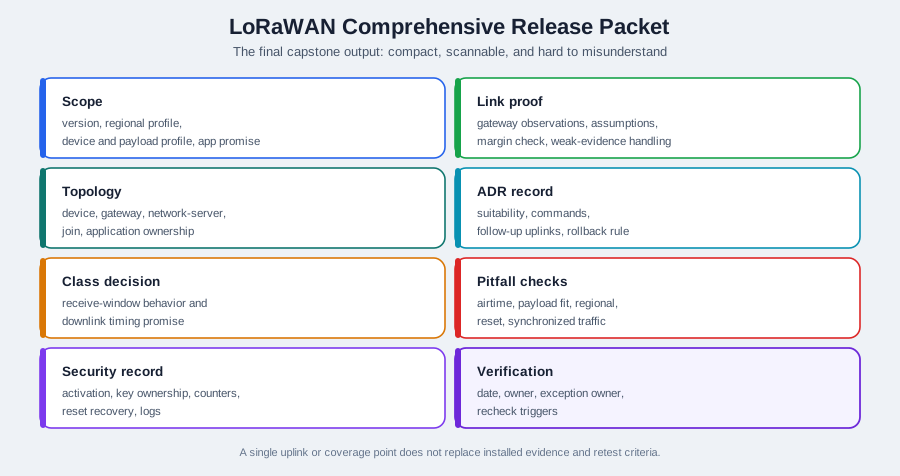
Rather than scanning Figure 16.4, use “The final capstone output: compact, scannable, and hard to misunderstand” as the start. Relate it to “Scope”, then carry “version, regional profile” toward “device and payload profile, app promise”. The labelled route demonstrates LoRaWAN comprehensive release packet: eight scannable fields, scope, topology, class decision, security record, link proof, ADR record, pitfall checks, and verification and returns the result to the “the final capstone output: compact, scannable, and hard to misunderstand”–“scope” decision.
Include:
- Scope: LoRaWAN version, regional profile, device profile, payload profile, and application promise.
- Topology: device, gateway, network-server, join, and application ownership.
- Class decision: receive-window behavior and downlink timing promise.
- Security record: activation, key ownership, counter behavior, reset recovery, and logs.
- Link proof: gateway observations, assumptions, margin check, and weak-evidence handling.
- ADR record: suitability, commands, follow-up uplinks, and rollback rule.
- Pitfall checks: airtime, payload fit, regional profile, reset, and synchronized traffic checks.
- Verification: date, owner, exception owner, and recheck triggers.
16.16 Readiness Rubric
This section: Readiness Rubric — Use this rubric to decide whether a learner answer is ready.
Use this rubric to decide whether a learner answer is ready.
Proof-backed
The answer names the relevant boundary, asks for proof, and avoids unsupported general claims.
Scoped
The answer stays inside LoRaWAN and the active deployment profile instead of comparing every protocol.
Assumption-heavy
The answer may be plausible, but it does not name the evidence that would prove the claim.
Shortcut-driven
The answer relies on blanket settings, broad promises, or old lab results without final-profile evidence.
16.17 Chapter Readiness Checklist
This section: Chapter Readiness Checklist
Before completing the LoRaWAN lane, make sure you can answer:
- Which chapter provides each proof point in the release packet?
- Which boundary separates radio behavior from LoRaWAN network behavior?
- Which records prove gateway forwarding and server decisions?
- Which class supports the downlink timing promise?
- Which activation method is used, and how is reset recovery tested?
- Which link evidence supports the ADR or data-rate policy?
- Which common pitfalls were checked before release?
- Which assumptions require future recheck?
16.18 Match Readiness Area to Proof
This section: Match Readiness Area to Proof
16.19 Order the Release Readiness Check
This section: Order the Release Readiness Check
16.20 Label the Comprehensive Release Packet
This section: Label the Comprehensive Release Packet
16.21 Knowledge Check
This section: Knowledge Check
16.22 Quiz: Incomplete Release Packet
This section: Quiz: Incomplete Release Packet
16.23 Quiz: Scenario Diagnosis
This section: Quiz: Scenario Diagnosis
16.24 Common Pitfalls
This section: Common Pitfalls
This chapter checks the whole evidence chain. It does not replace topology, class, security, link, ADR, or pitfalls review.
The answer may sound right and still be incomplete. Ask which artifact proves it.
Gateway forwarding, network-server decisions, join behavior, and application processing must stay separate in the review.
Changes in placement, payloads, gateways, firmware, channel plan, or server policy can invalidate earlier evidence.
A LoRaWAN release is ready only when the evidence chain holds from radio behavior through network-server decisions to application ownership. One good uplink, one dashboard screenshot, or one coverage point can support a narrow claim, but it cannot prove class timing, join recovery, ADR suitability, regional fit, and owner response by itself.
Use this capstone as a chain check. If any link is missing, the right answer is not a broader promise. The right answer is a narrower release scope, an explicit exception, or a retest before scale. This keeps the final release decision tied to evidence instead of confidence built from isolated demonstrations before launch sign-off.
For example, a warehouse tracker release might have acceptable gateway hearing and a clean dashboard sample, but the chain is still incomplete if the packet does not name the regional profile, payload schedule, Class A downlink limits, OTAA recovery evidence, and the owner who will revisit ADR after racks are moved. The release decision should say which behavior is approved now, which behavior is only a pilot assumption, and which future change reopens the review.
This is why the capstone treats readiness as evidence assembly. The focused chapters teach the mechanisms; this review asks whether the mechanisms have been tied to the same deployment scope. A good answer can point to the architecture record, class decision, activation record, link proof, pitfall checks, and owner log without relying on a technology slogan. It can also explain which artifact would fail if the deployment moved from pilot devices to a larger fleet.
Scope Holds
The record names LoRaWAN version, regional profile, payload schedule, device profile, and application promise.
Class Holds
Receive-window behavior supports the promised downlink timing without hiding energy or operations costs.
Join Holds
Activation, counters, key custody, reset behavior, and logs prove network acceptance beyond radio hearing.
Link Holds
Gateway observations, margin checks, ADR evidence, and rollback rules match the installed site, not a lab assumption.
Most release mistakes happen at the edge of an otherwise reasonable design. The packet should name every exception and connect it to evidence, an owner, and a recheck rule.
Write the exception record in operational language, not as a generic risk note. If ten devices are allowed to use a more conservative data-rate policy, name the device group, the installed evidence, the payload and retry assumptions, the expected impact on shared airtime, and the person who can remove the exception. If the downlink promise is limited to "after the next uplink," the record should say that directly so product and support teams do not sell it as immediate control.
Each exception should also have a closure path. A weak-link exception might close after a gateway move and a new packet record. A reset-risk exception might close after OTAA rejoin evidence or ABP counter persistence is demonstrated. Without a closure path, exceptions become permanent hidden requirements.
LoRaWAN review feels simple when each setting is considered alone. It becomes production work when settings interact. A slower data rate may improve link margin but increases airtime. More retries may help one device but raise channel pressure. Class C may improve command timing but changes the power model. ADR may save energy for stable devices but can become wrong when placement or gateway density changes.
The coupling matters because an apparently local fix can move risk into another layer. If a weak device is forced to a slower setting, the link budget may look healthier while the airtime budget becomes tighter. If a team adds confirmed uplinks to improve confidence, it also creates downlink scheduling pressure. If Class C is chosen to satisfy command timing, the power and operations evidence must change too. The review should therefore ask for before-and-after evidence, not only the new setting.
ADR is a common example. A stable meter with repeated installed uplinks can justify ADR because the history reflects the future path. A moving asset or a gateway plan that is still changing cannot use old history in the same way. The release packet should state the condition that makes ADR valid, the telemetry that proves it remains valid, and the rollback threshold when the condition stops holding.
Security and recovery are part of the same coupling. Reset behavior, frame counters, activation method, and application acceptance must be checked together after firmware or server changes. Otherwise a radio fix can mask a session-state failure until field maintenance creates the first large outage. The under-the-hood answer is ready when it names the layer that changed and the evidence that proves neighboring layers still behave correctly.
Robust Settings Consume Shared Capacity
Dense sites need spreading-factor distribution, payload cadence, and exception-device evidence before adding conservative settings.
Timing Promises Depend On Class
Class A, B, and C are not interchangeable labels. Each one changes latency, energy, server scheduling, and operations evidence.
Policy Must Follow The Installed Link
ADR is a closed-loop policy. It needs command evidence, follow-up uplinks, and rollback criteria after final placement.
16.25 Summary
This section: Summary — The LoRaWAN comprehensive review ties the lane together.
The LoRaWAN comprehensive review ties the lane together. A strong answer moves from scope to evidence, keeps responsibilities separate, diagnoses scenarios by proof, and leaves a release record that future reviewers can maintain. The chapter is complete when the learner can defend architecture, topology, class behavior, security, link evidence, ADR, pitfalls, and ownership as one coherent LoRaWAN review.
16.26 What’s Next?
This section: What’s Next?
- Use LoRaWAN Exercises for scenario-based practice.
- Use LoRaWAN Quiz Bank to test recall and diagnosis.
- Return to Common Pitfalls if any release evidence gap remains.
16.27 Key Takeaway
This section: Key Takeaway — A comprehensive LoRaWAN review ties together PHY settings, device class, activation, ADR, regional rules, gateway placement, application payloads, and operational monitoring.
A comprehensive LoRaWAN review ties together PHY settings, device class, activation, ADR, regional rules, gateway placement, application payloads, and operational monitoring.
Open printable teacher run sheet
Find help
3 reviewed answers.
Where should I start in a module?
Open the module page from the sidebar to see its chapters in order. Use the module map to return to a topic you need.
Modules and pathsReviewed
What can I try when a project does not work?
Check the symptom, then work through the diagnostic steps. Keep the error message and the smallest example that reproduces it.
When you are stuckReviewed
How do interactive examples work?
Use the interactive guide to check how examples and simulations work before changing your project.
Interactive examples guideReviewed