16 LoRaWAN: Topic Review
16.1 Learning Objectives
By the end of this review, you will be able to:
- Explain LoRaWAN Architecture: Describe star-of-stars topology and classify network server roles
- Differentiate Device Classes: Contrast A, B, C trade-offs for latency vs battery life
- Apply Security Features: Implement OTAA activation and configure AES-128 encryption
- Design Deployments: Architect sensor networks using TTN or private LoRaWAN servers
- Evaluate Alternatives: Assess LoRaWAN against NB-IoT and LTE-M for specific applications
- Configure Initial Nodes: Set up TTN accounts and build first LoRaWAN sensor nodes
16.2 Prerequisites
Required Chapters:
- LoRaWAN Overview - Core concepts
- LoRaWAN Architecture - Network structure
- LoRaWAN Comprehensive Review - Full review
This Quick Review Covers:
| Topic | Key Points |
|---|---|
| LoRa PHY | Chirp spread spectrum, SF |
| LoRaWAN MAC | Device classes A/B/C |
| Network | Gateways, network server |
| Security | AES-128, session keys |
Interactive Tool:
- Try the LoRaWAN Range Calculator
Key Concepts
- Topic Review Scope: Comprehensive coverage of LoRaWAN fundamentals including physical layer (LoRa CSS), network architecture, device classes, security, and deployment considerations.
- Key Trade-offs: Core LoRaWAN design decisions balancing range vs. data rate (SF selection), security (OTAA vs. ABP), power consumption (device class), and cost (public vs. private network).
- Architecture Components: End devices, gateways, network server, join server, and application server working together in star-of-stars topology.
- Security Summary: AES-128 dual-key security (NwkSKey + AppSKey), OTAA preferred for key freshness, frame counters for replay prevention.
- ADR Summary: Adaptive data rate optimizes SF based on SNR history; converges over ~20 packets; should be disabled for mobile devices.
- Regional Compliance: Each region has specific channel plans, duty cycles, and power limits requiring region-specific device configuration.
- Deployment Validation: Coverage testing, gateway connectivity verification, packet delivery ratio measurement, and end-to-end latency testing confirm deployment quality.
Estimated Time: 60 minutes (all sections) or 15 minutes per focused chapter
What is this chapter? Topic-based review consolidating LoRaWAN concepts, organized into focused sections.
When to use:
- After studying LoRaWAN fundamentals
- When reviewing specific topics
- Before comprehensive assessment
Topics Organized:
| Topic | Key Concepts | Chapter |
|---|---|---|
| Physical Layer | LoRa modulation, spreading factors | Physical Layer Review |
| Architecture | Star-of-stars, gateways | Architecture & Classes Review |
| Device Classes | Class A, B, C trade-offs | Architecture & Classes Review |
| Security | AES-128, session keys | Security & ADR Review |
| ADR | Adaptive data rate | Security & ADR Review |
| Deployment | Gateway planning, TTN | Deployment Review |
Prerequisites:
- LoRaWAN Overview
- LoRaWAN Architecture
- Basic RF and networking concepts
Recommended Path:
- Review fundamentals chapters first
- Study topics here by section
- Complete Quiz Bank
“This is your one-stop review for everything LoRaWAN!” said Max the Microcontroller, opening a massive study sheet. “Five topics, each with its own focused chapter. Physical layer covers chirp spread spectrum and spreading factors. Architecture explains the star-of-stars network. Device classes compare A, B, and C. Security covers AES-128 and OTAA. And deployment shows you how to plan gateway placement.”
Sammy the Sensor asked for the key numbers. “LoRa uses chirp spread spectrum – frequency sweeps that are very resistant to interference. SF7 gives 5.5 kbps at 2 kilometers. SF12 gives 0.3 kbps at 15 kilometers. Each step up doubles the airtime but adds about 3 dB of link budget – roughly 40 percent more range.”
“Security is AES-128 with two session keys,” added Lila the LED. “NwkSKey encrypts the network headers and generates the MIC for integrity. AppSKey encrypts your application payload end-to-end. With OTAA activation, these keys are generated fresh every time a device joins, making replay attacks much harder.”
Bella the Battery gave the deployment summary. “One gateway covers about 10 to 15 kilometers in rural areas and 2 to 5 kilometers in cities. For reliability, overlap gateway coverage by 20 percent. Use The Things Network for prototyping – it is free and global. Then move to a private server for production when you need guaranteed capacity.”
16.3 LoRaWAN Topic Review: Index
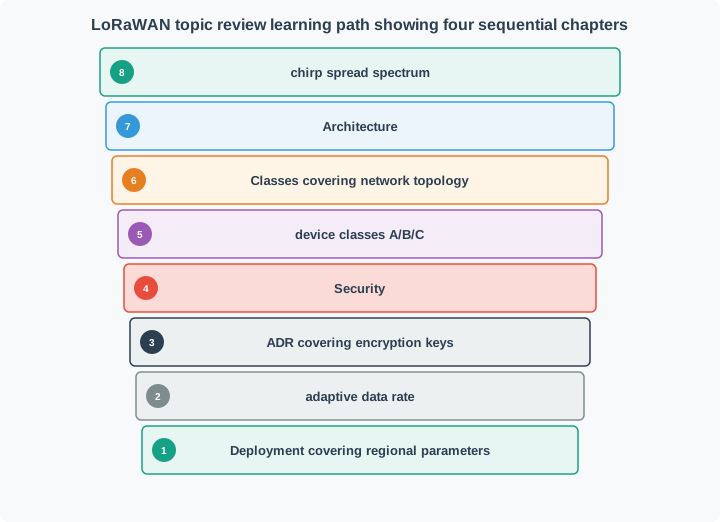
This comprehensive review is organized into four focused chapters. Study them in order or jump to specific topics as needed.
16.3.1 Review Chapters
16.3.2 Chapter 1: Physical Layer and Modulation
Physical Layer Review (~15 minutes)
| Topic | What You’ll Learn |
|---|---|
| Quick Reference | Essential LoRaWAN parameters table |
| LoRa vs LoRaWAN | Physical vs MAC layer distinction |
| Spreading Factors | SF7-SF12 trade-offs for range, speed, battery |
| Bandwidth Options | 125/250/500 kHz selection |
| Link Budget | Sensitivity and path loss calculations |
16.3.3 Chapter 2: Network Architecture and Device Classes
Architecture & Classes Review (~15 minutes)
| Topic | What You’ll Learn |
|---|---|
| Star-of-Stars Topology | Gateways, network server, application server |
| Gateway Role | Transparent relay function |
| Network Server Functions | Deduplication, ADR, MAC commands |
| Device Classes | Class A, B, C comparison |
| Class Selection | Decision tree for choosing classes |
16.3.4 Chapter 3: Security Architecture and Adaptive Data Rate
Security & ADR Review (~15 minutes)
| Topic | What You’ll Learn |
|---|---|
| Security Layers | Application, network, physical layer protection |
| Key Hierarchy | Root keys to session keys |
| OTAA vs ABP | Activation method comparison |
| Frame Counters | Replay attack prevention |
| ADR Operation | Automatic SF and power optimization |
16.3.5 Chapter 4: Deployment, Regional Parameters, and Troubleshooting
Deployment Review (~20 minutes)
| Topic | What You’ll Learn |
|---|---|
| Regional Parameters | EU868, US915, duty cycle compliance |
| Gateway Planning | Coverage and capacity calculations |
| Application Scenarios | Use case selection matrix |
| The Things Network | TTN architecture and quick start |
| Troubleshooting | Debug decision tree |
16.4 Quick Knowledge Check
Before diving into the detailed chapters, test your baseline knowledge:
When should you use Class A, B, or C devices? This decision impacts cost, battery life, and downlink latency.
Class A (Battery-Powered Sensors):
Choose Class A when: - Battery operation required (5-15 year life) - Downlink latency of minutes to hours acceptable - Application is primarily uplink (sensors reporting data) - Lowest device cost needed ($10-15 per module)
Real Examples: - Agriculture soil sensors (daily readings, config changes rare) - Parking sensors (occupancy status, no real-time control) - Water leak detectors (alert-based, battery lasts 10+ years)
Class B (Scheduled Downlinks):
Choose Class B when: - Battery operation needed but with predictable downlink windows - Downlink latency of seconds to 2 minutes acceptable - Balance between power and responsiveness required - Device cost: $15-20 per module
Real Examples: - Smart street lighting (scheduled dimming commands every 128 seconds) - Automated irrigation valves (watering schedules sent during beacon slots) - Building HVAC sensors (setpoint adjustments during business hours)
Class C (Mains-Powered Actuators):
Choose Class C when: - Mains power available (no battery constraint) - Immediate downlink required (<100ms latency) - Bidirectional communication is primary use case - Device cost: $20-30 per module (higher due to continuous RX)
Real Examples: - Building access control (door unlock commands need instant response) - Industrial alarm panels (emergency shutoff requires immediate action) - Smart plugs (on/off commands from mobile app)
Decision Tree:
Is mains power available?
├─ NO → Battery-powered options
│   ├─ Need downlink within minutes? → Class A
│   └─ Need downlink within seconds? → Class B
└─ YES → Class C (if immediate downlink needed)
└─ If latency minutes OK → Class A saves costA Class C device listening continuously at 50 mA vs Class A sleeping at 3 µA between messages creates a dramatic power difference. \(P_{\text{Class C}} = 50\,\text{mA} \times 24\,\text{h} = 1200\,\text{mAh/day}\) vs \(P_{\text{Class A}} = 24 \times (40\,\text{mA} \times 2\,\text{s}/3600\,\text{s}) + 0.003\,\text{mA} \times 24\,\text{h} \approx 0.6\,\text{mAh/day}\). Worked example: With a 2000 mAh battery, Class A runs 3333 days (9 years) while Class C drains in 1.7 days—requiring mains power.
Cost-Benefit Analysis Example (1,000 devices over 5 years):
| Class | Device Cost | Battery Replacement | Operations | Total Cost |
|---|---|---|---|---|
| A | $15,000 | $0 (10-yr battery) | $5,000 | $20,000 |
| B | $20,000 | $8,000 (replace 2×) | $8,000 | $36,000 |
| C | $30,000 | N/A (mains) | $15,000 | $45,000 |
Key Insight: Start with Class A unless you have a specific downlink latency requirement. Many applications that initially think they need Class C can be redesigned to work with Class A by making devices autonomous (e.g., irrigation valve with local schedule stored in device memory, updated weekly via Class A downlink, rather than real-time commands via Class C).
16.5 Summary
LoRaWAN is a powerful LPWAN protocol that enables long-range, low-power IoT communication. Key takeaways:
- LoRa = Physical layer modulation, LoRaWAN = MAC layer protocol
- Star-of-stars topology with gateways relaying to network servers
- Three device classes (A, B, C) for different latency/power requirements
- Spreading factors (SF7-SF12) trade range for data rate
- OTAA provides secure, scalable device activation
- AES-128 encryption with end-to-end security
- Ideal for battery-powered sensors in agriculture, smart cities, asset tracking
- Compare with NB-IoT/LTE-M for cellular alternatives
Common Pitfalls
LoRaWAN topic reviews focus on memorizing parameters (SF7–SF12, sensitivity values, duty cycle percentages) without building intuition for why these trade-offs exist. Understand the physics and engineering reasons behind each trade-off to answer novel questions in assessments and real deployments.
LoRaWAN architecture (end device → gateway → network server → application server) is easily confused under exam conditions. Practice drawing the complete architecture including data flow, key distribution, and protocol layers until it can be reproduced from memory.
Conceptual understanding without numerical practice leads to errors in calculations (link budget, battery life, duty cycle). Work through at least 3-5 numerical examples for each calculation type during review to build computational fluency.
The goal of LoRaWAN study is to make better deployment decisions, not just pass exams. For each topic reviewed, ask: “When would I choose this option in a real deployment, and what are the risks?” This anchors theory to practical judgment.
16.6 What’s Next
| Direction | Chapter | Focus |
|---|---|---|
| Start with | Physical Layer Review | LoRa modulation, spreading factors, link budget |
| Continue to | Architecture & Classes Review | Star-of-stars topology, device class selection |
| Then study | Security & ADR Review | AES-128 keys, OTAA/ABP, adaptive data rate |
| Complete with | Deployment Review | Gateway planning, TTN setup, troubleshooting |
| Test knowledge | LoRaWAN Quiz Bank | Practice questions across all LoRaWAN topics |
| Compare technologies | Sigfox Fundamentals | UNB modulation, operator model comparison |
| Compare technologies | NB-IoT Fundamentals | Cellular LPWAN alternative for licensed spectrum |
Prerequisites:
- LoRaWAN Overview - Start here if new to LoRaWAN
- LoRaWAN Architecture - Network structure and device classes
- LPWAN Fundamentals - Core LPWAN concepts
Deep Dives:
- LoRaWAN Comprehensive Review - Full technical review with all topics
- LoRaWAN Quiz Bank - Test your knowledge with practice questions
Comparisons:
- Sigfox - Operator-managed LPWAN alternative
- LPWAN Comparison - Compare all LPWAN technologies
- NB-IoT - Cellular LPWAN comparison
- Weightless - Open-standard LPWAN alternative
Hands-On:
- Quizzes Hub - Comprehensive LoRaWAN quiz collection
- Simulations Hub - LoRaWAN range and capacity calculators
- Videos Hub - LoRaWAN deployment video tutorials
16.7 Concept Relationships
Understanding how LoRaWAN concepts interconnect helps solidify your knowledge:
| Concept | Builds On | Enables | Common Confusion | Real-World Impact |
|---|---|---|---|---|
| Spreading Factor (SF) | Chirp spread spectrum modulation | Range-data rate trade-off, link budget calculation | SF is not the same as bandwidth - both affect throughput | SF12 = 15 km range but 0.3 kbps; SF7 = 5 km but 5.5 kbps |
| Device Classes (A/B/C) | MAC layer timing, downlink windows | Battery life optimization, latency requirements | Class doesn’t affect uplink - only downlink availability | Class A = 10 year battery, Class C = days (mains power needed) |
| OTAA vs ABP Activation | AES-128 encryption, key derivation | Dynamic session keys, scalable deployments | ABP is not inherently insecure - it’s operationally risky | OTAA regenerates keys on join - ABP static keys vulnerable to replay |
| Adaptive Data Rate (ADR) | Link margin, spreading factor, power control | Battery optimization, network capacity | ADR assumes stationary devices - fails for mobile trackers | Saves 40-60% battery by lowering SF/power when close to gateway |
| Star-of-Stars Topology | Gateway relay function, network server | Scalability, coverage flexibility | Gateways don’t route - network server does MAC logic | One gateway serves 1,000+ devices; add gateways for coverage not capacity |
16.8 See Also
Explore these related chapters to deepen your LoRaWAN expertise:
- LoRaWAN Architecture - Star-of-stars topology, network server roles, device classes implementation details
- LoRa Physical Layer - Chirp spread spectrum, spreading factors, bandwidth options, link budget analysis
- LoRaWAN Security - OTAA/ABP activation, AES-128 encryption, frame counters, key hierarchy
- The Things Network Guide - Free public network setup, gateway registration, device provisioning, data integration
- LPWAN Comparison - Sigfox vs LoRaWAN vs NB-IoT decision framework, cost analysis, technology selection
16.9 Visual Reference Gallery
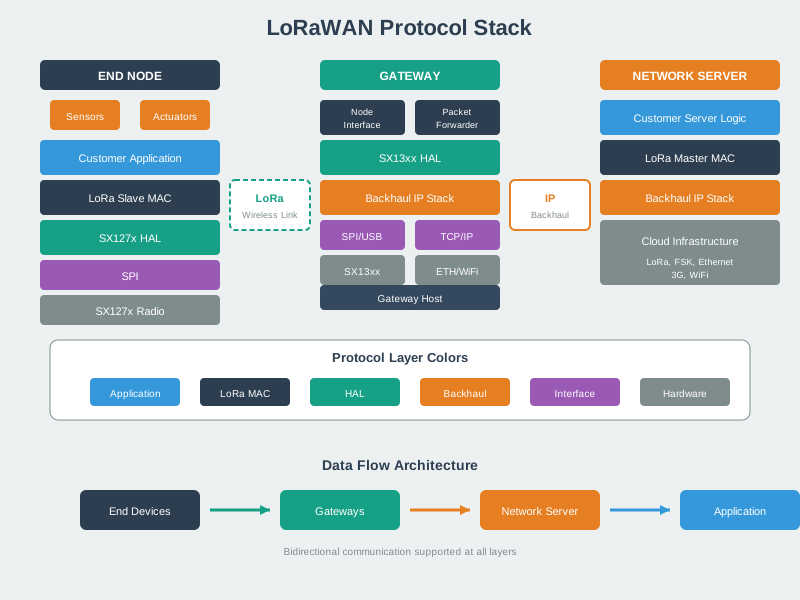
This layered view clarifies the distinction between LoRa (physical modulation) and LoRaWAN (MAC protocol) - a key concept tested in topic review assessments.
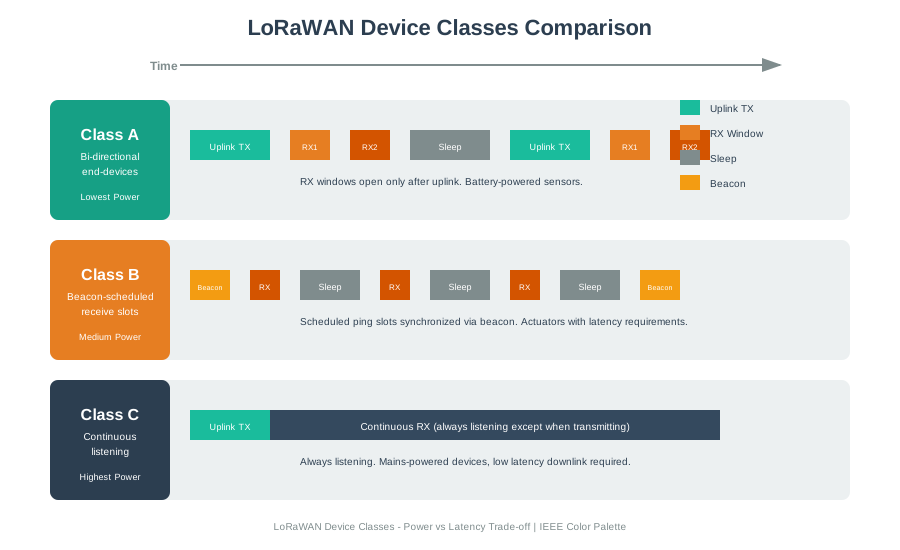
Understanding class selection trade-offs is fundamental to LoRaWAN deployment - this visualization summarizes the key decision factors for choosing between Class A, B, and C devices.
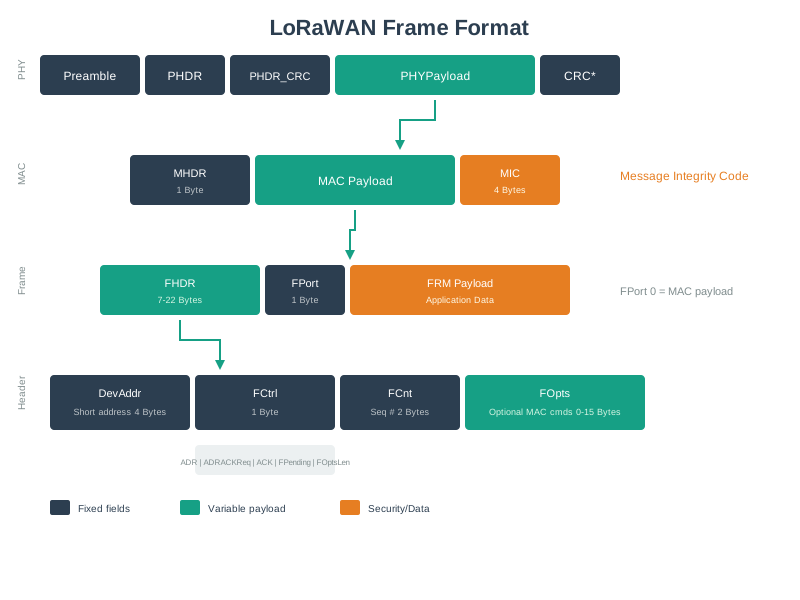
The frame format visualization helps review how LoRaWAN achieves security through MIC (Message Integrity Code) and manages device addressing through DevAddr and frame counters.