18 LoRaWAN Assessment
Layer Boundaries, Activation, Security, Energy, Scalability, Regional Deployment, and Review Readiness
18.1 Start Simple
Treat the quiz as a check on shortcuts. Before choosing an answer, ask whether the question is about LoRa radio behavior, LoRaWAN network behavior, gateway forwarding, device-class timing, ADR evidence, or deployment proof. Most wrong answers collapse two layers into one. The quickest path to the right answer is to name the layer and then ask what evidence belongs there.
18.2 How This Assessment Works
- Read each question as a review scenario.
- Choose the answer that preserves protocol boundaries.
- Ask for evidence before accepting a performance or architecture claim.
- Use missed questions to revisit the overview, architecture, topology, device-class, or ADR chapters.
18.3 Learning Objectives
By the end of this assessment, you will be able to:
- Separate LoRa physical-layer behavior from LoRaWAN network behavior.
- Explain what gateways do and do not own.
- Match Class A, B, and C behavior to downlink timing promises.
- Identify when ADR evidence should be requested.
- Choose a troubleshooting path from symptom and evidence rather than intuition.
18.4 Quick Check: LoRaWAN Assessment
18.5 Fundamentals Map
The fundamentals are a set of boundaries. Most wrong answers mix boundaries together.
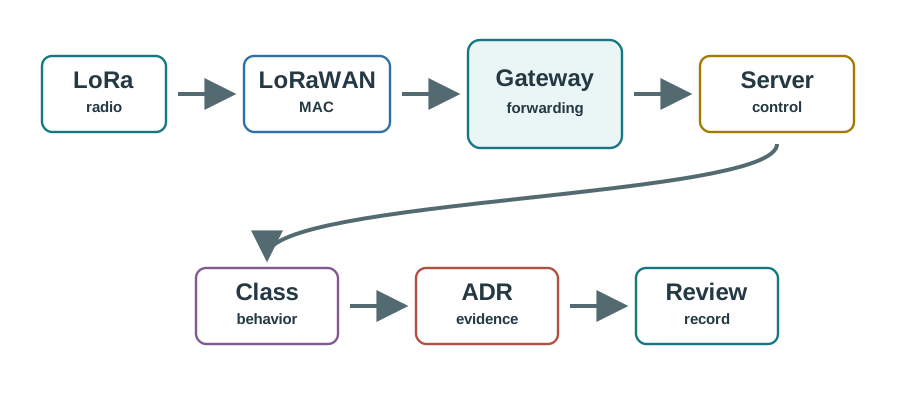
Use the map this way:
- LoRa radio: modulation and radio settings.
- LoRaWAN MAC: device behavior, activation, frame handling, and class behavior.
- Gateway forwarding: receives radio frames and forwards metadata; it is not the session authority.
- Network server control: deduplication, MAC behavior, ADR commands, and routing.
- Review record: evidence that proves the chosen behavior.
18.6 Minimum Review Knowledge
LoRa versus LoRaWAN
LoRa describes the radio layer. LoRaWAN adds network behavior, joining, class behavior, and server responsibilities.
Forwarding role
A gateway forwards frames and metadata. The network server owns deduplication, MAC control, and route decisions.
Downlink timing
Class behavior must match the application response promise and the energy source.
Evidence policy
ADR is a policy decision based on representative uplink evidence, not a magic performance switch.
18.7 Quiz Questions
18.8 Activation And Security Questions
The activation/security quiz is now part of this assessment. A good answer:
- prefers OTAA unless the release packet explains why ABP is necessary;
- treats frame-counter rollback as a security review, not a nuisance to disable;
- keeps key custody, invalid MIC diagnosis, and application payload ownership separate;
- records reset recovery, owner response, and retest triggers.
18.9 Energy Optimization Questions
The battery/energy quiz is now part of this assessment. A good answer:
- counts receive windows, retries, wake time, and measurement evidence, not only transmit current;
- matches device class to the application response promise and energy source;
- treats ADR as an evidence policy that can reduce airtime only when link margin remains acceptable;
- requires measured or representative current evidence before claiming lifetime.
18.10 Network Scalability Questions
The scalability quiz is now part of this assessment. A good answer:
- checks airtime pressure, spreading-factor distribution, payload cadence, gateway diversity, and application tolerance;
- distinguishes link weakness from channel occupancy;
- does not treat gateway overlap as a cure for every collision or airtime issue;
- records exception devices and retest triggers before scale.
18.11 Regional Deployment Questions
The regional deployment quiz is now part of this assessment. A good answer:
- checks regional profile, channel plan, data-rate limits, payload size, device firmware, gateway support, and server profile together;
- rejects copied settings from another region until target-region evidence exists;
- names owners for field validation, configuration drift, and application acceptance;
- records what profile or site change reopens the release decision.
18.12 Question 1: Layer Boundary
18.13 Question 2: Gateway Role
18.14 Boundary Stack
Use this stack to keep the review from merging unrelated responsibilities.
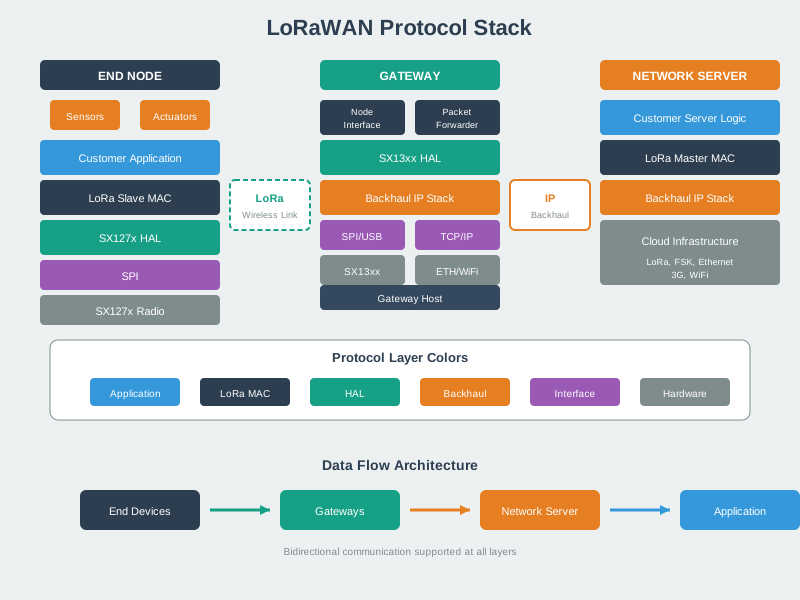
Ask:
- Which layer owns the claim?
- Which component can observe the evidence?
- Which component can change the behavior?
- Which chapter should the learner revisit?
18.15 Question 3: Device Class
18.16 Question 4: ADR Evidence
18.17 Troubleshooting Surfaces
Good troubleshooting starts by naming the surface being tested.
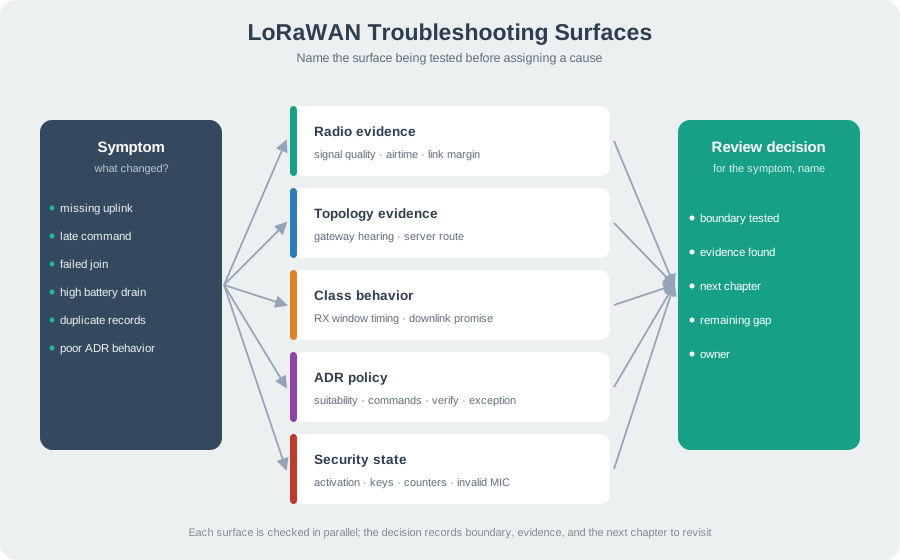
Review surfaces:
- Radio evidence: signal quality and airtime evidence.
- Topology evidence: gateway hearing and server route.
- Class behavior: receive-window timing and downlink promise.
- ADR policy: suitability, commands, verification, and exception rule.
- Security state: activation, keys, counters, and invalid-MIC events.
18.18 Match The Fundamentals
18.19 Order The Fundamentals Review
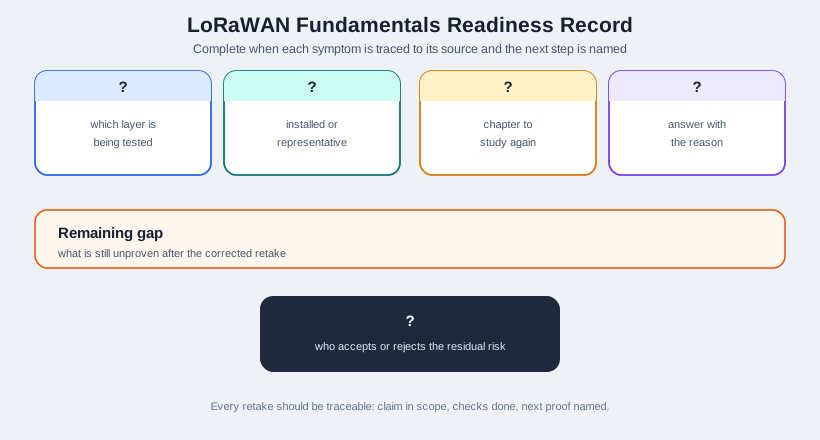
18.20 Readiness Record
The fundamentals quiz is complete when the learner can name the boundary, evidence, and next chapter for each symptom.
18.21 Label The Readiness Record
18.22 Common Pitfalls
Radio settings and network behavior are connected, but they are not the same review surface. Name the layer before choosing the evidence.
Gateways forward frames and metadata. Do not assign server, key, or application responsibilities to them without evidence.
Device class affects downlink timing and energy assumptions. It belongs in the early design review, not final polish.
ADR needs representative evidence, follow-up uplinks, and an exception path. It is not a universal fix or a feature to ignore.
Overview: Assessment Proves Boundaries
A LoRaWAN assessment is useful when every answer names the boundary being tested. LoRa radio behavior, LoRaWAN MAC behavior, gateway forwarding, network-server control, join/security custody, device class, ADR policy, regional settings, and application ownership each need different evidence.
The quiz is therefore not a memory check about labels. It is a review exercise: can the learner explain which claim is in scope, which component can observe it, and which record would prove or reopen the decision?
For example, a learner who answers “add another gateway” to every reliability problem has not passed the boundary check. The same missing uplink symptom could come from weak radio margin, channel occupancy, a regional profile mismatch, activation failure, a blocked route, or an application expectation that the network never promised. The assessment should push the learner to ask which surface is being tested before choosing a remedy.
A strong answer also keeps evidence proportional to the claim. “LoRaWAN reaches far” is not enough to approve a campus, farm, or warehouse deployment. The answer should ask for representative gateway metadata, payload cadence, spreading-factor mix, downlink timing needs, class behavior, activation status, and the owner who can accept or reject the remaining risk. The point of the quiz is to turn a quick multiple-choice response into a small release-review habit.
In practice, that means every corrected answer should be traceable. The learner should be able to say, “I changed my answer because the claim was about class timing, the gateway evidence did not prove listening time, and the next proof is a receive-window test.” If that sentence cannot be formed, the score is hiding an evidence gap.
- Layer boundary: separate radio settings from MAC, server, and application responsibilities.
- Evidence boundary: require installed or representative observations before approving range, class timing, ADR, or security claims.
- Decision boundary: record what answer is approved, what remains unproven, and what change triggers a retest.
Practitioner: Mark The Missed Evidence
When a learner misses a question, classify the miss before assigning review work. A layer miss sends them back to boundary diagrams. A timing miss sends them to device classes and downlink windows. A security miss sends them to activation, counters, MIC checks, and key custody. An ADR miss sends them to link evidence and exception handling.
Use a short assessment record for each missed surface: question, selected answer, boundary confused, evidence missing, chapter to revisit, and owner for the release decision. That turns the quiz into a readiness tool rather than a score alone.
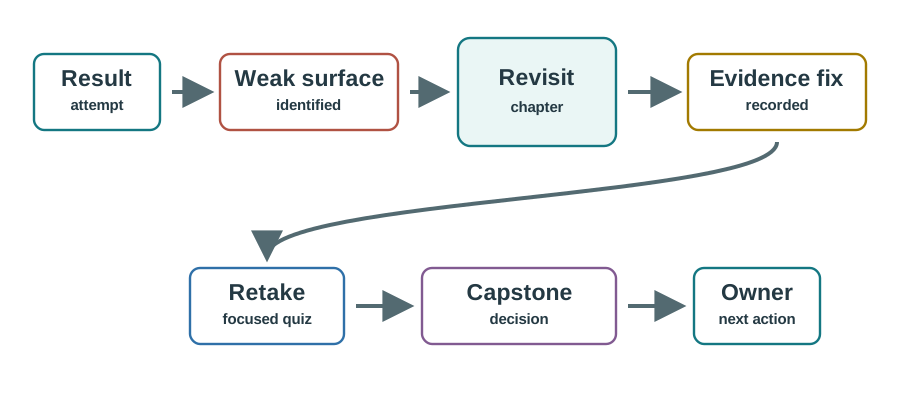
Suppose a learner chooses “Class A devices can receive whenever the gateway is nearby” for a downlink question. The feedback should not only say the answer is wrong. The record should say the learner confused gateway reachability with device listening behavior, point them to device classes, and ask for an example receive-window timeline before the retake. If the same learner later answers an ADR question by saying “enable ADR everywhere,” the record should add link-evidence and mobility suitability as the weak surface.
That lightweight record is useful for teams too. It shows whether the assessment uncovered one isolated gap or a pattern that could affect release work. A repeated security miss means the reviewer should not approve activation exceptions yet. A repeated regional-profile miss means copied settings need a field-validation owner. A repeated architecture miss means gateway, server, and application responsibilities should be reviewed before the learner moves to deployment scenarios.
- Boundary miss: LoRa, LoRaWAN MAC, gateway, server, and application roles were mixed together.
- Evidence miss: a range, energy, ADR, or class claim was accepted without representative observations.
- Ownership miss: the answer did not name who can change, verify, or reopen the behavior.
Under The Hood: Wrong Answers Collapse Layers
Most wrong LoRaWAN assessment answers collapse two layers into one shortcut. A nearby gateway is treated as proof of application success. A long-range radio is treated as proof of network readiness. ADR is treated as a universal optimizer. Device class is treated as an application preference instead of a radio-listening and energy contract.
The safer mental model is a chain of claims. The radio can be heard, the gateway can forward, the network server can accept and control MAC behavior, the application can interpret the payload, and the operator can respond to failures. A good assessment answer says which link is being tested and what evidence proves that link.
The chain matters because one successful observation does not prove the next one. A gateway log can show that a frame was heard, but it does not prove the message joined with valid session state, passed frame-counter checks, survived deduplication, reached the correct application route, or matched the application command timing. A dashboard value can prove ingestion, but it does not prove that a future downlink can be scheduled for a sleeping Class A device.
This is also why answer feedback should stay specific. If the wrong answer was “move the parser” for an ADR problem, the correction should name ADR as MAC/network behavior and point back to link evidence. If the wrong answer was “disable frame counters” for a reset problem, the correction should name security state and recovery evidence. If the wrong answer was “copy the EU profile” into another region, the correction should name regional configuration and field validation. The underlying skill is not trivia; it is controlled handoff between layers.
- Radio proof does not prove join success, payload acceptance, or downlink timing.
- Server proof does not prove application handling, owner response, or field power budget.
- Quiz proof expires when firmware, region profile, payload cadence, gateway placement, or class behavior changes.
18.23 Summary
LoRaWAN fundamentals are about boundaries and evidence. A strong quiz answer separates LoRa radio from LoRaWAN network behavior, keeps gateway and server responsibilities distinct, matches class behavior to downlink timing, and asks for ADR or troubleshooting evidence before approving a design claim.
18.24 What’s Next?
- Use Energy Optimization Quiz for energy and class evidence.
- Use Network Scalability Quiz for airtime, ADR, and density review.
- Use Activation and Security Quiz for join, counter, and key-role evidence.
- Return to LoRaWAN Quiz Bank to choose the next assessment surface.
18.25 Key Takeaway
Fundamentals quizzes should confirm the core LoRaWAN fit: low-rate telemetry, long range, constrained downlink, regional rules, and careful airtime management.