10 LoRaWAN Network Architecture

More
Depth: Practitioner
Progress saves as you read. Mark sections complete as you go; your progress appears in the sidebar.
A water meter transmits once and two rooftop gateways hear it. Both forward a packet, yet the customer should see one measurement. This is the simplest way to test where forwarding ends and network decisions begin.
10.1 Start Simple
This section: Start Simple — LoRaWAN is a low-power radio system in which gateways hear device messages and pass them to a network service.
LoRaWAN is a low-power radio system in which gateways hear device messages and pass them to a network service. A gateway is one of those radio listening points. Picture a water meter whose one radio message is heard by two gateways. Neither gateway decides the final meaning of that reading.
Trace one message first. Name the device, each listening gateway, the network service, and the application that uses the reading. Mark where a repeated copy is removed and who owns each handoff.
Then test the return path. A device may send well but listen only at short times. More gateways can improve reach, yet they add links, clocks, placement work, and support duties. A heard frame is not the same as an accepted reading.
This meter story cannot prove coverage, join success, safe roaming, or timely control. It also cannot choose a service owner. Those claims need site records and end-to-end tests.
Use the Practitioner sections to build the role and message-path record. Use Under the Hood for joins, repeat removal, receive times, and downlink limits. The deeper work adds exact roles without changing the simple trace.
Trace message 17. The meter sends once. Two sites hear it. Both pass a copy. The network checks both. It keeps one result. The app sees one reading. Staff can find both radio records. Now send a reply. Mark the receive slot. Mark which site sends. Check whether the meter hears it. Repeat with one site down. Keep the role of each part clear.
A LoRaWAN gateway is closer to a listener than a device owner. It hears radio frames and forwards packet records. The network server decides what to accept, deduplicate, route, and schedule. Start by tracing one uplink from device to gateway set to network server to application service. If that path is clear, downlink timing, joins, roaming, and troubleshooting have a place to attach.
Different bodies can provide the same LoRaWAN gateway capability: the concentrator and packet-forwarding role remain recognizable even when service access, weather sealing, antenna placement, mounting hardware, and backhaul packaging change.


Read the set from open prototype to sealed field appliance. Enclosure and mounting choices change maintainability and radio siting, but all four bodies remain listeners and forwarders; deduplication, routing, and downlink control still belong at the network-server boundary.

Overview: LoRaWAN Architecture Is a Boundary Map
LoRaWAN architecture is a star-of-stars network pattern for small IoT messages. End devices transmit LoRa radio frames. One or more gateways may hear the same uplink. Gateways forward packet records and reception metadata over IP. The network server validates traffic, deduplicates gateway copies, handles MAC behavior, schedules downlinks, and routes payloads toward application systems.
The beginner mistake is to treat a gateway like a Wi-Fi access point, router, or device owner. In LoRaWAN, the gateway is a forwarding point. The network server is where the architecture makes most of its control decisions.
For example, if sensor S-17 is heard by gateways G1 and G2 during the same uplink, the application should receive one temperature event, not two competing events. The release record therefore needs the device identifier, both gateway reception records, the network-server duplicate-handling evidence, the application route, and the owner who accepts the payload meaning. That same record should say what happens if G2 is moved to a new roof or the server route changes.
A useful architecture diagram is therefore less about drawing every cable and more about proving boundaries. It should let a reviewer trace one uplink from device to gateway set to network server to application owner, then trace one downlink request back through the network-server queue to the class-specific receive opportunity. If either path depends on a hidden setting, the architecture is not ready for release.
If you only need the intuition, remember this: approve a LoRaWAN architecture only when the device group, gateway hearing path, network-server boundary, join boundary, application owner, device-class promise, ADR policy, and retest trigger are visible.
Inspect Figure 10.1 with one question from the “devices”–“gateway” decision: how does “devices” constrain “Gateway”? The answer supports LoRaWAN architecture path: end devices transmit, gateways forward, the network server decides, and application systems receive routed payload meaning.
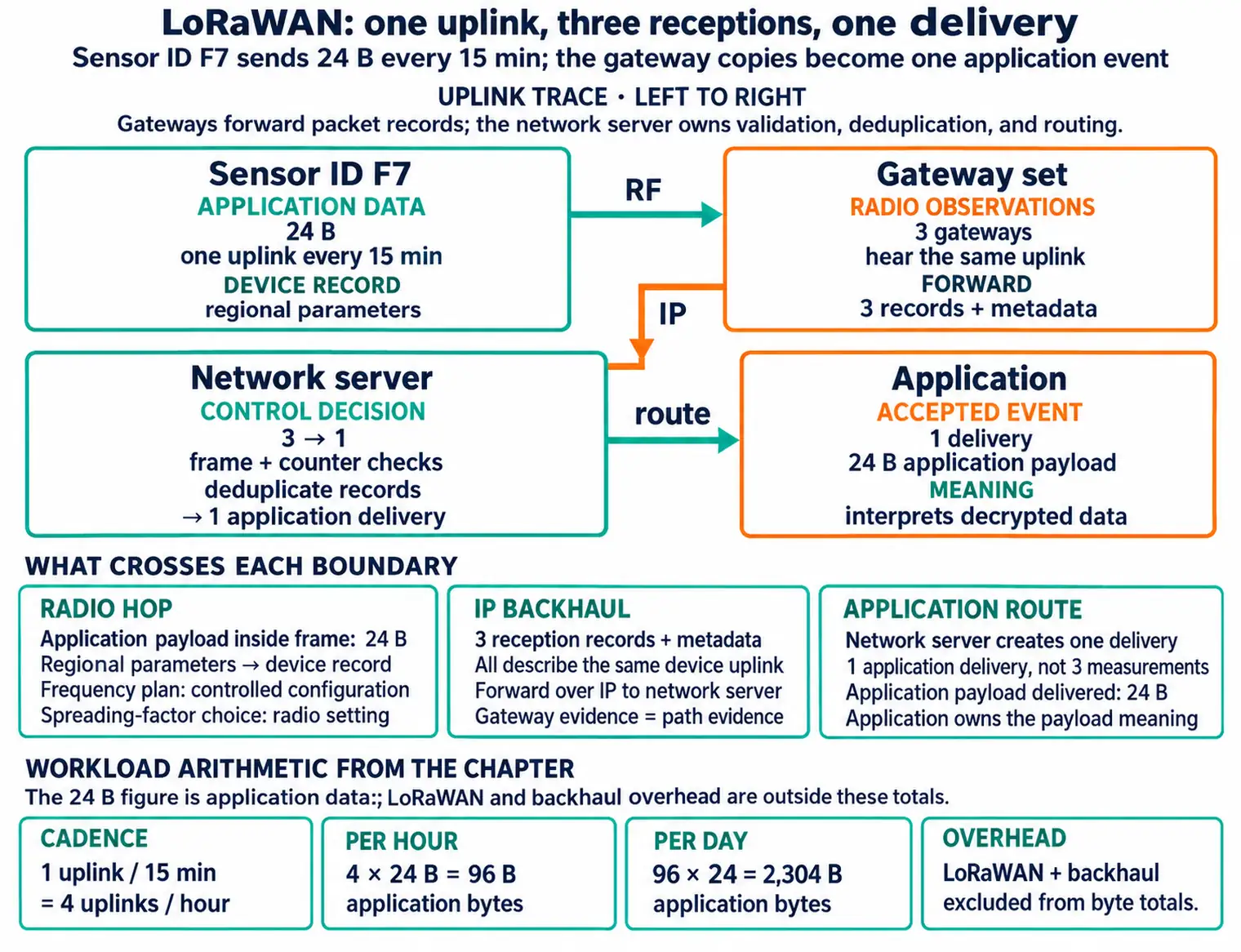
In Figure 10.1, end devices transmit, gateways forward, the network server decides, and application systems receive routed payload meaning.
The One-Minute Architecture Review
End Device
Sends uplinks, keeps counters, follows the selected class behavior, and opens receive opportunities according to the device mode.
Gateway
Receives LoRa frames and forwards packet records with metadata. It does not own application meaning or MAC policy.
Network Server
Validates, deduplicates, manages MAC behavior, controls ADR decisions, schedules downlinks, and routes payloads.
Application Boundary
Owns payload meaning, business action, application-level acknowledgements, and requests for downlinks.
Architecture Claims That Need Evidence
- Coverage claim: which device groups can be heard by which gateway set?
- Server claim: which network server owns validation, deduplication, routing, MAC behavior, and scheduling?
- Activation claim: which join or session-state boundary is in scope, and who owns exceptions?
- Application claim: which service owns payload meaning, command intent, and release acceptance?
- Retest trigger: gateway movement, antenna change, server migration, activation-policy change, device-class change, payload change, or application timing change.
Overview Knowledge Check
Practitioner: Build the Architecture Release Record
A release-ready LoRaWAN architecture record is not a decorative diagram. It is a set of claims that another reviewer can verify from packet records, server settings, join evidence, gateway metadata, application route evidence, and the operations owner for future changes.
The record should be specific to the device group and deployment condition. A campus meter design, a rural environmental sensor, and a mobile asset tag may all use LoRaWAN, but they do not share the same gateway evidence, downlink promise, ADR assumptions, or retest triggers.
A release decision about the “uplink →”–“end device” decision needs “transmits uplinks”, not a slogan. Inspect Figure 10.2 through “uplink →” and “End device” to check this claim: Role boundary map: separate forwarding, network control, join behavior, application meaning, device-class promises, and release evidence.
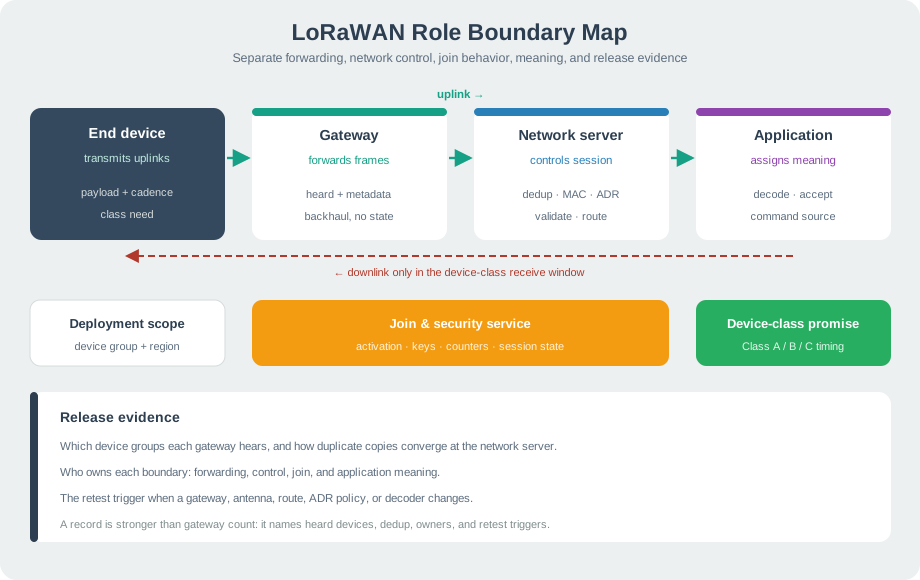
In Figure 10.2, notice how “uplink →” establishes the initial state; “End device” supplies the next check. The move through “transmits uplinks” reaches “payload + cadence”, making Role boundary map: separate forwarding, network control, join behavior, application meaning, device-class promises, and release evidence observable. Return to the “uplink →”–“end device” decision with “payload + cadence”, and keep “uplink →” in the release record.
Minimum Record Fields
Worked Review: Campus Occupancy Sensors
A campus project adds three gateways and claims the LoRaWAN network is redundant. A stronger review does not approve the claim from gateway count alone. It asks which sensor groups each gateway can hear, whether duplicate uplinks are deduplicated before application delivery, which network server owns route decisions, and whether the application can wait for the selected device-class receive behavior.
The release statement becomes narrower and stronger: "Device group A is heard by gateway set 1 under the final antenna placement; duplicate gateway copies converge at the network server; payloads route to the occupancy application; Class A is accepted because commands can wait for the next device uplink; gateway or antenna movement reopens the review."
Practitioner Knowledge Check
Under the Hood: Server Boundaries, Downlinks, and Retests
Under the hood, LoRaWAN architecture is a set of control boundaries. The end device owns its local transmit behavior and class behavior. The gateway forwards radio observations. The network server makes network-layer decisions. Join handling creates or validates session state. Application systems interpret payload meaning and request application-driven downlinks.
When these boundaries blur, reviews become fragile. A successful uplink does not prove that downlinks are schedulable. A gateway record does not prove application acceptance. A dashboard value does not prove that activation, counters, or duplicate-copy handling are correct.
A packet trace should also preserve the frame evidence that explains which boundary is being tested. At the outer level, a LoRaWAN frame carries an MHDR, a MAC payload, and a message integrity code (MIC). The frame header includes fields such as DevAddr, FCtrl, FCnt, and optional FOpts. The FPort value separates MAC-command use from application payload use; in review records, note when port 0 is carrying MAC behavior rather than ordinary application data. Keeping these fields visible prevents a "packet arrived" log from hiding whether the evidence belongs to addressing, counters, MAC behavior, integrity, or application delivery.
The MIC is a keyed message authentication code computed over the data frame, including the encrypted FRMPayload. The network server can verify it without decrypting application content. A valid MIC and fresh frame counter support network-side authenticity and replay checks; they do not prove that the decrypted application reading is semantically correct. AppSKey protects application payload confidentiality at the application boundary. A release record therefore checks network acceptance and application interpretation separately.
The claim that Downlink scheduling is a boundary-crossing action: application intent, network-server queueing, gateway selection, device receive opportunity, and verification must all line up needs “END DEVICES” as a concrete check beside “GATEWAYS”. Inspect Figure 10.3 before continuing the “end devices”–“gateways” decision, especially “END DEVICES” beside “GATEWAYS”.
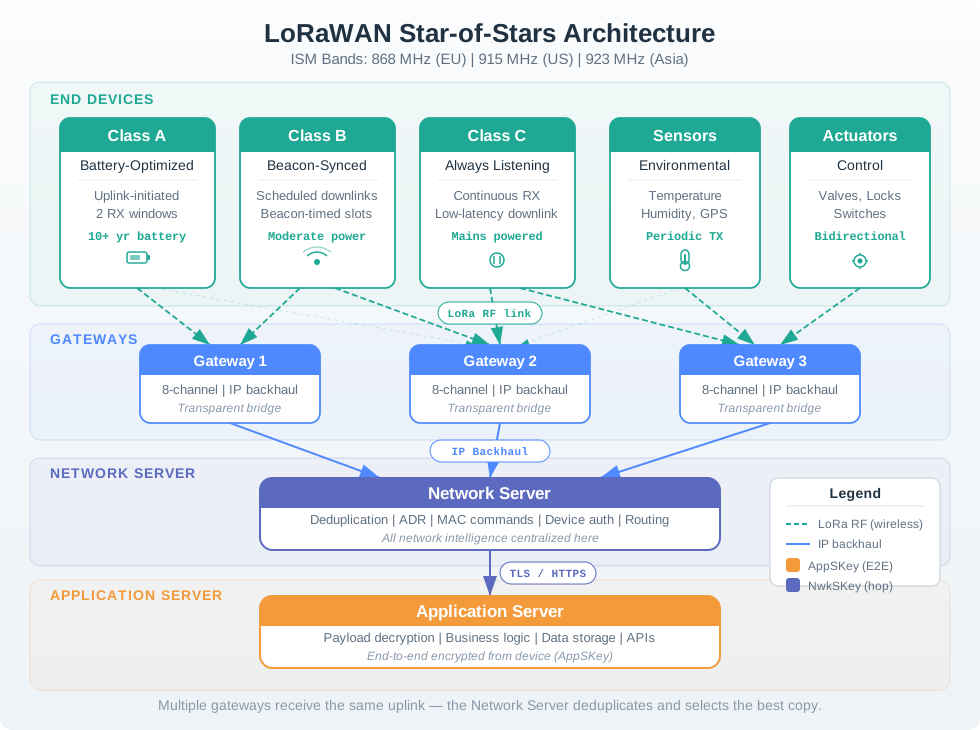
Trace the review path across Figure 10.3 from “END DEVICES” to “GATEWAYS”. From “NETWORK SERVER”, it arrives at “APPLICATION SERVER”. That path is evidence for Downlink scheduling is a boundary-crossing action: application intent, network-server queueing, gateway selection, device receive opportunity, and verification must all line up; retain it when revisiting the “end devices”–“gateways” decision.
Control Boundary Rules
- Gateway evidence is path evidence. It helps prove who heard a frame and with what metadata; it does not prove payload meaning.
- Network-server evidence is control evidence. It should show validation, duplicate handling, routing, ADR policy, downlink queue behavior, and owner accountability.
- Join evidence is session evidence. It should show how activation or loaded session state becomes usable, how counters behave, and how exceptions are recovered.
- Application evidence is meaning evidence. It should show decoder behavior, acceptance rules, command intent, and integration ownership.
- Class evidence is timing evidence. It should show when the device can hear downlinks and whether the application promise fits that timing.
Downlink Review Pattern
A downlink is not simply "the application sends a message to the device." The application requests a downlink. The network server decides whether it can schedule that message, chooses a gateway path that fits recent evidence, and waits for a receive opportunity that the device class actually provides.
The gateway-selection step is worth tracing concretely, because it is easy to assume the network server just replays the downlink through whichever gateway happened to hear the uplink. A confirmed-uplink example makes the actual mechanic visible: an end device transmits, two gateways both hear the frame and forward it, the network server accepts one copy and forwards the payload to the application server, the application server returns an acknowledgement, and the network server then picks whichever heard gateway currently has the best link evidence for that device -- not necessarily both, and not necessarily the one whose copy happened to be processed first -- to carry the downlink back. Gateway diversity on the uplink therefore buys the network server a choice on the downlink; a release record that only shows "a gateway heard the device" has not yet shown which gateway will be asked to deliver the reply.
Class A designs must tolerate waiting for the device to transmit before receive windows open. Class B designs need scheduled receive evidence and a plan for missed schedule signals. Class C designs need energy-source and operations review because the device listens far more often.
Before deciding the “evidence”–“gateway” decision, inspect “evidence” in Figure 10.4 and compare it with “Gateway”. That contrast matters because Release evidence map: topology, gateway set, server boundary, activation boundary, class promise, ADR policy, exception rule, and owner.
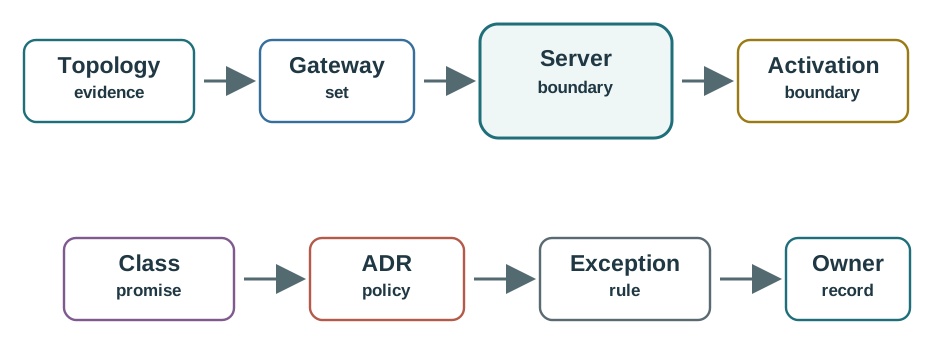
Use “evidence” as the entry point to Figure 10.4. Read “Gateway” next, with “set” as the bridge to “Server”. This route gives practical meaning to Release evidence map: topology, gateway set, server boundary, activation boundary, class promise, ADR policy, exception rule, and owner and supplies the review sequence for the “evidence”–“gateway” decision.
Retest Signals
- Retest when a device group moves, gateway placement changes, antenna orientation changes, or a backhaul path changes.
- Retest when payload size, message cadence, downlink promise, or application command semantics change.
- Retest when the network server, join boundary, route integration, ADR policy, or queue behavior changes.
- Retest when activation method, key custody, frame-counter recovery, or reset handling changes.
- Retest when operations ownership changes and the previous release owner can no longer answer exception questions.
Under-the-Hood Knowledge Check
-
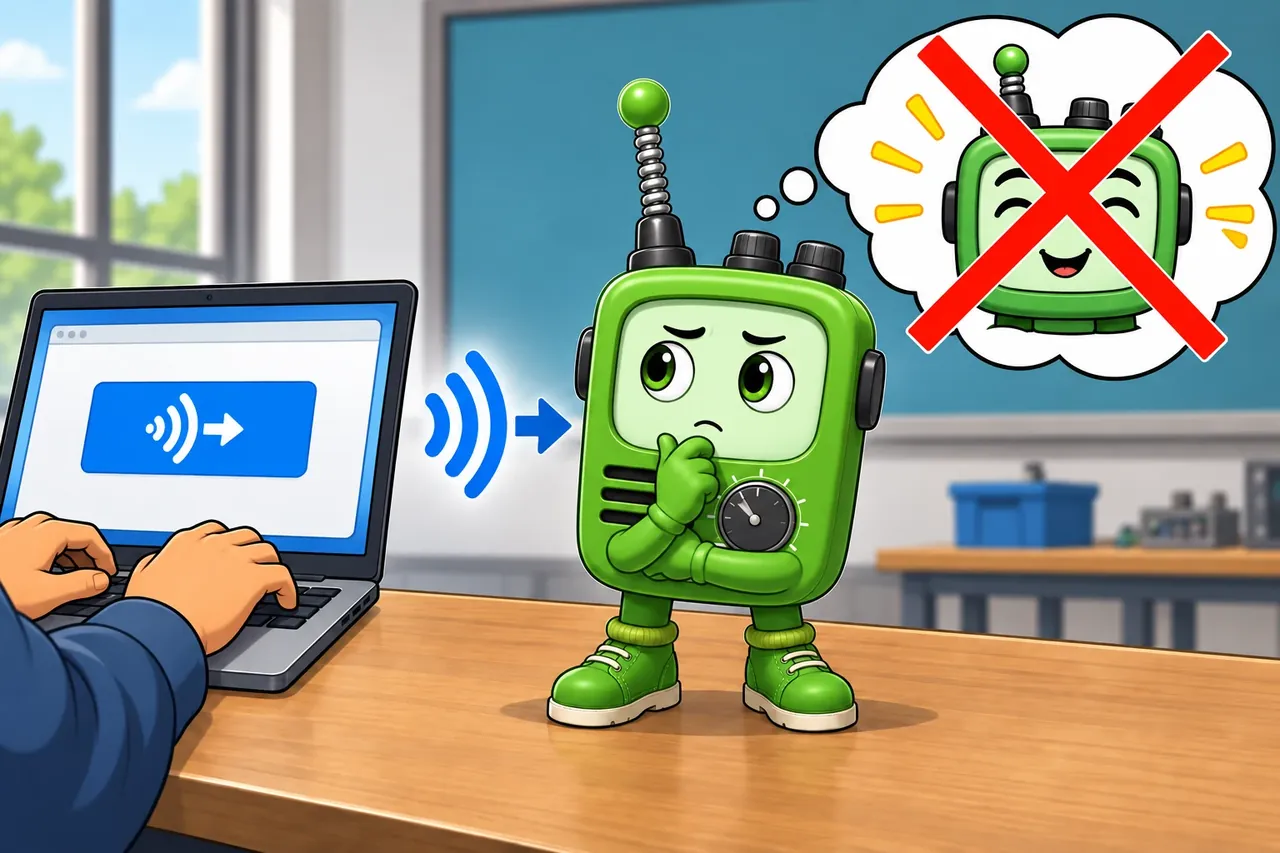
Wrong idea: submitting a downlink makes the command arrive at once. It fails because the sleeping device, receive window, and device class control when delivery is possible.
A star-of-stars diagram is useful only when its trust boundaries are explicit. Figure 10.5 separates radio forwarding, network control, join material, and application decryption.

In Figure 10.5, Gateways perform RF-to-IP packet forwarding while Network server owns MIC, deduplication, and ADR. Join server protects root-key and session work, and Application server decrypts application payloads; those labels prevent a gateway observation from being mistaken for end-to-end application proof.
10.2 Count Radio Copies Separately from Water Readings
This section: Count Radio Copies Separately from Water Readings — Assume the device produces 40 numbered readings during a test.
Assume the device produces 40 numbered readings during a test. Gateway A hears 38 and gateway B hears 35. The server finds that 33 readings were heard by both. The number of distinct readings heard by at least one is 38 + 35 − 33 = 40. The two forwarding paths carried 73 reception records, but those records describe only 40 device events.
Keep both reception observations for diagnostics. Their signal levels and arrival paths show how the gateway set contributes coverage. Deliver one accepted record per unique uplink to the application under the chosen deduplication rules. Simply dividing 73 by two would be wrong because not every transmission reached both sites.
Read Figure 10.5 across gateways, network server, join server and application server. The listening sites forward observations. The network validates and deduplicates, while the application owns the meaning of the water reading. A schema error can therefore reject content even after a valid radio frame reaches the server.
Now shut down gateway A. The same test history suggests B heard 35 of the 40 readings, but that is only evidence for the observed interval. It does not prove future coverage or authorize an unchanged availability claim. Repeat the installed-path test with A absent and inspect which locations lose reception.
Predict whether two forwarded copies should trigger two work orders. They should not if the application consumes the deduplicated event identity correctly. Next, enqueue a downlink through the server. The gateway with the strongest past uplink is not automatically a successful return path: timing, radio availability and the device’s receive window still govern the transmission.
This example gives the architecture a measurable division of work. Packet-forwarder logs explain what each site heard; server logs explain what was accepted and scheduled; application logs explain what the accepted content caused. Joining those records makes a missing reading traceable without confusing diversity of reception with duplication of physical events. It also lets operations judge the value of a second gateway using evidence rather than counting boxes on a diagram.
10.3 Summary
This section: Summary — The end-to-end stack is easiest to audit as a sequence of terminations.
The end-to-end stack is easiest to audit as a sequence of terminations. Figure 10.6 carries one pump alarm past the gateway packet forwarder to the network-server MAC and application service.

In Figure 10.6, Gateway packet forwarder translates the LoRa RF observation into an IP envelope without interpreting application meaning. Network server MAC owns MIC verification, deduplication, ADR, and downlink timing, while Application service terminates payload confidentiality and validates the alarm schema.
LoRaWAN network architecture separates radio forwarding, network control, activation, application meaning, downlink timing, and release ownership. End devices transmit. Gateways forward what they hear. The network server validates, deduplicates, controls MAC behavior, schedules downlinks, manages ADR decisions, and routes payloads. Join and application boundaries must stay explicit, because a gateway record, a dashboard value, or a single successful uplink does not prove the whole architecture. A release-ready review records gateway evidence, server ownership, activation behavior, application routing, selected class, exceptions, and retest triggers.
10.4 Key Takeaway
This section: Key Takeaway
LoRaWAN architecture is approved by boundary evidence: who heard the device, who made the network decision, who owns activation and payload meaning, when the device can receive, and what change reopens the review.
10.5 See Also
This section: See Also
LoRaWAN Introduction
Start here when the LoRa versus LoRaWAN boundary or workload fit is still unclear.
LoRa Modulation and Spreading Factors
Use this for radio settings, airtime evidence, spreading-factor choices, and ADR handoff vocabulary.
LoRaWAN Device Classes Review
Use this when the application promise depends on downlink timing and receive-window behavior.
LoRaWAN Security and Joining Review
Use this when activation, key custody, frame counters, or reset recovery affect the architecture decision.
Open printable teacher run sheet
Find help
3 reviewed answers.
Where should I start in a module?
Open the module page from the sidebar to see its chapters in order. Use the module map to return to a topic you need.
Modules and pathsReviewed
What can I try when a project does not work?
Check the symptom, then work through the diagnostic steps. Keep the error message and the smallest example that reproduces it.
When you are stuckReviewed
How do interactive examples work?
Use the interactive guide to check how examples and simulations work before changing your project.
Interactive examples guideReviewed