45 Sigfox Device Management
Learning Objectives
By the end of this chapter, you will be able to:
- Explain Firmware Update Constraints: Justify why OTA updates via Sigfox downlink are impractical using bandwidth and message limit calculations
- Design for Extensibility: Architect payloads with reserved bytes and status bitfields for future feature expansion
- Diagnose Downlink Issues: Apply systematic troubleshooting to identify why commands fail to reach deployed devices
- Evaluate Update Methods: Contrast the cost, time, and feasibility of Bluetooth OTA, physical access, and device replacement strategies
- Formulate Lifecycle Budgets: Construct maintenance cost projections for 5-10 year Sigfox device deployments
Key Concepts
- Device ID: Unique 4-byte Sigfox device identifier assigned by Sigfox SA; used for network authentication and message routing in the Sigfox backend.
- Device Token (PAC): Porting Authorization Code required to register a Sigfox device with an operator; prevents unauthorized device registration.
- Device Lifecycle: Sigfox device states from initial registration through active deployment, token refresh, and end-of-life decommissioning.
- Firmware OTA: Sigfox downlink limitations (8 bytes, 4/day) make traditional OTA updates impractical; firmware updates typically require physical access or alternative connectivity.
- Monarch Mode: Sigfox feature enabling devices to automatically detect and switch to the correct regional frequency band; simplifies global device deployment.
- Device Groups: Backend organization feature grouping Sigfox devices by project, location, or customer for streamlined management and reporting.
- Subscription Management: Sigfox device subscriptions providing network access; annual renewal required; device must be active for message delivery.
For Beginners: Sigfox Device Management
Managing a fleet of Sigfox devices means monitoring which ones are online, tracking their battery levels, handling firmware updates, and analyzing message delivery rates. This chapter covers the tools and practices for keeping hundreds or thousands of Sigfox-connected sensors running smoothly.
Sensor Squad: The Firmware Update Problem!
“Imagine trying to update my brain through a keyhole,” Sammy the Sensor said. “That is what a firmware update over Sigfox feels like. My firmware is 64 kilobytes, but Sigfox downlink only carries 8 bytes per message, and I can only receive 4 messages per day. Do the math: 65,536 bytes divided by 8 bytes divided by 4 messages per day equals 2,048 days – that is 5.6 years to update one device! Completely impractical.”
“This is why smart designers plan ahead,” Lila the LED emphasized. “Instead of needing a firmware update to add new features, they include reserved bytes in the payload from day one. If your sensor only needs 10 bytes now, use the last 2 bytes as a status bitfield. When you add a door sensor later, the device just fills in bit 0 of the status byte. The cloud starts reading it. No firmware change needed!”
Max the Microcontroller shared a war story. “I once saw a deployment of 1,000 smart bins where downlink commands never arrived. The developers spent weeks debugging the cloud backend. Turns out, the device firmware never set the downlink request flag – the bins were in uplink-only mode to save power. The fix was one line of code, but getting that fix to 1,000 deployed bins? That cost $41,500 in Bluetooth update visits.”
“The lesson is clear,” Bella the Battery concluded. “Think about your entire device lifecycle before you deploy. Include a secondary radio like Bluetooth for local updates. Design reserved bytes into your payload. And test your downlink handling before you ship. A little planning at the start saves enormous costs over a 10-year deployment.”
45.1 Prerequisites
Required Chapters:
- Sigfox Fundamentals - Core Sigfox concepts
- Sigfox Architecture - Network structure
- Sigfox Review - Overview and quizzes
Technical Background:
- Understanding of firmware updates
- Basic embedded systems concepts
- Sigfox downlink limitations (4 messages/day, 8 bytes)
Estimated Time: 25 minutes
45.2 The Firmware Update Challenge
Sigfox’s design philosophy prioritizes simplicity and low power, but this creates significant challenges for field updates.
## Firmware Update Methods Comparison {#net-sigfox-update-methods}
Scenario: Add feature to 10,000 deployed devices
| Update Method | Time | Cost | Feasibility |
|---|---|---|---|
| OTA via Sigfox downlink | 5.6 years | $0 | Impractical |
| Bluetooth OTA | 10 days | $41,500 | Feasible |
| Physical USB update | 3 months | $125,000 | Expensive |
| Device replacement | 6-12 months | $275,000 | Very expensive |
| Pre-planned reserved bytes | 0 days | $0 | Ideal! |
45.2.1 Method 1: OTA via Sigfox Downlink
Challenge: Sigfox downlink severely limited

Typical firmware size: 64-128 KB
Sigfox downlink: 8 bytes per message, 4 messages/day max

Calculation:
- Firmware: 64 KB = 65,536 bytes
- Per message: 8 bytes
- Messages needed: 65,536 / 8 = 8,192 messages
- Daily limit: 4 messages
- Time required: 8,192 / 4 = 2,048 days = 5.6 years!

Conclusion: OTA firmware update via Sigfox is IMPRACTICAL
45.2.2 Method 2: Dual-Radio Approach (Bluetooth)
Some Sigfox devices include secondary radio:
- Primary: Sigfox (for data transmission)
- Secondary: Bluetooth/Wi-Fi (for configuration/updates)

Update process:
1. Technician visits container location
2. Connects via Bluetooth (10m range)
3. Uploads new firmware (~5 minutes)
4. Validates update success

For 10,000 containers:
- Time: 10,000 x 5 min = 50,000 minutes = 833 hours
- With 10 techs: 83 hours = 10 working days
- Cost: 10 techs x $50/hour x 83 hours = $41,500

Feasible but expensive!
45.2.3 Method 3: Physical Access Update
Devices with USB or debug port:
- Requires opening container
- Connect programmer/debugger
- Flash new firmware

For 10,000 globally distributed containers:
- Travel costs: $1,000-5,000 per location
- Labor: 30 min per device
- Total cost: $100,000-$500,000

Extremely expensive and time-consuming!
45.2.4 Method 4: Device Replacement
If firmware update impossible:
- Order new devices with door sensor support
- Replace old devices at next container access
- Gradual migration over months/years

Cost:
- New devices: 10,000 x $15 = $150,000
- Labor for replacement: 10,000 x 15 min = 2,500 hours
- At $50/hour: $125,000
- Total: $275,000

Most expensive option!
45.3 Designing for Future Extensibility
Best Practice: Reserved Bytes Design
Original Design (Should Have):
Payload with reserved bytes:

Byte 0-1: Container ID
Byte 2-7: GPS coordinates
Byte 8: Battery level
Byte 9-10: Temperature
Byte 11: RESERVED / Status flags <- Planned for future!
Total: 12 bytes from Day 1

Status byte bit allocation:
- Bit 0: Door open/closed (planned)
- Bit 1: Motion detected (planned)
- Bit 2: Low battery warning
- Bit 3: GPS fix quality
- Bit 4-7: Reserved for future use

With this design:
- Door sensor hardware added later
- Device ALREADY sends status byte
- Cloud ignores bit 0 initially
- After sensor added, device sets bit 0
- Cloud starts processing bit 0
- NO firmware update required!
IoT Device Design Best Practices:
| Practice | Implementation |
|---|---|
| Plan for expansion | Include reserved bytes in payload |
| Secondary update mechanism | Bluetooth/Wi-Fi for local updates |
| Modular firmware | Bootloader for updates, config in EEPROM |
| Consider lifecycle | Budget for updates over 5-10 year life |
Pre-planning saves $41,500-$275,000!
Putting Numbers to It
OTA firmware update time via Sigfox downlink: \(T = \frac{F_{size}}{P_{down} \times R_{down}}\) where \(F\) is firmware size, \(P\) is payload per message, and \(R\) is message rate.
For 64 KB firmware: \[T = \frac{65,536 \text{ bytes}}{8 \text{ bytes/msg} \times 4 \text{ msg/day}} = \frac{65,536}{32} = 2,048 \text{ days} = 5.6 \text{ years}\]
At 128 KB: \(T = 11.2\) years
Bluetooth OTA at 20 kB/s: \[T = \frac{65,536}{20,480} = 3.2 \text{ seconds per device}\]
For 10,000 devices at 5 min each (drive-by + flash): \[T_{total} = 10,000 \times 5/60 = 833 \text{ hours} = 10 \text{ workdays with 10 technicians}\]
Sigfox downlink is \(2,048/3.2 = 640,000\times\) slower than Bluetooth – demonstrating why OTA via Sigfox is fundamentally impractical.
45.3.1 Interactive: OTA Update Time Calculator
45.4 Sigfox vs LoRaWAN Update Comparison
LoRaWAN advantages for updates:
LoRaWAN Class A:
- Downlink: After every uplink
- Payload: Up to 243 bytes
- Can implement reliable OTA updates

Example OTA update:
- Firmware: 64 KB
- Chunk size: 200 bytes per message
- Messages: 64 KB / 200 = 320 messages
- Device uplinks: 320 (to trigger downlinks)
- Time: 320 x 60s interval = 19,200s = 5.3 hours
- Feasible for entire fleet update!

LoRaWAN is FAR better for field updateability.| Aspect | Sigfox | LoRaWAN |
|---|---|---|
| OTA Update Time | 5.6 years | 5.3 hours |
| Downlink Payload | 8 bytes | 243 bytes |
| Daily Downlinks | 4 | Unlimited (duty cycle) |
| Update Feasibility | Impractical | Practical |
45.5 Troubleshooting Downlink Issues
## Diagnostic Steps for Downlink Issues {#net-sigfox-downlink-diagnostics}
1. Verify downlink request in uplink:
# Check Sigfox backend callback
{
  "device": "1A2B3C",
  "data": "01020304",
  "seqNumber": 1234,
  "ack": false  # THIS IS THE PROBLEM! Should be "true" for downlink
}
2. Check RX window timing:
- Device must remain awake after uplink transmission to open the RX window
- RX window opens approximately 20 seconds after TX ends, lasting about 25 seconds
- If device enters sleep before the RX window opens, it misses the downlink
3. Verify backend downlink queueing:
- Application must send downlink to Sigfox API within 20 seconds of uplink callback
- Late responses (>20 sec) are queued for next uplink
4. Test with Sigfox backend downlink tool:
- Use Sigfox backend web interface to manually queue downlink
- Trigger device uplink
- If manual downlink succeeds: problem is application server timing
- If manual downlink fails: problem is device RX configuration
45.6 Real-World Case Study: Smart Bin Sensors
Situation:
- Deployed 1,000 bins with Sigfox
- Uplinks (fill level) working perfectly
- Downlinks (config updates) never received
Root cause: Device firmware used “fast TX mode” to save power - TX only: 2-second transmission time - TX + RX: 22-second transmission time (10x longer) - Developer disabled RX to extend battery life
Fix: Added “listen for downlink only when cloud sends flag” logic - Normal uplinks: TX only (skip RX) - Config update needed: Backend sets “config pending” flag, next uplink enables RX - Battery impact: Minimal (only 1-2 RX windows per month for config updates)
45.7 Knowledge Check: Power and Cost
45.8 Visual Reference Gallery
Visual: Sigfox Network Architecture
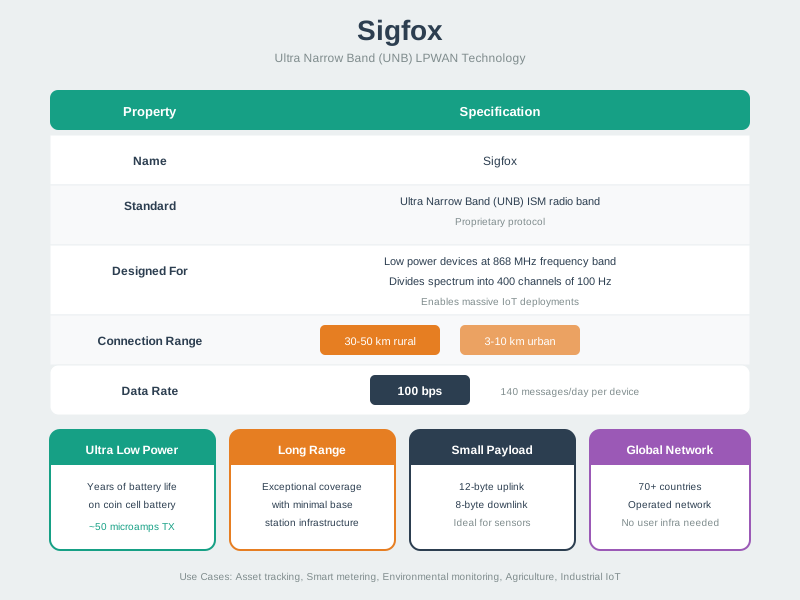
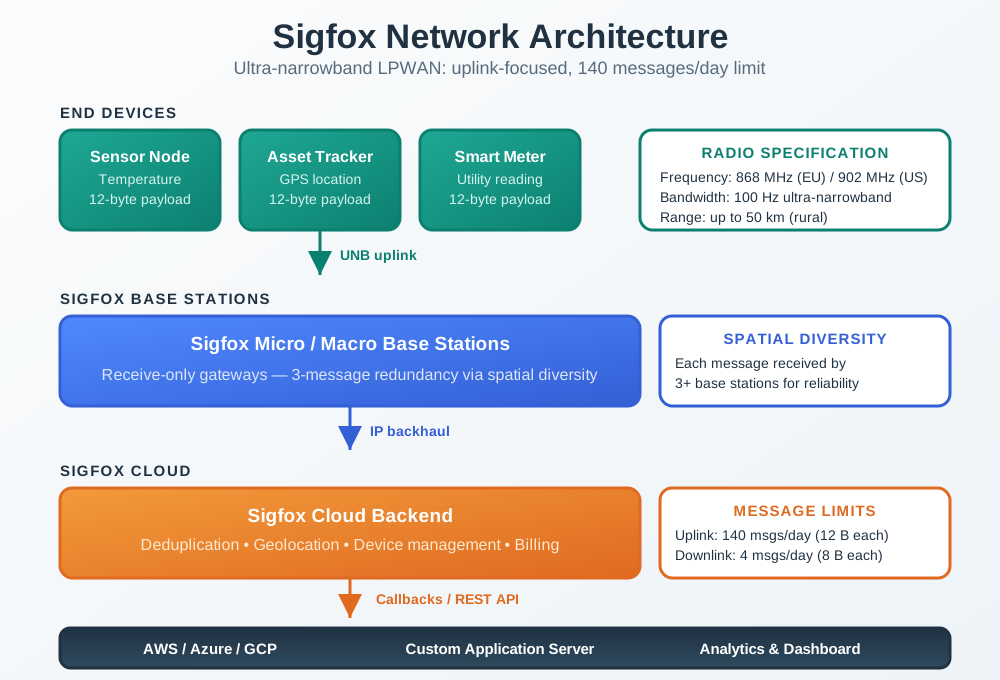
Sigfox provides a fully managed network where operators handle all infrastructure, allowing customers to focus on device development without deploying base stations.
Visual: Sigfox Ultra-Narrowband Modulation
Sigfox’s ultra-narrowband approach uses 100 Hz channels with DBPSK modulation, achieving exceptional receiver sensitivity (-142 dBm) for maximum range with minimal power consumption.
Visual: Sigfox Message Constraints
Understanding Sigfox’s strict message limits is essential for application design: 140 uplinks with 12 bytes and only 4 downlinks with 8 bytes per day.
45.10 Summary
Sigfox device management presents unique challenges due to limited downlink capability:
- OTA firmware updates via Sigfox are impractical (5.6 years for 64KB firmware)
- Physical access required for most firmware changes in deployed devices
- Pre-planning with reserved bytes is crucial for future extensibility
- Bluetooth/Wi-Fi secondary radio enables practical local updates
- LoRaWAN significantly better for field updateability (OTA in hours vs years)
- Device replacement is the most expensive option ($275K for 10K devices)
- Proper initial design saves $40-275K in update costs over device lifetime
- Downlink issues are most commonly caused by missing RX window configuration
Common Pitfalls
1. Not Storing Device IDs and PACs Before Deployment
The PAC (Porting Authorization Code) required for Sigfox device registration is often only available at device provisioning time and not easily retrievable later. Record all device IDs and PACs in a database immediately upon device procurement.
2. Assuming Firmware OTA Is Available Via Sigfox
Sigfox’s 8-byte maximum downlink and 4 downlinks/day makes firmware OTA completely impractical over Sigfox. Devices requiring firmware updates need alternative connectivity (USB, Bluetooth, cellular for updates) or physical access. Plan maintenance access upfront.
3. Not Monitoring Device Inactivity
Sigfox devices that stop transmitting (battery failure, damage) generate no alerts by default. Configure backend monitoring to alert when a device hasn’t transmitted for more than its expected interval × 2. Passive monitoring catches device failures before they become operational issues.
4. Letting Subscriptions Expire on Active Devices
Sigfox device subscriptions require annual renewal. Expired subscriptions cause silent message loss. Track subscription expiry dates and establish renewal procedures before first expiry rather than discovering the issue from missing data.
45.11 What’s Next
| Direction | Chapter | Description |
|---|---|---|
| Return to | Sigfox Review | Comprehensive overview and quizzes |
| Next | Sigfox Operator Risks | Infrastructure dependency analysis |
| Then | Sigfox Use Case Analysis | Evaluate suitability for different scenarios |
| Compare | NB-IoT Fundamentals | Cellular IoT alternative with better OTA support |