11 LoRaWAN Device Classes

More
Depth: Practitioner
Progress saves as you read. Mark sections complete as you go; your progress appears in the sidebar.
A battery valve sends a reading every ten minutes. An operator presses close just after the most recent receive windows end. The command is waiting at the network, but the device has returned to sleep. Choosing a LoRaWAN class decides where the next opportunity can come from.
11.1 Start Simple
This section: Start Simple — Picture a farm valve that reports every hour but may need a stop command within one minute.
Time One Command Before Choosing a Class
Picture a farm valve that reports every hour but may need a stop command within one minute. A class name is useful only when its listening pattern can meet that delay without exhausting the power source.
Latency means the delay between a request and its result. LoRaWAN means a low-power wide-area network system for small device messages. Its device class sets when an end device listens for a downlink.
Send one command after an uplink, during a planned slot, and between planned listens. Record request time, receive window, result time, missed case, energy source, and recovery after a restart. Compare the evidence with the product promise.
This runway does not prove network coverage or server support. The deeper sections compare Classes A, B, and C, their timing and energy costs, exception paths, and release records.
Device class is simply the promise about when a device will listen. Class A listens only after it speaks. Class B adds scheduled listening opportunities. Class C listens most of the time and spends more energy. Start with the user-visible command need, then choose the class that can honestly support that delay, power source, network support, and failure behavior.
Overview: Device Class Is A Downlink Timing Promise
LoRaWAN device classes describe when an end device listens for downlinks. Class A opens receive windows after an uplink. Class B adds scheduled ping slots synchronized by beacons. Class C keeps its receiver open most of the time except while transmitting.
The class choice should follow the application promise. If a command can wait until the device next reports, Class A may be enough. If the application needs scheduled or low-latency downlinks, the review must prove the energy source, network support, and failure behavior needed by Class B or Class C.
For example, consider a water meter that reports once every six hours and receives a new sampling interval only a few times per year. Class A is usually defensible because the server can queue the change and deliver it after the next uplink-opened receive window. A door controller that must unlock within a few seconds has a different promise: waiting for the next routine uplink would break the product behavior. That comparison keeps the class label tied to user-visible delay, not to a generic sense that one class is newer or stronger.
If you only need the intuition, this layer is enough: do not choose the most advanced sounding class. Choose the receive-window behavior that matches the downlink timing need and can be supported in the field.
Listening schedules in Figure 11.1 explain the device classes’ different energy costs and downlink delays.

Read Figure 11.1 on its common time scale. Class A transmits first and opens two receive windows, then sleeps; a downlink may wait until the next uplink. Class B adds scheduled ping slots, which shortens some waits but requires beacon synchronization and network support. Class C keeps its receiver open most of the time outside transmission, making low-latency downlink possible at a much higher energy cost. The state colors matter because they expose how long the radio listens rather than ranking application importance. Choose the class from the real command-delay need, power source, and network support, then define what the device does when a promised window is missed.
Class A
Baseline behavior for all LoRaWAN end devices: uplink first, then receive windows for possible downlinks.
Class B
Scheduled ping slots can reduce waiting time, but require beacon synchronization and network support.
Class C
Mostly open receive behavior can support faster downlinks, usually for devices with enough external power.
Release Evidence
The record must show timing need, energy source, server support, exception handling, owner, and retest trigger.
LoRaWAN classes narrated tour
Narrated audio tour. The full transcript is below.
Play the tour to open the simulator. Pause, replay a beat, or read the full transcript below.
Some beats explain situations this teaching model cannot show; those beats keep the existing frame and provide captions only.
Full transcript — LoRaWAN classes (8 beats)
B1 — Valve listening schedule
You are the operator responsible for a farm valve. It reports every hour, but a stop command may need to reach it within one minute. A command waiting at the network cannot help until the valve listens. How does its listening schedule affect that wait?
Model caption: You operate a farm valve: hourly reports, but a stop command may need to arrive within one minute. A queued command waits until the valve listens.
B2 — Uplink and downlink
LoRaWAN stands for long range wide area network, a low power system for small device messages. A report sent by the device is an uplink. A command returning to the device is a downlink. The device class determines when the receiver listens for that returning message.
Model caption: LoRaWAN is a low power wide area network system. Uplink: device report. Downlink: returning command. Class determines when the device listens.
B3 — Three listening classes
Class A opens two short receive windows after an uplink, then sleeps. Class B adds scheduled listening opportunities called ping slots. Beacons synchronize their timing. Class C keeps listening most of the time except while transmitting. More listening gives commands more chances to reach the device, at an energy cost.
Model caption: A: two post-uplink windows, then sleep. B: additional beacon-synchronized ping slots. C: mostly listening except during transmission, with much higher listening energy.
B4 — Class A wait
For your valve, use a shorter model schedule to compare the classes. Keep uplinks ninety seconds apart and queue the command at thirty seven seconds. In Class A, the next uplink is at ninety seconds; its first receive window is at ninety one. Ninety one minus thirty seven gives fifty four seconds of waiting for a receive opportunity.
Model caption: Model schedule: uplinks at 0 and 90 s; command at 37 s. Next receive window: 91 s. Wait: 91 − 37 = 54 s.
B5 — Class B wait
Keep the same command time and uplink period for Class B. With timing synchronized by beacons and ping slots sixteen seconds apart, the command arrives after the slot at thirty two seconds. The next slot is at forty eight. Forty eight minus thirty seven gives eleven seconds of waiting.
Model caption: Locked beacon timing; ping spacing 16 s. Next opportunity: 48 s. Wait: 48 − 37 = 11 s.
B6 — Class C availability
Now keep those times and choose Class C. The model gives less than one second of waiting because the receiver is already available. That availability carries a much higher listening energy cost. These calculated opportunities describe the schedule; actual delivery can take longer.
Model caption: C is already listening in this model: next opportunity 37 s, display <1 s wait; highest receive duty. These are schedule opportunities, not guaranteed delivery times.
B7 — Scheduled is not continuous
The misconception is that scheduled Class B listening means a command can arrive at any time. It fails because scheduled slots leave gaps. Your command at thirty seven seconds still waits eleven seconds for the slot at forty eight. Scheduled listening is not continuous listening.
Model caption: Scheduled does not mean continuous: a command at 37 s waits for the 48 s slot, a gap of 11 s.
B8 — Choose a schedule
Choose a listening schedule that meets the command's waiting budget with energy the device can afford.
Model caption: Choose a listening schedule that meets the command's waiting budget with energy the device can afford.
Overview Knowledge Check
Practitioner Pattern: Select The Class With Gates, Not Slogans
A useful class decision is a set of gates. The reviewer checks the message promise, acceptable wait, energy source, network-server and gateway support, exception behavior, and release owner before accepting a class.
The decision can split by flow. A periodic meter may use Class A for normal reporting while a mains-powered controller uses Class C for faster command response. The important point is that each promise gets its own evidence record.
A practical review table should be specific enough to falsify. If the requirement says "remote valve command within 30 seconds," the reviewer should name the expected uplink interval, whether confirmed downlinks are used, how long queued commands remain valid, and what the device does after a missed receive opportunity. If the same product also sends daily telemetry, that telemetry flow may still remain Class A while the command flow uses Class B or Class C. Splitting the flows prevents a single class decision from hiding two different timing promises.
A release decision about the “wait”–“energy” decision needs “Network”, not a slogan. Inspect Figure 11.2 through “Wait” and “Energy” to check this claim: Selection gates keep class choice tied to application timing, energy, network support, exception handling, and release approval.
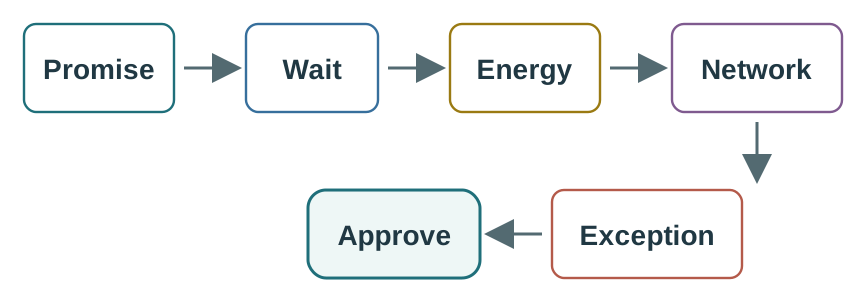
Read Figure 11.2 with “Wait” as the anchor; treat “Energy” as the first comparison. Then connect “Network” with “Exception”. Those labels make Selection gates keep class choice tied to application timing, energy, network support, exception handling, and release approval a traceable part of the “wait”–“energy” decision, not an unsupported assertion.
Do not accept Downlink timing evidence should show how a queued command reaches the device under the chosen class and how the result is verified as “Gateway” prose alone. Look at Figure 11.3 before the “gateway”–“network” decision, where “Gateway” is explicitly distinguished from “Network”.
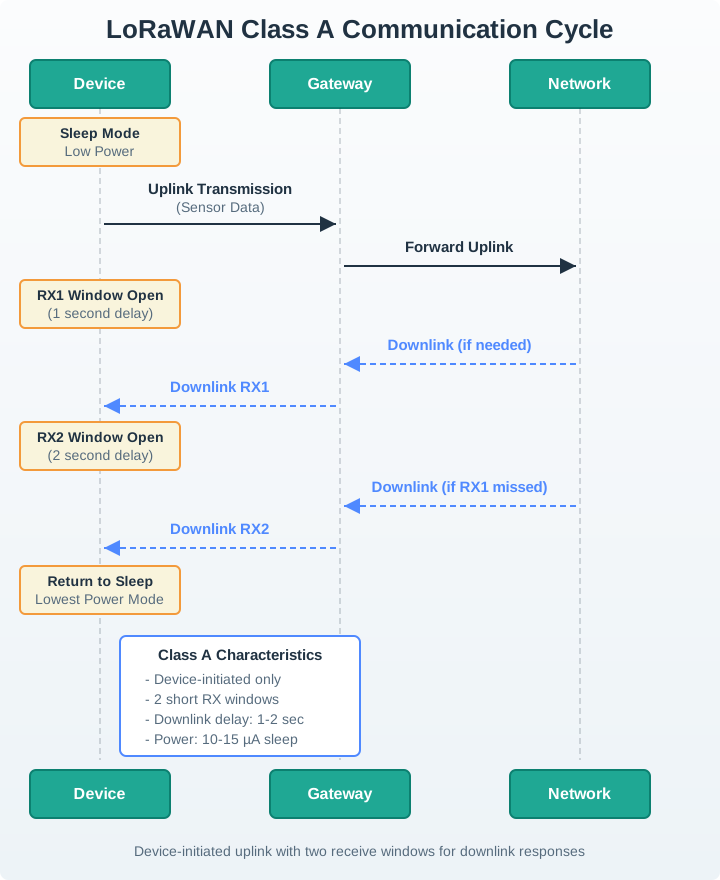
Trace Figure 11.3 by asking what “Gateway” establishes and what “Network” changes. Check “Sleep Mode” next, ending at “Low Power”. That progression is the mechanism behind Downlink timing evidence should show how a queued command reaches the device under the chosen class and how the result is verified and the evidence order needed for the “gateway”–“network” decision.
Practitioner Knowledge Check
Under The Hood: Release Evidence Separates Class Choice From Class Claim
A class claim becomes releasable only when the record names the application promise, selected class, downlink timing evidence, energy assumption, network support, exception rule, and owner. Without those fields, the class name hides too much implementation risk.
Class B and Class C especially need boundary checks. Class B depends on scheduled receive opportunities. Class C depends on a receiver that can stay open enough to meet the application promise. Both can fail if server support, gateway path, power budget, or operations handling changes.
The evidence should connect logs across the end device, network server, and application action. A Class B acceptance record might show beacon lock, the configured ping-slot periodicity, the queued MAC or application downlink, the device-side receive timestamp, and the resulting actuator or configuration change. A Class C record should additionally show that the receiver policy and power source can sustain the open-listen behavior during normal operation. If any one of those records is missing, the release note should name the uncertainty instead of turning "Class B" or "Class C" into an unsupported claim.
To ground the “promise”–“class” decision through “Timing” in visible evidence about “Promise”, inspect Figure 11.4. Its named elements “Promise” and “Class” frame the claim that The release record turns the class choice into a bounded claim with owner, verification, exception, and retest evidence.
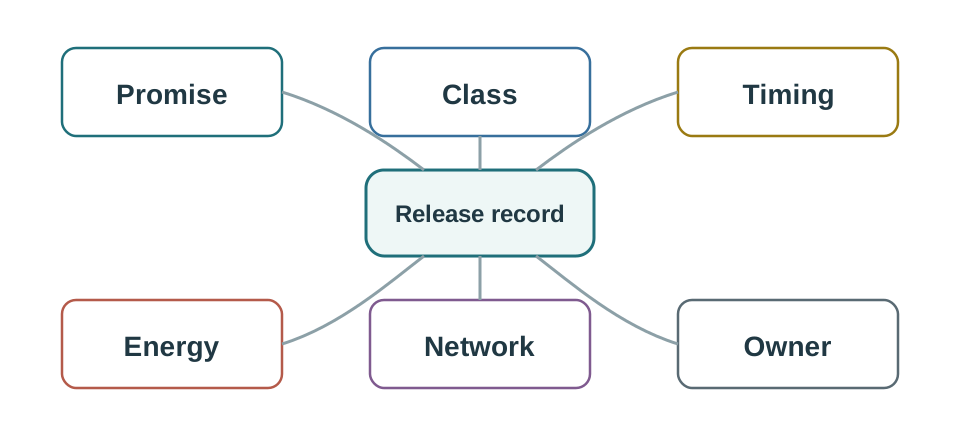
The first useful contrast in Figure 11.4 is “Promise” versus “Class”. After resolving it, move from “Timing” to “Energy”. This is how the visual substantiates The release record turns the class choice into a bounded claim with owner, verification, exception, and retest evidence and reconnects it to the “promise”–“class” decision.
Promise Boundary
Name the exact downlink promise: queued update, scheduled command, near-immediate command, or no downlink guarantee.
Verification Boundary
Show the trace, log, or field test that proves the receive opportunity and receiver action.
Exception Boundary
Record what happens when an uplink, beacon, ping slot, queue, or command acknowledgement is missed.
Retest Boundary
Rerun the review when timing, power, gateway path, network server, regional plan, or firmware behavior changes.
A LoRaWAN class is not a complete deployment design. It is one receive-window decision inside a larger architecture that also includes link budget, activation, security, ADR, regional profile, gateway placement, application semantics, and operations support.
Under-The-Hood Knowledge Check
Class A is easiest to remember when it shares a clock with the alternatives. Figure 11.5 highlights the receive windows an uplink actually opens.

On Figure 11.5, UP is the event that creates RX1 and RX2; no independent ping schedule exists. Compare that highlighted lane with RX OPEN in Class C to see why Class A has the lowest receive energy but may defer a downlink until the next uplink.
Class B inserts a schedule between the extremes. Figure 11.6 shows the beacon and ping-slot energy that buys a bounded wait.

Start at BCN in Figure 11.6 and follow the repeated PING opportunities. Unlike the Class A RX1/RX2 pair, these slots do not need a fresh application uplink, but the node must pay for synchronisation and recover explicitly when a beacon is missed.
Class C makes the opposite choice visible in Figure 11.7: listening is the default and transmission is the brief exception.

The long RX OPEN bar in Figure 11.7 surrounds the short TX interval. Compare it with Class B’s discrete PING slots: Class C removes most scheduling delay, but the highest energy badge makes clear why it normally belongs on a powered device.
The receive-window comparison in Figure 11.8 places all three device classes above the same LoRaWAN and LoRa foundation.

In Figure 11.8, Lowest energy belongs to CLASS A, whose RX1 and RX2 follow an uplink. Scheduled reachability adds beacon and ping-slot obligations in CLASS B, while Near-continuous receive makes CLASS C responsive by spending far more listening energy.
11.2 Put the Valve Command on the Receive Clock
This section: Put the Valve Command on the Receive Clock — For Class A, assume uplinks end at elapsed times 0 s and 600 s.
For Class A, assume uplinks end at elapsed times 0 s and 600 s. A command queued at 3 s has no new post-uplink opportunity until the next cycle. With the figure’s illustrative RX1 delay of 1 s, that opportunity is near 601 s, giving about 598 s of waiting. This is a schedule calculation, not a guaranteed delivery time; radio loss and network constraints can add delay.
Read Figure 11.5 from UP through RX1 and RX2. Those windows depend on the uplink. Then follow BCN and PING in Figure 11.6. Class B buys scheduled receive opportunities with listening and synchronization energy. Finally, the RX OPEN span in Figure 11.7 shows why a powered device can reduce scheduling delay by listening much more often.
Suppose a tested Class B schedule offers a receive opportunity every 32 s. A command arriving just after a slot waits nearly 32 s for the next one, before transmission and application handling. That is much shorter than the illustrative Class A wait, but only while synchronization and the network’s scheduled delivery support hold. Losing beacons requires an explicit recovery policy, not an unchanged latency claim.
Predict whether Class C guarantees that a valve closes immediately. It does not. A receive opportunity is only one part of the path; the downlink can fail, and the actuator must still check and carry out the command. Next, stop the periodic uplinks from the Class A valve. Its next downlink opportunity may now be unbounded, so the operator interface must stop presenting the old timing estimate as assured.
Use an application acknowledgement to distinguish command receipt from verified valve state. The module’s energy comparison matters because listening, transmitting and moving the valve all spend power differently. Select a class whose reachability fits the service, then measure total device energy and the failure path. A class label alone proves neither battery life nor physical closure.
11.3 Summary
This section: Summary — LoRaWAN device class review is a downlink-timing decision.
LoRaWAN device class review is a downlink-timing decision. Class A waits for uplink-opened receive windows, Class B adds scheduled receive opportunities, and Class C keeps receive behavior mostly open. The right class is the one whose timing, energy, network support, exception behavior, owner, and retest trigger are visible in the release record.
11.4 Key Takeaway
This section: Key Takeaway
Choose a LoRaWAN device class from application timing and field evidence, not from a feature list. Every accepted class needs proof of receive behavior, energy fit, network support, exceptions, and retest conditions.
11.5 See Also
This section: See Also
LoRaWAN Network Architecture
LoRaWAN Network Architecture - Frames device classes inside gateway, network-server, join, and application boundaries.
LoRaWAN Link Budget and ADR Review
LoRaWAN Link Budget and ADR Review - Keeps radio margin and ADR decisions separate from receive-window promises.
LoRaWAN Security and Joining Review
LoRaWAN Security and Joining Review - Reviews activation, key ownership, frame counters, and security evidence.
LoRaWAN Common Pitfalls Review
LoRaWAN Common Pitfalls Review - Diagnoses class, ADR, payload, activation, and deployment mistakes before release.
Open printable teacher run sheet
Find help
3 reviewed answers.
Where should I start in a module?
Open the module page from the sidebar to see its chapters in order. Use the module map to return to a topic you need.
Modules and pathsReviewed
What can I try when a project does not work?
Check the symptom, then work through the diagnostic steps. Keep the error message and the smallest example that reproduces it.
When you are stuckReviewed
How do interactive examples work?
Use the interactive guide to check how examples and simulations work before changing your project.
Interactive examples guideReviewed