15 LoRaWAN Field Deployment

More
Depth: Practitioner
Progress saves as you read. Mark sections complete as you go; your progress appears in the sidebar.
A soil-sensor trial covers an open orchard row and a low corner behind a metal shed. The average delivery rate is high, but the low corner carries the irrigation decision that staff need most. Field deployment must preserve that local failure in the release decision.
15.1 Start Simple
This section: Start Simple — Picture a farm team placing soil units across several fields.
Release the Tested Path, Not the Demo
Picture a farm team placing soil units across several fields. One unit sends a message beside the office. That proves a narrow bench path, not the final fields, power life, warning delay, or support plan.
This low-power wide-area radio system carries small messages. The release owner should name the exact device group, software version, radio region, site receivers, message rate, join method, application route, and person who responds to failure.
Test that same path in the real place. Try weak locations, a site-receiver outage, a lost join, a late command, and a changed message body. Record what was not tested. When an antenna, site receiver, region setting, or device version changes, reopen only the affected checks.
Walk the site with the person who will support it. Mark each placed unit, the expected reporting time, and the nearest useful radio path. Compare a known field value with the final application record. Do not hide a missed area behind an average success rate.
Run the test for long enough to include sleep, wake, normal messages, warnings, and recovery. Check the power estimate against measured current. Leave a clear list of open places and conditions so the pilot result is not sold as a wider promise.
Give each open gap a decision. Move the unit, add a receiver, reduce the promise, or block release for that place. Do not turn an unknown into a pass because most other locations worked. The field map should show both proof and limits.
Hand the record to the support owner before release. Ask them to find one unit, explain its last message, replace it, and recognise a failed path. Fix any step that depends on the original designer being present.
Use a release card for each group. Name the place. List the units. Record the tested version. Mark the radio region. Name the site receivers. State the normal message rate. State the warning path. Name the support owner.
Add the field results. Mark good places. Mark weak places. Mark places not visited. Record battery current. Record join time. Record the oldest accepted message. Record the result during one receiver loss. Link the full test notes.
End with a clear decision. Release the group. Move a unit. Add support. Reduce the promise. Or keep the group in trial. Every open gap gets one of these outcomes and a date for review.
This simple release rule cannot promise radio coverage everywhere. Practitioner builds the field plan and evidence record. Under the Hood explains airtime, channel rules, adaptive rates, joins, and delayed downlinks.
A deployment is ready when the tested path matches the real place and promise. One successful packet is useful, but it is not the whole release. Start by naming the device group, region, gateway set, firmware, join method, application route, monitoring signal, downlink expectation, and support owner. If any part changes later, the record should make the required recheck obvious.
Overview: Deployment Is a Release Decision
A LoRaWAN field deployment is ready only when the radio plan, regional profile, gateway path, activation path, application integration, monitoring plan, and fallback owner have been checked together. A coverage sketch or a single successful uplink can support a narrow observation, but neither one proves a release-ready deployment.
The deployment record should say what was tested, where it was tested, which assumptions remain open, and what change reopens the decision. That is especially important because LoRaWAN behavior depends on the device firmware, regional channel rules, gateway placement, network server profile, join behavior, downlink expectations, and application payload handling.
For example, a soil-moisture pilot may pass a bench join test and still fail release review if the field gateway sits behind a new obstruction, the server profile was copied from another region, or the application team has not accepted delayed downlinks. The deployment question is not "did one packet arrive?" It is "does the tested path match the actual place, firmware, region, gateway, server, application, and support promise?"
A good deployment record keeps those promises narrow. It names the device group, installation condition, firmware build, gateway set, join method, payload cadence, expected downlink behavior, application route, monitoring signal, and support owner. It also records what was not proven. If the test did not cover a basement, a mobile asset, a new payload size, or a gateway outage, that gap should stay visible instead of being hidden behind a green dashboard.
That narrowness protects the next maintainer. When a gateway is moved, a server profile is edited, or a firmware build changes transmit behavior, the release record tells the team exactly which evidence must be repeated instead of forcing a fresh investigation from memory.
Start the evidence review for the “alignment”–“gateway” decision: inspect Figure 15.1. Two labels deserve attention—“alignment” and “Gateway”—because they bound Deployment evidence should move from profile alignment and gateway planning through field validation, integration, monitoring, and a release record.
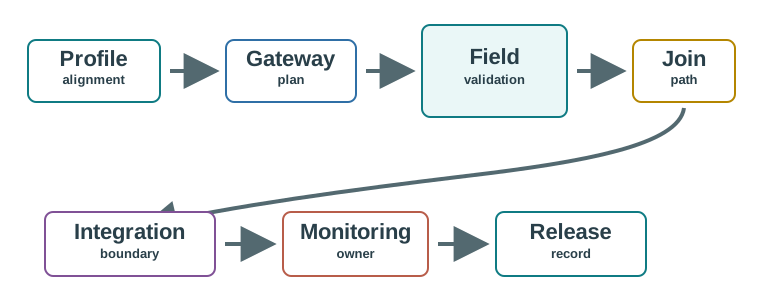
On Figure 15.1, inspect “alignment” before “Gateway”. The subsequent hand-off from “plan” to “Field” explains Deployment evidence should move from profile alignment and gateway planning through field validation, integration, monitoring, and a release record. Carry that sequence into the “alignment”–“gateway” decision so “alignment” evidence, “Gateway” decision, and “Field” recheck remain distinguishable.
Profile Alignment
Device firmware, regional profile, gateway receive plan, network-server profile, and operator policy must match the target geography.
Gateway Plan
Gateway placement needs field evidence for hearing, power continuity, backhaul, antenna path, and duplicate-copy behavior.
Release Boundary
The approval must state what the deployment proved and what still belongs to monitoring, support, or application owners.
Do Not Approve From One Signal
A single uplink proves only that one device reached one path once. Release readiness needs repeated join and uplink records, downlink expectations where relevant, application ingestion, monitoring signals, response owners, and recheck triggers.
Practitioner: Build the Field Evidence Chain
Start with the target deployment profile and follow the path in order: device configuration, gateway reception, network-server behavior, application ingestion, monitoring, and fallback. When a record is missing, avoid jumping to a later layer. For example, application debugging is premature if the gateway has not shown that it hears the device.
A practical review can use one representative installation as a trace. Record the device identifier and firmware, the selected regional profile, the gateway or gateways that heard the join and uplink, the network-server route, the decoded application event, the monitoring alert or heartbeat, and the person who owns the next action. If any field is blank, the release statement should be scoped down or held.
The next choice in the “site”–“antenna” decision depends on “path”, a boundary shown in Figure 15.2. Inspect “site”, then set it against “Antenna”, before judging A gateway plan becomes release evidence only after site assumptions, hearing records, backhaul, power, and duplicate-copy behavior are checked.
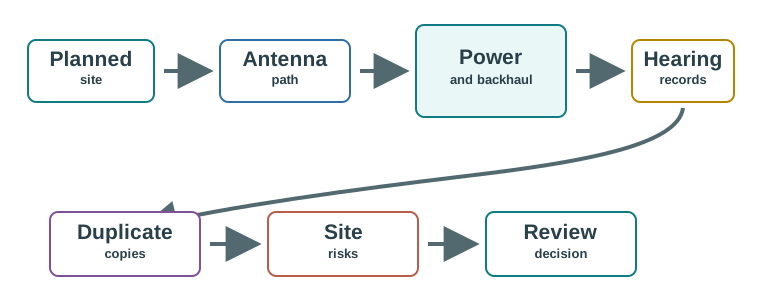
Read Figure 15.2 with “site” as the anchor; treat “Antenna” as the first comparison. Then connect “path” with “Power”. Those labels make A gateway plan becomes release evidence only after site assumptions, hearing records, backhaul, power, and duplicate-copy behavior are checked a traceable part of the “site”–“antenna” decision, not an unsupported assertion.
Start the evidence review for the “device”–“join” decision: inspect Figure 15.3. Two labels deserve attention—“device” and “Join”—because they bound Field validation should prove the path from test device to application record, not just the radio hop.
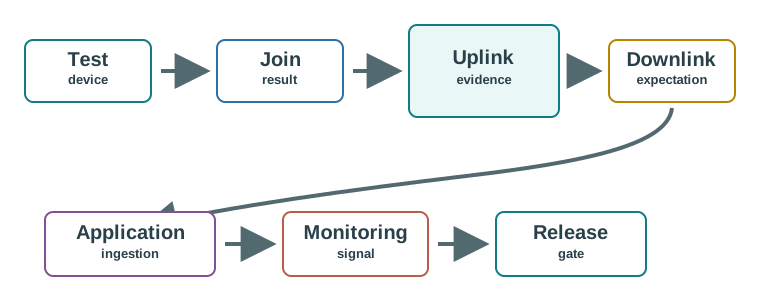
Trace the review path across Figure 15.3 from “device” to “Join”. From “result”, it arrives at “Uplink”. That path is evidence for Field validation should prove the path from test device to application record, not just the radio hop; retain it when revisiting the “device”–“join” decision.
Gateway Map Check
A gateway map is planning context. Before release, require field records for gateway hearing, power continuity, backhaul, expected duplicate copies, and the behavior when a gateway loses connectivity or the field evidence changes.
Worked Review: Two Real LoRaWAN Deployments, Read As Evidence
The "Things Connected" programme built a city-wide public LoRaWAN testbed across London: it launched an open call in September 2016, drew more than 110 expressions of interest (mostly SMEs), grew an LPWAN London community past 500 members, and onboarded a first cohort of 20 UK SMEs. Its published coverage map is field evidence, not a marketing claim, because it shows measured signal strength across the metro area (roughly -65 dBm near gateway clusters, fading to -105 dBm at the edge) rather than a single advertised range figure. That is the shape a gateway-plan record should take: a measured strength gradient tied to real installed gateways, not a uniform circle.
A university campus deployment shows the same discipline at a smaller, private-network scale. One documented campus LoRaWAN build used Pycom edge devices running MicroPython, placed gateways at three named sites (the library, Argyle House, and the Bush campus), and ran the network-server stack -- including a Things Network (TTN) open-source backend -- into a data-analysis pipeline for storage and visualization. The deployment record names the same fields this chapter asks for: which edge devices, which gateways at which sites, which network-server software, and which downstream integration owns the data.
Neither example is release evidence for a different site. A citywide public testbed's coverage gradient does not prove a private single-building deployment's field strength, and a three-gateway campus plan does not prove citywide capacity. What both show is the standard this chapter's release record is asking for: name the gateway sites, show measured field strength or hearing records instead of a range claim, and name the network-server and integration ownership before calling the deployment ready.
Under the Hood: Troubleshoot by Surface, Then Recheck
LoRaWAN deployment failures are easier to diagnose when each symptom is assigned to an evidence surface before action is taken. Missing uplinks after a firmware update, for example, should be checked through profile and channel records, gateway hearing, activation state, network-server routing, and application ingestion in that order.
The order matters because the same symptom can be produced by several layers. A missing application event might mean the device never transmitted on the expected channel, the gateway heard it but had no backhaul, the join state failed, the network server rejected a counter, the route pointed at the wrong integration, or the decoder rejected a changed payload. Acting on the last visible layer first can waste time and hide the real release risk.
Use the troubleshooting record as a ledger. Each action should name the surface, evidence, owner, result, and recheck trigger. If the team changes a channel mask, the recheck is representative uplinks through the intended gateway set. If it moves an antenna, the recheck is gateway hearing and duplicate-copy behavior. If it changes a decoder, the recheck is application event shape, storage result, and owner acceptance. The record prevents "fixed" from meaning only "not currently visible."
This surface-first habit also protects escalation. A support ticket can say "profile evidence passed, gateway evidence failed after an antenna move" instead of "LoRaWAN is unreliable." That language gives the next reviewer a bounded starting point, preserves working evidence from earlier layers, and keeps the fix tied to the deployment condition that actually changed. It also prevents one local repair from becoming an unreviewed fleet-wide policy.
Inspect Figure 15.4 with one question from the “symptom”–“e.g. several devices stop appearing in the application after a firmware update” decision: how does “Symptom” constrain “e.g. several devices stop appearing in the application after a firmware update”? The answer supports A troubleshooting record should preserve the symptom, evidence surface, action, owner, and recheck trigger.
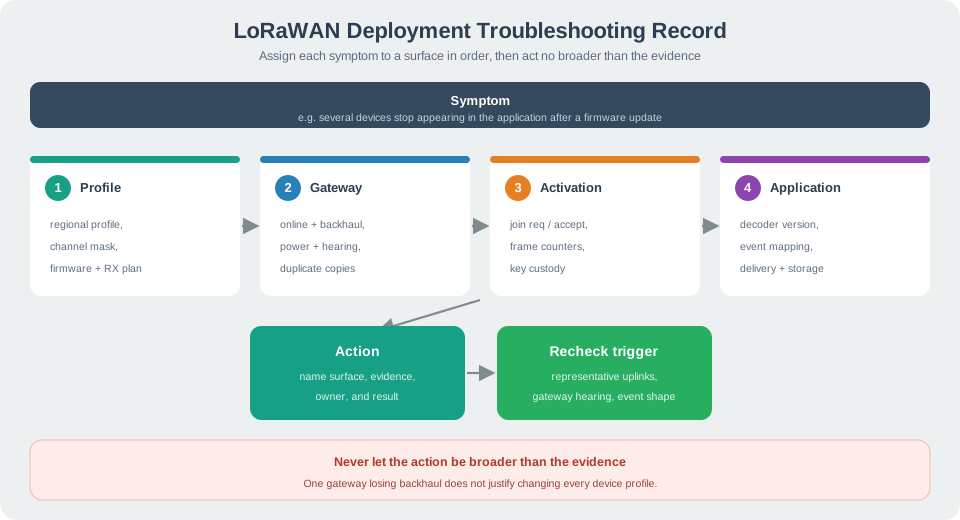
Trace Figure 15.4 by asking what “Symptom” establishes and what “e.g. several devices stop appearing in the application after a firmware update” changes. Check “Profile” next, ending at “channel mask”. That progression is the mechanism behind A troubleshooting record should preserve the symptom, evidence surface, action, owner, and recheck trigger and the evidence order needed for the “symptom”–“e.g. several devices stop appearing in the application after a firmware update” decision.
Firmware Update Walkthrough
If missing uplinks appear after a firmware update, first compare the old and new regional/channel behavior. Then check gateway logs, activation state, server routing, and application ingestion. Replacing devices or rewriting the application is not justified until the earlier surfaces are checked.
Close the loop by tying every fix back to release scope. A successful retest on one bench device does not prove the field fleet. A profile repair in one region does not prove another region. A restored integration endpoint does not prove downlink timing. The troubleshooting outcome should update the release record with the evidence that changed, the cases still outside proof, and the next condition that forces a new review.
A useful rule is to never let the action be broader than the evidence. If only one gateway lost backhaul, do not change every device profile. If only a decoder rejected a new payload field, do not weaken activation checks. If only a region profile was wrong, do not call the radio plan failed. Surface-by-surface troubleshooting keeps the repair small and leaves an auditable trail for the next deployment change.

15.2 Release the Orchard Rows One Coverage Class at a Time
This section: Release the Orchard Rows One Coverage Class at a Time — Assume ten tested units each send 20 numbered readings in the same observation window.
Assume ten tested units each send 20 numbered readings in the same observation window. Nine deliver all 20; the low-corner unit delivers 10. The fleet total is 9 × 20 + 10 = 190 accepted readings out of 200, or 95%. For the weak location, delivery is only 10 divided by 20 = 50%. The release cannot substitute the fleet average for that unit’s result.
Separate the tested installation classes before changing hardware. The open-row group has one evidence set; the obstructed corner has another. A revised antenna position or an additional receiving site should be tested with the final enclosure and the same reporting workload. Keep the earlier result so the gain can be tied to the actual intervention.
Follow Figure 15.1 from profile alignment and gateway planning into field validation and integration. The early configuration check confirms that the trial uses the intended regional profile. Field hearing records then establish the radio path, and application records establish that accepted readings reach the right soil plot. Neither record can replace the other.
Predict whether receiving the missing ten readings after recovery makes the irrigation display current during the outage. Late field readings repair history, but cannot retroactively provide timely irrigation control. The release record needs the oldest useful reading age as well as the eventual delivery count. Next, remove the main receiver during a tested watering window. Check the fallback and the operator’s warning before approving that failure condition.
A bounded decision may release the nine well-tested units while leaving the low corner in trial, provided the product can represent that boundary clearly. It must not label the whole orchard covered while quietly omitting the failed location. This module’s deployment work matters because radio settings become promises at named places. A support worker should be able to find the tested unit, recognize stale data and explain which change would reopen its acceptance. Twenty transmissions are an illustrative exercise, not a statistically sufficient universal coverage survey.
15.3 Summary
This section: Summary — LoRaWAN field deployment is a release decision, not a label on a network diagram.
LoRaWAN field deployment is a release decision, not a label on a network diagram. The deployment record should show that the regional profile, gateway plan, field validation, activation path, application integration, monitoring signals, owners, fallback behavior, and recheck triggers have been tested together.
When troubleshooting is needed, follow the evidence path in order. Check profile and channel records before gateway hearing; gateway and activation evidence before server routing; server routing before application ingestion; and application ingestion before release or support ownership.
15.4 Key Takeaway
This section: Key Takeaway
Approve LoRaWAN deployment only when field evidence ties profile alignment, gateway behavior, end-to-end validation, monitoring ownership, fallback action, and recheck triggers to the same release boundary.
15.5 See Also
This section: See Also
LoRaWAN Security and Joining
LoRaWAN Link Budget and ADR
Common LoRaWAN Pitfalls
LoRaWAN Simulation Lab
Open printable teacher run sheet
Find help
3 reviewed answers.
Where should I start in a module?
Open the module page from the sidebar to see its chapters in order. Use the module map to return to a topic you need.
Modules and pathsReviewed
What can I try when a project does not work?
Check the symptom, then work through the diagnostic steps. Keep the error message and the smallest example that reproduces it.
When you are stuckReviewed
How do interactive examples work?
Use the interactive guide to check how examples and simulations work before changing your project.
Interactive examples guideReviewed