Name the scenario
State the device behavior, region, activation method, payload, and downlink promise before reading the trace.
Progress saves as you read. Mark sections complete as you go; your progress appears in the sidebar.
This lab belongs to LoRaWAN Common Pitfalls
This section: Start Simple — Picture a field meter that sends one reading during a desk test.
Use the Rehearsal to Find the Missing Proof
Picture a field meter that sends one reading during a desk test. The record appears on screen, yet no one knows whether a second receiver heard it, whether the reply window opened, or whether the value still means the same thing after decoding. A neat trace is only the start of the review.
LoRaWAN means Long Range Wide Area Network, a system for small messages over long radio links. A gateway is a device that hears those radio messages and passes them onward. A payload is the useful data carried inside a message. Follow one payload from the meter, through each gateway copy, to the service that makes the final record.
Change one condition at a time. Remove a gateway copy, delay the reply, repeat the same message, and alter the radio setting chosen by the simulation. Record which symptom appears, what the operator should decide, and what real field proof is still missing.
A simulation cannot prove range, interference, battery life, or local installation quality. The deeper lab steps show how timing records, duplicate handling, decoded values, and release checks turn the rehearsal into a bounded evidence plan.
Use this lab as a rehearsal for reading evidence. A simulated packet trace is not field proof, but it can teach the habit of asking what each record shows and what it leaves unproven. Start with one uplink, one receive window, one ADR decision, and one duplicate gateway copy. Then decide what a release reviewer would still need from the real deployment.
This section: Learning Objectives: What This Lab Checks
This section: Learning Objectives
By the end of this lab, you will be able to:
This section: From One Uplink to Release Evidence
This section: Lab Check Map — The lab follows a controlled record path from trace to release packet.
The lab follows a controlled record path from trace to release packet.
Pause before applying the “each stage must leave a visible record; uncertainty goes to an owner before release”–“failed / ambiguous to owner” decision, then inspect Figure 1. It places “Each stage must leave a visible record; uncertainty goes to an owner before release” against “Failed / ambiguous to owner”, exposing the evidence behind this claim: LoRaWAN simulation evidence path from bounded lab question through packet, timing, ADR, and payload checks to named owner action and a bounded release claim.
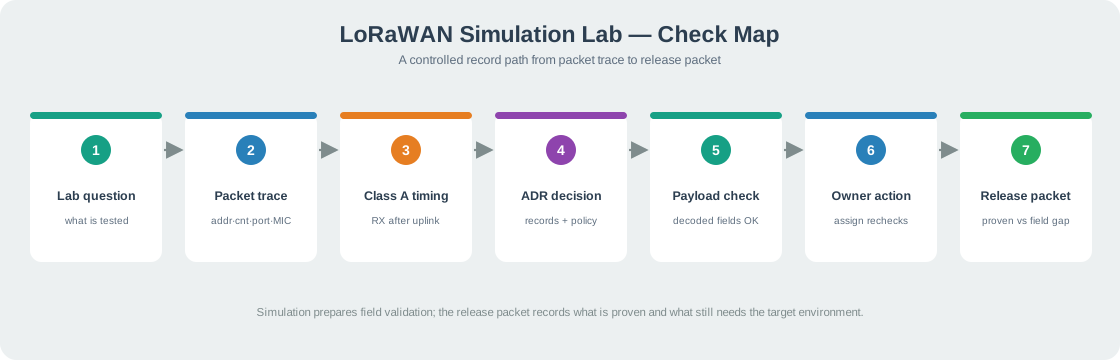
Figure 1 connects the lab question to packet, timing, ADR, and payload checks, with failed or ambiguous results sent to an owner before release.
Use the map this way:
This section: Minimum Check Knowledge
Device address, counter, port, MIC status, and payload status explain what the simulated packet path did.
Class A downlink depends on receive opportunities after an uplink, not on an always-listening device.
ADR decisions should reference link history, exception devices, rollback rules, and monitoring ownership.
Simulated success prepares field validation; it does not replace gateway and application records from the target environment.
This section: Step 1: Capture the Packet Trace — Start with a simulated packet trace.
Start with a simulated packet trace. The trace should show what the device sent, what the gateway heard, and what the application decoded.
DevAddr=26011ABC, FCnt=7, FPort=1, MIC=valid, and payload=temp=21.4 were stored together.Use Figure 2 with “Scenario” to ask what this simulated uplink should prove, and for which payload and location. Compare the uplink-frame fields with the gateway copy, server route, and application sample to make the packet-trace check reviewable.
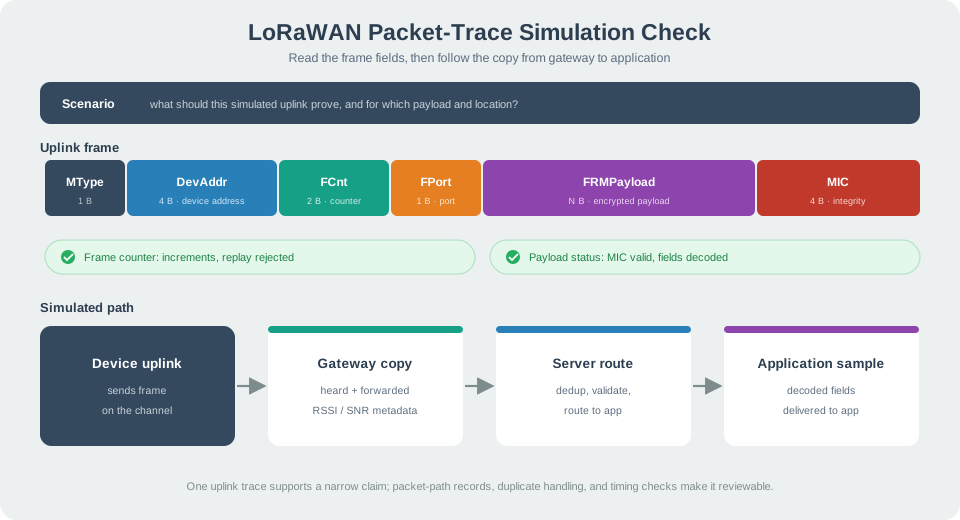
Read Figure 2 with “Scenario” as the anchor. Then inspect the “Uplink frame” fields, including “MType”, and trace the device uplink through the gateway copy and server route to the application sample.
Check the trace this way:
This section: Practice Exercises — The old practice worksheet chapter is folded into this lab.
The old practice worksheet chapter is folded into this lab. Use these exercises after the packet trace, timing, ADR, and release-packet checks.
This section: Step 2: Fill the Record Worksheet
Fill a one-page worksheet for a proposed LoRaWAN device:
Open a worksheet beside the packet trace and enter the scenario name and model version at the top.
Copy the trace’s actual device, gateway, server, and application fields into separate rows.
Put the timing, ADR, and duplicate-copy decisions beside their supporting records, not beside a general pass mark.
Mark missing evidence with an owner and recheck trigger so the worksheet cannot imply a field release.
application promise;
regional profile and payload size;
device class and downlink promise;
activation method and counter reset behavior;
gateway records and duplicate-copy handling;
ADR policy and exception devices;
application acceptance record;
release owner and retest trigger.
This section: Step 3: Decide the Device Class — Given a low-power meter that sends periodic readings and rarely receives commands, choose the class behavior and state what records would prove the downlink promise.
Given a low-power meter that sends periodic readings and rarely receives commands, choose the class behavior and state what records would prove the downlink promise. The answer should explain why a successful uplink does not prove routine downlink availability.
0, RX1 at 1, RX2 at 2, and a command at 3; it queued that command for the next uplink.Run it: Before you name the class, watch how each class actually delivers a downlink in the workbench below. Run the Class A fallback path to confirm the meter only hears a command right after its own uplink, then compare Class B ping slots and the Class C window to see the power-versus-downlink trade you are choosing against. Send a Configuration command or Emergency alert and read the Watch For panel to see which devices are Ready versus waiting on a Beacon or clock — that is the evidence a class decision must cite about the downlink promise.
This section: Step 4: Check Activation Recovery — Given a device that returns after reset with rejected frames, identify whether the next check belongs to activation, frame counters, key custody, application decoding, or radio link records.
Given a device that returns after reset with rejected frames, identify whether the next check belongs to activation, frame counters, key custody, application decoding, or radio link records. State what record clears the issue.
Run it: Work this activation-recovery question in the OTAA join workbench below. Step a JoinRequest through to JoinAccept and watch the DevNonce and MIC so you can tell an activation or key fault (bad MIC, replayed DevNonce) from a frame-counter or decoder fault. Switch the Key model between the LoRaWAN 1.0.x and 1.1 split-key models, then reset the device and re-join to see which record — nonce, MIC, or frame counter — actually clears the rejected-frame symptom the exercise describes.
This section: Step 5: Compare ADR Suitability — Given mixed fixed and moving devices, identify which devices can use ADR from recent uplink history and which need conservative settings or exception handling.
Given mixed fixed and moving devices, identify which devices can use ADR from recent uplink history and which need conservative settings or exception handling.
12 as eligible for review and a moving device with margin -2 as an exception.Run it: Decide ADR suitability by running each device profile in the ADR animation below. Compare a Rooftop meter against a Mobile tracker and an Obstruction event and watch how SNR and link margin drive the ADR decision toward a lower spreading factor and TX power — or fail to, when the link keeps moving. The stable fixed node converges to an efficient data rate, while the mover shows why it needs conservative settings or exception handling, which is exactly the fixed-versus-moving split this exercise asks you to make.
This section: Step 6: Check Payload and Airtime — Given a payload that grew during product design, decide whether to reduce payload, change cadence, add gateway records, revise ADR policy, or reject the release packet until the airtime effect is checked.
Given a payload that grew during product design, decide whether to reduce payload, change cadence, add gateway records, revise ADR policy, or reject the release packet until the airtime effect is checked.
Run it: Test the grown payload in the capacity workbench below before you accept or reject the release. Set the Region model and raise the Application payload to the new size, then read the Formula Trace to see airtime climb and duty-cycle headroom shrink. Now try the mitigations the exercise lists — lengthen the Report interval, cut Uplink repeats, or shift the Spreading-factor mix toward SF7-SF9 — and watch which one restores margin, so your decision to reduce payload, change cadence, or reject the packet is backed by the airtime numbers.
This section: Step 7: Route the Multi-Issue Scenario — When a scenario includes missed uplinks, duplicate gateway records, invalid MIC errors, and application decode gaps, split the records by owner before proposing a fix.
When a scenario includes missed uplinks, duplicate gateway records, invalid MIC errors, and application decode gaps, split the records by owner before proposing a fix.
In the review worksheet, put gateway hearing, server acceptance, and decoded application sample on separate lines.
Assign invalid MIC to the activation/security check and a missing decoded field to the application decoder check.
Treat duplicate gateway copies as a server deduplication question; the local model produced 2 copies and 1 application record.
Keep missed uplinks as missing evidence until a gateway or device trace identifies where the path stopped.
Does the server record show whether duplicate copies were merged?
Does the application sample show useful decoded fields?
Are missing or rejected records classified instead of ignored?
This section: Check 1: Packet Trace Records
This section: Step 8: Check Class A Timing — Class A timing helps learners separate uplink success from downlink opportunity.
Class A timing helps learners separate uplink success from downlink opportunity. A simulation record should show the uplink, receive opportunities, downlink attempt, and fallback path.
3, after RX1=1 and RX2=2 had passed.A release decision about the “class a”–“bi-directional” decision needs “end-devices”, not a slogan. Inspect Figure 3 through “Class A” and “Bi-directional” to check this claim: LoRaWAN device class comparison: Class A opens RX1 and RX2 windows only after an uplink (lowest power), Class B adds beacon-scheduled slots, and Class C listens almost continuously.
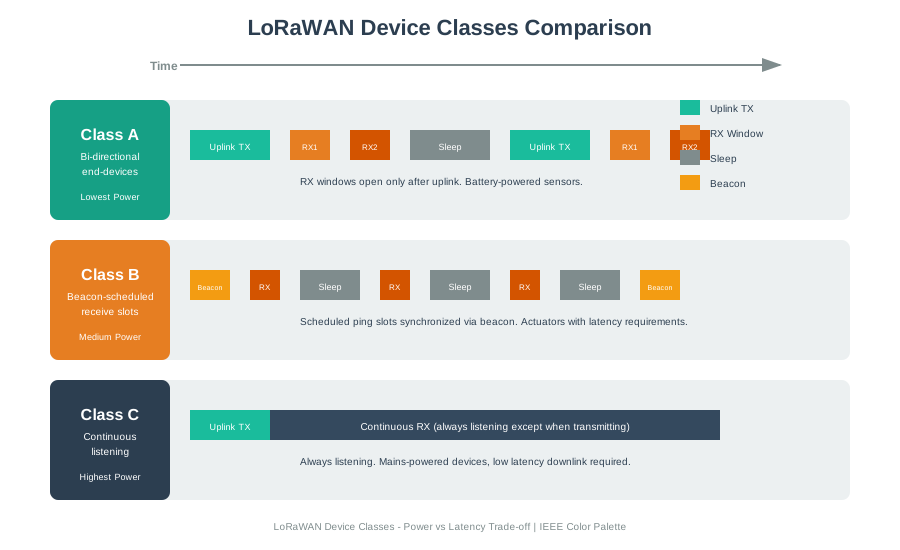
Read Figure 3 with “Class A” as the anchor; treat “Bi-directional” as the first comparison. Then connect “end-devices” with “Lowest Power”. Those labels make LoRaWAN device class comparison: Class A opens RX1 and RX2 windows only after an uplink (lowest power), Class B adds beacon-scheduled slots, and Class C listens almost continuously a traceable part of the “class a”–“bi-directional” decision, not an unsupported assertion.
Check timing records this way:
This section: Check 2: Class A Timing
This section: Step 9: Check ADR and Duplicate Copies — ADR and duplicate-copy handling are easier to understand in simulation, but the check still needs clear records and boundaries.
ADR and duplicate-copy handling are easier to understand in simulation, but the check still needs clear records and boundaries.
To ground the “history”–“adr” decision through “proposal” in visible evidence about “history”, inspect Figure 4. Its named elements “history” and “ADR” frame the claim that LoRaWAN ADR and duplicate-copy simulation check showing link history, ADR proposal, exception device, gateway copy, deduplication, decoded sample, and release decision.
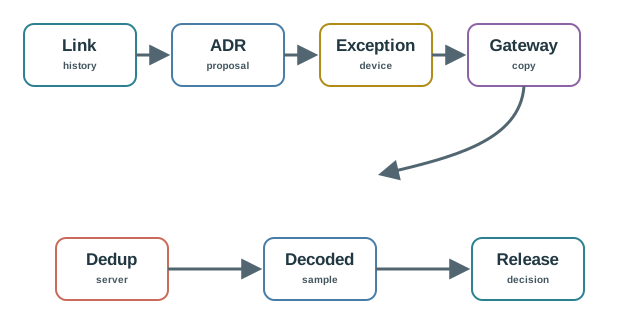
Trace the review path across Figure 4 from “history” to “ADR”, then from “proposal” to “Exception”. Retain the link history, ADR proposal, and exception-device record when revisiting the ADR decision.
ADR and duplicate-copy checks:
This section: Check 3: ADR And Duplicate Copies
This section: Step 10: Write the Lab Release Packet — The lab is complete only when learners can explain what the simulation proved and what it did not prove.
The lab is complete only when learners can explain what the simulation proved and what it did not prove.
Store packet traces, timing records, ADR decisions, duplicate-copy records, and decoded samples.
Name what was not represented, including physical environment, gateway placement, and field variation.
Route rejected counters, MIC errors, missing payloads, and delayed commands to the right check path.
Define the field records needed before the simulated design can be trusted outside the lab.
This section: Check 4: Lab Release Packet
This section: Match The Simulation Records
This section: Order The Simulation Check
This section: Label The Simulation Lab Map
This section: Common Pitfalls
Simulation helps learners practice record checks. It does not prove real gateway placement, physical environment, or application operations.
A complete lab record connects device trace, gateway hearing, server handling, decoded application data, and owner actions.
Rejected counters, MIC errors, missed downlinks, and decode failures are useful learning records when they are classified and routed.
A simulation release packet should name exactly what field records are required before the same design is trusted outside the lab.
A LoRaWAN simulation lab is useful when it proves one narrow claim and records the boundary around that claim. The learner should be able to say which scenario was tested, which records were accepted, which records were missing, and which field checks still own the final release decision.
For example, a desk simulation may show a sensor uplink, a valid frame counter, one gateway copy, a network-server route, and a decoded temperature field. That is useful evidence for the packet path, but it is not proof that the field gateway hears the same device through walls, that RX windows match the command promise, or that ADR remains safe after the device moves. The release claim should stay as narrow as the records: this scenario, this profile, this payload, this timing assumption, this server route, and these missing field checks.
The strongest lab outcome is a release answer, not a pass/fail screenshot. It separates useful evidence from missing evidence, names exceptions, assigns an owner, and states the trigger that forces a field test. If those pieces are absent, the simulation may still be a good exercise, but it is not yet a release record. A short note such as "bench trace only, field gateway unproven" is more honest than a broad green label. It also tells the next reviewer exactly where to resume.
Inspect Figure 5 to see how a simulation result becomes a bounded release answer without claiming field proof.
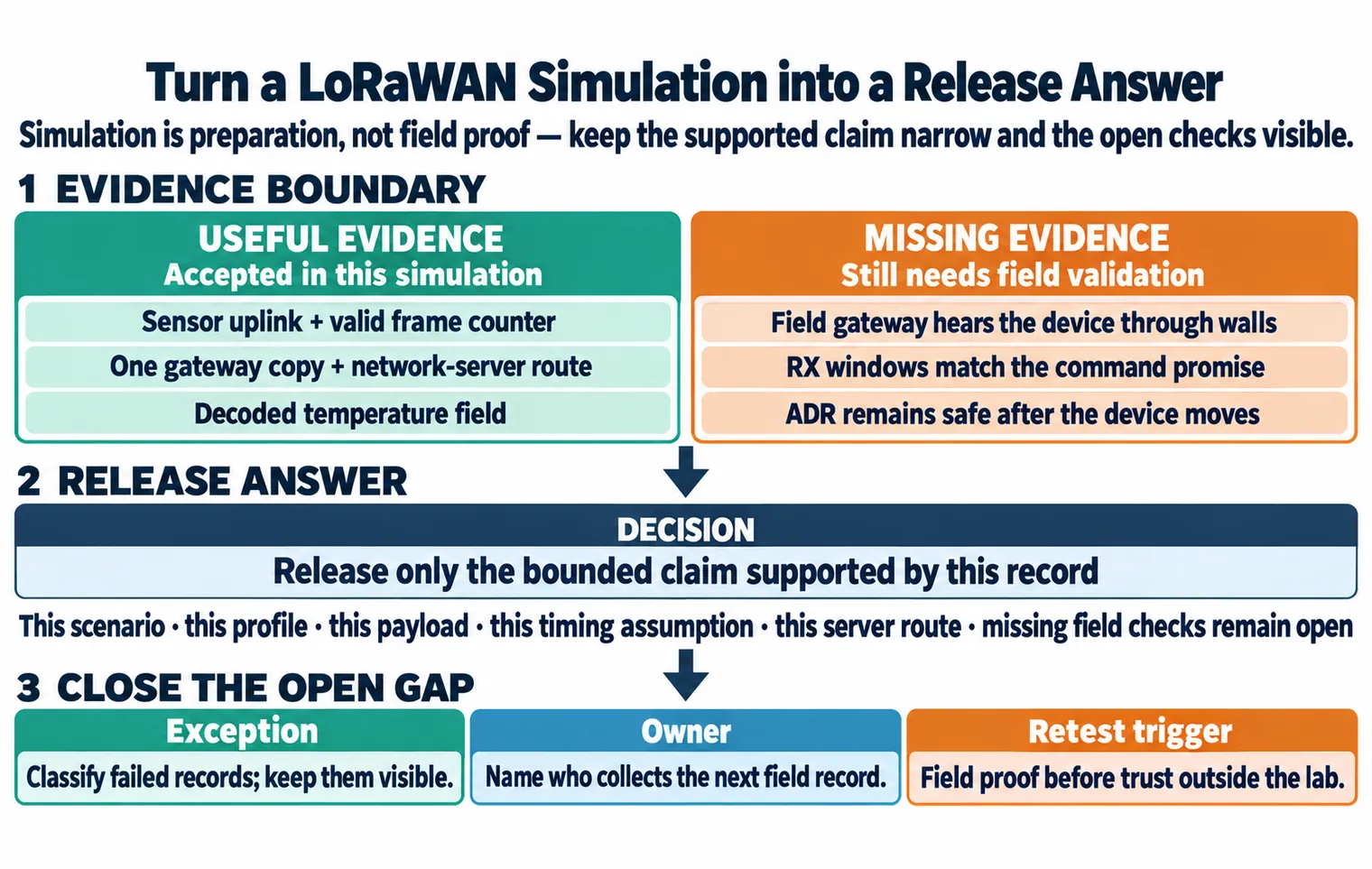
Read Figure 5 from what the modeled run can support: a sensor uplink with a valid frame counter, one gateway copy routed by the network server, and the decoded temperature field. Keep the missing evidence beside it. The browser run cannot prove that a field gateway hears through real walls, receive windows meet a command promise, or ADR remains safe after movement. The decision therefore releases only the bounded claim supported by the record. Failed records stay visible, an owner is named for the next field check, and field proof becomes the retest trigger before anyone trusts the result outside the lab.
State the device behavior, region, activation method, payload, and downlink promise before reading the trace.
Connect device frame, gateway copy, network-server handling, application decode, and owner action in one record.
Do not let simulated success stand in for gateway placement, interference, antenna orientation, or field operations.
The lab record should let another reviewer replay the decision without rerunning the exercise. That means the record needs enough packet, timing, ADR, duplicate-copy, payload, security, and owner evidence to explain the release decision.
Write the record as a trace through surfaces, not as a summary of screens. A useful entry might start with "meter-south-lot, EU868 profile, OTAA join, 12-byte uplink, Class A command promise, ADR enabled for fixed devices only." It then lists the device frame fields, the gateway copies, the server route, the decoded application sample, the RX1/RX2 queue result, the ADR basis, and the field condition still outside the simulation. Another reviewer should be able to see why the claim passed, why a broader claim did not pass, and which owner has to collect the next record.
When a record fails, preserve the failure instead of rewriting the scenario until it looks clean. A frame-counter reject belongs to activation and security state; a missing application row belongs to route, decoder, or storage evidence; a missed command belongs to Class A timing and queue behavior; duplicate gateway copies belong to server deduplication. Keeping those failures in separate rows prevents one vague "LoRaWAN failed" note from hiding the actual next action.
The device sends an uplink and the application decodes the payload, but a command is missed. A replayable record separates the good uplink path from the downlink promise, checks RX1/RX2 timing, records queue behavior, assigns the command owner, and adds a field test for the promised response time.
LoRaWAN failures often cross boundaries. A payload-size change can affect airtime, data-rate fit, ADR decisions, duty pressure, downlink capacity, decoder versioning, and field support. A simulation that checks only one layer can miss the coupling that matters in production.
Consider a firmware change that adds a diagnostic field and increases the reporting cadence. The application decoder may still pass because the JSON shape is recognized, while the radio path becomes less tolerant of low data rates, retries, and busy channels. If ADR then lowers spreading factor for fixed devices, moving or obstructed devices can become exceptions. If the product also promises operator commands, the extra uplinks can change when downlinks are queued and whether the device is listening. The simulation record should therefore connect payload fit, timing, ADR, duplicate handling, and owner action instead of treating them as independent checkboxes.
Security and state can hide the same kind of coupling. A gateway can hear a frame with good radio evidence while the network server rejects it because the activation context or frame counter is wrong. A decoder can accept a sample while the release owner has not proved storage, alerting, or rollback behavior. The under-the-hood habit is to ask which boundary accepted the record, which boundary rejected it, and which later change would make the evidence stale. That stale-evidence check is what keeps simulation results useful after firmware, payload, gateway, or owner assumptions change.
More fields can push packets over practical limits when the device needs slower settings or retries.
A gateway can hear a frame while the network server rejects it because activation or counter state is wrong.
A lab result is weak if no one owns the next field measurement, rollback rule, or retest after payload and firmware changes.
This section: Summary — This lab uses simulated LoRaWAN records to practice packet-trace checks, Class A timing checks, ADR decision checks, duplicate-copy handling, payload checking, security symptom routing, and release packet writing.
This lab uses simulated LoRaWAN records to practice packet-trace checks, Class A timing checks, ADR decision checks, duplicate-copy handling, payload checking, security symptom routing, and release packet writing. A strong lab result explains both what the simulation proved and what still needs field validation.
This section: Key Takeaway — A LoRaWAN simulation lab should test gateway placement, airtime, collisions, spreading factors, and traffic assumptions.
A LoRaWAN simulation lab should test gateway placement, airtime, collisions, spreading factors, and traffic assumptions. Simulation is a planning aid, not a replacement for measured deployment data.