12 LoRaWAN Security and Joining

More
Depth: Practitioner
Progress saves as you read. Mark sections complete as you go; your progress appears in the sidebar.
A farm meter loses power after sending several readings. A replacement battery brings it back, but its saved state is older than the state the server remembers. Joining and counter recovery now decide whether an encrypted packet is acceptable.
12.1 Start Simple
This section: Start Simple
12.1.1 Treat Joining as a Custody Change
A farm meter is replaced after a storm. The new unit must enter the right service, while the damaged unit must never return as a trusted member. The installer sees a successful join, but the security owner needs more: proof of which unit joined, which owner approved it, and what happened to the old secret state.
Write the custody path before the field visit. Name who creates the starting secrets, who stores them, which service approves entry, and which application receives the reading. Give the installer a way to confirm the unit and site without exposing secret material. Give the service team a clear retirement step for the removed unit.
Now test the boundary. Try the wrong unit at the right site. Restore old saved state. Reset the new unit after it has sent data. Repeat an earlier join request. Remove one service during entry. Check that unexpected attempts are rejected, counters do not move backward unnoticed, and every accepted change leaves a time, owner, and device record.
An encrypted reading alone does not prove safe entry, replacement, or retirement. This runway proves only the custody questions around joining. The deeper sections name the activation choices, key roles, server boundaries, replay checks, recovery evidence, and reasons an exception needs stronger review.
The release record should answer simple questions. Which unit is this? Which site owns it? Who may approve entry? Where did its first secret come from? Which service accepted it? Which application may read its data? How will a lost unit be blocked? How will a new owner take control? Which log proves each step?
Test those answers with real field tasks. Let an installer scan the wrong label. Let a service worker retire the unit. Restore a saved copy after retirement. Replace the unit without copying its identity. Check that the old path closes and the new path opens once. Keep the event time, unit, owner, and reason in the record. A join light is useful only when it points to that evidence.
Security review starts before the first payload. A reviewer needs to know how the device activates, who owns root material, where session state is created, which server validates network behavior, and who owns application meaning. OTAA and ABP are not just setup choices. They create different evidence for joins, counters, resets, replacement, replay protection, and retirement.
Overview: Security Review Starts at the Boundary
LoRaWAN security is not approved by writing "encrypted" beside a device fleet. The review starts by naming the activation method, the credential owner, the join boundary, the network-server boundary, the application boundary, and the evidence that proves each boundary behaved as expected.
Network-side material supports network behavior such as validation, frame counters, MAC behavior, and downlink scheduling. Application-side material protects application payload meaning for the application owner. Gateways forward what they hear; they are not the security owner for the whole system.
When the record names session material, keep the LoRaWAN version precise. DevAddr is the short device address used inside the network. In LoRaWAN 1.0.x, NwkSKey authenticates data frames and encrypts MAC commands in FRMPayload (FPort 0); MAC commands in FOpts are not encrypted. AppSKey encrypts application payloads. LoRaWAN 1.1 separates network integrity and encryption into FNwkSIntKey, SNwkSIntKey, and NwkSEncKey, while retaining AppSKey for application payloads. OTAA derives session keys during a join; ABP loads session state before use and therefore needs stronger reset, replay, and retirement evidence.
For example, an OTAA release record for a metering fleet should say which LoRaWAN profile is in scope, where root activation material is held, who approves join-server changes, and what log proves the device joined into the expected network and application paths. If a field technician can replace a device, the record should also say how the old device is retired and how the new device receives its own material. That level of detail prevents an "encrypted uplink" claim from hiding shared keys, unclear custody, or a recovery path that bypasses the intended owner.
The same boundary record helps during audits. A reviewer can ask for the device identity, activation event, session-state evidence, frame-counter behavior, application route, and decommissioning owner without guessing which team keeps each artifact. This keeps audit evidence reproducible after staff changes.
If you only need the intuition, remember this: prefer OTAA unless the release record proves why ABP is an exception, who owns the material, how counters survive recovery, and what evidence closes the review.
Before deciding the “join”–“network” decision, inspect “Join” in Figure 12.1 and compare it with “Network”. That contrast matters because Security boundaries make the release reviewable: activation, network behavior, payload meaning, recovery, and ownership are separate evidence lanes.
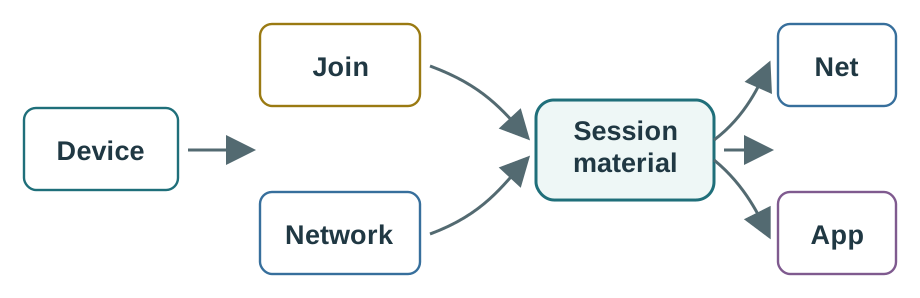
Trace the review path across Figure 12.1 from “Join” to “Network”. From “Session”, it arrives at “material”. That path is evidence for Security boundaries make the release reviewable: activation, network behavior, payload meaning, recovery, and ownership are separate evidence lanes; retain it when revisiting the “join”–“network” decision.
Security Review Evidence
Activation method
Record whether the release uses OTAA or ABP, which profile is active, and what log proves the device entered the expected session state.
Boundary owners
Name the join, network, and application owners. A vague platform label is not enough for incident recovery.
Counter behavior
Show what happens after reset, rejoin, recovery, and repeated traffic. Replay protection is part of the security evidence.
Retest trigger
Reopen the review when firmware, activation method, server boundary, credential custody, or recovery behavior changes.
Practitioner: Write the Activation Evidence Record
A useful release record separates the normal OTAA path from any ABP exception. OTAA gives the reviewer join evidence and fresh session state. ABP provisions session state directly, so it removes the join proof and shifts more burden onto counter persistence, recovery procedure, and owner approval.
OTAA's join evidence is not free, and a release record should say so. A restart that loses valid session state requires a new join request and join accept before normal traffic can resume; a device that persistently retains valid session state and counters need not rejoin merely because it restarted. A brownout-prone installation or firmware change can therefore create extra join traffic if its implementation discards session state. Track actual rejoin behavior and restart frequency alongside counter and recovery evidence, rather than treating "uses OTAA" as a cost-free default.
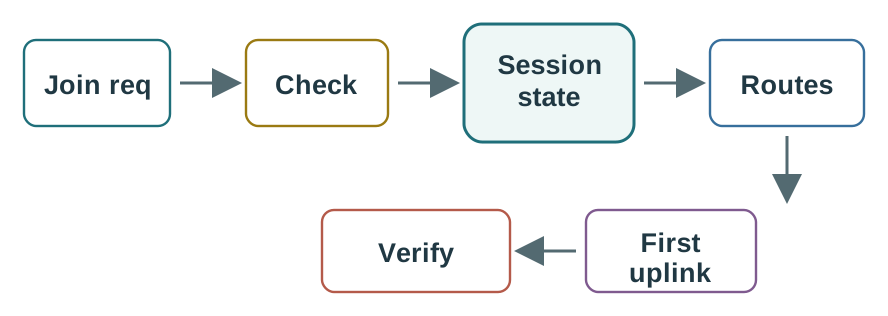
Before carrying OTAA review follows the join path: device identity, join service decision, session state, network route, application route, and verification uplink into the “Check” design record, view Figure 12.2. It makes “Check” and “Session” separate, inspectable parts of the “check”–“session” decision.
-

Remi sends the device request with its identity.
-

The join service checks who owns the device.
-

A fresh session is made only after the check.
-

The network route opens for the joined device.
-

The app route opens to the right service.
-

A test uplink proves the whole route.
Trace Figure 12.2 by asking what “Check” establishes and what “Session” changes. Check “state” next, ending at “Routes”. That progression is the mechanism behind OTAA review follows the join path: device identity, join service decision, session state, network route, application route, and verification uplink and the evidence order needed for the “check”–“session” decision.
LoRaWAN OTAA joining narrated tour
Play silently with captions on provisional storyboard timing; narration audio is pending. Production pacing is not protocol time. Choose Reduced motion for a complete still at each beat.
Play the tour to open the workbench. Pause, replay a beat, or read the full transcript below. Some situations cannot be shown by this teaching model; those beats keep the existing frame and provide captions only.
Full transcript — LoRaWAN OTAA joining (8 beats)
B1 — Meter needs a session
You are the technician bringing a farm meter back after a power failure. Suppose the restart has lost its valid session state. The meter needs to send readings again, but normal traffic must wait for a new join request and an acceptance. What makes that join succeed?
Model caption: After a restart that loses valid session state, normal traffic waits for a new join.
B2 — Root and session keys
The method is called over the air activation. It creates session keys during joining: keys for normal traffic, with different roles for network validation and application encryption. A root key is the secret stored beforehand on the device and trusted server side. It supplies the starting material for joining.
Model caption: A provisioned root secret supplies joining; session keys serve normal network and application traffic.
B3 — Join request
The meter sends a join request containing identifiers, a device nonce, and a message integrity check. A device nonce is a value that must be fresh for that device. The integrity check lets the server check possession of the root key without sending the secret itself over the air.
Model caption: The request carries identifiers, a fresh device nonce, and an integrity check; the root secret is not sent.
B4 — Forward and validate
The gateway forwards the request. The server checks the device registry, the integrity check, and nonce freshness. For an accepted request, the network prepares an encrypted join acceptance carrying a device address and settings. Your meter then listens during receive windows, timed from the end of its transmission.
Model caption: Gateway forwarding precedes server validation; acceptance returns an address and settings in a receive window.
B5 — Second receive window
Take the teaching model's missed first window example. The first join receive window is five seconds after the request finishes transmitting. The second follows one second later. Start with five seconds, add one second, and the second window is at six seconds. The acceptance arrives in that second window.
Model caption: From transmission end: first window at five seconds; add one second; second window at six seconds receives the acceptance.
B6 — Session established
The join succeeds through the second receive window. The device and server derive matching session keys locally from root material and join nonces. The root secret stays out of the radio exchange. With the session established, the meter can send normal traffic using its assigned device address.
Model caption: The second window delivered the reply; matching session keys and the assigned address support normal traffic.
B7 — Reused nonce rejected
The misconception is that a gateway hearing the request means the meter has joined. Forwarding only gets the request to validation. In the reused nonce example, the server has already seen the device nonce. Even with a valid integrity check, freshness fails. The server rejects the join before session keys are derived, so hearing the request was insufficient.
Model caption: Heard and forwarded does not mean joined: a reused device nonce fails freshness even when the integrity check is valid.
B8 — Join takeaway
Joining turns a checked request and a timely reply into fresh session keys for normal traffic.
Model caption: Joining turns a checked request and a timely reply into fresh session keys for normal traffic.
Do not accept ABP review is an exception review: the release must explain the shortcut and prove the extra controls that replace join evidence as “No join” prose alone. Look at Figure 12.3 before the “no join”–“counters” decision, where “No join” is explicitly distinguished from “Counters”.
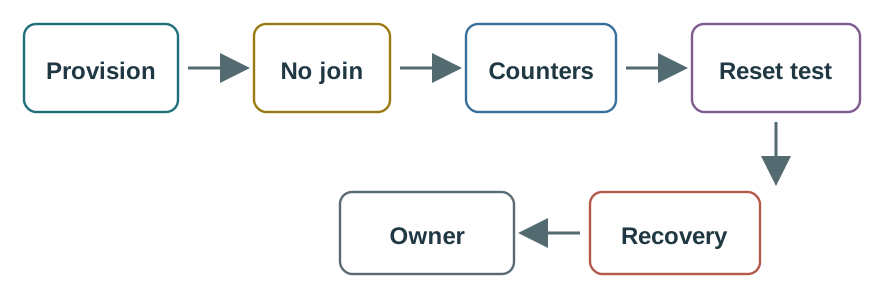
Inspect “No join” against “Counters” on Figure 12.3, then test the link between “Reset test” and “Recovery”. The two comparisons clarify ABP review is an exception review: the release must explain the shortcut and prove the extra controls that replace join evidence. They also keep “No join” in the running decision about the “no join”–“counters” decision, tied to labelled evidence.
Worked Review: New Sensor Fleet
A new sensor fleet uses OTAA with unique activation material. The join owner can show join records, the network owner can show validation and counter behavior, and the application owner can show the first routed payload after join. That is release-ready only after reset and rejoin behavior are also tested.
Worked Review: Legacy ABP Device
A legacy device cannot run the join procedure in its current firmware. ABP may be acceptable only as a limited exception with a written reason, counter persistence proof, recovery steps, decommissioning steps, and an owner-approved migration or expiry trigger.
Under the Hood: Recovery Cannot Bypass Replay Protection
Frame counters are not bookkeeping trivia. They help the receiving side reject stale or repeated traffic. Reset and recovery procedures therefore matter as much as the initial activation path. A device that works once but fails after reset is not release-ready.
Security and topology review also meet at server boundaries. The network side can validate network behavior without owning application payload meaning. The application side can process payload meaning without owning gateway forwarding. Incident playbooks should send each symptom to the boundary that can actually provide evidence.
A useful recovery test is deliberately uncomfortable: power-cycle the device, force a rejoin or approved ABP recovery path, send a normal uplink, and then confirm that stale counter values are rejected rather than silently accepted. If operations asks to "reset counters" so a troubled device comes back quickly, the release owner should treat that as a security decision, not a support shortcut. The same test should verify who can revoke or replace material after a lost device, because decommissioning weak spots often appear only after the first field failure.
The review should also keep timing clear. Counter repair, key replacement, and ADR retuning may happen in the same incident window, but they should have separate evidence and owners so a radio optimization is not mistaken for a security fix.
Inspect Figure 12.4 with one question from the “nwkskey (device”–“end encryption. both use aes-128” decision: how does “NwkSKey (device” constrain “end encryption. Both use AES-128”? The answer supports The release record closes the loop: version/profile, activation, material owners, counters, boundaries, verification, exceptions, and future owner.
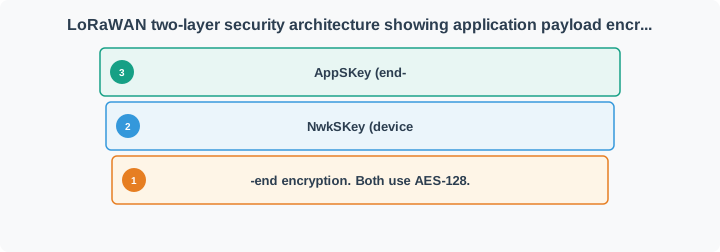
Use “NwkSKey (device” as the entry point to Figure 12.4. Read “end encryption. Both use AES-128” next, with “NwkSKey (device” as the bridge to “end encryption. Both use AES-128”. This route gives practical meaning to The release record closes the loop: version/profile, activation, material owners, counters, boundaries, verification, exceptions, and future owner and supplies the review sequence for the “nwkskey (device”–“end encryption. both use aes-128” decision.
Security and ADR Incident Review
Security recovery can look like radio trouble if the team reads symptoms too quickly. A reset, rejoin, profile change, or credential repair can change recent link evidence. Do not let a security incident automatically drive ADR changes until activation and counter evidence are understood.
Invalid message integrity symptoms
Route the diagnosis through credential, counter, profile, and payload-boundary checks before blaming the radio path.
Reset recovery
Test whether counters, join state, application route, and owner actions still work after the device resets.
ADR separation
Keep ADR decisions separate from stale, mobile, mixed, or recovery-period link evidence.
Decommissioning
Name how retired, replaced, or compromised devices lose access without weakening replay protection for the rest of the fleet.
Release Questions
- Which activation method and profile are in scope?
- Who owns device credentials, join decisions, network validation, and application payload handling?
- What evidence proves OTAA join or ABP provisioning succeeded?
- What happens to counters after reset, rejoin, recovery, replacement, and decommissioning?
- Which owner rechecks security, ADR state, and application acceptance after an incident?
A confirmed message crosses security and timing boundaries at once. Figure 12.5 follows duplicate gateway copies to one application event and one scheduled acknowledgement.

At GATEWAYS, Figure 12.5 retains both −78 dBm and −91 dBm copies; SERVER verifies and deduplicates them before the application sees one 23.4 °C event. The final ACK deliberately chooses GW-A and RX1, separating acknowledgement intent from the radio opportunity that can carry it.
Field names keep the two key domains honest. Figure 12.6 separates network integrity from application confidentiality across the LoRaWAN payload.

Read the NETWORK INTEGRITY row of Figure 12.6 across FHDR to MIC, then contrast it with APP CONFIDENTIALITY, where only FRMPayload is AppSKey ciphertext. The FHDR DETAIL row exposes DevAddr, FCtrl, FCnt, and FOpts so replay and overhead claims remain tied to actual fields.
12.2 Restore a Meter without Reusing Yesterday’s Session
This section: Restore a Meter without Reusing Yesterday’s Session — Take an illustrative active session in which the network has accepted an uplink counter of 105.
Take an illustrative active session in which the network has accepted an uplink counter of 105. A restored image resumes at 100. The counter has moved backward by 5, so those values cannot be treated as fresh progress in the same session. An integrity check on the packet does not erase this replay concern. The server and device must preserve valid state or establish a fresh session through the activation procedure appropriate to their version.
Contrast that reset with one uplink heard by two gateways. Both copies carry the same device frame and counter because they represent one radio transmission. The server can keep the two reception records while delivering one application event. That deduplication case is not permission for the device to reuse old counters after a reset.
Read Figure 12.6 from network integrity across FHDR and MIC, then compare the application confidentiality row over FRMPayload. The roles differ: checking a valid frame does not require the gateway to interpret a temperature, while decrypting application content does not settle every network replay rule. Record the protocol version and key roles rather than assuming every profile uses identical session-key names.
Predict whether copying the damaged meter’s credentials into a replacement makes custody simpler. It may create two devices with the same trusted identity if the old unit returns. Replacement needs its own approved identity and a retirement action for the removed unit. Next, restore an old backup after retirement. The server-side lifecycle test should demonstrate that yesterday’s accepted ownership does not silently reopen access.
The security lesson reaches beyond the join light. In an illustrative recovery trace, joining starts at 2 s and the application accepts the test reading at 14 s, an end-to-end interval of 12 s. Confirm the intended application receives a test reading after activation, then verify that the former device can no longer deliver accepted data. Keep public identifiers and event results in the support record without exposing secret material. A successful join establishes a session under specific checks; the deployment also needs durable counter handling, controlled replacement and a clear end to trust. Those behaviours depend on the exact device stack and server profile and must be exercised together.
12.3 Summary
This section: Summary — LoRaWAN security and joining review checks activation method, credential custody, frame counters, server boundaries, and ownership.
LoRaWAN security and joining review checks activation method, credential custody, frame counters, server boundaries, and ownership. OTAA is the normal release path because it leaves join evidence and derives session state during activation. ABP is an exception path that needs explicit controls. Good release records name the active profile, join owner, network owner, application owner, counter behavior, reset and recovery behavior, decommissioning procedure, and retest trigger.
12.4 Key Takeaway
This section: Key Takeaway
LoRaWAN security is approved by boundary evidence, not by a broad encryption claim: prove activation, key custody, counters, server roles, recovery behavior, and the owner who must recheck the release when those facts change.
12.5 See Also
This section: See Also
LoRaWAN Network Architecture
Use this when gateway forwarding, network-server control, join boundaries, and application boundaries are not yet clear.
LoRaWAN Device Classes Review
Connect activation and security evidence to downlink timing, receive windows, and device-class promises.
LoRaWAN Link Budget and ADR Review
Keep radio-margin and ADR decisions separate from security recovery symptoms.
LoRaWAN Common Pitfalls Review
Test activation, class, ADR, payload, and release mistakes before deployment approval.
Open printable teacher run sheet
Find help
3 reviewed answers.
Where should I start in a module?
Open the module page from the sidebar to see its chapters in order. Use the module map to return to a topic you need.
Modules and pathsReviewed
What can I try when a project does not work?
Check the symptom, then work through the diagnostic steps. Keep the error message and the smallest example that reproduces it.
When you are stuckReviewed
How do interactive examples work?
Use the interactive guide to check how examples and simulations work before changing your project.
Interactive examples guideReviewed