2 NB-IoT Fundamentals
More
Depth: Practitioner
Progress saves as you read. Mark sections complete as you go; your progress appears in the sidebar.
2.1 Overview: NB-IoT Is Narrowband Cellular for Small, Delayed Messages
This section: Overview: NB-IoT Is Narrowband Cellular for Small, Delayed Messages — Begin with a fixed meter.
Begin with a fixed meter. It wakes once each day. It has one small value to send. It may sit behind a thick wall. Its battery must last for years. This is the kind of job to test first.
Write down five facts. Note how much data moves. Note how often it moves. Set the longest safe wait. Mark the weakest place. Set the service-life goal. These facts define fit.
The device uses a mobile operator’s network. It can sleep for long periods. It can spend extra effort to reach difficult places. That effort may take time. It may also use more energy. Better reach is never free.
Test one full daily cycle. Wake the device. Join the network. Send the value. Confirm the result. Return to sleep. Count both time and energy. Repeat the test in the weakest place.
Plan for loss. Store a reading when service is absent. Mark its age. Try again by a clear rule. Do not let an old reading look current. Tell the operator when the gap matters.
This quick path is only a fit test. It does not model every network choice. Practitioner work records the site trial and battery budget. Under the Hood explains the timers and repeated sends that can change both reach and service life.
NB-IoT is the cellular IoT option for devices that send compact messages through an operator-managed network and can tolerate low throughput, scheduled communication, and limited mobility. It is not a smaller smartphone modem. It is a narrowband design for field devices such as meters, environmental sensors, and status monitors that spend most of their life asleep.
The useful first question is not whether NB-IoT is available in a country. The useful question is whether the selected operator, module, antenna, SIM or eSIM profile, enclosure, payload, sleep policy, and application path work together at the actual sites.
Think of NB-IoT as a service fit, not a universal low-power answer. It fits best when the device can initiate most communication, send a small record, tolerate delayed downlink, and accept that carrier policy controls important behavior such as coverage, bands, timer grants, and roaming. It fits poorly when the product needs continuous control, large diagnostics, frequent updates, high mobility, or a private network owner that does not want operator subscriptions.
The overview gate should name the exact transaction being approved. For example: wake once per day, register or resume on the target operator, send a 120-byte meter record, receive acknowledgement or queued settings during the active window, log the result, and return to PSM within the measured budget. That concrete transaction is easier to validate than a broad claim that NB-IoT has deep coverage and long battery life. It also gives support a reference behavior when field logs later show slower attach, missing acknowledgement, or repeated retries. Keep the trace identifier with the approval record.
Figure 2.1 is the checkpoint for overview: nb-iot is narrowband cellular for small, delayed messages; its purpose is to show NB-IoT system map for a daily 120-byte meter record moving from field device through operator radio, cellular core, IoT platform, operations evidence, and return to PSM before a field claim is accepted. Inspect meter sensor beside SIM or eSIM before the next claim.
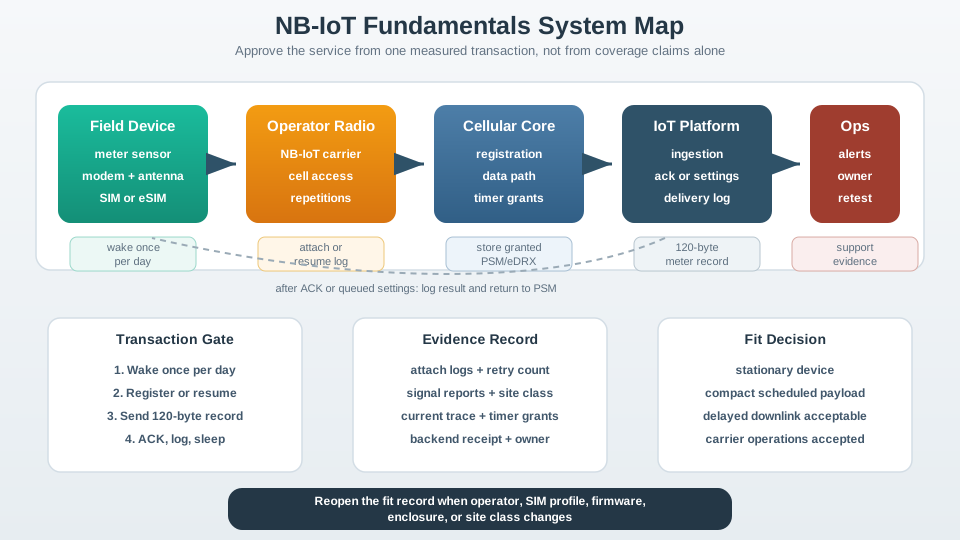
Inspect the boundary between NB-IoT Fundamentals System Map and meter sensor in Figure 2.1, then see where SIM or eSIM enters the path. Those labels make NB-IoT system map for a daily 120-byte meter record moving from field device through operator radio, cellular core, IoT platform, operations evidence, and return to PSM concrete. The chapter connects them to overview: nb-iot is narrowband cellular for small, delayed messages through cross-layer acceptance evidence.
Narrow carrier
The narrow radio design supports low-complexity devices and coverage-enhancement behavior, but it also keeps throughput modest.
Sleep-first operation
The normal pattern is wake, attach or resume, send a compact payload, wait only as needed, then return to a low-power state.
Operator-managed path
Coverage, bands, provisioning, roaming, diagnostics, and timer behavior depend on the carrier service and the module firmware.
2.2 Practitioner: Build the NB-IoT Fit Record
This section: Practitioner: Build the NB-IoT Fit Record
A defensible NB-IoT review writes down the behavior being approved. The record should not say "NB-IoT has deep coverage" or "battery life is long" without field evidence. It should connect the device behavior, site class, operator service, payload cadence, power policy, application delivery, and retest trigger.
Keep the record short enough to use during design changes. Each entry should point to the artifact that proves it: modem logs for attach and grants, current traces for power, backend receipts for delivery, asset records for SIM ownership, and field notes for the installation class. Evidence without a file, timestamp, or owner is still an assumption.
Use Figure 2.2 to compare the operator’s spectrum arrangement with the module, band, installed-signal, and payload evidence needed before treating placement as service proof.
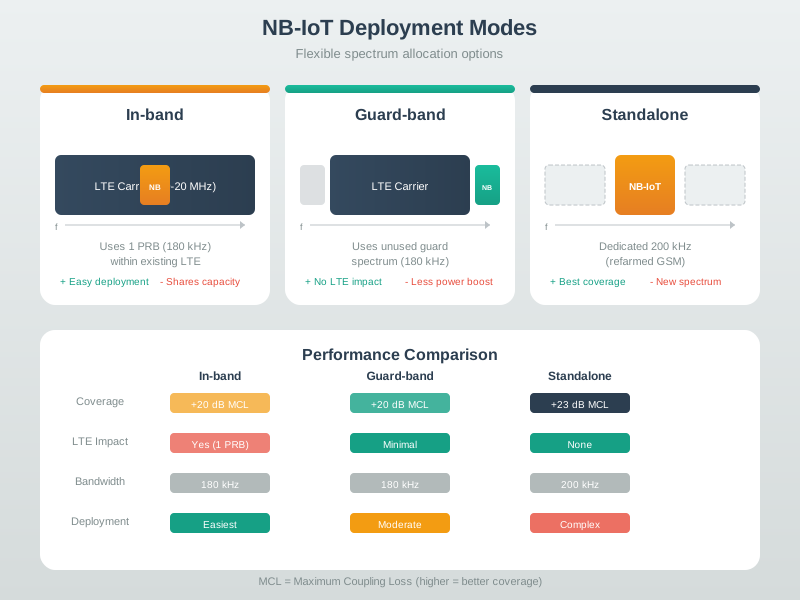
Read Figure 2.2 from operator control to the dedicated and shared spectrum choices. They show where an operator can host NB-IoT. They do not prove coverage or speed for a product. The test row starts with the target band and mode. It then checks the modem, operator setting, signal at the site, and payload result. The mode is useful context, but it is not the release proof. That proof must come from the final modem, network, antenna, case, and field sites.
2.3 Under the Hood: Timers, Coverage, and Payload Shape Drive the Tradeoff
This section: Under the Hood: Timers, Coverage, and Payload Shape Drive the Tradeoff
The underlying tradeoff is simple but unforgiving. NB-IoT can reduce device complexity and support difficult coverage, but each attach, retry, response wait, and coverage-enhancement repetition costs radio time. Power Saving Mode and extended DRX help only when the application accepts the reachability model they create.
Build the tradeoff from phases. A real transaction includes search or resume, random access, security and context handling where needed, payload transfer, acknowledgement or application response, active timer behavior, paging windows when eDRX is used, retries, logging, host work, and return to sleep. A battery estimate that uses only nominal sleep current misses the expensive phases that happen during poor coverage or recovery.
Payload shape matters as much as payload size. A compact binary reading with a stable acknowledgement path behaves differently from a verbose JSON record, a TLS session that renegotiates too often, or a firmware workflow that wakes the radio repeatedly. The under-the-hood review should measure the exact protocol stack the product will ship, including certificate handling, DNS or APN behavior, duplicate handling, and how the application responds when a record arrives late.
Timer behavior is negotiated, not commanded. The firmware can request PSM and eDRX values, but the network grants the values that the device must live with. The approved design should therefore store granted timers and adapt scheduling from measured grants rather than from configuration intent alone. If the grant changes after a network or SIM-profile update, the product should reopen the fit record instead of silently keeping stale battery assumptions.
Use Figure 2.3 to relate the post-uplink active period, scheduled paging, and unreachable sleep to both measured current and the application’s maximum tolerated command delay.
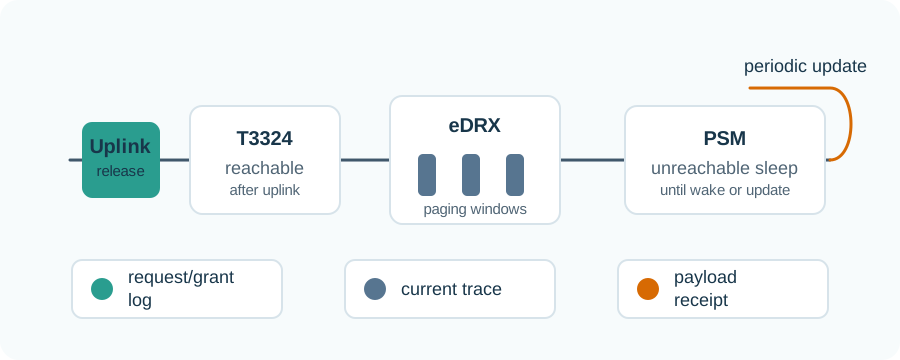
Read Figure 2.3 from active communication into T3324 active time, when the device can be paged. If both eDRX and PSM are granted, eDRX paging occurs during active time, and PSM begins when active time expires. The cards below the line join the granted timers with whole-board current and a payload receipt. They stop a low-current period from winning approval on its own. Each energy saving must still meet the delay and delivery needs of the app.
Deep sleep, delayed commands
Power Saving Mode preserves registration context while the device is not reachable until it wakes again. It fits scheduled reporting better than urgent command paths.
Less listening, some reachability
Extended DRX can reduce listening while still allowing paging windows. The useful setting depends on the application's acceptable command delay.
Repetitions cost time
Coverage enhancement can help difficult sites, but repeated access attempts and retries can dominate energy and latency.
Compact messages matter
Verbose JSON, frequent acknowledgements, and large updates can turn a good NB-IoT fit into a weak one.
Use Figure 2.4 to test one daily transaction against the five fit checks before approving NB-IoT or routing the workload elsewhere.

Start with the field need. Let each gate narrow the fit. Read Figure 2.4 from the transaction to approve—wake, register, send a 120-byte record, receive a response, log, and sleep—into the five fit checks. Stationary use, small messages, the full-cycle battery goal, delayed-downlink tolerance, and an evidenced operator path must all hold. A complete and observed transaction can become an NB-IoT candidate record; uncertainty calls for a pilot. High mobility, high throughput, low-latency control, or private-network ownership instead routes the workload elsewhere. This ordering prevents a technology label from outranking the behaviour the product must prove.

2.4 Start With the Story
This section: Start With the Story — Picture a water meter in a basement.
Picture a water meter in a basement. It sends one small reading each day. It spends most of its life asleep. The owner wants years of service from one battery. The meter also has to reach a mobile network through thick walls.
-
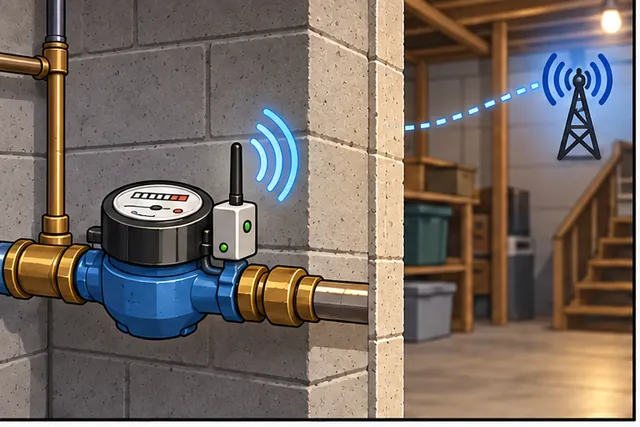
A basement water meter sends one small reading each day.
-
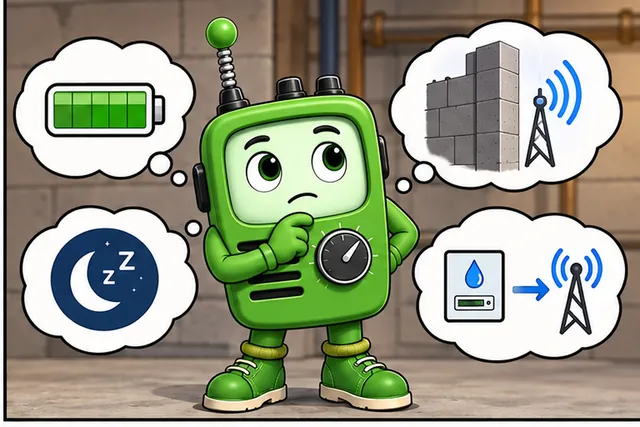
Thick walls weaken its link, while retries drain its battery.
-

Test the final case and antenna at the worst site.
-
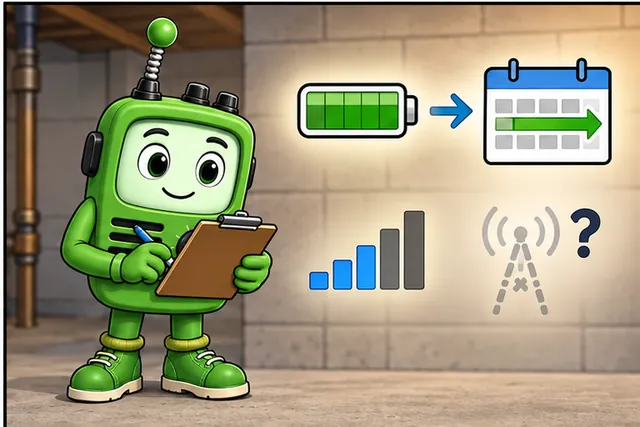
Use narrowband service only if reach, delay, and power all pass.
Narrowband IoT is a mobile-network option for jobs like this. Its short name is NB-IoT. It favors small and infrequent messages. It can trade speed for reach. It can also let a device sleep for long periods. Those traits can fit a meter, bin, or fixed alarm.
Start with the message. Record its size and how often it is sent. Decide how long it may wait. Then check the worst location. A label on a coverage map is not enough. Test the final case, antenna, and mounting place.
Power depends on more than sleep time. A weak link can force extra work. Joining the network costs energy. Failed sends cost energy too. Count the whole wake, connect, send, confirm, and sleep cycle. Plan what happens when the network is absent.
This first view uses a quiet fixed meter. It does not promise a fit for fast control, large transfers, or moving devices. The Practitioner layer builds the fit record and field trial. Under the Hood explains timers, repeated sends, coverage modes, and why better reach can increase delay and battery use.
Picture a water meter in a basement that sends one small reading each day. The useful question is not how fast the link can be; it is whether a narrowband device can wake, reach the operator network, send the payload, and go back to sleep for years.
Start simple: NB-IoT is a fit story about small messages, deep coverage, licensed spectrum, and patient latency.
The comparison envelope in Figure 2.5 provides a useful non-cellular baseline before NB-IoT spectrum is placed.

In Figure 2.5, Long reach, Tiny, sparse frames, and Short transmit bursts arrive as one trade. The GOOD FIT and POOR FIT cards establish the workload boundary that NB-IoT must be compared against rather than assuming every wide-area radio offers the same capacity or downlink behavior.
Spectrum fit then becomes concrete in Figure 2.6 because the same NB-IoT carrier can occupy three very different coexistence positions.

Read Figure 2.6 from Refarmed carrier to LTE edge resource and Inside LTE carrier. The modes alter coexistence, scheduler, and refarming evidence; the dark Ask the same four questions card keeps coverage, interference, capacity, and lifecycle proof common across all three.
2.5 Summary
This section: Summary — NB-IoT is a cellular IoT technology for small, infrequent messages from mostly stationary devices that can use operator-managed coverage and tolerate delayed downlink.
NB-IoT is a cellular IoT technology for small, infrequent messages from mostly stationary devices that can use operator-managed coverage and tolerate delayed downlink. Good decisions are evidence records: operator service, module and antenna behavior, payload cadence, power-state timing, application delivery, and support ownership all have to be measured or explicitly bounded.
2.6 Key Takeaway
This section: Key Takeaway
NB-IoT is not a general-purpose cellular replacement. It is a strong candidate when compact payloads, difficult coverage, scheduled reporting, and carrier-managed operations match the product’s real field evidence.
2.7 See Also
This section: See Also
Cellular IoT Overview and Evolution
Places NB-IoT beside LTE-M, private 5G, and other cellular IoT paths.
Compares payload, mobility, downlink, and coverage tradeoffs.
Deepens the field evidence and remediation path for weak sites.
NB-IoT Power Saving (PSM/eDRX)
Explains timer behavior, reachability windows, and power-state evidence.
Find help
3 reviewed answers.
Where should I start in a module?
Open the module page from the sidebar to see its chapters in order. Use the module map to return to a topic you need.
Modules and pathsReviewed
What can I try when a project does not work?
Check the symptom, then work through the diagnostic steps. Keep the error message and the smallest example that reproduces it.
When you are stuckReviewed
How do interactive examples work?
Use the interactive guide to check how examples and simulations work before changing your project.
Interactive examples guideReviewed