6 NB-IoT Coverage Enhancement
More
Depth: Practitioner
Progress saves as you read. Mark sections complete as you go; your progress appears in the sidebar.
6.1 Overview: Coverage Is Proven at the Installation Point
This section: Overview: Coverage Is Proven at the Installation Point — Picture a meter in a deep basement box.
Picture a meter in a deep basement box. It can reach the network, but only after several tries. The message arrives late and the battery pays for each try. A single success is not enough.
A payload is the useful data carried in a message. Latency means the time from sending work to receiving the needed result. Firmware is the software stored on the device. Test the final unit at the final type of site. Keep the antenna, case, SIM, software, message rate, and sleep plan the same. Record both delivery and energy. Approve the site only when the full product promise still fits.
Use four plain checks:
- Where is the unit mounted?
- Did the service accept it?
- Did the application get the data?
- How much active energy was used?
- How many tries were needed?
- Did the result arrive in time?
- Can support see a weak site?
- Can the antenna move safely?
- Can the site use another path?
- Who owns the next test?
More repeats can help a weak link. They also use time, air space, and battery energy. Practitioner records site classes and repair order. Under the Hood explains coding, scheduling, repeats, and cell load. Those details can explain the trade. They cannot turn a late, costly success into a pass.
NB-IoT coverage enhancement helps weak radio links by combining narrowband operation, robust coding, scheduling, and repeated transmissions. The goal is not to make every hard location acceptable. The goal is to decide whether a real device, in its real enclosure and mounting position, can deliver the application payload without breaking battery, latency, or support expectations.
Treat coverage as an evidence record. A coverage map or a single successful attach can start the review, but it cannot approve a fleet. The approval evidence is gathered at representative good, marginal, and weak sites with the production antenna, firmware, SIM profile, payload cadence, and sleep policy.
Classify the result by installation class, not by optimism. A basement cabinet, an outdoor pit, a rooftop enclosure, and a street-level meter can have different approved actions even in the same city. Each class should record delivery rate, retry pattern, measured transaction energy, application acknowledgement, and the remediation action that was accepted. That prevents one convenient site from becoming evidence for every difficult location.
Coverage enhancement is useful when it keeps the full product promise inside budget. It is not useful when the payload arrives only after repeated active windows that drain the battery or miss the alarm timing. The release decision should say whether the site is approved, approved with installation constraints, sent for remediation, or assigned to another network path.
A useful coverage decision connects four facts: where the device is installed, what the serving network grants, whether the application receives the payload, and how much active energy the transaction consumes.
Before approving a weak-signal site, inspect Figure 6.1 to connect the installed location and serving-cell behavior to repetitions, application receipt, energy cost, and the chosen remediation. The purpose is to judge the whole transaction rather than celebrate one successful attach.
Read Figure 6.1 from installation context into radio and cell evidence, then follow scheduled repetitions to payload delivery and its measured transaction energy. Finish at the remediation or release decision: adjust antenna or placement, change cadence, constrain the installation class, or use another path. This sequence connects coverage enhancement to the product promise because added repetitions may improve decodability while also extending latency and draining the battery.
6.1.1 First-Pass Coverage Evidence
6.1.2 Installed Location
Use the production enclosure, antenna, orientation, mounting surface, and nearby materials. Indoor and below-grade paths often differ from outdoor coverage assumptions.
6.1.3 Radio Behavior
Record serving cell behavior, access attempts, granted resources, repetition behavior, retries, and payload timing across repeated tests.
6.1.4 Energy Trace
Measure from wake through search, access, transfer, acknowledgement, retry behavior, and return to PSM or eDRX.
6.1.5 Release Decision
Approve only locations that meet delivery, latency, and battery budgets. Weak locations need a remediation rule before rollout.
6.2 Practitioner: Write the Coverage Review Record
This section: Practitioner: Write the Coverage Review Record — A coverage review record keeps weak-link decisions from becoming anecdotal.
A coverage review record keeps weak-link decisions from becoming anecdotal. It captures the product requirement, the installed conditions, the radio evidence, the application result, the energy trace, and the remediation rule. The record is especially important for rooms, cabinets, pits, and enclosures where a small installation change can turn an acceptable link into a support problem.
Inspect Figure 6.2 after completing the ledger to see how one site record becomes a controlled fleet decision. The loop keeps remediation and later monitoring attached to the original installation evidence.
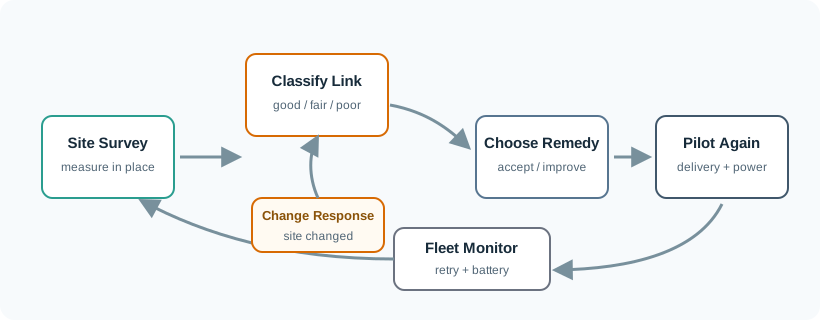
Read Figure 6.2 from site survey into evidence classification, then select a remediation such as antenna or placement change, cadence adjustment, installation constraint, or rejection. A representative pilot confirms the revised class before fleet monitoring watches for drift. This sequence connects the record fields above to release authority: weak evidence loops back for correction instead of being averaged into an optimistic fleet-wide coverage claim.
6.2.1 Remediation Order
Do not approve a weak location just because it eventually connects. Approve it only when the measured transaction, application result, and maintenance plan still meet the product requirement.
6.3 Under the Hood: Repetitions Trade Airtime for Decodability
This section: Under the Hood: Repetitions Trade Airtime for Decodability — Coverage enhancement works by making weak radio evidence more recoverable, but the mechanism has a cost.
Coverage enhancement works by making weak radio evidence more recoverable, but the mechanism has a cost. Repeated transmissions, robust coding, access retries, and longer grant waits can stretch a small payload into a much longer active window. That active window drives battery impact and can also affect alarm timing, network load, and fleet support behavior.
A link budget is useful for screening a design, but it is not a release gate by itself. The under-the-hood release gate is the measured transaction: cell search, access, scheduling, repeated transmission behavior, payload delivery, acknowledgement, retry handling, and return to the approved sleep state.
Measure the cost as a sequence, not as a single signal number. The same received-power value can behave differently across operators, modules, firmware versions, antenna placements, and enclosure materials. What matters to the product is how long the radio stays active, how many attempts are needed, whether the application receives the right payload once, and whether the device returns to the planned low-power state without a support intervention.
Also watch for fleet-level side effects. If every weak location uses heavy repetition at the same reporting time, the network, battery budget, and support process may all see load that the single-device pilot did not expose. Under-the-hood coverage review should therefore include normal, marginal, and poor-site traces, plus a rule for batching, staggering, relocating, or rejecting weak classes. Keep the raw trace links with the rollout decision so later battery or delivery incidents can be compared with the approved evidence.
Inspect Figure 6.1 to reconnect the radio mechanisms to the installed transaction the product actually pays for. The diagram is the release boundary after the link-budget discussion, not another coverage slogan.
Read Figure 6.1 from installation and serving-cell behavior into access attempts, scheduled repetitions, payload delivery, and the whole-device current trace. Then follow the result to remediation or approval. Repetition can improve decodability while lengthening the active window, so radio success, application receipt, latency, transaction energy, and return to sleep must agree before the site class is released.
6.3.1 Boundary Checks
6.3.2 Do Not Universalize Thresholds
Signal values are useful diagnostics, but operator configuration, module firmware, deployment mode, antenna design, and site materials change the practical result.
6.3.3 Do Not Hide Active Time
Battery projections must include search, access, grant waits, repetitions, retries, acknowledgements, and return-to-sleep behavior.
6.3.4 Do Not Confuse Radio Success With Product Success
The payload must arrive at the application with the right meaning, duplicate policy, late-message handling, and owner response.
6.3.5 Do Not Freeze the Decision
Building changes, network updates, antenna damage, firmware changes, and subscription changes should trigger retest criteria.
6.3.6 Coverage Release Gate

6.4 Start With the Story
This section: Start With the Story — Coverage enhancement is the reason a device at the edge of a cell can still be useful.
Coverage enhancement is the reason a device at the edge of a cell can still be useful. The network may repeat messages and accept slower exchanges so a sensor in a cabinet, basement, or rural field can still report.
Start simple: decide how much delay and battery cost the application can afford for each extra step of reach.
NB-IoT Coverage Narrated Tour
This section: NB-IoT Coverage Narrated Tour
NB-IoT coverage narrated tour
Play silently with captions on provisional storyboard timing; narration audio is pending. Production pacing is not protocol time. Choose Reduced motion for a complete still at each beat.
Play the tour to open the workbench. Pause, replay a beat, or read the full transcript below. Unsupported processes keep the existing frame and provide captions only.
Full transcript — NB-IoT coverage (8 beats)
B1 — Basement meter
You are the engineer responsible for a water meter in a deep basement. Its daily reading must reach the application without exhausting the battery. Repeated transmissions can help the weak radio link, but each attempt costs time and energy. How much does that extra reach cost?
Model caption: Your basement water meter must deliver its daily reading within its time and battery budgets.
B2 — Repeated information
Coverage enhancement can send the same information repeatedly so the receiver can combine energy across attempts. That helps recover a weak message. More repetitions also keep the radio active longer. The useful question for your meter is whether the delivery still fits its time and battery budgets.
Model caption: Repeated information lets the receiver combine energy; extra transmissions keep the radio active longer.
B3 — Model settings
Take the model's basement water meter: thirty-two bytes of useful message data, sent daily, with one hundred twenty-eight transmissions. Its location requires tolerance for one hundred sixty-two decibels of path loss. Path loss describes how much signal is lost along the radio path.
Model caption: Teaching setup: 32 bytes daily; 128 transmissions; 162 dB required loss tolerance.
B4 — Ideal repetition gain
First, calculate the ideal gain from repetitions. For one hundred twenty-eight transmissions, the base ten logarithm is about two point one zero seven. Multiply by ten to get about twenty-one point one decibels of ideal gain. The receiver gains a better chance of recovering the same information.
Model caption: For 128 transmissions: log base ten of 128 ≈ 2.107; multiply by 10 → ideal gain ≈ 21.1 dB.
B5 — Capped margin
The model takes the smaller of twenty and that ideal gain: twenty decibels. Add the baseline of one hundred forty-four to get one hundred sixty-four. Take the smaller of that result and the cap of one hundred sixty-four. Subtract the required one hundred sixty-two: two decibels of margin.
Model caption: Practical gain = min(20, 21.072…) = 20 dB. Add 144 → 164 dB. Available tolerance = min(164, 164) = 164 dB. Subtract 162 → +2 dB margin.
B6 — Delay and radio cost
Now calculate the delay estimate. Multiply thirty-two bytes by three point two milliseconds per byte: one hundred two point four milliseconds. Add ninety milliseconds: one hundred ninety-two point four. Multiply by one hundred twenty-eight, then by one for daily reporting: twenty-four thousand six hundred twenty-seven point two milliseconds. Round to the nearest millisecond. That is about twenty-five seconds. The model also assigns one hundred twenty-eight times the baseline radio time.
Model caption: 32 × 3.2 = 102.4 ms; +90 = 192.4 ms; ×128 ×1 = 24627.2 ms; round → 24627 ms, displayed as 25 s. Radio time proxy: 128× baseline.
B7 — Field evidence needed
The misconception is that enough repetitions guarantee a usable basement meter. Two decibels of modeled margin cannot establish that: actual delivery must fit the installation's time and battery budgets. The calculated delay and radio time explain why extra reach has a cost.
Model caption: A modeled +2 dB margin does not guarantee a usable meter. Actual delivery must fit installation time and battery budgets.
B8 — Reach has a cost
For your meter, buy extra reach only at a time and battery cost the application can afford.
Model caption: Buy extra reach only at a time and battery cost the application can afford.
6.5 Summary
This section: Summary — NB-IoT coverage enhancement can make difficult locations reachable, but it is not a universal range guarantee.
NB-IoT coverage enhancement can make difficult locations reachable, but it is not a universal range guarantee. The chapter-level decision should be based on installed-device evidence: radio behavior, application delivery, current trace, remediation options, and fleet monitoring.
6.6 Key Takeaway
This section: Key Takeaway
Approve NB-IoT coverage enhancement only when the measured weak-location transaction still meets delivery, latency, battery, and operations requirements.
6.7 See Also
This section: See Also
Find help
3 reviewed answers.
Where should I start in a module?
Open the module page from the sidebar to see its chapters in order. Use the module map to return to a topic you need.
Modules and pathsReviewed
What can I try when a project does not work?
Check the symptom, then work through the diagnostic steps. Keep the error message and the smallest example that reproduces it.
When you are stuckReviewed
How do interactive examples work?
Use the interactive guide to check how examples and simulations work before changing your project.
Interactive examples guideReviewed