15 Building Cellular IoT Devices
More
Depth: Practitioner
Progress saves as you read. Mark sections complete as you go; your progress appears in the sidebar.
15.1 Start With the Story
This section: Start With the Story — Picture a flood gauge that wakes every hour, joins a mobile network, sends a level, and returns to sleep.
Prove One Attach, Send, Sleep, and Recovery Loop
Picture a flood gauge that wakes every hour, joins a mobile network, sends a level, and returns to sleep. On the bench it works from a strong supply. In the field it restarts during the first radio burst and loses the reading. The device team must prove the whole loop under the real power and signal range.
Record the unit identity, hardware and software versions, power trace, antenna state, account profile, network state, message identity, time, unit, quality, receiver result, and sleep current. Keep the urgent local warning independent of a distant service.
Lower the supply, weaken the signal, deny network entry, delay the reply, fill saved-message space, remove the card or account profile, restart each state, and update the software. Count attempts, energy, time, repeats, gaps, and final results.
A successful network join does not prove message delivery, a correct cloud record, or safe field life. A single lab carrier and location also do not prove every country, band, plan, or site.
Practitioner builds the bring-up and pilot record. Under the Hood explains modem states, command timing, power peaks, network context, retry cost, antenna limits, updates, and the recovery races hidden by a simple connected light.
Use this field-loop check:
- Label the exact test unit.
- Measure the first radio power peak.
- Record the final antenna state.
- Join the network from cold start.
- Send one known reading.
- Check the receiver’s final record.
- Sleep and measure steady current.
- Weaken the signal and retry.
- Deny entry and watch recovery.
- Fill saved space on purpose.
- Restart during each main state.
- Reconcile all attempts and results.
Building a cellular device means turning a modem, firmware task, SIM profile, antenna, payload, and cloud endpoint into one reliable path. Most failures appear at the boundaries between those pieces.
Start simple: make one attach-send-sleep loop observable before adding retries, batching, diagnostics, or fleet policy.
15.2 Learning Objectives
This section: Learning Objectives
After completing this chapter, you should be able to:
- Translate a cellular IoT plan into hardware, firmware, SIM, and cloud implementation tasks.
- Select a module capability class without depending on stale product or price claims.
- Bring up a modem with a measured power rail, antenna path, SIM or eSIM profile, serial interface, and AT-command state machine.
- Configure network registration, packet data context, APN, diagnostics, and payload delivery in a repeatable order.
- Estimate data and energy budgets from the actual reporting pattern, retry behavior, and firmware-update plan.
- Troubleshoot attach, signal, SIM, APN, payload, and sleep-mode failures using evidence instead of guesswork.

- Cellular module: The certified modem, RF front end, SIM or eSIM interface, firmware, and host interface used by the device.
- Host interface: The UART, USB, SPI, or network-style interface between the application processor and the module.
- AT commands: Text commands used to configure and query many cellular modules. Standard commands are often extended with vendor-specific commands.
- APN (Access Point Name): The operator or connectivity-provider gateway name used when creating a packet data context.
- Packet data context: The configured cellular data session that gives the device an IP path for payload delivery.
- Registration: The modem state in which it is accepted by the cellular network for service.
- URC (Unsolicited Result Code): An asynchronous modem message such as a registration change, socket event, or power-state notification.
- Current trace: A measured profile of current draw during boot, attach, transmit, retry, idle, and sleep.
A cellular IoT device is not just a microcontroller with a radio attached. It is a small system with five moving parts:
Start by The host application collects sensor data and decides when to send it. Then The cellular module handles radio registration and data sessions. Next The SIM or eSIM profile identifies the device to the operator. After that The antenna and enclosure determine whether the radio can actually reach the network. Finally The cloud endpoint and operations workflow receive data, monitor failures, and manage the fleet.
The early prototype proves that one device can send a payload. The production implementation proves that many devices can send payloads repeatedly, sleep correctly, recover from failures, update safely, and be supported after installation.
15.3 Implementation Standard
This section: Implementation Standard — Use this chapter as a build checklist.
Use this chapter as a build checklist. A cellular implementation is ready for pilot only when each layer has evidence.
Do not treat a development board demo as a production design. The production device must be tested with the final or production-equivalent module, antenna, enclosure, SIM profile, firmware configuration, and installation orientation.
15.4 Module Capability Classes
This section: Module Capability Classes — Avoid choosing hardware from a single product name or a forum example.
Avoid choosing hardware from a single product name or a forum example. Start with the capability class, then shortlist modules that support the required bands, region, certifications, power modes, host interface, supply chain, and firmware maintenance plan.
Fixed, tiny telemetry
Best for mostly stationary devices with small reports, long sleep periods, and difficult coverage locations when local operator support exists.
Mobile or reachable devices
Best when devices move between cells, need lower delay, may need voice features, or need richer diagnostics and firmware maintenance.
Regional risk reduction
Useful when operator support differs by country or site, but only if firmware, SIM policy, tests, and power budgets cover both modes.
More data without broadband
Fits devices needing more frequent data, simpler LTE availability, or update headroom while still avoiding full broadband complexity.
High-throughput edge devices
Use for cameras, gateways, and edge appliances where power and data cost are secondary to throughput and low-latency service needs.
Module selection is a lifecycle decision. Include firmware support, certification documents, antenna guidance, command documentation, regional band support, subscription model, and end-of-life risk in the shortlist.
15.5 Hardware Bring-Up
This section: Hardware Bring-Up — Cellular modules fail in prototypes for practical reasons: weak power rails, marginal antennas, missing SIM provisioning, serial timing mistakes, or an enclosure that changes the RF path.
Cellular modules fail in prototypes for practical reasons: weak power rails, marginal antennas, missing SIM provisioning, serial timing mistakes, or an enclosure that changes the RF path.
Follow the module vendor hardware guide for antenna connection, layout, and operating limits. An unattached or mismatched antenna can make tests misleading and may violate the assumptions used for RF compliance or safe operation.
15.6 AT Command Bring-Up Sequence
This section: AT Command Bring-Up Sequence — Command details vary by module, but the implementation pattern should be consistent.
Command details vary by module, but the implementation pattern should be consistent. Build a state machine with explicit timeouts, retries, and logs. Do not let application code hide modem state inside a single blocking function.
AT, and disable echo if needed.Useful command families include:
Start by AT and ATE0 for basic communication and echo control. Then AT+CPIN? for SIM readiness. Next AT+CEREG? or AT+CREG? for registration state, depending on radio access and module behavior. After that AT+CGDCONT for packet data context and APN configuration. Continue by AT+CGACT and AT+CGPADDR for context activation and IP address checks. Finally module-specific socket, MQTT, HTTP, CoAP, TLS, PSM, eDRX, and firmware-update commands.
Treat every AT step as a state transition:
Start by Send command. Then Wait for expected response or URC. Next Classify the result as success, retryable, configuration fault, SIM fault, network fault, or hardware fault. Finally Record diagnostics before retrying or sleeping.
15.7 Payload and Protocol Choices
This section: Payload and Protocol Choices — Many prototypes send whatever is easiest for the developer.
Many prototypes send whatever is easiest for the developer. Production firmware should choose payload and protocol behavior intentionally.
Keep it small and versioned
Use compact JSON, CBOR, protobuf, or a documented binary format. Include schema version and device time context.
Match reliability to data value
MQTT, HTTPS, CoAP, UDP, and module-native clients each trade overhead, reliability, buffering, and security differently.
Budget for credentials
TLS, DTLS, SIM-based identity, certificates, and key rotation affect memory, data use, update design, and support workflows.
Protect the battery and network
Use bounded retries, jitter, local buffering, and clear discard rules for stale telemetry.
Use measured payloads and overhead, then add retry and update allowances.
devices x reports per day x days per month x bytes per report with overhead x retry multiplier, plus diagnostics and firmware-update allowance.
The same formula works for cost planning without baking a carrier price into the chapter. The price changes; the measurement method should not.
15.8 Power Budget Method
This section: Power Budget Method — Battery life is not a module feature you can copy from a data sheet.
Battery life is not a module feature you can copy from a data sheet. It is the result of measured current, real network behavior, firmware timing, installation conditions, and the battery chemistry at the expected temperature range.
Capture the whole cycle
Measure boot, registration, payload delivery, retries, idle, PSM, eDRX, host sleep, and sensor activity.
Use duty-cycle energy
Calculate energy per report and multiply by reporting frequency, retry behavior, health checks, and update windows.
Test weak-site behavior
Poor signal, long attach times, and repeated retries can dominate energy even when sleep current looks excellent.
boot energy + registration energy + payload energy + retry energy + idle energy + sleep energy between reports.
This section:
Low sleep current is useful, but it does not rescue a design that spends too long attaching or retrying. Measure the active radio states first, because weak coverage can turn an apparently efficient design into a battery drain.
This section:
15.9 Troubleshooting With Diagnostic Records
This section: Troubleshooting With Diagnostic Records — When a device fails to send data, do not jump straight to the application protocol.
When a device fails to send data, do not jump straight to the application protocol. Work from physical diagnostics upward.
Check power and host interface
Verify rail voltage under burst load, reset state, boot pins, serial level, baud rate, flow control, and terminal line endings.
Check provisioning path
Confirm SIM/eSIM state, profile activation, PIN requirement, physical contact, and subscription status.
Check radio and operator fit
Check bands, technology mode, antenna placement, signal metrics, operator coverage, roaming policy, and barred states.
Check APN and context
Validate APN spelling, authentication requirements, packet context, IPv4/IPv6 behavior, firewall policy, and DNS.
Check cloud contract
Confirm endpoint, port, TLS version, certificate date, device identity, payload schema, and server-side throttling.
Check retry and sleep states
Compare expected and measured current traces, attach duration, retry count, eDRX/PSM acceptance, host sleep, and sensor duty cycle.
At minimum, store firmware version, module firmware version, SIM or profile identifier, radio mode, registration result, signal metrics, APN, IP/session result, payload outcome, retry count, reset reason, and a timestamp from the best available clock.
15.10 Pilot Diagnostic Record
This section: Pilot Diagnostic Record — Use one compact record for lab notebooks, pilot reports, and support tickets so failures can be compared across hardware, firmware, locations, and operators.
Use one compact record for lab notebooks, pilot reports, and support tickets so failures can be compared across hardware, firmware, locations, and operators.
timestamp:
device_id:
board_revision:
host_firmware:
module_class:
module_firmware:
sim_or_profile_id:
profile_state:
test_location:
enclosure_state:
antenna_state:
radio_policy:
operator_policy:
registration_state:
serving_cell_metrics:
packet_context:
assigned_address:
security_handshake_result:
application_exchange_result:
power_state_after_test:
current_trace_id:
failure_summary:
next_action_owner:
The record is useful only if it climbs the diagnostic ladder in order: hardware alive, profile accepted, network visible, registered, packet context active, application session complete, and low-power recovery proven.
15.11 Production Readiness Checklist
This section: Production Readiness Checklist — Prototype success means one device worked once.
Prototype success means one device worked once. Pilot readiness means the team can explain what happens when devices fail.
15.12 Implementation Walkthrough
This section: Implementation Walkthrough — Use this sequence for a first production-oriented prototype.
Use this sequence for a first production-oriented prototype.
15.12.1 1. Define the Contract
Write a one-page device contract before choosing a board:
Start by payload fields and maximum bytes per report. Then reporting interval and maximum acceptable delay. Next whether old data should be sent later or discarded. After that installation site categories and expected motion. Continue by firmware update size and frequency. Finally required logs for support.
15.12.2 2. Build the Hardware Proof
Bring up the module with a controlled power supply and measure current during boot, network attachment and transmission. A module that responds on the serial interface may still reset during a radio burst, so keep the power trace alongside the command transcript. Check the antenna connection against the vendor hardware guide, then confirm SIM or eSIM readiness, signal observations, registration and packet context activation in sequence.
Send a small known payload and check the receiving service’s final record before adding sensors or a complex cloud client. Record the hardware and firmware versions, antenna state, profile, APN and test location. These observations help distinguish power, identity, network and delivery faults and provide a baseline for repeatable bring-up.
15.12.3 3. Automate the State Machine
Move the working terminal-session sequence into firmware as explicit modem states. Keep the modem driver separate from application logic so command handling, retries, timeouts and power transitions can be tested. Each command transition should have a precondition, an expected response, a bounded wait and an error classification. Record diagnostics before choosing whether to retry, back off, reset or sleep.
Handle unsolicited result codes alongside command responses. These asynchronous events can report registration or socket changes while the host is preparing a payload or waiting for a reply. Ignoring them can make a network-state fault look like an application failure. Test rejected profiles, failed contexts and modem resets, checking that firmware reaches a known state and records enough evidence to explain its next action.
15.12.4 4. Add Data Controls
Use the device contract to set payload fields, maximum report size, reporting interval and acceptable delay. Compact the payload within those requirements and enforce its size limit in firmware.
Measure the bytes the module sends over the air-facing connection, including protocol overhead, and include retries, diagnostics and firmware updates in the data budget. Payload size alone does not describe total data use. Evaluate compression or batching against measured total energy before adopting either. Keep current traces and retry counts with the byte measurements so data controls can be assessed against both the reporting contract and the power budget.
15.12.5 5. Validate Sleep and Recovery
Test normal sleep, network-denied sleep requests, weak-signal attach, server outage, SIM rejection, DNS failure, TLS failure, and module reset. A device that cannot recover without a technician is not ready for remote deployment.
15.13 Quick Check: Implementation Design
This section: Quick Check: Implementation Design
15.14 Concept Relationships
This section: Concept Relationships
15.15 See Also
This section: See Also
15.16 Try It Yourself
This section: Try It Yourself
15.17 Repeatable Bring-Up Evidence Flow
This section: Repeatable Bring-Up Evidence Flow — A cellular prototype is not pilot-ready because it sent one payload from a bench.
A cellular prototype is not pilot-ready because it sent one payload from a bench. Pilot readiness means the same hardware, firmware, identity, antenna, power rail, and network path can be brought up repeatedly with bounded timeouts and useful diagnostics.
The implementation job is to turn a radio module into an operated system: a device that can register, authenticate, send data, sleep, recover, update, and explain failures after it leaves the lab.
To decide repeatable bring-up evidence flow, inspect Figure 15.1 now: it makes cellular modem bring-up evidence flow showing serial response, SIM or profile readiness, signal observation, registration, data context, power observation, and lab record visible before the prose turns that evidence into a release choice.
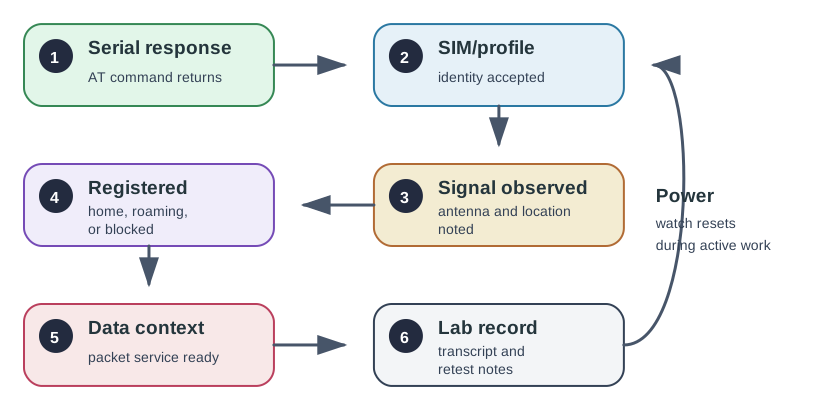
Follow Serial response first in Figure 15.1; SIM/profile is the next observable state, and Signal observed is the later gate or destination. The progression represents cellular modem bring-up evidence flow showing serial response, SIM or profile readiness, signal observation, registration, data context, power observation, and lab record. The chapter’s repeatable bring-up evidence flow narrative uses that order to localise failures and assign retest evidence.
For a pilot device, the repeatable route matters more than the fastest successful demo. A clean bring-up record starts with the physical interface, confirms identity, records signal and registration state, proves a packet context, sends a small payload, then records the power behavior that follows.
That order protects the team from false fixes. If the module resets during a burst, an APN edit is irrelevant. If the SIM profile is not ready, a server dashboard cannot explain the failure. If the device sends once but never returns to the intended sleep state, the implementation is still unfinished.
Prove the physical stack
Power rail, reset line, level shifting, host interface, antenna path, SIM slot or eSIM, enclosure, and current measurement all need production-equivalent checks.
Prove the packet path
Registration, APN, packet data context, DNS, TLS, payload delivery, and server response must be captured with signal and retry evidence.
Prove recovery
SIM rejection, no service, weak coverage, server outage, firmware update, and sleep recovery need runbooks before fleet rollout.
A pilot gate should pass only when repeated bring-up succeeds from cold boot, failed network state, weak coverage, and post-update recovery without manual terminal intervention.
15.18 Cellular Implementation Record
This section: Cellular Implementation Record — The implementation record is the artifact that lets a field failure be reproduced.
The implementation record is the artifact that lets a field failure be reproduced. It links hardware evidence, firmware state, network identity, data budget, power trace, and operational ownership to the same release decision.
Write the record so another engineer can rerun the fault without guessing what changed. Name the module variant, modem firmware, host firmware, antenna state, SIM or eSIM profile, APN, operator policy, backend endpoint, payload schema, and test location. Then attach the transcript or log that proves the modem moved through each expected state.
Keep enough context
For each upload, keep timestamp, signal metrics, registration state, APN/context result, bytes sent, retries, server status, and current-trace marker.
Reject terminal-only success
If a human terminal session is required to recover a fault, the design is still a prototype, not a pilot release.
Retest hidden dependencies
SIM profile, operator policy, APN, antenna, enclosure, modem firmware, host firmware, and backend endpoint changes can all alter field behavior.
The practical test is whether a support ticket can be classified from evidence alone. A good record separates “no serial reply” from “SIM not ready”, “not registered” from “registered but no data context”, and “payload rejected by the server” from “payload sent but the device never returned to sleep”. Those distinctions drive different fixes, owners, and pilot gates.
15.19 URC State-Machine Review
This section: URC State-Machine Review — Cellular modules do not behave like simple serial sensors.
Cellular modules do not behave like simple serial sensors. They report asynchronous modem events through unsolicited result codes, change state while the host is waiting, and can fail in ways that look like application bugs unless the firmware owns an explicit state machine.
A robust host moves through power, SIM readiness, registration, packet context, transport, payload, sleep, and recovery states with bounded timeouts. It records both the command response and the modem events that happened around the command.
The firmware should treat every modem command as a transition with a precondition, a timeout, an expected response, and an error classification. For example, a registration wait should not block forever. It should end as registered, barred, SIM fault, no service, weak signal, or timeout, with enough context for the next state to choose retry, backoff, reset, sleep, or support escalation.
URCs make this especially important because the modem can report a network change while the host is preparing a payload or waiting for a socket response. If firmware ignores those events, the application may blame TLS, MQTT, or the cloud when the real fault was a lost registration, rejected context, or power-state transition.
Release testing should therefore include unhappy paths, not just the normal upload. Force a SIM rejection, wrong APN, weak-signal attach, server outage, DNS failure, modem reset, and denied sleep request. The expected result is not “always succeeds”; it is that the device reaches a known state, records why it failed, protects the battery budget, and can recover without a manual terminal session.
15.20 Summary
This section: Summary — Start by cellular IoT implementation is a system task across module selection, hardware, firmware, SIM lifecycle, data budget, power budget, and operations.
Start by cellular IoT implementation is a system task across module selection, hardware, firmware, SIM lifecycle, data budget, power budget, and operations. Then choose module capability classes first; only then shortlist specific modules using regional bands, certification, firmware support, host interface, and supply-chain evidence. Next use a modem state machine with explicit timeouts, URC handling, retries, and diagnostics instead of ad hoc terminal-session code. After that battery and data plans should be based on measured payloads, attach behavior, retry counts, update strategy, and current traces. Finally production readiness is proven by repeatable bench bring-up, representative site pilots, fleet operations workflow, and supportable failure diagnostics.
15.21 Key Takeaway
This section: Key Takeaway — Cellular implementation work is as much about provisioning and operations as firmware.
Cellular implementation work is as much about provisioning and operations as firmware. Test SIM or eSIM activation, attach behavior, APN settings, retries, power modes, data usage, and failure recovery before field rollout.
Find help
3 reviewed answers.
Where should I start in a module?
Open the module page from the sidebar to see its chapters in order. Use the module map to return to a topic you need.
Modules and pathsReviewed
What can I try when a project does not work?
Check the symptom, then work through the diagnostic steps. Keep the error message and the smallest example that reproduces it.
When you are stuckReviewed
How do interactive examples work?
Use the interactive guide to check how examples and simulations work before changing your project.
Interactive examples guideReviewed