Practice: NB-IoT Modem Bring-Up
More
Depth: Practitioner
Progress saves as you read. Mark sections complete as you go; your progress appears in the sidebar.
This lab belongs to NB-IoT Power Saving (PSM/eDRX)
-

Why does the parking sensor stop after it starts?
Start With the Story
This section: Start With the Story — Picture a parking sensor whose modem sometimes reaches the service and sometimes stops after power-up.
Make Bring-Up Leave a Trail
Picture a parking sensor whose modem sometimes reaches the service and sometimes stops after power-up. Repeating a few setup commands until it works creates a demo, but it does not show which state failed or whether the next restart will recover.
A payload is the useful data carried inside a message. Begin with one known device, account, network, and small payload. Record power state, card identity, network search, attachment, signal condition, assigned address, send time, reply, and energy used. Keep the exact command and result for each step.
Then remove one condition at a time. Use a wrong setting, weak signal, denied account, lost reply, low supply, and restart during a send. The device should stop safely, expose its state, and retry within a stated limit rather than loop forever.
One bench path cannot promise coverage or battery life in every field site. The deeper sections explain modem states, power-saving choices, antenna and network evidence, and the release record needed before a successful message becomes an implementation claim.
The lab begins when a real modem refuses to behave like a diagram. Attach state, APN settings, signal quality, SIM status, and payload tests turn the theory into evidence you can debug.
Start simple: bring up one known-good message path, record every state, and only then add power saving or field complexity.

Learning Objectives
This section: Learning Objectives
By the end of this chapter, you will be able to:
- Build a safe NB-IoT lab bench for modem bring-up.
- Use generic AT-command checkpoints without assuming every module behaves the same way.
- Capture the records needed for registration, data-path, power-mode, and recovery decisions.
- Separate requested PSM or eDRX settings from network-granted behavior.
- Decide whether a prototype is ready for a field pilot, needs redesign, or should use a different radio option.
Overview: Bring-Up Is An Evidence Chain
This section: Overview: Bring-Up Is An Evidence Chain — An NB-IoT modem is not ready because it answers one command or sends one payload from a desk.
An NB-IoT modem is not ready because it answers one command or sends one payload from a desk. Inspect Figure 1 to connect power safety, modem access, SIM readiness, network registration, payload delivery, power-mode behavior, wake behavior, and recovery into one reviewable chain.
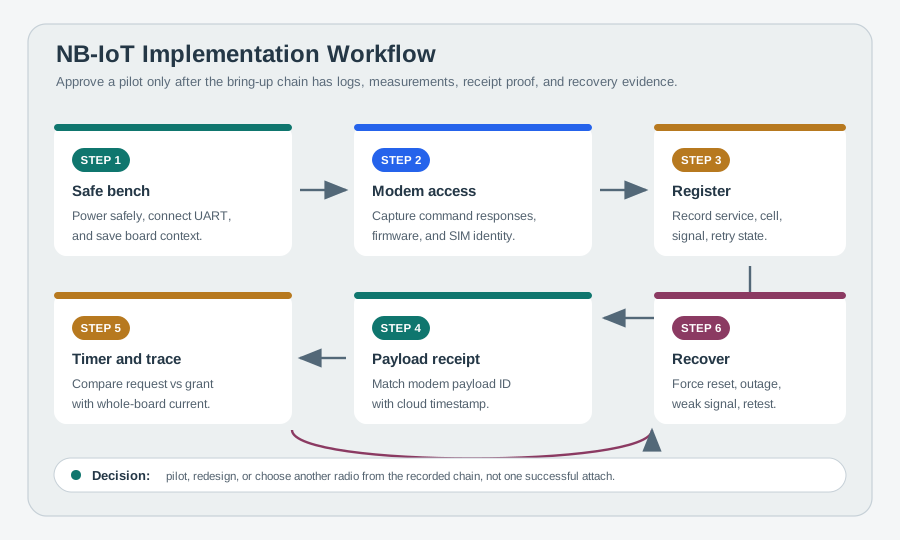
Read Figure 1 from safe bench setup to modem access, then through service registration and a payload that is matched to its application receipt. Continue into timer readback, a whole-board current trace, and a forced recovery retest. Each stage depends on the earlier context, so the practical question is whether this board, antenna, firmware, subscription, operator path, endpoint, and field environment meet the product promise—not whether a generic modem once answered AT.
Keep the first bring-up claim narrow. “The modem works” is not a useful claim. “This board boots safely, records modem responses, reaches the intended NB-IoT service, sends one identified payload, reads back the granted power behavior, and recovers from a forced reset” is useful because every part can be checked. If any part is missing, the result is still a learning record, not a field-pilot approval.
The workflow also prevents a common mistake: testing the easiest condition first and treating it as representative. A desk near a window, a developer SIM, an open enclosure, or a powered USB bench can hide the failures that appear when the antenna moves inside the final housing or when weak coverage triggers repeated attach attempts. Bring-up evidence should therefore be saved with the exact hardware, power source, firmware, SIM profile, antenna, and location context that produced it.
Practitioner: Build The Bring-Up Record
This section: Practitioner: Build The Bring-Up Record — Do the lab in gates.
For each checkpoint, save the command, response, timestamp, firmware version, SIM or eSIM profile, registration state, cell and signal context, payload ID, cloud receipt, current trace, granted timer behavior, and recovery result. A reviewer should be able to replay the decision from the records.
Do the lab in gates. First prove safe power and modem logging, then subscription and registration, then a small data path, then whole-board power behavior, then fault recovery. Do not approve a field pilot from a single successful attach or a requested PSM/eDRX timer. Each gate should have a pass condition and a stop condition. If the modem responds only after a power cycle, if SIM readiness is intermittent, if the payload cannot be matched to the cloud receipt, or if the current trace omits the retry window, the gate should remain open.
Record the evidence in a way that separates causes. Put modem commands and unsolicited events in one trace, current measurements in another, cloud acknowledgements in another, and operator or cell context in the run sheet. Then link them with a shared timestamp or payload ID. That structure lets a reviewer distinguish a weak RF path from an APN or packet-context issue, a cloud problem from a modem reset, and a network-granted timer mismatch from a board-level sleep-current problem.
Run at least three categories before field approval: a normal bench run, a weak-coverage or installed-position run, and a recovery run. The normal run proves the sequence is wired correctly. The weak-coverage run shows whether repetitions, registration time, or retries change the energy budget. The recovery run shows whether queued data is handled safely after modem reset, cloud outage, or low-battery restart. A strong record can still reject NB-IoT; rejection is useful when it prevents the wrong radio choice from reaching the field.
Under the Hood: Requested Timers Are Not Granted Behavior
This section: Under the Hood: Requested Timers Are Not Granted Behavior — NB-IoT power behavior depends on both the device request and the network response.
NB-IoT power behavior depends on both the device request and the network response. The modem can request PSM or eDRX, but the operator network decides what it grants, and the whole board still has to enter the expected low-power state.
Recovery also has hidden state. A modem reset, weak-coverage attach loop, cloud outage, or low-battery restart can turn a successful demo into a battery drain or duplicate-message problem. That is why the lab pairs modem logs with current traces, cloud receipts, retry limits, and owner actions. The application has to know whether a reading was created before or after a reconnect, whether a payload was acknowledged, and whether retrying it would create a duplicate event.
The timer problem has two layers. First, the network may grant different active-time, periodic-update, PSM, or eDRX behavior than the firmware requested. Second, the board may fail to reach the expected low-power state even when the modem does. Regulators, sensors, level shifters, pull-ups, debug interfaces, and host firmware can keep consuming current. A credible power result therefore needs both modem readback and whole-board measurement.
Coverage enhancement and retry behavior are another reason to test the full sequence. In poor conditions, a device may spend more time searching, registering, repeating transmissions, or waiting for a response. That can erase the energy advantage expected from long sleep intervals. The under-the-hood lesson is simple: NB-IoT bring-up is not a single attach command. It is a state machine whose states must be logged, measured, bounded, and tied to product behavior.
That state machine also needs owner rules. Firmware should cap retry loops, label queued payloads with their original measurement time, and expose enough diagnostics for support to know whether the failure was radio, identity, packet context, cloud, or power related. Without those rules, a device can look healthy after recovery while quietly spending too much energy or uploading data with the wrong operational meaning.
Prerequisites
This section: Prerequisites
Use these chapters first:
- NB-IoT Lab Simulation for the state-machine and record workflow.
- NB-IoT Fundamentals for architecture, power states, and operator dependencies.
- NB-IoT PSM and eDRX for timer and reachability trade-offs.
- Cellular IoT Implementations for broader module integration patterns.
Implementation Principle
This section: Implementation Principle — NB-IoT implementation work should be run like an evidence notebook.
NB-IoT implementation work should be run like an evidence notebook. Each lab step should produce a trace, screenshot, modem log, current waveform, or cloud receipt that someone else can review. A command returning OK is useful, but it is not enough by itself.
Prove the board is safe
Confirm supply voltage, peak-current margin, UART voltage levels, antenna connection, and module boot behavior before attaching to a network.
Prove service behavior
Log SIM readiness, registration state, selected cell, signal quality, APN or data profile, and operator-granted power-mode behavior.
Prove the workflow
Show payload delivery, sleep entry, wake behavior, queued-message handling, and recovery from modem reset or temporary network loss.
AT commands are standardized in part, but module vendors add extensions, response formats, socket commands, and power-mode helpers. Treat the commands below as checkpoints. Always verify the exact syntax, timeout, and response codes in the module documentation used by the lab.
Lab Bench Setup
This section: Lab Bench Setup — Start with a bench that can expose faults early.
Start with a bench that can expose faults early. A reliable NB-IoT lab is more than a USB cable and a terminal window.
Step 1: Record the physical bench boundary on your own hardware
- At the bench, label the board supply, modem rail, UART voltage, antenna port, SIM profile, and whole-board current measurement point.
- In the terminal, capture boot time and firmware identity before issuing network commands; a stable
ATreply alone does not prove current margin. - Confirm that supply voltage stays within the module’s limits during a burst and that the UART logic level matches the board.
- Save the antenna and enclosure arrangement so later field readings can be compared with the same RF path.
- No physical NB-IoT board or instrument was attached here; these checks require your own hardware and are not implied by the local dry run.
Use a supply that can tolerate modem current bursts, plus a measurement point for whole-board current. Do not infer battery life from modem-only current.
Use the correct logic voltage, a stable baud rate, and a way to capture timestamped terminal logs.
Record SIM or eSIM identity, subscription status, intended operator profile, roaming policy, and any private APN requirement.
Use the correct antenna for the deployment bands and avoid testing in a location where coverage is unknown but not being measured.
Prepare a minimal endpoint that records payload time, device identity, transport path, and application-layer acknowledgement.
Bring-Up Workflow
This section: Bring-Up Workflow
Step 2: Complete the six bring-up gates in order on your own hardware
- In the terminal, log the Power safely and Prove modem access gates with supply readings, boot time,
ATresponse, and firmware identity. - Add Prove subscription and Prove network records with SIM readiness, registration, cell, signal, and attach time.
- For Prove application, send a payload ID and find the same ID in the endpoint receipt rather than accepting a socket
OKalone. - For Prove recovery, interrupt the modem and record whether the host reconnects and sends queued work once.
- The six gates below are the checklist; no modem, subscription, endpoint, or electrical measurement was run for this example.
Simulation-First Dry Run
This section: Simulation-First Dry Run — Before a real modem lab, run a small state-machine dry run that names the evidence each state should produce.
Before a real modem lab, run a small state-machine dry run that names the evidence each state should produce. The dry run is not a substitute for RF testing; it prevents the lab from hiding missing assumptions.
Step 3: Replay the state chain locally before attaching
- In a local Python terminal, advance through the state names in the trace below and mark the expected evidence at each transition.
- This run printed
BOOT,CELL_SEARCH,ATTACH_REQUEST,REGISTERED,UPLINK_REPORT,NETWORK_GRANTED_TIMER_CHECK,PSM_SLEEP_OR_EDRX_PAGING, andWAKE_AND_REPEAT. - Mark
REGISTEREDas conditional on a real modem response, andNETWORK_GRANTED_TIMER_CHECKas conditional on grant readback, not a requested value. - Add placeholders for whole-board current and a cloud receipt with the same payload ID; leave them explicitly unverified until the hardware run.
- The local output is a state-model replay only. It did not perform radio attach, grant negotiation, sleep-current measurement, or cloud delivery.
BOOT
CELL_SEARCH
ATTACH_REQUEST
REGISTERED
ACTIVE_WINDOW_OR_SHORT_ACK
UPLINK_REPORT
NETWORK_GRANTED_TIMER_CHECK
PSM_SLEEP_OR_EDRX_PAGING
WAKE_AND_REPEAT
Check the trace before changing parameters:
First, did the device attach once, repeatedly, or not at all? Then, was the requested PSM or eDRX behavior granted by the network? Next, did weak coverage add repetitions, retries, or longer attach time? After that, did the current trace show the whole board returning to the expected low-power state? Finally, did cloud receipt match the payload ID and modem log timestamp?
Generic AT Checkpoints
This section: Generic AT Checkpoints — Use short command checkpoints and record the response.
Use short command checkpoints and record the response. Avoid turning the lab into a copy-paste script that hides judgment.
Step 4: Query each AT checkpoint on your own modem
- In the terminal, send
ATrepeatedly after boot and save its timestamped response; an intermittent reply points back to power, UART, or reset behavior. - Send
AT+CPIN?and record SIM readiness or the exact provisioning failure before attempting attach. - Send
AT+CEREG?,AT+CSQ, and your vendor’s cell-statistics command; pair the registration state with cell and signal context. - Read
AT+CGDCONT?and compare the APN or profile with the subscription requirement before a data send. - These are generic checkpoints from the chapter, not a claimed transcript. No modem AT commands were issued for this example; use your module’s command manual for syntax and timeouts.
AT
Expected evidence: the modem returns a valid response repeatedly after power-up and does not reset under load.
AT+CPIN?
Expected evidence: the identity is ready for registration, or the lab records the exact provisioning problem.
AT+CEREG?
Expected evidence: the device reaches an acceptable EPS registration state and the log includes the time needed to get there.
AT+CSQ plus vendor-specific radio statistics
Expected evidence: the lab records enough signal and cell information to explain retries, coverage class, and attach delay.
AT+CGDCONT?
Expected evidence: the APN or data profile matches the operator, private-network, or platform requirement for the pilot.
Connection and data commands can take far longer than simple status commands, especially in weak coverage. Your firmware should use command-specific timeouts and state-machine logging, not one universal timeout.
Data Path Validation
This section: Data Path Validation — The first payload test should be deliberately small.
The first payload test should be deliberately small. Inspect Figure 2 to see which six records must describe the same transaction; the goal is to prove the path and logging, not to stress throughput.
Step 5: Match one payload across the path on your own hardware
- In the modem terminal, send a short payload with a unique ID and log the request, response, timestamp, and registration state.
- In the cloud endpoint, find the same ID and server timestamp; a modem
OKwithout this receipt is incomplete. - Mark boot, registration, send, active window, and sleep on the whole-board current trace for that transaction.
- Record the requested and granted power timers beside the trace, then check whether a retry would duplicate the application side effect.
- This example did not send a cellular payload or receive a cloud acknowledgement; the local UDP CoAP test elsewhere in this lab set is separate evidence.
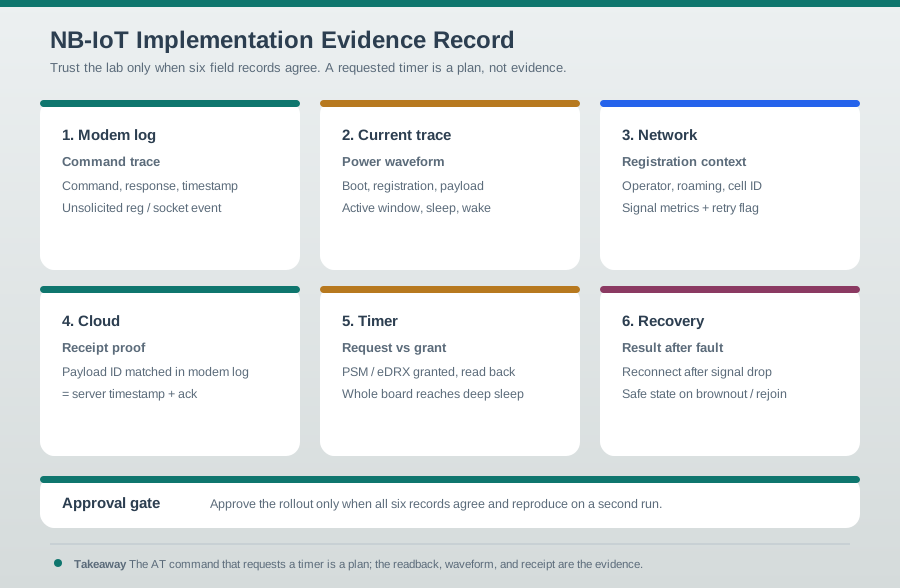
Read Figure 2 from the modem command trace and current waveform to registration context and cloud receipt proof. Then compare requested timers with the values the network actually granted and finish with the recovery result. A payload ID and timestamps tie these records together. This evidence packet connects bring-up to approval: a successful command without server receipt, measured energy, grant readback, or reproducible recovery remains an incomplete result.
Command trace
Save the command, response, timestamp, and any unsolicited registration or socket event.
Current waveform
Mark boot, registration, payload send, active window, sleep entry, wake, and recovery on the current trace.
Registration context
Record operator profile, roaming state, cell identity, signal metrics, and any coverage-enhancement or retry indicator available.
Receipt proof
Match the payload ID in the modem log to a server-side timestamp and acknowledgement.
Power-Mode Verification
This section: Power-Mode Verification
Power-mode implementation has two separate questions:
Step 6: Compare the browser power model with granted timers
- In the NB-IoT Power Saving Mode Animation below, choose Water meter and press Step. This browser workbench was run here.
- Its displayed model read
Reachable for 2 min/day,0.85 mAh/day, andEvidence: verify granted values; none is a measured network grant or current waveform. - On your own modem, request PSM or eDRX and save both the request and the granted timer readback from its documented command or URC.
- Compare the actual whole-board current waveform with the active, paging, and sleep windows, including host and regulator current.
- Test a downlink attempt during sleep, record the delivery delay, and reject the mode if it misses the product’s reachability target.
Run it: Before filling the request-versus-grant rows below, drive the power-timeline animation. Load a preset such as Water meter, choose Power strategy PSM after active timer, and set the T3324 active time, eDRX cycle, and Report interval you intend to request. Press Play and read the 24-Hour Reachability Timeline and Current Draw Model to see whether the whole board returns to the deep-sleep current, then switch Power strategy to eDRX reachable sleep and set a Downlink attempt to test the reachability window. Record what the device requested, what the timeline treats as granted behavior, whether the whole cycle reaches low power, and whether the reachability window is tolerable.
Record the requested PSM or eDRX configuration, the firmware version, and why the application needs that reachability behavior.
Read back the granted behavior and confirm it appears in both the modem log and current trace.
Confirm the MCU, sensors, level shifters, regulators, and modem all enter the intended low-power state.
If the cloud needs quick downlink, validate that the active window or eDRX paging behavior is sufficient.
The command that requests PSM or eDRX is not deployment evidence. Approval needs readback, network grant, current waveform, and an application test showing the device wakes and communicates as expected.
Recovery Tests
This section: Recovery Tests — Recovery is where many prototypes fail.
Recovery is where many prototypes fail. Add these tests before a field pilot:
Step 7: Fault the recovery path on your own hardware
- Queue a payload with a unique ID, reset the modem, and log whether the host detects loss and reinitializes it.
- Repeat with controlled coverage loss and a blocked cloud endpoint; record backoff, retry ceiling, and whole-board current during failure.
- On recovery, compare the delivered payload ID with the queue record and prove that duplicate processing is suppressed.
- Repeat near the board’s specified minimum voltage and watch for attach loops that keep the device awake.
- No reset, attenuation, cloud outage, or battery test was performed here; the four fault cards below define the on-hardware observations.
Modem reset
Reset the modem while the host stays awake. Confirm the host detects loss, reinitializes the modem, and resends any queued payload once safe.
Coverage loss
Move to a known poor-coverage condition or controlled attenuation. Confirm retry limits, backoff, and battery protection.
Cloud unavailable
Block the endpoint or reject the application request. Confirm payload queueing, duplicate suppression, and observability.
Low-battery restart
Restart near the minimum operating voltage and confirm the firmware avoids attach loops that drain the remaining battery.
Field Pilot Gate
This section: Field Pilot Gate — A bench pass is not field readiness.
A bench pass is not field readiness. Before rollout, record a field gate that proves the selected module, antenna, enclosure, operator profile, and firmware policy work together at representative sites.
Step 8: Review the field pilot evidence on your own hardware
- At each representative site, attach the final enclosed board and record its antenna orientation, cell, signal, and registration time.
- Match one payload ID per site across modem log and cloud receipt, with retry and acknowledgement timestamps.
- Record the granted timers, whole-board sleep current, wake-and-send result, and recovery after a controlled reset.
- Use the gate table below to mark proceed, revise, or reject with the exact missing record and responsible owner.
- The worked gate is an example only; no site, enclosure, operator, or field pilot was tested for this example.
| Gate | Pass evidence | Reject or rework signal |
|---|---|---|
| Installation | Final enclosure, antenna orientation, and mounting notes match the pilot plan | A smartphone signal check is the only coverage evidence |
| Registration | Attach and registration logs succeed at normal and hard locations | The device succeeds on the bench but fails in the installed position |
| Application | Payload IDs match cloud receipt, acknowledgement, retry, and duplicate-suppression logs | Network attach works but the application path fails silently |
| Power recovery | Current trace shows return to the expected sleep state after normal, weak-coverage, and reset cases | Retry loops or maintenance windows leave the device awake |
| Rollout support | Firmware version, profile ID, operator ticket path, and next-action owner are recorded | Failures cannot be assigned to hardware, subscription, network, or cloud evidence |
Module Selection Record
This section: Module Selection Record — Do not rank modules by headline current, price, or a single forum example.
Do not rank modules by headline current, price, or a single forum example. Keep a decision record with the evidence that matters for the product.
Match the module, antenna, operator, region, and product certification path before ordering pilot hardware.
Prefer modules that expose the diagnostics your test plan needs: registration state, cell context, retry behavior, timer grants, and power-mode status.
Record firmware support, availability, end-of-life notices, documentation quality, and alternate module options.
Use bench and field evidence from your board. Do not copy module-selection conclusions from a different antenna, enclosure, region, or operator.
Worked Example: First Pilot Gate
This section: Worked Example: First Pilot Gate — Scenario: A team has a fixed utility sensor prototype.
Scenario: A team has a fixed utility sensor prototype. The simulation said NB-IoT may fit, but the product needs a real-modem pilot gate before ordering field hardware.
Pilot gate evidence:
BOARD_BOOT_OK
MODEM_RESPONDS
SIM_READY
REGISTERED_ON_INTENDED_SERVICE
PAYLOAD_RECEIVED_BY_CLOUD
POWER_MODE_GRANTED_AND_MEASURED
WAKE_AND_SEND_CONFIRMED
MODEM_RESET_RECOVERY_CONFIRMED
Decision:
All required evidence exists, the current waveform matches the expected state transitions, and recovery behavior is documented.
The device sends data but the granted timer, retry behavior, or whole-board sleep current does not match the application requirement.
The module cannot register reliably in the target environment, the application needs reachability that NB-IoT sleep behavior cannot provide, or recovery drains the battery.
Common Mistakes
This section: Common Mistakes
Testing only at the desk
A clean desk test does not prove basement, enclosure, rural, or marginal-coverage behavior.
Ignoring whole-board current
Regulators, sensors, pull-ups, level shifters, and host firmware can dominate sleep current even when the modem is configured correctly.
Trusting one successful payload
A single cloud receipt does not prove attach stability, retry limits, duplicate handling, power-mode behavior, or recovery.
Knowledge Check
This section: Knowledge Check
Field Pilot Checklist
This section: Field Pilot Checklist — Start by board revision, firmware revision, modem firmware revision, and antenna configuration.
Before approving the next phase, collect:
Start by board revision, firmware revision, modem firmware revision, and antenna configuration. Then sIM or eSIM profile, operator service, roaming policy, and data profile. Next timestamped command log for boot, SIM readiness, registration, payload send, sleep request, sleep readback, wake, and recovery. After that whole-board current trace with the same events marked. Continue by signal quality, cell identity, retry indicators, and location notes. Continue by cloud receipt matched to the modem payload ID. Continue by recovery results for modem reset, coverage loss, cloud failure, queued payload, and low-battery restart. Finally decision record: proceed to field pilot, revise the prototype, or choose a different radio path.
Related Resources
This section: Related Resources — Start by NB-IoT Power and Channel - Connect power-mode choices to radio behavior.
Continue in this module:
Start by NB-IoT Power and Channel - Connect power-mode choices to radio behavior. Then NB-IoT Power Optimization - Build a measurement-led power budget. Next Cellular IoT Implementations - Compare NB-IoT implementation with broader cellular IoT workflows. Finally CoAP Fundamentals - Compare constrained request-response protocol options.
Official and standards-oriented references:
Start by 3GPP TS 27.007 - AT command reference used by many cellular modem workflows. Then 3GPP TS 23.682 - Architecture enhancements for machine-type communication. Next 3GPP TS 36.300 - E-UTRA and E-UTRAN overall description. Finally GSMA Mobile IoT Deployment Guide - Deployment guidance for Mobile IoT networks and interoperability planning.
Summary
This section: Summary — NB-IoT implementation labs connect modem setup, network attach, payload transfer, sleep behavior, and measurement into one workflow.
NB-IoT implementation labs connect modem setup, network attach, payload transfer, sleep behavior, and measurement into one workflow. They reveal practical issues such as APN configuration, signal quality, and power draw during retries.
Key Takeaway
This section: Key Takeaway — A useful NB-IoT lab records evidence: signal quality, attach time, message success, retry behavior, sleep current, and total energy per reporting cycle.
A useful NB-IoT lab records evidence: signal quality, attach time, message success, retry behavior, sleep current, and total energy per reporting cycle.