32 Wireless Propagation Basics
32.1 Learning Objectives
By the end of this chapter series, you will be able to:
- Explain the fundamental physics of radio wave propagation
- Calculate free-space path loss and complete link budgets for IoT deployments
- Predict how frequency selection affects range, penetration, and data rate
- Analyze multipath fading and interference in real-world environments
- Evaluate wireless technology trade-offs for different IoT applications
- Design reliable wireless links with proper fade margins
- Compare sub-GHz, 2.4 GHz, and 5 GHz frequency bands for specific deployment scenarios
Key Concepts
- Link budget: Start with received power = transmit power + gains - losses; it is the fastest way to predict whether the deployment is feasible.
- Frequency trade-off: Lower frequencies usually travel farther and penetrate better, while higher frequencies deliver more throughput over shorter paths.
- Obstacle loss: Floors, metal shelving, reinforced concrete, and machinery often dominate the loss more than the open-air distance.
- Fade margin: A link that barely closes in a calm test usually fails in production. Reserve 10–20 dB or more for fading and interference.
- Band selection: Sub-GHz is the coverage-first option, 2.4 GHz balances size and throughput, and 5 GHz is for short-range high-bandwidth links.
- Verification loop: Calculate first, then survey the site, then measure RSSI/SNR and retries before full deployment.
- Worst-case thinking: Design for the hardest sensor location, not the easy one near the gateway.
32.2 Connect with Learning Hubs
Explore Further:
- Knowledge Map: Visualize wireless concepts at Knowledge Map
- Simulations: Try the Path Loss Calculator for hands-on practice
- Quizzes: Test your understanding with Networking Quizzes
- Videos: Watch wireless tutorials in the Video Gallery
32.3 Most Valuable Understanding (MVU)
MVU: The Link Budget is Everything
Core Concept: A wireless link works when received signal power exceeds receiver sensitivity plus required margin. This is summarized by the link budget equation:
Received Power = Transmit Power + Gains - Losses
Or mathematically:
\[ \begin{aligned} P_{rx} &= P_{tx} + G_{tx} + G_{rx} \\ &\quad - L_{path} - L_{other} \end{aligned} \]
Why It Matters: Before deploying a single sensor, the link budget tells you: - Will the signal reach the destination? - How much margin do you have for fading/interference? - What antenna/power combination is needed? - Whether battery life goals are achievable
Key Takeaway: Every 6 dB of additional gain approximately doubles your effective range in free space (since path loss scales as distance squared). In real-world environments with obstacles, 8–12 dB may be needed to double range. Lower frequencies (sub-GHz) travel farther and penetrate walls better than higher frequencies (2.4/5 GHz), but at the cost of data rate.
Putting Numbers to It
The 6 dB Rule in Practice: Let’s prove that 6 dB doubles your wireless range.
Scenario: LoRa sensor at 868 MHz with 100m range. How far after adding 6 dB antenna gain?
Free-Space Path Loss (FSPL) formula: \(FSPL = 20\log_{10}(d_{\text{km}}) + 20\log_{10}(f_{\text{MHz}}) + 32.45\)
At 100m, 868 MHz: \(FSPL = 20\log_{10}(0.1) + 20\log_{10}(868) + 32.45 = -20 + 58.77 + 32.45 = 71.2\) dB
Original link budget: TX power (+14 dBm) + TX antenna (+2 dBi) - FSPL (-71.2 dB) + RX antenna (+2 dBi) = -53.2 dBm received
After adding 6 dB (via +6 dBi antenna upgrade): Received power = -53.2 + 6 = -47.2 dBm
To find new range, solve for distance where FSPL increases by 6 dB: \(71.2 + 6 = 20\log_{10}(d) + 58.77 + 32.45\) \(77.2 = 20\log_{10}(d) + 91.22\) \(20\log_{10}(d) = -14\) \(d = 10^{-14/20} = 0.2\) km = 200 meters
Result: 100m → 200m = 2× range from +6 dB, as predicted!
Interactive Calculator: Free-Space Path Loss
Try changing the distance and frequency to see how they affect path loss:
Interactive Calculator: Link Budget
Calculate whether your wireless link will work:
32.4 Chapter Overview
This comprehensive guide to wireless signal propagation for IoT has been organized into four focused chapters for better learning. Each chapter builds on the previous one, taking you from basic concepts to hands-on practice.
Key Takeaway
In one sentence: Radio signal strength decreases with distance and frequency, and a link budget calculation tells you whether your wireless system will work before you deploy it.
For Beginners: What is Wireless Propagation?
Think of wireless communication like shouting across a playground. The farther away your friend is, the harder it is to hear you clearly. Several things affect how well your message gets through:
Use this quick mapping:
- You shout louder -> Higher transmit power
- Your friend cups their ears -> Better antenna gain on the receiver
- Wind carries or distorts your voice -> The radio channel changes the signal
- Trees and walls block sound -> Obstacles add path loss
- Other kids are shouting nearby -> Interference from other devices
- Echo bounces off buildings -> Multipath reflections create stronger and weaker spots
Key insight: Radio waves follow predictable physics. Before you deploy sensors in the field, you can calculate whether they’ll be able to communicate - just like an architect can calculate if a bridge will hold before building it.
Example: A LoRa sensor in a farm field might reach 10 km to a gateway, but the same sensor inside a warehouse might only reach 100 meters due to metal walls blocking the signal.
Sensor Squad: The Wireless Adventure!
Hey there, young engineer! Ever wonder how your smart devices talk to each other without any wires?
32.4.1 The Story of the Invisible Messenger
Imagine you’re Sammy the Sensor, sitting in a garden measuring temperature. You need to send your readings to Max the Microcontroller who’s inside the house. But there’s no wire connecting you!
Sammy creates invisible waves - tiny ripples of energy that travel through the air, just like ripples in a pond when you drop a stone!
Sammy (Garden)  ~~~Wave~~~>  Max (House)
     [Sensor]                [Gateway]
But waves get tired as they travel! The farther they go, the weaker they become. It’s like how your voice gets quieter when your friend walks farther away.
32.4.2 The Wave Superhero Powers
Different waves have different superpowers:
- Sub-GHz waves (like LoRa): Travel far and push through walls well, but only carry small messages.
- 2.4 GHz waves (like Wi-Fi and Zigbee): Balance speed and convenience, but lose strength faster indoors.
- 5 GHz waves (like fast Wi-Fi): Deliver very high throughput, but range and wall penetration drop quickly.
32.4.3 Lila’s Link Budget Game
Lila the LED invented a game to check if waves can make the journey:
- Start with Power: How loud is Sammy shouting? (+20 points)
- Add Antenna Boost: Sammy has a special megaphone! (+3 points)
- Subtract Distance Loss: The journey is 100 meters (-60 points)
- Subtract Wall Loss: One brick wall to go through (-10 points)
- Total Received: 20 + 3 - 60 - 10 = -47 points
Max can hear anything louder than -100 points, so the message gets through!
32.4.4 Fun Challenge
If Sammy moved to 500 meters away, the distance loss would be -74 points instead of -60. Would the message still reach Max? (Hint: Calculate the new total!)
Answer: 20 + 3 - 74 - 10 = -61 points. Yes! Still louder than -100, so it works!
32.5 How It Works: A Wireless Signal’s Journey
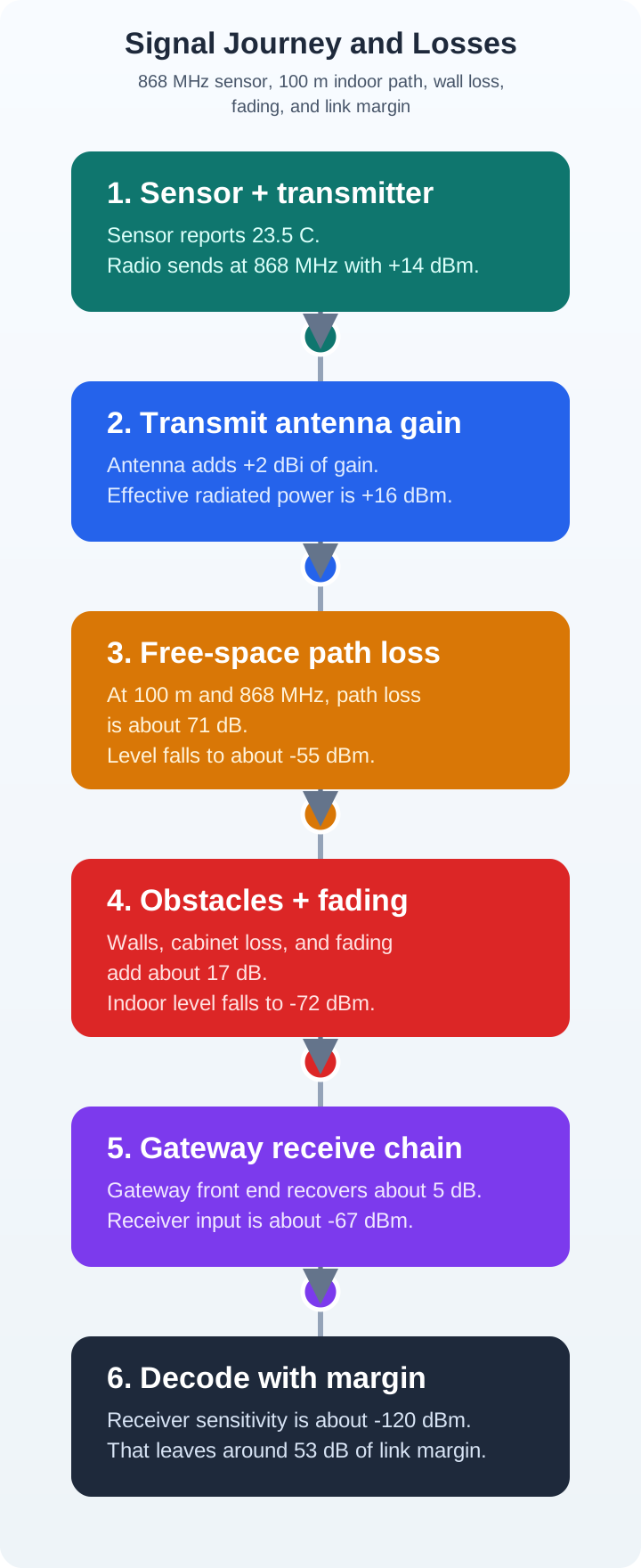
How It Works: From Transmitter to Receiver in 7 Steps
Let’s follow a sensor’s temperature reading as it wirelessly travels to a gateway 100 meters away.
Step 1: Power Conversion Your temperature sensor generates a digital value (e.g., “23.5°C”). The transmitter converts this into a radio frequency (RF) signal at, say, 868 MHz. The transmit power is +14 dBm (about 25 milliwatts).
Step 2: Antenna Boost The RF signal reaches the transmitting antenna (a small helical antenna with +2 dBi gain). The antenna focuses the energy slightly, giving an effective radiated power of +16 dBm in the direction of the gateway.
Step 3: Free-Space Loss As the signal travels through air, it spreads out in all directions (like ripples in a pond). At 100m and 868 MHz, the free-space path loss is approximately 71 dB. The signal strength is now +16 dBm - 71 dB = -55 dBm.
Step 4: Obstacle Attenuation The signal passes through one wooden wall (+5 dB loss) and encounters a metal filing cabinet that causes partial reflection (+8 dB loss). Total obstacle loss: 13 dB. Signal is now -55 dBm - 13 dB = -68 dBm.
Step 5: Multipath Effects Some signal bounces off nearby concrete floors and walls, creating multiple copies that arrive at slightly different times. Some copies add constructively (boost signal), others destructively (weaken it). On average, this causes 4 dB of fading. Signal: -68 dBm - 4 dB = -72 dBm.
Step 6: Receiving Antenna The gateway has a better antenna (+5 dBi gain) that captures more of the arriving energy. The received signal strength is now -72 dBm + 5 dB = -67 dBm.
Step 7: Receiver Decision The gateway’s receiver has a sensitivity of -120 dBm (meaning it can decode signals down to this level). Since -67 dBm is much stronger than -120 dBm, the receiver successfully decodes the temperature value “23.5°C”.
Link Margin: The difference between received signal (-67 dBm) and sensitivity (-120 dBm) is 53 dB of margin - excellent! Even if obstacles move or interference appears, the link will remain reliable.
Key Insight: The entire journey from sensor to gateway is deterministic and calculable BEFORE deployment. This is why link budget calculations are essential - they predict whether your IoT system will work before you spend time and money installing hundreds of sensors.
32.6 How Wireless Propagation Works
Understanding wireless propagation starts with visualizing the journey of a radio signal from transmitter to receiver:
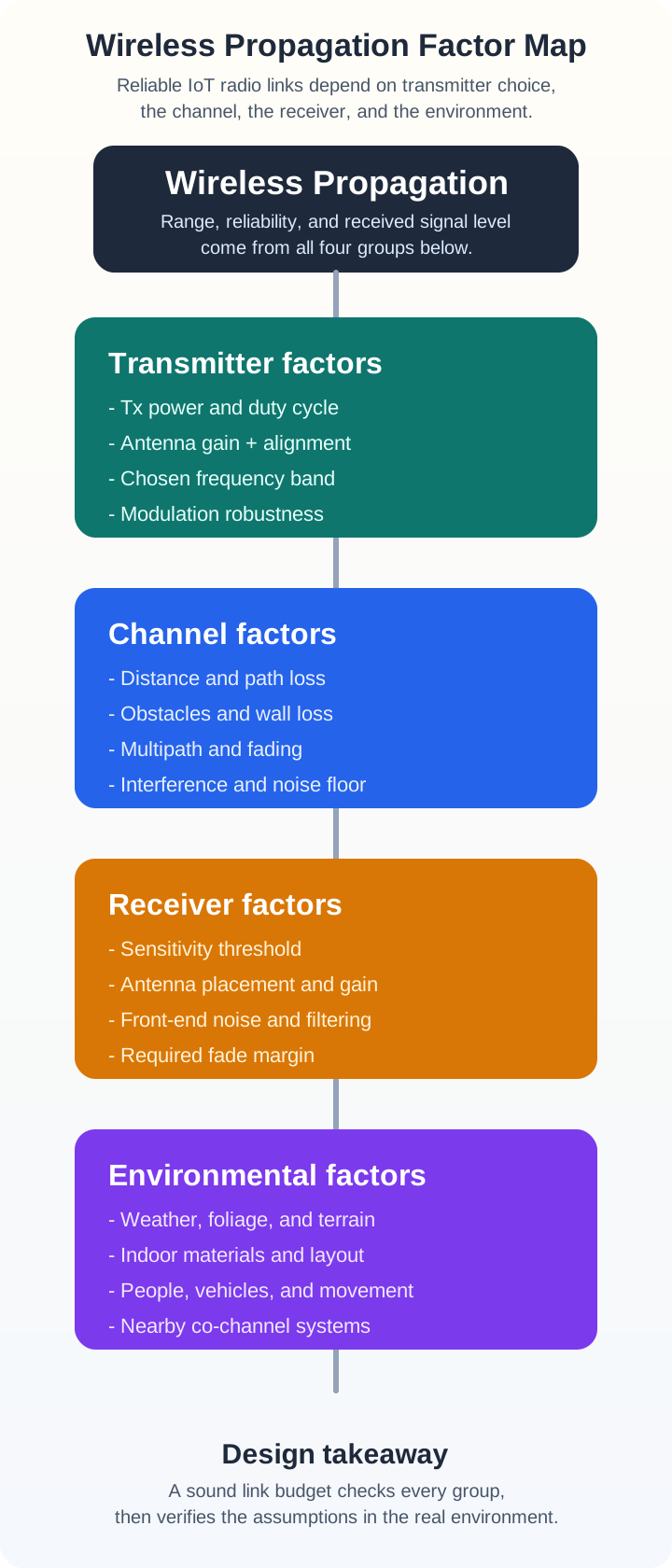
The key factors that determine whether communication succeeds:
32.7 Frequency Band Comparison
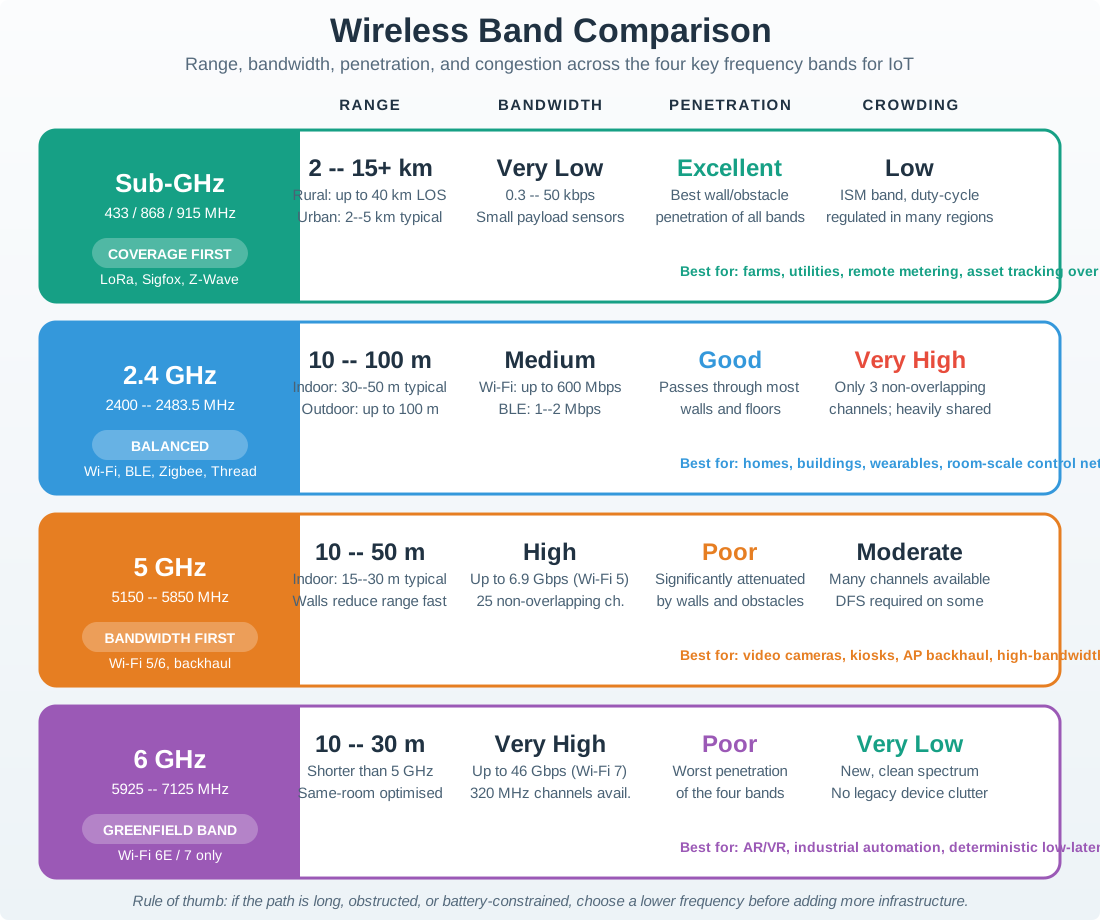
Different IoT applications use different frequency bands, each with distinct characteristics:
32.7.1 Band At a Glance
- Sub-GHz (433/868/915 MHz): Typical range
2-15+ km; data rate0.3-50 kbps; wall penetrationexcellent; best for agriculture, utilities, smart-city sensors, and sparse wide-area deployments. - 2.4 GHz: Typical range
10-100 m; data rate250 kbps-2 Mbps; wall penetrationgood; best for home automation, wearables, and indoor sensor networks that need moderate throughput. - 5 GHz: Typical range
10-50 m; data rate100+ Mbps; wall penetrationpoor; best for short-range high-bandwidth links such as cameras, kiosks, and local backhaul.
32.8 Quick Knowledge Check
Before diving into the detailed chapters, test your intuition:
32.9 Common Pitfalls and How to Avoid Them
Pitfall 1: Ignoring the Link Budget
The Mistake: Deploying sensors based on datasheet “maximum range” specifications without calculating actual link budget for your environment.
Why It Fails: Datasheet ranges assume ideal conditions (line-of-sight, no interference). Real deployments have walls, interference, and environmental factors that significantly reduce range.
The Fix: Always calculate your link budget with realistic path loss estimates and include a 10-20 dB fade margin.
Pitfall 2: Wrong Frequency Band Selection
The Mistake: Choosing 2.4 GHz or 5 GHz for long-range outdoor deployments because “Wi-Fi is familiar.”
Why It Fails: Higher frequencies have higher path loss and worse penetration. A sensor that works at 50m in the lab may fail at 500m in the field.
The Fix: Match frequency to application: - Long range (>100m): Use sub-GHz (LoRa, Sigfox) - Medium range indoor: Use 2.4 GHz (Zigbee, BLE) - High bandwidth short range: Use 5 GHz (Wi-Fi)
Pitfall 3: Underestimating Obstacle Loss
The Mistake: Treating all walls as equal or assuming “it’s just one wall, no big deal.”
Why It Fails: A metal wall can add 15-20 dB of loss (reducing range by 90%+), while drywall might only add 3 dB. One metal filing cabinet in the path can kill your link.
The Fix: Survey your deployment environment. Identify metal obstacles, reinforced concrete, and industrial equipment. Add appropriate obstacle losses to your link budget.
Check your understanding of obstacle effects on wireless signals:
Pitfall 4: No Fade Margin
The Mistake: Designing a system that “just works” in testing conditions with 0 dB margin.
Why It Fails: Wireless signals vary due to multipath fading, weather, moving objects, and interference. A system with no margin will have intermittent failures.
The Fix: Include fade margin based on reliability requirements: - 99% reliability: 10 dB margin - 99.9% reliability: 15-20 dB margin - Mission-critical: 25+ dB margin
32.10 Chapter Guide
32.10.1 1. Radio Wave Basics for IoT
Start here to understand the fundamental physics of wireless communication.
Read: Radio Wave Basics for IoT
Topics covered:
- The electromagnetic spectrum and frequency-wavelength relationship
- IoT frequency bands (Sub-GHz, 2.4 GHz, 5 GHz, mmWave)
- Trade-offs between frequency bands (range vs data rate)
- Why lower frequencies penetrate walls better
Estimated reading time: 15 minutes
32.10.2 2. Path Loss and Link Budgets
Learn to calculate whether your wireless link will work before deployment.
Read: Path Loss and Link Budgets
Topics covered:
- Free Space Path Loss (FSPL) formula and calculations
- Real-world path loss models (indoor, outdoor, urban)
- Complete link budget equation and worked examples
- Signal strength measurements (dBm, RSSI, SNR)
- Link margin requirements for reliable systems
Estimated reading time: 20 minutes
32.10.3 3. Fading, Multipath, and RF Interference
Understand why signals vary unpredictably and how to design for it.
Read: Fading, Multipath, and RF Interference
Topics covered:
- Multipath propagation and how it causes fading
- Types of fading (slow/shadow, fast/multipath, frequency-selective)
- Fading margin selection for different environments
- RF interference sources and mitigation strategies
- Channel planning and frequency hopping
- Site survey checklist for deployments
Estimated reading time: 25 minutes
32.10.4 4. Practical Considerations and Lab
Apply your knowledge with hands-on experiments and engineering trade-offs.
Read: Practical Considerations and Lab
Topics covered:
- Indoor vs outdoor deployment challenges
- Antenna selection guide (chip, dipole, Yagi, parabolic)
- Engineering trade-offs (frequency band, power, margin, antennas)
- Knowledge check with 8 questions
- Hands-on Wokwi Lab: ESP32 RSSI measurement and packet transmission simulation
- Challenge exercises for deeper understanding
Estimated reading time: 45-60 minutes (including lab)
32.11 Learning Path
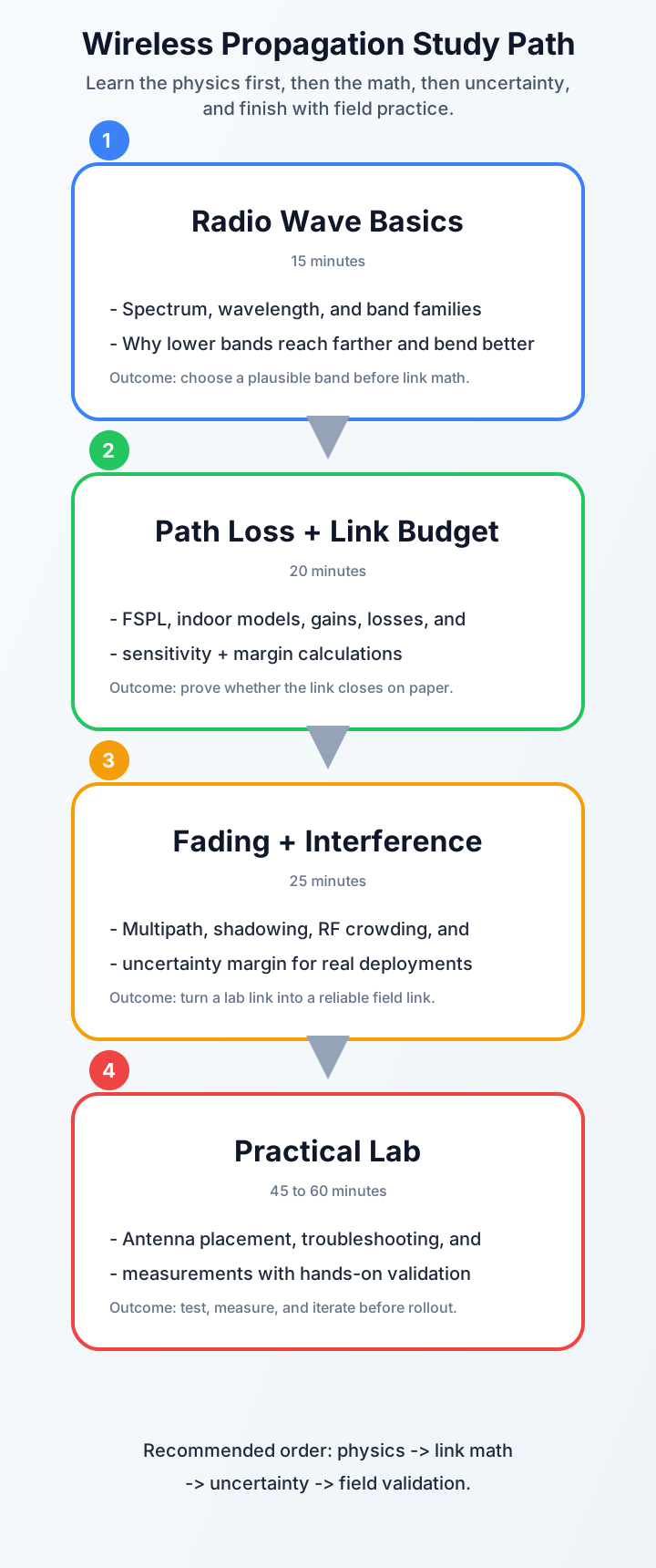
Recommended approach:
- New to wireless? Start with Chapter 1 and work through sequentially
- Need link budget help? Jump to Chapter 2 for formulas and examples
- Troubleshooting connectivity? Chapter 3 covers interference and fading
- Ready to experiment? Chapter 4 has the hands-on lab
32.12 Prerequisites
Before diving into these chapters, you should be comfortable with:
- Basic algebra and logarithms (dB math): Mathematical Foundations
- Core networking vocabulary (links, range, reliability): Networking Basics
32.13 What You’ll Be Able to Do
After completing all four chapters, you will be able to:
- Differentiate how radio waves propagate through indoor, outdoor, and industrial environments
- Calculate free-space path loss and link budgets for multi-obstacle IoT deployments
- Interpret signal strength measurements (dBm, RSSI) and translate them into deployment decisions
- Compare frequency bands and quantify their trade-offs for range, penetration, and data rate
- Diagnose the factors that degrade wireless range in real-world scenarios
- Evaluate wireless technologies against propagation requirements and cost constraints
- Design systems with appropriate fading margins for target reliability levels
- Troubleshoot RF interference issues using systematic site-survey methods
32.14 Incremental Example Set: Link Budget Calculations
Example Set: From Simple to Complex Link Budgets
32.14.1 Beginner Example: LoRa Sensor in Open Field
Scenario: A soil moisture sensor transmits to a gateway 2 km away in flat farmland with clear line-of-sight.
Given:
- Frequency: 868 MHz
- TX power: +14 dBm (25 mW, typical LoRa)
- TX antenna gain: +2 dBi (small helical)
- RX antenna gain: +5 dBi (gateway whip antenna)
- RX sensitivity: -137 dBm (LoRa SF12)
- Distance: 2,000 m
Calculate Free-Space Path Loss (FSPL) (where \(d\) is in km, \(f\) in MHz): \[\text{FSPL (dB)} = 20\log_{10}(d) + 20\log_{10}(f) + 32.45\] \[= 20\log_{10}(2) + 20\log_{10}(868) + 32.45\] \[= 6.02 + 58.77 + 32.45 = 97.2 \text{ dB}\]
Link Budget: \[P_{rx} = P_{tx} + G_{tx} + G_{rx} - L_{path}\] \[= 14 + 2 + 5 - 97.2 = -76.2 \text{ dBm}\]
Link Margin: \[\text{Margin} = P_{rx} - \text{Sensitivity} = -76.2 - (-137) = 60.8 \text{ dB}\]
Conclusion: Massive margin! This link will work reliably even with significant fading.
32.14.2 Intermediate Example: Zigbee in Office Building
Scenario: A temperature sensor on the 2nd floor transmits to a coordinator on the 3rd floor, through two concrete floors.
Given:
- Frequency: 2.4 GHz
- TX power: 0 dBm (1 mW, typical Zigbee)
- TX antenna gain: +1 dBi (PCB trace)
- RX antenna gain: +2 dBi (dipole)
- RX sensitivity: -100 dBm
- Distance: 15 m (vertical + horizontal)
- Floor loss: 12 dB per concrete floor (2 floors = 24 dB)
Calculate FSPL at 2.4 GHz: \[\text{FSPL} = 20\log_{10}(15) + 20\log_{10}(2400) + 32.45\] \[= 23.52 + 67.60 + 32.45 = 123.6 \text{ dB}\]
Wait - that can’t be right! This is the free-space formula. For indoor environments, we use a simplified indoor model:
Indoor Path Loss (using log-distance model with n=3 for through-floor): \[L_{path} = L_0 + 10n\log_{10}(d/d_0) + L_{floors}\]
At 2.4 GHz, the reference loss at 1m is approximately 40 dB. For n=3 (obstructed indoor): \[L_{path} = 40 + 10(3)\log_{10}(15/1) + 24\] \[= 40 + 30(1.18) + 24 = 40 + 35.4 + 24 = 99.4 \text{ dB}\]
Link Budget: \[P_{rx} = 0 + 1 + 2 - 99.4 = -96.4 \text{ dBm}\]
Link Margin: \[\text{Margin} = -96.4 - (-100) = 3.6 \text{ dB}\]
Conclusion: Only 3.6 dB margin - marginal! Moving furniture or people walking through the path could cause intermittent connectivity. Solution: add a mesh repeater on the intermediate floor or use higher TX power (+10 dBm models).
32.14.3 Advanced Example: Multi-Obstacle Industrial Deployment
Scenario: A vibration sensor on a factory machine transmits to a gateway across the facility. The path includes metal shelving, machinery, and varying obstacles.
Given:
- Frequency: 868 MHz
- TX power: +20 dBm (100 mW, boosted LoRa)
- TX antenna gain: +3 dBi (external stub)
- RX antenna gain: +8 dBi (directional Yagi on gateway)
- RX sensitivity: -134 dBm (LoRa SF10)
- Distance: 150 m
- Required reliability: 99.9% (industrial monitoring)
Obstacle Survey:
- 3 drywall partitions: 3 × 3 dB = 9 dB
- 1 metal shelving unit: 15 dB
- 1 large CNC machine (metal obstruction): 10 dB
- Industrial RF noise floor: +5 dB effective sensitivity degradation
Calculate Path Loss (using indoor model, n=2.5 for industrial): \[L_{path} = 40 + 10(2.5)\log_{10}(150/1) + L_{obstacles}\] \[= 40 + 25(2.18) + (9 + 15 + 10)\] \[= 40 + 54.5 + 34 = 128.5 \text{ dB}\]
Effective Sensitivity (accounting for noise): \[S_{eff} = -134 + 5 = -129 \text{ dBm}\]
Link Budget: \[P_{rx} = 20 + 3 + 8 - 128.5 = -97.5 \text{ dBm}\]
Preliminary Margin: \[\text{Margin} = -97.5 - (-129) = 31.5 \text{ dB}\]
Required Fade Margin for 99.9% reliability in industrial environment: ~20 dB
Final Assessment: \[\text{Net Margin} = 31.5 - 20 = 11.5 \text{ dB}\]
Conclusion: Adequate margin (11.5 dB) for 99.9% reliability. However, consider: - Risk: If a forklift parks between sensor and gateway, add 10+ dB loss → margin drops to 1.5 dB - Mitigation: Install secondary gateway with diversity (different path), or use SF11 (sensitivity -137 dBm, adds 3 dB margin but reduces data rate)
Key Insight: Industrial environments require detailed site surveys and fade margins significantly higher than residential deployments due to moving metal obstacles and high RF noise.
32.15 See Also
Related Content Across Modules
Within This Module (Fundamentals):
- Signal Processing Essentials - Understand modulation, demodulation, and SNR
- Protocol Selection Framework - Choose wireless protocols based on propagation constraints
Application Layer (Module 3: Connectivity):
- LPWAN Introduction - Apply propagation to LoRa, Sigfox, NB-IoT
- CoAP Protocol - Lightweight protocols for constrained wireless links
Wireless Technologies (Module 4):
- LoRaWAN Architecture - How LoRa leverages sub-GHz propagation advantages
- Bluetooth Low Energy - 2.4 GHz short-range design considerations
- Zigbee and Thread - Mesh networking to overcome path loss
- Cellular IoT (NB-IoT/LTE-M) - Licensed spectrum with link budget optimization
System Design (Module 5):
- WSN Deployment Planning - Apply link budgets to large-scale sensor networks
- Edge Computing - Local gateways reduce wireless hop distances
Real-World Examples:
- Smart Agriculture - Long-range requirements drive sub-GHz choice
- Industrial IoT - Metal environments require careful propagation analysis
Decision Framework: Choosing Between Sub-GHz and 2.4 GHz for IoT Deployment
Scenario: You need to deploy 200 sensors across a facility and must choose between 868 MHz (LoRa) and 2.4 GHz (Wi-Fi/Zigbee).
Quick Comparison:
- Path loss at 1 km: Sub-GHz is about
91 dB; 2.4 GHz is about100 dB, so the higher band starts almost 9 dB behind before walls are added. - Wall penetration: Sub-GHz often loses
5-8 dBper wall; 2.4 GHz is more often in the10-15 dBrange. - Antenna size: Sub-GHz antennas are larger (
8-17 cm), while 2.4 GHz antennas can fit in very compact devices (about 3 cm). - Data rate: Sub-GHz is typically
0.3-50 kbps; 2.4 GHz can support250 kbps-2 Mbpsor more, depending on the protocol. - Battery life: Sub-GHz often reaches
5-10 yearswith small periodic messages; 2.4 GHz systems usually trade more energy for higher throughput. - Interference: Sub-GHz bands are usually quieter; 2.4 GHz must share spectrum with Wi-Fi, BLE, microwaves, and many consumer devices.
- Infrastructure cost: A Sub-GHz gateway costs more, but each gateway covers a much larger area. 2.4 GHz access points are cheaper but many more may be needed.
Decision Rules:
Choose Sub-GHz (LoRa, Sigfox) when:
- Outdoor deployment or large buildings (>500m)
- Through-wall coverage needed (warehouses, multi-story)
- Battery-powered sensors (>1 year life required)
- Low data rate acceptable (<10 kbps)
- Wide area coverage (hundreds of hectares)
Choose 2.4 GHz (Wi-Fi, Zigbee, BLE) when:
- Indoor deployment with existing Wi-Fi infrastructure
- High bandwidth needed (>100 kbps)
- Compact sensor form factor required
- Mains power available
- Short range acceptable (<100m)
Real Example: A 40-hectare vineyard needs soil moisture monitoring: - Sub-GHz choice: 3 LoRa gateways cover entire property, sensors last 10 years - 2.4 GHz alternative: Would need 80+ Wi-Fi access points, sensor batteries drain in months
Key Insight: The 9 dB advantage of sub-GHz at the same distance translates to approximately 3x the range with identical hardware, which is why agricultural IoT overwhelmingly uses LoRa/Sigfox despite lower data rates.
32.16 Try It Yourself: Link Budget Challenge
Try It Yourself: Design a Parking Garage Sensor Network
Your Challenge: You need to deploy 100 occupancy sensors across a 5-level underground concrete parking garage. Each sensor must report to a single gateway mounted in the central stairwell. Design the wireless link.
Given Constraints:
- Garage dimensions: 80m × 50m per level
- Construction: Reinforced concrete (rebar)
- Sensor placement: Ceiling-mounted, one per parking space
- Gateway location: Central stairwell (equidistant from all levels)
- Required battery life: 5 years (1 report per 5 minutes)
- Budget: $50 per sensor, $1,500 for gateway
Step 1: Select Frequency Band
Consider your options: - Option A: 5 GHz Wi-Fi (high bandwidth, short range) - Option B: 2.4 GHz Zigbee (mesh capable, medium range) - Option C: 868 MHz LoRa (long range, low power)
Hint: Concrete is 20-30 cm thick with rebar. Each floor slab causes 15-20 dB of attenuation. The farthest sensor is in a corner of Level 5, approximately 60m horizontal + 15m vertical = 75m total distance through 5 concrete floors.
Step 2: Calculate Worst-Case Link Budget
Assume you chose 868 MHz LoRa (good choice!). Now calculate if the farthest sensor can reach the gateway.
Sensor specifications (typical LoRa module): - TX power: +14 dBm - TX antenna: +2 dBi (PCB antenna, compact) - Current draw: 120 mA TX, 1.5 μA sleep
Gateway specifications:
- RX sensitivity: -137 dBm (SF12, 293 bps)
- RX antenna: +5 dBi (whip antenna, omnidirectional)
Path loss components:
- Distance: 75m
- Frequency: 868 MHz
- 5 concrete floors with rebar: 5 × 18 dB = 90 dB
- Multipath fading in enclosed structure: 10 dB margin needed
Use the log-distance path loss model (n=3 for heavy obstruction): \[L_{path} = L_0 + 10n\log_{10}(d/d_0) + L_{floors}\]
Step 3: Verify Battery Life
If TX current is 120 mA for 200ms per transmission, how long will a 2,500 mAh battery last?
Reports per day: 24 hours × 60 min / 5 min = 288 reports Average current: (120 mA × 0.2s × 288) / 86400s + 1.5 μA ≈ ?
Step 4: Check Your Work
Click to reveal the solution
Step 1 Solution: Option C (868 MHz LoRa) is correct. - 5 GHz: FSPL at 75m ≈ 87 dB + 90 dB floors = 177 dB total loss → impossible with typical IoT hardware - 2.4 GHz: Could work with mesh, but requires many relay nodes (expensive, complex) - 868 MHz: Best penetration, lowest path loss
Step 2 Solution: Link budget calculation
Reference loss at 868 MHz, 1m: ~32 dB
\[L_{path} = 32 + 10(3)\log_{10}(75/1) + 90\] \[= 32 + 30(1.875) + 90\] \[= 32 + 56.3 + 90 = 178.3 \text{ dB}\]
Link Budget: \[P_{rx} = 14 + 2 + 5 - 178.3 = -157.3 \text{ dBm}\]
Uh-oh! Received signal is -157.3 dBm, but sensitivity is only -137 dBm. We’re 20.3 dB short!
Fix: Use SF12 with lower bandwidth and higher processing gain. Some LoRa modules achieve -148 dBm sensitivity at SF12, but that’s still not enough. We need to: - Increase TX power to +20 dBm (+6 dB improvement) - Use better gateway antenna (+8 dBi instead of +5 dBi, +3 dB improvement) - Reduce floors: Place gateway on Level 3 instead of ground level (only 2 floors max to any sensor, saves 54 dB!)
Revised calculation (gateway on Level 3, worst-case sensor on Level 5): - Distance: ~50m horizontal + 6m vertical = 56m - Floors: 2 × 18 dB = 36 dB
\[L_{path} = 32 + 30\log_{10}(56) + 36 = 32 + 52.5 + 36 = 120.5 \text{ dB}\]
\[P_{rx} = 20 + 2 + 8 - 120.5 = -90.5 \text{ dBm}\]
Margin: -90.5 - (-137) = 46.5 dB ✓ Excellent!
Step 3 Solution: Battery Life
TX time per day: 288 reports × 0.2s = 57.6 seconds TX TX charge per day: 120 mA × (57.6 / 3600) hours = 1.92 mAh Sleep charge per day: 0.0015 mA × 24 hours = 0.036 mAh Total per day: 1.92 + 0.036 ≈ 1.96 mAh
Battery life: 2500 mAh / 1.96 mAh/day = 1,276 days ≈ 3.5 years
Close, but not quite 5 years! Reduce reporting to every 10 minutes → 7 years battery life ✓
Key Lessons:
- Gateway placement is critical - moving it from ground to mid-level saved 54 dB!
- Floor attenuation dominates in multi-story concrete structures
- Sub-GHz is essential for through-floor penetration
- Always calculate worst-case scenarios (farthest sensor, most obstacles)
32.17 Concept Relationships: Wireless Propagation
Concept Relationships: Wireless Propagation Factors
- Frequency -> Wavelength: They move in opposite directions. Higher frequency means a shorter wavelength.
- Frequency -> Path loss: All else equal, higher frequencies lose more power over the same distance.
- Wavelength -> Diffraction: Longer wavelengths bend around obstacles more effectively, which is one reason Sub-GHz links survive clutter better.
- Link budget -> Fade margin: A valid link budget includes more than raw reach; it also needs spare margin for fading, interference, and installation variation.
- Antenna gain -> Range: Roughly every 6 dB of extra gain can double free-space range, assuming power limits and antenna alignment allow it.
- Environment -> Reliability: The same hardware behaves differently in fields, offices, warehouses, and parking garages because the channel changes the losses.
Cross-module connection: Wireless propagation principles directly connect to LPWAN Introduction for practical LoRaWAN deployments and Protocol Selection Framework where range requirements drive technology choice.
32.17.1 Match the Wireless Concept
32.17.2 Order the Link Budget Calculation Steps
32.17.3 Label the Diagram
32.17.4 Code Challenge
32.18 Summary
This chapter series provides a comprehensive foundation in wireless signal propagation for IoT systems. Here are the key takeaways:
Key Takeaways
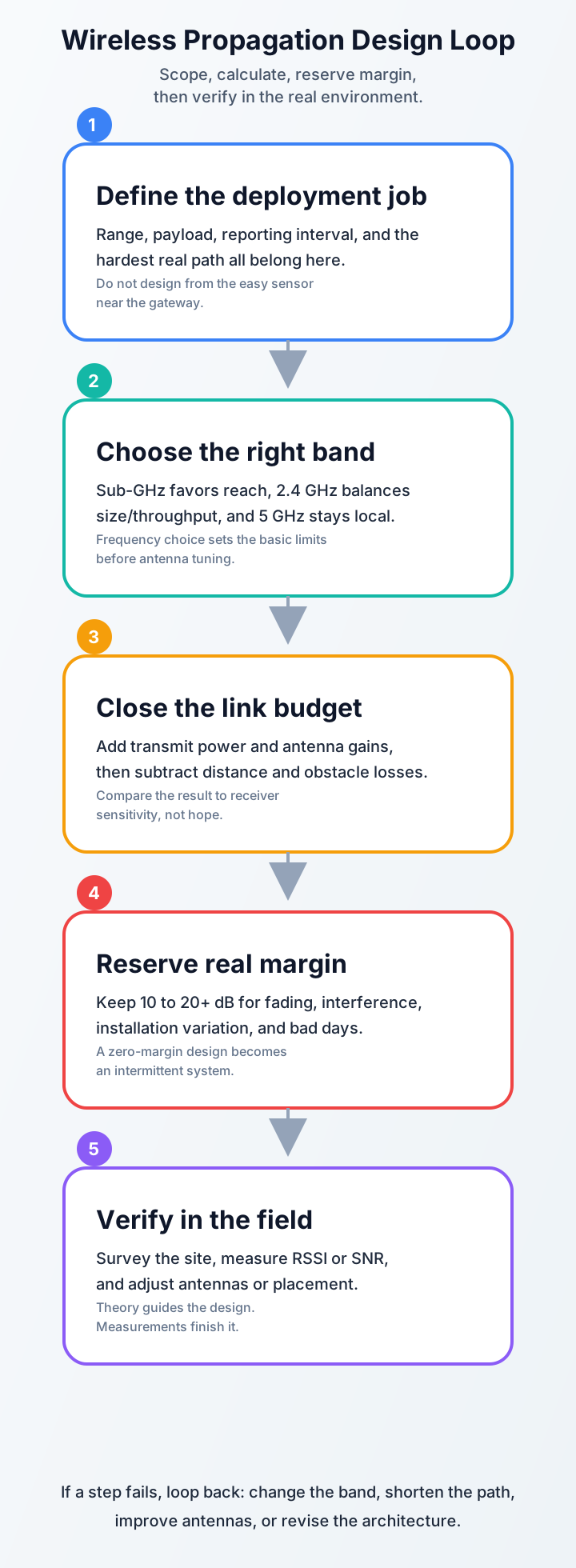
Link Budget is Your Planning Tool: Before deploying any wireless sensor, calculate whether the link will work using: Received Power = TX Power + Gains - Losses
Frequency Trade-offs Matter:
- Sub-GHz (LoRa, Sigfox): Long range (10+ km), excellent wall penetration, low data rates
- 2.4 GHz (Wi-Fi, Zigbee, BLE): Medium range (10-100 m), good penetration, medium data rates
- 5 GHz (Wi-Fi 5/6): Short range (10-50 m), poor penetration, high data rates
The 6 dB Rule: Every 6 dB of additional gain approximately doubles your effective range in free space (since FSPL scales as 1/d2, doubling distance requires 4x power = +6 dB). In real-world environments with higher path loss exponents (n = 2.7–4), the effect of each dB is less, so 8–12 dB may be needed to double range
Real-World Challenges:
- Path loss increases with distance and frequency
- Obstacles (especially metal) cause significant attenuation
- Multipath reflections cause unpredictable fading
- Always include fade margin (10-20+ dB) for reliability
Practical Verification: Always validate designs with real measurements - theory guides, practice confirms
32.19 What’s Next
Now that you have a foundation in wireless propagation, explore specific wireless technologies and their applications:
- Long-range IoT networks: LPWAN Introduction - apply propagation principles to LoRa, Sigfox, and NB-IoT deployments.
- LoRa technology deep dive: LoRaWAN Overview - see how Sub-GHz propagation advantages enable multi-kilometer links.
- Signal processing fundamentals: Signal Processing Essentials - examine modulation, demodulation, and SNR in wireless channels.
- Wireless protocol selection: Protocol Selection Framework - use propagation constraints to choose between IoT protocols.
- Short-range wireless options: BLE Overview - explore 2.4 GHz design considerations for indoor IoT.
- Mesh networking for coverage: Zigbee and Thread - overcome path loss limitations through multi-hop mesh topologies.
Recommended Path
If you’re building a complete IoT wireless competency, we recommend:
- Complete all 4 chapters in this series (Radio Basics → Path Loss → Fading → Lab).
- Then choose the next track that matches your work:
- Long-range deployments: Continue to LPWAN and LoRaWAN.
- Short-range and indoor systems: Explore BLE, Zigbee, or Wi-Fi modules.
- Protocol design: Study Signal Processing and Protocol Selection.