20 Sensor-to-Network Pipeline
More
Depth: Practitioner
Progress saves as you read. Mark sections complete as you go; your progress appears in the sidebar.
20.1 In 60 Seconds
This section: In 60 Seconds — Picture a freezer probe that produces the number 612.
Keep the Meaning With the Reading
Picture a freezer probe that produces the number 612. By the time the cloud screen shows four degrees, several steps have changed that number. If the unit, time, probe identity, or conversion version is lost, the final value can look exact while meaning something else.
An analog-to-digital converter is a part that turns a changing electrical signal into numbered steps. It is often shortened to ADC. Trace one reading through signal shaping, conversion, calibration, local checks, message creation, and delivery. At every hand-off, keep the original identity, time, unit, quality state, and version that explains how the value was made.
Try a known input, a noisy input, a value beyond the measured range, a delayed message, and a restart. Check the raw and converted records together. The receiver should distinguish a bad measurement from a damaged message and an old message from a new one.
This trace does not teach every sensor circuit, filter, or radio choice. The deeper sections show how sampling, quantization, calibration, packet fields, and link evidence protect the same meaning across the full chain.
A delivered sensor reading is a relay across measurement, conditioning, conversion, processing, formatting, packet assembly, and transmission. Each boundary must preserve the value and the context that explains it, or the cloud record can look precise while carrying the wrong meaning.
20.2 Start With the Story
This section: Start With the Story — You will trace a reading through seven stages and locate the first boundary where its value or context changes incorrectly.
You will trace a reading through seven stages and locate the first boundary where its value or context changes incorrectly. Start with the physical measurement and compare the evidence entering and leaving each stage.
Follow one reading across four beats to see how evidence at each handoff reveals where a mismatch begins.
-

Physics Phoebe: “One reading changes form at every handoff.”
-

Bex: “The value stopped matching here, so this boundary owns the fix.”
-

The team: “Compare each transformation and keep the evidence beside it.”
-

Test Tessa: “The delivered reading still traces back to the physical event.”
Read the story panels from the physical event to the delivered packet. The first handoffs change the reading’s form, and the red trace identifies the earliest boundary where output no longer agrees with input. Evidence retained at every transformation lets the team localize that fault instead of blaming the final network stage. The verified delivery closes the chain by linking the reported value back to its physical origin.
A sensor is a transducer: it responds to a physical quantity such as temperature, light, pressure, or motion and produces a signal that changes with that quantity. The signal may be analog—such as a voltage, current, resistance, or capacitance—or it may already be a digital value produced by electronics inside the sensor.
That signal is not yet a trustworthy application reading. The measurement chain conditions it, samples and converts it when necessary, uses a calibration relationship—the rule that maps the raw signal into engineering units—and carries context such as units, time, and sensor identity. This minimum model is enough for the pipeline below; the Sensors module later develops sensor mechanisms, specifications, and device families in depth.
The mathematical gist. Sampling at Hz preserves content only up to Hz; a Hz component becomes Hz and is indistinguishable from DC after conversion. By contrast, the chapter’s MHz path model gives dB link margin, which a dBi antenna can raise to dB. Aliasing destroys evidence before the pipeline can protect it; attenuation leaves a recoverable margin problem.

20.3 A Reading Is a Relay, Not a Number
This section: A Reading Is a Relay, Not a Number — A sensor reading does not appear in a database as a clean number.
A sensor reading does not appear in a database as a clean number. It is handed across a series of boundaries, from a physical quantity in the world to a delivered, trustworthy record. At each handoff, meaning can be preserved or quietly lost, which is why the pipeline, not any single chip, decides whether the final number can be believed.
Think of a relay race. The baton is the reading, each runner is a stage, and a fumbled handoff anywhere ruins the result no matter how fast the other runners are. The pipeline's job is to keep the baton intact and to keep its label attached at every exchange.
If you only need the intuition, this layer is enough: a delivered number is only as trustworthy as the weakest handoff between the sensor and the database, so design and debug the pipeline boundary by boundary rather than as one black box.
At a glance, the same value crosses these boundaries in order: measure, condition, sample and convert, process and calibrate, format, assemble into a packet, and transmit. Each boundary can add error or strip away the context that makes the number interpretable.
For example, a battery monitor may start as an analog voltage, be scaled by the conditioning circuit, be quantized by an ADC, be converted into volts by firmware, be serialized as JSON or CBOR, be wrapped in an MQTT or CoAP message, and finally be stored as a time-stamped record. The same number appears throughout, but its form and evidence change at every boundary.
Inspect Figure 20.1 and look for the first boundary where identity, time, unit, or quality can be lost.
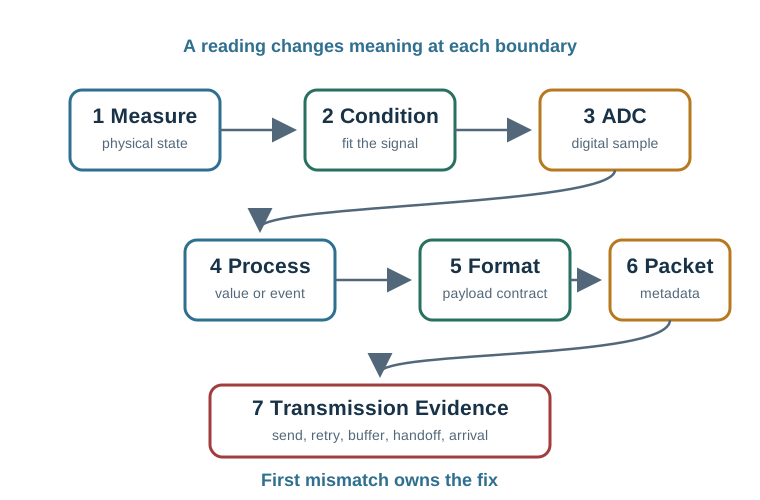
Trace Figure 20.1 through the battery case. The reading starts as an analogue voltage. The front end scales and guards it before the ADC makes a code. Firmware turns that code into volts and applies the known correction. JSON or CBOR gives the reading a data form. MQTT or CoAP then adds the facts needed for transfer, and link proof shows if it arrived. Identity, time, unit, quality state, and version must stay with it at each handoff. The first edge where value or context goes wrong owns the fix, even if the screen shows the fault later.
Use the map as a fault-isolation checklist. If the raw ADC code is wrong, look before formatting and networking. If the device value is correct but the cloud record has the wrong unit, inspect the format contract. If retransmission duplicates a count, inspect packet identity and delivery handling before changing the sensor.
The One-Minute Pipeline View
See the boundaries
List the handoffs, because errors and lost context hide at handoffs, not inside the individual stages.
Carry the context
Units, scale, time, and identity must travel with the value, or the final record cannot be interpreted.
Localize problems
When a number looks wrong, find the boundary where it changed instead of blaming the whole system.
Beginner Examples
- A temperature that is correct on the device but wrong in the cloud points to a formatting or transmission boundary, not the sensor.
- A reading with no timestamp may be a correct value that no one can place in time, which makes it hard to trust.
- Two devices that report the same quantity in different units, such as raw codes versus degrees, have a formatting-contract problem, not a sensor problem.
Pipeline Boundary Knowledge Check
If this gives you the mental model, you can stop here. Continue to Practitioner when you need to design or debug each boundary.
20.4 Apply It: Walk and Defend Each Boundary
This section: Apply It: Walk and Defend Each Boundary — The practical job is to define what crosses each boundary and what evidence travels with it, so a value stays interpretable from the sensor to the database.
The practical job is to define what crosses each boundary and what evidence travels with it, so a value stays interpretable from the sensor to the database. A useful trick is to design backward, starting from the record you need at the end.
The Seven Boundaries
Walkthrough: Designing the Pipeline Backward
- Start at the database, not the sensor. State what a trustworthy final record must contain, such as value, units, time, device identity, and quality, then make each stage supply its part.
- Define each boundary's contract. For every handoff, write what crosses it and in what form.
- Decide where calibration and unit conversion happen. On the device, at the gateway, or in the cloud, but exactly once and recorded.
- Make context travel with the value. Attach units, scale, timestamp, and identity early, and preserve them rather than reconstructing them later.
- Add integrity and delivery evidence. Error detection on the packet and acknowledgement on delivery turn "we sent it" into "it arrived intact."
- Test boundary by boundary. Inject a known input and confirm it survives each handoff unchanged in meaning.
Incremental Practice
Beginner
For a single temperature sensor, list the minimum context fields a final record needs to be trustworthy.
Intermediate
For a two-device fleet, decide where calibration is applied and justify doing it exactly once.
Advanced
Design a boundary-by-boundary test that proves a known input arrives unchanged in meaning at the database.
Context Propagation Knowledge Check
If your job is to define and test the pipeline's boundaries, you can stop here. Continue to Under the Hood for which errors are permanent and which can be recovered.
20.5 Under the Hood: Where Meaning Is Lost and Cannot Be Recovered
This section: Under the Hood: Where Meaning Is Lost and Cannot Be Recovered — The deeper layer separates boundary errors that can be recovered from those that cannot.
The deeper layer separates boundary errors that can be recovered from those that cannot. Knowing the difference decides where prevention is mandatory and where a later check is enough.
Recoverable Versus Irreversible Errors
The Unit and Scale Contract
Every numeric value implies a type, a unit, and a scale. If the sender and receiver disagree, the bits arrive intact but the meaning is wrong, and nothing in the network can detect it. The fix is a shared, versioned contract: when the representation changes, the version changes too, so a mismatch is visible rather than silent.
End-to-End Accounting
Delay and error accumulate across boundaries. The end-to-end latency is the sum of conditioning, conversion, processing, queuing, and transmission delays, so a pipeline can be slow even when every stage seems fast. End-to-end trust is bounded by the weakest boundary: a precise sensor behind a sloppy format contract delivers imprecise meaning.
Delivery Evidence and Idempotency
"Sent" is not "delivered," and "delivered" is not "delivered once." Acknowledgements confirm arrival, integrity checks confirm the bytes are intact, and sequence numbers with idempotent processing prevent a retried packet from being counted twice. Without these, retries can inflate counts and corrupt averages while every individual packet looks correct.
Common Pitfalls
- Treating the pipeline as one black box. Errors hide at handoffs, so a black-box view cannot localize them.
- Reconstructing context late. Units, scale, and time attached after the fact are guesses.
- Confusing sent with delivered intact. Without acknowledgement and integrity checks, neither is proven.
- Applying calibration more than once. Double-applied or unrecorded conversions corrupt the value silently.
- Ignoring ordering and duplicates. Retries without sequencing inflate counts and averages.
Delivery Idempotency Knowledge Check
At this depth, the pipeline is a chain of contracts, not a wire. The reading survives only if each boundary preserves both the value and the context, if irreversible errors are prevented at their source, and if delivery is proven rather than assumed.
20.6 Checkpoint: Summary
This section: Checkpoint: Summary
- A sensor reading is relayed across boundaries: measure, condition, sample, process and calibrate, format, assemble into a packet, and transmit.
- Errors and lost context hide at the handoffs, so design and debug the pipeline boundary by boundary.
- Units, scale, time, and identity must travel with the value and be attached early rather than reconstructed later.
- Some boundary errors are irreversible, such as aliasing before sampling and a lost timestamp, so prevention beats cleanup.
- A shared, versioned unit and scale contract keeps correct bits from carrying the wrong meaning.
- “Sent” is not “delivered intact,” so integrity checks, acknowledgements, sequencing, and idempotent handling provide delivery evidence.
Treat a delivered reading as a relayed baton whose trust equals the weakest handoff: define each boundary’s contract, carry units, scale, time, and identity across all of them, and prevent the errors that cannot be undone.
20.7 See Also
This section: See Also
Signal Processing Essentials
The sampling, resolution, and filtering decisions inside the conversion boundary.
ADC Sampling Fundamentals
Why the sampling boundary can lose information that no later stage recovers.
Packet Anatomy
How the formatted payload becomes an addressed, checkable packet.
Find help
3 reviewed answers.
Where should I start in a module?
Open the module page from the sidebar to see its chapters in order. Use the module map to return to a topic you need.
Modules and pathsReviewed
What can I try when a project does not work?
Check the symptom, then work through the diagnostic steps. Keep the error message and the smallest example that reproduces it.
When you are stuckReviewed
How do interactive examples work?
Use the interactive guide to check how examples and simulations work before changing your project.
Interactive examples guideReviewed