23 Signal Processing Overview
23.1 Learning Objectives
By the end of this chapter, you will be able to:
- Distinguish Analog from Digital: Explain why sensors produce continuous analog signals and why processors require discrete digital data
- Apply the Nyquist Theorem: Calculate minimum and practical sampling rates for a given signal frequency
- Trace the ADC Pipeline: Identify each stage of analog-to-digital conversion (anti-aliasing filter, sample-and-hold, quantizer) and describe its role
- Evaluate Sampling Rate Trade-offs: Compare power consumption, data quality, and battery life across different sampling configurations for IoT applications
- Diagnose Signal Processing Errors: Classify common pitfalls such as aliasing from undersampling, wasted resources from oversampling, and mismatched ADC resolution relative to sensor precision
Related Chapters
Fundamentals:
- Data Representation - Binary numbers and ADC resolution
- Sensor to Network Pipeline - Complete signal journey
- Aliasing and ADC Resolution - Next in series
- Voice Compression - Audio signal processing
- Sensor Dynamics - Temporal response characteristics
Sensing:
- Sensor Fundamentals - Sensor types and outputs
- Sensor Circuits - Signal conditioning circuits
- Sensor Interfacing - Reading analog sensors
- Electronics Basics - Voltage and current fundamentals
- Analog/Digital Electronics - ADC deep dive
Data Processing:
- Data Formats for IoT - Encoding processed data
- Multi-Sensor Fusion - Combining signals
- Modeling and Inferencing - ML on sensor data
Design:
- Hardware Prototyping - ADC selection
- Sensor Labs - Hands-on ADC
- Network Traffic Analysis - Signal analysis tools
Learning:
- Knowledge Gaps Hub - Start here
- Simulations Hub - Signal processing tools
23.2 Prerequisites
Before diving into this chapter, you should be familiar with:
- Sensor Fundamentals and Types: Understanding different sensor types and their output characteristics provides context for why signal processing is necessary
- Data Representation Fundamentals: Knowledge of binary numbers, bits, and bytes is essential for understanding ADC resolution and digital signal representation
- Basic electronics: Familiarity with voltage, current, and simple circuits helps understand analog signal characteristics
For Beginners: Why Signal Processing Matters
The Problem: Sensors measure the real world (temperature, light, pressure), which is continuous and smooth. But microcontrollers and computers only understand discrete numbers (0s and 1s).
The Solution: Signal processing bridges this gap by converting continuous analog signals into discrete digital values that computers can process.
Real-World Analogy: Imagine watching a movie. The real world moves smoothly, but a movie is actually 24 still pictures per second. Your brain fills in the gaps, so it looks smooth. Signal processing does the same thing—it takes “snapshots” of sensor values fast enough that we capture all the important information.
Key Terms:
- Analog signal: a continuous value that can take infinitely many values, such as temperature drifting from 23.45 C to 23.46 C.
- Digital signal: a discrete representation limited to countable levels, such as ADC codes from 0 to 4095.
- Sampling: taking repeated snapshots of an analog signal at fixed time intervals.
- Sampling rate: how many snapshots are taken per second, measured in hertz.
- Resolution: how finely each snapshot can be represented, such as 8-bit for 256 levels or 12-bit for 4096.
- Aliasing: distortion caused when the system samples too slowly and fast signal content masquerades as slower behavior.
The Bottom Line: Sample fast enough (at least 2× the fastest change you care about) and with enough precision (10-12 bits for most IoT) to capture what matters without wasting resources.
Decision Framework: Choosing ADC Sampling Rate
Use this table to select the right sampling rate for your IoT application:
- Room temperature: about 0.001 Hz bandwidth, so Nyquist says 0.002 Hz minimum. In practice, 0.1 Hz, or one sample every 10 seconds, is already generous and avoids pointless battery drain.
- Industrial vibration: up to about 1000 Hz, so 2000 Hz minimum and about 2500-5000 Hz in practice to keep motor harmonics from folding back into the measured band.
- Human voice: roughly 300-3400 Hz, so about 6800 Hz minimum and 8000 Hz in practice for standard narrowband speech capture.
- ECG or heart rate waveform capture: about 0.5-40 Hz, so 80 Hz minimum and about 250 Hz in practice when waveform shape matters, not just beats per minute.
- Motion or accelerometer data for human movement: about 0-50 Hz, so 100 Hz minimum and about 200-400 Hz in practice to catch transient falls and impacts.
- Power-quality monitoring: 50 or 60 Hz mains plus harmonics up to about 1 kHz, so at least 2000 Hz and more realistically 4000-6400 Hz.
- Soil moisture: around 0.0001 Hz because it changes over hours, so 0.001 Hz, one sample every 15 minutes, is already more than enough.
Calculation example: If monitoring HVAC airflow (changes up to 2 Hz), use 2 Hz × 2.5 = 5 Hz sampling rate (one sample every 200 ms).
Power impact: Sampling 10× faster than needed = 10× more ADC power consumption. For battery devices, this can reduce lifetime from 5 years to 6 months.
23.2.1 Interactive: Sampling Rate Calculator
Common Mistake: Using Arduino’s Default Analog Read Speed
Problem: analogRead() on Arduino Uno samples at ~10 kHz (0.1 ms per reading). Engineers use this default without considering if their signal needs it.
Why this wastes power:
- Reading a slow temperature sensor (0.1 Hz signal) at 10 kHz = sampling 100,000× faster than Nyquist requires
- The Arduino Uno draws ~45 mA while actively running its loop, but only ~15 mA in idle sleep mode
- At 10 kHz (tight loop, no sleep): MCU stays fully active at ~45 mA (drains a 500 mAh battery in ~11 hours)
- At 1 Hz (with sleep between readings): MCU sleeps 99.99% of the time at ~15 mA average (lasts days); with deep sleep, current drops to <1 mA (lasts months)
Real-world example: Student’s battery-powered greenhouse monitor (6× temperature sensors) died after 8 hours. Root cause: loop() called analogRead() with no delay, sampling at full 10 kHz speed.
Fix: Add appropriate delay between readings:
void loop() {
  float temp = analogRead(TEMP_PIN) * (5.0 / 1023.0);  // Convert to voltage
  transmit_data(temp);
  delay(60000);  // 60 seconds = 0.0167 Hz sampling (appropriate for temperature)
}
What to observe: Measure battery current with multimeter. Should be <1 mA in sleep mode for slow sensors. If >100 mA, you’re sampling too fast.
Real-World Example: ECG Heart Rate Monitor
A wearable ECG sensor demonstrates the complete signal processing pipeline:
Raw Signal Characteristics:
- Cardiac signal: 0.5-40 Hz frequency range (heart rate + waveform shape)
- Powerline noise: 50/60 Hz interference from electrical environment
- Muscle artifacts: High-frequency noise from arm movement
- DC drift: Baseline wander from electrode contact variation
Processing Chain:
- High-pass filter (0.5 Hz cutoff): Removes DC drift and baseline wander
- Notch filter (50/60 Hz): Eliminates powerline interference
- Low-pass filter (40 Hz cutoff): Removes muscle artifacts and high-frequency noise
- Anti-aliasing filter (100 Hz): Prevents sampling distortion
- ADC sampling (250 Hz): Nyquist requires 2× the max frequency = 200 Hz minimum; 250 Hz provides 25% safety margin above Nyquist
- R-peak detection: Pan-Tompkins algorithm identifies heartbeat peaks
- Heart rate calculation: 72 BPM from R-R interval measurement (833 ms between peaks)
System Performance:
- ADC resolution: 12-bit (0.8 mV precision for 3.3V range)
- Power consumption: 1.2 mW continuous operation
- Battery life: 8 hours on 50 mAh battery
- Accuracy: ±2 BPM compared to medical-grade ECG
- Latency: <100 ms from heartbeat to BPM update
Why This Matters: Without proper filtering, the 60 Hz powerline noise would overwhelm the 1-2 Hz heart rate signal (30× stronger!). The multi-stage filter cascade removes interference while preserving the cardiac waveform. Sampling at 250 Hz (not 1000 Hz) saves 75% power without losing essential information.
Key Lesson: Signal processing isn’t just about converting analog to digital—it’s about intelligently filtering noise, choosing appropriate sample rates, and balancing accuracy with power consumption.
Key Takeaway
In one sentence: Signal processing converts continuous analog sensor signals to discrete digital values through sampling (time discretization) and quantization (amplitude discretization), and getting both right prevents aliasing artifacts and wasted resources.
Remember this rule: Sample at 2.5-5x the highest frequency you care about (not higher), and match ADC resolution to sensor accuracy - there’s no point having 16-bit precision if your sensor is only accurate to 1%.
Cross-Hub Connections: Signal Processing Across IoT
Signal processing concepts appear throughout IoT systems. Here’s where to explore deeper:
Learning Hubs:
- Simulations Hub: Try the Quick Sensor Selector tool to see how sampling rate and resolution affect different sensor types
- Knowledge Gaps Hub: Common misconceptions about aliasing and resolution
- Quizzes Hub: Test your Nyquist theorem understanding with interactive scenarios
Practical Applications:
- Sensor Labs: Hands-on ADC configuration with real sensors
- Prototyping Hardware: ADC selection for Arduino, ESP32, Raspberry Pi
- Network Traffic Analysis: Wireshark uses signal processing to analyze packet timing
Advanced Topics:
- Multi-Sensor Fusion: Combining signals from multiple sensors with different sampling rates
- Anomaly Detection: Detecting outliers in filtered sensor streams
- Edge Computing Patterns: Processing signals locally to reduce bandwidth
Explore these connections to see how signal processing fundamentals apply across diverse IoT applications!
23.3 Analog vs Digital Signals
23.3.1 The Continuous World
Physical phenomena are inherently continuous—temperature changes smoothly, light intensity varies gradually, and sound waves oscillate continuously.
Example: A thermometer might show 23.456789…°C at one instant and 23.458123…°C a moment later. There are infinite possible values between any two measurements.
23.3.2 The Digital Constraint
Microcontrollers and computers work with discrete digital values: - 8-bit number: Can only represent 256 different values (0-255) - 12-bit number: 4,096 different values (0-4095) - 16-bit number: 65,536 different values (0-65535)
This creates two challenges:
- Sampling: How often do we measure the signal? (temporal discretization)
- Quantization: How precisely do we measure each sample? (amplitude discretization)
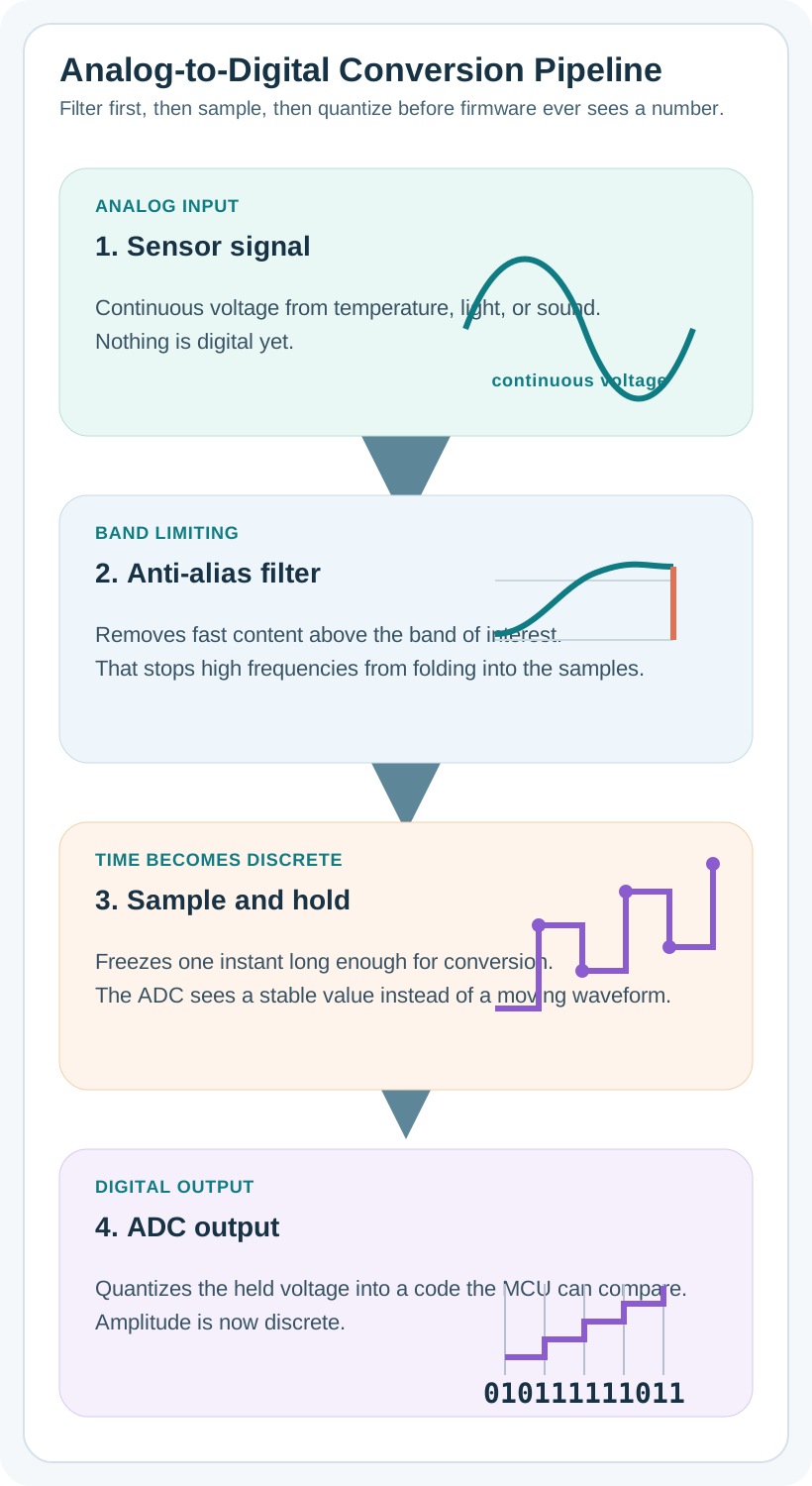
ADC Pipeline: The complete analog-to-digital conversion process. Anti-aliasing filter removes high frequencies before sampling to prevent distortion. Sample & hold captures instantaneous voltage. ADC quantizes to nearest digital level.
Alternative View: Temperature Sensor Example
This variant shows the same ADC pipeline with concrete values from a real temperature sensor - making abstract concepts tangible:
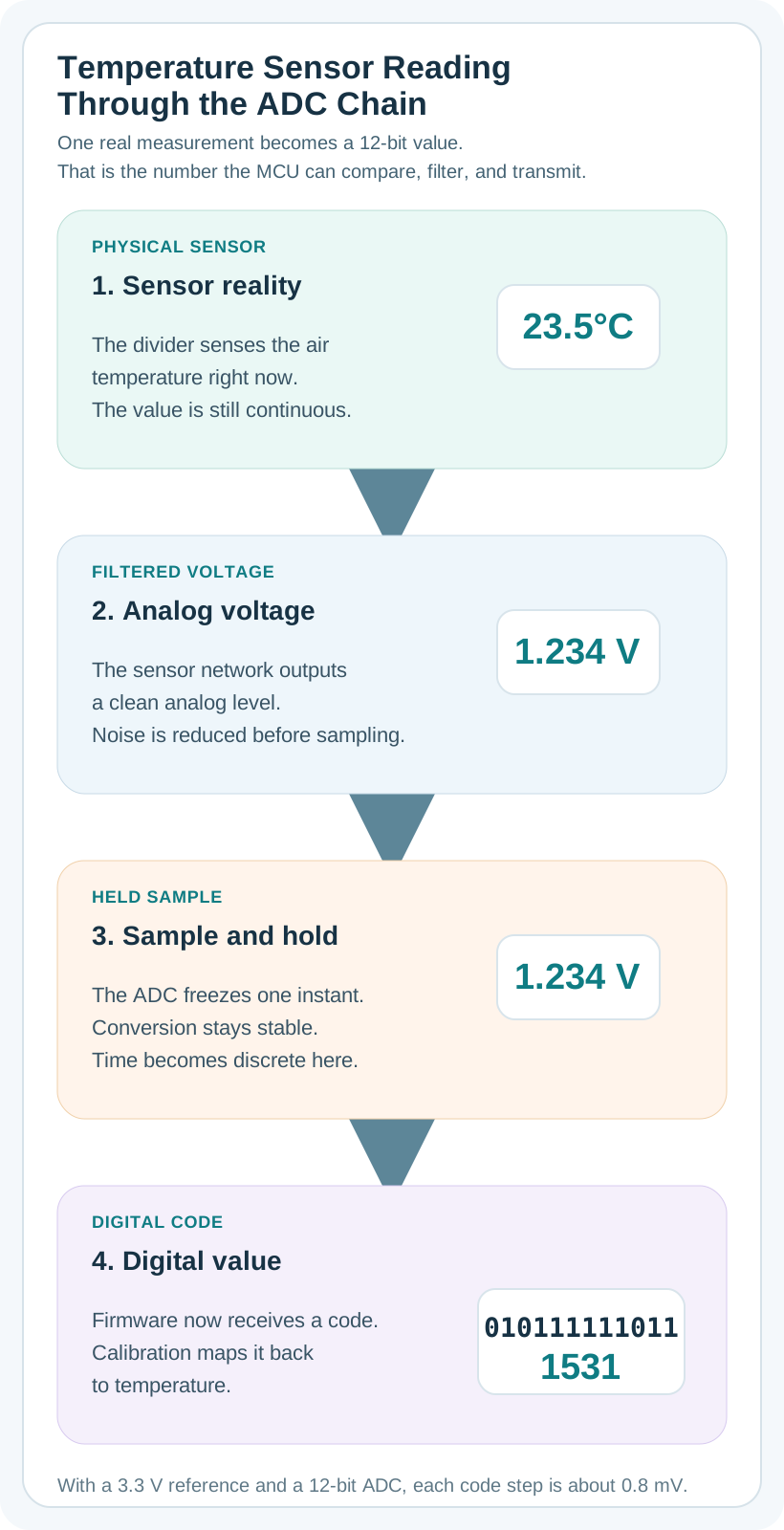
Why this variant helps: The original shows abstract component names. This variant shows actual values flowing through a real temperature sensor - you can trace 23.5°C from voltage (1.234V) through digital value (1534) and back. Understanding what happens to real data at each stage makes the pipeline tangible.
23.4 The Nyquist Theorem: How Fast to Sample?
The fundamental question: How many times per second must we sample to accurately capture a changing signal?
Nyquist-Shannon Sampling Theorem: > To accurately capture a signal, you must sample at more than twice the highest frequency component.
Minimum Sampling Rate = 2 × Maximum Signal Frequency
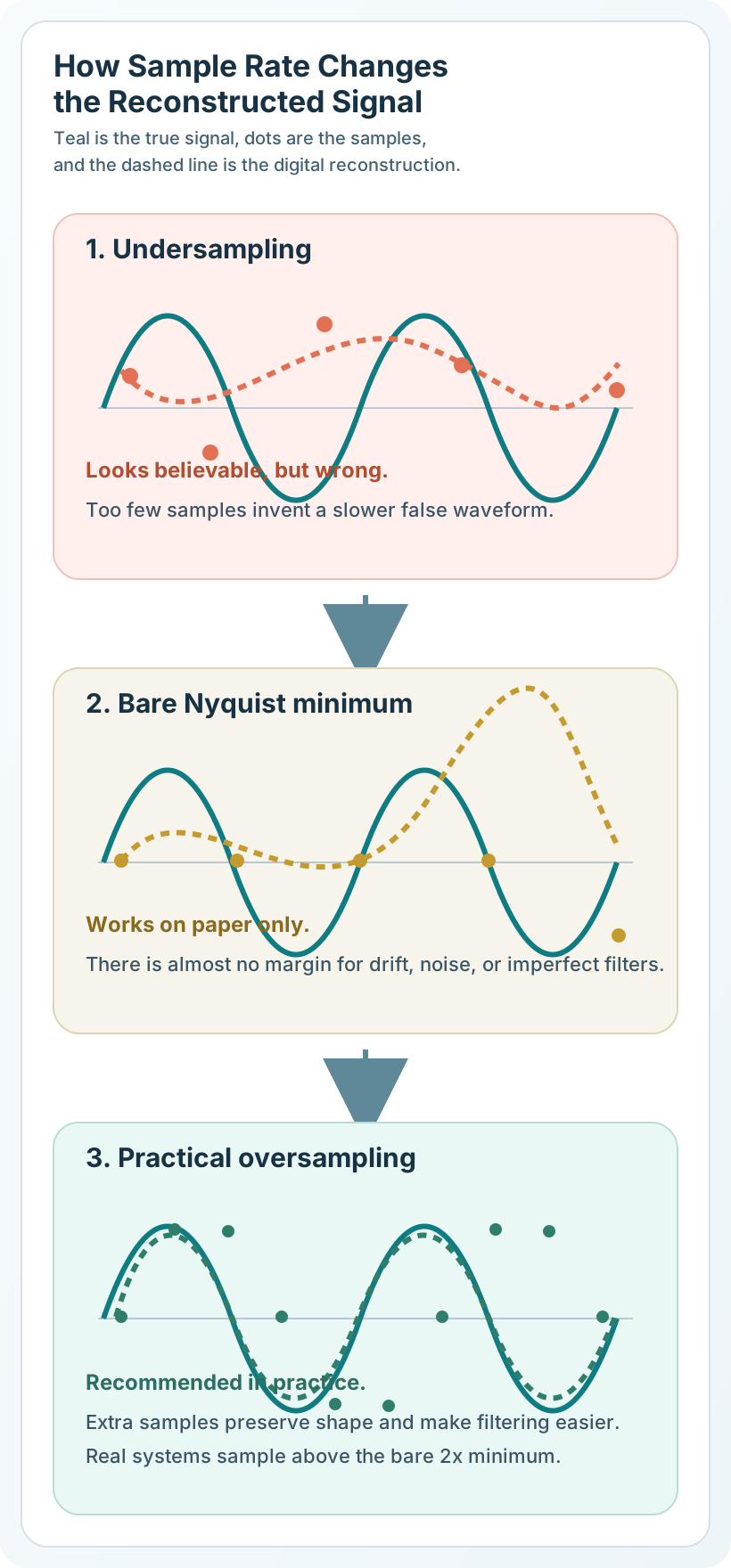
Nyquist Sampling Comparison: Undersampling causes aliasing distortion. Sampling exactly at 2f is theoretically sufficient but risky. Practical systems sample at 5-10× the signal frequency for reliability.
Alternative View: Nyquist as Movie Frame Rate
This variant uses a movie filming analogy to make sampling rate intuitive:
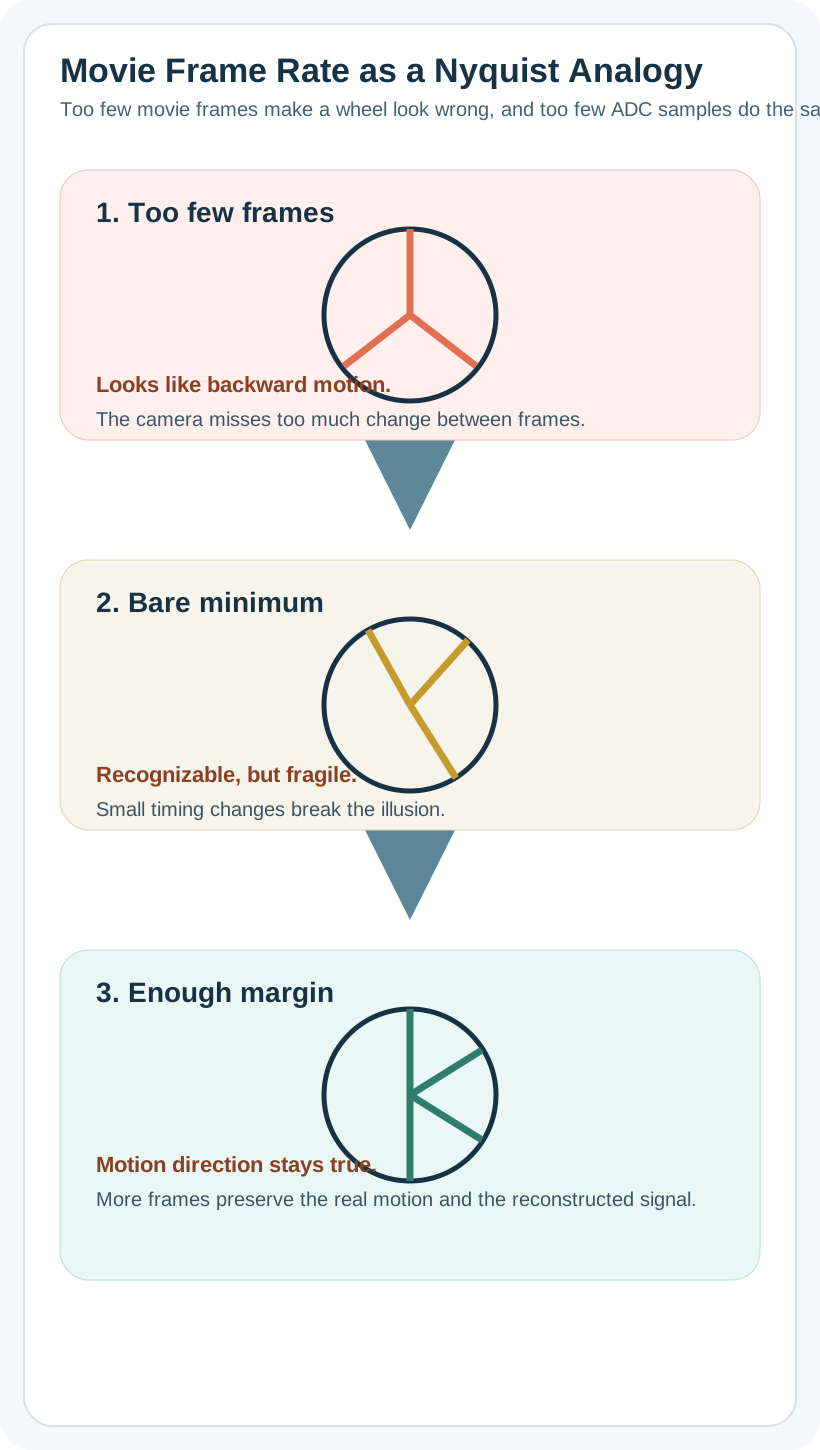
Why this variant helps: The original shows abstract frequency ratios (2f, 0.8f). Everyone has seen the “wagon wheel effect” in movies where car wheels appear to spin backward. This directly connects Nyquist undersampling to a visible, memorable phenomenon that students can visualize.
23.4.1 Practical Examples
Example 1: Temperature Sensor
- Building HVAC changes slowly: ~0.01 Hz (1 cycle per 100 seconds)
- Nyquist requirement: Sample > 0.02 Hz
- Practical choice: 0.1 Hz (once every 10 seconds) provides 5× margin
Example 2: Heart Rate Monitor
- Heart rate: 0.5-3 Hz (30-180 bpm)
- Nyquist requirement: Sample > 6 Hz
- Practical choice: 100-500 Hz to capture waveform shape, not just frequency
Example 3: Accelerometer for Vibration
- Machine vibration: 0-1000 Hz
- Nyquist requirement: Sample > 2000 Hz
- Practical choice: 5000-10000 Hz for safety margin
Knowledge Check: Sampling and Signal Fundamentals
Q1: A temperature sensor changes at most once per second (1 Hz). What sampling rate follows the Nyquist theorem?
- 0.5 Hz (once every 2 seconds)
- 1 Hz (once per second)
- 2.5 Hz (2.5 times per second) correct
- 1000 Hz (1000 times per second)
Answer: C) 2.5 Hz. Nyquist requires more than 2x the signal frequency, so anything above 2 Hz is valid. 2.5 Hz adds a small safety margin, while 0.5 Hz and 1 Hz would alias and 1000 Hz just wastes resources.
Q2: Why do sensors produce analog signals but microcontrollers need digital data?
- Sensors are outdated technology
- Physical phenomena are continuous, but computers process discrete numbers correct
- Analog signals are always noisy
- Digital signals travel farther
Answer: B) Physical phenomena are continuous, but computers process discrete numbers. Temperature, pressure, and light vary continuously in the physical world, while microcontrollers store and manipulate discrete binary values, so the ADC has to bridge the gap.
Putting Numbers to It
Nyquist Sampling Rate Calculation for Predictive Maintenance:
Scenario: Motor bearing monitoring for defects. Healthy bearing fundamental frequency: \[f_0 = \frac{\text{RPM} \times \text{ball count}}{60} = \frac{1800 \times 8}{60} = 240\text{ Hz}\]
Defect signatures appear as harmonics: 2f₀ = 480 Hz, 3f₀ = 720 Hz, up to 5f₀ = 1200 Hz.
Nyquist requirement: Sample > 2 × 1200 Hz = 2400 Hz minimum
Practical selection with anti-aliasing filter:
- Anti-aliasing filter at 1.2 kHz (brick-wall ideal, real ~1.5 kHz)
- Sample at 3 kHz (2.5× Nyquist) = safety margin for non-ideal filter roll-off
Power comparison (ADXL345 accelerometer): - @ 400 Hz: 50 µA - @ 800 Hz: 90 µA - @ 3200 Hz: 140 µA
Battery life calculation (CR2032, 225 mAh): \[\text{Life} = \frac{225\text{ mAh}}{I_{avg}} = \frac{225}{0.09\text{ mA}} = 2500\text{ hours} = 104\text{ days}\]
Decision: Use 3.2 kHz sampling at 140 µA for 1615 hours (67 days) to safely capture up to 1.2 kHz signals with aliasing protection.
23.4.2 Interactive: Bearing Frequency Calculator
Common Misconception Alert: “Higher Sampling Rate is Always Better”
The Myth: “I should sample as fast as possible to get the best data quality.”
Why It’s Wrong: Higher sampling rates don’t improve signal quality beyond Nyquist requirements—they just waste resources.
The Reality:
Misconception #1: “1000 Hz is better than 100 Hz for all sensors” - Reality: Temperature changes at 0.01 Hz. Sampling at 1000 Hz captures the same 0.01 Hz signal 100,000 times without gaining new information. - Cost: 10× higher sampling rate = 10× more power, 10× more data storage, 10× more bandwidth - Better approach: Match sampling rate to signal bandwidth (5-10× Nyquist, not 1000×)
Misconception #2: “16-bit ADC is always better than 12-bit” - Reality: If your sensor accuracy is ±1% (e.g., thermistor), 12-bit resolution (0.025%) already exceeds sensor precision by 40×. Using 16-bit (0.0015%) provides 667× more precision than the sensor can deliver! - Cost: 16-bit ADCs typically consume 3-5× more power than 12-bit - Better approach: Match ADC resolution to sensor precision, not maximum available bits
Misconception #3: “Filtering removes important data” - Reality: Filtering removes noise, not signal. A low-pass filter with 40 Hz cutoff removes 60 Hz powerline interference (noise) while preserving your 1 Hz heart rate signal (data). - Analogy: Noise-canceling headphones don’t remove music—they remove background noise so you hear music better - Better approach: Apply appropriate filters to improve signal-to-noise ratio (SNR)
Real-World Example:
- Inefficient design: Soil moisture sensor sampled at 1 kHz, 16-bit ADC, no filtering
- Soil moisture changes over hours (0.0003 Hz)
- Power consumption: 5 mA continuous
- Battery life: 20 hours
- Optimized design: Same sensor sampled at 0.01 Hz (once per 100 seconds), 10-bit ADC, median filter
- Captures all relevant changes (30× Nyquist margin)
- Power consumption: 50 μA average (100× reduction!)
- Battery life: 2000 hours (83 days)
- Data quality: Identical for the application
Key Lesson: “Good enough” signal processing saves 100× power without sacrificing data quality. Over-specification wastes resources on precision you can’t use.
Rule of Thumb:
- Identify maximum signal frequency (fmax)
- Sample at 5-10× fmax (not 100× or 1000×)
- Match ADC resolution to sensor accuracy ±20% margin
- Filter intelligently to remove noise, not signal
Learning Scenario: Choosing the Right Sample Rate
Your Challenge: You’re designing a predictive maintenance system for industrial machinery. Your accelerometer detects vibrations indicating bearing wear.
Scenario Details:
- Bearing frequency: Healthy bearings vibrate at 200 Hz (shaft rotation rate)
- Wear signature: Damaged bearings show harmonics up to 500 Hz (2.5× fundamental)
- Your accelerometer: ADXL345 digital accelerometer
- Available sample rates: 25 Hz, 50 Hz, 100 Hz, 200 Hz, 400 Hz, 800 Hz, 1600 Hz, 3200 Hz
- Power consumption scales with sample rate: 40 μA @ 100 Hz, 140 μA @ 3200 Hz
- Power budget: Battery-powered sensor node, need 1-year battery life
Your Task: What sample rate should you choose? Show your reasoning.
Solution: Step-by-Step Analysis
Step 1: Identify Maximum Signal Frequency
- Bearing fundamental: 200 Hz
- Wear harmonics: up to 500 Hz
- Maximum frequency to detect: 500 Hz (fmax)
Step 2: Apply Nyquist Theorem
- Nyquist minimum: Sample rate > 2 × fmax = 2 × 500 Hz = 1000 Hz
- Practical target: 5-10× margin → 1250-1500 Hz minimum
Step 3: Evaluate Available Options
- 400 Hz: only 0.8x Nyquist margin, about 60 microamps, and not acceptable because aliasing risk is guaranteed.
- 800 Hz: about 1.6x margin, about 85 microamps, but still marginal for the stated defect frequencies.
- 1600 Hz: about 3.2x margin, about 115 microamps, and the best balanced option in this set.
- 3200 Hz: about 6.4x margin, about 140 microamps, which works but is probably more power than the application needs.
Step 4: Power Budget Analysis
- Battery capacity: 1000 mAh (typical AA battery)
- Target lifetime: 1 year = 8760 hours
- Allowed current: 1000 mAh / 8760 h = 114 μA average
Power consumption breakdown:
- Accelerometer @ 1600 Hz: 115 μA
- Microcontroller sleep mode: 20 μA
- Wireless transmission (1% duty): 5 μA average
- Total: ~140 μA (exceeds budget by 26 μA!)
Step 5: Optimization Strategy
Option A: Accept shorter battery life - Use 1600 Hz sampling - Battery life: 1000 mAh / 0.14 mA = 7142 hours ≈ 10 months - Status: below the 1-year target
Option B: Duty-cycle the accelerometer - Sample at 1600 Hz for 1 second every 10 seconds (10% duty cycle) - Accelerometer power: 115 μA × 10% = 11.5 μA average - Total: 11.5 + 20 + 5 = 36.5 μA - Battery life: 1000 mAh / 0.0365 mA = 27,400 hours ≈ 3.1 years (meets target)
Option C: Use edge processing - Sample at 1600 Hz - Compute FFT locally (frequency spectrum) - Transmit only anomaly alerts (not raw data) - Saves 80% wireless transmission power - Total: 115 + 20 + 1 = 136 μA - Battery life: 7350 hours ≈ 10.2 months (close, but still short)
Best Choice: Option B - 1600 Hz with 10% duty cycle
Why This Works:
- Nyquist-compliant: 1600 Hz > 1000 Hz requirement (3.2× margin)
- Catches transient events: 1-second bursts at 1600 Hz = 1600 samples per measurement window
- Power-efficient: 10% duty cycle saves 90% accelerometer power
- Exceeds 1-year target: 3+ years battery life
- Practical: Bearings don’t wear instantly—sampling every 10 seconds catches degradation trends
Key Lessons:
- Nyquist is non-negotiable: 400 Hz would alias 500 Hz signals to 100 Hz (false readings!)
- Oversampling has costs: 3200 Hz provides no benefit over 1600 Hz for this application
- Duty cycling saves power: 10% duty cycle = 10× battery life extension
- Match sampling to physics: Bearing wear develops over days/weeks, not milliseconds
Real-World Validation: Industrial IoT vendors (e.g., Samsara, Augury) use similar strategies—burst sampling at high rates with long sleep periods between measurements.
23.4.3 Interactive: Battery Life Calculator
23.5 Summary
This chapter introduced the fundamentals of analog-to-digital signal conversion:
Key Concepts:
- Analog vs Digital: Sensors produce continuous signals; computers need discrete values
- ADC Pipeline: Anti-aliasing filter → Sample & Hold → ADC → Digital value
- Nyquist Theorem: Sample at >2× the maximum signal frequency
- Practical Sampling: Use 2.5-5× the signal frequency (providing 25-150% safety margin above Nyquist)
- Resource Optimization: Match sampling rate and ADC resolution to actual signal characteristics
Common Pitfalls to Avoid:
- Over-sampling wastes power, storage, and bandwidth
- Under-sampling causes aliasing distortion
- Excessive ADC resolution doesn’t improve accuracy beyond sensor precision
- Filtering removes noise, not signal—apply intelligently
For Kids: Meet the Sensor Squad!
Sammy the Sensor was trying to explain signal processing to the team using a fun example.
“Imagine I’m watching a bouncing ball,” Sammy said. “The ball moves smoothly up and down – that’s the analog signal. But Max can only understand snapshots!”
Max the Microcontroller nodded: “I take photographs of the ball at regular intervals – that’s sampling! If I take enough photos, I can figure out how the ball was bouncing.”
“But how many photos do you need?” asked Lila the LED.
“The Nyquist Rule says: take photos at least TWICE as fast as the ball bounces!” Max explained. “If the ball bounces 10 times per second, I need at least 20 photos per second. Too few photos and I’ll think the ball is bouncing differently than it really is – that’s called aliasing!”
Bella the Battery raised her hand: “But don’t take TOO many photos! Each photo costs energy. If 20 photos captures the bounce perfectly, taking 10,000 photos just wastes my power!”
The lesson: Signal processing is about taking just the right number of snapshots – enough to capture the signal, but not so many that you waste energy!
23.6 Knowledge Check
Concept Relationships: Signal Processing Overview
- Nyquist theorem -> sampling rate: the sample rate must exceed 2x the highest signal frequency to avoid aliasing.
- ADC pipeline -> anti-aliasing: the analog filter ahead of the ADC prevents high-frequency content from folding into the measured band.
- Oversampling -> power budget: sampling 10x faster than needed generally creates 10x more conversions, data movement, and wasted energy.
- Temperature monitoring -> practical sampling: a 0.01 Hz signal only needs around 0.1 Hz sampling, not a fast default loop.
Cross-module connection: Aliasing and ADC Resolution covers quantization levels and filter implementation.
23.7 What’s Next
- Aliasing and ADC Resolution: deeper treatment of aliasing prevention, quantization levels, and digital filtering.
- Quantization and Filtering: ADC resolution trade-offs and digital noise reduction methods.
- Sensor Dynamics: sensor response time, bandwidth, and temporal characteristics.
- Voice Compression: audio signal processing and codec design for IoT voice applications.
- Data Representation: binary encoding, bit depth, and digital value representation.
- Sensor Circuits and Signals: signal conditioning circuits that prepare analog signals for ADC input.