Practice choosing IoT data formats through real-world scenarios: smart meter deployments, LoRaWAN agriculture sensors, format migration strategies, and industrial monitoring. Learn to calculate payload sizes, compare annual costs, and design custom binary encodings that maximize battery life.
11.1 Learning Objectives
By the end of this chapter, you will be able to:
Solve format selection scenarios: Apply decision frameworks to real-world IoT cases involving smart meters, agriculture sensors, and industrial monitoring
Calculate payload sizes and costs: Compute byte-level encodings and annual bandwidth expenses for JSON, CBOR, Protobuf, and custom binary formats
Debug encoding issues: Diagnose and fix common serialization problems such as Base64 overhead, endianness mismatches, and precision loss
Design migration strategies: Plan phased format upgrades from JSON to binary without service disruption or data loss
Evaluate battery-life trade-offs: Quantify how payload size affects transmission energy and device longevity for LoRaWAN deployments
Justify format recommendations: Defend format choices with quantitative cost-benefit analysis across the full sensor-to-cloud pipeline
Key Concepts
JSON: Human-readable key-value format — default IoT API format but 2-5× larger than binary alternatives
CBOR: Concise Binary Object Representation — binary superset of JSON data model, no schema required
Protocol Buffers (Protobuf): Schema-defined binary serialization achieving maximum efficiency with code-generated parsers
MessagePack: Binary-JSON bridge: no schema needed, 30-50% smaller than JSON, drop-in replacement for JSON libraries
Serialization: Converting in-memory data structures to bytes for transmission or storage
Deserialization: Reconstructing data structures from bytes — must match the serialization format exactly
Data Format Trade-off: Human readability (JSON) vs. size efficiency (CBOR/Protobuf) vs. schema flexibility (self-describing vs. compiled)
11.2 For Beginners: Data Formats Practice
This chapter is a hands-on exercise where you practice choosing the best way to package sensor data for different situations. Think of data formats like choosing between sending a text message, an email, or a letter – each has trade-offs in size, speed, and cost. You will work through real scenarios (like a farm with thousands of sensors) and learn to calculate which format saves the most battery and bandwidth.
Test your understanding of IoT data formats with these scenario-based questions.
Scenario 1: Smart Meter Deployment
Situation: You’re deploying 10,000 smart electricity meters across a city using NB-IoT cellular connectivity. Each meter sends readings every 15 minutes, including:
Current power consumption (float)
Voltage (float)
Meter ID (8-character string)
Timestamp (Unix epoch)
The cellular plan costs $0.02 per MB. You’re evaluating JSON vs CBOR vs Protocol Buffers.
Question: Which format would you choose, and why? Calculate the annual data cost difference between JSON and your recommended format.
Answer
Recommended: Protocol Buffers (or CBOR)
Calculation:
Messages per meter per year: 4/hour x 24 hours x 365 days = 35,040 messages
Total messages: 35,040 x 10,000 meters = 350.4 million messages/year
Format size estimates for this payload:
JSON: ~75 bytes (field names, quotes, braces)
CBOR: ~40 bytes (binary encoding, field names still present)
Protobuf: ~20 bytes (field numbers instead of names)
Annual data costs:
JSON: 350.4M x 75 bytes = 26.3 GB/year = $526/year
CBOR: 350.4M x 40 bytes = 14.0 GB/year = $280/year
Protobuf: 350.4M x 20 bytes = 7.0 GB/year = $140/year
Savings with Protobuf vs JSON: $386/year (73% reduction)
No room for error (one more decimal place breaks it)
No room for device ID or timestamp
JSON parsing on constrained MCU is expensive
Custom Binary Format (9 bytes total):
pH: uint8 (value x 10) using 1 byte Range: 0-140 -> 0.0-14.0 Note: divide by 10 to decode.
Nitrogen: uint16 using 2 bytes Range: 0-1000 Note: direct value.
Phosphorus: uint16 using 2 bytes Range: 0-1000 Note: direct value.
Potassium: uint16 using 2 bytes Range: 0-1000 Note: direct value.
Temperature: int16 (C x 10) using 2 bytes Range: -200 to 600 -> -20.0 to 60.0C Note: divide by 10 to decode.
Total: 9 bytes Result: about 81% smaller than JSON.
Benefits:
9 bytes vs 48 bytes = 81% bandwidth savings
42 bytes remaining for device ID, timestamp, battery voltage
Lower transmission energy = longer battery life
Simpler parsing on constrained MCU
Alternative: CBOR would be ~20 bytes, which also fits and provides more flexibility than custom binary.
Scenario 3: Format Migration Strategy
Situation: Your company has 50,000 deployed sensors sending JSON over MQTT. Management wants to reduce cellular data costs by 50%. The sensors have limited flash memory (32KB available for firmware updates) and are deployed in remote locations (firmware updates are expensive to verify).
Question: What format would you migrate to, and what is your migration strategy to avoid bricking devices or losing data during the transition?
Answer
Recommended Format: CBOR
Why CBOR over Protobuf for this migration:
Same data model as JSON - minimal code changes required
Self-describing - cloud can decode without schema synchronization
Smaller library footprint - fits in 32KB flash constraint
No breaking changes - can decode both JSON and CBOR during transition
Migration Strategy (Zero-Downtime):
Phase 1: Cloud Preparation (Week 1)
Update cloud ingest to accept both JSON and CBOR
Add content-type header detection (application/json vs application/cbor)
Validate CBOR decoding matches JSON semantics
Phase 2: Gradual Firmware Rollout (Weeks 2-8)
Push firmware update to 1% of devices (500 sensors)
Monitor for decode errors, data quality issues
If successful, expand to 10%, 50%, 100%
New firmware sends CBOR but can fallback to JSON on decode error response
Phase 3: Transition Monitoring (Weeks 8-12)
Track ratio of JSON vs CBOR messages
Identify any devices that failed to update
Cloud continues accepting both formats indefinitely for stragglers
Phase 4: Cost Verification
Measure actual bandwidth reduction (target: 40-50%)
Calculate ROI: savings vs firmware update costs
Critical Success Factors:
Never remove JSON support from cloud (some devices may never update)
Include version field in firmware to track migration status
Have rollback plan if CBOR library causes stability issues
Scenario 4: Real-Time Industrial Monitoring
Situation: A factory floor has 200 vibration sensors monitoring machine health. Each sensor samples at 1 kHz and sends FFT results (256 frequency bins, each a 32-bit float) every second. The system requires:
Less than 100ms latency for anomaly detection
99.99% reliability (equipment damage/downtime is extremely expensive)
Local edge processing before cloud upload
Question: What format would you use for sensor-to-edge communication vs edge-to-cloud communication? Justify your choices.
Answer
Two-Tier Format Strategy:
Sensor-to-Edge: Custom Binary or FlatBuffers
Payload: 256 floats x 4 bytes = 1,024 bytes per message
Latency requirement: <100ms means format must be ultra-fast to parse
Why Custom Binary/FlatBuffers:
Zero-copy access - read floats directly from buffer, no parsing
Predictable latency - no variable-length decoding surprises
Minimal CPU overhead - critical when processing 200 streams simultaneously
FlatBuffers advantage - provides schema evolution if needed later
Edge-to-Cloud: Protocol Buffers with Delta Compression
After edge processing, only anomalies and aggregates are sent:
Normal operation: 1 aggregate per minute per sensor (summary stats)
Anomaly detected: Full FFT spectrum + alerts
Why Protobuf:
Schema enforcement - cloud and edge must agree on data format
Compression-friendly - repeated similar values compress well
Language-agnostic - edge might be C++, cloud is Python/Java
gRPC integration - natural fit for edge-to-cloud RPC patterns
Bandwidth comparison:
Sensor to Edge Raw data: 204.8 KB/s With strategy: 204.8 KB/s Savings: 0% (local)
Edge to Cloud (normal) Raw data: 204.8 KB/s With strategy: 2 KB/s (aggregates) Savings: 99%
Edge to Cloud (anomaly) Raw data: 204.8 KB/s With strategy: 10 KB/s (selected FFTs) Savings: 95%
Key insight: Format choice depends on communication path. Local high-speed links can afford larger payloads; cloud links need aggressive optimization.
11.5 Worked Example: Payload Design for Battery-Constrained Sensor
11.6 Worked Example: Optimizing Payload Size for LoRaWAN Sensor
Scenario: You are designing a soil moisture sensor for precision agriculture. The sensor runs on 2x AA batteries and must operate for 2+ years. It connects via LoRaWAN (max payload 51 bytes in SF12 mode) and sends readings every 15 minutes. Each reading includes: soil moisture (0-100%), temperature (-40 to +60C), battery voltage (2.0-3.6V), and timestamp.
Goal: Design the most efficient payload format that fits LoRaWAN constraints while maximizing battery life.
What we do: Quantify how payload size affects battery life.
Why: For LoRaWAN devices, transmission energy dominates power budget.
Putting Numbers to It
Transmission energy scales with total packet size for LoRaWAN. The total packet includes payload plus protocol overhead (LoRaWAN header, CRC, etc.). For SF12 at 14dBm, approximate energy is \(E_{\text{tx}} = (n_{\text{total\_bytes}}) \times 0.5\,\text{mJ/byte}\) where total bytes includes ~60 bytes of protocol overhead plus your payload. Worked example: A 44-byte JSON payload becomes 104 total bytes (44 + 60 overhead) requiring \(104 \times 0.5 = 52\,\text{mJ}\) per transmission, while a 10-byte binary payload becomes 70 total bytes requiring \(70 \times 0.5 = 35\,\text{mJ}\), saving 33% energy per message. Over 2-3 years at 96 messages/day, this extends battery life by months.
Reality check: These calculations assume only TX energy. Real battery life is 2-3 years due to sensor, MCU, and leakage. But relative differences still apply!
Temperature offset - Enables unsigned encoding of negative values
Big-endian - Network byte order for consistency
Timestamp included - Handles network delays, out-of-order delivery
Implementation note:
// ESP32/Arduino encodingvoid encode_payload(uint8_t* buf,float moisture,float temp,float battery,uint32_t ts){uint16_t m =(uint16_t)(moisture *10);uint16_t t =(uint16_t)((temp +40)*10);uint16_t v =(uint16_t)(battery *100); buf[0]= m >>8; buf[1]= m &0xFF; buf[2]= t >>8; buf[3]= t &0xFF; buf[4]= v >>8; buf[5]= v &0xFF; buf[6]= ts >>24; buf[7]=(ts >>16)&0xFF; buf[8]=(ts >>8)&0xFF; buf[9]= ts &0xFF;}
11.7 Additional Knowledge Check
Knowledge Check: Data Format Selection Quick Check
Concept: Choosing the right data format for IoT applications.
11.8 Visual Reference Gallery
The following AI-generated figures provide alternative visual perspectives on data format concepts.
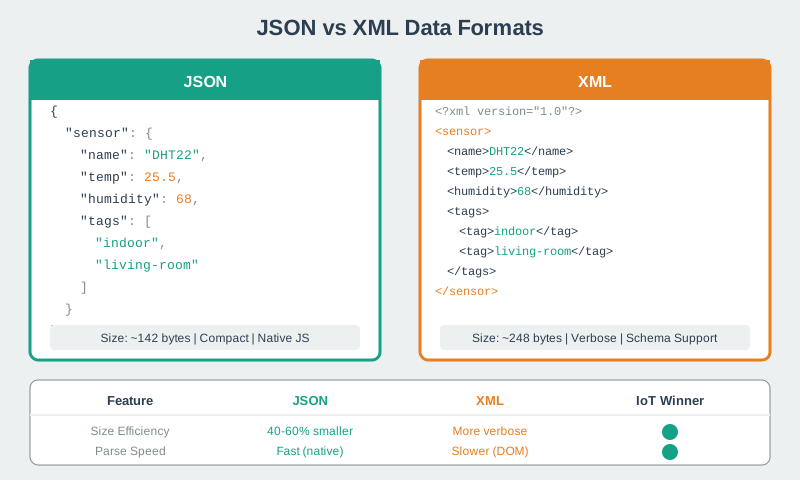
JSON vs XML Comparison (Alternative View)
JSON and XML Format Comparison
JSON and XML are the two most widely used text-based data formats in IoT. This visualization contrasts their structural approaches: XML uses hierarchical tags with explicit opening and closing elements, while JSON uses a more compact key-value notation with curly braces and square brackets. For IoT applications, JSON typically offers 30-50% smaller payloads than equivalent XML, faster parsing on resource-constrained devices, and broader support in modern programming languages and cloud platforms.
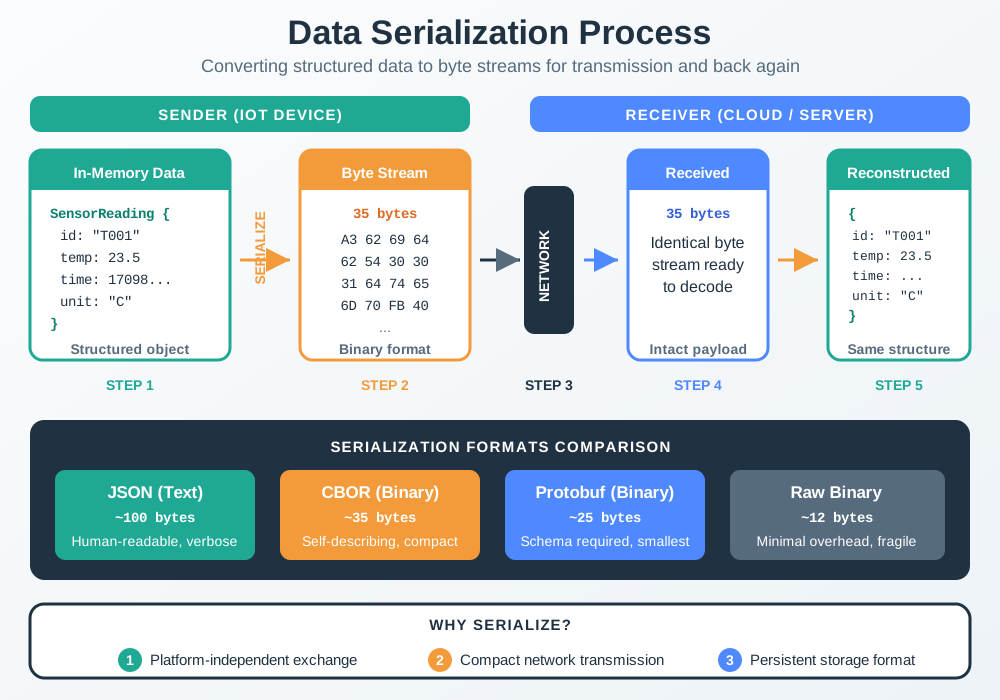
Serialization Process (Alternative View)
Data Serialization Process Visualization
Serialization transforms structured data (objects, arrays, sensor readings) into a sequential byte stream for transmission or storage. This process is fundamental to IoT communication: sensor readings in memory must be serialized before network transmission, then deserialized at the receiving end. The choice of serialization format directly impacts transmission size, parsing speed, and interoperability between heterogeneous IoT devices and cloud services.
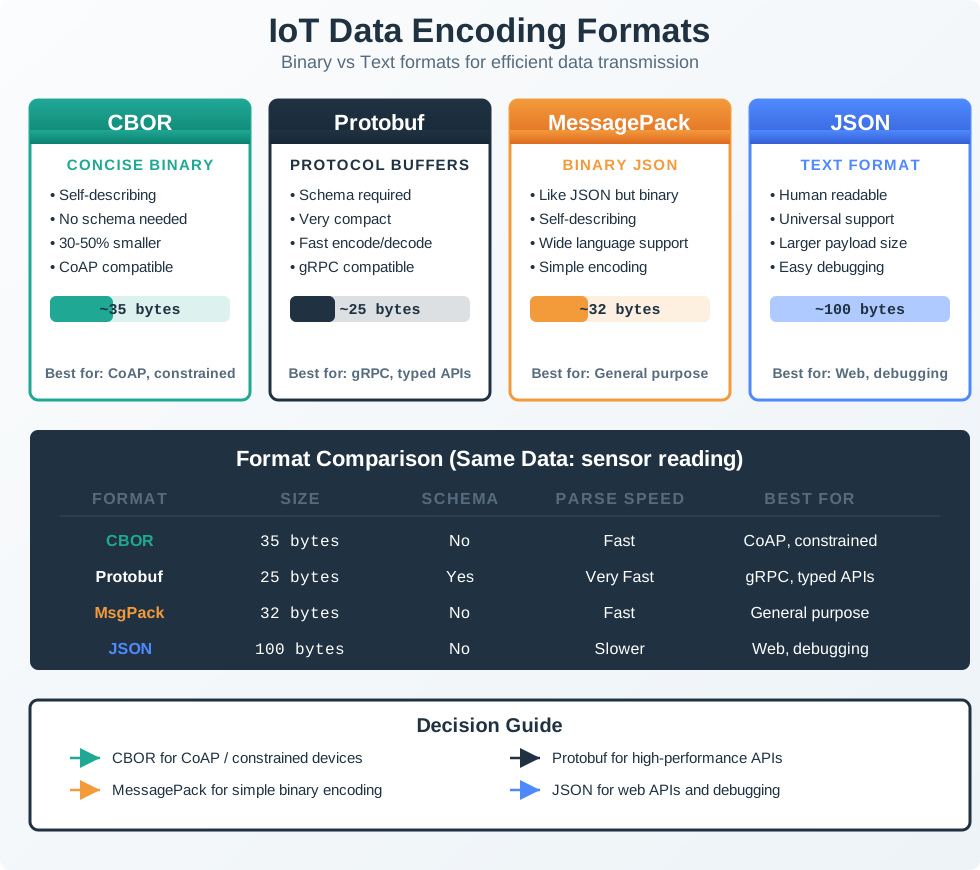
Data Encoding Formats Overview (Alternative View)
Data Encoding Formats for IoT
IoT systems can choose from multiple data encoding formats, each with distinct trade-offs. Text formats (JSON, XML) prioritize human readability and debugging ease. Binary formats (CBOR, MessagePack, Protocol Buffers) optimize for compact size and parsing speed. Custom binary formats offer maximum efficiency but sacrifice interoperability. This visualization helps engineers select the appropriate format based on their bandwidth constraints, processing power, and ecosystem requirements.
Common Mistake: Forgetting to Account for Base64 Encoding Overhead
The Problem:
Many IoT developers optimize their binary format to 10 bytes, celebrate the efficiency, then discover their cloud ingestion pipeline requires Base64 encoding for JSON/REST APIs – adding 33% overhead.
Real Scenario:
Your LoRaWAN sensor sends a perfectly optimized 10-byte binary payload: - Raw binary: 10 bytes - Base64 encoded: 16 bytes (ceil(10/3) x 4 = 16, including padding) - JSON wrapper: {"data":"AQIDBAUG...=="} = 16 + ~14 (quotes/braces/field name) = ~30 bytes
Impact:
Expected: 10 bytes
Actual transmitted: 10 bytes (good!)
Actual stored/forwarded: ~30 bytes (200% overhead!)
LoRaWAN → Cloud gateway bandwidth: 3x larger than expected
Why This Happens:
Base64 encodes 3 bytes as 4 ASCII characters. Most cloud APIs (AWS IoT, Azure IoT Hub, Google Cloud IoT) require JSON, and JSON can’t natively represent binary data, forcing Base64 encoding.
The Solution:
Account for it upfront: Budget 33% overhead when estimating cloud storage/bandwidth costs
Use binary-native protocols: MQTT with binary payloads, CoAP with CBOR, or gRPC
Compress before Base64: If payload is compressible (sensor logs), gzip first
Avoid double-encoding: Don’t Base64 encode, then hex encode, then Base64 again (yes, this happens!)
Example Calculation (1,000 sensors, 96 msgs/day, 10-byte payload):
Sensor → Gateway Raw binary: 10 bytes Base64+JSON: 10 bytes Annual data: 350 MB Cost at $0.10/MB: $35
Gateway → Cloud Raw binary: 10 bytes Base64+JSON: 24 bytes Annual data: 841 MB Cost at $0.10/MB: $84
Savings opportunity: Use a binary-native cloud ingestion protocol to save $49/year per 1,000 sensors.
Interactive Calculator: Base64 Overhead Impact
Show code
viewof binary_payload = Inputs.range([5,100], {value:10,step:1,label:"Binary payload size (bytes)"})viewof num_sensors = Inputs.range([100,10000], {value:1000,step:100,label:"Number of sensors"})viewof msgs_day = Inputs.range([10,200], {value:96,step:10,label:"Messages per day per sensor"})viewof cloud_cost_mb = Inputs.range([0.05,0.20], {value:0.10,step:0.01,label:"Cloud ingestion cost ($/MB)"})
11.9 How It Works: From Sensor Reading to Cloud Ingestion
Understanding the complete data format pipeline helps you make informed encoding decisions. Here’s how a sensor reading travels from measurement to cloud storage.
Step 1: Sensor Measurement The temperature sensor produces an analog voltage (e.g., 2.35V representing 23.5°C). The ADC converts this to a digital value (e.g., 2350 at 0.01V resolution).
Step 2: In-Memory Representation The microcontroller stores this as a float variable temperature = 23.5 (4 bytes in RAM) or could optimize to uint16_t temp_raw = 235 (2 bytes, implied decimal).
Step 3: Format Selection Decision The firmware chooses an encoding format based on: - Connectivity: LoRaWAN (51-byte limit) → Custom binary. WiFi (unlimited) → JSON. - Scale: 10 sensors → JSON is fine. 10,000 sensors → CBOR/Protobuf saves $thousands/year. - Lifespan: 6-month deployment → JSON. 10-year deployment → Protobuf for schema evolution.
Step 4: Serialization The firmware serializes the reading: - JSON: {"device":"A1","temp":23.5,"ts":1702732800} → 44 bytes - CBOR: Binary encoding of same structure → 22 bytes - Custom Binary: Device ID (2 bytes) + temp×10 (2 bytes) + timestamp (4 bytes) → 8 bytes
Step 5: Transmission The serialized payload is transmitted via the chosen protocol: - LoRaWAN adds 13-byte header → Total: 21 bytes (for 8-byte payload) - MQTT adds variable header (~5 bytes) + topic name (~15 bytes) → Total: ~28 bytes - CoAP adds 4-byte header → Total: 12 bytes
Step 6: Gateway Processing The network gateway may transcode the format: - LoRaWAN gateway: Forwards raw 8-byte binary unchanged (good!) - Legacy REST API: Wraps binary in Base64+JSON → 24 bytes (bad! 3x inflation) - Modern binary protocol: Keeps binary encoding → 8 bytes (good!)
Step 7: Cloud Ingestion The cloud service deserializes and stores: - Time-series DB (InfluxDB, TimescaleDB): Optimized columnar storage, ~2-3 bytes/reading long-term - Document DB (MongoDB, DynamoDB): JSON storage, ~40-60 bytes/reading - Data lake (S3 Parquet): Highly compressed, ~1 byte/reading in aggregate files
Key Insight: The format you choose in Step 4 affects battery life (Step 5), gateway costs (Step 6), and cloud storage expenses (Step 7). A 10-byte binary payload that gets Base64-wrapped becomes 24 bytes in cloud storage – always trace the full pipeline!
Cloud Storage (TimescaleDB) JSON: about 40 bytes per JSON document CBOR: about 2.5 bytes when decomposed into columns Binary: about 2.5 bytes when decomposed into columns
What to Observe: Optimizing transmission (sensor→gateway) saves battery. Optimizing cloud ingestion (gateway→cloud) saves bandwidth costs. Optimizing storage format saves long-term costs. You need to consider ALL three.
11.10 Concept Relationships
Understanding how data format concepts interrelate helps you navigate trade-offs:
JSON Depends on: text encoding (UTF-8) and a key-value data model Enables: human-readable debugging and web APIs Common confusion: “JSON is always slower” — false for small payloads with fast parsers
CBOR Depends on: binary encoding and the JSON data model Enables: 30-60% size reduction and stronger typing than JSON Common confusion: “CBOR is the same as JSON” — it is a binary encoding with additional types
Protocol Buffers Depends on: schema definitions (.proto files) and code generation Enables: type safety, schema evolution, and tooling support Common confusion: “Protobuf is too complex for IoT” — the upfront cost pays off at larger scale
Custom Binary Depends on: bit-level encoding decisions and careful documentation Enables: maximum efficiency and domain-specific optimization Common confusion: “Custom binary is always best” — that ignores maintenance, debugging, and interoperability costs
Base64 Encoding Depends on: ASCII representation of binary data Enables: embedding binary content in text protocols such as JSON and XML Common confusion: “Base64 compresses data” — it expands data by about 33%
Schema Evolution Depends on: versioning strategy and backward compatibility planning Enables: long-term deployments that can evolve safely over 5-10 years Common confusion: “Add a version byte to custom binary and you’re done” — migration logic is still required
Endianness Depends on: byte order decisions (big-endian vs little-endian) Enables: correct multi-byte integer serialization Common confusion: “Endianness only matters for multi-platform systems” — it matters for any binary format
Payload Size Depends on: encoding format, data precision, and metadata overhead Enables: lower transmission energy and lower airtime cost Common confusion: “Smaller is always better” — parsing CPU cost can still matter on tiny devices
How These Concepts Work Together:
Choose format family (text vs binary) based on bandwidth constraints
Within binary formats, choose self-describing (CBOR) vs schema-based (Protobuf) vs custom based on scale and lifespan
Account for Base64 encoding if crossing text-based APIs (adds 33% overhead)
Plan schema evolution strategy upfront for deployments lasting >2 years
Document endianness and precision decisions for any custom binary format
Calculate total pipeline cost (sensor→gateway→cloud→storage), not just over-the-air size
Critical Decision Points:
If your deployment has tight bandwidth limits such as LoRaWAN or NB-IoT: Prioritize custom binary or CBOR because payload size directly affects battery life.
If your deployment has 10,000+ devices: Prioritize Protocol Buffers or CBOR because schema validation prevents data corruption at scale.
If your deployment has a 10-year lifespan: Prioritize Protocol Buffers with versioning because schema evolution is inevitable.
If your deployment uses WiFi or Ethernet: Prioritize JSON or CBOR because bandwidth is cheap and debugging ease matters more.
If your deployment spans mixed platforms from Arduino to Python to Java: Prioritize Protobuf or CBOR because language-agnostic formats reduce vendor lock-in.
If your deployment changes schema frequently: Prioritize JSON or CBOR because self-describing formats tolerate ad-hoc fields better.
11.11 Format Matching Challenge
Match each IoT data format to its defining characteristic:
11.12 Format Selection Decision Process
Place the steps for selecting an IoT data format in the correct order:
Common Pitfalls
1. Encoding Sensor Readings as JSON Strings Instead of Numbers
Sending {‘temperature’: ‘23.5’} as a string instead of {‘temperature’: 23.5} as a number forces consumers to parse strings, breaks numeric queries, and increases message size. Validate that all numeric fields are encoded as JSON numbers — this is the most common IoT data format error.
2. Ignoring Schema Evolution When Updating Firmware
Adding a new field to a JSON/CBOR message immediately after a firmware update means old consumers (not yet updated) receive unexpected fields. Use additive-only schema changes (never remove or rename fields), version your schemas, and handle unknown fields gracefully in all consumers.
3. Using Floating Point for All Numeric Fields
IEEE 754 float64 uses 8 bytes per value — a 10-field sensor reading becomes 80 bytes just for numbers. Integer-scaled fixed point (temperature × 100 as int16) reduces the same reading to 2 bytes per value with identical precision for typical IoT ranges.
Label the Diagram
11.13 Summary
Key Takeaways from Practice:
Context matters more than raw size - JSON is often fine for Wi-Fi deployments
Calculate total cost of ownership - Include development, maintenance, and debugging costs
Plan for evolution - Schema changes are inevitable over device lifetimes
Use two-tier strategies - Different formats for local vs cloud communication
Migration requires careful planning - Never remove support for old formats immediately
Practice Checklist:
Can you calculate payload sizes for JSON, CBOR, Protobuf, and custom binary?
Can you design a custom binary encoding for given sensor data?
Can you justify format choices with quantitative analysis?
Can you plan a migration strategy from JSON to binary formats?
For Kids: Meet the Sensor Squad!
Sammy the Sensor has a problem. “I need to send my temperature reading to the cloud, but I only have a tiny envelope to put it in!”
Max the Microcontroller grins. “That’s like choosing how to write a letter! You could write a long, fancy letter with beautiful handwriting (that’s JSON), or you could write a short coded message (that’s binary)!”
Lila the LED holds up examples:
“Dear Cloud, the temperature is 23.5 degrees” = 32 bytes (like JSON – easy to read but long!)
“T:23.5” = 6 bytes (like a text message – shorter!)
Just the number “235” = 2 bytes (like a secret code – super tiny!)
Bella the Battery does a happy dance. “I LOVE the short version! The less Sammy has to transmit, the longer I last! With the tiny code, I can live for YEARS!”
“But wait,” says Sammy, “won’t the cloud be confused by just a number?”
“That’s why we agree on the code beforehand,” Max explains. “We tell the cloud: ‘the first two bytes are temperature times 10.’ It’s like having a secret decoder ring!”
The Squad’s Rule: Pick the format that fits your envelope! Big envelope (Wi-Fi)? Write fancy letters (JSON). Tiny envelope (LoRaWAN)? Use your secret code (binary)!
11.14 What’s Next
Now that you’ve practiced data format selection and design, explore these related topics:
Protocol headers Chapter: Packet Structure and Framing Why it matters: See how your chosen data format fits inside protocol packets and framing layers.
MQTT messaging Chapter: MQTT Fundamentals Why it matters: Implement JSON and CBOR payloads with the most widely used IoT messaging protocol.
Protocol selection Chapter: Protocol Selector Wizard Why it matters: Get interactive recommendations for your specific deployment scenario.
Data formats overview Chapter: IoT Data Formats Overview Why it matters: Review the foundational concepts of text-based formats like JSON and XML.
Binary formats Chapter: Binary Data Formats Why it matters: Revisit CBOR, Protocol Buffers, and custom binary encoding details.
CoAP protocol Chapter: CoAP Fundamentals Why it matters: Explore the lightweight protocol designed for constrained IoT devices using CBOR.