15 Packet Anatomy

More
Depth: Practitioner
Progress saves as you read. Mark sections complete as you go; your progress appears in the sidebar.
15.1 In 60 Seconds
This section: In 60 Seconds — Picture a receiver that accepts a valid packet but assigns the temperature to the wrong device.
Trace One Reading From Header to Value
Picture a receiver that accepts a valid packet but assigns the temperature to the wrong device. Delivery alone cannot prove correct interpretation.
JavaScript Object Notation is a text format for named values; it is shortened to JSON. A payload means the part of a message that carries the application data.
Send one marked message, change its length, damage one field, and repeat it. Keep raw bytes, boundary, header values, JSON schema or other decoder rule, payload, check result, identity, and rejection reason.
This trace covers one packet contract, not the whole network. The deeper sections separate boundaries, headers, application data, checks, and representation rules.
Read a packet as fields, not as one blob of bytes. First find the boundary, then read the header fields that tell the receiver how to handle the message, then decode the payload with its representation contract, and finally validate the check field against the bytes it covers.
15.2 Start With the Story
This section: Start With the Story — You will separate a captured frame into header, payload, and check fields, then explain how the receiver interprets each part.
You will separate a captured frame into header, payload, and check fields, then explain how the receiver interprets each part. Start by marking the frame boundaries and finding the rule that assigns meaning to each byte.
Follow one packet across four beats to see why boundaries, field roles, and validation scope must travel together.
-

Packet Pete: “One message, but the receiver still needs to know what each region does.”
-

Dora and Bex: “The bytes arrived; the parse is still ambiguous.”
-

The team: “Separate control, application data, and the check.”
-

Test Tessa: “Now the receiver can rebuild the reading and validate the packet.”
Read the story panels from the coloured byte regions to the verified output. A receiver first sees one continuous message, and the conflicting parses show that arrival alone cannot reveal field boundaries. The team separates control information, application data, and the check before decoding. In the final panel, reconstruction and validation succeed together, reinforcing the chapter’s claim that packet anatomy is an operational contract rather than decorative labelling.
15.3 A Packet Is Three Regions
This section: A Packet Is Three Regions — A packet is a structured message, not an undifferentiated string of bytes.
A packet is a structured message, not an undifferentiated string of bytes. Read almost any frame as three regions: a header that tells the receiver how to handle the message, a payload that carries the application data, and a trailer or check field that helps detect corruption or tampering.
Packet anatomy is the skill of seeing those regions in raw bytes. It is what lets you debug a capture, compare protocol overhead, confirm what a payload means, and explain why a receiver accepted or rejected a frame.
In real IoT work, those regions appear in different places depending on the layer you are reading. An IEEE 802.15.4 or Ethernet frame has link-layer addressing and checks. An IPv6 or UDP packet adds network and transport headers. A CoAP, MQTT-SN, BLE advertisement, LoRaWAN MAC frame, or custom serial protocol then adds its own type, length, sequence, flags, or application layout. The names change, but the reading habit is the same: identify control fields before trusting the value bytes.
If you only need the intuition, this layer is enough: think of an addressed parcel. The shipping label (header) says where it goes and how to handle it, the contents (payload) are what you actually wanted, and the tamper seal (check field) tells you whether it arrived intact. You read the label before you trust the contents.
That order matters during debugging. In Wireshark, a logic-analyzer capture, a serial monitor, or a gateway log, a temperature value that looks plausible can still be wrong if the length field points to a different boundary, the message type selects another parser, the byte order is reversed, or the check field fails. Packet anatomy keeps the review mechanical: boundary first, control fields second, payload interpretation third, validation last.
Inspect Figure 15.1 and ask which region must be decoded before the payload bytes can be trusted.
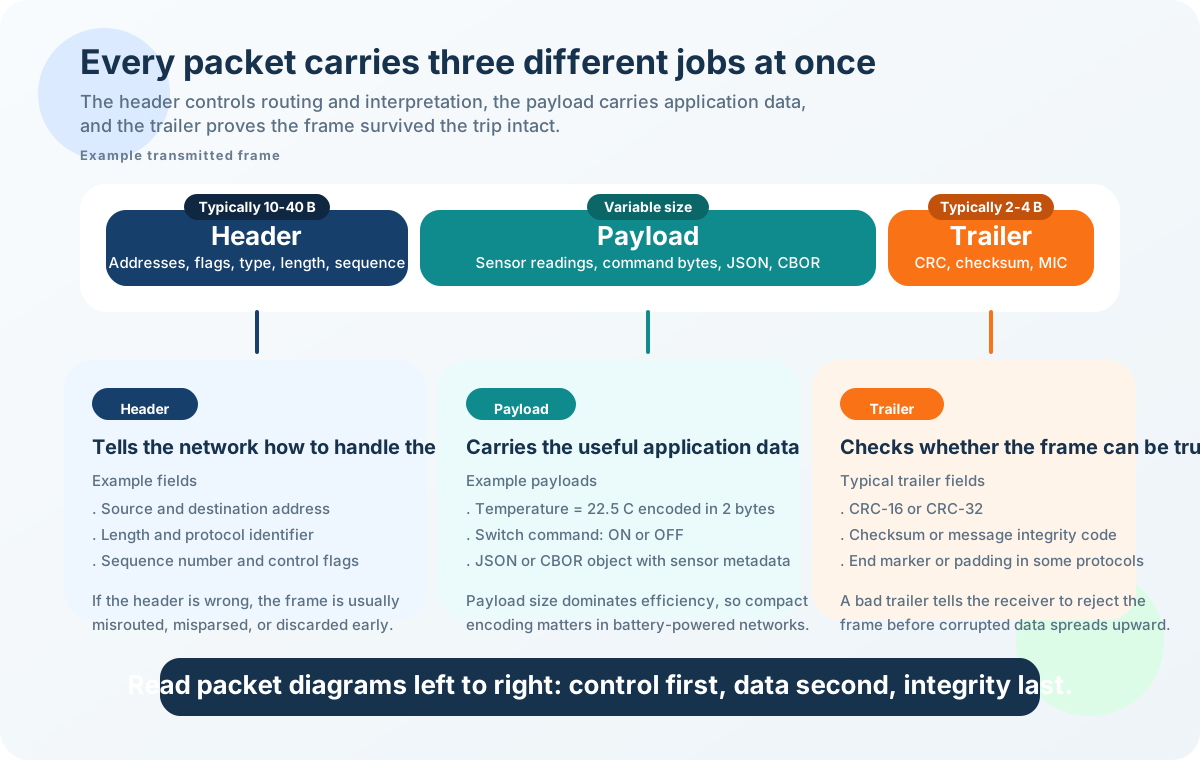
Read Figure 15.1 from header through payload to trailer. Address, type, length, sequence, flags, and version tell the receiver how to handle and delimit the remaining bytes. The payload then gains meaning only through its schema, units, byte order, and encoding contract; a plausible number is not enough. Finally, a checksum, CRC, authentication tag, or end marker tests a defined byte range for corruption or tampering. The order matters because a length or version error can change where the payload and check are believed to begin. This supports the chapter’s debugging method: establish control fields and representation before interpreting values, then validate exactly the integrity coverage the protocol defines.
The One-Minute Read
Header — how to handle it
Address, type, length, sequence, flags, version. The receiver reads this first to decide what to do with the rest.
Payload — the data
The sensor reading, command, or nested message. Meaningful only once you know its schema, units, and byte order.
Trailer / check — integrity
Checksum, CRC, or authentication tag. Tells you whether the bytes survived the trip unchanged.
Beginner Example
A tiny sensor message has a type byte, a two-byte temperature value, and a checksum. The type and length belong to the header, the temperature is the payload, and the checksum is the validation field. Same bytes, three different jobs.
Packet Region Knowledge Check
The core review habit is to identify the boundary and control fields before trusting the payload, then validate the check field against the bytes it is supposed to cover.
15.4 Apply It: Read a Packet by Region
This section: Apply It: Read a Packet by Region — The practical workflow turns raw bytes into a decode record.
The practical workflow turns raw bytes into a decode record. Work in order — boundaries first, then header, then payload, then check — because each step depends on the one before it.
- Find the boundary. Confirm where one packet starts and ends before assigning meaning to any byte.
- Read the header first. Use type, length, address, flags, sequence, or version to decide how the payload should be handled.
- Interpret the payload with a contract. Decode the data only after the schema, units, byte order, and nesting rules are known.
- Check the trailer. Ask which bytes the check covers and what kind of error it can detect.
Worked Decode: AA 03 10 00 EB 7C
Bytes only mean something once a layout assigns boundaries and field roles. Here is one small application frame decoded byte by byte — the hands-on core of this chapter. Try covering the "meaning" column and predicting each field from the layout before you read it.
Change the layout and the same six bytes decode differently. That is the whole point: the receiver and sender must agree on boundaries, field order, and units in advance.
The header map in Figure 15.2 identifies address, length, type, sequence, flags, and version jobs; notice what each field says about routing or decoding.
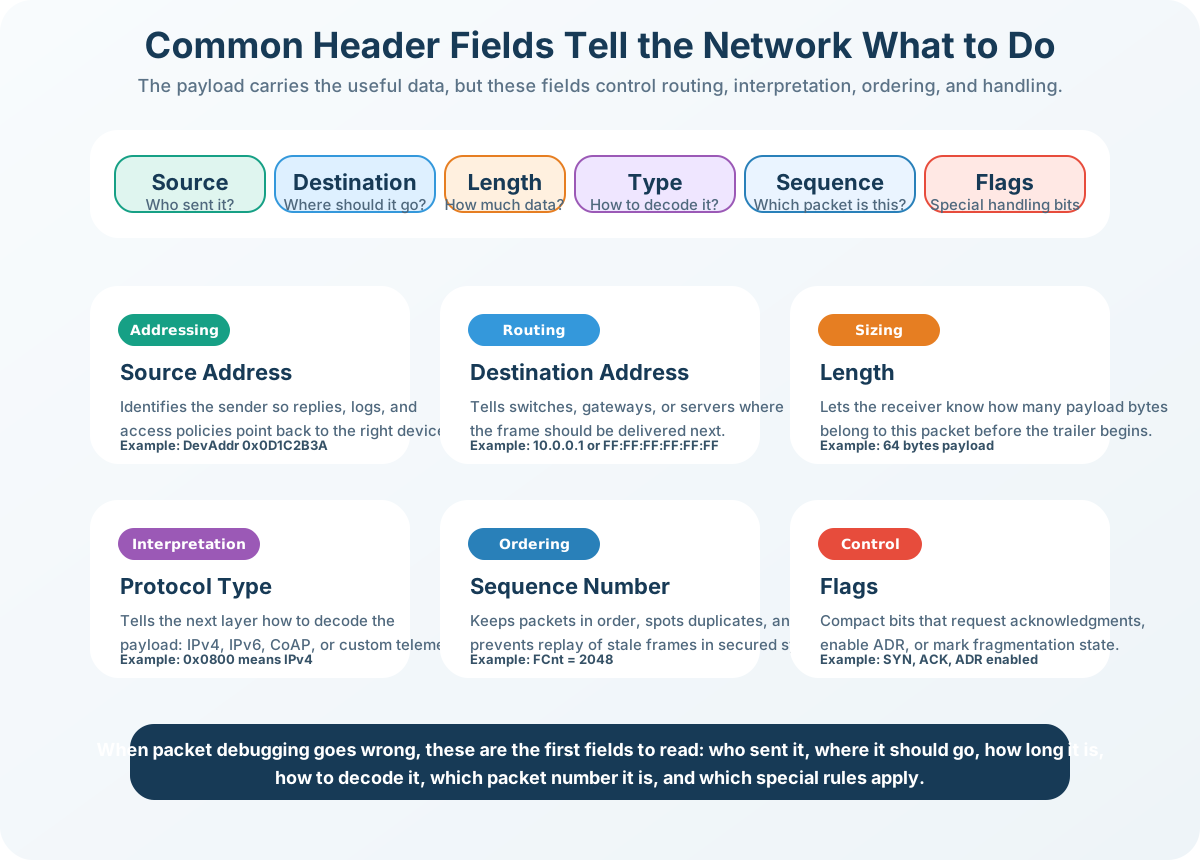
Read the header jobs in Figure 15.2 row by row: address and length, type and sequence, then flags and version. The worked frame below uses a start marker, a length, and a message type before the value and check byte. Its length counts the type together with the value, so field names alone cannot define the parser boundary.
Length Field Knowledge Check
Match Field to Purpose
A useful decode record keeps the raw bytes, boundary rule, header fields, payload contract, check result, and expected accept/reject behavior together.
15.5 Under the Hood: Contracts, Overhead, and Workflow
This section: Under the Hood: Contracts, Overhead, and Workflow — A payload is not automatically self-describing.
The Payload Needs a Representation Contract
A payload is not automatically self-describing. The same bytes can be a fixed binary layout, text, a compact structured format, or a nested packet — and each needs its own contract before the values can be trusted.
Overhead Without Hype
Overhead is the non-payload part of a packet. It is not automatically bad — it pays for routing, reliability, security, ordering, or parsing. Measure it against the requirement, not a universal target.
A small payload share can be perfectly acceptable when the extra fields provide needed addressing, integrity, ordering, security, or compatibility. A 6-byte frame that is 50% header may still be the right design for a noisy, security-sensitive link.
Inspect Figure 15.3 and ask why frame boundaries must be established before any value bytes are interpreted.
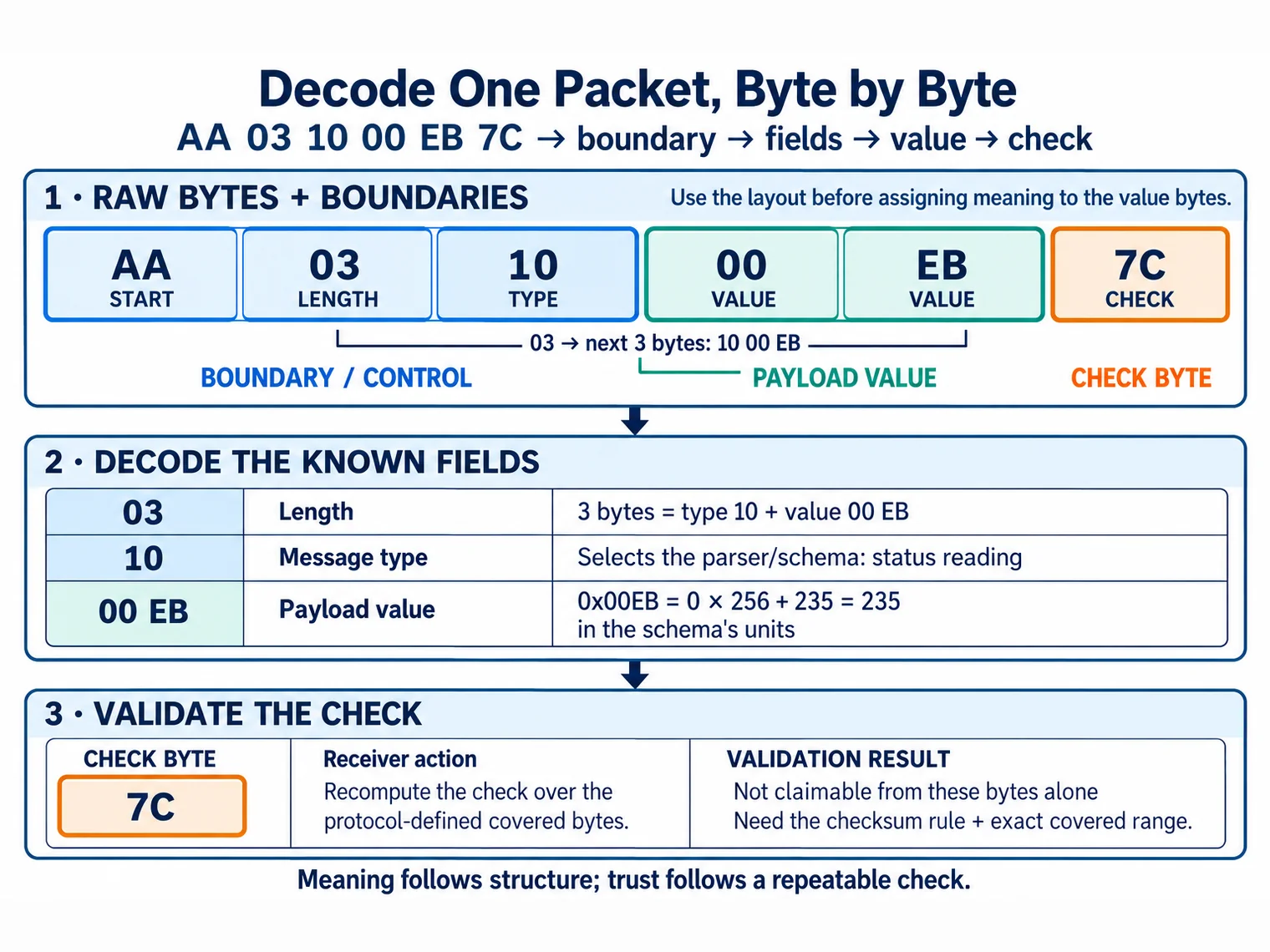
Walk through Figure 15.3 from the raw capture to a saved test. First find the true frame bounds so each later offset points at the right byte. Apply the known field layout next. Only then read the payload with its data form, unit, scale, sign, and byte order. Checksum fields cover only the range set by the protocol. Record whether that check passed. Save the raw bytes, context, meaning, and result so another decoder can repeat the choice. A wrong bound can make every later field look sound but false. Meaning follows structure, and trust follows a repeatable check.
Order the Packet Decode
Label the Packet Review Record
Common Pitfalls
- Guessing field boundaries. Do not split bytes by eye; use the documented delimiter, length, or frame layout.
- Treating the payload as self-describing. Compact bytes, text, and nested formats each need their contract before interpretation.
- Checking the wrong bytes. Integrity fields cover a specific range; confirm exactly which bytes are included.
- Ignoring version and type. The same payload bytes can mean different things under a different message type or version.
At this depth, a packet is a contract: boundaries, field layout, payload representation, and a check whose coverage is known. A good review records all four as a reusable test vector, so the next capture can be decoded the same way.
Packet diagrams compress a lot of design information into a few boxes. Read them as an engineering record, not as decoration.
- Name every field. Write down each field label, byte count, and position before interpreting behavior.
- Find the boundary rule. Identify whether the format uses a length field, delimiter, fixed size, or lower-layer framing.
- Separate payload from control. Keep application data distinct from addressing, routing, ordering, flags, and validation fields.
- Locate validation. Record what check field exists and when the receiver evaluates it.
- Record assumptions. State byte order, units, optional fields, and what changes when a flag is present.
- Test one example. Walk one realistic byte sequence through the diagram and confirm the parser result.
15.6 Checkpoint: Summary
This section: Checkpoint: Summary
- A packet is read as three regions: header (how to handle it), payload (the data), and trailer/check (integrity).
- Header fields describe how to route, order, parse, or version the packet; the length field is boundary evidence, not proof of payload meaning.
- The payload needs a representation contract — fixed layout, text, structured, or nested — before its bytes can be trusted.
- Overhead is the non-payload share; it is useful when it buys addressing, integrity, ordering, or security, so measure it against the requirement.
- A good decode is repeatable: capture → boundary → layout → payload → check → saved test vector.
A packet is a structured contract between sender and receiver. Headers, payloads, addresses, lengths, flags, sequence fields, and checksums only carry meaning when both sides agree on boundaries, field order, and representation.
15.7 See Also
This section: See Also
Packet Framing
How the receiver finds the packet boundary before anatomy can be trusted.
Packet Error Detection
How check fields (checksums, CRCs) support receiver-side validation.
Packet Protocol Overhead
How the regions contribute useful non-payload bytes and how to compare them.
Data Representation
How payload bytes become trusted values through encoding and byte order.
Find help
3 reviewed answers.
Where should I start in a module?
Open the module page from the sidebar to see its chapters in order. Use the module map to return to a topic you need.
Modules and pathsReviewed
What can I try when a project does not work?
Check the symptom, then work through the diagnostic steps. Keep the error message and the smallest example that reproduces it.
When you are stuckReviewed
How do interactive examples work?
Use the interactive guide to check how examples and simulations work before changing your project.
Interactive examples guideReviewed