32 Fading and RF Interference
More
Depth: Practitioner
Progress saves as you read. Mark sections complete as you go; your progress appears in the sidebar.
32.1 In 60 Seconds
This section: In 60 Seconds — Packet loss means that some sent units never reach the other end.
Find Out Whether the Signal Is Weak or Crowded
Packet loss means that some sent units never reach the other end. A gateway is a device or service that joins a local network to another system. A protocol is a set of rules for exchanging data. Received signal strength is a radio’s estimate of received power. The full label is Received Signal Strength Indicator, often shortened to RSSI.
Picture a door sensor that fails only at lunch time. A low power reading may point to distance, walls, or antenna position. A strong reading with poor delivery may point to other radio use. The fixes are different.
Keep time, place, channel, device, received power, noise evidence, retries, and final delivery in one record. Test the weakest spot when the site is quiet and busy. Move the device and antenna in small steps. Change one radio setting at a time.
More transmit power can waste energy or make a nearby sender harder to hear. One average reading can also hide short deep fades. The deeper sections separate path loss, reflected signals, and competing energy so the repair follows the measured failure.
Wireless reliability failures look similar from the application layer: packets arrive late, retries climb, or delivery collapses. The fix depends on separating weak wanted signal, fading variation, and competing RF energy before changing antennas, channels, power, or protocol behavior.
32.2 Start With the Story
This section: Start With the Story — You will distinguish weak coverage, fading, and interference using radio measurements and delivery evidence.
You will distinguish weak coverage, fading, and interference using radio measurements and delivery evidence. Start by comparing signal strength, channel quality, and retries under the conditions where the link fails.
Follow one intermittent link across four beats to see why fading and interference require different evidence and mitigations.
-

Remi: “The same link alternates between clean delivery and retries.”
-

Bex: “A fading path and a noisy channel can look similar until we compare strength with noise.”
-

The team: “Diagnose the cause before choosing placement, channel, or margin changes.”
-

Test Tessa: “The validation record shows the link remains stable under the tested conditions.”
32.3 Fading and Interference Are Not the Same Failure
This section: Fading and Interference Are Not the Same Failure — Fading and interference can both cause packet loss, but they are different problems.
Fading and interference can both cause packet loss, but they are different problems. Fading is variation in the wanted signal caused by distance, shadowing, motion, and reflected copies of the same transmission. Interference is unwanted energy from other transmitters or noise sources that reduces usable signal-to-noise ratio.
The important idea is to keep the two diagnoses separate. A strong RSSI with poor SNR points toward interference; a weak RSSI with poor margin points toward coverage, antenna, or path design.
If you only need the intuition, this layer is enough: wireless links vary over time and space, so an acceptable average can still hide deep fades and busy-hour interference. Measure both how strong and how clean the link is before deciding what to fix.
Think of a conversation in a room. Fading is the other person's voice getting quieter as they move behind furniture; the signal you want changes. Interference is a loud crowd drowning them out even when they are standing right next to you; the wanted voice is there, but the noise wins.
In an IoT deployment, make that distinction with evidence instead of guesswork. Keep the packet-delivery rate, retry count, timestamp, channel or spreading factor, gateway or access-point identity, antenna placement, and movement or occupancy condition beside the RSSI reading. LoRaWAN gateways often expose packet SNR, Wi-Fi tools can show channel occupancy or noise-floor changes, BLE logs commonly expose RSSI variation, and IEEE 802.15.4 systems may expose link-quality or retry evidence. Those fields turn a vague "bad range" complaint into a testable diagnosis.
The same record catches the near-far problem. A nearby transmitter can dominate the receiver front end while a farther transmitter is still valid but much weaker, so "strong signal present" does not prove every sender is decodable. Review received power per sender, SNR, retry bursts, and channel occupancy before increasing transmit power, because extra power can make the near sender even more disruptive.
A weak wireless result needs a diagnosis before a fix. In Figure 32.1, the main path links transmitter and receiver, while a delayed reflection can add to or cancel the wanted signal. Shadowing reduces its margin. The lower labels separate path loss, which sets average strength, from fading, which moves that strength around in time and place. The section adds interference as unwanted energy from other senders or noise sources. Record RSSI, SNR, retries, channel, site position, and time together so those causes can be compared. A site survey or pilot then checks whether the chosen remedy works where the devices will operate.
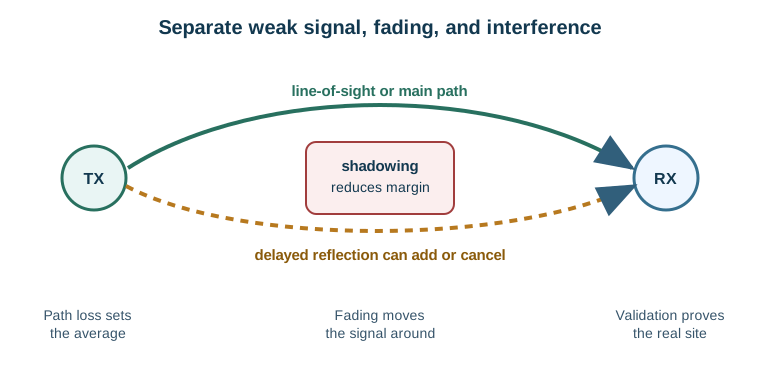
Follow the main and reflected paths between transmitter and receiver in Figure 32.1. Shadowing reduces margin, while delayed reflections can reinforce or cancel the signal. The lower boxes separate average loss from variation and point to validation at the real site.
The One-Minute View
Path loss
The average signal is too low because the link is too long, blocked, poorly oriented, or outside the antenna pattern.
Fading
The average may look fine, but motion, reflections, and objects create local dips below the required margin.
Interference
The wanted signal may still be strong, but competing energy raises the noise floor or occupies the same channel.
Beginner Examples
- A sensor at the edge of a building has weak RSSI and poor delivery; first review distance, walls, antenna orientation, and link-budget margin.
- A mobile asset has acceptable average RSSI but fails at certain positions; that pattern suggests fading or shadowing, so test placement and fade margin.
- A gateway shows strong RSSI but poor SNR during working hours; the likely issue is coexistence, so channel planning and time-of-day evidence matter more than extra power.
RF Failure Knowledge Check
If you can tell the two failures apart in principle, you can stop here. Continue to Practitioner to diagnose a real link with RSSI and SNR.
32.4 Apply It: Diagnose a Wireless Reliability Failure
This section: Apply It: Diagnose a Wireless Reliability Failure — Start with the evidence that distinguishes weak signal, unstable signal, and unwanted energy.
Start with the evidence that distinguishes weak signal, unstable signal, and unwanted energy. RSSI says how much signal the receiver sees; SNR says how much cleaner the wanted signal is than the background and interfering energy.
Walkthrough: Measure, Then Classify
- Measure the wanted link. Record RSSI or received power, antenna placement, receiver mode, and packet delivery.
- Add quality evidence. Record SNR, retry count, channel occupancy, or noise-floor evidence when the platform exposes it.
- Classify the symptom. Weak RSSI points to path loss; unstable readings point to fading; good RSSI with poor SNR points to interference.
- Retest after mitigation. Any placement, antenna, channel, or band change needs a fresh measurement under the failing condition.
The matrix in Figure 32.2 compares RSSI and SNR patterns; use both to separate weak signal, fading, interference, and a healthy link.
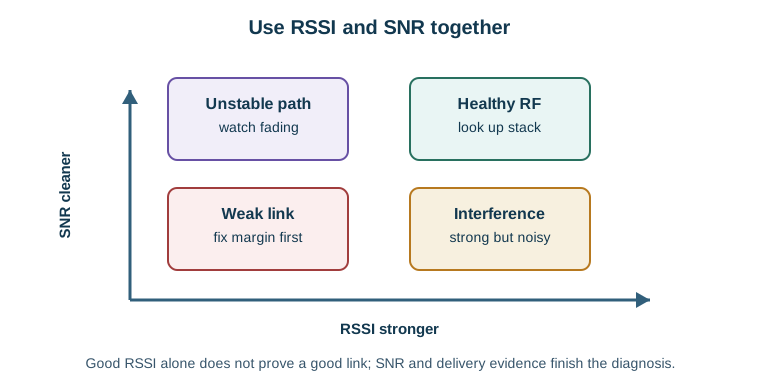
Within the visual Figure 32.2, RSSI stronger establishes the opening checkpoint because it highlights RSSI stronger. SNR cleaner develops the Walkthrough: Measure, Then Classify reading by showing how it highlights SNR cleaner; Weak link completes it by showing where it uses Weak link to locate a communication boundary. The sequence makes The diagnosis matrix: RSSI and SNR together separate weak signal, fading, and interference auditable for Walkthrough: Measure, Then Classify.
Try It: Link Budget and Fresnel Explorer
Fade margin is the link-budget reserve kept for fading and installation variation; the Fresnel zone describes the space around the direct path that obstructions intrude into. Move the distance, frequencies, and clearance and watch how the received margin shrinks, so margin becomes a number you reserve on purpose rather than discover in the field.
Incremental Practice
Beginner
For a node with weak RSSI and poor delivery, list the first three things to review before adding power.
Intermediate
For a mobile asset that fails at certain positions, explain why fade margin and placement come before a channel change.
Advanced
Build a four-row table for weak RSSI, unstable RSSI, good RSSI with poor SNR, and good RF metrics with poor delivery, naming the first evidence for each.
RSSI and SNR Knowledge Check
If you can diagnose a link from RSSI and SNR, you can stop here. Continue to Under the Hood for multipath detail, coexistence, and the release record.
32.5 Under the Hood: Multipath, Coexistence, and the Review Record
This section: Under the Hood: Multipath, Coexistence, and the Review Record — The deeper layer explains why the wanted signal varies and why interference is a coexistence problem rather than a coverage problem.
The deeper layer explains why the wanted signal varies and why interference is a coexistence problem rather than a coverage problem.
Multipath Fading
Multipath occurs when reflected copies of the same packet reach the receiver with different delays and phases. Depending on placement and frequency, those copies can add together or partly cancel the desired signal. The key review terms:
- Slow fading or shadowing: changes from large objects, people, doors, vehicles, shelving, or seasonal layout changes.
- Fast fading: rapid changes from motion and multipath phase shifts.
- Rayleigh-like fading: no dominant line-of-sight path; reflections dominate the received envelope.
- Rician-like fading: a dominant line-of-sight path is present, so fluctuations are usually less severe.
- Fade margin: link-budget reserve kept for fading and installation variation, not wasted power.
This section:
The mathematical gist. A receiver adds arriving electric fields before squaring their magnitude to get power: . At 2.4 GHz, the wavelength is 12.5 cm, so an equal reflected path that travels 6.25 cm farther arrives 180° late and produces the ideal null. Real reflections are unequal, so the null is finite, but small placement changes can still spend many decibels of margin.

This section: — Read the measured RSSI and SNR in Figure 32.3, then consider band, channel, placement, and protocol changes.
Interference and Coexistence
RF interference can come from another network on the same channel, a nearby system leaking into an adjacent channel, bursty equipment that raises the noise floor, or collocated transmitters that overload a receiver front end. Work the evidence before changing hardware:
Read the measured RSSI and SNR in Figure 32.3, then consider band, channel, placement, and protocol changes. Use the lower instruction to retest under the same failure condition before accepting a fix.
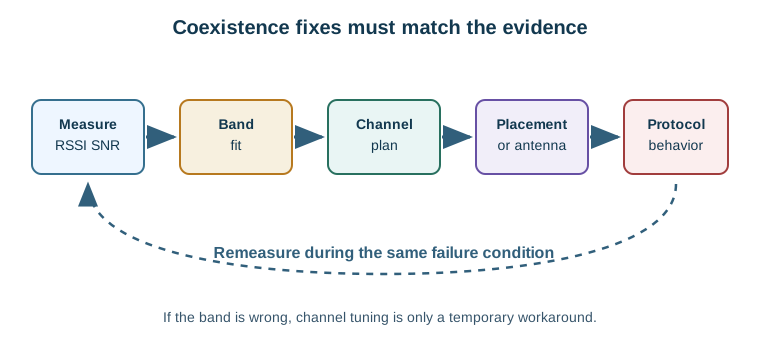
The map in Figure 32.3 links band, channel, and site; compare calm and busy times after a change.
- Record RSSI, SNR, packet delivery, retries, and timestamps.
- Compare quiet periods with peak operating periods.
- Identify whether failures align with a channel, location, schedule, or nearby transmitter.
- Try a channel plan if the band still has usable quiet space.
- Change placement or antenna orientation if receiver overload or local shadowing dominates.
- Change band or link technology if the current band is inherently unsuitable, then remeasure under the same peak conditions.
Channel planning helps when the chosen band still has usable quiet space. It does not fix a continuously occupied band, a receiver overloaded by a nearby transmitter, or an application that needs a range and penetration profile the band cannot provide.
Mitigation Matched to Diagnosis
Add margin
Better placement, antenna gain, diversity, a lower data rate, coding, or gateway location when the link is margin-limited.
Change channel
Move away from persistent co-channel or adjacent-channel energy when the band still has usable spectrum.
Change band
Move to a more suitable band when coexistence, range, penetration, or duty-cycle behavior makes the current band a poor fit.
Change behavior
Use clear-channel assessment, listen-before-talk, adaptive hopping, retries, buffering, or scheduled reporting when protocol behavior is part of the failure.
The record in Figure 32.4 links the link goal to tests and a fix; test again.
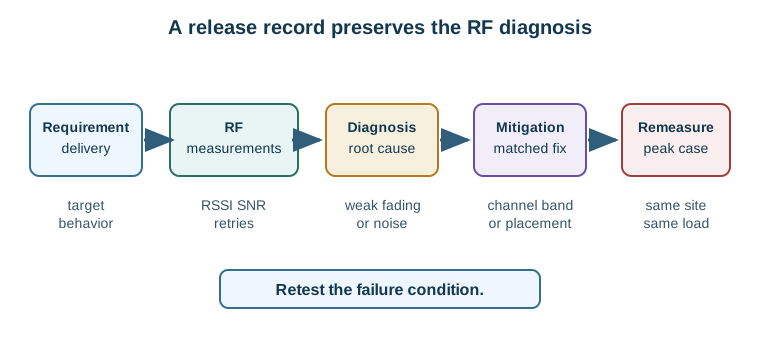
The route in Figure 32.4 starts with link data and ends with a retest; judge the fix there.
A useful release record answers: what delivery, latency, or availability the link must meet; where RSSI, SNR, retries, and delivery were measured; whether measurements covered quiet and peak conditions; what evidence separates weak signal, fading, and interference; which mitigation was chosen and why it matches the diagnosis; and whether the fix was remeasured under the condition that caused the failure.
Common Pitfalls
- Treating every failure as weak coverage. If RSSI is healthy but SNR and delivery are poor, more power may not help and can worsen coexistence.
- Testing only when the site is quiet. A channel that works after hours can fail during normal occupancy or nearby network use.
- Forgetting fade margin. A link that barely passes the spreadsheet can fail when people, doors, inventory, vehicles, rain, or orientation change.
- Changing channels without remeasurement. A new channel is not a fix until delivery, SNR, retries, and margin improve under the original failure condition.
Fade Margin Knowledge Check
At this depth, wireless reliability is shaped by multipath, fading, interference, noise, antenna placement, and movement. The release decision must rest on remeasurement under realistic operating conditions, not on a datasheet or a single quiet reading.
32.6 Summary
This section: Summary
- Fading is variation in the wanted signal; interference is unwanted energy that reduces usable SNR.
- Diagnose with RSSI and SNR together, plus retries, packet delivery, location, and time.
- Weak RSSI points to path loss; unstable RSSI points to fading; strong RSSI with poor SNR points to interference.
- Add fade margin when the wanted signal is unstable or weak; it is a reserve, not wasted power.
- Use channel planning, placement, protocol behavior, or a band change when the channel is crowded.
- The release decision should rest on remeasurement under realistic, peak operating conditions.
32.7 Key Takeaway
This section: Key Takeaway — Wireless reliability is shaped by multipath, fading, interference, noise, antenna placement, and movement.
Wireless reliability is shaped by multipath, fading, interference, noise, antenna placement, and movement. Link tests must include the environment, not just the radio datasheet.
32.8 See Also
This section: See Also
Path Loss and Link Budgets
Put fade margin back into the full receive-power budget for the link.
Practical Wireless Lab
Measure RSSI, SNR, packet delivery, and interference symptoms in the field.
Radio Wave Basics for IoT
Review band, wavelength, antenna, and propagation fundamentals behind placement choices.
Find help
3 reviewed answers.
Where should I start in a module?
Open the module page from the sidebar to see its chapters in order. Use the module map to return to a topic you need.
Modules and pathsReviewed
What can I try when a project does not work?
Check the symptom, then work through the diagnostic steps. Keep the error message and the smallest example that reproduces it.
When you are stuckReviewed
How do interactive examples work?
Use the interactive guide to check how examples and simulations work before changing your project.
Interactive examples guideReviewed