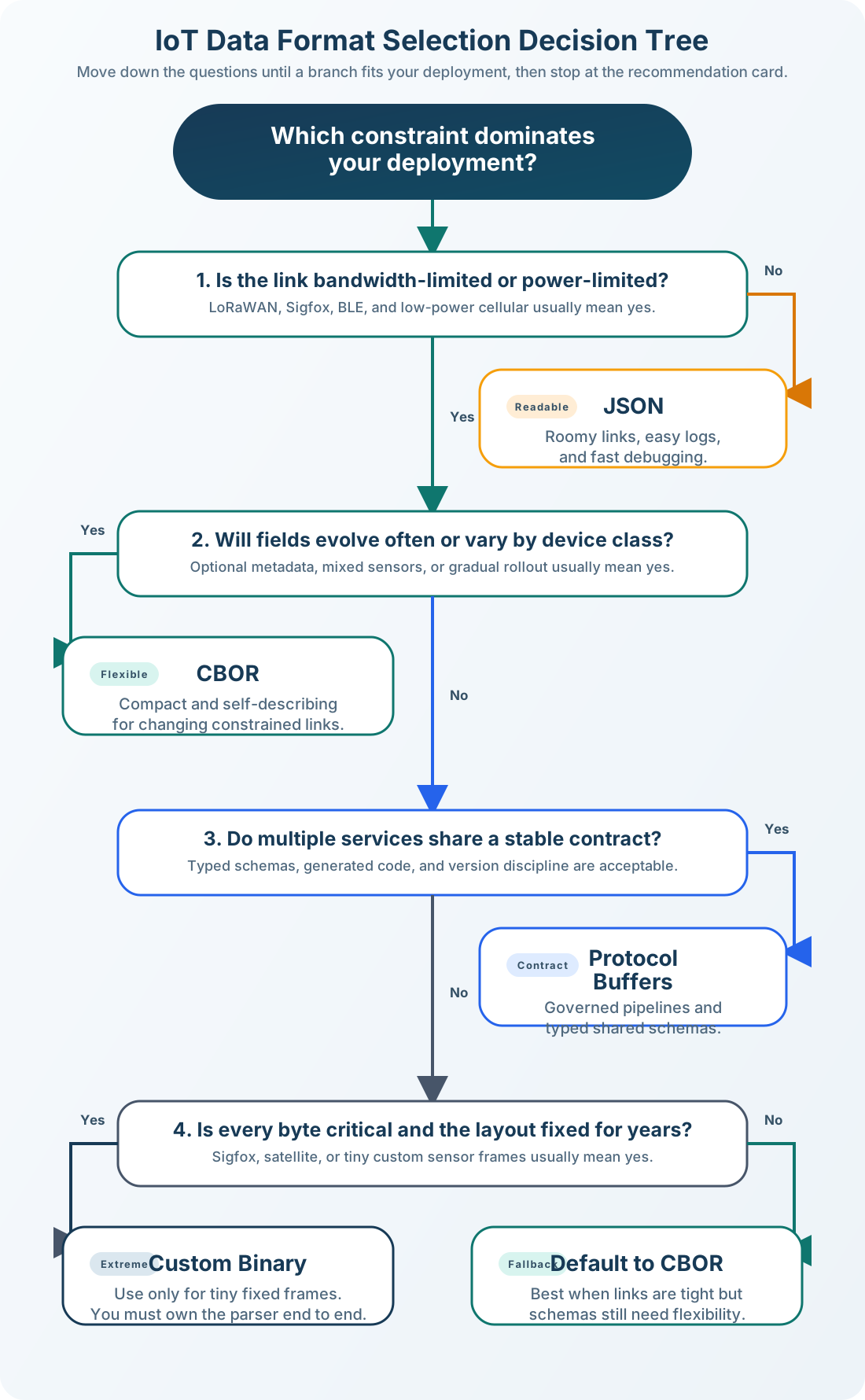
Use the format decision tree to choose between JSON, CBOR, Protobuf, and custom binary. If bandwidth is not constrained (Wi-Fi/LTE), use JSON. If constrained (LoRa/Sigfox), evaluate volume and byte limits to select CBOR, Protobuf, or custom binary. Always consider total cost of ownership – not just payload size.
10.1 Learning Objectives
By the end of this chapter, you will be able to:
Apply the format decision tree: Systematically evaluate constraints to select the right format for a given IoT scenario
Calculate total cost of ownership: Quantify bandwidth, battery, development, and maintenance costs for competing format choices
Classify IoT applications by format suitability: Map real-world use cases to JSON, CBOR, Protobuf, or custom binary based on network and power constraints
Design format migration strategies: Architect a phased transition from JSON to binary formats while maintaining backward compatibility
Justify format decisions to stakeholders: Present trade-off analyses with concrete data on cost, battery life, and schema evolution
CBOR: Binary self-describing format — best choice when schema distribution is impractical and size matters
Protocol Buffers: Schema-enforced binary format — optimal for high-throughput pipelines where schema management is acceptable
Schema Registry: Central repository storing format versions — prevents incompatibility between producers and consumers
Compression: gzip/zstd applied over any format further reduces size 60-80% — beneficial for text-heavy payloads
Self-Description: Format carrying its own type information (JSON, CBOR) versus requiring external schema (protobuf, Avro)
Parsing Overhead: CPU cost to deserialize: JSON (slow, text parsing) < CBOR (fast, binary) < Protobuf (fastest, compiled)
10.2 For Beginners: Data Format Selection
Choosing a data format is like deciding how to pack a suitcase. JSON is like packing in clear labeled bags – easy to see what is inside, but takes more space. Binary formats like CBOR are like vacuum-sealing everything – much smaller, but harder to inspect. For IoT devices with limited battery and slow connections, picking the right format can mean the difference between a sensor lasting one year or five years.
Flowchart decision tree starting with navy Start box asking Choose Data Format. First decision (gray): Bandwidth Constrained? (LoRa, Sigfox, NB-IoT). No path (Wi-Fi, Ethernet, LTE) leads to orange JSON box (Simple, Universal, Best for Wi-Fi/LTE). Yes path (LoRa, Sigfox) leads to second decision: Need Human Readability? (Debugging, Dev). Yes path leads to orange JSON or CBOR with tools box. No path leads to third decision: High Volume? (>1000 devices, >1 msg/min). No path (Small deployment) leads to teal CBOR box (Balance efficiency and flexibility). Yes path (>1000 devices) leads to fourth decision: Every Byte Critical? (e.g., 12 byte limit). No path leads to teal Protobuf or CBOR box (Typed, efficient pipelines). Yes path (Sigfox, ultra-LP) leads to navy Custom Binary box (Ultimate efficiency). Color coding: Navy for start/custom binary, Gray for decision points, Orange for JSON options, Teal for CBOR/Protobuf options.
Format Selection Decision Tree: Interactive flowchart for choosing the right IoT data format based on network constraints and application requirements. The tree starts by evaluating bandwidth constraints (Wi-Fi/LTE vs LoRa/Sigfox). High-bandwidth networks can use JSON for simplicity. Constrained networks require further evaluation: human readability needs (debugging vs production), message volume (small deployment vs high-scale fleet), and byte-level criticality (standard protocols vs ultra-constrained like Sigfox’s 12-byte limit). Each path leads to the optimal format choice balancing efficiency, maintainability, and ecosystem support.
Mobile Decision Tree Summary
Start: Identify whether your network is bandwidth constrained.
If bandwidth is not constrained: Choose JSON for simplicity, debugging, and broad tool support.
If bandwidth is constrained: Ask whether you still need human-readable payloads.
If readability still matters: Choose JSON or CBOR with tooling support.
If readability does not matter: Ask whether you have many devices or high message volume.
If volume is high: Choose Protobuf or CBOR for efficient typed payloads.
If volume is moderate: Choose CBOR for a balance between size and flexibility.
If every byte is critical: Choose Custom binary only when you control both ends and need the smallest possible payload.
10.4.1 Step-by-Step Decision Process
Question 1: Is bandwidth severely constrained?
No (Wi-Fi, Ethernet, LTE): Use JSON for simplicity
Yes (LoRa, Sigfox, NB-IoT): Continue to Q2
Question 2: Do you need human readability for debugging?
Yes: Use JSON or CBOR with tooling
No: Continue to Q3
Question 3: Do you have many devices with high message volume?
Yes (>1000 devices, >1 msg/min): Use Protobuf or CBOR
No (small deployment): Use CBOR for balance
Question 4: Is every byte critical? (Sigfox: 12 bytes max)
Yes: Custom binary format
No: Protobuf or CBOR
Place the format selection decision steps in the correct order:
10.4.2 Interactive Format Cost Calculator
Try this calculator to compare data format costs for your own IoT deployment:
Sigfox parking sensor: 12-byte payload cap; every byte must be planned.
Wearable fitness tracker: BLE power budget; fixed compact frames extend battery life.
Satellite remote monitor: high cost per transmitted byte; smallest practical payload wins.
10.5.1 Application-Format Reference Table
Smart home thermostat: Protocol Wi-Fi + MQTT; format JSON; rationale: bandwidth is plentiful and debugging matters.
Agricultural soil sensor: Protocol LoRaWAN; format CBOR; rationale: bandwidth is limited but flexibility is still needed.
City parking sensor: Protocol Sigfox; format Custom binary; rationale: the 12-byte limit demands a fixed compact structure.
Industrial gateway: Protocol Ethernet + gRPC; format Protobuf; rationale: high volume and strong typing justify schema overhead.
Wearable fitness tracker: Protocol BLE; format Custom binary; rationale: power sensitivity and fixed data structure favor maximum efficiency.
Match each IoT application to its recommended data format:
10.6 Learning Scenario: Soil Moisture Network
Learning Scenario: Choosing a Format for Soil Moisture Network
Your Challenge: You’re designing a precision agriculture system for a large vineyard. You need to monitor soil moisture to optimize irrigation and prevent crop damage.
System Requirements:
100 battery-powered sensor nodes placed throughout vineyard
Cellular backhaul (NB-IoT): $0.01/KB data cost, 250 KB/month included per SIM
Readings every 15 minutes (96 readings/day)
Battery life target: 5 years on 2x AA batteries
Sensors measure: Soil moisture (0-100%), temperature (-20 to 60C), battery voltage (2.0-3.6V), GPS location (once/day)
Your Mission: Choose the optimal data format and calculate the real costs.
10.6.1Step 1: Calculate Message Volume
Think: How many messages per year per node?
Click to reveal calculation
Readings per day: 96 (every 15 minutes)
Days per year: 365
Total messages/year/node: 96 x 365 = 35,040 messages
Fleet total: 35,040 x 100 nodes = 3,504,000 messages/year
10.6.2Step 2: Compare Format Options
You’re considering three formats. Let’s analyze each:
Cons: Largest size, more battery drain for transmission
10.6.2.2Option B: CBOR (Balanced)
Binary encoding with same structure: - Size: 42 bytes per message (46% smaller than JSON) - Pros: 50% bandwidth savings, standard format, easier debugging than custom binary - Cons: Less ecosystem than JSON, requires CBOR library
Battery capacity: 2x AA batteries = 2 x 2500 mAh x 3V = 15 Wh total
Transmission as % of battery (assuming other circuitry uses 50% of battery): - JSON: 7.6 Wh / 7.5 Wh available = 101% of available budget - 4.9 year battery life - CBOR: 4.1 Wh / 7.5 Wh = 55% of budget - 5+ year target achieved - Custom: 1.3 Wh / 7.5 Wh = 17% of budget - 5+ year target easily met
Verdict: JSON fails the 5-year battery life requirement!
Development time: JSON 1 day (JSON libs everywhere); CBOR 2-3 days (CBOR setup); Custom Binary 1-2 weeks (custom parser).
Maintenance burden: JSON Low (standard format); CBOR Medium (CBOR docs); Custom Binary High (DIY everything).
Total 5-year TCO: JSON $5,200 (overage costs); CBOR $0 (no overage); Custom Binary $0 (no overage).
10.6.7Your Recommendation: CBOR (Option B)
Rationale:
Meets battery life target (5+ years) with 46% size reduction vs JSON
Zero overage costs even with summer spike (1.09 MB < 3 MB limit)
Flexible schema - Can add new sensor types without breaking existing nodes
Standard format - CBOR libraries exist for embedded C, Python, cloud processing
Reasonable debugging - Tools like cbor2diag convert binary to human-readable
Moderate setup - 2-3 days to integrate CBOR library, but well-documented
Why not custom binary?
Custom saves only 0.63 MB/year (1.47 - 0.46 MB) per node vs CBOR
Zero cost benefit (both are under data cap)
Battery savings: 2.8 Wh/year = 6 extra months of battery life
Trade-off: 6 months extra battery vs 2 weeks development + ongoing maintenance burden
Verdict: Not worth it unless battery life is absolutely critical
Why not JSON?
Fails 5-year battery life target (4.9 years)
$1,040/year overage costs during summer spike
Total 5-year cost: $5,200 vs $0 for CBOR
10.6.8Real-World Lesson
Key Insight: Don’t just optimize for bytes - optimize for total cost of ownership (TCO): - Data costs - Battery replacement costs (labor + materials) - Development time costs - Maintenance burden costs
In this case, CBOR provides 80% of the efficiency of custom binary with 20% of the engineering effort. The sweet spot!
Bonus: With CBOR, you can easily add new fields (soil pH, nutrient levels) next season without touching deployed hardware - just update the cloud parser. With custom binary, that’s a breaking change requiring firmware updates or protocol versioning.
10.7 Fleet Tracking Quiz
Quiz: Format Selection for Fleet Tracking
Scenario: You’re building a fleet tracking system for 500 delivery trucks. Each truck sends GPS updates:
Cost analysis: Since all formats fit within the $5/month plan, costs are identical: $5 x 500 = $2,500/month
BUT - what if you want to upgrade update frequency to every 10 seconds?
10-second updates (3x more frequent):
JSON: 4.32 MB/month - Still under 50 MB
CBOR: 2.22 MB/month - Still under 50 MB
Custom: 0.96 MB/month - Still under 50 MB
Best choice: CBOR (Option B)
52% smaller than JSON (bandwidth efficient)
Self-describing format (schema flexibility)
Standard libraries available
Easy debugging with CBOR tools
Fits well within data plan even with future growth
Why not custom binary?
Saves only 0.42 MB/month per truck (1% of data plan)
Loses flexibility for schema changes
Harder to debug in production
Not worth the maintenance burden for minimal savings
Real-world lesson: Choose formats based on flexibility and maintainability, not just raw size. CBOR provides 80% of custom binary’s efficiency with 20% of the complexity. In this case, all formats fit comfortably within the data budget, so optimize for developer productivity, not bytes.
Putting Numbers to It: Fleet Tracking Cost Reality
For a cellular-connected fleet tracker, format overhead directly impacts your bill:
The $350/year CBOR→Custom savings seems significant, but amortize the $15K engineering cost: breakeven takes 43 years. For most deployments, CBOR’s sweet spot (half the bandwidth of JSON, standard tooling) wins.
Decision Framework: Format Selection for Your IoT Project
Use this decision framework to choose the right data format based on your specific constraints:
10.7.1 Step 1: Identify Your Primary Constraint
Bandwidth-limited (LoRa, Sigfox, NB-IoT): go to Step 2.
Battery-critical (10+ year lifespan): go to Step 2.
Wi-Fi/Ethernet (bandwidth plentiful): use JSON and stop here.
Rapid prototyping (speed over efficiency): use JSON and stop here.
10.7.2 Step 2: Calculate Your Byte Budget
Total available bytes per message = MTU - Protocol Headers
LoRaWAN SF12: MTU 51; headers 13; available payload 38 bytes.
Sigfox: MTU 12; headers 0; available payload 12 bytes.
NB-IoT: MTU 1500; headers 48 (IPv6 + UDP); available payload 1452 bytes.
BLE (default ATT MTU): MTU 23; headers 3; available payload 20 bytes.
Example: LoRaWAN → 38 bytes available for your sensor data
10.7.3 Step 3: Evaluate Format Options Against Your Payload
For your specific sensor readings, estimate size with each format:
Example: Temperature (16-bit), Humidity (8-bit), Battery (8-bit), Timestamp (32-bit) = 8 bytes raw
Payload fits in JSON within budget: recommended format JSON because it is the simplest and most debuggable option.
Payload doesn’t fit, but deployment is small (<100 devices): recommended format CBOR because it balances efficiency and flexibility.
Large deployment (1000+ devices), stable schema: recommended format Protobuf because it provides tooling, type safety, and ecosystem support.
Ultra-constrained (Sigfox, every byte critical): recommended format Custom binary because it maximizes efficiency.
Schema changes frequently: recommended format CBOR or JSON because schema-less flexibility matters most.
Strong typing required (multi-team): recommended format Protobuf because compile-time validation reduces integration errors.
10.7.5 Step 5: Validate Your Choice
Checklist before committing:
Example Decision:
“We’re deploying 500 agricultural sensors on LoRaWAN SF12. Our payload is 10 bytes raw. JSON doesn’t fit (45 bytes). We’re a 2-person team without Protobuf experience. Schema may evolve (adding soil pH sensor next season). Decision: CBOR – fits in 18 bytes, we can debug with cbor2diag, schema-less flexibility, and our Python backend has native CBOR support.”
Inline Concept Check: Format Selection Mid-Chapter Review
Question 1: A smart building deploys 2,000 temperature sensors over WiFi (100 Mbps available bandwidth). Each sensor reports every 60 seconds. The development team is small (3 engineers) and needs to iterate quickly. Which format should they choose?
Custom binary – maximum efficiency for 2,000 devices
JSON – bandwidth is plentiful, development speed matters more
Protocol Buffers – 2,000 devices justifies the schema investment
CBOR – best compromise between size and flexibility
Show Answer
b) JSON – bandwidth is plentiful, development speed matters more
Reasoning:
WiFi bandwidth: 100 Mbps = 12.5 MB/sec. Even if all 2,000 sensors send simultaneously, that’s ~150 KB (assuming 75-byte JSON payloads). This is 0.001% of available bandwidth – bandwidth is NOT the constraint.
Development speed: Small team (3 engineers) needs fast iteration. JSON requires no schema definition, no code generation, no special tooling. Changes to data structure take minutes, not hours.
Debugging: JSON is human-readable in logs, browser dev tools, and command-line debugging.
Scale: 2,000 devices is significant but not massive. The efficiency gains from binary formats don’t justify the development overhead when bandwidth is unconstrained.
When would the answer change?
If connectivity were LoRaWAN/NB-IoT → CBOR
If scale were 100,000+ devices → Protocol Buffers
If payloads were >1KB → Consider compression or binary formats
Question 2: Your deployed sensors currently use JSON over LoRaWAN (48-byte payload, barely fits in 51-byte limit). You need to add two new sensor readings (4 bytes each). What’s the best migration path?
Compress the JSON with gzip before transmission
Migrate to CBOR (self-describing, gradual rollout possible)
Switch to Protocol Buffers (most efficient)
Remove less important existing fields to make room
Show Answer
b) Migrate to CBOR (self-describing, gradual rollout possible)
Reasoning:
Current state: JSON = 48 bytes, barely fits in 51-byte LoRaWAN limit
Adding 2 fields: JSON would be ~62 bytes (exceeds limit by 21%)
CBOR encoding: Same data = ~25 bytes (fits comfortably with room to grow)
Migration safety: CBOR is self-describing, so cloud can accept both JSON and CBOR during gradual firmware rollout
Library footprint: CBOR libraries are small (~10-20 KB), fit in typical MCU flash
Why not the alternatives?
gzip compression (a): Adds CPU overhead on battery-powered MCU, decompression complexity in cloud, and compressed JSON might still exceed 51 bytes for this payload.
Protocol Buffers (c): Requires schema definition, code generation, larger library footprint. The schema-based approach is harder to evolve gracefully during a live migration.
Remove fields (d): Defeats the purpose (you need MORE data, not less).
Key lesson: CBOR is the ideal migration path from JSON when you need size reduction but want to maintain schema flexibility and enable gradual deployment.
10.8 Try It Yourself: Format Selection Decision
Scenario: You’re designing an industrial vibration monitoring system with these requirements:
Given Data:
50 sensors per factory floor
3 factories (150 sensors total)
Each sensor: 6-axis accelerometer (3 axes × 2 readings each)
Sampling rate: 1 kHz (1,000 samples/second)
Data resolution: 16-bit integers per axis reading (±8g range, 0.001g precision)
Connectivity: Wired Ethernet (1 Gbps available) from sensor to edge gateway
Edge-to-cloud: 4G LTE cellular (10 Mbps uplink)
Development timeline: 6 months to production
Expected deployment lifespan: 15 years
Team size: 8 engineers (4 embedded, 2 backend, 2 data science)
Your Task (Step-by-Step):
Part A: Sensor-to-Edge Format Selection
Calculate the raw data rate per sensor:
Samples/sec: _________
Axes: _________
Bytes per sample (2 bytes × 6 axes): _________
Data rate per sensor: _________ bytes/sec = _________ KB/sec
Calculate total sensor-to-edge bandwidth (150 sensors):
Total data rate: _________ KB/sec = _________ Mbps
Compare this to available Ethernet bandwidth (1 Gbps = 125 MB/sec). Is bandwidth constrained?
Yes / No
Given the latency requirement (<10ms for anomaly detection), which format should you choose for sensor-to-edge?
No. 14.4 Mbps is only 1.4% of 1 Gbps Ethernet capacity.
Recommended format: FlatBuffers or Custom Binary
Reasoning:
Bandwidth is NOT constrained (only 1.4% of capacity)
Latency IS constrained (<10ms for anomaly detection)
At 1 kHz sampling, parsing overhead matters more than transmission size
FlatBuffers enables zero-copy access (edge gateway can read accelerometer values directly from buffer without deserializing)
Custom binary (just 12 raw bytes per sample) is even simpler but lacks schema evolution
Best choice: FlatBuffers – provides zero-copy performance for real-time processing while maintaining schema evolution capability for the 15-year lifespan.
15-year lifespan drove Protobuf choice: Schema evolution is inevitable over that timeline
Common Pitfalls
1. Encoding Sensor Readings as JSON Strings Instead of Numbers
Sending {‘temperature’: ‘23.5’} as a string instead of {‘temperature’: 23.5} as a number forces consumers to parse strings, breaks numeric queries, and increases message size. Validate that all numeric fields are encoded as JSON numbers — this is the most common IoT data format error.
2. Ignoring Schema Evolution When Updating Firmware
Adding a new field to a JSON/CBOR message immediately after a firmware update means old consumers (not yet updated) receive unexpected fields. Use additive-only schema changes (never remove or rename fields), version your schemas, and handle unknown fields gracefully in all consumers.
3. Using Floating Point for All Numeric Fields
IEEE 754 float64 uses 8 bytes per value — a 10-field sensor reading becomes 80 bytes just for numbers. Integer-scaled fixed point (temperature × 100 as int16) reduces the same reading to 2 bytes per value with identical precision for typical IoT ranges.
Label the Diagram
10.9 Summary
Key Decision Factors:
Bandwidth constraints - The primary driver (Wi-Fi vs LoRaWAN)
Scale - Format efficiency matters more at >1000 devices
Battery life - Payload size directly affects transmission energy
Development time - Binary formats require more setup
Schema evolution - How often will your data structure change?
Total cost of ownership - Not just data costs, but development and maintenance
Quick Decision Guide:
Prototyping anything: recommended format JSON.
Wi-Fi/Ethernet, any scale: recommended format JSON.
LoRaWAN, NB-IoT, moderate scale: recommended format CBOR.
1000+ devices, stable schema: recommended format Protobuf.
Sigfox, extreme battery constraints: recommended format Custom binary.
For Kids: Meet the Sensor Squad!
Sammy the Sensor is at the post office, trying to choose how to send a letter.
“I have four choices,” Sammy explains to the Squad:
Lila the LED reads the options:
JSON = Writing a full letter – “Dear Cloud, my temperature is 23.5 degrees Celsius. Yours truly, Sammy.” Clear, but uses lots of paper!
CBOR = A postcard – Same information, but smaller. Like writing in neat tiny print.
Protobuf = A coded telegram – “TEMP=235 STOP” – short and structured, but you need the codebook.
Custom binary = A number on a stamp – Just “235” – the tiniest possible, but only works if everyone knows the secret.
Max the Microcontroller pulls out a chart. “Here’s my decision trick:”
“Got a BIG mailbox? (Wi-Fi)” – Write a full letter (JSON)!
“Tiny mailbox? (LoRaWAN)” – Use a postcard (CBOR) or code (binary)!