21 Turning Signals Into Readings
More
Depth: Practitioner
Progress saves as you read. Mark sections complete as you go; your progress appears in the sidebar.
21.1 In 60 Seconds
This section: In 60 Seconds — Picture a vaccine box with a temperature probe near its outer wall.
Follow One Physical Event Until It Becomes a Trusted Number
Picture a vaccine box with a temperature probe near its outer wall. The screen shows a steady value, but the medicine sits deeper inside. The design team must prove that the number starts with the right physical event before polish, storage, or a chart makes it look convincing.
Trace one known temperature through the sensing part, analog circuit, converter, code, stored record, and user display. At each step, keep source, time, unit, range, expected error, version, and owner. Mark where information can be lost and which later step cannot restore it.
Try known cold and warm points, a moved probe, noise, a loose wire, a value near each limit, a changed reference, a slow clock, and a restart. Compare raw and processed values with an outside reference. Check that a bad stage is visible rather than smoothed into a believable answer.
Keep urgent local protection near the box when a distant service may be late. A remote chart can store trends, but it must not be the only path to a safe response. Keep the raw reading and quality mark when data moves between stages.
This opening does not size every part or prove final accuracy. Practitioner builds the end-to-end measurement test. Under the Hood examines transduction, conditioning, conversion, calibration, timing, number formats, and uncertainty.
Physical signals become trustworthy readings only when the sensing element, conditioning circuit, ADC, and firmware are treated as one evidence chain. Placement decides whether the right phenomenon is observed, conditioning keeps the analog signal useful and safe, and conversion records the conditioned value with known reference, resolution, and timing limits.
21.2 Start With the Story
This section: Start With the Story — You will trace how sensing, conditioning, and conversion determine the quality of a digital reading.
You will trace how sensing, conditioning, and conversion determine the quality of a digital reading. Start with the physical quantity and check how the sensor turns it into an electrical signal.
Follow one physical change across four beats to see how transduction, conditioning, and conversion produce a traceable reading.
-

Physics Phoebe: “The reading begins as a physical change at the sensor.”
-

Bex: “Noise, drift, and a poor range fit can distort what the converter sees.”
-

The team: “Fit the signal at each boundary and keep both raw and processed traces.”
-

Test Tessa: “The digital value is useful because its physical origin remains traceable.”
21.3 A Measurement Is Only as Good as Its Pipeline
This section: A Measurement Is Only as Good as Its Pipeline — A sensor system is a pipeline.
A sensor system is a pipeline. A physical condition becomes an electrical signal, the signal is conditioned, an analog-to-digital converter samples it, and only then does firmware have a number to work with. The full sensor-to-network path has seven stages, but the first three, physical measurement, signal conditioning, and ADC conversion, decide what information is even available to the rest of the system.
The important idea is not "add more bits" or "sample faster." The important idea is that the measurement becomes trustworthy only when the sensor, the analog interface, and the digitizer are designed as one chain.
If you only need the intuition, this layer is enough: treat the sensor as the start of a pipeline, protect the signal before the ADC sees it, and remember that later software can preserve evidence but cannot recreate information lost during acquisition.
Think of a relay race. The first runners set the pace that the rest of the team inherits. If acquisition starts from a weak, noisy, or mis-placed signal, every later stage, including the cloud dashboard, only refines a flawed measurement.
For example, a cold-chain logger can publish perfectly formatted messages while still measuring the wrong thing. If its thermistor is taped to the outside foam wall instead of near the payload, it may track room air after each door opening more than vaccine temperature. If the divider then uses only a narrow part of the ADC range, the graph looks stable but hides poor evidence. The fix starts with placement and range fit, not with the dashboard.
The path in Figure 21.1 shows sensing, signal care, and conversion; check risk at each stage.
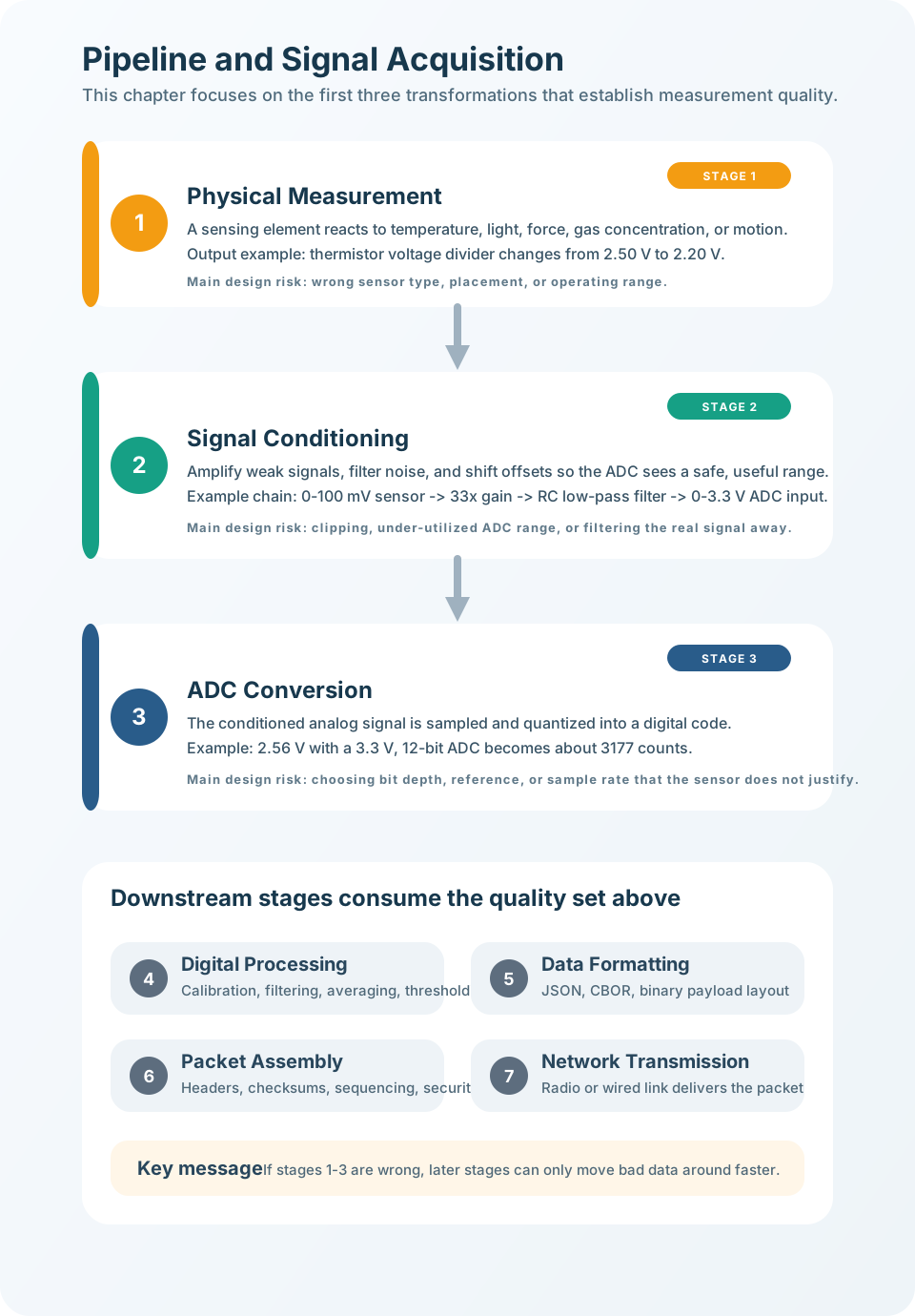
Read the upper three stages of Figure 21.1 downward, from physical measurement through conditioning to conversion. Each stage lists a risk that can damage the reading before the smaller downstream stages process or transmit it.
The One-Minute Pipeline View
Physical measurement
The sensing element responds to a real phenomenon and produces a raw electrical signal. Placement and the right phenomenon matter most here.
Signal conditioning
The analog interface scales, filters, offsets, and protects the signal so it is safe and useful for the converter.
ADC conversion
The converter turns the conditioned voltage into a digital count tied to a reference, bit depth, and sample time.
Beginner Examples
- A slow room-temperature sensor can use a modest sample rate and simple validation because the condition changes gradually.
- A temperature sensor mounted next to a warm regulator may give stable, repeatable, and completely misleading data; the fault is placement, not software.
- A tiny millivolt signal wired straight to a wide ADC range barely moves the count; it needs conditioning before the count means anything.
Pipeline Traceability Knowledge Check
If this gives you the mental model, you can stop here. Continue to Practitioner when you need to build the acquisition chain or debug a wrong reading.
21.4 Apply It: Build and Debug the Acquisition Chain
This section: Apply It: Build and Debug the Acquisition Chain — The practical method is the same whether you are designing a new channel or debugging a wrong cloud value: move along the pipeline from left to right, and let each stage explain the next.
The practical method is the same whether you are designing a new channel or debugging a wrong cloud value: move along the pipeline from left to right, and let each stage explain the next.
Walkthrough: Debug a Reading by Stage
A room sensor reports 32 degrees C while nearby sensors report about 22 degrees C. Check the stages in order instead of editing firmware first.
- State the measurement. Name the physical quantity, expected range, and the fastest change that matters.
- Check the physical output. Measure the raw sensor or divider output. If it matches the real condition, placement and the sensing element are probably fine.
- Check the conditioned signal. Probe the ADC pin. If it is clipped, noisy, or outside the converter range, fix the analog interface before touching code.
- Check the ADC count. Compare the expected count with the register value using the actual reference voltage. A sagging reference makes a correct input look wrong.
- Only then check firmware. Investigate calibration constants, unit conversion, and payload formatting last.
On the 32 degrees C room sensor, this order prevents a common waste of effort. If a meter shows the raw sensing node already sits near the expected voltage for 22 degrees C, the fault may be a gain, reference, or conversion problem. If the raw node itself reads hot, the likely causes move upstream: self-heating, a bad location near a regulator, sunlight on the enclosure, or poor thermal contact with the air being measured.
Follow Figure 21.2 from the physical phenomenon through the sensor to its raw electrical signal. Use the lower checks to connect signal quality with placement, operating range, and calibration.
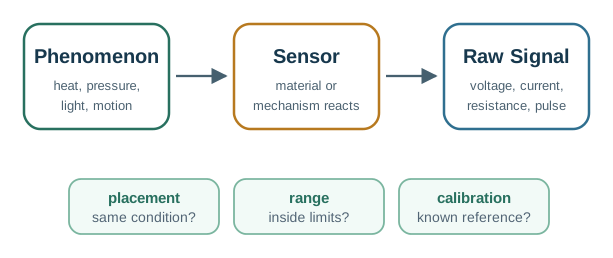
The path in Figure 21.2 turns a real event into a signal; check sensor placement.
Conditioning the Signal
Raw sensor outputs rarely fit the ADC perfectly. Conditioning prepares the analog value with three jobs: scale it into the input range, filter unwanted content before sampling, and offset or protect it so the converter is safe.
Scale
Amplify a small signal that uses only a sliver of the range, or attenuate one that could exceed the input limit.
Filter
Remove high-frequency noise before conversion so it cannot alias into the measured band after sampling.
Offset and protect
Shift bipolar signals into a unipolar range, buffer weak sources, and protect the pin from fault voltages.
Worked Example: Fit a Small Signal to the ADC Range
A sensor produces 0 to 100 mV and the ADC range is 0 to 3.3 V. The range-fit relationship is V_ADC = V_sensor x Gain + Offset. A gain near 33 stretches the 100 mV span across most of the 3.3 V input, so the converter codes carry real detail instead of crowding into a few values near zero.
Evidence for Worked Example: Fit a Small Signal to the ADC Range starts at Figure 21.3 with raw sensor. Contrast Scale against it to make Conditioning chain: scale, filter, offset or protect, and verify before the ADC input reviewable rather than assumed.
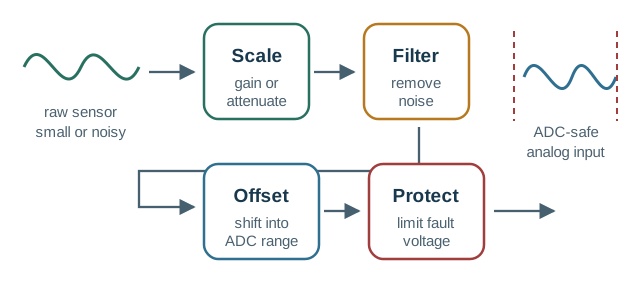
Follow the raw sensor signal across Figure 21.3 as scaling changes its size and filtering removes noise. The offset and protection stages prepare it for a safe ADC input.
Try It: Sampling and Aliasing Visualizer
The ADC stage also has a timing job: sample fast enough for the signal, but not wastefully fast. Move the signal frequency and sample rate and watch the sample points thin out, then cross the Nyquist boundary to see a false lower-frequency pattern appear.
Incremental Practice
Beginner
For a slow room-temperature channel, justify why a low sample rate and modest bit depth still preserve the useful signal.
Intermediate
For a 0 to 50 mV sensor on a 3.3 V ADC, choose a gain and explain how much of the input range it uses.
Advanced
Given an industrial 0 to 10 V output and a 3.3 V ADC, specify the divider or protection needed before the pin.
Signal Conditioning Knowledge Check
If you can build and debug a channel stage by stage, you can stop here. Continue to Under the Hood for the conversion math and the failure modes behind the checks.
21.5 Under the Hood: Conversion Math and Failure Modes
This section: Under the Hood: Conversion Math and Failure Modes — The deeper layer explains why each acquisition stage has its own gate.
The deeper layer explains why each acquisition stage has its own gate. The ADC count is only meaningful when the reference, bit depth, and sample timing are known.
ADC Count and Step Size
For an ideal unipolar ADC with reference V_ref and N bits:
Code ~= V_in / V_ref x (2^N - 1)Step size = V_ref / 2^NA 12-bit, 3.3 V ADC has a step of about 0.806 mV. That number is the amplitude grain, not the sensor's accuracy. Real measurement quality also depends on analog noise, reference stability, calibration, linearity, and the sensor itself.
Read Figure 21.4 from the conditioned input voltage to the digital code. The middle panel shows how reference voltage, bit depth, and sample timing govern conversion; the formulas below connect voltage to counts.
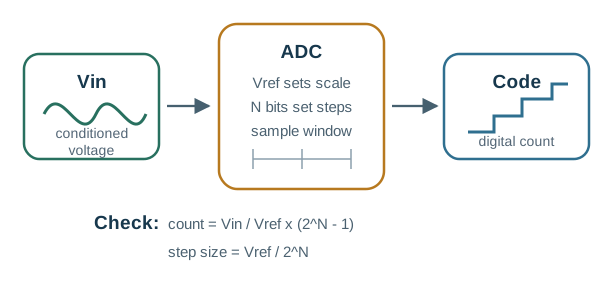
In the diagram Figure 21.4, begin at Vin, which highlights Vin. Shift next to ADC because it highlights ADC, and close on Vref sets scale, which highlights Vref sets scale. This route carries ADC Count and Step Size from ADC conversion: a conditioned voltage and reference produce a quantized count at a chosen sample time into the project record.
Choosing Resolution from Requirements
Map the requirement to a code step before buying bits. For a channel that maps 0 to 100 degrees C across 0 to 3.3 V:
If the sensor itself is only reliable to about 0.5 degrees C, a 12-bit converter already has plenty of quantization headroom. A 16-bit converter does not turn a half-degree sensor into a thousandth-degree instrument.
This section:
The mathematical gist. Across the chapter’s °C span, 12 bits give °C codes and °C RMS quantization noise, about below the sensor’s own °C accuracy. That accuracy carries only effective bits, so a 16-bit converter’s ideal dB SNR cannot recover evidence the sensor never supplied.
This section: — At this depth, acquisition is a chain of limits: phenomenon, placement, conditioning, reference, resolution, and timing.
Debugging by Stage
Common Pitfalls
- Treating ADC bit depth as sensor accuracy. More bits shrink the step size, not sensor noise, calibration error, reference drift, or bad placement.
- Digitizing an unprepared signal. If the raw signal is too small, too noisy, or unsafe, the ADC just preserves the problem as a number. Fix the analog interface first.
- Debugging downstream before acquisition. Dashboards and parsers add their own errors but cannot explain a wrong ADC input. Start at the physical signal.
- Oversampling a slow signal. Sampling a room-temperature channel at kilohertz rates mostly burns power and storage without adding physical information.
ADC Resolution Knowledge Check
At this depth, acquisition is a chain of limits: phenomenon, placement, conditioning, reference, resolution, and timing. A trustworthy channel records each one so firmware starts from meaningful evidence rather than polished uncertainty.
21.6 Summary
This section: Summary
- Physical measurement decides whether the system observes the right condition in the right place.
- Signal conditioning makes the raw analog signal safe, scaled, filtered, and compatible with the ADC.
- ADC conversion turns the conditioned voltage into a digital count using a reference, bit depth, and sample timing.
- Debugging moves left to right: physical condition, raw output, conditioned input, ADC count, firmware value, payload.
- Resolution should be chosen from the required physical change, not from the largest available bit depth.
- Later processing can preserve or corrupt evidence, but it cannot recreate information lost before or during digitization.
The first three stages set the measurement ceiling. A well-designed acquisition chain gives firmware meaningful evidence; a weak one gives firmware polished uncertainty.
21.7 See Also
This section: See Also
Processing and Formatting
Continue with calibration, filtering, engineering units, and payload encoding after acquisition.
Transmission and Optimization
Follow the value into packets, protocols, link behavior, and end-to-end trade-offs.
Signal Processing Essentials
Review sampling, filtering, quantization, and frequency-domain reasoning in more depth.
Find help
3 reviewed answers.
Where should I start in a module?
Open the module page from the sidebar to see its chapters in order. Use the module map to return to a topic you need.
Modules and pathsReviewed
What can I try when a project does not work?
Check the symptom, then work through the diagnostic steps. Keep the error message and the smallest example that reproduces it.
When you are stuckReviewed
How do interactive examples work?
Use the interactive guide to check how examples and simulations work before changing your project.
Interactive examples guideReviewed