8  IoT Data Formats Overview

In 60 Seconds

Data formats are the languages IoT systems use to package the same sensor reading for transport. JSON and XML are easy for humans to inspect but consume more bytes, while CBOR, Protocol Buffers, and custom binary formats reduce payload size at the cost of readability and tooling simplicity. The right choice depends on your bandwidth budget, battery constraints, debugging needs, and deployment scale.

8.1 Learning Objectives

By the end of this chapter, you will be able to:

  • Evaluate format impact on IoT constraints: Analyze how data format choice affects bandwidth consumption, battery life, and development velocity in constrained deployments
  • Compare human-readable formats: Differentiate JSON and XML characteristics for IoT applications based on size, parsing speed, and ecosystem support
  • Classify formats along the readability-efficiency spectrum: Categorize text-based and binary formats (JSON, XML, CBOR, Protobuf, custom binary) by their trade-offs in size, speed, and debuggability
  • Calculate payload overhead costs: Compute the per-message and annual cost of format metadata for real-world sensor deployments at scale
  • Design a format migration strategy: Select an appropriate starting format for prototyping and plan a transition path to more efficient formats as deployments scale

This is part of a series on IoT Data Formats:

  1. IoT Data Formats Overview (this chapter) - Introduction and text formats
  2. Binary Data Formats - CBOR, Protobuf, custom binary
  3. Data Format Selection - Decision guides and real-world examples
  4. Data Formats Practice - Scenarios, quizzes, worked examples

Fundamentals:

Networking:

  • MQTT - Messaging protocol with JSON/binary
  • CoAP - Constrained protocol with CBOR

8.2 Prerequisites

Before starting this chapter, you should be familiar with:

8.3 Sensor Squad: How Do Devices Talk to Each Other?

Meet Temperature Terry, Humidity Hannah, and Pressure Pete! Today they’re learning how sensors send messages to computers.

Imagine you’re sending a letter to a friend in another country…

Cartoon illustration of Sensor Squad characters showing three ways to send the same data: JSON as a long letter, CBOR as a short note, and binary as machine code

Sensor Squad: Different Ways to Send Messages
Figure 8.1: Sensor Squad: Different Ways to Send Messages

8.3.1 The Language Problem

If you wrote a letter in English and sent it to someone who only speaks Japanese, they wouldn’t understand it! The same thing happens with computers and IoT devices.

When a sensor wants to tell a computer “It’s 23 degrees outside,” it needs to say it in a way the computer understands. That’s what data formats are - they’re the languages that devices use to talk!

8.3.2 Different Ways to Say the Same Thing

Let’s say Temperature Terry wants to tell a computer it’s warm outside:

Language How Terry Says It Good For
English (JSON) “The temperature is 23 degrees” People who need to read it
Shorthand (CBOR) “T:23” When you want to save space
Number Code (Binary) “10111” When computers talk fast

8.3.3 A Story: The Three Messengers

Once upon a time, three messengers needed to deliver the same message: “It’s sunny and 25 degrees.”

Messenger 1 (JSON) wrote a beautiful letter: “Dear Computer, Today the weather is sunny. The temperature is exactly 25 degrees Celsius. Have a nice day!” It was easy to read but took a long time to write and a lot of paper!

Messenger 2 (CBOR) wrote a quick note: “Sun. 25.” It was shorter and faster, but harder to read unless you knew the code!

Messenger 3 (Binary) sent dots and dashes like Morse code: “.- .–. .-..” The fastest of all, but only machines could understand it!

8.3.4 Which Language Is Best?

It depends on what you need!

If You Need… Use This Why
People to read it JSON It’s like regular writing
To save battery CBOR or Binary Smaller messages use less energy
Super fast Binary Computers love numbers

8.3.5 Continue Your Journey

Next Chapters:

Related Fundamentals:

Protocol-Specific Examples:

8.3.6 Real Life Example: Your Fitness Tracker

When your fitness tracker counts your steps and sends them to your phone:

  1. The tracker measures: “I counted 5,000 steps today!”
  2. It picks a language: Usually a small format like CBOR (to save battery)
  3. It sends the message: Through Bluetooth to your phone
  4. Your phone translates: Turns it into words and pictures you can see!

8.3.7 Key Words for Kids

Word What It Means
Data Information, like numbers and words
Format The way information is organized
JSON A popular way to write data that people can read
Binary Data written in 0s and 1s (computer language)
Message Data being sent from one place to another

8.3.8 Try This at Home!

Play “Data Format” with a friend: 1. Think of a simple message like “I have 3 apples” 2. Long way (JSON): “I am holding three apples in my basket” 3. Short way (CBOR): “3 apples” 4. Code way: Hold up 3 fingers (no words at all!)

All three say the same thing, but in different ways!

8.4 For Beginners: Why Data Formats Matter

The Problem: How do you send sensor data so another device can understand it?

Sensor reads: Temperature = 23.5°C, Humidity = 65%

How to send it?
Option 1: "23.5,65"          <- Which is which? What units?
Option 2: "temp=23.5;hum=65" <- Better, but custom format
Option 3: {"temp":23.5,"humidity":65}  <- JSON (standard!)

Analogy: Languages for Data

Data formats are like languages—both sides must speak the same one:

Human Languages Data Formats
English JSON
Chinese XML
Morse Code Binary/CBOR

Trade-offs:

  • JSON: Excellent readability, large size, medium parse speed, universal ecosystem
  • XML: Good readability, huge size, slow parse speed, legacy systems
  • CBOR: Binary format, compact size, fast parsing, growing ecosystem
  • MessagePack: Binary format, compact size, fast parsing, moderate ecosystem
  • Protobuf: Binary format, very compact size, very fast parsing, strong ecosystem through gRPC
  • Custom Binary: No readability, smallest size, fastest parsing, DIY-only ecosystem
Key Takeaway

In one sentence: Choose your data format based on bandwidth constraints and debugging needs - JSON for prototyping and high-bandwidth networks, CBOR for most IoT deployments, and custom binary only when every byte matters.

Remember this rule: CBOR gives you 80% of custom binary’s efficiency with 20% of the engineering effort - it’s the sweet spot for most constrained IoT applications.

MVU: IoT Data Format Selection

Core Concept: IoT data formats exist on a spectrum from human-readable (JSON at 100 bytes) to machine-optimized (binary at 10 bytes), and the IETF standardized CBOR as the recommended middle ground for constrained IoT networks.

Why It Matters: Data format directly impacts three critical costs: bandwidth (cellular IoT charges per KB), battery life (larger payloads = longer radio-on time), and development time (binary formats require custom parsers). A smart thermostat sending JSON over Wi-Fi costs nothing extra, but the same thermostat on NB-IoT cellular could cost $50/year more in data fees versus CBOR.

Key Takeaway: Follow the industry standard “50-byte rule”: if your typical payload exceeds 50 bytes, switch from JSON to CBOR. If it exceeds 100 bytes on LPWAN, consider Protobuf or custom binary. For payloads under 20 bytes (most sensors), format overhead matters more than the data itself - a 10-byte reading in JSON becomes 50+ bytes, while CBOR keeps it under 20.


8.5 The Format Spectrum: Human-Readable to Binary

The following diagram illustrates how IoT data formats exist on a spectrum from human-readable (text-based) to machine-optimized (binary):

Spectrum diagram showing IoT data formats from human-readable (JSON, XML) to binary (CBOR, Protobuf, Custom) with size and readability trade-offs

IoT Data Format Spectrum: From Human-Readable to Binary
Figure 8.2: IoT Data Format Spectrum: From Human-Readable to Binary

Key Insight: Each step from left to right trades human readability for efficiency. JSON is easiest to debug; Custom Binary is smallest but requires custom parsers.

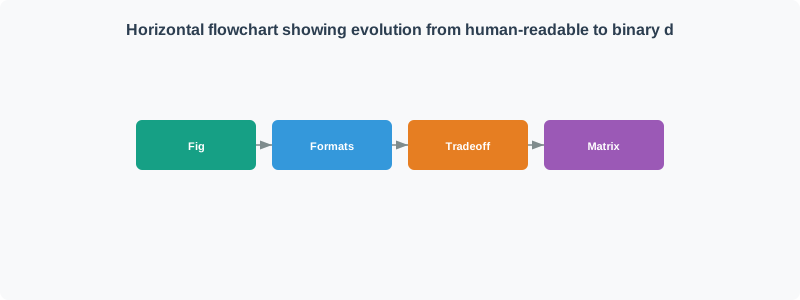
Horizontal flowchart showing evolution from human-readable to binary data formats. Left group (Human-Readable Formats) contains JSON (orange box: Size Large, Speed Medium, Ecosystem Universal, Flexibility Excellent) and XML (gray box: Size Huge, Speed Slow, Ecosystem Legacy, Flexibility Good). Right group (Binary Formats) contains CBOR (teal box: Size Compact, Speed Fast, Ecosystem Growing, Flexibility Good), Protobuf (teal box: Size Very Compact, Speed Very Fast, Ecosystem Strong, Flexibility Schema-based), and Custom Binary (gray box: Size Smallest, Speed Fastest, Ecosystem DIY, Flexibility Rigid). Arrows flow left to right showing progression: JSON to CBOR (Trade size for simplicity), CBOR to Protobuf (Add schema for efficiency), Protobuf to Custom (Remove all overhead). Each transition represents increased efficiency at cost of complexity.

Horizontal flowchart showing evolution from human-readable to binary data formats. Left group (Human-Readable Formats) contains JSON (orange box: Size Large, Speed Medium, Ecosystem Universal, Flexibility Excellent) and XML (gray box: Size Huge, Speed Slow, Ecosystem Legacy, Flexibility Good). Right group (Binary Formats) contains CBOR (teal box: Size Compact, Speed Fast, Ecosystem Growing, Flexibility Good), Protobuf (teal box: Size Very Compact, Speed Very Fast, Ecosystem Strong, Flexibility Schema-based), and Custom Binary (gray box: Size Smallest, Speed Fastest, Ecosystem DIY, Flexibility Rigid). Arrows flow left to right showing progression: JSON to CBOR (Trade size for simplicity), CBOR to Protobuf (Add schema for efficiency), Protobuf to Custom (Remove all overhead). Each transition represents increased efficiency at cost of complexity.
Figure 8.3: Format Trade-off Comparison: Visual comparison of IoT data formats showing the progression from human-readable (JSON/XML) to ultra-compact binary formats. JSON offers universal ecosystem and simplicity but at the cost of size. CBOR balances compactness with flexibility. Protobuf adds schema enforcement for maximum efficiency. Custom binary provides ultimate size optimization but requires complete DIY implementation. The arrows show the trade-offs made when moving from one format to another.

Alternative View:

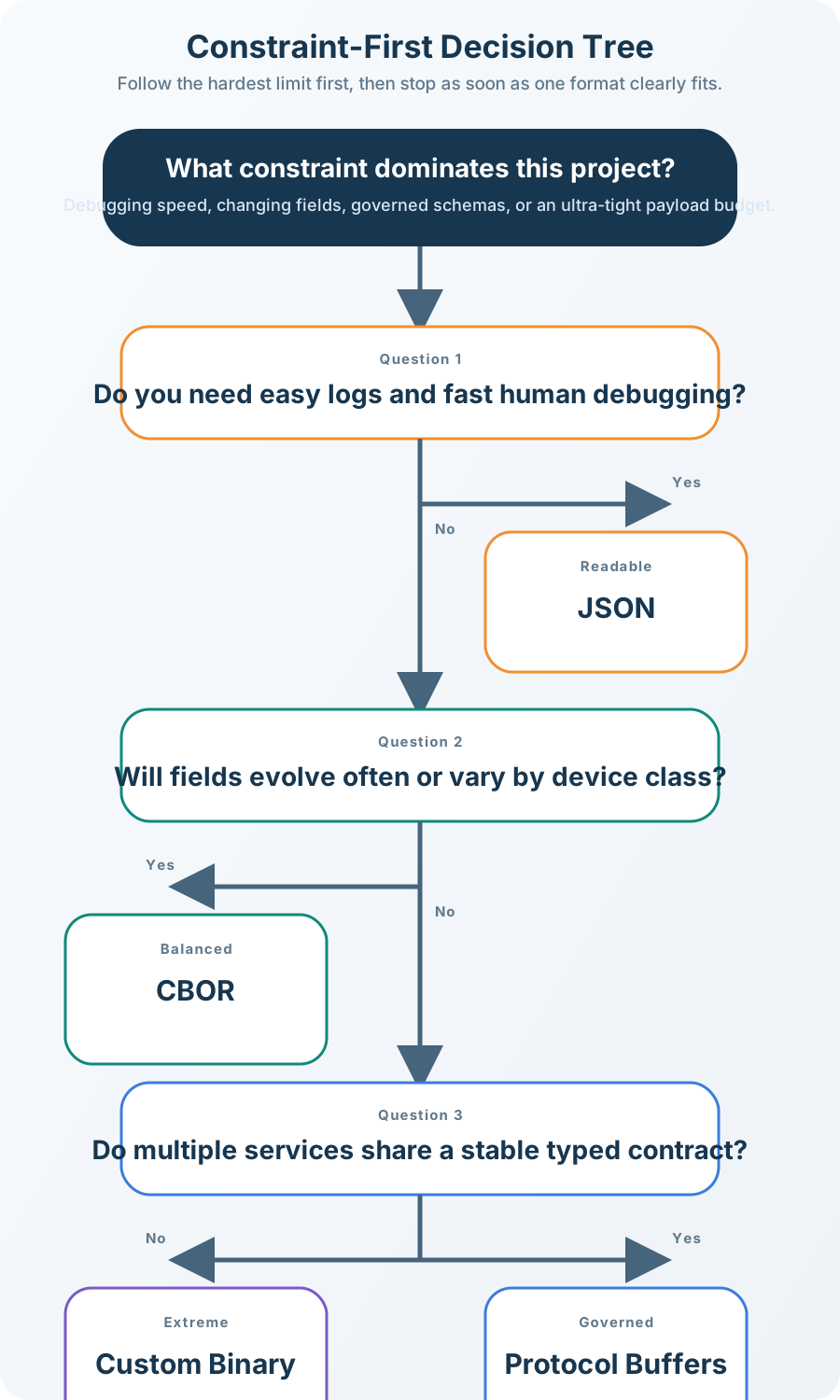
Decision tree flowchart starting with navy box asking Choose Your Data Format. First decision (gray): What is your PRIMARY constraint? Four orange constraint boxes branch out: Bandwidth (LoRa, Sigfox, NB-IoT), Development Speed (Prototype, MVP), Scale (10,000+ devices), and Debuggability (Production monitoring). Development Speed and Debuggability both connect to teal JSON recommendation box showing 95 bytes typical, human-readable, universal tools, fastest development. Bandwidth connects to teal CBOR recommendation showing 50 bytes typical, 47% smaller than JSON, self-describing, good balance. Scale connects to teal Protobuf recommendation showing 22 bytes typical, 77% smaller than JSON, schema-enforced, strong typing. Bandwidth also has secondary path for extreme limits (12-byte max) leading to navy Custom Binary recommendation showing 16 bytes typical, 83% smaller than JSON, zero overhead, maximum efficiency. Color coding indicates decision flow from constraint identification to format recommendation.

Alternative view: Constraint-First Decision Tree - Rather than comparing format features, this decision tree asks “What is your primary constraint?” and guides you directly to the best format. Development speed and debuggability both lead to JSON. Bandwidth constraints suggest CBOR as the balanced choice. Large-scale deployments benefit from Protobuf’s schema enforcement and efficiency. Only extreme byte limits (like Sigfox’s 12-byte maximum) justify custom binary formats. This approach helps students make practical decisions based on real project needs rather than theoretical comparisons.
Figure 8.4

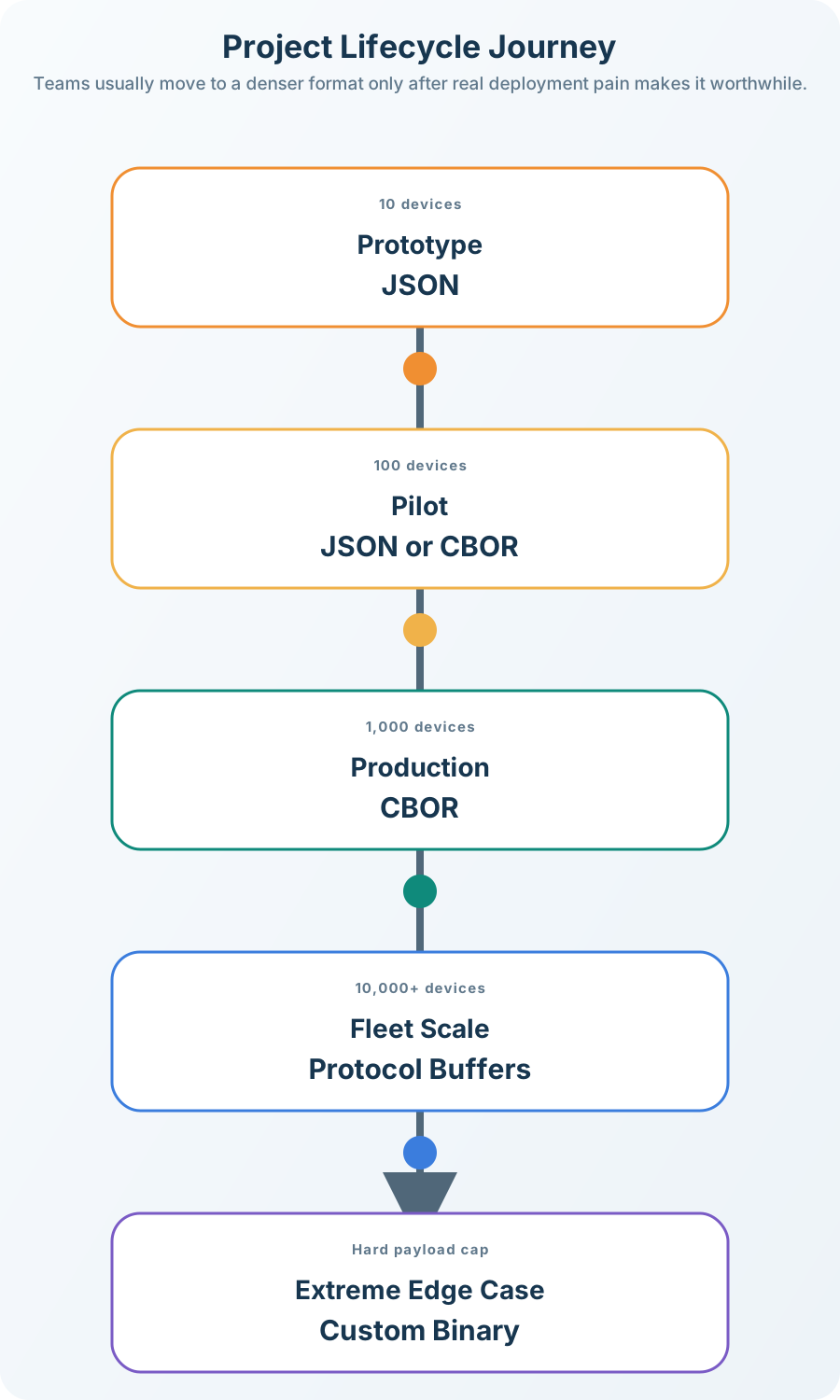
Timeline diagram showing IoT project evolution through 5 phases. Prototype Phase (10 devices): JSON chosen for easy debugging, rapid development, 95 bytes per message. Pilot Deployment (100 devices): Decision point between JSON and CBOR as first bandwidth concerns and cloud costs appear. Production Scale (1,000 devices): CBOR adopted with 50 bytes per message, 47% bandwidth savings, acceptable complexity. High-Scale Fleet (10,000+ devices): Protobuf with 22 bytes per message, schema enforcement, 77% savings critical. Ultra-Constrained (LPWAN/Battery): Custom Binary with 16 bytes per message, maximum efficiency, only when necessary. Timeline flows left to right showing increasing device count and decreasing message size.

Alternative view: Project Lifecycle Journey - This timeline shows how data format choices typically evolve as an IoT project scales. During prototyping, JSON’s readability accelerates development. As the fleet grows to hundreds of devices, bandwidth costs prompt evaluation of CBOR. At thousands of devices, Protobuf’s efficiency becomes essential. Only ultra-constrained scenarios (LPWAN, extreme battery life) justify custom binary’s maintenance burden. This helps students understand that format choice is not static - it evolves with project needs.
Figure 8.5

8.6 Data Encoding Pipeline

Understanding how sensor data flows from measurement to cloud storage helps clarify why format choice matters at each stage.

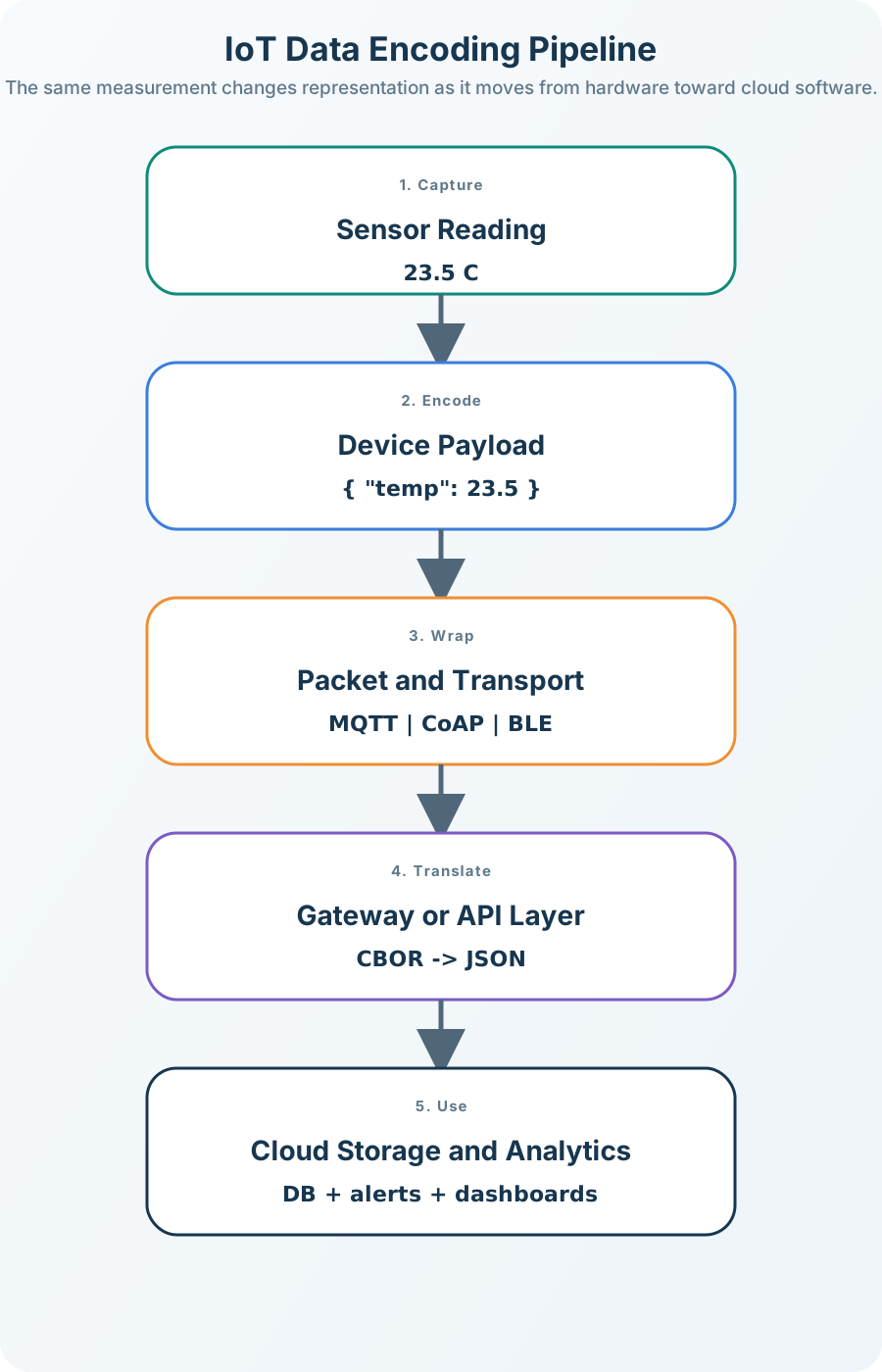
Pipeline diagram showing data flow from sensor through network and gateway to cloud, with format conversion at each stage

IoT Data Encoding Pipeline: From Sensor to Cloud
Figure 8.6: IoT Data Encoding Pipeline: From Sensor to Cloud

Pipeline Stages:

Stage What Happens Format Impact
1. Sensor Raw value encoded into chosen format Smaller format = less encoding time, less memory
2. Network Data wrapped in protocol headers Smaller payload = faster transmission, less power
3. Gateway May convert between formats CBOR-to-JSON common for cloud APIs
4. Cloud Parse and store for analysis JSON easier to query, binary more compact

Key Insight: The format you choose at the sensor determines encoding complexity, transmission cost, and parsing overhead at every subsequent stage.


8.7 Real-World Example: Temperature Reading Comparison

Real-World Example: Same Sensor Reading in 4 Formats

Let’s compare how a simple temperature sensor reading is encoded in different formats. This is the actual data sent over the network:

Sensor data: Temperature = 23.5°C, Device ID = “sensor-001”, Timestamp = 1702732800

8.7.1 Format 1: JSON (Human-Readable)

{
  "deviceId": "sensor-001",
  "temp": 23.5,
  "unit": "C",
  "ts": 1702732800
}

  • Size: 62 bytes
  • Hex dump:
7B 22 64 65 76 69 63 65
49 64 22 3A 22 73 65 6E
73 6F 72 2D 30 30 31 22
2C 22 74 65 6D 70 22 3A
32 33 2E 35 2C 22 75 6E
69 74 22 3A 22 43 22 2C
22 74 73 22 3A 31 37 30
32 37 33 32 38 30 30 7D
  • Overhead: Field names (“deviceId”, “temp”, “unit”, “ts”) + JSON syntax ({, }, :, “,”) = ~35 bytes
  • Readable: Yes, you can read it in a text editor

8.7.2 Format 2: CBOR (Binary JSON)

A4                          # Map with 4 pairs
68 6465766963654964         # "deviceId" (8 chars)
6A 73656E736F722D303031     # "sensor-001" (10 chars)
64 74656D70                 # "temp" (4 chars)
F9 4DE0                     # 23.5 as float16
64 756E6974                 # "unit" (4 chars)
61 43                       # "C" (1 char)
62 7473                     # "ts" (2 chars)
1A 6577F080                 # 1702732800 as uint32
  • Size: 40 bytes (35% smaller than JSON)
  • Overhead: Still includes field names, but uses efficient binary encoding
  • Readable: No, requires CBOR parser

8.7.3 Format 3: Protocol Buffers (Schema-Based)

Schema file (sent once, not with each message):

message SensorReading {
  string deviceId = 1;
  float temp = 2;
  string unit = 3;
  uint64 ts = 4;
}

Binary message:

0A 0A 73656E736F722D303031  # Field 1: "sensor-001"
15 0000BC41                  # Field 2: 23.5 (float32)
1A 01 43                     # Field 3: "C"
20 80F07765                  # Field 4: 1702732800
  • Size: 23 bytes (63% smaller than JSON)
  • Overhead: Field numbers (1, 2, 3, 4) instead of names
  • Readable: No, requires schema + protoc

8.7.4 Format 4: Custom Binary (DIY)

Byte layout:
[0-9]:   deviceId "sensor-001" (10 bytes, ASCII)
[10-11]: temp = 235 (uint16, value × 10 = 23.5°C)
[12]:    unit = 0 (enum: 0=Celsius, 1=Fahrenheit)
[13-16]: timestamp (uint32, big-endian)

Hex: 73656E736F722D303031 00EB 00 6577F080
     |---- device ID ----| temp unit timestamp
  • Size: 17 bytes (73% smaller than JSON)
  • Overhead: Zero! Every byte is data
  • Readable: No, requires custom parser

8.7.5 Size Comparison Summary

Bar chart comparing payload sizes for the same sensor reading: JSON at 62 bytes, CBOR at 40 bytes, Protobuf at 23 bytes, and custom binary at 17 bytes

Data Format Size Comparison for Same Sensor Reading
Figure 8.7: Data Format Size Comparison for Same Sensor Reading

Size comparison at a glance:

  • JSON: 62 bytes; baseline; 16.1M messages per GB; about $620/GB
  • CBOR: 40 bytes; 35% smaller; 25.0M messages per GB; about $400/GB
  • Protobuf: 23 bytes; 63% smaller; 43.5M messages per GB; about $230/GB
  • Custom binary: 17 bytes; 73% smaller; 58.8M messages per GB; about $170/GB

Real-world impact: For 100 sensors sending data every 60 seconds over cellular at $0.01/KB: - Messages per month: 100 sensors × 43,200 msgs/sensor/month = 4,320,000 msgs - JSON (62 bytes): 4,320,000 × 62 = 267.84 MB/month = $2,748/month - CBOR (40 bytes): 4,320,000 × 40 = 172.80 MB/month = $1,772/month (35% savings = $976/month) - Protobuf (23 bytes): 4,320,000 × 23 = 99.36 MB/month = $1,020/month (63% savings = $1,728/month) - Custom (17 bytes): 4,320,000 × 17 = 73.44 MB/month = $754/month (73% savings = $1,994/month)

Key insight: The savings multiply with scale. For a 10,000-sensor deployment, choosing Protobuf over JSON saves $207,360/year in data costs alone!

8.7.6 Interactive: Format Comparison Calculator

Compare different formats for your specific use case:

Show code
viewof compare_sensors = Inputs.range([10, 100000], {value: 100, step: 10, label: "Number of sensors"})
viewof compare_interval = Inputs.range([10, 3600], {value: 60, step: 10, label: "Message interval (seconds)"})
viewof compare_period = Inputs.select(["Month", "Year", "5 Years"], {value: "Month", label: "Time period"})
viewof compare_cost_kb = Inputs.range([0.001, 0.1], {value: 0.01, step: 0.001, label: "Data cost ($/KB)", format: x => `$${x.toFixed(3)}`})
Show code
///| echo: false
comparison_results = {
  const period_multiplier = compare_period === "Month" ? 30 : compare_period === "Year" ? 365 : 1825;
  const msgs_per_sensor = (86400 / compare_interval) * period_multiplier;
  const total_msgs = compare_sensors * msgs_per_sensor;

  const formats = [
    {name: "JSON", bytes: 62, color: "#E67E22"},
    {name: "CBOR", bytes: 40, color: "#16A085"},
    {name: "Protobuf", bytes: 23, color: "#3498DB"},
    {name: "Custom Binary", bytes: 17, color: "#7F8C8D"}
  ];

  return formats.map(f => {
    const total_mb = (total_msgs * f.bytes) / (1024 * 1024);
    const cost = (total_mb * 1024) * compare_cost_kb;
    const reduction = f.bytes === 62 ? 0 : ((62 - f.bytes) / 62 * 100);
    return {...f, total_mb, cost, reduction};
  });
}
Show code
///| echo: false
html`<div style="width:100%; max-width:100%; box-sizing:border-box; background:#f8f9fa; padding:1.25rem; border-radius:8px; border-left:4px solid #3498DB; margin-top:1rem;">
  <h4 style="margin-top: 0; color: #2C3E50;">Format Comparison for ${compare_period}</h4>
  <div style="display:grid; grid-template-columns:repeat(auto-fit, minmax(11rem, 1fr)); gap:0.75rem;">
    ${comparison_results.map(r => `
      <div style="background:white; border:1px solid #d7dee5; border-top:4px solid ${r.color}; border-radius:10px; padding:0.9rem;">
        <div style="display:flex; justify-content:space-between; align-items:flex-start; gap:0.75rem;">
          <div>
            <div style="font-weight:700; color:${r.color};">${r.name}</div>
            <div style="margin-top:0.2rem; font-size:0.85rem; color:#5B6572;">${r.bytes} bytes per reading</div>
          </div>
          <div style="font-size:0.8rem; font-weight:700; color:${r.reduction > 0 ? '#16A085' : '#7F8C8D'}; text-align:right;">
            ${r.reduction > 0 ? `${r.reduction.toFixed(1)}% smaller` : 'Baseline'}
          </div>
        </div>
        <div style="margin-top:0.75rem; display:grid; gap:0.35rem; font-size:0.9rem; color:#334155; line-height:1.4;">
          <div><strong>Data volume:</strong> ${r.total_mb.toFixed(2)} MB</div>
          <div><strong>Estimated cost:</strong> $${r.cost.toLocaleString('en-US', {minimumFractionDigits: 2, maximumFractionDigits: 2})}</div>
          <div><strong>Savings vs JSON:</strong> ${r.reduction > 0 ? `$${(comparison_results[0].cost - r.cost).toLocaleString('en-US', {minimumFractionDigits: 2, maximumFractionDigits: 2})}` : '—'}</div>
        </div>
      </div>
    `).join('')}
  </div>
  <div style="margin-top:0.85rem; font-size:0.86rem; color:#5B6572; line-height:1.45;">
    Assumes ${compare_sensors.toLocaleString()} sensor(s), one message every ${compare_interval} seconds, and data charges of $${compare_cost_kb.toFixed(3)} per KB.
  </div>
</div>`

Over a 5-year deployment, data cost savings compound significantly. Using the formula \(\text{Total Savings} = (\text{Cost}_{\text{JSON}} - \text{Cost}_{\text{format}}) \times \text{Years}\), Worked example: JSON at $2,748/month vs Protobuf at $1,020/month → ($2,748 - $1,020) × 12 months × 5 years = $103,680 saved per 100 sensors over 5 years. For 10,000 sensors: $103,680 × 100 = $10,368,000 in data cost savings from format selection alone.


8.8 JSON - The Universal Choice

JavaScript Object Notation is the most popular IoT data format.

Example:

{
  "deviceId": "sensor-001",
  "temp": 23.5,
  "humidity": 65,
  "timestamp": 1702834567
}

Size: ~95 bytes

Pros:

  • Human-readable, easy to debug
  • Universal support (every language, platform, tool)
  • Self-describing (field names included)
  • Easy schema evolution

Cons:

  • Large overhead (field names, quotes, braces)
  • Inefficient for bandwidth-constrained networks
  • Parsing requires more CPU/memory than binary

Best for: Wi-Fi, Ethernet, cellular IoT where bandwidth isn’t critical

Problem: You have 200 temperature sensors sending readings every 60 seconds over NB-IoT cellular. How much does JSON overhead cost per year?

Step 1: Measure actual vs. data-only payload

{"temp":23.5}  // 13 bytes (JSON with field name + syntax)
23.5           // 4 bytes (raw float32)

Overhead ratio: 9 bytes / 13 bytes = 69% overhead

Step 2: Calculate annual data

  • Messages per sensor per year: 60/hour × 24 hours × 365 days = 525,600
  • Total messages: 200 sensors × 525,600 = 105,120,000
  • JSON data: 105,120,000 × 13 bytes = 1.37 GB/year
  • Raw data content: 105,120,000 × 4 bytes = 0.42 GB/year
  • Overhead: 0.95 GB/year wasted on formatting

Step 3: Calculate cost At $0.01/KB for NB-IoT: - JSON cost: 1.37 GB × 1,048,576 KB/GB × $0.01/KB = $14,336/year - If using binary: 0.42 GB × 1,048,576 KB/GB × $0.01/KB = $4,403/year - Waste from JSON overhead: $9,933/year

Decision: For this deployment, migrating to CBOR or custom binary saves ~$10K annually. At this scale, format choice matters.

8.8.1 Interactive: Calculate Your Data Format Costs

Try this calculator with your own deployment parameters:

Show code
viewof num_sensors = Inputs.range([1, 10000], {value: 200, step: 10, label: "Number of sensors"})
viewof msg_interval = Inputs.range([10, 3600], {value: 60, step: 10, label: "Message interval (seconds)"})
viewof json_size = Inputs.range([10, 200], {value: 62, step: 1, label: "JSON message size (bytes)"})
viewof binary_size = Inputs.range([5, 100], {value: 17, step: 1, label: "Binary message size (bytes)"})
viewof data_cost = Inputs.range([0.001, 0.1], {value: 0.01, step: 0.001, label: "Data cost ($/KB)", format: x => `$${x.toFixed(3)}`})
Show code
///| echo: false
cost_results = {
  const msgs_per_day = num_sensors * (86400 / msg_interval);
  const msgs_per_year = msgs_per_day * 365;
  const json_bytes_year = msgs_per_year * json_size;
  const binary_bytes_year = msgs_per_year * binary_size;
  const json_mb_year = json_bytes_year / (1024 * 1024);
  const binary_mb_year = binary_bytes_year / (1024 * 1024);
  const json_cost_year = (json_mb_year * 1024) * data_cost;
  const binary_cost_year = (binary_mb_year * 1024) * data_cost;
  const savings_year = json_cost_year - binary_cost_year;
  const savings_pct = ((json_size - binary_size) / json_size * 100).toFixed(1);
  return {msgs_per_year, json_mb_year, binary_mb_year, json_cost_year, binary_cost_year, savings_year, savings_pct};
}
Show code
///| echo: false
html`<div style="background: linear-gradient(135deg, #2C3E50 0%, #34495E 100%); padding: 1.5rem; border-radius: 8px; color: white; margin-top: 1rem;">
  <h4 style="margin-top: 0; color: #16A085;">Annual Data Costs</h4>
  <table style="width: 100%; border-collapse: collapse;">
    <tr style="border-bottom: 1px solid rgba(255,255,255,0.2);">
      <td style="padding: 8px;"><strong>Messages/year:</strong></td>
      <td style="padding: 8px; text-align: right;">${cost_results.msgs_per_year.toLocaleString()}</td>
    </tr>
    <tr style="border-bottom: 1px solid rgba(255,255,255,0.2);">
      <td style="padding: 8px;"><strong>JSON cost:</strong></td>
      <td style="padding: 8px; text-align: right; color: #E67E22;">${cost_results.json_mb_year.toFixed(2)} MB → $${cost_results.json_cost_year.toLocaleString('en-US', {minimumFractionDigits: 2, maximumFractionDigits: 2})}</td>
    </tr>
    <tr style="border-bottom: 1px solid rgba(255,255,255,0.2);">
      <td style="padding: 8px;"><strong>Binary cost:</strong></td>
      <td style="padding: 8px; text-align: right; color: #16A085;">${cost_results.binary_mb_year.toFixed(2)} MB → $${cost_results.binary_cost_year.toLocaleString('en-US', {minimumFractionDigits: 2, maximumFractionDigits: 2})}</td>
    </tr>
    <tr>
      <td style="padding: 8px;"><strong>Annual savings:</strong></td>
      <td style="padding: 8px; text-align: right; color: #3498DB; font-size: 1.2em;"><strong>$${cost_results.savings_year.toLocaleString('en-US', {minimumFractionDigits: 2, maximumFractionDigits: 2})} (${cost_results.savings_pct}%)</strong></td>
    </tr>
  </table>
</div>`
Common Mistake: Sending Unnecessary Precision

Problem: Sending temperature as {"temp":23.456789} when sensor accuracy is only ±0.5°C.

Why it’s wasteful:

  • JSON number: 23.456789 = 10 characters = 10 bytes
  • Needed precision: 23.5 = 4 characters = 4 bytes
  • Wasted: 6 bytes per reading

For 1,000,000 readings/year: 6 MB wasted on meaningless decimals.

Fix: Round values to sensor precision BEFORE serializing: {"temp":23.5}. In Python: round(temp_reading, 1). In C: float rounded = roundf(temp * 10) / 10.0.

Additional tip: Use integer representation for efficiency: Send 235 (temperature × 10) and divide on the receiving end. Saves 3-5 bytes per value in JSON.

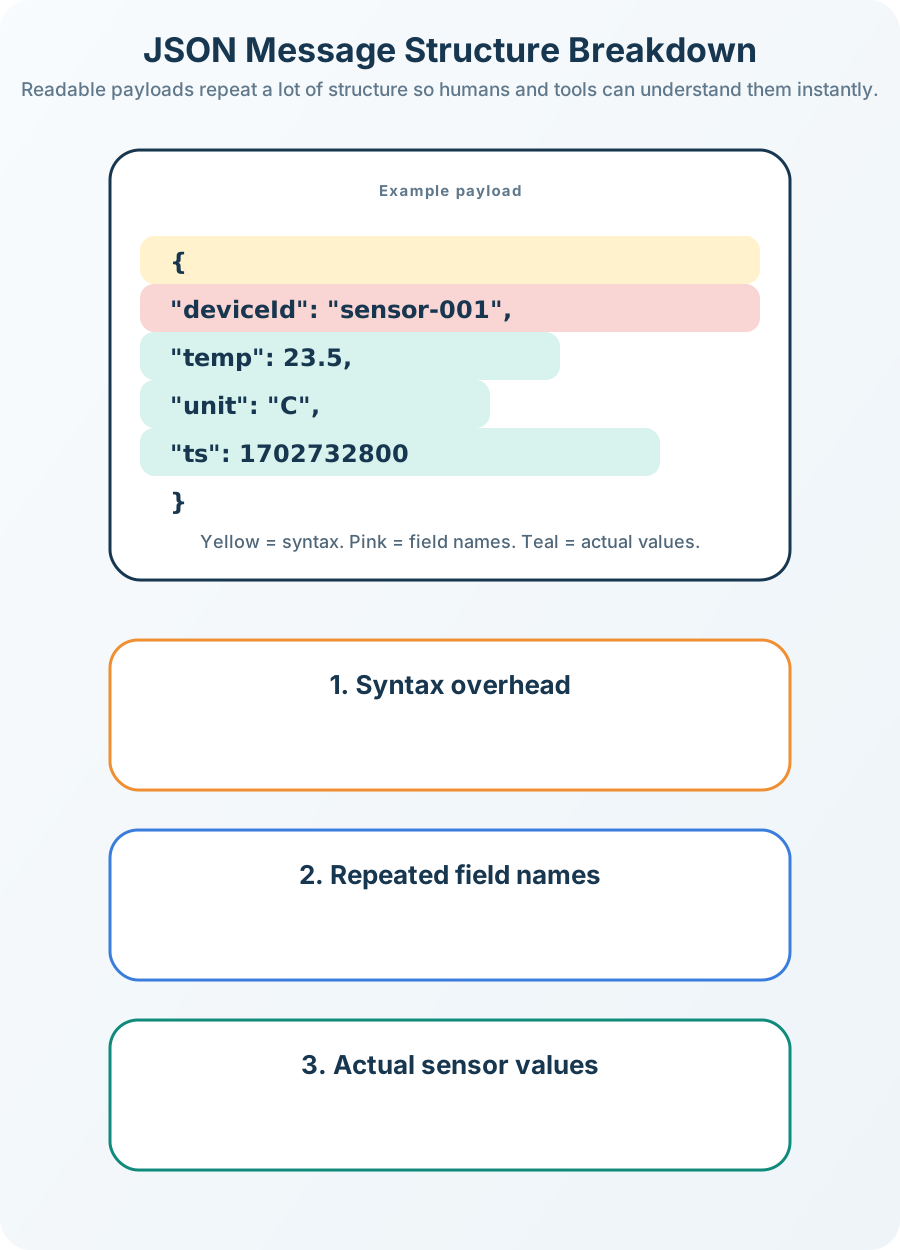
8.8.2 JSON Message Structure

Annotated breakdown of a JSON sensor message showing syntax overhead from braces, colons, quotes, and field names versus actual data content

JSON Message Structure Breakdown
Figure 8.8: JSON Message Structure Breakdown

Overhead Breakdown: In a typical JSON sensor message, only about 35% is actual data. The rest is syntax (braces, colons, quotes) and field names repeated with every message.


Common Misconception Alert: “JSON is Too Heavy for IoT”

Myth: “JSON is too large and slow for IoT systems - you should always use binary formats.”

Reality: It depends on your constraints!

8.8.3 When JSON is Perfect for IoT:

  • Wi-Fi/Ethernet/LTE networks: Bandwidth is plentiful (megabits/sec), JSON’s 60-byte overhead is negligible
  • Development/debugging: JSON is human-readable, reducing debugging time by hours
  • Small deployments: For <100 devices, the total bandwidth difference is often <10GB/year
  • Rapid prototyping: JSON libraries exist in every language, accelerating development
  • Cloud integration: Most cloud IoT platforms (AWS IoT, Azure IoT) default to JSON

8.8.4 When to Consider Binary Formats:

  • LPWAN networks (LoRaWAN, Sigfox, NB-IoT): Bandwidth measured in bytes/sec, not megabits/sec
  • High message volume: >1000 devices sending >1 msg/min = TB/year scale
  • Data cost constraints: Cellular data at $0.01/KB x 1 million messages = $620 (JSON) vs $170 (custom binary)
  • Power-critical devices: Transmitting 60 bytes vs 17 bytes = 3.5x more radio energy

8.8.5 Real-World Data Point:

Smart thermostat (Wi-Fi, 1 message/5 minutes): - Messages per year: 12 msgs/hour × 24 hours × 365 days = 105,120 msgs - JSON: 105,120 × 62 bytes = 6.52 MB/year = $66.81/year per device at $0.01/KB - Custom binary: 105,120 × 17 bytes = 1.79 MB/year = $18.33/year per device - Savings: $48.48/year per device

Verdict: For a 1,000-home deployment, JSON costs $48,480/year more than custom binary. Is that worth the engineering complexity of maintaining a custom format? Depends on your business model!

Key Lesson: Don’t optimize prematurely. Start with JSON, measure your actual bandwidth usage, then optimize if needed. Many production IoT systems run JSON happily for years before hitting bandwidth limits.

When binary formats actually matter:

  1. Agricultural soil sensor (LoRaWAN): 12 readings/day x 60 bytes JSON = 720 bytes/day - Exceeds LoRaWAN daily limit! Must use CBOR or custom binary.
  2. City parking sensor (Sigfox): 12-byte message limit - Must use custom binary, no choice.
  3. Fitness tracker (BLE): 1 reading/sec x 60 bytes x 3600 sec/hour = 216 KB/hour - Drains battery! Must use efficient binary format.

Bottom line: Use JSON by default. Switch to binary formats when you have actual evidence (measurements, not assumptions) that bandwidth or power consumption is a problem.

8.8.6 Format Selection Decision Tree

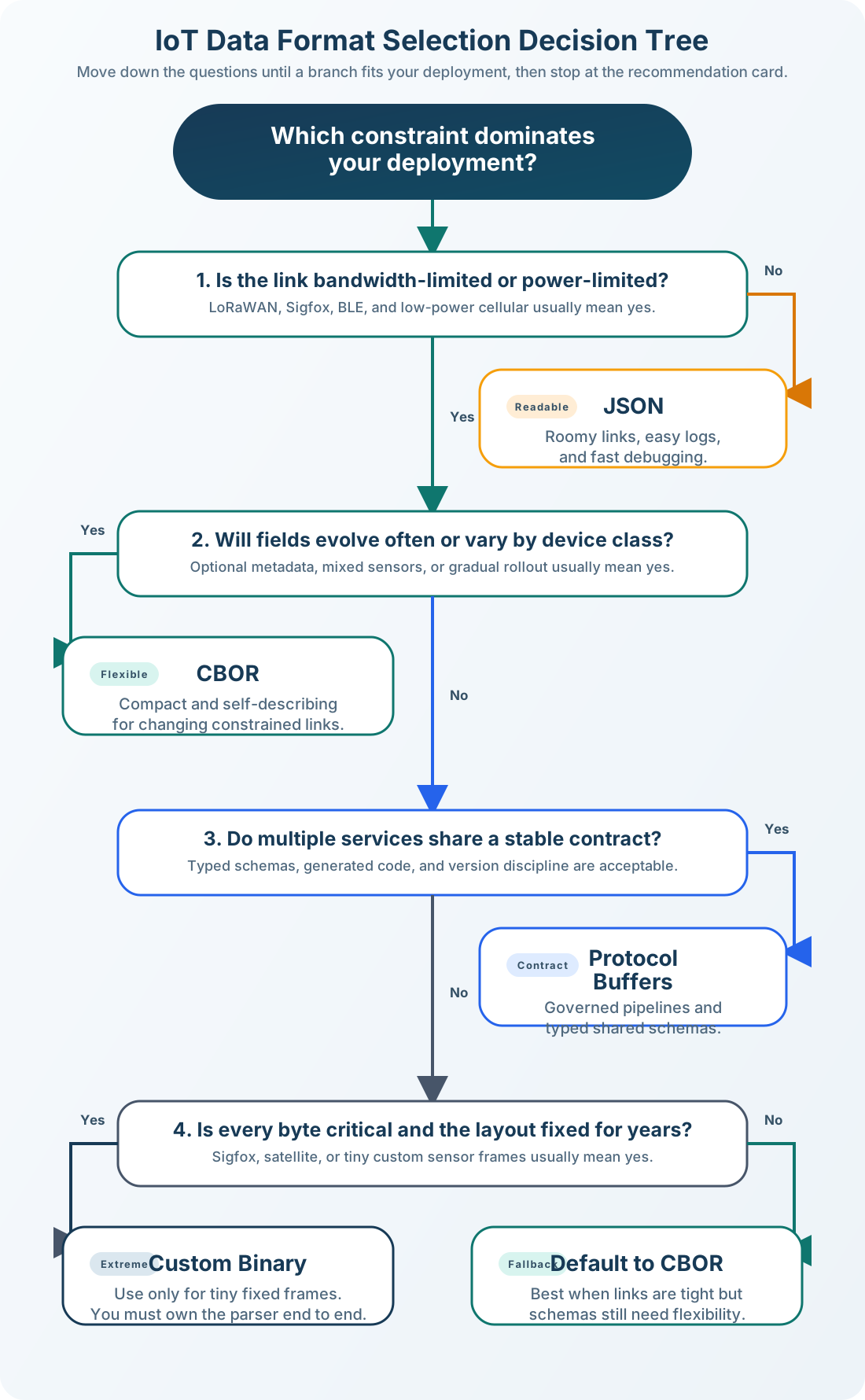
Use this decision tree to quickly identify the right format for your IoT application:

Decision tree for selecting IoT data formats based on bandwidth constraints, device count, and debugging needs, guiding to JSON, CBOR, Protobuf, or custom binary

IoT Data Format Selection Decision Tree
Figure 8.9: IoT Data Format Selection Decision Tree

Reading the Tree: Start at the top and follow the path based on your constraints. Most IoT projects should land on JSON (prototyping) or CBOR (production). Only use custom binary when you have proven, measured bandwidth problems.

8.8.7 Check Your Understanding: Format Strategy


8.9 Knowledge Check


Common Pitfalls

Sending {‘temperature’: ‘23.5’} as a string instead of {‘temperature’: 23.5} as a number forces consumers to parse strings, breaks numeric queries, and increases message size. Validate that all numeric fields are encoded as JSON numbers — this is the most common IoT data format error.

Adding a new field to a JSON/CBOR message immediately after a firmware update means old consumers (not yet updated) receive unexpected fields. Use additive-only schema changes (never remove or rename fields), version your schemas, and handle unknown fields gracefully in all consumers.

IEEE 754 float64 uses 8 bytes per value — a 10-field sensor reading becomes 80 bytes just for numbers. Integer-scaled fixed point (temperature × 100 as int16) reduces the same reading to 2 bytes per value with identical precision for typical IoT ranges.
8.10 Summary

Summary diagram of IoT data format concepts: format spectrum from JSON to binary, key trade-offs, encoding pipeline stages, and selection criteria

IoT Data Formats: Key Concepts Summary
Figure 8.10: IoT Data Formats: Key Concepts Summary

Key Points:

  • Data formats are the “languages” devices use to communicate
  • JSON is human-readable but verbose (~95 bytes for typical sensor data)
  • Binary formats (CBOR, Protobuf) reduce size by 35-77%
  • Format choice impacts bandwidth costs, battery life, and development time
  • Start with JSON for prototyping, optimize later if needed
  • Gateway layer typically converts between formats (binary to JSON for cloud APIs)

Format Overview Table:

Format overview at a glance:

  • JSON: large baseline size; excellent readability; best for Wi-Fi, prototyping, and debugging
  • XML: very large; good readability; best for legacy systems
  • CBOR: 35% smaller; binary format; best for LoRaWAN, NB-IoT, and CoAP
  • Protobuf: 63% smaller; binary format; best for high-volume systems and gRPC
  • Custom binary: 73% smaller; binary format; best for Sigfox and ultra-low-power deployments

8.11 What’s Next

Now that you can evaluate data format trade-offs and calculate payload overhead costs, explore these related topics:

  • Binary Data Formats: CBOR, Protocol Buffers, and custom binary encoding Deep dive into the binary formats introduced in this overview.
  • Data Format Selection: decision frameworks and selection guides Apply format trade-off knowledge to real project decisions.
  • Data Formats Practice: scenarios, quizzes, and worked examples Reinforce concepts with hands-on exercises.
  • Data Representation: binary, hexadecimal, and byte encoding Build foundational encoding skills that underpin all formats.
  • Packet Structure and Framing: protocol headers and payload wrapping See how data formats fit into network packet structure.
  • MQTT: messaging protocol with JSON/binary payloads Explore the most popular IoT protocol that carries these formats.

Continue to Binary Data Formats –>