26 Aliasing and ADC Resolution
26.1 Learning Objectives
By the end of this chapter, you will be able to:
- Diagnose Aliasing Artefacts: Detect when undersampling distorts a signal and predict the false frequency that appears
- Calculate Nyquist-Compliant Sampling Rates: Derive the minimum and recommended sampling rates for a given signal bandwidth, including safety margins for real-world filter roll-off
- Evaluate ADC Resolution Trade-offs: Compare bit depth options (8/10/12/16-bit) against sensor accuracy, power budget, and speed constraints to justify a design choice
- Design Anti-Aliasing Filter Specifications: Specify cutoff frequency, filter order, and attenuation requirements for an analog low-pass filter placed before an ADC
- Implement Digital Noise Filters: Write moving average, median, and exponential low-pass filters in firmware and select the appropriate filter type based on noise characteristics
- Justify Component Selection: Defend an ADC and filter configuration for a given IoT application by matching specifications to sensor precision and signal bandwidth
For Beginners: Aliasing and ADC Resolution
Aliasing is a strange effect where measuring a signal too slowly makes it appear as something completely different – like how a spinning wheel can look like it is going backward in a video. An ADC (Analog-to-Digital Converter) is the component that turns real-world measurements (voltage from a sensor) into numbers a computer can use. This chapter helps you choose the right measurement speed and precision so your IoT sensor captures accurate data without wasting battery on unnecessary detail.
Related Chapters
Fundamentals:
- Signal Processing Overview - Previous chapter on sampling basics
- Data Representation - Binary numbers and ADC resolution
- Voice Compression - Next chapter on audio signals
- Sensor Dynamics - Temporal response characteristics
Sensing:
- Sensor Fundamentals - Sensor types and outputs
- Sensor Circuits - Signal conditioning circuits
- Analog/Digital Electronics - ADC deep dive
Practical:
- Hardware Prototyping - ADC selection for platforms
- Signal Processing Labs - Hands-on ESP32 experiments
26.2 Prerequisites
Before diving into this chapter, you should understand:
- Signal Processing Overview: Nyquist theorem and sampling fundamentals
- Data Representation: Binary numbers and bit depth
- Basic math: Logarithms and percentages for resolution calculations
26.3 Aliasing: When Sampling is Too Slow
What happens if you sample too slowly?
Fast signals masquerade as slow signals—this is called aliasing.
Visual Example: Imagine a wheel spinning at 60 RPM (1 revolution/second = 1 Hz). If you sample at 1.5 Hz (every 0.67 seconds), the wheel appears to spin slowly backward instead of forward!
IoT Example:
- True signal: 50 Hz vibration (motor spinning at 3000 RPM)
- Sampling rate: 40 Hz (too slow! Violates Nyquist)
- Observed signal: Appears as 10 Hz vibration (completely wrong!)
Solution: Use anti-aliasing filter (low-pass) before ADC to remove frequencies above Nyquist limit.
Interactive Nyquist Calculator
Explore how signal frequency affects the required sampling rate to avoid aliasing:
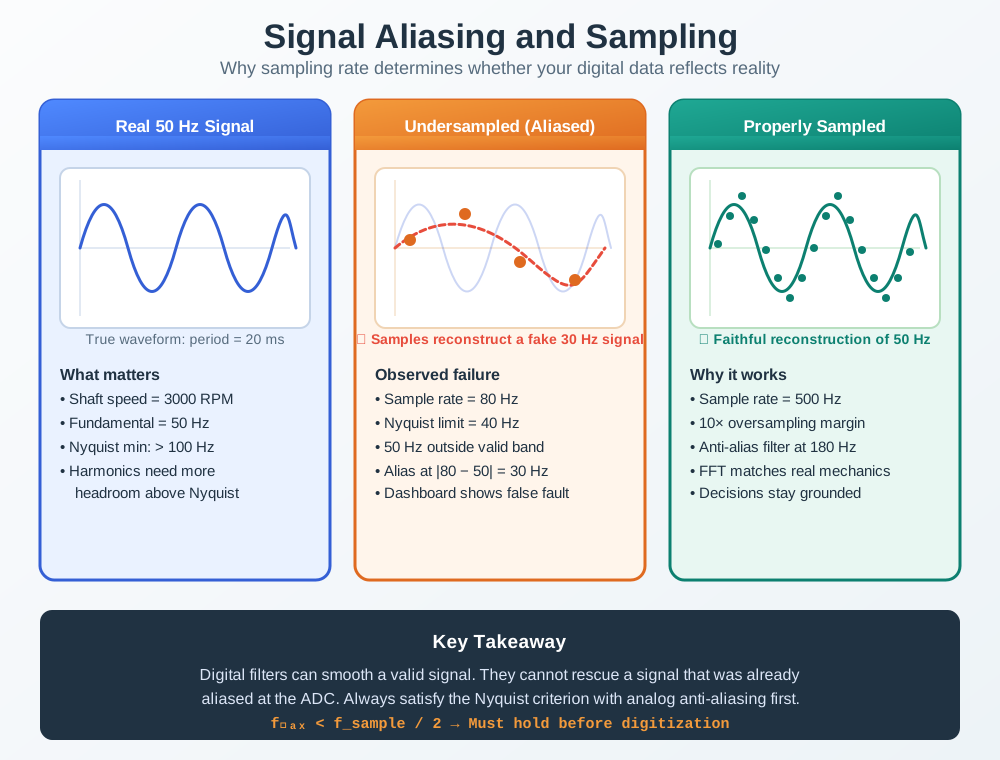
26.3.0.1 Real machine signal
50 Hz motor vibration
- Shaft speed = 3000 RPM = 50 Hz
- Nyquist minimum is above 100 Hz
- Harmonics need even more headroom
26.3.0.2 Undersampled design
80 Hz sampling, no analog filter
- Nyquist limit = 40 Hz
- The 50 Hz input folds into a false 30 Hz reading
- Dashboards suggest the wrong mechanical fault
26.3.0.3 Corrected design
500 Hz sampling, 180 Hz low-pass filter
- 10x oversampling margin preserves the true waveform
- The filter blocks foldback energy before the ADC
- FFT peaks now correspond to the real machine behaviour
Aliasing Effect: When sampling rate is below Nyquist (2× signal frequency), high-frequency signals incorrectly appear as low-frequency signals. A 50 Hz vibration sampled at 40 Hz masquerades as 10 Hz. Anti-aliasing filters prevent this by removing high frequencies before sampling.
26.4 ADC Resolution: How Precisely to Measure?
Resolution determines measurement precision:
8-bit ADC (0-255): - Voltage range: 0-3.3 V - Step size: 3.3 V / 256 = 12.9 mV - Reading 127 corresponds to 1.638 V ± 6.4 mV
12-bit ADC (0-4095): - Voltage range: 0-3.3 V - Step size: 3.3 V / 4096 = 0.8 mV - Reading 2048 corresponds to 1.638 V ± 0.4 mV
Interactive ADC Calculator
Try adjusting the parameters below to see how ADC resolution affects measurement precision:
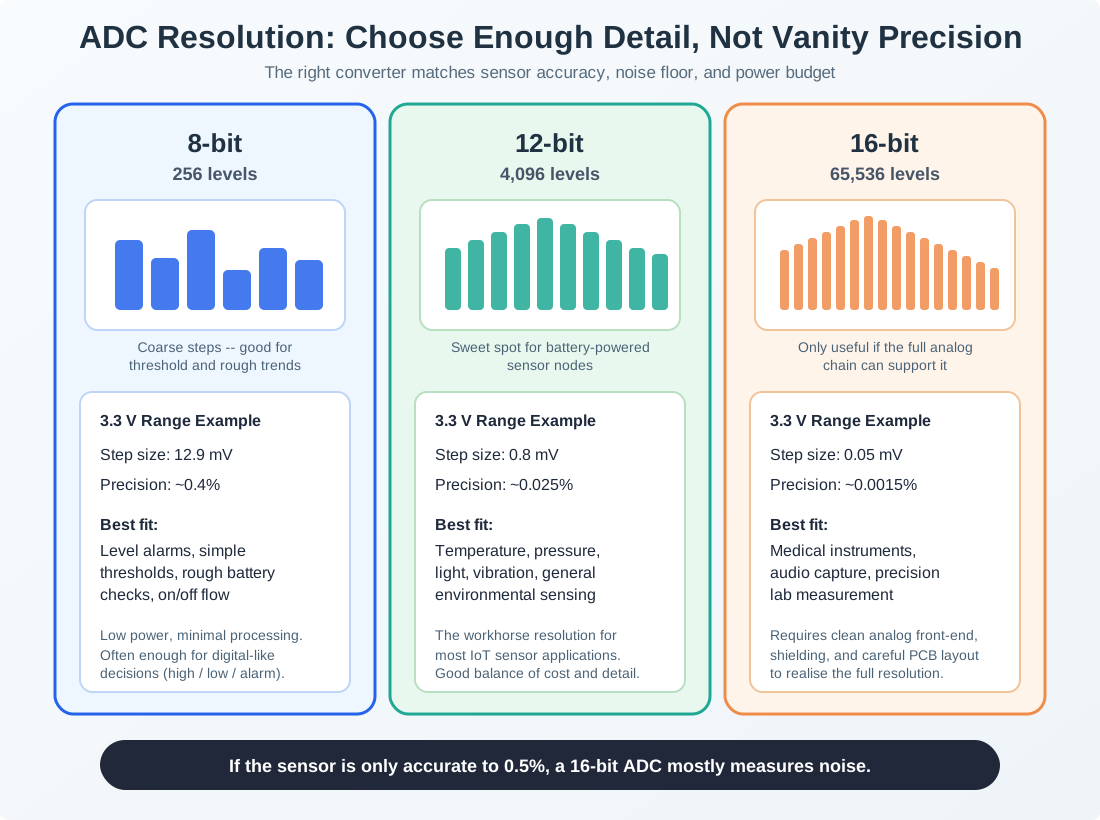
26.4.0.1 8-bit
256 levels
- Step size: 12.9 mV at 3.3 V
- Approx. precision: ~0.4%
- Best fit: level alarms, simple thresholds, rough battery checks
26.4.0.2 12-bit
4,096 levels
- Step size: 0.8 mV at 3.3 V
- Approx. precision: ~0.025%
- Best fit: temperature, light, pressure, vibration, most IoT sensing
26.4.0.3 16-bit
65,536 levels
- Step size: 0.05 mV at 3.3 V
- Approx. precision: ~0.0015%
- Best fit: medical instruments, audio capture, precision lab measurement
Quantization Levels Comparison: Higher bit depth provides more levels and finer resolution. 8-bit (orange) is coarse with 256 steps. 12-bit (teal) is typical for IoT with 4096 steps. 16-bit (navy) provides medical-grade precision with 65536 steps at the cost of power and speed.
Putting Numbers to It
ADC resolution calculations for a soil moisture sensor (0-3.3V, 0-100% moisture):
Given: Sensor voltage range 0-3.3V, ADC reference voltage \(V_{\text{ref}} = 3.3\text{V}\)
8-bit ADC: \(\text{Levels} = 2^8 = 256\) \(\text{Step size} = \frac{3.3\text{V}}{256} = 12.9\text{ mV}\) \(\text{Moisture resolution} = \frac{100\%}{256} = 0.39\%\) per step \(\text{Quantization error} = \pm\frac{12.9\text{ mV}}{2} = \pm 6.45\text{ mV} = \pm 0.2\%\) moisture
12-bit ADC: \(\text{Levels} = 2^{12} = 4096\) \(\text{Step size} = \frac{3.3\text{V}}{4096} = 0.81\text{ mV}\) \(\text{Moisture resolution} = \frac{100\%}{4096} = 0.024\%\) per step (42× better) \(\text{Quantization error} = \pm 0.40\text{ mV} = \pm 0.012\%\) moisture
Effective Number of Bits (ENOB): Real-world noise reduces effective resolution. If sensor has 50 mV peak-to-peak noise: \(\text{Noisy bits} = \log_2\left(\frac{50\text{ mV}}{0.81\text{ mV}}\right) = \log_2(62) = 5.95\text{ bits}\) \(\text{ENOB} = 12 - 6 = 6\text{ bits}\) (only 6 bits usable despite 12-bit ADC)
Key insight: Sensor noise floor determines useful resolution. A 12-bit ADC with 50 mV noise performs like a 6-bit ADC. Fix: Add analog low-pass filter before ADC to reduce noise to 5 mV, recovering 9-10 effective bits.
Trade-off snapshot:
- 8-bit: 256 levels, ~0.4% precision, low cost, low power, fast conversion
- 10-bit: 1,024 levels, ~0.1% precision, medium cost, medium power, medium speed
- 12-bit: 4,096 levels, ~0.025% precision, medium cost, medium power, medium speed
- 16-bit: 65,536 levels, ~0.0015% precision, high cost, high power, slow conversion
Rule of thumb for IoT:
- 8-bit: Simple applications, on/off detection
- 10-12-bit: Most sensor applications (temperature, light, pressure)
- 16-bit: High-precision measurements (audio, medical, scientific)
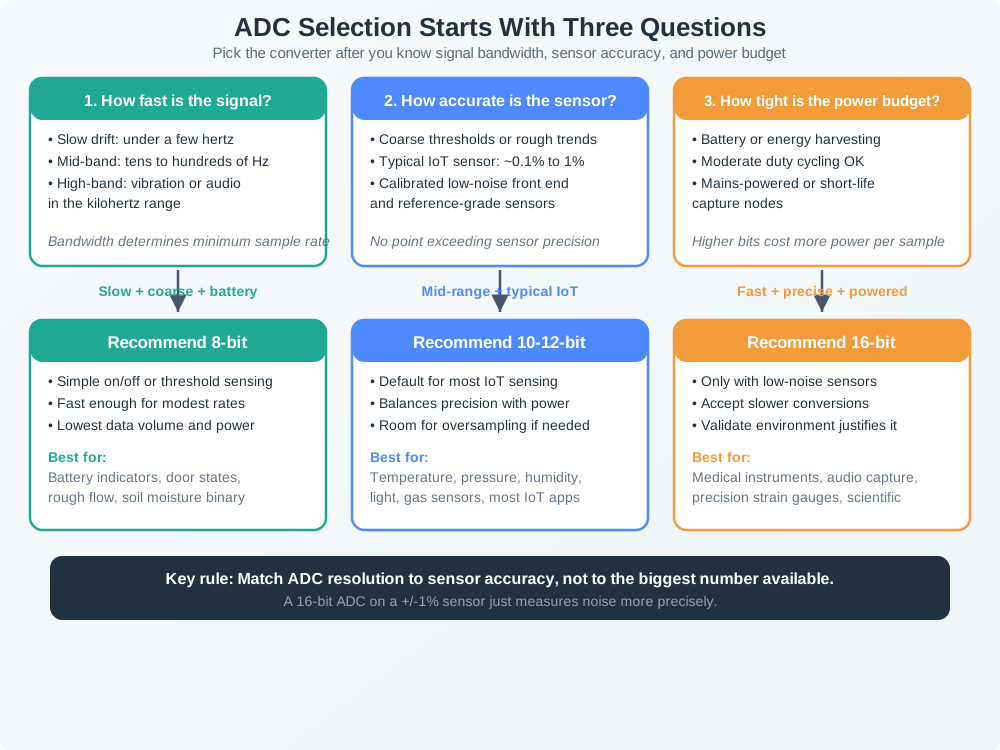
26.4.0.4 Recommend 8-bit
- Signal is slow or event-driven
- The sensor only needs rough thresholds or trend tracking
- Battery budget is tight and fast conversion is useful
26.4.0.5 Recommend 10-12-bit
- Signal bandwidth is moderate
- Sensor accuracy is around 0.1% to 1%
- You want the default IoT balance of precision, speed, and power
26.4.0.6 Recommend 16-bit
- Signal chain is low-noise and well conditioned
- You genuinely need medical, audio, or laboratory precision
- Power, layout, and conversion time can all tolerate the extra cost
ADC Selection Decision Tree: Choose ADC based on three key factors: signal bandwidth (sampling speed), required precision (bit depth), and power budget. Most IoT applications use 10-12-bit ADCs as they balance precision, speed, and power consumption.
26.5 Digital Filtering
Problem: ADC readings are noisy due to electrical interference, sensor limitations, and quantization.
Solution: Apply digital filters in firmware.
26.5.1 Moving Average Filter
Simplest filter: Average the last N samples.
- Example readings:
23.4, 23.6, 23.5, 23.7, 23.5 - 5-point average:
(23.4 + 23.6 + 23.5 + 23.7 + 23.5) / 5 = 23.54 °C
Pros: Simple, smooths noise Cons: Slow response to rapid changes
26.5.2 Median Filter
Better for removing spikes: Take the middle value of last N samples.
- Example readings:
23.5, 23.6, 99.9, 23.7, 23.5(99.9is an outlier) - Sorted window:
23.5, 23.5, 23.6, 23.7, 99.9 - Median result:
23.6 °Cwith the spike removed
Pros: Removes outliers effectively Cons: More complex than moving average
26.5.3 Low-Pass Filter (Simple RC)
Removes high-frequency noise, keeps slow changes:
- Firmware update formula:
filtered_value = 0.9 * previous_value + 0.1 * new_reading - Interpretation: 90% of the last filtered value is retained while 10% of the newest sample is blended in
Weight factor (0.9) determines how much history to keep: - High weight (0.95): Very smooth, slow response - Low weight (0.5): Faster response, less smoothing
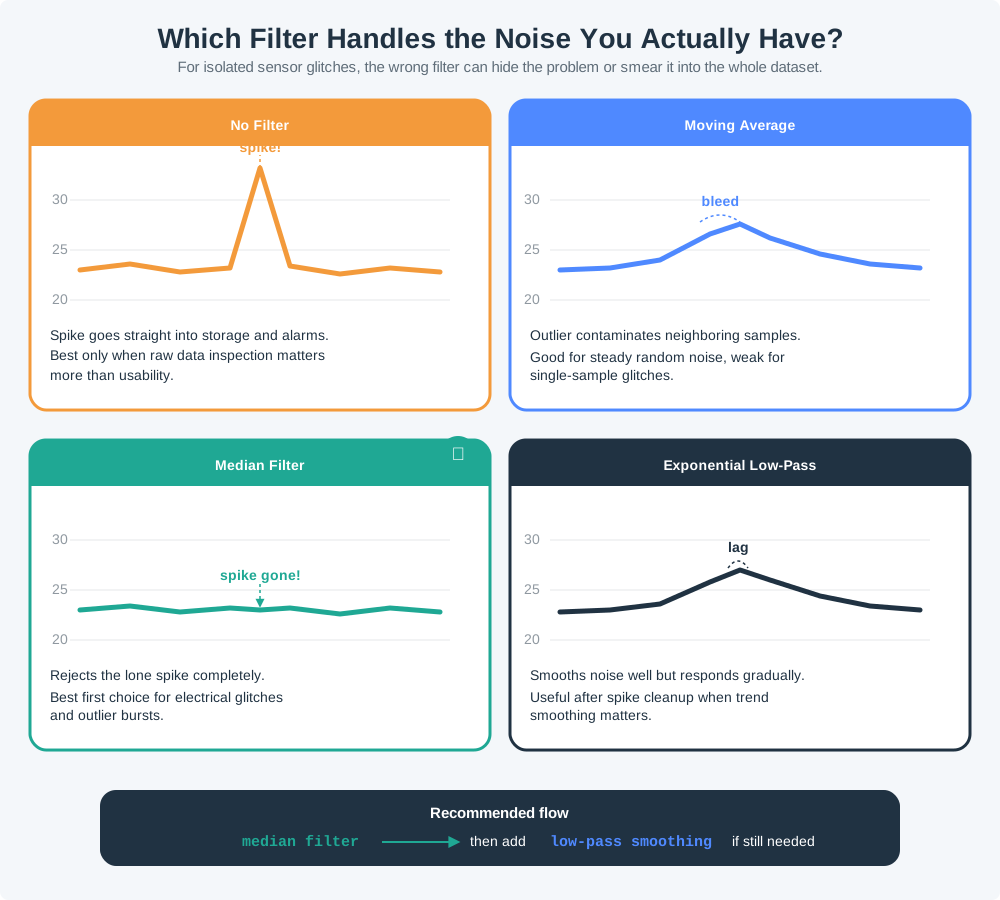
26.5.3.0.1 No filter
- Noise and spikes pass straight through
- Fastest response, but least trustworthy output
26.5.3.0.2 Moving average
- Smooths random jitter across a short window
- Single outliers contaminate multiple samples
26.5.3.0.3 Median filter
- Rejects isolated spikes by choosing the middle value
- Best choice when electrical glitches create one-sample outliers
26.5.3.0.4 Exponential low-pass
- Smooths high-frequency noise with tunable weight
- Responds gradually to real step changes
Digital Filter Comparison: Four approaches to handling noisy temperature data with outlier spike (99.9°C). No filter keeps noise and spikes. Moving average is corrupted by outliers. Median filter (teal) effectively removes spikes by selecting middle value. Low-pass filter smooths gradually but responds slowly to changes.
Alternative View: Filter Selection Decision Tree
This variant presents filtering as a decision-making process based on your specific noise problems:
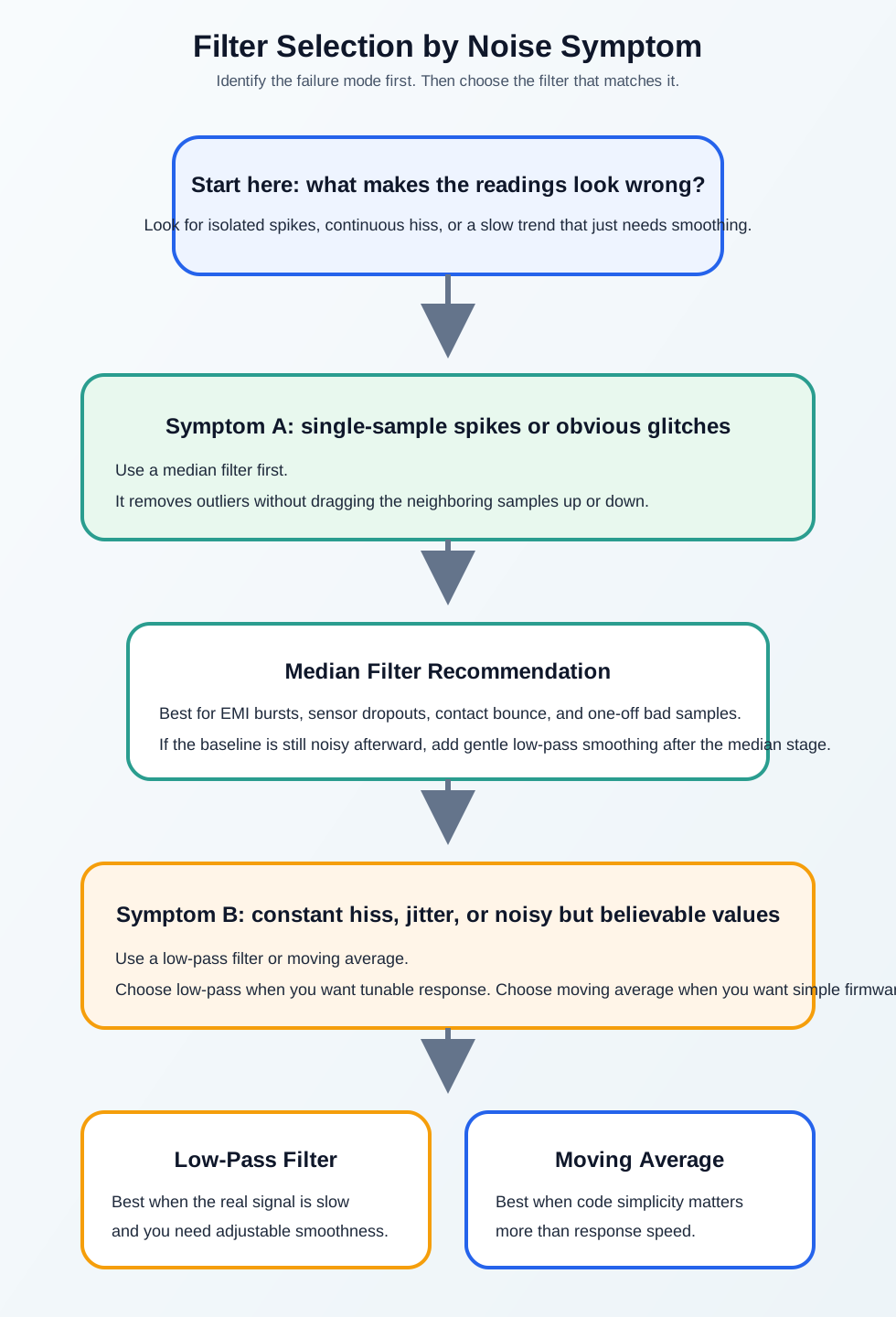
Why this variant helps: The original compares all filters side-by-side. This decision tree helps students answer the practical question: “Which filter should I use for MY problem?” It turns knowledge into actionable decisions by matching filter type to noise characteristics.
Quiz 1: ADC Configuration for Water Flow Sensor
Scenario: You’re designing a smart irrigation system using a turbine water flow sensor. The sensor outputs: - Voltage range: 0.5V (no flow) to 4.5V (maximum flow 10 L/min) - Signal characteristics: Pulsed output, 1-50 Hz depending on flow rate - Noise: ±50mV from pump electrical interference
Your microcontroller options: - Option A: 8-bit ADC, 100 ksps (samples/second), 10µA power - Option B: 12-bit ADC, 10 ksps, 100µA power - Option C: 16-bit ADC, 1 ksps, 500µA power
Think about:
- What sampling rate do you need to accurately measure 50 Hz pulses? (Nyquist)
- What ADC resolution do you need to measure ±0.1 L/min precision (assuming linear sensor)?
- Which ADC option provides the best balance of precision, speed, and power?
Key Insights:
Sampling rate requirement:
- Maximum frequency: 50 Hz
- Nyquist requirement: > 100 samples/second
- Practical target: 250-500 samples/second for safety
- ✅ All options meet this (slowest is 1000 sps)
Resolution requirement:
- Voltage span: 4.5V - 0.5V = 4.0V
- Flow span: 10 L/min - 0 L/min = 10 L/min
- Sensitivity: 4.0V / 10 L/min = 0.4V per L/min
- Desired precision: ±0.1 L/min = ±0.04V
8-bit ADC:
- Step size: 5V / 256 = 19.5 mV
- Precision: 19.5mV / 400mV per L/min = ±0.049 L/min ✅ (Just barely meets requirement!)
12-bit ADC:
- Step size: 5V / 4096 = 1.2 mV
- Precision: 1.2mV / 400mV per L/min = ±0.003 L/min ✅ (Excellent!)
Noise consideration:
- Noise: ±50mV
- 8-bit: Noise = ±2.5 steps (poor SNR)
- 12-bit: Noise = ±40 steps (good SNR, averaging helps)
Best choice: Option B - 12-bit ADC - ✅ Plenty of resolution (0.003 L/min vs. 0.1 L/min requirement) - ✅ Adequate sampling rate (10,000 sps >> 100 sps needed) - ✅ Reasonable power (100µA vs. 500µA for 16-bit) - ✅ Good SNR with noise (40 steps margin)
Option A (8-bit) would work but has minimal margin for noise. Option C (16-bit) is overkill and wastes 5× more power for precision you don’t need.
Real-world lesson: Don’t over-specify. Match ADC resolution to actual sensor precision and application requirements. The 16-bit ADC costs more, draws 5× power, and provides 400× the precision—but irrigation doesn’t need microliter accuracy!
26.5.4 Worked Example: Vestas Wind Turbine Gearbox Vibration Monitoring
Scenario: Vestas, the Danish wind turbine manufacturer, monitors gearbox health on 3,000 offshore turbines in the North Sea. Each turbine has 3 accelerometers on the gearbox measuring vibration. The key gear-mesh frequency for defect detection is 1,200 Hz. The engineering team must specify the ADC sampling rate and anti-aliasing filter to avoid aliasing.
Given:
- Gear-mesh frequency of interest: 1,200 Hz
- Harmonic frequencies: 2,400 Hz (2nd), 3,600 Hz (3rd)
- Environmental vibration noise: broadband up to 10 kHz (wave impacts, blade passing)
- Sensor: PCB Piezotronics 352C33, output 0-5V, bandwidth 0.5-10,000 Hz
- MCU ADC: 12-bit, maximum sampling rate 100 ksps
Step 1: Determine minimum sampling rate (Nyquist)
- Fundamental gear-mesh (1,200 Hz): sample above 2,400 Hz
- 2nd harmonic (2,400 Hz): sample above 4,800 Hz
- 3rd harmonic (3,600 Hz): sample above 7,200 Hz
The 3rd harmonic at 3,600 Hz requires sampling above 7,200 Hz. With standard engineering margin (2.5x), the target is 9,000 Hz.
Step 2: Design anti-aliasing filter
- 5,000 Hz (no filter): 10 kHz noise aliases to 0-1 kHz, masking real defects. Assessment: Unacceptable.
- 4,500 Hz (Nyquist/2 at 9 kHz): noise above 4,500 Hz aliases back into the band. Assessment: Marginal.
- 4,000 Hz (2nd-order Butterworth): a -12 dB/octave slope attenuates 10 kHz noise by about 16 dB. Assessment: Acceptable.
- 4,000 Hz (4th-order Butterworth): a -24 dB/octave slope attenuates 10 kHz noise by about 32 dB. Assessment: Recommended.
Selected: 4th-order Butterworth at 4,000 Hz cutoff, sampling at 10,000 Hz (10 ksps). This preserves the 3rd harmonic at 3,600 Hz while attenuating wave-impact noise at 10 kHz by approximately 32 dB.
Step 3: Verify ADC resolution adequacy
- Sensor output range: 0-5 V (rescaled to 0-3.3 V via voltage divider)
- 12-bit ADC step size: 3.3 V / 4,096 = 0.8 mV
- Minimum vibration of interest: 0.01g (bearing defect onset)
- Sensor sensitivity: 100 mV/g
- Signal voltage at 0.01g: 1 mV
- ADC steps per minimum signal: 1 mV / 0.8 mV = 1.25 steps
Problem: 1.25 ADC steps per minimum detectable signal gives only 1 dB of signal-to-noise ratio – insufficient.
Solution: Apply 16x oversampling (sample at 160 ksps, then decimate to 10 ksps). Oversampling by 16x adds 2 effective bits of resolution, bringing the effective resolution to 14-bit (0.2 mV steps, 5 steps per minimum signal). This is equivalent to a 14-bit ADC at 10 ksps using only the existing 12-bit hardware.
Result: By combining a 4th-order anti-aliasing filter at 4,000 Hz with 16x oversampling on the existing 12-bit ADC, Vestas detects bearing defects at 0.01g onset level with 14-bit effective resolution – without upgrading to an expensive 16-bit ADC. The anti-aliasing filter prevents wave-impact noise from corrupting the gear-mesh spectrum.
Key Insight: Aliasing in vibration monitoring is especially dangerous because aliased frequencies appear as real spectral peaks. A 10 kHz wave-impact vibration sampled at 9 kHz aliases to 1 kHz, which could be misidentified as a shaft imbalance fault, triggering unnecessary (and expensive) offshore maintenance. The anti-aliasing filter is not optional – it is a safety requirement.
26.6 Concept Relationships: Aliasing and ADC Resolution
- Aliasing -> false machine faults: once a signal is sampled below the safe rate, the false low-frequency content looks real in dashboards and FFT plots.
- Anti-aliasing filter -> hardware guardrail: the analog low-pass stage must reject unwanted energy before the converter because digital filtering cannot reverse foldback after the ADC.
- ADC bit depth -> sensor accuracy: choose resolution that matches the real noise floor and tolerance of the sensor chain instead of chasing impressive but meaningless digits.
- Oversampling -> effective resolution gain: sampling faster than the final reporting rate can improve ENOB when you have the bandwidth and power budget to average or decimate.
- Digital filters -> cleanup after valid sampling: median and low-pass filters are useful only after the sample rate and front-end filtering are already correct.
- Conditioning circuits -> trustworthy input range: amplification, biasing, and anti-aliasing shape the analog waveform so the ADC sees the right voltage window.
Cross-module connection: Signal Processing Overview introduced sampling theory, while Voice and Audio Compression shows how the same timing and quantization decisions affect real audio payloads.
Common Pitfalls
1. Picking the Sample Rate From Firmware Convenience
It is common to reuse a timer setting that already exists in the codebase, then assume the signal will somehow fit. That backwards approach is how 50 Hz vibration turns into a fake 10 Hz or 30 Hz fault. Start with the fastest real phenomenon you need to preserve, then choose the ADC timing from that requirement.
2. Assuming Digital Filtering Can Repair Aliasing
Median filters, moving averages, and low-pass code are useful only after the converter has captured a valid representation of the analog waveform. If frequencies above fs/2 were allowed into the ADC, the damage is already baked into the samples. The fix belongs in the analog anti-aliasing filter and sampling plan, not in a later software patch.
3. Buying ADC Bits That Your Sensor Cannot Use
Designs often jump to 16-bit conversion because “more precision is better,” even when the sensor itself is only accurate to 0.5% or 1%. In that case the extra codes mostly measure noise, reference drift, and front-end imperfections while increasing current draw and data volume. Match the converter to the real sensor chain, then spend effort on calibration and filtering.
26.7 Summary
This chapter covered critical aspects of analog-to-digital conversion:
Key Concepts:
- Aliasing: Undersampling makes fast signals appear slow—always sample >2× signal frequency
- Anti-Aliasing Filters: Low-pass filters before ADC prevent aliasing by removing high frequencies
- ADC Resolution: Match bit depth to sensor accuracy (8-bit for simple, 10-12-bit for typical IoT, 16-bit for precision)
- Digital Filtering: Apply median filters for spike removal, low-pass for smoothing
- Trade-offs: Higher resolution costs more power and speed—choose appropriately
Practical Guidelines:
- Use 12-bit ADC for most IoT sensor applications
- Apply median filtering first to remove outliers, then smooth with low-pass if needed
- Don’t over-specify—16-bit precision is wasted if your sensor is only ±1% accurate
- Anti-aliasing filters are non-negotiable for signals approaching Nyquist limit
Key Takeaway
Aliasing is the most dangerous signal processing error because it creates convincing but completely false data that looks like real signals. Always use an analog anti-aliasing filter before the ADC and sample at more than 2x the maximum signal frequency. For ADC resolution, don’t over-specify: match bit depth to your sensor’s actual precision, not the ADC’s maximum capability. A 12-bit ADC is sufficient for 90% of IoT applications.
For Kids: Meet the Sensor Squad!
Sammy the Sensor was watching a fan spin really fast, but his camera was too slow!
“Look! The fan appears to spin BACKWARDS!” Sammy was confused. Max the Microcontroller explained: “That’s aliasing! Your camera takes pictures too slowly, so the fast-spinning blades look like they’re going the wrong way. It’s an optical illusion!”
Lila the LED had a similar problem: “When I blink really fast and you sample me slowly, it looks like I’m blinking at a completely different speed. The data looks real, but it’s totally WRONG!”
“The fix is the Nyquist Rule,” Max announced. “You need to take pictures at LEAST twice as fast as the thing is moving. If the fan spins 100 times per second, sample at 200+ times per second!”
Bella the Battery added: “And about ADC resolution – that’s how precisely Max converts my analog voltage into a number. Using too many bits is like measuring your height to the nearest atom – wasteful! Match your precision to what you actually need.”
The lesson: Sample fast enough to avoid aliasing (2x the signal frequency), and use just enough precision to match your sensor’s accuracy!
26.8 Knowledge Check
26.9 What’s Next
Now that you can diagnose aliasing and justify ADC resolution, continue with:
- Voice and Audio Compression: see how sampling rate, quantization, and filtering choices shape real audio quality and payload size.
- Sensor Dynamics: connect sample-rate decisions to rise time, settling, and the real temporal limits of sensors.
- Signal Processing Labs: test aliasing, ADC sampling, and digital filtering on ESP32 hardware.
- Sensor Circuits and Signals: design the analog front-end that feeds the ADC, including filtering, dividers, and amplification.
- Energy-Aware Design: tune sample rate, oversampling, and filter cost against battery life in deployed IoT nodes.