7  Bitwise Operations and Endianness

In 60 Seconds

Endianness determines byte order in multi-byte values: big-endian (network byte order, MSB first) vs. little-endian (ARM/Intel, LSB first). Bitwise operations (AND, OR, XOR, shifts) let you set, clear, toggle, and extract individual bits – essential for reading hardware registers and packing status flags into single bytes to save bandwidth.

Chapter Scope (Avoiding Duplicate Deep Dives)

This chapter covers byte order and bit-level manipulation in implementation detail.

7.1 Learning Objectives

By the end of this chapter, you will be able to:

  • Differentiate endianness formats: Classify big-endian vs little-endian byte ordering and identify which IoT protocols use each format
  • Apply bitwise operations: Implement AND, OR, XOR, NOT, and shift operations to manipulate individual bits in IoT sensor data
  • Configure hardware registers: Select appropriate masks to set, clear, and toggle individual bits in microcontroller control registers
  • Convert byte order for cross-platform communication: Implement network-to-host and host-to-network byte order conversions using htonl, htons, ntohl, and ntohs
  • Construct compact data payloads: Design bit-packed data structures that minimize LoRaWAN and BLE payload sizes for bandwidth-constrained IoT deployments
No-One-Left-Behind Bitwise Loop
  1. Start with one byte and label each bit position.
  2. Apply one mask operation and verify bit-by-bit.
  3. Repeat with a real register or packet field from a datasheet.
  4. Confirm behavior with a quick code test before scaling up.

Bitwise operations let you work with individual bits – the tiny on/off switches that make up all computer data. Imagine a row of eight light switches: you can flip just one switch without touching the others. This is essential in IoT because sensors and microcontrollers use individual bits to represent status flags, settings, and compact data. Learning these operations is like learning to read the control panel of your IoT device at the most fundamental level.

Foundation Topics:

Apply These Concepts:

Learning Hubs:

7.2 Prerequisites

Before reading this chapter, you should understand:


7.3 Endianness and Byte Ordering

⏱️ ~9 min | ⭐⭐ Intermediate | 📋 P02.C01.U04

Key Concepts

  • Byte order governs interoperability: A 16-bit or 32-bit value is only portable when both systems agree on which byte comes first.
  • Network order is big-endian: TCP/IP and many wire protocols expect most-significant-byte first even when the MCU stores data little-endian.
  • Masks isolate meaning: Bitwise AND keeps only the status flag or field you care about so packed bytes can be decoded safely.
  • Shifts reposition fields: Left and right shifts move values into the correct bit positions before packing, unpacking, or scaling.
  • Register writes must preserve neighbors: |=, &= ~, and ^= change one feature bit without clobbering the rest of a control register.
  • Packed payloads save real resources: Combining flags into bytes reduces airtime, battery drain, and network cost on constrained links.
  • Named masks prevent silent bugs: Explicit bit positions, masks, and host/network conversions are easier to audit than raw magic numbers.

When storing multi-byte numbers (16-bit, 32-bit, 64-bit), the order of bytes in memory matters. This is called endianness.

7.3.1 Big-Endian vs Little-Endian

Example: The 32-bit hexadecimal number 0x12345678

Endianness comparison diagram showing a 32-bit hexadecimal value 0x12345678 stored in memory using two different byte ordering schemes. The top section illustrates big-endian (network byte order) with four memory addresses 0x00 through 0x03 storing bytes in most-significant-first order: address 0x00 contains 0x12, 0x01 contains 0x34, 0x02 contains 0x56, and 0x03 contains 0x78. The bottom section shows little-endian (Intel x86 and ARM) ordering with the same addresses storing bytes in least-significant-first order: address 0x00 contains 0x78, 0x01 contains 0x56, 0x02 contains 0x34, and 0x03 contains 0x12. Both representations derive from the same source value, demonstrating how processor architecture determines memory layout.

Big-Endian vs Little-Endian Memory Byte Ordering Comparison
Figure 7.1

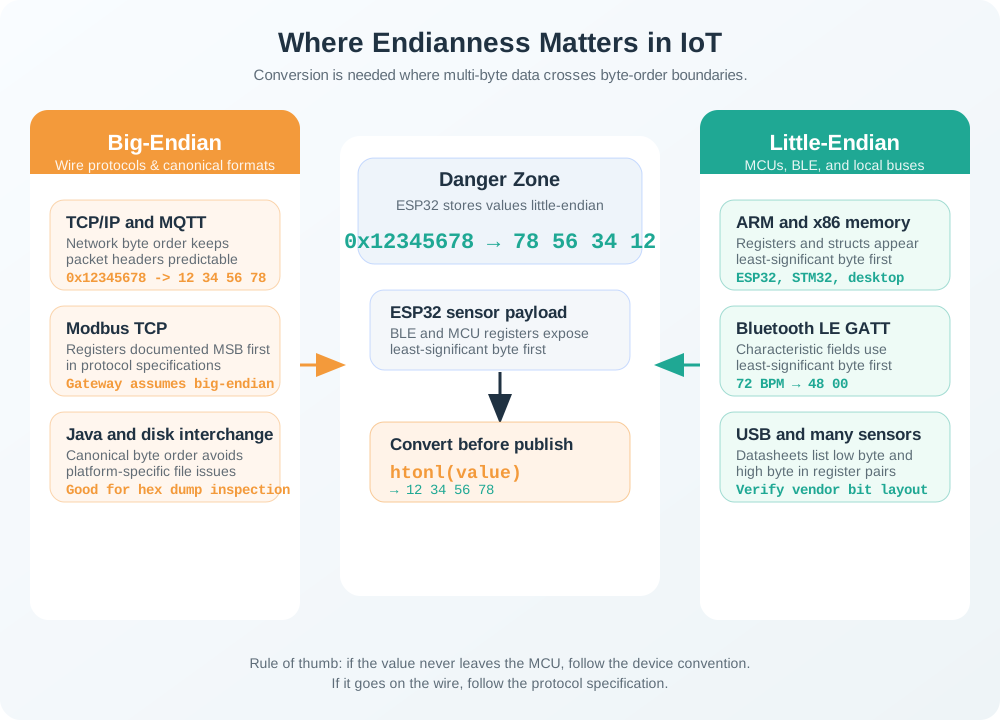
Protocol map showing endianness in IoT systems. Left section (Big-Endian Protocols, orange): TCP/IP (internet protocols, htonl required), Modbus TCP (industrial control, standard network), Java/JVM (cross-platform, consistent order). Right section (Little-Endian Protocols, teal): Bluetooth LE (wearables sensors, ARM native), USB (peripherals, x86/ARM native), Most I2C sensors (check datasheet, varies by vendor). Center section (Danger Zone, gray with orange border): ESP32 to Cloud showing little-endian CPU connecting to big-endian network with warning symbol and must convert note. Arrows from TCP/IP and BLE point to the danger zone, illustrating where byte order conversion is required.

Alternative view: Where Endianness Matters in IoT - Rather than abstract memory layouts, this diagram shows actual IoT protocols grouped by byte order. Big-endian (network byte order) is used by TCP/IP, Modbus TCP, and Java. Little-endian is used by Bluetooth LE, USB, and most ARM-based sensors. The “danger zone” highlights where conversion is needed: when an ESP32 (little-endian ARM) sends data to cloud servers expecting network byte order.
Figure 7.2

Big-Endian (Most Significant Byte First):

  • Used by: Network protocols (TCP/IP, Modbus), Java Virtual Machine
  • Why “Big”? The biggest (most significant) byte comes first
  • Memory layout: 0x12 at lowest address, 0x78 at highest address
  • Human-readable: Matches how we write numbers left-to-right

Little-Endian (Least Significant Byte First):

  • Used by: Intel x86, ARM Cortex-M (ESP32, STM32), Bluetooth LE
  • Why “Little”? The littlest (least significant) byte comes first
  • Memory layout: 0x78 at lowest address, 0x12 at highest address
  • Performance advantage: Processor can read lower bytes first during arithmetic

7.3.2 Endianness in IoT Protocols

Network protocols use big-endian (also called “network byte order”):

// Sending 16-bit temperature value 1234 (0x04D2) over TCP/IP
uint16_t temp = 1234;
uint16_t temp_network = htons(temp);  // Host TO Network Short
// Bytes sent: 0x04, 0xD2 (big-endian, regardless of CPU)

Bluetooth LE uses little-endian:

// BLE GATT characteristic: heart rate 72 BPM (0x0048)
uint16_t heart_rate = 72;
// Bytes sent: 0x48, 0x00 (little-endian, LSB first)
Real-World Example: Multi-Sensor Gateway Data Aggregation

Scenario: A smart building gateway collects data from 50 sensors every minute. Each sensor sends a 32-bit timestamp (Unix epoch seconds).

Problem: Temperature sensors use ESP32 (little-endian ARM), but the central server expects network byte order (big-endian). Without conversion:

Sensor sends timestamp 1609459200 (Jan 1, 2021, 00:00:00 UTC):

  • Correct big-endian bytes: 0x5F 0xEE 0x66 0x00 (hex of 1609459200 = 0x5FEE6600)
  • ESP32 sends (WRONG): 0x00 0x66 0xEE 0x5F (little-endian, LSB first)
  • Server interprets as: 6,745,695 seconds (~78 days from epoch)
  • Error: Over 50 years off! Data appears to be from March 1970 instead of January 2021

Impact:

  • Historical analytics show impossible negative time deltas
  • Energy usage graphs show 51 years of missing data
  • Triggered false “clock drift” alerts across all 50 sensors
  • Cost: 8 hours of debugging time ($800+ engineering cost)

Fix: Use htonl() (Host TO Network Long) function:

uint32_t timestamp = 1609459200;
uint32_t network_order = htonl(timestamp); // Converts to big-endian
client.write((uint8_t*)&network_order, 4);  // Sends: 5F EE 66 00

Prevention: Always use network byte order functions (htonl, htons, ntohl, ntohs) for multi-byte values in protocols.

Endianness Mismatch Bug

Real scenario: ESP32 (little-endian) sends sensor data to Python server expecting network byte order:

// ESP32 code (WRONG - sends little-endian)
uint32_t timestamp = 1609459200;
client.write((uint8_t*)&timestamp, 4); // Sends: 00 66 EE 5F (LSB first)

// Python server receives
data = sock.recv(4)
timestamp = struct.unpack('>I', data)[0]  # Expects big-endian
# Result: 6745695 (wrong!) instead of 1609459200

Fix: Use explicit byte order conversion:

// ESP32 code (CORRECT)
uint32_t timestamp = 1609459200;
uint32_t timestamp_be = htonl(timestamp); // Convert to big-endian
client.write((uint8_t*)&timestamp_be, 4); // Sends: 5F EE 66 00

Practical rule: Always check protocol specifications for endianness. When in doubt, network protocols use big-endian.

Interactive: Endianness Byte Order Converter

Try different values to see how byte order changes between little-endian and big-endian:

Try it: Enter the timestamp from the example above (0x5FE0AD00) and see how the bytes are arranged differently in each format.


7.4 Bitwise Operations

⏱️ ~12 min | ⭐⭐ Intermediate | 📋 P02.C01.U05

Bitwise operations manipulate individual bits within bytes, essential for: - Setting/clearing hardware register flags - Packing multiple boolean values into single bytes - Extracting protocol header fields - Efficient sensor data encoding

7.4.1 Basic Bitwise Operators

Four-panel diagram illustrating fundamental bitwise operations with binary examples. The AND operation panel shows 1010 1100 & 1111 0000 resulting in 1010 0000, demonstrating that output bits are 1 only where both inputs are 1. The OR operation panel displays 1010 1100 | 0000 1111 producing 1010 1111, showing that output is 1 when at least one input is 1. The XOR operation panel presents 1010 1100 ^ 0101 0101 yielding 1111 1001, illustrating that output is 1 when inputs differ. The NOT operation panel shows ~1010 1100 resulting in 0101 0011, demonstrating bitwise inversion where each 0 becomes 1 and each 1 becomes 0. Each panel includes input values and resulting output with clear visual separation.

Bitwise AND, OR, XOR, and NOT Operations with Binary Examples
Figure 7.3

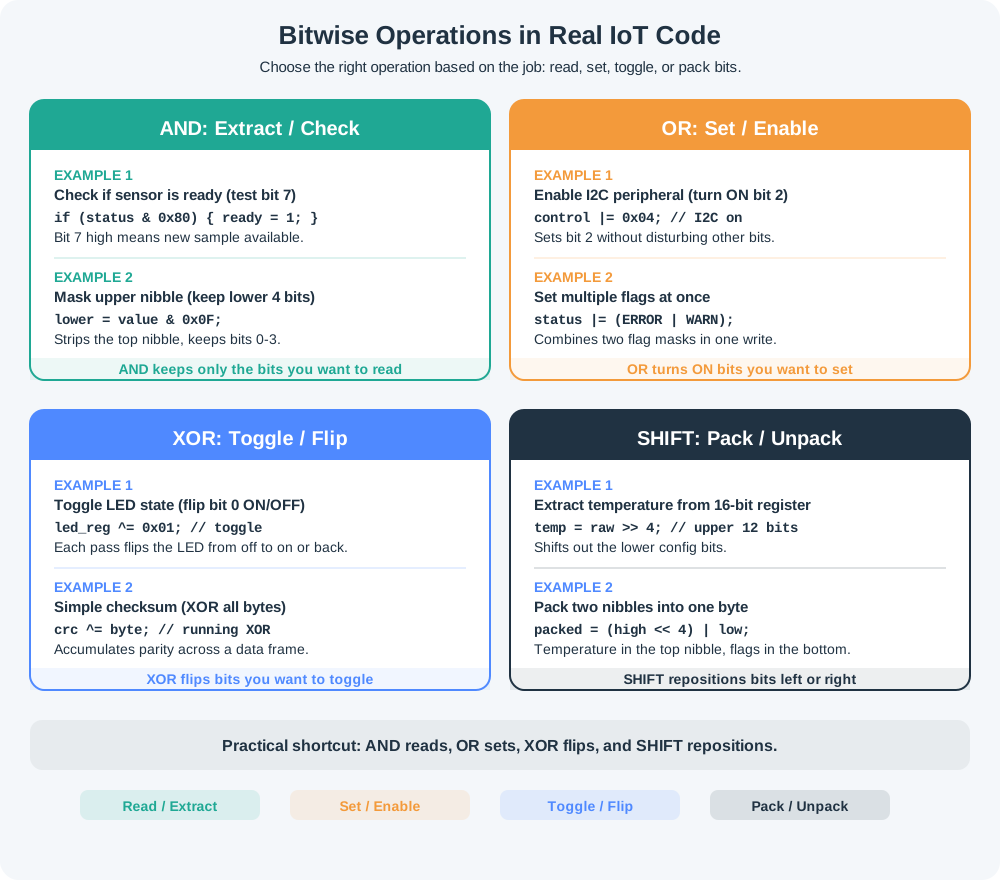
Practical application diagram for bitwise operations in IoT. AND Extract/Read section (teal): Check if sensor ready using status AND 0x80 to test bit 7, Mask upper nibble using value AND 0x0F to keep lower 4 bits. OR Set/Enable section (orange): Enable I2C peripheral using register OR-equals 0x04 to turn ON bit 2, Set multiple flags using status OR-equals ERROR OR WARN. XOR Toggle/Flip section (navy): Toggle LED state using led_reg XOR-equals 0x01 to flip bit 0 ON-OFF, Simple checksum using crc XOR-equals byte to XOR all bytes together. Shift Pack/Extract section (gray): Extract temp from 16-bit using raw shift-right 4 bits, Pack 2 values in byte using high shift-left 4 OR low to combine nibbles. Each operation is labeled with its purpose and a concrete code example.

Alternative view: Bitwise Operations in Real IoT Code - Instead of abstract binary examples, this diagram shows actual use cases. AND extracts or checks bits (reading sensor status). OR sets bits (enabling peripherals). XOR toggles states (blinking LEDs, simple checksums). Shifts pack/unpack data (combining sensor readings into bytes). Students can identify which operation to use based on what they need to accomplish.
Figure 7.4

Truth tables:

A B A AND B A OR B A XOR B
0 0 0 0 0
0 1 0 1 1
1 0 0 1 1
1 1 1 1 0

7.4.2 Bit Shifts

Left shift (<<): Moves bits left, fills with zeros (multiplies by 2^n)

0b00001101 << 2  =  0b00110100
(13 << 2 = 52 = 13 x 4)

Right shift (>>): Moves bits right, fills with sign bit or zero (divides by 2^n)

0b00001100 >> 2  =  0b00000011
(12 >> 2 = 3 = 12 / 4)
Interactive: Bitwise Operation Explorer

Experiment with different bitwise operations:

How to use: Adjust the sliders to see how different bitwise operations affect the binary representation in real-time.

Try It: Bit Shift Visualizer

Drag the shift amount slider to watch individual bits slide left or right in real time. Notice how left shifts multiply by powers of 2 and right shifts divide.

7.4.3 Common Bit Manipulation Patterns

Setting a bit (turn ON):

// Set bit 3 of register to 1 (enable I2C)
register |= (1 << 3);  // OR with mask 0b00001000

Clearing a bit (turn OFF):

// Clear bit 5 of status byte (disable LED)
status &= ~(1 << 5);  // AND with inverted mask 0b11011111

Toggling a bit (flip state):

// Toggle bit 7 (invert MSB)
value ^= (1 << 7);  // XOR with mask 0b10000000

Checking if a bit is set:

// Check if error flag (bit 2) is set
if (status & (1 << 2)) {
    printf("Error detected!\n");
}

Extracting multi-bit fields:

// Extract bits 4-6 from sensor reading
// Example: 0b11010110, bits 4-6 = 101 (value 5)
uint8_t sensor = 0xD6;  // 11010110
uint8_t field = (sensor >> 4) & 0x07;  // Shift right 4, mask with 0b00000111
// Result: 0b00000101 = 5
Check Your Understanding: Match the Bitwise Operation to Its Purpose

Try It: Bit Manipulation Sandbox

Practice the four core bit manipulation patterns – set, clear, toggle, and check – on a live register value. Select an operation and a target bit to see the mask and result.

7.4.4 Real IoT Example: Sensor Status Byte

Many sensors pack multiple flags into a single status byte:

// BME280 sensor status register (0xF3)
// Bit 7-4: Reserved
// Bit 3: measuring (1 = conversion running)
// Bit 2-1: Reserved
// Bit 0: im_update (1 = NVM data copying)

uint8_t status = i2c_read(0xF3);

// Check if sensor is busy
bool is_measuring = status & (1 << 3);
bool is_updating = status & (1 << 0);

if (is_measuring || is_updating) {
    delay(10);  // Wait before reading data
}

// More efficient: check both bits at once
if (status & 0b00001001) {  // Mask for bits 3 and 0
    delay(10);
}
Real-World Example: LoRaWAN Device Status Byte

Scenario: A battery-powered agricultural soil sensor transmits data via LoRaWAN (51-byte payload limit). The device needs to report multiple status flags with every reading.

Traditional approach (wasteful):

bool temp_sensor_ok = true;        // 1 byte
bool moisture_ok = true;           // 1 byte
bool battery_low = false;          // 1 byte
bool calibration_needed = false;   // 1 byte
bool valve_open = true;            // 1 byte
bool network_joined = true;        // 1 byte
bool gps_fix = false;              // 1 byte
bool rain_detected = true;         // 1 byte
// Total: 8 bytes for status flags

Optimized approach (bitwise packing):

// Pack 8 status flags into 1 byte
uint8_t status = 0;  // Start with all flags cleared

// Set individual flags using bitwise OR
status |= (1 << 0);  // Bit 0: temp_sensor_ok = 1
status |= (1 << 1);  // Bit 1: moisture_ok = 1
// Bit 2: battery_low = 0 (keep cleared)
// Bit 3: calibration_needed = 0
status |= (1 << 4);  // Bit 4: valve_open = 1
status |= (1 << 5);  // Bit 5: network_joined = 1
// Bit 6: gps_fix = 0
status |= (1 << 7);  // Bit 7: rain_detected = 1

// Result: status = 0b10110011 = 0xB3
// Total: 1 byte for all status flags

Savings:

  • Payload size: 8 bytes to 1 byte (87.5% reduction)
  • Energy: Fewer bytes = faster transmission = 3.36 mAh saved per day (7 fewer bytes × 96 transmissions/day × 5 µA/byte × 250 ms airtime)
  • Battery life: ~7 extra days per year on a 2,000 mAh battery
  • Cost: $2 battery replacement avoided annually per device (×1,000 devices = $2,000/year savings)

Reading flags:

if (status & (1 << 2)) {
    printf("Battery low - replace soon\n");
}

Why this matters at scale:

For a LoRaWAN network with 1,000 agricultural sensors transmitting every 15 minutes (96 msgs/day):

Bandwidth savings:

  • Unpacked (8 bytes status): 1,000 × 96 × 365 × 8 = 280.32 GB/year
  • Packed (1 byte status): 1,000 × 96 × 365 × 1 = 35.04 GB/year
  • Savings: 245.28 GB/year (87.5% reduction)
  • At $0.001/KB gateway costs: $245/year saved

Energy and maintenance:

  • 7 bytes × 5 µA/byte × 250 ms × 96 msgs/day = 3.36 mAh/day per device
  • Battery life extension: ~7 days/year per device
  • Avoided replacements: 1,000 devices × $25/visit = $25,000/year savings

Why bitwise operations excel in IoT:

  • Fast: Single CPU instruction (2-4 cycles)
  • Low power: No multiplication/division operations
  • Compact: Pack 8 boolean flags into 1 byte instead of 8 bytes
Interactive: LoRaWAN Bandwidth & Energy Calculator

Calculate savings from bit-packing for your deployment:

Insight: Even small byte savings multiply dramatically across thousands of devices and millions of transmissions.

7.4.5 Python Struct Module for Binary Data

When IoT devices communicate with Python servers/scripts, use the struct module:

import struct

# Pack 32-bit integer as big-endian (network byte order)
timestamp = 1609459200
packed = struct.pack('>I', timestamp)  # '>' = big-endian, 'I' = uint32
# Result: b'\x5f\xee\x66\x00'

# Pack multiple values into binary message
# Format: '>H f B' = big-endian, uint16, float32, uint8
sensor_id = 42
temperature = 23.5
status = 0b10010001

message = struct.pack('>H f B', sensor_id, temperature, status)
# Result: 7 bytes (2 + 4 + 1) - Python struct doesn't add padding

# Unpack received binary data
data = b'\x00\x2a\x41\xbc\x00\x00\x91'
sensor_id, temp, status = struct.unpack('>H f B', data)
print(f"Sensor {sensor_id}: {temp}C, Status: {status:08b}")
Try It: Python Struct Pack/Unpack Explorer

Experiment with packing sensor values into binary messages using Python’s struct module. Change the sensor ID, temperature, and status byte to see the packed binary output and how byte order affects the result.


7.5 Knowledge Check

Order the Steps: Decoding a Multi-Byte Sensor Value

Scenario: You’re programming an ESP32 microcontroller for a smart agriculture sensor. The datasheet shows the I2C peripheral control register at memory address 0x3FF53000. During debugging, you need to set bit 7 (the I2C enable bit) of the byte at offset 0x10 from this base address.

Think about:

  1. What is the complete memory address in hexadecimal where you’ll write? (Base + offset)
  2. What binary value should you write to enable I2C while keeping other bits unchanged? (Use bitwise OR)
  3. If you read back 0x8F from that address, is I2C successfully enabled?

Key Insights:

  • Address calculation: 0x3FF53000 + 0x10 = 0x3FF53010 (hex addition)
  • Enable bit 7: Write 0x80 (binary 10000000) using bitwise OR to preserve other bits
  • Verification: 0x8F = 10001111 in binary - bit 7 is 1, so yes, I2C is enabled!
  • Real impact: Incorrect bit manipulation could disable other peripherals or crash the sensor, requiring a field technician visit costing $200+ per device

This is why every IoT developer must master hexadecimal and bitwise operations - a single bit error can mean the difference between a working $50 sensor and a $250 warranty replacement.

You’re debugging a temperature sensor connected to an ESP32. The serial monitor shows: Received bytes: 01 90. The sensor uses 16-bit big-endian format where the value represents temperature in tenths of a degree Celsius.

Question: What is the actual temperature reading?

Temperature: 40.0C

Step-by-step solution:

  1. Combine bytes (big-endian): 0x01 is MSB, 0x90 is LSB
  2. Hexadecimal value: 0x0190
  3. Convert to decimal: 0x0190 = 1 x 256 + 9 x 16 + 0 = 256 + 144 = 400
  4. Apply scaling: 400 tenths = 40.0C

Key insight: Big-endian means the most significant byte comes first. If this were little-endian (like Intel/ARM), you’d read it as 0x9001 = 36,865 tenths = 3686.5C (obviously wrong!). Always check the datasheet for byte order.

You’re designing a battery-powered environmental sensor that needs to transmit 6 status flags over LoRaWAN (where every byte matters):

  • Bit 0: Temperature sensor OK
  • Bit 1: Humidity sensor OK
  • Bit 2: Battery low warning
  • Bit 3: Calibration needed
  • Bit 4: Wi-Fi connected
  • Bit 5: SD card present

Question: If the temperature sensor is OK, humidity sensor is OK, battery is low, and Wi-Fi is connected, what single byte value should you transmit?

Byte value: 0x17 (decimal 23, binary 00010111)

Step-by-step solution:

  1. Identify set bits:

    • Bit 0: Temperature OK = 1
    • Bit 1: Humidity OK = 1
    • Bit 2: Battery low = 1
    • Bit 3: Calibration needed = 0
    • Bit 4: Wi-Fi connected = 1
    • Bit 5: SD card present = 0
  2. Build binary value: 00010111 (reading right to left: bits 0,1,2,4 are set)

  3. Convert to hex: 0001 0111 = 0x17

  4. Code implementation:

    uint8_t status = 0;
    status |= (1 << 0);  // Temp OK
    status |= (1 << 1);  // Humidity OK
    status |= (1 << 2);  // Battery low
    status |= (1 << 4);  // Wi-Fi connected
    // Result: status = 0x17

Key insight: Bitwise packing saves 5 bytes compared to sending 6 separate boolean bytes. Over thousands of transmissions, this dramatically extends battery life.

Your ESP32 sensor (little-endian ARM) sends a 32-bit Unix timestamp to a cloud server. The timestamp value is 1704067200 (January 1, 2024, 00:00:00 UTC).

Question:

  1. What bytes will the ESP32 send if you just write the raw memory bytes (wrong approach)?
  2. What bytes should be sent for correct network byte order (big-endian)?
  3. What C function converts between these formats?

1. Raw little-endian bytes (WRONG):

First, convert 1704067200 to hexadecimal: - 1704067200 = 0x65920080

Little-endian stores LSB first: 80 00 92 65

2. Network byte order (CORRECT):

Big-endian stores MSB first: 65 92 00 80

3. Conversion function:

#include <arpa/inet.h>  // or <netinet/in.h>

uint32_t timestamp = 1704067200;
uint32_t network_order = htonl(timestamp);  // Host TO Network Long

What happens with wrong byte order:

  • Server receives: 80 00 92 65 (little-endian)
  • Server interprets as big-endian: 0x80009265 = 2,147,521,125
  • Wrong date: January 2038 instead of January 2024!

Key insight: Always use htonl() (32-bit), htons() (16-bit), ntohl(), and ntohs() when sending multi-byte values over networks. This ensures correct communication regardless of processor architecture.

You’re reading the datasheet for an I2C accelerometer. It says: - “X-axis acceleration is stored in registers 0x32 (low byte) and 0x33 (high byte)” - “Resolution: 10-bit, range: +/-2g, left-justified in 16-bit format”

You read register 0x32 = 0x40 and register 0x33 = 0x01.

Question: What is the actual acceleration value in g?

Acceleration: +0.0195g (approx 0.02g)

Step-by-step solution:

  1. Combine bytes (little-endian since low byte is at lower address):
    • Low byte 0x32 = 0x40
    • High byte 0x33 = 0x01
    • Combined 16-bit value: 0x0140
  2. Handle left-justification:
    • “Left-justified in 16-bit” means the 10-bit value occupies the upper 10 bits
    • Shift right by 6 to get the actual 10-bit value: 0x0140 >> 6 = 5
  3. Interpret as signed value:
    • 10-bit range: -512 to +511 (two’s complement)
    • Value 5 is positive (MSB = 0)
  4. Convert to g:
    • +/-2g range means: -2g to +2g over 1024 levels
    • Resolution: 4g / 1024 = 0.00390625 g/LSB
    • Acceleration: 5 x 0.00390625 = 0.0195g (or about 0.02g)

Alternative calculation:

  • Full scale: +/-2g = 4g total range
  • 10-bit resolution: 2^10 = 1024 levels
  • Value of 5: (5/512) x 2g = 0.0195g

Key insight: Datasheets often describe “left-justified” or “right-justified” data. Left-justified means you need to shift right to extract the actual value. Always check the bit layout diagram in the datasheet!

Knowledge Check: Bitwise Operations Quick Check

Concept: Using bitwise operations for hardware control.


7.7 How It Works: Bit-Level Data Manipulation

Understanding how microcontrollers manipulate data at the bit level is fundamental to efficient IoT programming. Let’s walk through a complete example of reading, modifying, and transmitting sensor status.

Step 1: Sensor Reports 8 Status Flags

A BME680 environmental sensor has a status register with 8 boolean flags: - Bit 7: Gas measurement valid - Bit 6: Heater stable - Bit 5: Temperature valid - Bit 4: Pressure valid - Bit 3: Humidity valid - Bit 2: New data available - Bit 1: Measuring in progress - Bit 0: Reserved (always 0)

The sensor returns the status byte: 0b11111000 (hex: 0xF8)

Step 2: MCU Reads Status Byte via I2C

uint8_t status = read_i2c_register(BME680_STATUS_REG);
// status = 0b11111000 = 0xF8 = 248 decimal

Step 3: Check Individual Flags with Bitwise AND

To check if “new data available” (bit 2) is set:

bool has_new_data = (status & 0b00000100) != 0;  // AND with mask
// 0b11111000 & 0b00000100 = 0b00000000
// Result: false (bit 2 is NOT set in this status byte)

Wait, that doesn’t look right. Let me recalculate: - Status: 0b11111000 (bits 7-3 are set) - Bit 2 mask: 0b00000100 - AND result: 0b00000000 (bit 2 is 0 in status) - Correct result: No new data available

Step 4: Wait for New Data (Poll Until Bit 2 Sets)

while (!(status & 0b00000100)) {  // Loop until bit 2 is set
    delay(10);
    status = read_i2c_register(BME680_STATUS_REG);
}
// Eventually status becomes 0b11111100 (bit 2 now set)

Step 5: Pack Multiple Sensors’ Status into One Byte

Your system has 4 sensors. Instead of sending 4 separate bytes, pack their “data ready” flags:

uint8_t multi_sensor_status = 0;  // Start with 0b00000000
multi_sensor_status |= (sensor1_ready << 0);  // Set bit 0 if sensor 1 ready
multi_sensor_status |= (sensor2_ready << 1);  // Set bit 1 if sensor 2 ready
multi_sensor_status |= (sensor3_ready << 2);  // Set bit 2 if sensor 3 ready
multi_sensor_status |= (sensor4_ready << 3);  // Set bit 3 if sensor 4 ready
// Result: 0b00001101 if sensors 1,3,4 are ready (bits 0,2,3 set)

Step 6: Transmit via LoRaWAN (1 Byte vs 4 Bytes)

Without bit packing: - 4 separate bytes: [1, 0, 1, 1] = 4 bytes

With bit packing: - Single byte: 0b00001101 = 1 byte - Savings: 75% bandwidth reduction

Step 7: Cloud Decodes the Packed Byte

status_byte = 0b00001101  # Received from sensor
sensor1_ready = (status_byte & 0b0001) != 0  # True
sensor2_ready = (status_byte & 0b0010) != 0  # False
sensor3_ready = (status_byte & 0b0100) != 0  # True
sensor4_ready = (status_byte & 0b1000) != 0  # True

Key Insight: A single bitwise operation (&) extracts individual boolean flags from a packed byte. This is MUCH more efficient than sending multiple bytes over bandwidth-constrained networks.

Real-World Endianness Issue:

If you pack a 16-bit sensor ID and status byte into a 3-byte payload:

uint16_t sensor_id = 0x1234;
uint8_t status = 0xF8;

// Method 1: Little-endian (ARM/Intel default)
uint8_t payload[3];
payload[0] = sensor_id & 0xFF;        // 0x34 (LSB first)
payload[1] = (sensor_id >> 8) & 0xFF; // 0x12
payload[2] = status;                  // 0xF8
// Transmitted: [0x34, 0x12, 0xF8]

// Method 2: Big-endian (network byte order)
payload[0] = (sensor_id >> 8) & 0xFF; // 0x12 (MSB first)
payload[1] = sensor_id & 0xFF;        // 0x34
payload[2] = status;                  // 0xF8
// Transmitted: [0x12, 0x34, 0xF8]

If sensor sends little-endian but cloud expects big-endian, sensor ID 0x1234 (4660 decimal) is decoded as 0x3412 (13330 decimal) – completely wrong!

What to Observe:

  • Bitwise operations work on binary representation, not decimal values
  • Packing flags into bytes is a fundamental IoT optimization
  • Endianness matters when multi-byte values cross systems (MCU → cloud)
Try It: Multi-Sensor Status Packing Visualizer

Toggle individual sensor flags on and off to see how eight boolean values get packed into a single byte using bitwise OR. This is exactly what happens inside an IoT microcontroller before transmitting over LoRaWAN.

7.8 Incremental Example Set: Bitwise Operations in Practice

Scenario: A motion sensor has a status byte where bit 3 indicates “motion detected”. You need to check if motion was detected.

Given:

  • Status register value: 0b01001100 (hex: 0x4C, decimal: 76)
  • Motion detection flag: bit 3

Task: Write code to check if motion was detected.

Beginner Solution (Step-by-Step):

uint8_t status = 0b01001100;  // Read from sensor

// Step 1: Create a mask for bit 3
uint8_t motion_mask = 0b00001000;  // Only bit 3 is set

// Step 2: AND the status with the mask
uint8_t result = status & motion_mask;
// 0b01001100 & 0b00001000 = 0b00001000

// Step 3: Check if result is non-zero
if (result != 0) {
    Serial.println("Motion detected!");
} else {
    Serial.println("No motion.");
}

Visual Breakdown:

Status:       0 1 0 0 1 1 0 0  (0x4C)
Mask:         0 0 0 0 1 0 0 0  (0x08)
              ---------------
AND result:   0 0 0 0 1 0 0 0  (0x08 = non-zero, so motion detected!)

Beginner Pattern:

  1. Create a mask with only the target bit set
  2. AND the value with the mask
  3. Check if result is non-zero

Common Beginner Mistake:

// WRONG: Checking if result == mask
if ((status & motion_mask) == motion_mask) {  // This works, but...
    // More complex than needed
}

// CORRECT: Just check if non-zero
if (status & motion_mask) {  // Simpler!
    // Bit is set
}

Scenario: You’re configuring a sensor’s control register. You need to: - Enable bits 2, 4, and 7 (turn on features) - Disable bits 1 and 5 (turn off features) - Leave other bits unchanged

Given:

  • Current control register: 0b10010110 (0x96)
  • Enable: bits 2, 4, 7
  • Disable: bits 1, 5

Intermediate Solution:

uint8_t control = 0b10010110;  // Current state

// Step 1: Enable bits 2, 4, 7 using OR
control |= 0b10010100;  // Set these bits to 1
// 0b10010110 | 0b10010100 = 0b10010110 (bits already set, no change yet)

// Step 2: Clear bits 1, 5 using AND with inverted mask
control &= ~0b00100010;  // Clear these bits
// ~0b00100010 = 0b11011101
// 0b10010110 & 0b11011101 = 0b10010100

// Final: 0b10010100 (bits 1,5 cleared, bits 2,4,7 set)

Visual Breakdown:

Original:     1 0 0 1 0 1 1 0  (0x96)

Enable mask:  1 0 0 1 0 1 0 0  (OR with this)
After OR:     1 0 0 1 0 1 1 0  (no change, bits already had those values)

Clear mask:   0 0 1 0 0 0 1 0  (NOT this)
Inverted:     1 1 0 1 1 1 0 1  (AND with inverted)
After AND:    1 0 0 1 0 1 0 0  (bits 1,5 now cleared)
              ^ ^       ^ ^
              7 6       2 1 (bit numbers)

Intermediate Pattern:

  • Use |= (OR-assign) to set bits to 1
  • Use &= ~ (AND-assign with inverted mask) to clear bits to 0
  • Combine operations when you need to both set and clear

Why Invert the Mask for Clearing?

  • To clear bit 5, you want all OTHER bits to stay the same
  • AND with 1 preserves bits, AND with 0 clears them
  • ~0b00100010 gives 0b11011101 – all 1s except the bits you want to clear

Scenario: You’re designing a LoRaWAN payload (11 bytes max) for a weather station that reports: - Wind direction (0-359 degrees) – needs 9 bits (2^9 = 512 max) - Wind speed (0-50 m/s, 0.1 m/s precision) – needs 9 bits (0-500) - Temperature (-40 to +60 C, 0.1 C precision) – needs 10 bits (0-1000 after offset) - Humidity (0-100%, 0.5% precision) – needs 8 bits (0-200) - Battery voltage (2.0-4.2V, 0.01V precision) – needs 8 bits (0-220)

Total bits needed: 9 + 9 + 10 + 8 + 8 = 44 bits = 5.5 bytes (round up to 6 bytes)

Advanced Solution (Bit-Field Packing):

// Pack 5 sensor fields into 6 bytes using bit-field packing
void pack_weather_data(uint8_t *buf,
    uint16_t wind_dir,        // 0-359  (9 bits)
    uint16_t wind_spd_x10,    // 0-500  (9 bits)
    uint16_t temp_x10_off,    // 0-1000 (10 bits, (temp+40)*10)
    uint8_t  hum_x2,          // 0-200  (8 bits)
    uint8_t  batt_x100)       // 0-220  (8 bits)
{
    buf[0] = (wind_dir >> 1) & 0xFF;          // dir[8:1]
    buf[1] = ((wind_dir & 0x01) << 7)         // dir[0]
           | ((wind_spd_x10 >> 2) & 0x7F);    // spd[8:2]
    buf[2] = ((wind_spd_x10 & 0x03) << 6)     // spd[1:0]
           | ((temp_x10_off >> 4) & 0x3F);     // temp[9:4]
    buf[3] = ((temp_x10_off & 0x0F) << 4)     // temp[3:0]
           | ((hum_x2 >> 4) & 0x0F);           // hum[7:4]
    buf[4] = ((hum_x2 & 0x0F) << 4)           // hum[3:0]
           | ((batt_x100 >> 4) & 0x0F);        // bat[7:4]
    buf[5] = (batt_x100 & 0x0F) << 4;         // bat[3:0]
}
// Result: 44 bits of data in 6 bytes vs 35+ bytes as JSON text

Example Encoding:

Input values: - Wind direction: 247 degrees = 0b011110111 (9 bits) - Wind speed: 12.5 m/s = 125 (×10) = 0b001111101 (9 bits) - Temperature: 23.7 C = (23.7+40)×10 = 637 = 0b1001111101 (10 bits) - Humidity: 68.5% = 137 (×2) = 0b10001001 (8 bits) - Battery: 3.24V = (324-200) = 124 = 0b01111100 (8 bits)

Packed binary (6 bytes):

Byte 0: 01111011 (wind_dir >> 1)
Byte 1: 10011111 (wind_dir[0] + wind_speed[8:2])
Byte 2: 01100111 (wind_speed[1:0] + temp[9:4])
Byte 3: 11011000 (temp[3:0] + humidity[7:4])
Byte 4: 10010111 (humidity[3:0] + battery[7:4])
Byte 5: 11000000 (battery[3:0] left-aligned)

Hex: 0x7B 0x9F 0x67 0xD8 0x97 0xC0 = 6 bytes

Comparison with JSON:

{"dir":247,"spd":12.5,"tmp":23.7,"hum":68.5,"bat":3.24}

= 53 bytes (8.8× larger!)

Advanced Patterns:

  • Use bit shifts and masks to pack fields that don’t align to byte boundaries
  • Document the bit layout clearly (essential for debugging)
  • Validate field ranges BEFORE packing (overflow causes silent corruption)
  • Use the same bit order in pack/unpack (MSB-first is conventional)

When to Use Advanced Bit-Packing:

  • Extreme bandwidth constraints (Sigfox 12-byte limit, LoRaWAN SF12 51-byte limit)
  • Ultra-low-power devices (transmission energy >> CPU energy, so complex packing is worth it)
  • High message volume (1M+ messages/day, where byte savings multiply dramatically)

When NOT to Use:

  • WiFi/Ethernet (bandwidth is cheap, debugging difficulty isn’t worth it)
  • Prototyping (use JSON until you have proven bandwidth constraints)
  • When CBOR or Protobuf provide sufficient compression with better tooling

Common Pitfalls

Writing a uint16_t or uint32_t buffer directly to the network works only when both sides already agree on byte order. The safe default is to convert multi-byte values explicitly with htons(), htonl(), ntohs(), or ntohl() before they cross MCU, gateway, server, or file boundaries.

Assigning a new byte to a control register often clears unrelated enable bits, interrupt flags, or mode settings. Use named masks plus |=, &= ~, and read-modify-write patterns so one feature bit changes without destabilizing the rest of the peripheral.

Bit-packed payloads fail silently when you forget sign extension, use the wrong shift distance, or decode left-justified sensor data as if it were right-justified. Verify each field with a worked example from the datasheet and test the exact boundary values that should fit in the allotted bits.

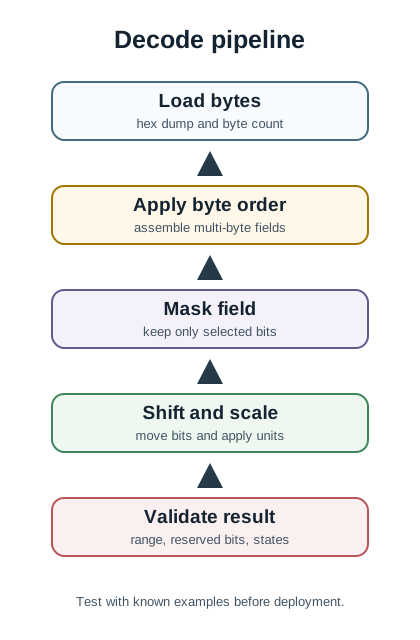
Bitwise decoding pipeline diagram with four numbered boxes connected left to right. Stage 1 is Load Raw Bytes, stage 2 is Apply Bit Mask, stage 3 is Shift or Rotate Bits, and stage 4 is Extract Value using the correct endianness.

Four-stage bitwise decoding pipeline with numbered steps for loading bytes, masking, shifting, and extracting the final value.

7.9 Summary

Endianness and bitwise operations are essential for IoT programming:

  • Endianness: Big-endian (network byte order, MSB first) vs little-endian (Intel/ARM, LSB first)
  • Conversion Functions: htonl(), htons(), ntohl(), ntohs() for cross-platform communication
  • Bitwise AND: Extract bits, check flags, mask values
  • Bitwise OR: Set bits, enable features, combine flags
  • Bitwise XOR: Toggle bits, simple checksums
  • Bit Shifts: Pack/unpack data, multiply/divide by powers of 2

Key Takeaways:

  • Always check protocol specs for endianness - network protocols use big-endian
  • Bitwise operations are fast (single CPU instruction) and memory-efficient
  • Pack multiple boolean flags into single bytes to save bandwidth and battery
  • Use Python’s struct module for binary data parsing in server-side code
  • A single bit error can cause 51-year timestamp errors or crash sensors

7.10 What’s Next

Now that you can apply bitwise operations and convert between byte orders, explore how these skills connect to broader IoT topics:

Next Chapter What You Will Explore
Packet Structure and Framing Discover how bytes are packaged into protocol frames for network transmission
Data Formats for IoT Compare JSON, CBOR, and Protocol Buffers for IoT messaging efficiency
Data Representation Fundamentals Return to the complete data representation topic map
Sensor Circuits and Signals Apply register manipulation skills to real sensor hardware interfaces
Prototyping Hardware Practice bitwise operations on ESP32 and Arduino microcontrollers

Sammy the Sensor is confused. “I have eight things to report: Am I warm? Am I wet? Is it bright? Is it windy? But I can only send ONE byte!”

Max the Microcontroller smiles. “No problem! Think of a byte like a row of eight light switches. Each switch is ON or OFF. We can pack all eight answers into one byte!”

Max draws a picture:

Switch: [warm] [wet] [bright] [windy] [moving] [loud] [dark] [cold]
Value:  [  1 ] [ 0 ] [  1  ] [  0  ] [  1   ] [ 0 ] [  0 ] [  1 ]

“That’s 10100101 in binary – which is just ONE byte!” Max explains.

Lila the LED adds: “And to check just ONE switch, we use a trick called AND. It’s like putting a mask over everything else so we can peek at just one switch!”

Bella the Battery cheers: “Instead of sending 8 separate letters (8 bytes), we pack everything into 1 byte. That saves me 87.5% of my energy!”

“But wait,” Sammy asks, “what about big numbers? Like my reading of 1,234?”

Max explains: “Big numbers need multiple bytes. The tricky part is which byte goes first! Some computers put the big part first (big-endian), others put the small part first (little-endian). It’s like writing a number left-to-right or right-to-left. Always check!”

The Squad’s Tip: Think of bytes as rows of light switches. Bitwise operations flip, check, and read those switches one at a time!