31 Path Loss and Link Budgets
More
Depth: Practitioner
Progress saves as you read. Mark sections complete as you go; your progress appears in the sidebar.
31.1 In 60 Seconds
This section: In 60 Seconds — Picture a loading-bay sensor that works with the door open but loses reports when a truck parks nearby.
Prove One Installed Radio Link
Picture a loading-bay sensor that works with the door open but loses reports when a truck parks nearby. A range claim alone cannot tell the operator whether the installed path is safe to use.
A gateway means the boundary system that joins local devices to another network or service. Received signal strength means the radio power that arrives at a receiver. RSSI means received signal strength indicator, the radio’s reported estimate of that power.
Send marked packets over the real route, then change the door, vehicle position, channel, and antenna angle. Keep place, time, radio settings, RSSI, retries, delivery, and remaining margin so another person can repeat the test.
This check covers one route and set of conditions, not every season or obstruction. The deeper sections build the loss model, link-budget ledger, fade margin, and field validation plan.
A wireless range claim is only useful when the budget behind it can be inspected. Path-loss and link-budget work turns radio terms into an auditable decision: what the link must achieve, what each gain or loss contributes, how much margin remains, and what site evidence proves it.
31.2 Start With the Story
This section: Start With the Story — You will estimate received power and margin, then compare the calculation with delivery evidence from the site.
You will estimate received power and margin, then compare the calculation with delivery evidence from the site. Start by recording the radio terms, path assumptions, and reliability requirement.
Follow one link-budget promise across four beats to see how every gain, loss, and reserve must survive field measurement.
-

Remi: “The baseline shows what the link can deliver before the path spends its margin.”
-

Test Tessa: “Distance and obstruction have consumed the margin the bench concealed.”
-

The team: “Count every gain and loss, then keep a reserve for fading.”
-

Test Tessa: “The field result now supports the ledger and its retained reserve.”
Read the story panels from the close-range baseline to the obstructed field check. Distance and concrete consume margin that the bench result could not expose, producing retries before the budget is complete. The ledger then balances transmitter and antenna gains against path, wall, and fade losses while retaining a reserve. Measured delivery at the real location tests both the prediction and that reserve, making the budget an auditable promise.
31.3 What a Link Budget Promises
This section: What a Link Budget Promises — Path loss is the signal a radio link spends while crossing distance, frequency, walls, clutter, and motion.
Path loss is the signal a radio link spends while crossing distance, frequency, walls, clutter, and motion. A link budget is the accounting that turns that loss into a deployment decision: start with transmitter power, add antenna gains, subtract every loss, then check whether the predicted receive level still sits comfortably above the receiver's sensitivity.
The important idea is not "use the most powerful radio." The important idea is margin: a link should still work after the site behaves like a real site, with people, weather, metal, and interference all spending part of the budget.
If you only need the intuition, this layer is enough: a link budget is a bank account in decibels. Power and antenna gain are deposits, every path and installation loss is a withdrawal, and the receiver sensitivity is the minimum balance. You want money left over (fade margin) for a rainy day.
Think of shouting across a field. Double the distance and your voice is noticeably harder to hear; add a wall, a crowd, or wind and it gets worse fast. Radio behaves the same way, except we can put numbers on each effect in decibels and add them up before anyone installs hardware.
The formula in Figure 31.1 makes two sources of free-space loss explicit. Its distance term uses kilometers, and its frequency term uses gigahertz; the constant belongs to those units. Increasing either term raises loss in decibels, so a farther gateway or a higher band spends more of the link budget before walls and installation effects are counted. The section’s doubling rule gives about 6 dB more loss for either distance or frequency. Use the formula to build a first estimate, then add antenna gains, other losses, and a fade reserve. Delivery at the installed site must still test that estimate.
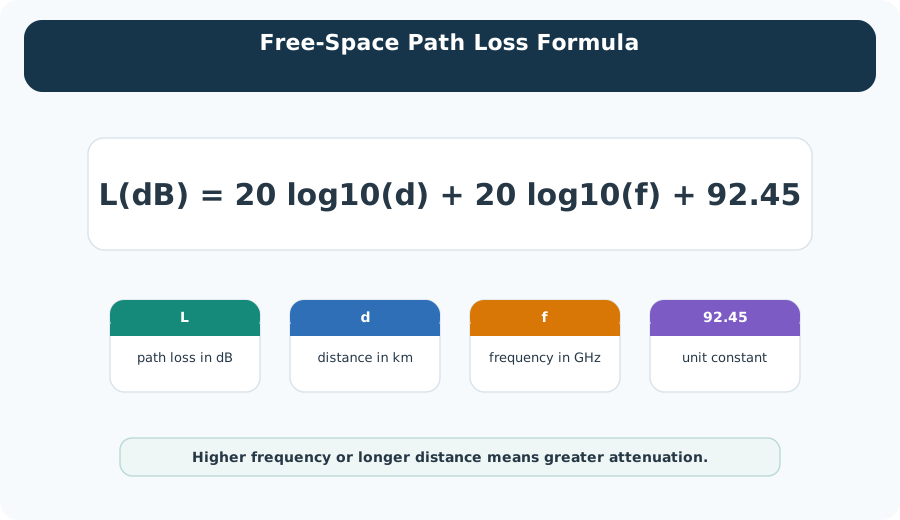
Read the formula in Figure 31.1, then match each symbol to its unit below. Both distance and frequency contribute logarithmic loss, so increasing either increases attenuation.
Two rules of thumb fall straight out of the physics and are worth memorizing:
- Doubling distance in free space adds about 6 dB of loss.
- Doubling frequency at the same distance adds about 6 dB of loss.
That is why a 2.4 GHz link generally reaches less far than a 900 MHz link at the same power, and why moving a gateway twice as far away is a real cost, not a rounding error.
The mathematical gist. The log-distance model grows the chapter’s 2.4 GHz, 1 m reference of about 40 dB to 69.5 dB at 30 m in free space or 87.3 dB for indoors. Its separate reviewed ledger predicts dBm, 21.0 dB raw margin above dBm sensitivity, and 9.00 dB after reserving 12 dB for fading and shadowing.

The One-Minute Link Decision
Name the link requirement
Start with the packet delivery, latency, and availability the application actually needs, not a range number in isolation.
Add the deposits and withdrawals
Transmit power and antenna gains are deposits; path loss, cable, body, wall, and installation losses are withdrawals.
Keep a reserve
Leave fade margin above receiver sensitivity so normal site variation does not drop the link.
Beginner Examples
- A short outdoor sensor with clear line of sight may close its budget easily and only needs a quick margin check.
- An indoor sensor through two walls can lose tens of decibels to the building alone, so the same radio may not reach.
- A higher transmit power does not fix a link that fails on receiver sensitivity, antenna placement, or interference.
Link Budget Knowledge Check
If this gives you enough to reason about why a link reaches or fails, you can stop here. Continue to Practitioner when you need to build and defend an actual budget.
31.4 Apply It: Build the Link-Budget Ledger
This section: Apply It: Build the Link-Budget Ledger — A link budget is an accounting ledger.
A link budget is an accounting ledger. Gains are positive, losses are negative, and the result is compared with receiver sensitivity and a reserved margin. The workflow below produces a number you can defend in review.
Walkthrough: From Radio Terms to a Release Number
- State the requirement. Name the packet delivery, latency, and availability target the link must meet.
- Start with the clean path. Estimate path loss for the distance and frequency before adding any site-specific loss.
- Add every gain and loss. Transmit power, antenna gains, cable and connector loss, body or enclosure loss, wall loss, and installation loss.
- Compare with receiver sensitivity. Use the sensitivity for the actual data rate, bandwidth, coding, and packet target, not a best-case headline.
- Reserve and verify margin. Hold margin for fading and interference, then compare the prediction with measured RSSI, SNR, and delivery.
The bars in Figure 31.2 add gains and subtract losses; check power left at the receiver.
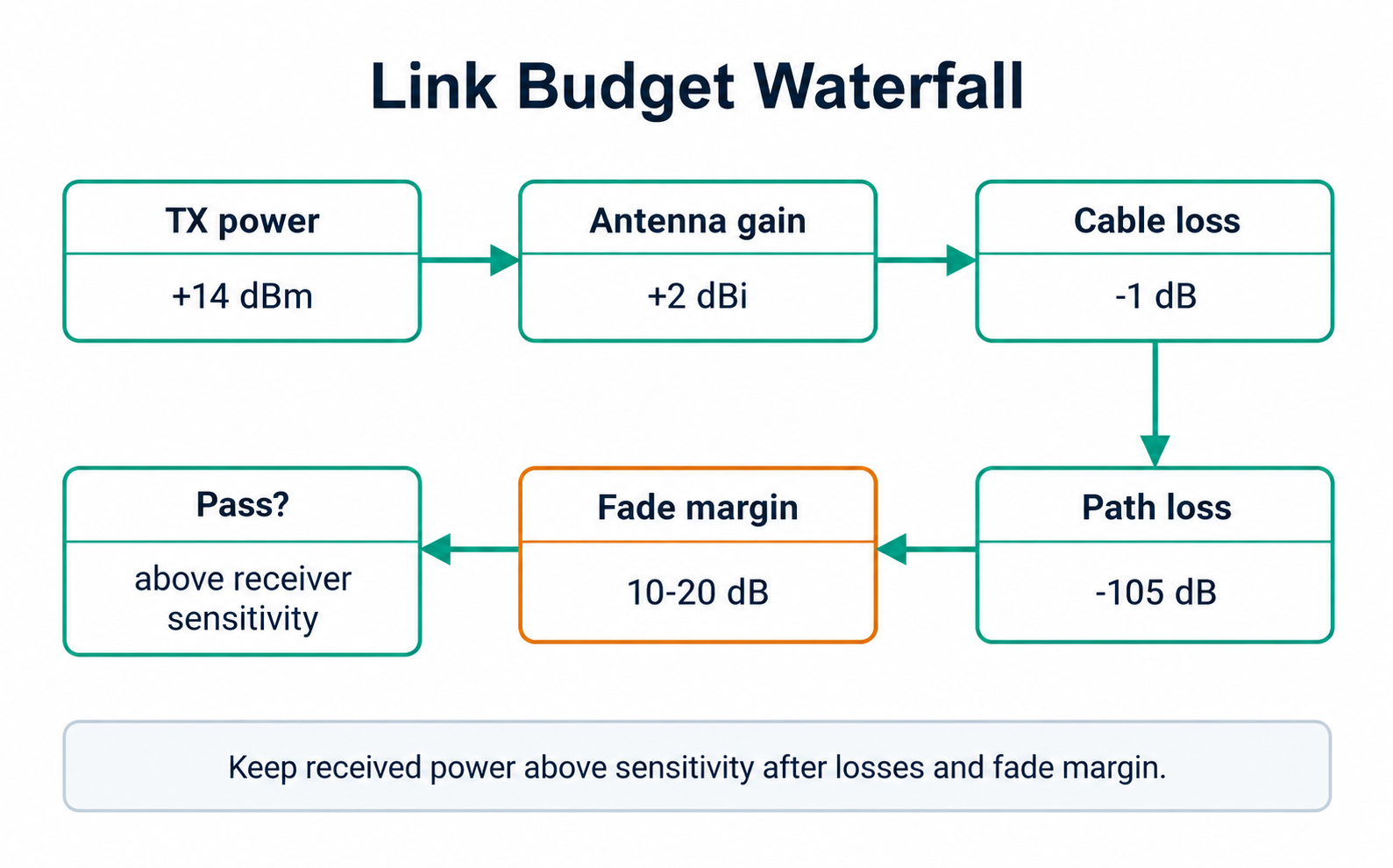
Inspect Figure 31.2 at Link Budget Waterfall and note that it uses Link Budget Waterfall to locate a communication boundary. Compare TX power, which uses TX power to expose operating cost, before reading +14 dBm as the place that highlights +14 dBm. The comparison turns A link budget is a waterfall: add gains, subtract losses, and confirm the received power stays above receiver sensitivity after a reserved fade margin into a bounded Walkthrough: From Radio Terms to a Release Number choice.
The receive level and available margin come from two short equations:
P_rx = P_tx + G_tx - L_tx + G_rx - L_rx - L_path - L_miscAvailable margin = P_rx - P_sensitivity - M_reservedWorked Budget Example
Suppose a low-rate outdoor sensor has these reviewed terms:
- Transmit power:
+14 dBm - Sensor antenna gain:
0 dBi; sensor cable/enclosure loss:1 dB - Gateway antenna gain:
+3 dBi; gateway cable loss:1 dB - Estimated path loss for the planned route:
118 dB - Miscellaneous installation loss:
2 dB - Receiver sensitivity in the selected mode:
-126 dBm - Reserved fade and shadowing margin:
12 dB
P_rx = 14 + 0 - 1 + 3 - 1 - 118 - 2 = -105 dBmRaw link margin is -105 - (-126) = 21 dB. After reserving 12 dB for fading and shadowing, 21 - 12 = 9 dB remains.
This model closes, but it is not a release by itself. The team should validate the route under expected mounting, traffic, weather, occupancy, and interference. If the application is critical or the site is variable, a thin remaining margin should trigger better placement, antenna work, a gateway move, a lower data rate, or a different link choice.
Try It: Wireless Range and Path-Loss Explorer
Use the explorer to move frequency, distance, environment, and the radio terms. Watch how doubling distance or frequency each adds roughly 6 dB, how a harsher environment exponent eats margin, and where the predicted receive level crosses the receiver sensitivity line.
Incremental Practice
Beginner
Draft a ledger for a clear-line-of-sight outdoor link and confirm whether it closes with at least 10 dB reserved margin.
Intermediate
Add two interior walls and an enclosure loss to the same link; record which row changed the decision.
Advanced
For a mobile tag near metal, plan measurements at the worst expected locations because reflections can make the average path misleading.
Why Cable and Enclosure Losses Get Their Own Rows
Separate rows make the decision auditable. If a field measurement fails, the team can see which assumption to retest instead of hiding losses inside one optimistic number. A ledger that collapses everything into a single "path loss" figure cannot be debugged later.
Available Margin Knowledge Check
Order the Review
If your job is to produce a defensible budget and a release number, you can stop here. Continue to Under the Hood for the path-loss math and the failure modes behind each row.
31.5 Under the Hood: Path-Loss Math and Failure Modes
This section: Under the Hood: Path-Loss Math and Failure Modes — The deeper layer explains where the ledger numbers come from and how each one fails.
The deeper layer explains where the ledger numbers come from and how each one fails. Path loss is the row most often estimated wrongly, so it gets the most attention here.
The formulas are useful only when the assumptions are visible. Record the units, reference distance, receiver mode, antenna context, and environment class beside the number, because those choices decide whether another engineer can reproduce the estimate or find the mistake.
Free-Space Path Loss
Free-space path loss (FSPL) is the clean-air baseline: a clear line of sight, no walls, no reflectors, no people, and no detuning. For distance in kilometers and frequency in megahertz:
FSPL_dB = 20 log10(d_km) + 20 log10(f_MHz) + 32.45Useful reference points at 1 km:
- A 900 MHz-class signal: about
91.5 dB. - A 2.4 GHz signal: about
100 dB. - A 5 GHz signal: about
107 dB.
These are not range promises. They are clean-air reference points used before adding environment, antenna, installation, and reliability terms. The 20 log10 terms are exactly why doubling either distance or frequency adds about 6 dB.
Unit check. The constant 32.45 assumes kilometers and megahertz. If distance is in meters, convert first (30 m = 0.03 km). A correct equation with inconsistent units produces a wrong budget that still looks reasonable.
The Log-Distance Model (and the n/2 Trap)
Real environments grow loss faster than free space. The path-loss exponent n describes how quickly loss grows after a reference point. It does not mean "multiply the whole free-space loss by n / 2." The safe review model is:
PL(d) = PL(d0) + 10 n log10(d / d0) + X_sigmaPL(d0)is measured or calculated loss at a reference distance such as 1 m.nis the environment's path-loss exponent.X_sigmais shadowing variation from walls, people, vehicles, shelves, terrain, and layout changes.
Clear or Outdoor LOS
Use n near 2 only with a credible line-of-sight path and a mostly clear Fresnel region.
Office or Light Indoor
Use a larger exponent when furniture, partitions, people, and reflections make the path worse than clean air.
Obstructed or Industrial
Metal, dense walls, equipment, vehicles, and non-line-of-sight routes consume margin quickly and must be measured.
Example at 2.4 GHz, where free-space loss at 1 m is about 40 dB, evaluated at 30 m:
PL_free  = 40 + 10(2.0) log10(30) = 69.5 dB
PL_indoor = 40 + 10(3.2) log10(30) = 87.3 dB
The environment changes the distance-growth term. It does not turn 69.5 dB into 111 dB by multiplying the whole free-space result by 3.2 / 2.
Inspect Figure 31.3 and ask why a positive raw link margin is insufficient for deployment approval.
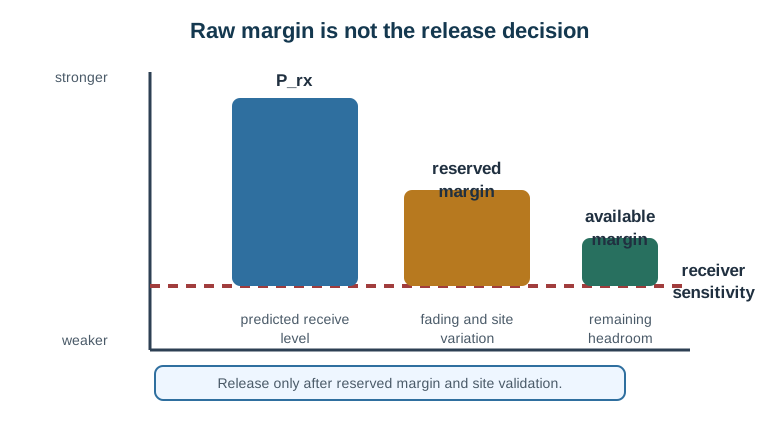
Read Figure 31.3 from predicted receive power to receiver need. Their gap, , is raw margin in decibels. It is the headroom before doubt is covered. Next subtract a set reserve for fade, site change, install error, and measure error. A positive release margin is still just a model result. The last stage must test hard places and real work states. Compute the normal headroom, protect a clear reserve, and test the installed path. A vendor range claim or one good RSSI value cannot replace any of those steps.
RSSI Is Not a Universal Grade
dBm is an absolute power unit. RSSI is a receiver-reported strength indicator that may be calibrated differently across chipsets and radio families, so the same RSSI can be healthy for one link and unusable for another.
- Compare RSSI with the sensitivity of the exact receiver mode.
- Compare RSSI with SNR, retry count, packet delivery, and time-of-day behavior.
- Do not copy alert thresholds from a different radio technology.
- Treat a single RSSI reading as a clue, not a deployment proof.
Example: -85 dBm means very different things at sensitivity -92 dBm (raw margin 7 dB) versus -120 dBm (raw margin 35 dB). High RSSI with poor delivery often points to interference or receiver overload; low RSSI with poor delivery points toward path loss, antenna, placement, or sensitivity.
Before RSSI Is Not a Universal Grade, inspect the figure Figure 31.4. Compare Link-budget review record with Requirement; their difference reveals The link-budget review record ties the requirement to reviewed radio terms, a path estimate, site validation, and an explicit release decision. This gives RSSI Is Not a Universal Grade evidence to revisit.
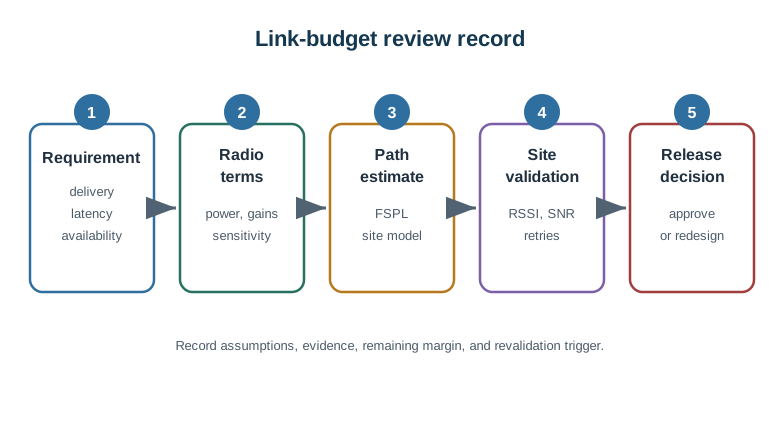
Read Figure 31.4 downward from the requirement through the radio terms and predicted margin to site validation. The final branch accepts or redesigns the link using measured conditions; the calculation alone does not approve deployment.
Interactive Review
Log-Distance Knowledge Check
Common Pitfalls
- Multiplying FSPL by the path-loss exponent. Use the log-distance model from a reference point; multiplying the whole FSPL result by
n / 2greatly overstates loss and hides the assumption. - Treating a closed spreadsheet as a released link. A spreadsheet shows the link might close; it does not prove mounting, clutter, interference, delivery, or seasonal variation.
- Forgetting receiver mode. Sensitivity changes with data rate, bandwidth, coding, and error target. Use the mode that ships.
- Copying RSSI thresholds across radios. A value that is weak for one link can be healthy for another with different sensitivity, bandwidth, modulation, and SNR.
At this depth, a link is a chain of limits: transmit power, antenna gain, path loss, environment, receiver sensitivity, reserved margin, and measured evidence. A trustworthy decision records each limit instead of trusting one optimistic range number.
31.6 Checkpoint: Summary
This section: Checkpoint: Summary
- Path loss is the baseline cost of distance, frequency, and environment; free-space loss is the clean-air reference and doubling distance or frequency each adds about 6 dB.
- The log-distance model describes how loss grows from a reference distance in a real site; the exponent belongs in the distance term, never as an
n / 2multiplier on total FSPL. - A link budget adds gains, subtracts path and installation losses, compares the result with receiver sensitivity, and reserves margin for variation.
- Margin has three layers: raw, reserved, and verified; only verified margin reflects real site evidence.
- RSSI is meaningful only against the specific receiver’s sensitivity, SNR, and delivery, not as a universal grade.
31.7 Key Takeaway
This section: Key Takeaway — A link budget connects transmit power, antenna gain, path loss, receiver sensitivity, and fade margin into one auditable decision.
A link budget connects transmit power, antenna gain, path loss, receiver sensitivity, and fade margin into one auditable decision. It is the first sanity check before promising wireless range, and the site measurement is the proof.
31.8 See Also
This section: See Also
Radio Wave Basics for IoT
Review frequency, wavelength, and antennas before calculating loss.
Fading and RF Interference
See why reserved margin can disappear in the field and how to tell coverage from coexistence problems.
Practical Wireless Lab
Validate path-loss and margin assumptions against measured evidence.
Find help
3 reviewed answers.
Where should I start in a module?
Open the module page from the sidebar to see its chapters in order. Use the module map to return to a topic you need.
Modules and pathsReviewed
What can I try when a project does not work?
Check the symptom, then work through the diagnostic steps. Keep the error message and the smallest example that reproduces it.
When you are stuckReviewed
How do interactive examples work?
Use the interactive guide to check how examples and simulations work before changing your project.
Interactive examples guideReviewed