18 Packet Protocol Overhead

More
Depth: Practitioner
Progress saves as you read. Mark sections complete as you go; your progress appears in the sidebar.
18.1 In 60 Seconds
This section: In 60 Seconds — Picture a battery sensor sending a two-byte value every minute.
Count the Whole Exchange for One Tiny Reading
Picture a battery sensor sending a two-byte value every minute. Addresses, checks, wrappers, replies, and retries may cost far more than the value itself. The first budget counts every byte and radio state needed for one accepted reading.
JSON means JavaScript Object Notation, a readable text format for named data. A payload means the useful reading or command inside a message.
Capture the application value, each added header, link frame, acknowledgement, retry, and total time. Compare one reading with a small batch, lose a reply, repeat the exchange, and restart the receiver. Record delay as well as bytes and energy.
This runway does not prove that batching or a compact format is always better. The deeper sections explain wrapping layers, payload share, byte budgets, timing, reliability, and the trade between fewer packets and fresher data.
Every packet carries two kinds of bytes: the payload you actually care about, and the overhead the network needs to deliver it, such as addresses, ports, framing, and error checks. Protocol overhead is mostly fixed per packet, so it barely matters for large transfers but dominates the tiny messages that constrained IoT devices send. Understanding the byte budget is what separates an efficient sensor fleet from one that wastes most of its airtime and energy on packaging.
18.2 Start With the Story
This section: Start With the Story — You will calculate how much of a transmitted transaction carries useful data and explain the costs of encapsulation and batching.
You will calculate how much of a transmitted transaction carries useful data and explain the costs of encapsulation and batching. Start with a captured message and count the bytes added by every layer.
Follow one small reading across four beats to see why the whole transmitted transaction, not just the payload, owns the byte budget.
-

Packet Pete: “The reading is small, but it does not travel alone.”
-

Radio Remi: “Headers, checks, and handshakes can dominate a short payload.”
-

The team: “Count every layer, then batch only when the timing trade-off fits.”
-

Test Tessa: “The measured packet now fits the link and the delivery need.”
18.3 The Packaging Can Outweigh the Contents
This section: The Packaging Can Outweigh the Contents — Imagine mailing a single small key in a large box with bubble wrap, an address label, a return label, and a tracking slip.
Imagine mailing a single small key in a large box with bubble wrap, an address label, a return label, and a tracking slip. The packaging and paperwork can easily weigh more than the key itself. A network packet is the same: the payload is the key, and the headers are the box, the labels, and the tracking. For a large shipment the packaging is a rounding error, but for one tiny item it is most of what you pay to send.
The important idea is that overhead is roughly constant per packet. Sending more useful data per packet spreads that fixed cost across more payload, while sending tiny payloads pays the same packaging cost over and over.
If you only need the intuition, this layer is enough: each packet has fixed overhead for addressing, framing, and control. Small IoT payloads suffer proportionally more overhead, so efficiency comes from sending fewer, fuller packets rather than many tiny ones.
Payload share is the simple way to see this: it is the fraction of transmitted bytes that is actual data. A payload share of ninety percent means the network is mostly carrying your data. A payload share of twenty percent means you are mostly paying to move headers.
Suppose a water-meter node reports an 8-byte timestamp and pulse count in a UDP/IPv4 datagram. Before link framing, UDP and IPv4 add 28 bytes, so the packet carries 8 useful bytes out of 36 total bytes: about 22 percent payload share. If the node sends eight readings together, the useful payload becomes 64 bytes while the same UDP/IPv4 header is still 28 bytes, so the share rises to about 70 percent before link framing. That improvement is not compression; it is fixed-cost amortization. The limit is freshness and frame size: a leak alarm may need immediate delivery, while a routine hourly total can wait and batch safely.
Evidence for The Packaging Can Outweigh the Contents starts at Figure 18.1 with Protocol Overhead for 10-Byte Payload. Contrast TOTAL BYTES against it to make A 10-byte payload can be most of a BLE packet but only one fifth of a TCP/IPv4 packet; choose the stack and batch size from the useful-byte share, not from protocol names alone reviewable rather than assumed.
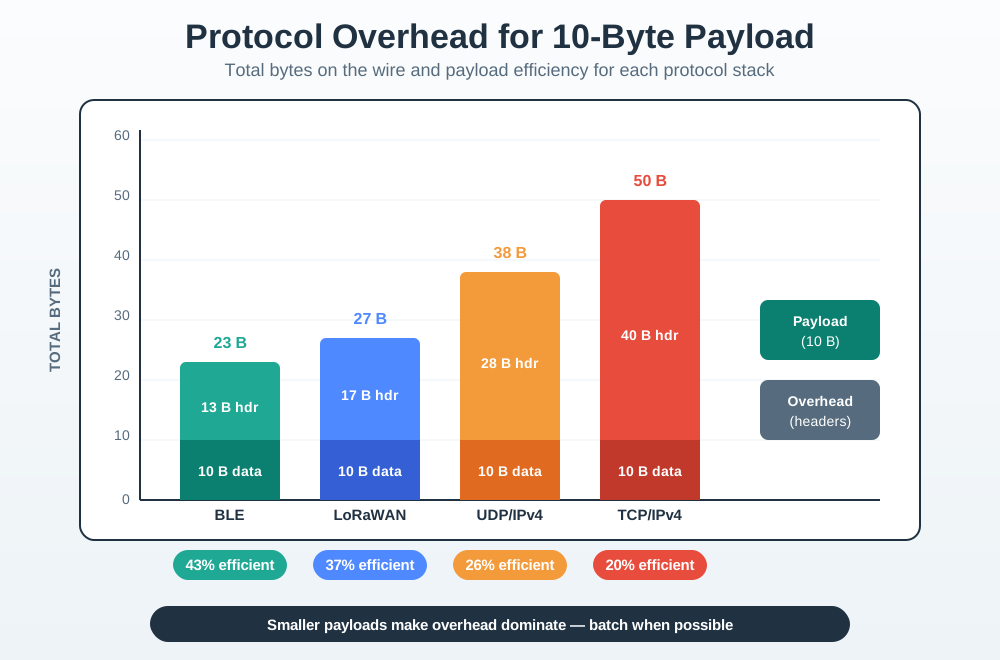
Three labelled stops organise Figure 18.1. Protocol Overhead for 10-Byte Payload uses Protocol Overhead for 10-Byte Payload to show the next hand-off; moving to TOTAL BYTES shows where it highlights TOTAL BYTES; ending at BLE shows where it highlights BLE. Together they explain why A 10-byte payload can be most of a BLE packet but only one fifth of a TCP/IPv4 packet; choose the stack and batch size from the useful-byte share, not from protocol names alone matters to The Packaging Can Outweigh the Contents.
The One-Minute View
Overhead is fixed per packet
Addressing, framing, and control bytes are added to every packet regardless of how small the payload is.
Small payloads pay the most
When the payload is tiny, the fixed header can be larger than the data itself, wasting bandwidth and energy.
Fuller packets are cheaper
Carrying more data per packet, or choosing a lighter protocol, raises the share of bytes that are useful.
Beginner Examples
- A 1-megabyte file transfer barely notices a few dozen header bytes per packet, because the payload dwarfs the overhead.
- A sensor sending a 4-byte reading can spend far more bytes on headers than on the reading itself.
- Sending ten readings in one packet pays the header cost once instead of ten times.
Payload Share Knowledge Check
If this gives you the principle, you can stop here. Continue to Practitioner when you need to add up a real byte budget and decide how to improve it.
18.4 Apply It: Add Up the Byte Budget
This section: Apply It: Add Up the Byte Budget — A byte-budget review lists the protocol layers wrapped around your payload, sums their headers, and computes the payload share.
A byte-budget review lists the protocol layers wrapped around your payload, sums their headers, and computes the payload share. If the share is low, you change the design before you scale the fleet, not after.
Walkthrough: A Byte-Budget Review
- List the encapsulation layers. Identify which application, transport, network, and link protocols wrap the payload.
- Sum the header bytes. Add each layer's header, and any trailer such as a frame check sequence.
- Compute payload share. Divide the payload size by the total transmitted size.
- Compare to the link budget. Check whether the total fits the link's frame size and the device's energy and airtime budget.
- Decide an action. If the share is poor, batch readings, use a lighter protocol, or compact the payload, then re-check.
Encapsulation: Headers Stack Up
The payload is wrapped layer by layer, and each layer adds its own header. The sizes below are the defining minimum header sizes for these named protocols; options and addresses can make some of them larger.
Worked Example: A 12-Byte Reading Over UDP/IPv4
A node sends a 12-byte reading as a UDP datagram over IPv4. The transport and network headers alone are 8 + 20 = 28 bytes, before any link framing. The payload share is therefore low:
payload = 12 bytes
header  = 8 (UDP) + 20 (IPv4) = 28 bytes
total   = 12 + 28 = 40 bytes
payload share = 12 / 40 = 30%
Seventy percent of the transmitted bytes are packaging. Batching ten readings into one datagram changes the picture sharply: 120 payload bytes against the same 28-byte header gives a payload share of about 120 / 148 = 81%. The fixed header was paid once instead of ten times.
The arithmetic is small enough to audit directly. The optional panel below works only with numbers already used in this chapter, so another reviewer can reproduce the byte-budget decision without trusting a calculator.
Improving the Budget
Batch readings
Combine several samples into one packet so the per-packet header is amortized across more data.
Use a lighter protocol
For constrained nodes, a compact application protocol over UDP avoids the larger control overhead of heavier stacks.
Compact the payload
A smaller payload helps, but watch the ratio: shrinking an already tiny payload makes the overhead share worse, not better.
Batching Knowledge Check
If you can total a byte budget and pick an action, you can stop here. Continue to Under the Hood for the efficiency math and the link limits behind the decision.
18.5 Under the Hood: Efficiency Math and Link Limits
This section: Under the Hood: Efficiency Math and Link Limits — The payload-share rule comes from a simple ratio, and the batching trade-off comes from amortizing a fixed cost.
The payload-share rule comes from a simple ratio, and the batching trade-off comes from amortizing a fixed cost. The link's frame size then sets a hard ceiling on how far you can push it.
Payload Efficiency
For a payload of size P and total header and trailer overhead H, the efficiency is the fraction of bytes that are useful:
efficiency = P / (P + H)Because H is fixed per packet, efficiency rises toward 100 percent as P grows and falls toward 0 percent as P shrinks. This single ratio explains why the same network feels efficient for downloads and wasteful for one-line sensor messages.
Amortizing With Batches
Batching N readings of size R into one packet replaces N separate headers with one. The efficiency becomes:
per-reading:  efficiency = R / (R + H)
batched (N):  efficiency = (N x R) / (N x R + H)
As N grows, the single H is spread thinner and efficiency climbs. The cost is latency, because the device waits to fill the batch, and risk, because losing one packet now loses N readings instead of one. Batch size is therefore a deliberate trade among efficiency, freshness, and loss exposure.
The Link Frame Sets a Ceiling
You cannot batch without limit. Each link has a maximum frame size, and a payload larger than the link's maximum transmission unit must be fragmented, which adds headers and increases the chance that a loss forces a resend. On a classic Ethernet link the data payload limit is 1500 bytes; on a constrained radio it is far smaller. An IEEE 802.15.4 frame, for example, is at most 127 bytes in total, so after addressing and security fields very little room remains for application data, which is exactly why overhead discipline matters most on constrained links.
Common Pitfalls
- Counting only the application header. The real overhead is the sum across every layer, including link framing and trailers.
- Shrinking an already tiny payload. Below a point, compacting the payload makes the overhead share worse, not better; batch instead.
- Batching past the frame limit. A batch larger than the link MTU is fragmented, which reintroduces overhead and adds loss risk.
- Ignoring the latency cost of batching. Waiting to fill a batch delays every reading in it, which can violate freshness requirements.
Efficiency Math Knowledge Check
At this depth, overhead is a budget problem with a hard ceiling. Measure the full stack, compute the payload share, batch up to the frame limit, and balance efficiency against latency and loss instead of treating headers as a fixed cost you cannot influence.
18.6 Summary
This section: Summary
- Every packet carries fixed overhead for addressing, framing, and control, plus the useful payload.
- Because overhead is roughly fixed per packet, small IoT payloads suffer proportionally more overhead than large transfers.
- Payload share, P divided by P plus H, measures how much of the transmitted data is actually useful.
- Headers stack through encapsulation: application, transport, network, and link each add their own bytes, and link layers may add a trailer too.
- Batching readings amortizes the fixed header across more payload, trading efficiency against latency and loss exposure.
- The link’s maximum frame size caps batching; exceeding it forces fragmentation, which reintroduces overhead.
Protocol overhead is the packaging around your data, and it is paid per packet. Measure the full encapsulation stack, compute the payload share, and send fewer, fuller packets up to the link frame limit to keep useful bytes ahead of packaging bytes.
18.7 See Also
This section: See Also
Packet Anatomy
See the header, payload, and trailer regions that make up the bytes you are budgeting.
Packet Framing
Learn how frames mark their own boundaries, which is part of the link-layer overhead.
Packet Error Detection
Understand the checksums and frame checks that trade a few overhead bytes for integrity.
Find help
3 reviewed answers.
Where should I start in a module?
Open the module page from the sidebar to see its chapters in order. Use the module map to return to a topic you need.
Modules and pathsReviewed
What can I try when a project does not work?
Check the symptom, then work through the diagnostic steps. Keep the error message and the smallest example that reproduces it.
When you are stuckReviewed
How do interactive examples work?
Use the interactive guide to check how examples and simulations work before changing your project.
Interactive examples guideReviewed