9 From Bytes to Meaning

More
Depth: Practitioner
Progress saves as you read. Mark sections complete as you go; your progress appears in the sidebar.
9.1 In 60 Seconds
This section: In 60 Seconds — Picture a temperature value that keeps the same bytes after an update but silently changes units.
Keep One Reading Meaningful Across an Update
Picture a temperature value that keeps the same bytes after an update but silently changes units. The message arrived, yet the receiver made a different claim.
Firmware means the program stored on a device to control its hardware. A payload means the part of a message that carries the application data.
Send one known negative, zero, and maximum value through old and new versions. Keep raw payload, width, signedness, byte order, scale, unit, firmware version, decoded result, and rejection reason.
This test covers one representation contract, not every data format. The deeper sections explain bits, bytes, integers, text, floating point, packed fields, and schema changes.
Every IoT reading eventually becomes bytes. A byte is just a pattern of eight bits, such as 0xEB, and that pattern means nothing on its own. It becomes a number, a character, a flag, or a packet field only when a receiver applies the same interpretation rules the sender used. Data representation is the name for those rules, and most “wrong value” bugs in IoT are really disagreements about them.
9.2 Start With the Story
This section: Start With the Story — You will explain how raw bytes become sensor values and identify the decoding rules that sender and receiver must share.
You will explain how raw bytes become sensor values and identify the decoding rules that sender and receiver must share. Start with a payload and record its units, field widths, signedness, and byte order.
Follow the disputed payload across four review beats to see how bare bytes become shared meaning.
-

Packet Pete: “Here are the bytes; what do they mean?”
-

Dora and Bex: “Same payload, different answers—the contract is missing.”
-

The team: “Write units, width, signedness, order, and encoding.”
-

Test Tessa: “Sender and receiver now decode the same trusted reading.”
Read the story panels from the bare payload to the agreed reading. The same bytes initially produce conflicting results because neither decoder has a complete interpretation rule. The contract panel then binds units, width, signedness, byte order, and encoding to that payload. When both ends finally display the same value, the agreement demonstrates why transport success is insufficient: interoperable data requires sender and receiver to share meaning.
9.3 Bytes Are Evidence, Meaning Is a Contract
This section: Bytes Are Evidence, Meaning Is a Contract — Imagine the digits 1015 written on a slip of paper.
Imagine the digits 1015 written on a slip of paper. They could be a price of ten dollars and fifteen cents, a time of 10:15, a year, a part number, or a temperature of 101.5 stored in tenths. The digits are identical. Only the agreed convention tells you which reading is correct. Bytes work the same way, one level lower: the bits are fixed, but their meaning depends on a shared agreement.
The important idea is not "store data efficiently." The important idea is agreement. A value only survives the trip from sensor to dashboard if both ends share the same contract for decoding it: the base, the field width, whether it can be negative, the byte order, the text encoding, the scale, and the units.
A useful first check is to ask what the bytes are allowed to become. The same sequence may be a scaled integer, a UTF-8 string, a group of status flags, or a structured payload field. Each choice has different proof: numeric values need range checks, text needs byte-length checks, flags need bit labels, and structured fields need a schema version.
Before Bytes Are Evidence, Meaning Is a Contract, inspect the figure Figure 9.1. Compare Sensor Boundary with Physical Signal; their difference reveals Data representation reviews keep raw bytes visible while checking the contract that turns them into numbers, text, flags, or validated values. This gives Bytes Are Evidence, Meaning Is a Contract evidence to revisit.
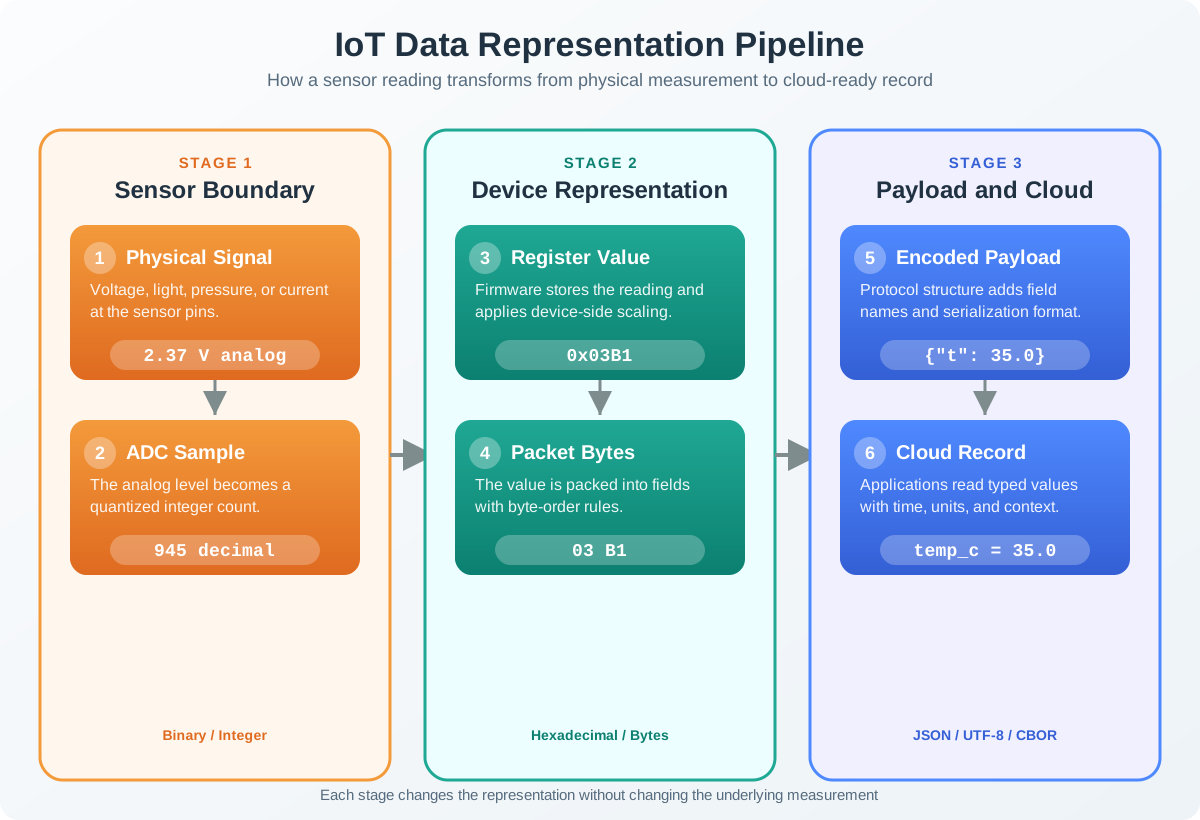
At the left of Figure 9.1, a physical signal becomes an ADC sample. The middle column stores that count as a register value and packet bytes; the right adds payload structure and application context. Each boundary needs an agreed interpretation so that changing representation preserves the measurement.
If you only need the intuition, this layer is enough: keep the original bytes as evidence, write down the rules used to decode them, and check the result against a plausible range. A number that "looks reasonable" is not proof that the rules were right.
Think of a sealed envelope full of digits with no label. A second person can open it and read the digits perfectly, yet still report the wrong answer because they assumed dollars when you meant tenths of a degree. The reading was careful and still wrong, because the label, the contract, was missing.
The One-Minute View
Width and sign set the range
How many bytes a field uses, and whether it can be negative, decide which values it can even represent.
Byte order assembles values
A multi-byte number can be built most-significant-first or least-significant-first. The wrong choice gives a different, often plausible, number.
Encoding and scale carry meaning
Text needs an encoding, and raw integers usually need a scale and units before they become real measurements.
Beginner Examples
- The byte
0x50is decimal 80, not decimal 50. Reading hexadecimal as if it were decimal is one of the most common decode mistakes. - A two-byte temperature field of
00 EBis the integer 235, but if the contract says "tenths of a degree" the real value is 23.5 degrees. - A device name and a measurement are both "data," but text and numbers follow different rules. Counting characters is not the same as counting the bytes they occupy.
Representation Contract Knowledge Check
The central habit is to keep bytes and meaning separate until the contract joins them: preserve the original bytes, name the rules, decode once, and check the result against a plausible range or known-good test vector.
9.4 Apply It: Decode a Field With a Contract
This section: Apply It: Decode a Field With a Contract — A reliable decode is a short, ordered procedure, not a guess.
A reliable decode is a short, ordered procedure, not a guess. The goal is a value you can defend later, with the original bytes and the exact rules kept together so the same work is reproducible.
Walkthrough: From Raw Bytes to a Trusted Value
- Preserve the raw bytes. Capture the original byte sequence before any tool formats or rounds it, so the evidence is not lost.
- Find the contract. Identify the base, field width, signedness, byte order, encoding, scale, and units for that field.
- Assemble the value. Combine the bytes in the documented order into an integer, character, or flag set.
- Apply scale and units. Convert the raw integer into the physical quantity it represents, such as tenths of a degree into degrees.
- Check plausibility. Compare the result against expected minimum, maximum, and boundary values before trusting it.
- Record a test vector. Save the bytes, the rules, and the decoded value so the contract is documented for the next person.
Worked Example: A Two-Byte Temperature Field
Suppose a payload begins with the bytes below, and the contract says field one is temp_tenths, a signed 16-bit big-endian integer in tenths of a degree, followed by a one-byte unsigned status.
00 EB 01
  00 EB  -> signed 16-bit, big-endian -> 235
  235 tenths of a degree -> 23.5 degrees C
01 -> unsigned 8-bit status -> reading acceptedIncremental Practice
Beginner
Decode the single byte 0x19 after confirming the notation is hexadecimal and the field is one byte wide. State the decimal value.
Intermediate
Decode the bytes 01 2C twice: once as one big-endian unsigned 16-bit value, and once as two separate one-byte fields. Note how the contract changes the meaning.
Advanced
Review a small structured payload with a numeric field, a text field, and a flag byte, and write a one-line contract for each before decoding.
Field Decode Knowledge Check
A decoded value is defensible when the original bytes, field contract, converted value, units, range check, and test vector can all be reviewed together.
9.5 Under the Hood: Ranges, Two’s Complement, and Byte Order
This section: Under the Hood: Ranges, Two’s Complement, and Byte Order — The decode workflow works because each rule answers a precise mathematical question.
The decode workflow works because each rule answers a precise mathematical question. Knowing the mechanism lets you predict ranges, recognize overflow, and explain why a byte-order mistake produces a number that still looks believable.
Bases and Positional Value
Decimal, binary, and hexadecimal are different notations for the same quantities. Each digit's value is its symbol times the base raised to the digit's position. Hexadecimal is popular for bytes because one hex digit maps exactly to four bits, so two hex digits describe one byte without ambiguity. This is why 0x50 is 80 in decimal, not 50.
Fixed-Width Ranges
An IoT field usually has a fixed number of bits, which caps how many distinct values it can hold. For a width of N bits:
unsigned range:  0 to 2^N - 1
signed range: -2^(N-1) to 2^(N-1) - 1 (two's complement)- An unsigned 8-bit field holds 0 to 255.
- A signed 8-bit field holds -128 to 127.
- An unsigned 16-bit field holds 0 to 65535.
Use the diagram Figure 9.2 to choose a field type from the values it must hold. Include fault values before testing a candidate width, so an unusual reading cannot silently exceed the chosen range.
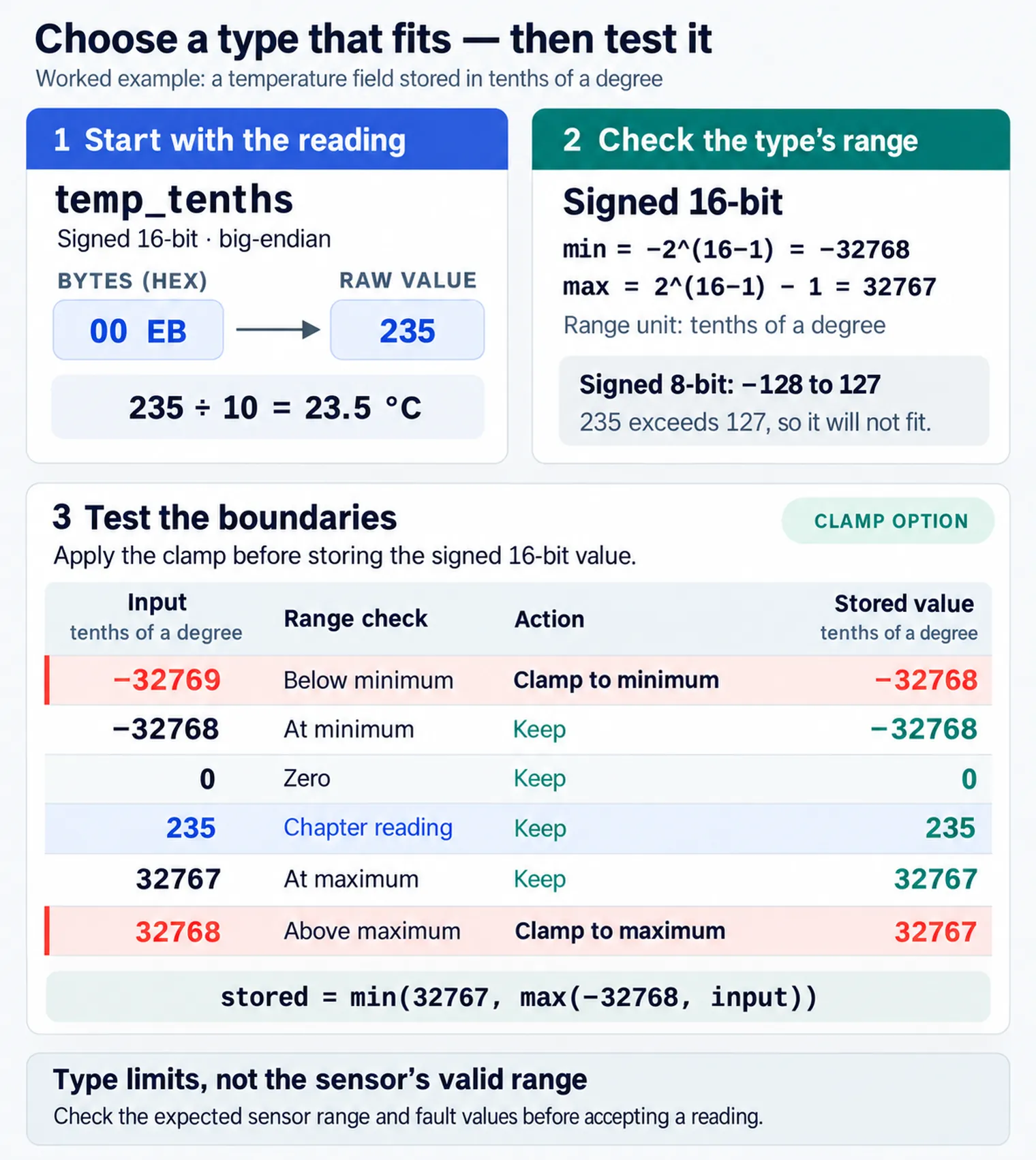
Follow Figure 9.2 downward from minimum and maximum values to signedness and width. Then test the boundaries and define whether overflow is rejected, clamped, or allowed to wrap. A type is suitable only when every valid value fits and the out-of-range behaviour is deliberate.
When an out-of-range result is stored in an unsigned N-bit field, it wraps modulo 2^N instead of saturating. An unsigned 8-bit counter at 255 plus one returns to 0. Signed overflow must not be assumed to wrap. Silent unsigned wraparound is a classic source of impossible-looking jumps in counters and timers.
Two's Complement and Sign
Almost all systems store signed integers in two's complement, where the most significant bit carries negative weight. The same bits decode very differently depending on whether the field is signed. Consider the two bytes FF 38 read as a 16-bit big-endian value:
0xFF38 as unsigned 16-bit = 65336
0xFF38 as signed   16-bit = 65336 - 65536 = -200
Both readings are arithmetically valid. Only the contract's signedness rule decides which one is correct, which is why signedness must be documented per field.
Byte Order (Endianness)
A multi-byte value can be stored most significant byte first (big-endian) or least significant byte first (little-endian). The same two bytes assemble into two different numbers:
bytes 12 34
  big-endian    -> 0x1234 = 4660
  little-endian -> 0x3412 = 13330
Inspect Figure 9.3 and look for which byte carries the largest place value under each decoding rule.
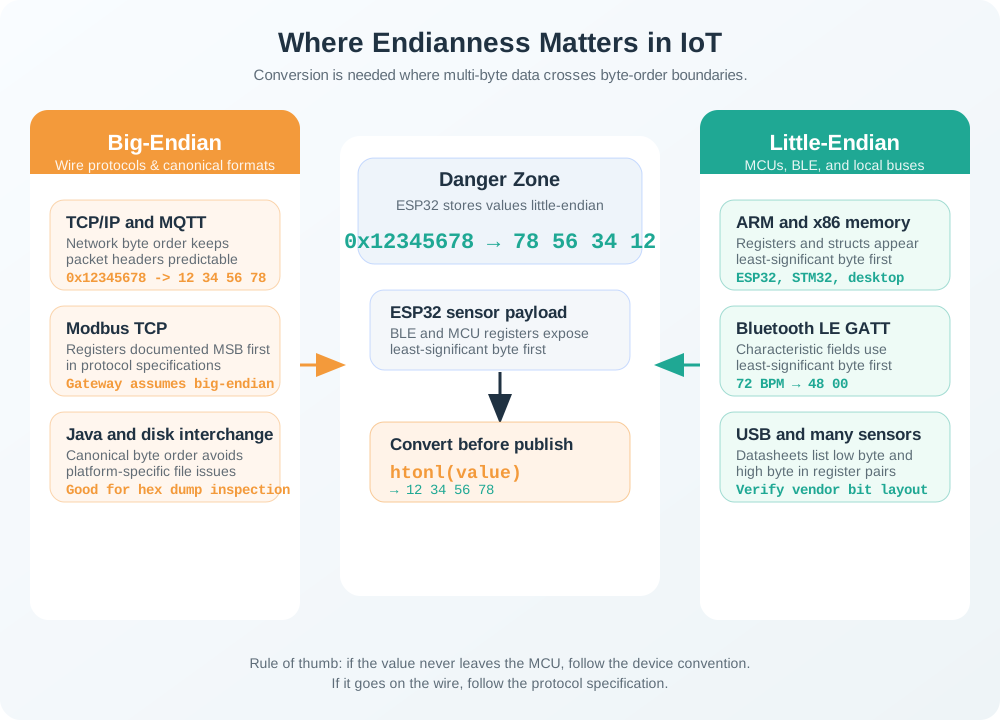
Follow Figure 9.3 through the same bytes under two ordering contracts. For 12 34 in big-endian form, 0x12 occupies the place and 0x34 the unit place, giving . Little-endian assigns those places in reverse, yielding . Neither arithmetic result reveals which contract the sender intended. The figure therefore connects representation to interoperability: a schema must state byte order before a receiver interprets a multi-byte field, and a captured test vector should verify the decision. Canonical network order is useful precisely because it makes that hidden agreement common across implementations.
Both results are real integers, so a byte-order mistake rarely throws an error. It quietly produces a wrong-but-plausible value, which makes endianness one of the hardest representation bugs to spot without a known-good test vector.
Text Is Not Free Either
Character data also follows a contract. In UTF-8, a character occupies one to four bytes: the ASCII range uses a single byte, while many accented, symbol, and non-Latin characters use more. Counting characters is therefore not the same as counting bytes, so a field limited to a fixed number of bytes may hold fewer characters than expected.
Inspect Figure 9.4 when a payload includes names or other text alongside numeric fields. Its lower checks show why both allowed characters and encoded size belong in the payload contract.
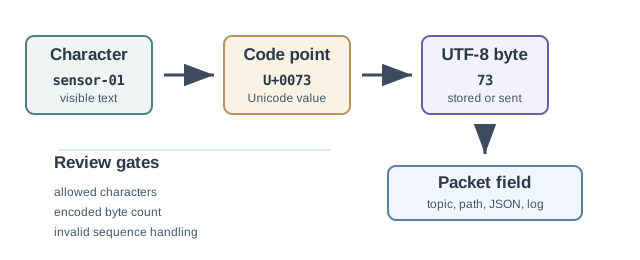
Trace the top row of Figure 9.4 from visible text through a Unicode code point and UTF-8 bytes into a field. Below, the character policy controls accepted symbols, while the byte limit controls storage. Check both before forwarding a record, even when the displayed name looks short.
Common Pitfalls
- Reading hexadecimal as decimal. The base must be confirmed first, or values can be wrong by amounts that depend on the digits.
- Ignoring signedness. A fault code stored as a small negative number can be read as a huge positive counter.
- Assuming byte order. Without a documented order, a value can decode to a believable wrong number that survives into dashboards.
- Treating text as unlimited. Identifiers and topic names still occupy bytes, and multi-byte characters can overflow a fixed field.
- Changing a schema without versioning. If field order or meaning changes silently, deployed receivers decode new payloads as old ones.
Signed Integer Knowledge Check
At this depth, data representation is a chain of small contracts: base, width, sign, byte order, encoding, scale, and schema. A trustworthy decode records each one and keeps a test vector, rather than treating a clean-looking number as proof that the rules were right.
9.6 Checkpoint: Summary
This section: Checkpoint: Summary
- Raw bytes are evidence; their meaning comes from a shared interpretation contract, not from the bytes alone.
- Numeric fields need base, width, signedness, byte order, scale, and units before they can be trusted.
- Two’s complement and endianness can both turn the same bytes into different, plausible values, so signedness and byte order must be documented per field.
- Fixed-width fields have hard ranges; unsigned results wrap modulo 2^N, while signed overflow needs an explicit policy.
- Text follows a contract too: UTF-8 characters span one to four bytes, so byte count and character count differ.
- Many “wrong value” bugs are interpretation bugs, not sensor or network failures; keep the raw bytes and a known-good test vector.
A byte means nothing until a contract says what it is. Preserve the raw bytes, record the width, signedness, byte order, encoding, scale, and units, and validate every decoded value against a known-good example.
9.7 See Also
This section: See Also
Number Systems and Data Units
Go deeper on binary, hexadecimal, byte width, signedness, ranges, and overflow.
Bitwise Operations and Endianness
Apply masks, shifts, packed flags, and byte order to real packed fields.
Text Encoding for IoT
See how characters become bytes and why UTF-8 byte length is not character count.
Find help
3 reviewed answers.
Where should I start in a module?
Open the module page from the sidebar to see its chapters in order. Use the module map to return to a topic you need.
Modules and pathsReviewed
What can I try when a project does not work?
Check the symptom, then work through the diagnostic steps. Keep the error message and the smallest example that reproduces it.
When you are stuckReviewed
How do interactive examples work?
Use the interactive guide to check how examples and simulations work before changing your project.
Interactive examples guideReviewed