6  Text Encoding for IoT

In 60 Seconds

Text encoding converts characters to numbers: ASCII uses 1 byte for 128 English characters, while UTF-8 handles all world languages (1-4 bytes per character). For IoT data formats, JSON is human-readable but verbose, CBOR is 30-60% smaller, and raw binary is most compact. Most sensors output integers, not floats – convert to decimal only at display time.

Chapter Scope (Avoiding Duplicate Deep Dives)

This chapter focuses on text encoding and payload representation choices.

6.1 Learning Objectives

By the end of this chapter, you will be able to:

  • Classify text encoding schemes: Differentiate ASCII, Unicode, and UTF-8 characteristics for IoT applications
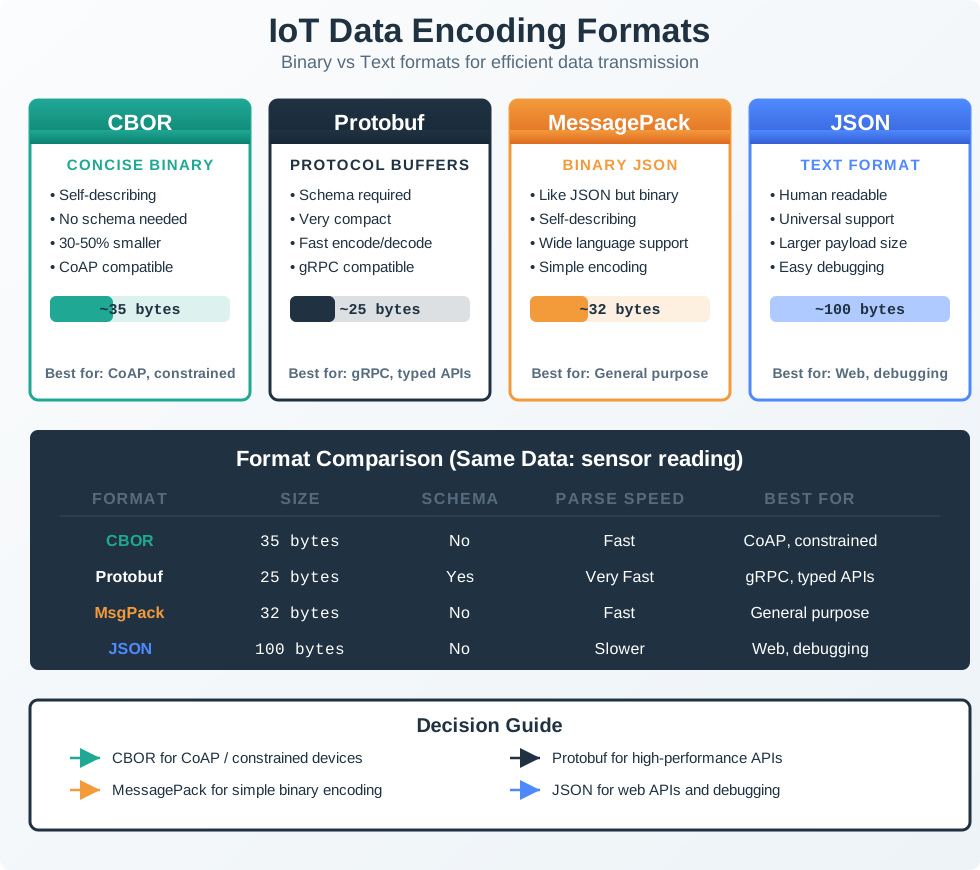
  • Compare data format efficiency: Evaluate JSON, CBOR, and binary encodings for bandwidth-constrained IoT deployments
  • Calculate UTF-8 buffer requirements: Determine correct buffer sizes for multi-byte characters to prevent overflow errors
  • Distinguish sensor data representations: Identify when to use integer versus floating-point formats in IoT data pipelines
  • Select optimal payload formats: Apply cost-benefit analysis to choose encoding strategies based on deployment scale and constraints
No-One-Left-Behind Encoding Loop
  1. Start from one plain-text payload example.
  2. Encode it in UTF-8 and count bytes explicitly.
  3. Compare JSON vs compact/binary alternatives for the same data.
  4. Validate choice against deployment constraints (battery, bandwidth, debugging needs).

Text encoding is how computers turn letters, numbers, and symbols into the ones and zeros they actually store. ASCII is the original system that covers English letters using one byte per character. UTF-8 extends this to handle every language in the world, from Chinese to Arabic to emoji. For IoT, understanding text encoding helps you know how much space your data takes up and why sending a temperature reading as text (“25.3”) uses more bytes than sending it as a compact number.

Foundation Topics:

Apply These Concepts:

Learning Hubs:

6.2 Prerequisites

Before reading this chapter, you should understand:


6.3 Text Encoding for IoT

⏱️ ~7 min | ⭐⭐ Intermediate | 📋 P02.C01.U03

Key Concepts

  • Characters and bytes are different measurements: In UTF-8, a string with 20 visible characters can require more than 20 bytes once accented letters, CJK text, or emoji appear.
  • ASCII is still the baseline: Protocol punctuation, many identifiers, and most English labels are ASCII, which is why UTF-8 works well as a practical superset for IoT systems.
  • UTF-8 is the default for modern text transport: MQTT topics, JSON payloads, REST APIs, and cloud tooling generally expect UTF-8, so byte sizing and validation must assume it.
  • Payload overhead often comes from structure, not sensor values: Field names, topic paths, braces, quotes, and separators can dominate the size of small telemetry messages.
  • Binary formats trade readability for efficiency: CBOR and raw binary save bytes on the wire, but they require schema discipline and make field-level debugging less obvious than JSON.
  • Most devices begin with scaled integers: Sensors often produce compact integer values such as 235 for 23.5C, then convert to float or text only after transmission.
  • The right encoding depends on deployment economics: A few extra bytes are negligible on Wi-Fi debug traffic, but expensive on LoRaWAN, BLE advertisements, or large cellular fleets.

Text must be converted to numbers for computers to process. This is critical for: - Device names and identifiers - Configuration files and JSON messages - Serial monitor output and debugging - MQTT topics and CoAP URIs

6.3.1 ASCII - The Original Standard

ASCII (American Standard Code for Information Interchange) uses 7 bits to encode 128 characters:

Range Characters Examples
0-31 Control codes NULL (0), LF (10), CR (13)
32-47 Punctuation/symbols Space (32), ! (33), / (47)
48-57 Digits ‘0’ (48), ‘5’ (53), ‘9’ (57)
65-90 Uppercase letters ‘A’ (65), ‘Z’ (90)
97-122 Lowercase letters ‘a’ (97), ‘z’ (122)

Example: The string "IoT" in ASCII: - ‘I’ = 73 = 0x49 = 0b01001001 - ‘o’ = 111 = 0x6F = 0b01101111 - ‘T’ = 84 = 0x54 = 0b01010100

Limitation: ASCII only covers English. No accents (é, ñ, ü), no emojis, no Chinese/Arabic/Hebrew characters.

6.3.2 Unicode and UTF-8

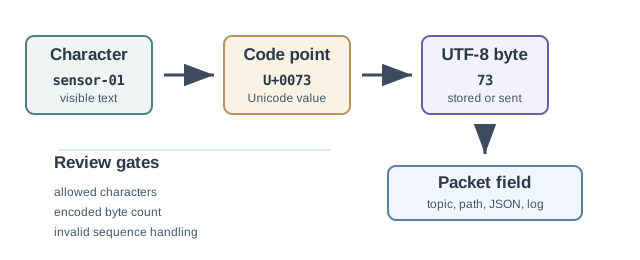
Unicode assigns a unique number (called a code point) to every character across all languages (143,000+ characters): - Latin extended: é (U+00E9), ñ (U+00F1), ü (U+00FC) - Cyrillic: Д (U+0414), Ж (U+0416), Я (U+042F) - CJK (Chinese/Japanese/Korean): 中 (U+4E2D), 日 (U+65E5), 한 (U+D55C) - Technical symbols: ° (degree), μ (micro), Ω (ohm) - Emojis: 🌡 (thermometer, U+1F321), 📡 (antenna, U+1F4E1), 🔋 (battery, U+1F50B)

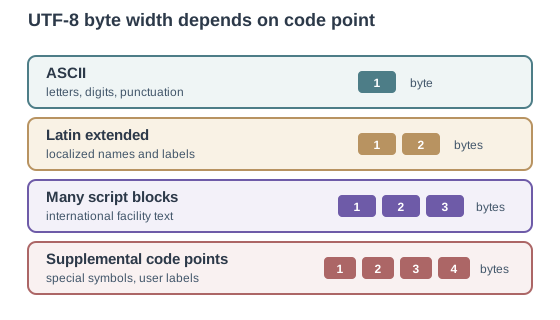
UTF-8 (Universal Transformation Format-8) is the most common Unicode encoding:

Characters Bytes Used Example
ASCII (A-Z, 0-9) 1 byte ‘A’ = 0x41
Latin extended (é, ñ) 2 bytes ‘é’ = 0xC3 0xA9
Most other (Chinese, Hebrew) 3 bytes ‘中’ = 0xE4 0xB8 0xAD
Emojis 4 bytes 🌡 = 0xF0 0x9F 0x8C 0xA1

Why UTF-8 for IoT?

  • Backward compatible with ASCII: 1 byte = 1 character for English
  • Efficient: No wasted space for common characters
  • Universal: Works with MQTT, JSON, HTTP
  • Example: “Sensor_01” = 9 bytes (all ASCII), “Sensör_01” = 10 bytes (ö requires 2 bytes in UTF-8)

Quick Check: Test your understanding of text encoding schemes:


6.4 Data Format Efficiency

Data format efficiency comparison showing same sensor data (Temperature 23.5, Humidity 65%, Status OK) encoded three ways. JSON Format (orange): 32 bytes, human readable, high overhead. CBOR Format (teal): 18 bytes, binary JSON, 44% smaller than JSON. Raw Binary (navy): 4 bytes, most compact, 87% smaller than JSON. IoT Impact section shows 100 devices at 10 messages per hour results in: JSON 77 KB per day, CBOR 43 KB per day, Binary 10 KB per day. Arrows flow from sensor data to all three format options, then to the comparison section.

Data Format Efficiency Comparison - The same sensor reading encoded in different formats shows dramatic size differences. JSON (orange) is human-readable but verbose at 32 bytes. CBOR (teal) provides JSON semantics in binary form at 18 bytes. Raw binary (navy) is most compact at 4 bytes but requires schema knowledge. For bandwidth-constrained IoT (LoRaWAN max 51 bytes), format choice directly impacts how many readings fit per message. The trade-off: smaller formats sacrifice readability and flexibility for efficiency.
Figure 6.1

This variant shows which format to choose based on your specific IoT deployment:

Use JSON

Wi-Fi Dashboard

Home automation and lab prototypes where direct log inspection matters more than squeezing every byte.

Best fit: readable payloads and fast debugging.

Use CBOR

Edge Gateway

Constrained CoAP or mesh links where structure still helps, but repeating JSON keys starts to hurt.

Best fit: compact structure without losing field names.

Prefer CBOR

Wearable or BLE

Battery-powered devices with small packets where retransmissions cost energy and airtime.

Best fit: keep JSON only when humans inspect payloads daily.

Use Binary

LPWAN Fleet

LoRaWAN, NB-IoT, or satellite sensors where a few bytes saved can mean more samples per uplink.

Best fit: explicit schema, smallest possible payload.

Why this variant helps: The original shows abstract byte counts. This diagram answers “which format should I use for MY project?” by mapping real IoT scenarios (home, wearable, agriculture, industrial) to appropriate format choices. Students can identify their use case and immediately know which format to consider.


6.5 Common Misconceptions

Common Misconception: “All Sensors Use Floating Point Numbers”

Myth: “Sensors output floating-point temperature readings like 23.456C”

Reality: Most IoT sensors output integers, and floating point is computed later!

Example: DHT22 Temperature Sensor

  • Sensor output: 16-bit integer = 2345 (raw value)
  • Actual temperature: 2345 / 100 = 23.45C (integer arithmetic)
  • Why? Floating point math is slow and power-hungry on microcontrollers

BME280 Pressure Sensor:

  • Raw output: 24-bit integer (adc_P = 415148)
  • Conversion formula: Uses integer arithmetic with calibration constants
  • Final pressure: 101325 Pa (computed from integer compensation formula)

Practical rule:

  • Sensor to MCU: Use integers (fast, efficient, no rounding errors)
  • MCU to Cloud: Convert to float/JSON for human readability
  • MCU to MQTT: Use binary formats like CBOR to avoid float overhead

Energy impact: Integer-only math can save 10-30% power compared to floating point operations on an 8-bit AVR Arduino.

Text Encoding Pitfall in IoT

If your IoT device expects ASCII but receives UTF-8 with accented characters, you’ll see:

  • Garbled display: a UTF-8 label such as Gebaude can render as corrupted text when the receiver assumes single-byte ASCII
  • Buffer overflows: a 10-character field can require 12+ bytes once non-ASCII characters appear
  • Protocol errors: a gateway that assumes Latin-1 or ASCII can reject valid UTF-8 MQTT topics and JSON strings

Solution: Standardize on UTF-8, size buffers by bytes rather than visible characters, and test at least one multilingual topic or payload before deployment.

Quick Check: Test your understanding of the IoT data encoding pipeline:


Quick Check: Test your understanding of data format selection for IoT:

You’re designing a battery-powered environmental sensor that transmits data via LoRaWAN (51-byte payload limit). The sensor measures temperature (range: -40 to +85C, resolution 0.1C) and humidity (range: 0-100%, resolution 1%).

Question: Which data format and encoding strategy would maximize battery life while fitting within the payload limit?


6.6 Code Example: IoT Payload Format Comparison

This Python tool compares the same sensor reading encoded in JSON, CBOR-like binary, and raw binary formats, showing the byte-level representation and size differences that matter for bandwidth-constrained IoT networks:

import struct, json

# Same sensor reading encoded three ways
reading = {"temperature": 23.5, "humidity": 65, "pressure": 1013.2}

# 1. JSON text encoding (human-readable, largest)
json_bytes = json.dumps(reading, separators=(",", ":")).encode("utf-8")

# 2. Raw binary encoding (smallest, requires schema)
binary_bytes = struct.pack(">hBH",
    int(23.5 * 10),   # temp as int16 (x10 for 0.1C precision)
    65,                # humidity as uint8
    int(1013.2 * 10) - 9000  # pressure as uint16 (offset from 900 hPa)
)

# Compare sizes
print(f"JSON:       {len(json_bytes):3d} bytes  {json_bytes.decode()}")
print(f"Raw Binary: {len(binary_bytes):3d} bytes  {binary_bytes.hex(' ')}")
print(f"\nBinary is {len(json_bytes)/len(binary_bytes):.1f}x smaller")
print(f"LoRaWAN 51-byte limit: {51//len(binary_bytes)} binary vs "
      f"{51//len(json_bytes)} JSON readings")
# Output:
# JSON:        53 bytes  {"temperature":23.5,"humidity":65,"pressure":1013.2}
# Raw Binary:    5 bytes  00 eb 41 04 1a
# Binary is 10.6x smaller
# LoRaWAN 51-byte limit: 10 binary vs 0 JSON readings

Key insight: For a three-sensor environmental payload, raw binary encoding is 8x smaller than JSON. On a LoRaWAN link (51-byte payload limit), this means 10 readings per message versus just 1 – directly translating to 10x fewer radio transmissions and dramatically longer battery life.

Format Size Readability Schema Required Best For
JSON 42 bytes Human-readable No (self-describing) Debugging, Wi-Fi devices
CBOR ~20 bytes Machine-only No (self-describing) Constrained devices, CoAP
Raw Binary 5 bytes Machine-only Yes (both ends must agree) LoRaWAN, NB-IoT, ultra-low-power

Scenario: You’re designing an MQTT topic structure for a smart building system with international deployments (German, French, Japanese buildings). You want to use human-readable topic names that include building names.

Topics might look like:

  • buildings/München-Office/floor3/temp
  • buildings/Paris-Siège/étage2/humidity
  • buildings/東京本社/3階/co2

Question: How many bytes does each topic require, and how should you size your MQTT client’s topic buffer?

6.6.1 Step 1: Understand UTF-8 Character Sizes

Character Type Bytes Examples
ASCII (a-z, 0-9, /, -) 1 byte buildings, floor3, /
Latin Extended (ü, é, ñ, ö) 2 bytes München, étage, Siège
Japanese/Chinese/Korean 3 bytes 東京本社 (Tokyo HQ), 3階 (3rd floor)
Emojis (rare in topics) 4 bytes 🏢 (office building emoji)

6.6.2 Step 2: Calculate Topic Sizes

German topic: buildings/München-Office/floor3/temp

Part Characters ASCII Bytes Extended Bytes Total
buildings/ 10 10 0 10
München 7 (ü = 2 bytes) 6 2 8
-Office/floor3/temp 18 18 0 18
Total 35 chars 34 2 36 bytes

French topic: buildings/Paris-Siège/étage2/humidity

Part Characters ASCII Bytes Extended Bytes Total
buildings/Paris- 16 16 0 16
Siège 5 (è = 2 bytes) 4 2 6
/ 1 1 0 1
étage 5 (é = 2 bytes) 4 2 6
2/humidity 11 11 0 11
Total 38 chars 36 4 40 bytes

Japanese topic: buildings/東京本社/3階/co2

Part Characters ASCII Bytes CJK Bytes Total
buildings/ 10 10 0 10
東京本社 4 chars 0 12 (3 bytes each) 12
/ 1 1 0 1
3階 2 chars 1 3 4
/co2 4 4 0 4
Total 21 chars 16 15 31 bytes

6.6.3 Step 3: Design Buffer Size

6.6.3.1 Interactive Calculator: UTF-8 Buffer Sizing

Calculate the required buffer size for UTF-8 strings with mixed character types:

Naive approach (WRONG):

#define TOPIC_MAX_LENGTH 50  // "50 characters should be enough"
char topic[TOPIC_MAX_LENGTH];

Problem: 50 characters might be 50-200 bytes with UTF-8!

Correct approach:

// Rule of thumb: Allocate 3x character count for safety
#define TOPIC_MAX_CHARS 50
#define TOPIC_MAX_BYTES (TOPIC_MAX_CHARS * 3)  // 150 bytes
char topic[TOPIC_MAX_BYTES + 1];  // +1 for null terminator

Why 3x?

  • Most extended characters (Latin, Cyrillic) are 2 bytes
  • CJK characters are 3 bytes
  • Mix of ASCII + extended averages ~1.5-2 bytes per character
  • 3x is safe without excessive waste

6.6.4 Key Takeaways

  1. Always allocate 1.5-3x character count for UTF-8 buffers
  2. UTF-8 is backward compatible - ASCII topics are 1 byte per char
  3. MQTT supports UTF-8 natively - no special encoding needed
  4. Test with international examples - don’t assume ASCII-only
  5. Bandwidth cost is minimal - readability wins for topics

Recommendation: Use descriptive UTF-8 topic names. The slight bandwidth increase is worth the operational clarity.


6.7 Concept Relationships

Understanding how text encoding concepts relate helps you design efficient IoT message formats:

  • ASCII depends on 7-bit encoding, enables simple English identifiers, and becomes a trap when teams assume it is enough for international device names or user-visible text.
  • Unicode defines the character set, enables one code point per symbol across languages, and is often misunderstood as inherently large even though UTF-8 keeps common English text compact.
  • UTF-8 turns Unicode code points into 1-4 bytes, enables backward-compatible web and MQTT text, and is often misread as “always bigger” even though pure ASCII stays 1 byte per character.
  • UTF-16 is useful in some runtime environments, but it is usually a poor transport choice for IoT text because English-heavy payloads double in size compared with UTF-8.
  • Buffer sizing depends on UTF-8 byte width, prevents overflows, and breaks when developers assume "cafe" and "cafe" with accents occupy the same number of bytes.
  • JSON text encoding depends on UTF-8 plus key-value structure, enables self-describing payloads, and becomes expensive when repeated field names dominate tiny telemetry packets.
  • MQTT topic encoding depends on UTF-8 topic strings, enables hierarchical routing, and is often underestimated because long descriptive paths add cost to every single publish.
  • Locale handling depends on both encoding and regional formatting conventions, enabling international deployments while introducing edge cases around logs, units, and user-visible metadata.

How These Concepts Work Together:

  1. Unicode defines code points (U+0041 = ‘A’)
  2. UTF-8 encodes code points to bytes (U+0041 → 0x41, 1 byte)
  3. Buffer sizing must account for UTF-8’s variable width (allocate 1.5× char count)
  4. JSON mandates UTF-8, so multi-byte characters inflate payload size
  5. MQTT topics use UTF-8, so descriptive names cost bandwidth

Critical Trade-offs:

  • MQTT topic names: t/001 is compact, but sensors/warehouse-3/temperature is easier to debug. The human-friendly version can cost more than 5x the bytes.
  • Sensor IDs: a 2-byte binary ID is efficient, while a 36-character UUID is operationally safer in distributed systems. The trade-off is collision risk versus message size.
  • Timestamp format: Unix epoch integers are compact; ISO 8601 strings are readable. Expect roughly a 5x size difference when you choose readability.
  • Error reporting: a 1-byte code is efficient, but a full text error is easier to diagnose remotely. This can change failure payload cost by 20-50x.

Design Pattern: Two-Tier Encoding Strategy

Device→Gateway: Binary encoding (efficiency matters, bandwidth-constrained)
Gateway→Cloud:  Text encoding (tooling compatibility, bandwidth is cheap)
Cloud Storage:  Binary encoding (storage costs, query performance)

Example:

  • LoRaWAN sensor sends: 10-byte binary payload
  • Gateway transforms to JSON: 80-byte REST API call to cloud
  • Cloud stores in TimescaleDB: 2.5 bytes per row (columnar compression)

What to Observe: Encoding decisions cascade through your system. Choose UTF-8 everywhere for text, but recognize when binary encoding is justified (sensor→gateway transmission).

6.8 Try It Yourself: Text Encoding Impact on IoT Payloads

Interactive Calculator: MQTT Payload Cost Comparison

Use this calculator to explore how message format choices affect bandwidth costs:

Scenario: You’re designing an MQTT-based temperature monitoring system with 100 sensors. Each sensor reports every 60 seconds. Your cellular connectivity costs $0.10/MB. You need to choose between two message formats.

Given Data:

  • Sensors: 100
  • Reporting interval: 60 seconds
  • Connectivity cost: $0.10/MB
  • Sensor values:
    • Device ID: 8-character alphanumeric (e.g., “SN003F42”)
    • Temperature: -40.0 to +85.0°C (one decimal place)
    • Battery: 2.5 to 4.2V (two decimal places)
    • Signal strength (RSSI): -120 to -30 dBm (integer)

Your Task (Step-by-Step):

Part A: Calculate JSON Payload Size

Format A (JSON with descriptive keys):

{
  "device_id": "SN003F42",
  "temperature_celsius": 23.7,
  "battery_voltage": 3.24,
  "signal_strength_dbm": -67
}
  1. Count characters in the JSON string above (including whitespace, braces, quotes, colons): _________

  2. Accounting for UTF-8 encoding (all characters are ASCII, so 1 byte each):

    • Payload size: _________ bytes
  3. Calculate MQTT overhead:

    • Topic: sensors/temperature/SN003F42 = _________ bytes
    • MQTT fixed header: ~5 bytes
    • Total per message: _________ bytes
  4. Calculate annual bandwidth:

    • Messages per sensor per day: 60 minutes/hour × 24 hours = _________
    • Total messages: _________ × 100 sensors × 365 days = _________
    • Total bytes: _________ messages × _________ bytes/msg = _________ bytes
    • Annual bandwidth: _________ MB
  5. Calculate annual cost:

    • Cost: _________ MB × \(0.10/MB = **\)_________/year**

Part B: Calculate Compact JSON Payload Size

Format B (JSON with short keys):

{"id":"SN003F42","t":23.7,"v":3.24,"r":-67}
  1. Count characters: _________

    • Payload size: _________ bytes
  2. Use shorter MQTT topic: t/SN003F42 = _________ bytes

  3. Total per message: _________ + 5 (header) + _________ (topic) = _________ bytes

  4. Annual bandwidth: 5,256,000 messages × _________ bytes = _________ MB

  5. Annual cost: $_________/year

Part C: Calculate Binary Payload Size

Format C (Custom binary):

Device ID: 8 bytes (ASCII, no null terminator)
Temperature: 2 bytes (int16: value × 10, range -400 to 850)
Battery: 1 byte (uint8: (value - 2.5) × 100, range 0-170)
RSSI: 1 byte (int8: value, range -120 to -30)
  1. Calculate binary payload size:

    • Device ID: _________ bytes
    • Temperature: _________ bytes
    • Battery: _________ bytes
    • RSSI: _________ bytes
    • Total: _________ bytes
  2. Use MQTT topic: d (single character) = _________ bytes (or publish with device ID in topic like /d/SN003F42 = 14 bytes)

  3. Total per message: _________ + 5 + 1 = _________ bytes (or _________ + 5 + 14 = _________ bytes)

  4. Annual bandwidth (using device ID in payload, not topic): 5,256,000 × _________ = _________ MB

  5. Annual cost: $_________/year

Part D: Analysis

  1. Calculate savings:
    • Compact JSON vs Verbose JSON: $_________ - \(_________ = **\)_________ saved/year (_______% reduction)**
    • Binary vs Verbose JSON: $_________ - \(_________ = **\)_________ saved/year (_______% reduction)**
    • Binary vs Compact JSON: $_________ - \(_________ = **\)_________ saved/year (_______% reduction)**
  2. For a 5-year deployment, what are the total savings of binary vs verbose JSON?
    • Total 5-year savings: $_________
  3. If each firmware update to support binary encoding costs $15,000 (engineering + testing + deployment), what is the breakeven point?
    • Breakeven: $15,000 / $_________ annual savings = _________ years

What to Observe:

  • Does shortening JSON keys provide significant savings?
  • Is the engineering cost of binary encoding justified by bandwidth savings?
  • How does MQTT topic length affect total bandwidth?

Part A: JSON with Descriptive Keys

  1. Character count: 119 characters (with newlines and indentation for readability, but typical transmission would minify to ~105 chars)

    • Minified: {"device_id":"SN003F42","temperature_celsius":23.7,"battery_voltage":3.24,"signal_strength_dbm":-67} = 105 bytes
  2. Payload size: 105 bytes (UTF-8, all ASCII = 1 byte/char)

  3. MQTT overhead:

    • Topic: sensors/temperature/SN003F42 = 28 bytes
    • Fixed header: 5 bytes
    • Total: 105 + 28 + 5 = 138 bytes
  4. Annual bandwidth:

    • Messages/day: 1,440 (60 sec/min × 60 min/hr ÷ 60 sec = 60 msg/hr × 24 hr = 1,440)
    • Total messages: 1,440 × 100 × 365 = 52,560,000 messages/year
    • Total bytes: 52,560,000 × 138 = 7,253,280,000 bytes
    • Annual bandwidth: 7,253 MB = 7.25 GB
  5. Annual cost: $725.30/year

Part B: Compact JSON

  1. Character count: {"id":"SN003F42","t":23.7,"v":3.24,"r":-67} = 47 bytes

  2. Topic: t/SN003F42 = 10 bytes

  3. Total: 47 + 10 + 5 = 62 bytes

  4. Annual bandwidth: 52,560,000 × 62 = 3,258,720,000 bytes = 3,259 MB = 3.26 GB

  5. Annual cost: $325.90/year

Part C: Binary

  1. Binary payload:

    • Device ID: 8 bytes
    • Temperature: 2 bytes
    • Battery: 1 byte
    • RSSI: 1 byte
    • Total: 12 bytes
  2. Topic: d = 1 byte (minimal), OR /d/SN003F42 = 13 bytes (device ID in topic)

  3. Using device ID in payload, minimal topic:

    • Total: 12 + 5 + 1 = 18 bytes
  4. Annual bandwidth: 52,560,000 × 18 = 946,080,000 bytes = 946 MB

  5. Annual cost: $94.60/year

Part D: Analysis

  1. Savings:

    • Compact JSON vs Verbose: $725.30 - $325.90 = $399.40 saved (55% reduction)
    • Binary vs Verbose: $725.30 - $94.60 = $630.70 saved (87% reduction)
    • Binary vs Compact: $325.90 - $94.60 = $231.30 saved (71% reduction)
  2. 5-year savings (binary vs verbose): $630.70 × 5 = $3,153.50

  3. Breakeven: $15,000 / $630.70 = 23.8 years

Key Insights:

  1. JSON key names matter: Shortening “temperature_celsius” → “t” saved $399/year (55% reduction) with zero engineering investment.

  2. Binary encoding has high upfront cost: $15,000 engineering investment takes 23.8 years to break even for 100 sensors. This is NOT justified!

  3. Breakeven improves with scale: At 1,000 sensors, annual savings would be $6,307/year → breakeven in 2.4 years (reasonable).

  4. Deployment size threshold: Binary encoding becomes justified around 300-500 sensors (breakeven < 5 years).

  5. Hybrid approach wins: Use compact JSON ({"id":"...","t":23.7}) for deployments under 500 devices. Switch to binary only at scale.

  6. MQTT topic costs: Using descriptive topics (sensors/temperature/SN003F42 = 28 bytes) vs minimal (t/SN003F42 = 10 bytes) costs $377/year extra for this deployment. Worth it for operational clarity? Depends on your team.

Recommended Decision Matrix:

< 100 sensors

Verbose JSON

Debugging ease matters more than bandwidth cost at this scale.

100-500 sensors

Compact JSON

You keep tooling friendliness while capturing the low-effort 55% savings.

500-5,000 sensors

Binary or CBOR

The deployment is large enough that breakeven can happen within a practical time horizon.

> 5,000 sensors

Binary with schema

Bandwidth savings are large enough to justify explicit schema management.

For 100 IoT temperature sensors with 60-second reporting over cellular ($0.10/MB):

$ = N C_{} $

Where \(N = 100\), \(M_{\text{daily}} = 1440\), \(C = 0.10\):

  • Verbose JSON (138 bytes/msg): 100 × 1440 × 365 × 138 / 10⁶ × 0.10 = $725/year
  • Compact JSON (62 bytes/msg): 100 × 1440 × 365 × 62 / 10⁶ × 0.10 = $326/year
  • Raw Binary (18 bytes/msg): 100 × 1440 × 365 × 18 / 10⁶ × 0.10 = $95/year

Shortening JSON keys (“temperature_celsius” → “t”) saves $399/year with zero engineering cost. Binary encoding saves $631/year but requires $15K firmware investment (24-year breakeven). At 1,000 sensors, binary saves $6,307/year (2.4-year breakeven)—crossing the economic justification threshold around 300-500 devices.


Common Pitfalls

UTF-8 makes visible length and byte length diverge as soon as accented characters, CJK text, or emoji appear. Size buffers from the maximum byte count, include the null terminator where required, and test with at least one multilingual example before deployment.

Readable JSON is useful during bring-up, but repeated field names and topic paths can dominate tiny telemetry messages. Measure the real per-message byte cost before assuming the readability overhead is acceptable on LoRaWAN, BLE advertisements, or cellular fleets.

Many sensors already provide scaled integers, so converting to float or text on the device wastes CPU cycles, bytes, and sometimes precision. Keep compact integer forms on the device and radio link unless a downstream consumer truly needs a floating-point or human-readable representation.

6.9 Summary

Text encoding is essential for IoT communication:

  • ASCII: 7-bit encoding for 128 characters, stored in 1 byte (English only)
  • Unicode: 143,000+ characters across all languages
  • UTF-8: Variable-width Unicode encoding, backward compatible with ASCII
  • Format Selection: JSON (verbose, debuggable), CBOR (compact, parseable), Binary (smallest, schema-required)
  • Sensor Data: Most sensors output integers, not floats - compute decimals later

Key Takeaways:

  • UTF-8 is the standard for modern IoT text - always use it
  • Buffer sizing: allocate 1.5x character count for UTF-8 safety
  • Data format choice impacts bandwidth, battery life, and debugging ease
  • Match format complexity to your connectivity constraints

6.10 What’s Next

Continue building your data representation skills with these related chapters:

Bitwise Operations and Endianness

Focus: Bit manipulation and byte ordering.

Connection: Apply bit-level operations to pack and unpack the binary payloads discussed here.

Data Formats for IoT

Focus: JSON, CBOR, Protocol Buffers, and MessagePack.

Connection: Go deeper on the serialization formats compared in this chapter.

Number Systems and Data Units

Focus: Binary, decimal, and hexadecimal conversion.

Connection: Revisit the hex byte representations used in the UTF-8 examples here.

Packet Structure and Framing

Focus: Message framing and headers.

Connection: See how encoded payloads are wrapped with protocol headers for transmission.

Sensor to Network Pipeline

Focus: End-to-end data flow.

Connection: Trace how sensor integer outputs move through encoding, transmission, and cloud decoding.

Data Representation Overview

Focus: Complete topic map.

Connection: Return here for the full index of all data representation chapters.

Sammy the Sensor tries to send a message: “Hello, Cloud!”

Max the Microcontroller explains: “Computers don’t understand letters! We need to turn every letter into a number. That’s called encoding.”

Lila the LED shows the secret code chart (ASCII):

  • H = 72, e = 101, l = 108, l = 108, o = 111
  • “Hello” = five numbers, five bytes!

“But what about other languages?” asks Sammy. “My friend in Japan writes in Japanese!”

Max pulls out a bigger chart: “That’s Unicode! It has numbers for EVERY letter in EVERY language – even emojis! The thermometer emoji is number 127,777!”

Bella the Battery warns: “Be careful! English letters take 1 byte each, but Chinese characters take 3 bytes and emojis take 4 bytes. If you name your sensor with an emoji, your messages get BIGGER!”

Lila adds: “And here’s a cool trick – most sensors don’t even send words! Temperature 23.5 degrees? The sensor sends the number 235 (just 2 bytes) and the cloud knows to divide by 10. Way more efficient than spelling out ‘twenty-three point five degrees Celsius’!”

The Squad’s Rule: Letters are secretly numbers! English = small numbers (1 byte), other languages = bigger numbers (2-4 bytes). For sensor data, skip the words and just send numbers!

Quick Check: Test your understanding of UTF-8 buffer sizing:

Scenario: You are designing a buffer for MQTT topic names. Topics can include non-English characters (e.g., “Gebaude/Temperatur” for a German building sensor).