36 Protocol Selection Scenarios

More
Depth: Practitioner
Progress saves as you read. Mark sections complete as you go; your progress appears in the sidebar.
36.1 In 60 Seconds
This section: In 60 Seconds — Begin with the product, not a technology name.
Begin with the product, not a technology name. A parking sensor stays still. A wrist alarm moves with a person. A shipping tag crosses many sites. A building control must work through walls. These jobs differ even when their messages are small.
List the hard facts. Mark the farthest place. Set the battery goal. State the safe wait. Note whether the device moves. Name who owns fixed equipment. Record the cost that continues after sale.
Remove any choice that fails a hard fact. Do this before scoring features. A familiar choice still fails when it cannot reach. A long-reach choice still fails when it cannot meet the action time. Write the failed fact beside each removal.
Compare the survivors. Check field evidence. Check security duties. Check recovery after a break. Check support skills. Check local rules. Name the test that would change the result.
Use one clear decision record. Keep the facts, removals, comparison, trial, and review trigger together. Another team should be able to repeat the reasoning. They should not need to trust a brand or a hidden score.
This quick path uses one main connection per case. Real products may combine several. Practitioner work builds full records. Under the Hood examines edge cases, weights, and why a failed hard limit must overrule a high total score.
Protocol-selection scenarios test whether the decision workflow travels across real deployment shapes. Extract the facts, mark hard constraints, eliminate candidates that fail them, compare the survivors, and record the field tests that could still change the recommendation.
36.2 Start With the Story
This section: Start With the Story — Picture four products: a parking sensor, a wrist alarm, a shipping tag, and a building control.
Picture four products: a parking sensor, a wrist alarm, a shipping tag, and a building control. All send small messages. They still need different connection choices. The place, power source, movement, timing, and owner change the answer.
Treat each case as a reasoning test. First list facts. Mark the limits that cannot move. A buried parking sensor may need years of battery life. A wrist alarm may need a nearby phone and quick notice. A shipping tag moves across sites. A building control must fit local rules and walls.
Remove choices that fail a hard limit. Do not give points to an option that cannot reach the site or meet the power goal. Compare only the survivors. Ask who owns fixed equipment. Count ongoing cost. Check security and recovery. Name the field test that could change the answer.
Write why each option left the list. “Familiar” is not evidence. “Long range” is not enough. A good decision record links every choice to a measured need. It also states when the review must happen again.
This first view gives each product one main path. Real products can combine paths and change after release. The Practitioner layer works through full comparison records. Under the Hood examines edge cases, decision weights, and why a neat score must never overrule a failed hard limit.
You will compare connectivity choices for parking, wearable, logistics, and building-retrofit deployments using their different constraints. Start with each product’s location, traffic, power source, and operator before proposing a protocol.
Compare the four products across four beats to see how the deployment facts change each decision path.
-

Packet Pete: “Four small messages should mean one simple connection choice, right?”
-

Bex: “Place, power, movement, timing, and ownership change the answer.”
-

Test Tessa: “A failed hard limit cannot be rescued by a neat score.”
-

The team: “Record why each path fits and when changing facts require another review.”
36.3 Scenarios Test Reasoning, Not Protocol Names
This section: Scenarios Test Reasoning, Not Protocol Names — Protocol-selection scenarios are practice cases, not answer keys to memorize.
Protocol-selection scenarios are practice cases, not answer keys to memorize. The same protocol can be the right choice in one scenario and the wrong choice in another when the environment, power source, mobility, or ownership model changes.
The important idea is that a good scenario answer is a process, not a brand. It turns deployment facts into hard constraints, eliminates options that fail them, compares the survivors with lifecycle and operations evidence, and records what must be validated before installation.
For a dense fixed-sensor deployment, the useful comparison may be LoRaWAN, NB-IoT, LTE-M, and a powered local-gateway design, with the decision driven by weak-location coverage, gateway ownership, battery-service interval, and recurring operations cost. For a wearable or body-to-phone sensor, the first question is usually whether BLE can satisfy alert timing, reconnect behavior, buffering, and phone operating-system limits without draining the tiny battery. For a building retrofit, Thread, Zigbee, BLE mesh, Wi-Fi, and wired gateway backhaul are not ranked in the abstract; they are tested against wall materials, channel congestion, approved IT boundaries, router density, and maintenance access.
That is why a scenario answer should name the failed constraint beside every rejected option. "Wi-Fi is familiar" is not enough if the power budget requires years of sleep-heavy operation. "LPWAN is long range" is not enough if the owner cannot install gateways or if downlink and firmware-update paths are part of the product. "Cellular works everywhere" is not enough without route evidence, coverage exceptions, subscription handling, antenna placement, and fallback behavior. The answer becomes credible when the reasoning says what would change it.
If you only need the intuition, this layer is enough: for any scenario, extract the facts, mark the non-negotiable constraints, remove the candidates that fail them, compare the survivors honestly, and record the field tests that must still be passed. A good answer explains the eliminations and the validation plan, not just the winner.
The route in Figure 36.1 moves from site facts to a short list; test it in a pilot.
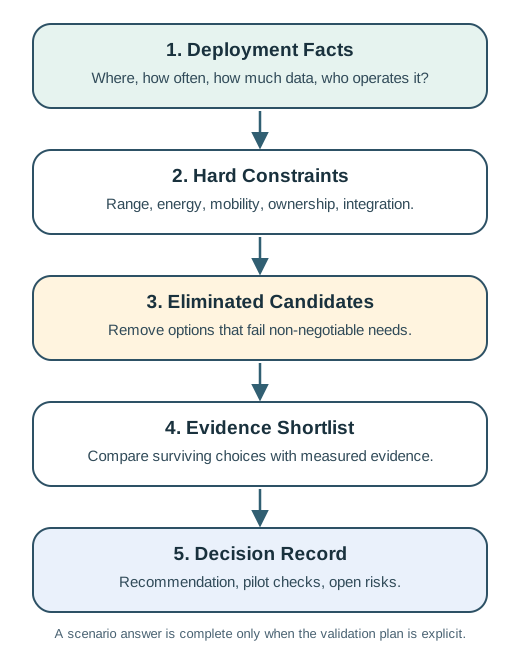
Follow Figure 36.1 downward from deployment facts to hard constraints, then remove candidates that fail those limits. Compare the survivors in the evidence shortlist before writing the decision record. The final box includes pilot checks and open risks, so the recommendation comes with a validation plan.
The One-Minute View
Facts to constraints
Extract the deployment facts, then mark which requirements are non-negotiable rather than merely desirable.
Eliminate, then compare
Remove candidates that fail a hard constraint, then compare only the survivors with evidence.
Record and validate
Write down the recommendation, the assumptions, the open risks, and the field test that could overturn it.
Beginner Examples
- Dense fixed sensors and a body-worn sensor can both report "temperature," yet their dominant constraints are completely different.
- A scenario answer that names a protocol without explaining the eliminations is incomplete.
- The same recommendation can flip when the site, mobility, or ownership model changes, so the reasoning must travel with it.
Scenario Reasoning Knowledge Check
If you grasp the loop, you can stop here. Continue to Practitioner to apply it to four common deployment shapes.
36.4 Apply It: Four Scenario Families
This section: Apply It: Four Scenario Families — These four cases cover common IoT connectivity shapes.
These four cases cover common IoT connectivity shapes. They are simplified, but each highlights a different dominant constraint, so the same loop produces different answers.
The map in Figure 36.2 compares four site types; check what each one needs to prove.
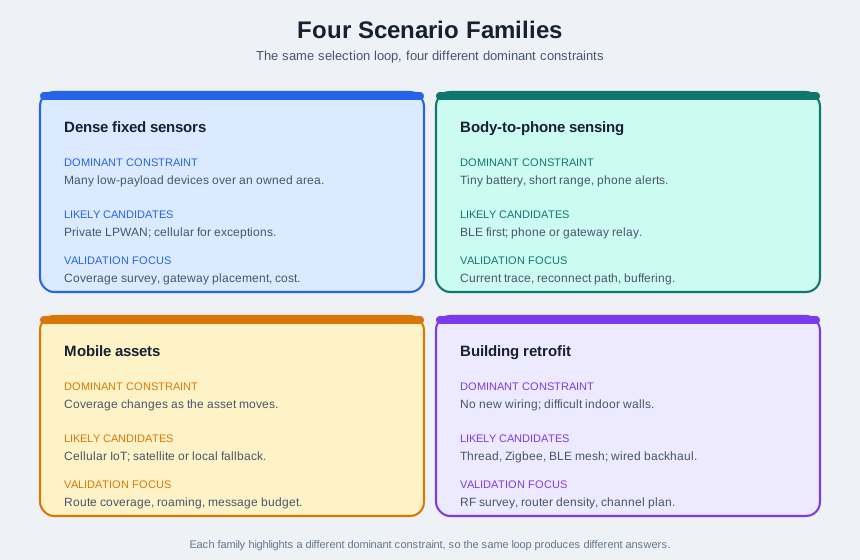
Read the upper row of Figure 36.2: dense fixed sensors emphasise coverage, while body-to-phone sensing emphasises battery use and reconnection. Below, mobile assets require route checks, while building retrofit depends on indoor radio conditions. Each panel pairs likely candidates with validation work, showing why one preferred protocol cannot settle every case.
Worked Case: Dense Outdoor Parking Sensors
A city wants curbside-occupancy sensors across several blocks. Each device sends a small status message when a space changes state and may spend years in the field; some spaces are near concrete structures. The payload is tiny, so bandwidth is not the constraint. The real questions are coverage, maintenance interval, ownership, and field operations.
- Private LPWAN is strong when the owner can place gateways, tune coverage, and absorb gateway operations; infrastructure cost does not grow one-for-one with device count.
- Cellular IoT is strong when local gateway ownership is impractical or difficult zones need carrier-supported penetration, but recurring service and SIM operations must be in the record.
- Wi-Fi or short-range mesh is usually weak for battery street sensors unless power and access-point density already exist.
A defensible recommendation starts with an owned LPWAN design for surface sensors, marks enclosed or underground spaces as exception zones, and uses cellular IoT or a local gateway only where coverage tests prove the exception. The record should not claim a universal lowest-cost winner; it should show gateway quotes, installation constraints, service fees, maintenance assumptions, and the coverage results that justify any split.
The Other Three, in Brief
Body-to-phone sensor
BLE is the primary candidate because it is phone-native and low-energy. Wi-Fi is usually eliminated by energy and antenna limits, and wide-area radios are mismatched to a direct body-to-phone link. The recommendation is "BLE fits the link, then prove the alert and reconnect behavior."
Mobile assets
The dominant constraint is coverage transition. Use a multi-protocol architecture: cellular IoT for normal movement, a satellite or remote fallback where terrestrial coverage drops, and local wireless inside controlled yards. The record needs a route-coverage matrix and a radio-selection state machine.
Building retrofit
The problem is indoor path diversity and ownership, not raw range. Pilot a low-power mesh such as Thread or Zigbee per floor, anchored by approved border routers on known backhaul, and treat a single long-range gateway skeptically until floor-by-floor tests prove it.
For health-related products, protocol choice is only one engineering input. Regulatory, clinical, privacy, cybersecurity, and human-factors requirements need separate expert review before any real product decision.
Parking Scenario Evidence Knowledge Check
If you can run a scenario to a recommendation, you can stop here. Continue to Under the Hood for the decision record, lifecycle cost, and the edge cases that flip an answer.
36.5 Under the Hood: Decision Records and Edge Cases
This section: Under the Hood: Decision Records and Edge Cases — The output of a scenario review should be a record another engineer can audit.
The output of a scenario review should be a record another engineer can audit. It should show what was assumed, what was measured, what was eliminated, and what remains uncertain.
The record in Figure 36.3 keeps site facts, rejects, and risks together; check what remains unknown.
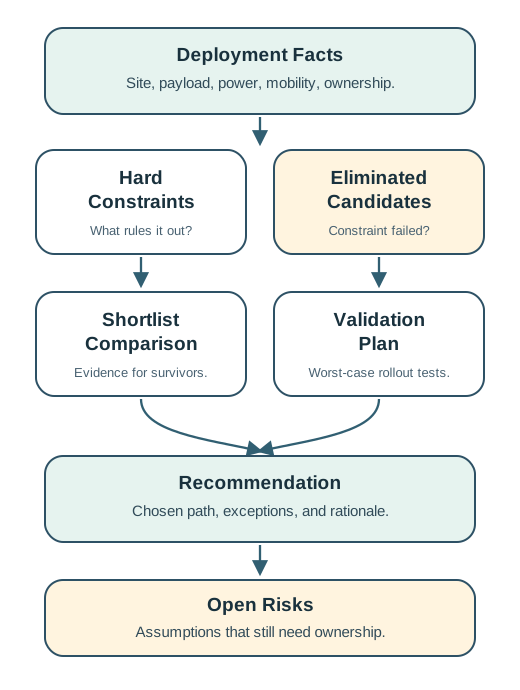
Figure Figure 36.3 gives a reviewer an order for recording a link decision. Start with deployment facts such as site, payload, power, mobility, and ownership. Hard constraints then explain why a candidate is ruled out; the eliminated-candidate field records the failed constraint. Compare only the surviving shortlist, with evidence for each option. The recommendation records the chosen path and its exceptions, while the validation plan names rollout tests. Open risks keep unresolved assumptions visible and assigned. This order lets another engineer trace the result back to facts and measurements instead of accepting a protocol ranking on trust.
Lifecycle cost is useful only with local assumptions and context, never as a universal protocol ranking. A credible comparison includes device hardware, gateway or antenna or backhaul infrastructure, installation labor, subscriptions or managed-service fees, battery replacement and truck rolls, monitoring and key-management tooling, and the replacement risk when coverage or battery assumptions are wrong. If the answer changes when device count, service term, gateway count, or replacement interval changes, the record should say so.
When the Recommendation Changes
Scenario reasoning should make clear what would flip the answer. If most parking sensors move into deep garages, carrier-supported cellular or local gateways may outrank an outdoor LPWAN design. If a wearable must report without a nearby phone, the architecture may need a gateway, a cellular path, or store-and-forward. If logistics assets never leave controlled yards, local wireless and periodic dock uploads may replace wide-area connectivity. If a building permits new cabling or Power over Ethernet, wired backhaul can simplify reliability and reduce the burden on the mesh.
Common Pitfalls
- Treating a scenario winner as a universal winner. A choice that suits parking does not suit a body sensor, a warehouse tag, or a concrete-heavy building. Keep the recommendation tied to the facts.
- Skipping the exception zones. Average coverage hides failures; underground corners, loading docks, elevator cores, and remote route segments often decide the architecture.
- Confusing pilot success with operational readiness. A prototype that sends data once is not a deployment plan; production needs provisioning, keys, updates, monitoring, and replacement.
- Comparing costs without operations. Recurring fees matter, but so do truck rolls, gateway maintenance, battery replacement, and the labor to diagnose failures.
Multi-Protocol Architecture Knowledge Check
At this depth, scenario reasoning forces protocol choices back to deployment reality. State the hard constraints, eliminate candidates with evidence, compare the survivors honestly, and record the field tests that must still be passed before rollout.
36.6 Summary
This section: Summary
- Scenarios test reasoning, not memorized protocol names; the same protocol can be right or wrong by context.
- Dense fixed sensors emphasize coverage ownership and lifecycle operations.
- Body-to-phone sensing emphasizes phone-native, low-energy communication, usually BLE.
- Mobile assets emphasize coverage transitions and fallback logic, often a multi-protocol design.
- Building retrofits emphasize indoor path diversity, powered routers, approved backhaul, and operations boundaries.
- A good decision record shows facts, eliminations with evidence, an honest shortlist, and a validation plan.
36.7 Key Takeaway
This section: Key Takeaway — Scenarios make protocol trade-offs concrete.
Scenarios make protocol trade-offs concrete. Different payloads, power budgets, distances, update rates, and failure consequences can each lead to a different correct choice, so the recommendation must carry its evidence and its validation plan.
36.8 See Also
This section: See Also
Systematic Protocol Selection
Turn this scenario reasoning into a repeatable, step-by-step selection workflow.
Protocol Framework Anti-Patterns
Review the shortcuts that produce brittle protocol decisions and late redesigns.
Protocol Selection: The Challenge
Return to the underlying range, energy, throughput, latency, security, and operations trade-offs.
Find help
3 reviewed answers.
Where should I start in a module?
Open the module page from the sidebar to see its chapters in order. Use the module map to return to a topic you need.
Modules and pathsReviewed
What can I try when a project does not work?
Check the symptom, then work through the diagnostic steps. Keep the error message and the smallest example that reproduces it.
When you are stuckReviewed
How do interactive examples work?
Use the interactive guide to check how examples and simulations work before changing your project.
Interactive examples guideReviewed